Various Slack web app settings/bindings etc..
Shortcuts
Neither Slack web app nor the desktop app lets you define your own custom keybindings but using the web app in combination with Tridactyl we can create our own shortcuts.
Following shortcuts may override some defaults but they are only bound on *.slack.com.
Jumping to most used sidebar links
Pressing f does not really work for sidebar links and even worse, a typical Slack window contains quite a lot of links. The following binding only hints sidebar links.
" ;s highlights all sidebar items
bindurl .*.slack.com --mode=normal ;s hint -Jc div[data-sidebar-link-id]:not([data-sidebar-link-id=""]),div[data-section-channel-index]:not([data-section-channel-index=""])
Following bindings are direct shortcuts that takes you a specific Slack window.
" ;u jumps to "All unreads" directly
bindurl .*.slack.com --mode=normal ;u hint -Jc div[data-sidebar-link-id="Punreads"]
" ;t jumps to "Threads" directly
bindurl .*.slack.com --mode=normal ;t hint -Jc div[data-sidebar-link-id="Vall_threads"]
" ;d jumps to "All DMs" directly
bindurl .*.slack.com --mode=normal ;d hint -Jc div[data-sidebar-link-id="Pdms"]
" ;a jumps to "Mentions & Reactions" directly
bindurl .*.slack.com --mode=normal ;a hint -Jc div[data-sidebar-link-id="Pactivity"]
Message actions
Hints all messages shown on the screen and let's you select an action (like editing, deleting etc.) that you can apply on a message:
bindurl .*.slack.com ;m composite hint -Jc div[class=c-message_kit__gutter]; hint -Jc button[data-qa=more_message_actions]; hint -Jc button[data-focus-key=message_actions],[role=menuitem]
The previous one shows something like the following, after you select a message (notice how it only hints the actions and nothing else on the page):
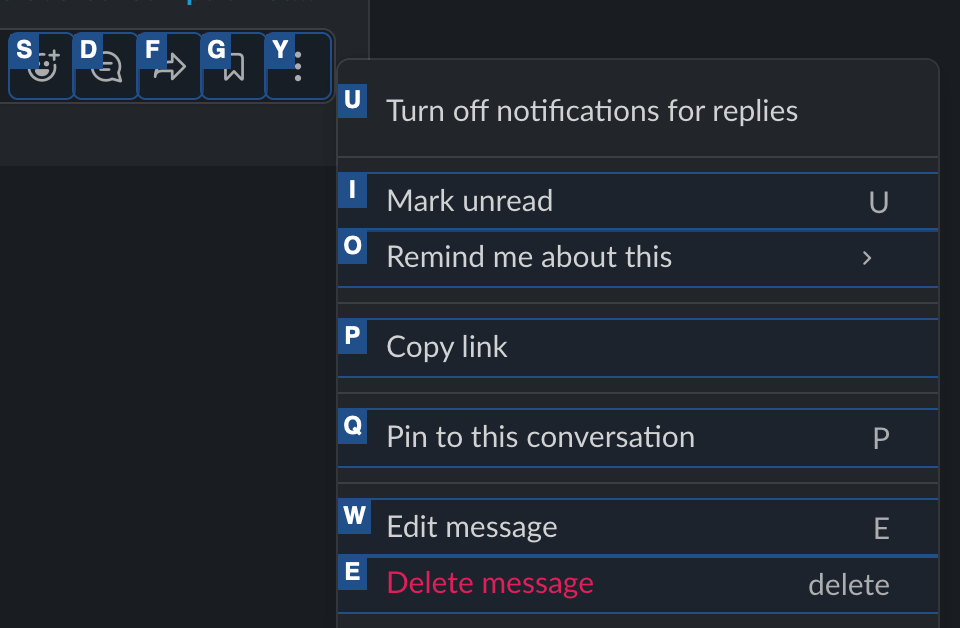
Hints all messages shown on the screen and let's you edit the selected one directly:
bindurl .*.slack.com ;e composite hint -Jc div[class=c-message_kit__gutter]; hint -Jc button[data-qa=more_message_actions]; hint -Jc button[data-qa=edit_message]
Hints all messages shown on the screen and let's you copy the link for selected one directly:
bindurl .*.slack.com ;c composite hint -Jc div[class=c-message_kit__gutter]; hint -Jc button[data-qa=more_message_actions]; hint -Jc button[data-qa=copy_link]
isamert's configuration
I realized it's kinda hard to keep this page up to date with all those explanations, so here is my configuration copied verbatim from my .tridactylrc:
" f -> just like f but more intelligent
bindurl .*.slack.com --mode=normal f hint -Jc div[data-sidebar-link-id]:not([data-sidebar-link-id=""]),div[data-section-channel-index]:not([data-section-channel-index=""]),button,a

" v -> select and copy the message
bindurl .*.slack.com --mode=normal v composite hint -pipe div[data-qa=message-text] | js -p navigator.clipboard.writeText(JS_ARG.innerText)

" ;n -> compose new message
bindurl .*.slack.com --mode=normal ;n hint -Jc button[data-qa=composer_button]

" ;q quote selected message
bindurl .*.slack.com --mode=normal ;q composite hint -pipe div[data-qa=message-text] | js -p navigator.clipboard.writeText(JS_ARG.innerText.split('\n').map(it => `> ${it}`).join('\n')); hint -c div[data-qa=message_input]

" ;u -> open unreads
bindurl .*.slack.com --mode=normal ;u hint -Jc div[data-sidebar-link-id="Punreads"]

" ;t -> open all threads
bindurl .*.slack.com --mode=normal ;t hint -Jc div[data-sidebar-link-id="Vall_threads"]

" ;d -> open all dms
bindurl .*.slack.com --mode=normal ;d hint -Jc div[data-sidebar-link-id="Pdms"]

" ;a -> open activity window
bindurl .*.slack.com --mode=normal ;a hint -Jc div[data-sidebar-link-id="Pactivity"]

" ;m -> interactively select a message and open message actions
bindurl .*.slack.com ;m composite hint -Jc div[class=c-message_kit__gutter]; hint -Jc button[data-qa=more_message_actions]; hint -Jc button[data-focus-key=message_actions],[role=menuitem]

" ;e -> interactively select a message and edit the selected message
bindurl .*.slack.com ;e composite hint -Jc div[class=c-message_kit__gutter]; hint -Jc button[data-qa=more_message_actions]; hint -Jc button[data-qa=edit_message]

" ;c -> interactively select a message and copy the link of selected message
bindurl .*.slack.com ;c composite hint -Jc div[class=c-message_kit__gutter]; hint -Jc button[data-qa=more_message_actions]; hint -Jc button[data-qa=copy_link]