mirror of
https://github.com/arzzen/git-quick-stats.git
synced 2026-09-12 08:36:17 -04:00
Compare commits
No commits in common. "master" and "2.1.4" have entirely different histories.
4
.github/FUNDING.yml
vendored
4
.github/FUNDING.yml
vendored
|
|
@ -1 +1,5 @@
|
||||||
# These are supported funding model platforms
|
# These are supported funding model platforms
|
||||||
|
|
||||||
|
github: [arzzen]
|
||||||
|
open_collective: git-quick-stats
|
||||||
|
custom: ['https://lukasmestan.com/thanks/']
|
||||||
|
|
|
||||||
5
.gitignore
vendored
5
.gitignore
vendored
|
|
@ -7,7 +7,4 @@
|
||||||
.Spotlight*
|
.Spotlight*
|
||||||
.Trash*
|
.Trash*
|
||||||
**/*~
|
**/*~
|
||||||
nbproject/*
|
nbproject/*
|
||||||
/tests/test-git/.git/
|
|
||||||
#/tests/test-git/*
|
|
||||||
!/tests/test-git/resetgit
|
|
||||||
4
.mailmap
4
.mailmap
|
|
@ -1,3 +1,3 @@
|
||||||
Lukas <test@gmail.com> Lukáš <arzzen@users.noreply.github.com>
|
Lukas Mestan <lukas.mestan@gmail.com> Lukáš Mešťan <arzzen@users.noreply.github.com>
|
||||||
Lukas <lukas@gmail.com> arzzen
|
Lukas Mestan <lukas.mestan@gmail.com> arzzen
|
||||||
|
|
||||||
|
|
|
||||||
25
CITATION.cff
25
CITATION.cff
|
|
@ -1,25 +0,0 @@
|
||||||
cff-version: 1.2.0
|
|
||||||
title: Git Quick Stats
|
|
||||||
message: >-
|
|
||||||
If you use this software, please cite it using the
|
|
||||||
metadata from this file.
|
|
||||||
type: software
|
|
||||||
authors:
|
|
||||||
- name-particle: tomice
|
|
||||||
- name-particle: arzzen
|
|
||||||
identifiers:
|
|
||||||
- type: url
|
|
||||||
value: "https://github.com/git-quick-stats"
|
|
||||||
description: >-
|
|
||||||
Simple and efficient way to access various statistics
|
|
||||||
in a git repository
|
|
||||||
repository-code: "https://github.com/git-quick-stats/git-quick-stats"
|
|
||||||
url: "https://git-quick-stats.sh/"
|
|
||||||
abstract: >-
|
|
||||||
Git-quick-stats is a simple and efficient way to access
|
|
||||||
various statistics in a git repository.
|
|
||||||
keywords:
|
|
||||||
- git
|
|
||||||
- stats
|
|
||||||
license: MIT
|
|
||||||
version: 2.6.2
|
|
||||||
|
|
@ -4,7 +4,7 @@ FROM alpine
|
||||||
COPY . /app
|
COPY . /app
|
||||||
|
|
||||||
# Install required packages & build git-quick-stats
|
# Install required packages & build git-quick-stats
|
||||||
RUN apk add --no-cache bash git make ncurses coreutils util-linux \
|
RUN apk add --no-cache bash git make ncurses util-linux \
|
||||||
&& cd /app \
|
&& cd /app \
|
||||||
&& make install \
|
&& make install \
|
||||||
&& rm -rf /app \
|
&& rm -rf /app \
|
||||||
|
|
@ -23,6 +23,5 @@ ENV _GIT_SINCE= \
|
||||||
TERM=xterm-256color
|
TERM=xterm-256color
|
||||||
|
|
||||||
WORKDIR /git
|
WORKDIR /git
|
||||||
RUN git config --global --add safe.directory /git
|
|
||||||
ENTRYPOINT [ "/usr/local/bin/docker-entrypoint" ]
|
ENTRYPOINT [ "/usr/local/bin/docker-entrypoint" ]
|
||||||
CMD [ "/usr/bin/git", "quick-stats" ]
|
CMD [ "/usr/bin/git", "quick-stats" ]
|
||||||
2
LICENSE
2
LICENSE
|
|
@ -1,6 +1,6 @@
|
||||||
MIT License
|
MIT License
|
||||||
|
|
||||||
Copyright (c) 2024 git-quick-stats.sh
|
Copyright (c) 2020 Lukáš Mešťan
|
||||||
|
|
||||||
Permission is hereby granted, free of charge, to any person obtaining a copy
|
Permission is hereby granted, free of charge, to any person obtaining a copy
|
||||||
of this software and associated documentation files (the "Software"), to deal
|
of this software and associated documentation files (the "Software"), to deal
|
||||||
|
|
|
||||||
5
Makefile
5
Makefile
|
|
@ -3,7 +3,6 @@ _INSTDIR ?= $(DESTDIR)$(PREFIX)
|
||||||
BINDIR ?= $(_INSTDIR)/bin
|
BINDIR ?= $(_INSTDIR)/bin
|
||||||
MANDIR ?= $(_INSTDIR)/share/man
|
MANDIR ?= $(_INSTDIR)/share/man
|
||||||
TASK_DONE = echo -e "\n✓ $@ done\n"
|
TASK_DONE = echo -e "\n✓ $@ done\n"
|
||||||
SHELL := $(shell which bash)
|
|
||||||
|
|
||||||
.PHONY: test
|
.PHONY: test
|
||||||
|
|
||||||
|
|
@ -30,8 +29,8 @@ uninstall:
|
||||||
@$(TASK_DONE)
|
@$(TASK_DONE)
|
||||||
|
|
||||||
reinstall:
|
reinstall:
|
||||||
@curl -sO https://raw.githubusercontent.com/git-quick-stats/git-quick-stats/master/git-quick-stats
|
@curl -sO https://raw.githubusercontent.com/arzzen/git-quick-stats/master/git-quick-stats
|
||||||
@curl -sO https://raw.githubusercontent.com/git-quick-stats/git-quick-stats/master/git-quick-stats.1
|
@curl -sO https://raw.githubusercontent.com/arzzen/git-quick-stats/master/git-quick-stats.1
|
||||||
$(MAKE) install
|
$(MAKE) install
|
||||||
@$(TASK_DONE)
|
@$(TASK_DONE)
|
||||||
|
|
||||||
|
|
|
||||||
752
README.md
752
README.md
|
|
@ -1,433 +1,319 @@
|
||||||
# GIT quick statistics [](https://twitter.com/intent/tweet?text=Simple%20and%20efficient%20way%20to%20access%20various%20statistics%20in%20git%20repository&url=https://github.com/arzzen/git-quick-stat&via=arzzen&hashtags=git,stats,tool,statistics,developers)
|
|
||||||
|
# GIT quick statistics [](#backers) [](#sponsors) [](https://twitter.com/intent/tweet?text=Simple%20and%20efficient%20way%20to%20access%20various%20statistics%20in%20git%20repository&url=https://github.com/arzzen/git-quick-stat&via=arzzen&hashtags=git,stats,tool,statistics,developers) [](https://travis-ci.org/arzzen/git-quick-stats) [](https://formulae.brew.sh/formula/git-quick-stats#default) [](https://repology.org/metapackage/git-quick-stats/packages)
|
||||||
[](https://formulae.brew.sh/formula/git-quick-stats#default)
|
|
||||||
|
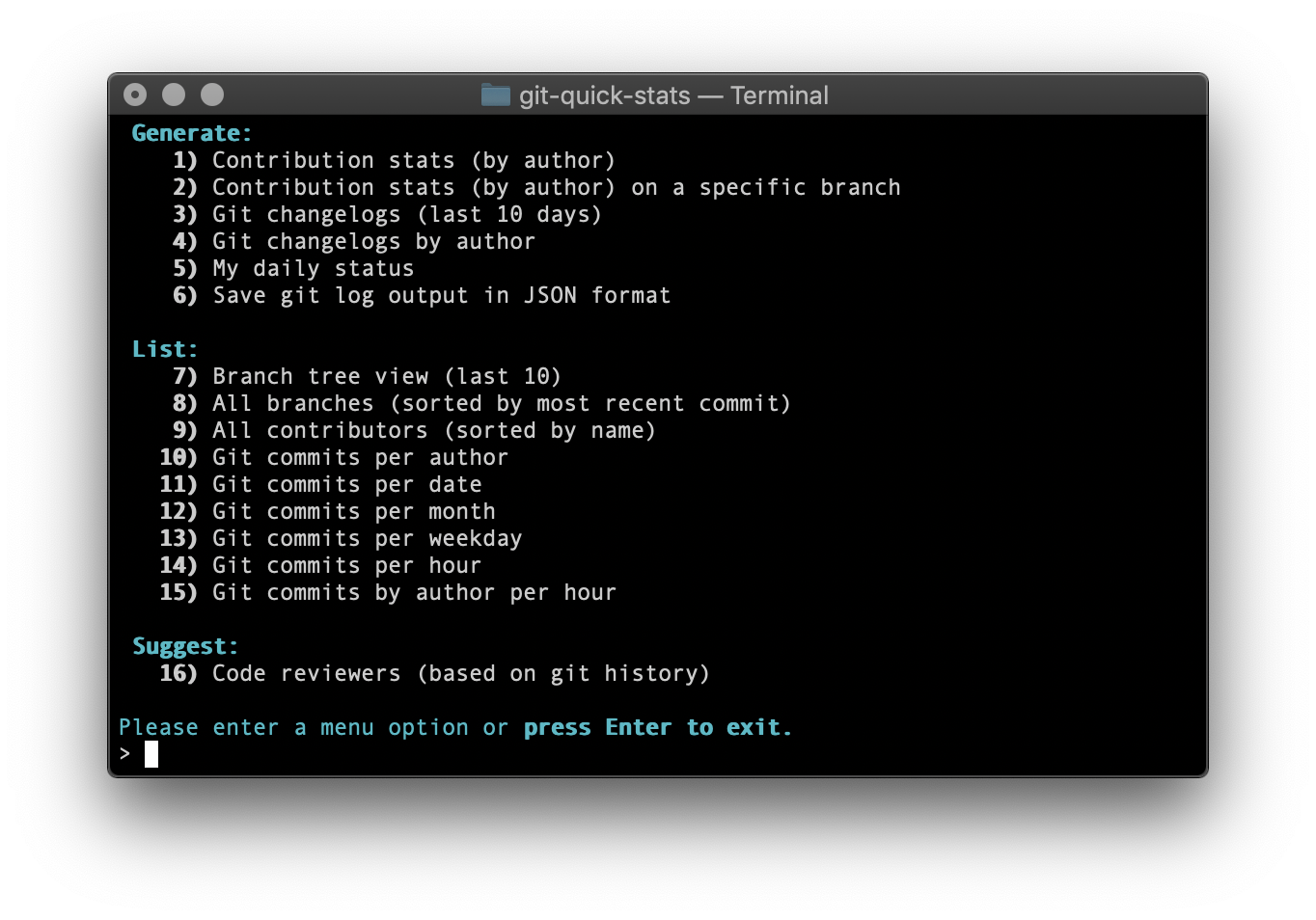
> `git-quick-stats` is a simple and efficient way to access various statistics in a git repository.
|
||||||
> `git-quick-stats` is a simple and efficient way to access various statistics in a git repository.
|
>
|
||||||
>
|
> Any git repository may contain tons of information about commits, contributors, and files. Extracting this information is not always trivial, mostly because there are a gadzillion options to a gadzillion git commands – I don’t think there is a single person alive who knows them all. Probably not even [Linus Torvalds](https://github.com/torvalds) himself :).
|
||||||
> Any git repository may contain tons of information about commits, contributors, and files. Extracting this information is not always trivial, mostly because there are a gadzillion options to a gadzillion git commands - I don't think there is a single person alive who knows them all. Probably not even [Linus Torvalds](https://github.com/torvalds) himself :).
|
|
||||||
|
|
||||||

|
|
||||||
|
## Table of Contents
|
||||||
## Table of Contents
|
|
||||||
|
[**Screenshots**](#screenshots)
|
||||||
[**Screenshots**](#screenshots)
|
|
||||||
|
[**Usage**](#usage)
|
||||||
[**Usage**](#usage)
|
|
||||||
|
* [**Interactive**](#interactive)
|
||||||
- [**Interactive**](#interactive)
|
* [**Non-interactive**](#non-interactive)
|
||||||
- [**Non-interactive**](#non-interactive)
|
* [**Command-line arguments**](#command-line-arguments)
|
||||||
- [**Command-line arguments**](#command-line-arguments)
|
* [**Git log since and until**](#git-log-since-and-until)
|
||||||
- [**Git log since and until**](#git-log-since-and-until)
|
* [**Git log limit**](#git-log-limit)
|
||||||
- [**Git log limit**](#git-log-limit)
|
* [**Git log options**](#git-log-options)
|
||||||
- [**Git log options**](#git-log-options)
|
* [**Git pathspec**](#git-pathspec)
|
||||||
- [**Git pathspec**](#git-pathspec)
|
* [**Git merge view strategy**](#git-merge-view-strategy)
|
||||||
- [**Git merge view strategy**](#git-merge-view-strategy)
|
* [**Color themes**](#color-themes)
|
||||||
- [**Color themes**](#color-themes)
|
|
||||||
|
[**Installation**](#installation)
|
||||||
[**Installation**](#installation)
|
|
||||||
|
* [**UNIX and Linux**](#unix-and-linux)
|
||||||
- [**UNIX and Linux**](#unix-and-linux)
|
* [**macOS**](#macos-homebrew)
|
||||||
- [**macOS**](#macos-homebrew)
|
* [**Windows**](#windows)
|
||||||
- [**Windows**](#windows)
|
* [**Docker**](#docker)
|
||||||
- [**Docker**](#docker)
|
|
||||||
|
[**System requirements**](#system-requirements)
|
||||||
[**System requirements**](#system-requirements)
|
|
||||||
|
* [**Dependencies**](#dependencies)
|
||||||
- [**Dependencies**](#dependencies)
|
|
||||||
|
[**FAQ**](#faq)
|
||||||
[**FAQ**](#faq)
|
|
||||||
|
[**Contribution**](#contribution)
|
||||||
[**Contribution**](#contribution)
|
|
||||||
|
* [**Code reviews**](#code-reviews)
|
||||||
- [**Code reviews**](#code-reviews)
|
* [**Some tips for good pull requests**](#some-tips-for-good-pull-requests)
|
||||||
- [**Some tips for good pull requests**](#some-tips-for-good-pull-requests)
|
* [**Formatting**](#formatting)
|
||||||
- [**Formatting**](#formatting)
|
|
||||||
|
[**Tests**](#tests)
|
||||||
[**Tests**](#tests)
|
|
||||||
|
[**Licensing**](#licensing)
|
||||||
[**Licensing**](#licensing)
|
|
||||||
|
[**Contributors**](#contributors)
|
||||||
[**Contributors**](#contributors)
|
|
||||||
|
* [**Backers**](#backers)
|
||||||
- [**Backers**](#backers)
|
* [**Sponsors**](#sponsors)
|
||||||
- [**Sponsors**](#sponsors)
|
|
||||||
|
## Screenshots
|
||||||
## Screenshots
|
|
||||||
|

|
||||||

|
|
||||||
|

|
||||||

|
|
||||||
|
## Usage
|
||||||

|
|
||||||
|
### Interactive
|
||||||
## Usage
|
|
||||||
|
git-quick-stats has a built-in interactive menu that can be executed as such:
|
||||||
### Interactive
|
|
||||||
|
```bash
|
||||||
`git-quick-stats` has a built-in interactive menu that can be executed as such:
|
git-quick-stats
|
||||||
|
```
|
||||||
```bash
|
|
||||||
git-quick-stats
|
Or
|
||||||
```
|
|
||||||
|
```bash
|
||||||
Or
|
git quick-stats
|
||||||
|
```
|
||||||
```bash
|
|
||||||
git quick-stats
|
### Non-interactive
|
||||||
```
|
|
||||||
|
For those who prefer to utilize command-line options, `git-quick-stats` also has a non-interactive mode supporting both short and long options:
|
||||||
### Non-interactive
|
|
||||||
|
```bash
|
||||||
For those who prefer to utilize command-line options, `git-quick-stats` also has a non-interactive mode supporting both short and long options:
|
git-quick-stats <optional-command-to-execute-directly>
|
||||||
|
```
|
||||||
```bash
|
|
||||||
git-quick-stats <optional-command-to-execute-directly>
|
Or
|
||||||
```
|
|
||||||
|
```bash
|
||||||
Or
|
git quick-stats <optional-command-to-execute-directly>
|
||||||
|
```
|
||||||
```bash
|
|
||||||
git quick-stats <optional-command-to-execute-directly>
|
### Command-line arguments
|
||||||
```
|
|
||||||
|
Possible arguments in short and long form:
|
||||||
### Command-line arguments
|
|
||||||
|
```bash
|
||||||
Possible arguments in short and long form:
|
-r, --suggest-reviewers
|
||||||
|
show the best people to contact to review code
|
||||||
```bash
|
-T, --detailed-git-stats
|
||||||
GENERATE OPTIONS
|
give a detailed list of git stats
|
||||||
-T, --detailed-git-stats
|
-R, --git-stats-by-branch
|
||||||
give a detailed list of git stats
|
see detailed list of git stats by branch
|
||||||
-R, --git-stats-by-branch
|
-d, --commits-per-day
|
||||||
see detailed list of git stats by branch
|
displays a list of commits per day
|
||||||
-c, --changelogs
|
-m, --commits-by-month
|
||||||
see changelogs
|
displays a list of commits per month
|
||||||
-L, --changelogs-by-author
|
-w, --commits-by-weekday
|
||||||
see changelogs by author
|
displays a list of commits per weekday
|
||||||
-S, --my-daily-stats
|
-o, --commits-by-hour
|
||||||
see your current daily stats
|
displays a list of commits per hour
|
||||||
-V, --csv-output-by-branch
|
-A, --commits-by-author-by-hour
|
||||||
output daily stats by branch in CSV format
|
displays a list of commits per hour by author
|
||||||
-j, --json-output
|
-a, --commits-per-author
|
||||||
save git log as a JSON formatted file to a specified area
|
displays a list of commits per author
|
||||||
|
-S, --my-daily-stats
|
||||||
LIST OPTIONS
|
see your current daily stats
|
||||||
-b, --branch-tree
|
-C, --contributors
|
||||||
show an ASCII graph of the git repo branch history
|
see a list of everyone who contributed to the repo
|
||||||
-D, --branches-by-date
|
-b, --branch-tree
|
||||||
show branches by date
|
show an ASCII graph of the git repo branch history
|
||||||
-C, --contributors
|
-D, --branches-by-date
|
||||||
see a list of everyone who contributed to the repo
|
show branches by date
|
||||||
-n, --new-contributors
|
-c, --changelogs
|
||||||
list everyone who made their first contribution since a specified date
|
see changelogs
|
||||||
-N, --new-contributors-since-tag
|
-L, --changelogs-by-author
|
||||||
list everyone who made their first contribution since a specified git tag
|
see changelogs by author
|
||||||
-a, --commits-per-author
|
-j, --json-output
|
||||||
displays a list of commits per author
|
save git log as a JSON formatted file to a specified area
|
||||||
-d, --commits-per-day
|
-h, -?, --help
|
||||||
displays a list of commits per day
|
display this help text in the terminal
|
||||||
-m, --commits-by-month
|
```
|
||||||
displays a list of commits per month
|
|
||||||
-Y, --commits-by-year
|
### Git log since and until
|
||||||
displays a list of commits per year
|
|
||||||
-w, --commits-by-weekday
|
You can set the variables `_GIT_SINCE` and/or `_GIT_UNTIL` before running `git-quick-stats` to limit the git log. These work similar to git's built-in `--since` and `--until` log options.
|
||||||
displays a list of commits per weekday
|
|
||||||
-W, --commits-by-author-by-weekday
|
```bash
|
||||||
displays a list of commits per weekday by author
|
export _GIT_SINCE="2017-01-20"
|
||||||
-o, --commits-by-hour
|
export _GIT_UNTIL="2017-01-22"
|
||||||
displays a list of commits per hour
|
```
|
||||||
-A, --commits-by-author-by-hour
|
|
||||||
displays a list of commits per hour by author
|
Once set, run `git quick-stats` as normal. Note that this affects all stats that parse the git log history until unset.
|
||||||
-z, --commits-by-timezone
|
|
||||||
displays a list of commits per timezone
|
### Git log limit
|
||||||
-Z, --commits-by-author-by-timezone
|
|
||||||
displays a list of commits per timezone by author
|
You can set variable `_GIT_LIMIT` for limited output. It will affect the "changelogs" and "branch tree" options.
|
||||||
|
|
||||||
CALENDAR OPTIONS
|
```bash
|
||||||
-k, --commits-calendar-by-author
|
export _GIT_LIMIT=20
|
||||||
shows a calendar heatmap of commits per day-of-week per month for a given author
|
```
|
||||||
-H, --commits-heatmap
|
|
||||||
shows a heatmap of commits per day-of-week per month for the last 30 days
|
### Git log options
|
||||||
|
|
||||||
SUGGEST OPTIONS
|
You can set _GIT_LOG_OPTIONS for [git log options](https://git-scm.com/docs/git-log#_options):
|
||||||
-r, --suggest-reviewers
|
|
||||||
show the best people to contact to review code
|
```bash
|
||||||
-h, -?, --help
|
export _GIT_LOG_OPTIONS="--ignore-all-space --ignore-blank-lines"
|
||||||
display this help text in the terminal
|
```
|
||||||
```
|
|
||||||
|
### Git pathspec
|
||||||
### Git log since and until
|
|
||||||
|
You can exclude a directory from the stats by using [pathspec](https://git-scm.com/docs/gitglossary#gitglossary-aiddefpathspecapathspec)
|
||||||
You can set the variables `_GIT_SINCE` and/or `_GIT_UNTIL` before running `git-quick-stats` to limit the git log. These work similar to git's built-in `--since` and `--until` log options.
|
|
||||||
|
```bash
|
||||||
```bash
|
export _GIT_PATHSPEC=':!directory'
|
||||||
export _GIT_SINCE="2017-01-20"
|
```
|
||||||
export _GIT_UNTIL="2017-01-22"
|
|
||||||
```
|
You can also exclude files from the stats. Note that it works with any alphanumeric, glob, or regex that git respects.
|
||||||
|
|
||||||
Once set, run `git quick-stats` as normal. Note that this affects all stats that parse the git log history until unset.
|
```bash
|
||||||
|
export _GIT_PATHSPEC=':!package-lock.json'
|
||||||
### Git log limit
|
```
|
||||||
|
|
||||||
You can set variable `_GIT_LIMIT` for limited output. It will affect the "changelogs" and "branch tree" options. The default limit is `10`.
|
### Git merge view strategy
|
||||||
|
|
||||||
```bash
|
You can set the variable `_GIT_MERGE_VIEW` to enable merge commits to be part of the stats by setting `_GIT_MERGE_VIEW` to `enable`. You can also choose to only show merge commits by setting `_GIT_MERGE_VIEW` to `exclusive`. Default is to not show merge commits. These work similar to git's built-in `--merges` and `--no-merges` log options.
|
||||||
export _GIT_LIMIT=20
|
|
||||||
```
|
```bash
|
||||||
|
export _GIT_MERGE_VIEW="enable"
|
||||||
### Git tag
|
export _GIT_MERGE_VIEW="exclusive"
|
||||||
|
```
|
||||||
You can set `_GIT_TAG` to define the default tag used by the "new contributors since tag" option.
|
|
||||||
|
### Color themes
|
||||||
```bash
|
|
||||||
export _GIT_TAG="foo"
|
You can change to the legacy color scheme by toggling the variable `_MENU_THEME` between `default` and `legacy`
|
||||||
```
|
|
||||||
|
```bash
|
||||||
### Git log options
|
export _MENU_THEME=legacy
|
||||||
|
```
|
||||||
You can set `_GIT_LOG_OPTIONS` for [git log options](https://git-scm.com/docs/git-log#_options):
|
|
||||||
|
|
||||||
```bash
|
|
||||||
export _GIT_LOG_OPTIONS="--ignore-all-space --ignore-blank-lines"
|
## Installation
|
||||||
```
|
|
||||||
|
### UNIX and Linux
|
||||||
### Git pathspec
|
|
||||||
|
```bash
|
||||||
You can exclude a directory from the stats by using [pathspec](https://git-scm.com/docs/gitglossary#gitglossary-aiddefpathspecapathspec)
|
git clone https://github.com/arzzen/git-quick-stats.git && cd git-quick-stats
|
||||||
|
sudo make install
|
||||||
```bash
|
```
|
||||||
export _GIT_PATHSPEC=':!directory'
|
|
||||||
```
|
For uninstalling, open up the cloned directory and run
|
||||||
|
|
||||||
You can also exclude files from the stats. Note that it works with any alphanumeric, glob, or regex that git respects.
|
```bash
|
||||||
|
sudo make uninstall
|
||||||
```bash
|
```
|
||||||
export _GIT_PATHSPEC=':!package-lock.json'
|
|
||||||
```
|
For update/reinstall
|
||||||
|
|
||||||
### Git merge view strategy
|
```bash
|
||||||
|
sudo make reinstall
|
||||||
You can set the variable `_GIT_MERGE_VIEW` to enable merge commits to be part of the stats by setting `_GIT_MERGE_VIEW` to `enable`. You can also choose to only show merge commits by setting `_GIT_MERGE_VIEW` to `exclusive`. Default is to not show merge commits. These work similar to git's built-in `--merges` and `--no-merges` log options.
|
```
|
||||||
|
|
||||||
```bash
|
### macOS (homebrew)
|
||||||
export _GIT_MERGE_VIEW="enable"
|
|
||||||
export _GIT_MERGE_VIEW="exclusive"
|
```bash
|
||||||
```
|
brew install git-quick-stats
|
||||||
|
```
|
||||||
### Git branch
|
|
||||||
|
Or you can follow the UNIX and Linux instructions if you wish.
|
||||||
You can set the variable `_GIT_BRANCH` to set the branch of the stats. Works with commands `--git-stats-by-branch` and `--csv-output-by-branch`.
|
|
||||||
|
### Windows
|
||||||
```bash
|
|
||||||
export _GIT_BRANCH="master"
|
If you are installing with Cygwin, use these scripts:
|
||||||
```
|
|
||||||
|
* [installer](https://gist.github.com/arzzen/35e09866dfdadf2108b2420045739245)
|
||||||
### Ignore authors
|
* [uninstaller](https://gist.github.com/arzzen/21c660014d0663b6c5710014714779d6)
|
||||||
|
|
||||||
You can set the variable `_GIT_IGNORE_AUTHORS` to filter out specific authors. It will affect the "All contributors", ""Suggested code reviewers" and "New contributors" options.
|
If you are wishing to use this with WSL, follow the UNIX and Linux instructions.
|
||||||
|
|
||||||
```bash
|
### Docker
|
||||||
export _GIT_IGNORE_AUTHORS="(author@examle.com|username)"
|
|
||||||
```
|
You can use the Docker image provided:
|
||||||
|
|
||||||
### Sorting contribution stats
|
* Build: `docker build -t arzzen/git-quick-stats .`
|
||||||
|
* Run interactive menu: `docker run --rm -it -v $(pwd):/git arzzen/git-quick-stats`
|
||||||
You can sort contribution stats by field `name`, `commits`, `insertions`, `deletions`, or `lines` (total lines changed) and order (`asc`, `desc`). e.g.: `commits-desc`
|
* Docker pull command: `docker pull arzzen/git-quick-stats` [docker repository](https://hub.docker.com/r/arzzen/git-quick-stats)
|
||||||
|
|
||||||
```bash
|
## System requirements
|
||||||
export _GIT_SORT_BY="name-asc"
|
|
||||||
```
|
* An OS with a Bash shell
|
||||||
|
* Tools we use: awk ; basename ; cat ; column ; echo ; git ; grep ; head ; seq ; sort ; tput ; tr ; uniq ; wc
|
||||||
### Commit days
|
|
||||||
|
### Dependencies
|
||||||
You can set \_GIT_DAYS to set the number of days for the heatmap
|
|
||||||
|
* [`bsdmainutils`](https://packages.debian.org/sid/bsdmainutils) `apt install bsdmainutils`
|
||||||
```bash
|
|
||||||
export _GIT_DAYS=30
|
## FAQ
|
||||||
```
|
|
||||||
|
*Q:* I get some errors after run git-quick-stats in cygwin like `/usr/local/bin/git-quick-stats: line 2: $'\r': command not found`
|
||||||
### Color themes
|
|
||||||
|
*A:* You can run the dos2unix app in cygwin as follows: `/bin/dos2unix.exe /usr/local/bin/git-quick-stats`. This will convert the script from the CR-LF convention that Microsoft uses to the LF convention that UNIX, OS X, and Linux use. You should then should be able to run it as normal.
|
||||||
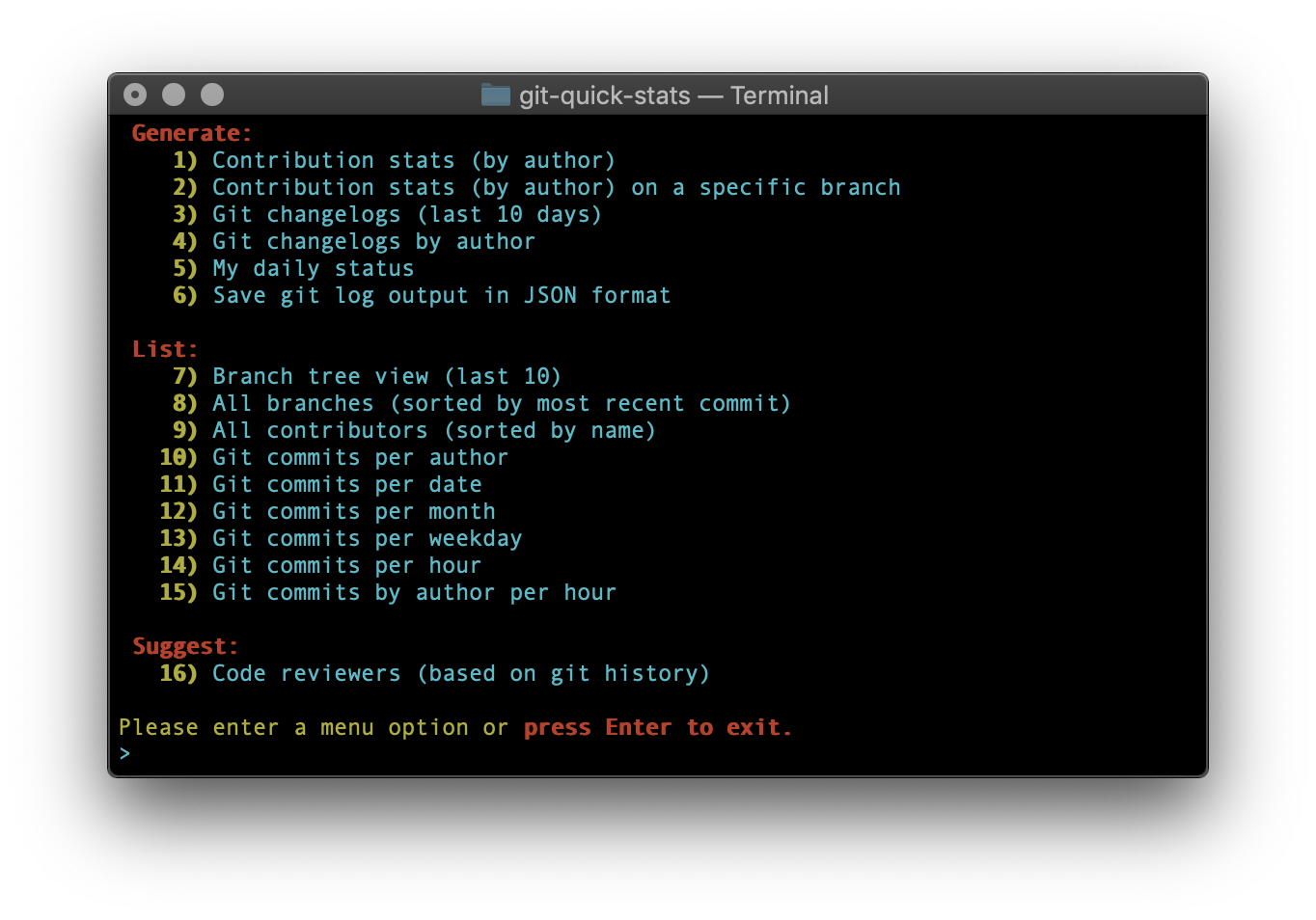
You can change to the legacy color scheme by toggling the variable `_MENU_THEME` between `default` and `legacy`.
|
|
||||||
You can completely disable the color theme by setting the `_MENU_THEME` variable to `none`.
|
## Contribution
|
||||||
|
|
||||||
```bash
|
Want to contribute? Great! First, read this page.
|
||||||
export _MENU_THEME="legacy"
|
|
||||||
# or
|
### Code reviews
|
||||||
export _MENU_THEME="none"
|
|
||||||
```
|
All submissions, including submissions by project members, require review.</br>
|
||||||
|
We use GitHub pull requests for this purpose.
|
||||||

|
|
||||||
|
### Some tips for good pull requests
|
||||||
## Installation
|
|
||||||
|
* Use our code </br>
|
||||||
### Debian and Ubuntu
|
When in doubt, try to stay true to the existing code of the project.
|
||||||
|
* Write a descriptive commit message. What problem are you solving and what
|
||||||
If you are on at least Debian Bullseye or Ubuntu Focal you can use apt for installation:
|
are the consequences? Where and what did you test? Some good tips:
|
||||||
|
[here](http://robots.thoughtbot.com/5-useful-tips-for-a-better-commit-message)
|
||||||
```bash
|
and [here](https://www.kernel.org/doc/Documentation/SubmittingPatches).
|
||||||
apt install git-quick-stats
|
* If your PR consists of multiple commits which are successive improvements /
|
||||||
```
|
fixes to your first commit, consider squashing them into a single commit
|
||||||
|
(`git rebase -i`) such that your PR is a single commit on top of the current
|
||||||
### UNIX and Linux
|
HEAD. This make reviewing the code so much easier, and our history more
|
||||||
|
readable.
|
||||||
```bash
|
|
||||||
git clone https://github.com/git-quick-stats/git-quick-stats.git && cd git-quick-stats
|
### Formatting
|
||||||
sudo make install
|
|
||||||
```
|
This documentation is written using standard [markdown syntax](https://help.github.com/articles/markdown-basics/). Please submit your changes using the same syntax.
|
||||||
|
|
||||||
For uninstalling, open up the cloned directory and run
|
## Tests
|
||||||
|
|
||||||
```bash
|
[](https://codecov.io/gh/arzzen/git-quick-stats)
|
||||||
sudo make uninstall
|
|
||||||
```
|
```bash
|
||||||
|
make test
|
||||||
For update/reinstall
|
```
|
||||||
|
|
||||||
```bash
|
## Licensing
|
||||||
sudo make reinstall
|
|
||||||
```
|
MIT see [LICENSE][] for the full license text.
|
||||||
|
|
||||||
### macOS (homebrew)
|
[read this page]: http://github.com/arzzen/git-quick-stats/blob/master/.github/CONTRIBUTING.md
|
||||||
|
[landing page]: http://arzzen.github.io/git-quick-stats
|
||||||
`git-quick-stats` requires GNU `date`. On macOS, install GNU coreutils:
|
[LICENSE]: https://github.com/arzzen/git-quick-stats/blob/master/LICENSE
|
||||||
|
|
||||||
```bash
|
## Contributors
|
||||||
brew install coreutils
|
|
||||||
export PATH="$HOMEBREW_PREFIX/opt/coreutils/libexec/gnubin:$PATH"
|
This project exists thanks to all the people who contribute.
|
||||||
```
|
<a href="https://github.com/arzzen/git-quick-stats/graphs/contributors"><img src="https://opencollective.com/git-quick-stats/contributors.svg?width=890&button=false" /></a>
|
||||||
|
|
||||||
The script auto-detects GNU date as either `date` or `gdate`, so exporting
|
### Backers
|
||||||
`gnubin` is optional for this project.
|
|
||||||
|
Thank you to all our backers! 🙏 [[Become a backer](https://opencollective.com/git-quick-stats#backer)]
|
||||||
From there, you can install via Homebrew as follows:
|
|
||||||
|
<a href="https://opencollective.com/git-quick-stats#backers" target="_blank"><img src="https://opencollective.com/git-quick-stats/backers.svg?width=890"></a>
|
||||||
```bash
|
|
||||||
brew install git-quick-stats
|
### Sponsors
|
||||||
```
|
|
||||||
|
Support this project by becoming a sponsor. Your logo will show up here with a link to your website. [[Become a sponsor](https://opencollective.com/git-quick-stats#sponsor)]
|
||||||
Or you can follow the UNIX and Linux instructions if you wish.
|
|
||||||
|
<a href="https://opencollective.com/git-quick-stats/sponsor/0/website" target="_blank"><img src="https://opencollective.com/git-quick-stats/sponsor/0/avatar.svg?v=1"></a>
|
||||||
If you would like to default to using GNU coreutils system-wide, add
|
<a href="https://opencollective.com/git-quick-stats/sponsor/1/website" target="_blank"><img src="https://opencollective.com/git-quick-stats/sponsor/1/avatar.svg"></a>
|
||||||
`export PATH="$HOMEBREW_PREFIX/opt/coreutils/libexec/gnubin:$PATH"` to your
|
<a href="https://opencollective.com/git-quick-stats/sponsor/2/website" target="_blank"><img src="https://opencollective.com/git-quick-stats/sponsor/2/avatar.svg"></a>
|
||||||
applicable `~/.bash_profile`, `~/.zprofile`, or other relevant profile based
|
<a href="https://opencollective.com/git-quick-stats/sponsor/3/website" target="_blank"><img src="https://opencollective.com/git-quick-stats/sponsor/3/avatar.svg"></a>
|
||||||
on the shell of your choice.
|
<a href="https://opencollective.com/git-quick-stats/sponsor/4/website" target="_blank"><img src="https://opencollective.com/git-quick-stats/sponsor/4/avatar.svg"></a>
|
||||||
|
<a href="https://opencollective.com/git-quick-stats/sponsor/5/website" target="_blank"><img src="https://opencollective.com/git-quick-stats/sponsor/5/avatar.svg"></a>
|
||||||
### FreeBSD
|
<a href="https://opencollective.com/git-quick-stats/sponsor/6/website" target="_blank"><img src="https://opencollective.com/git-quick-stats/sponsor/6/avatar.svg"></a>
|
||||||
|
<a href="https://opencollective.com/git-quick-stats/sponsor/7/website" target="_blank"><img src="https://opencollective.com/git-quick-stats/sponsor/7/avatar.svg"></a>
|
||||||
`git-quick-stats` requires GNU `date`. On FreeBSD, install GNU coreutils:
|
<a href="https://opencollective.com/git-quick-stats/sponsor/8/website" target="_blank"><img src="https://opencollective.com/git-quick-stats/sponsor/8/avatar.svg"></a>
|
||||||
|
<a href="https://opencollective.com/git-quick-stats/sponsor/9/website" target="_blank"><img src="https://opencollective.com/git-quick-stats/sponsor/9/avatar.svg"></a>
|
||||||
```bash
|
|
||||||
pkg install coreutils
|
|
||||||
```
|
|
||||||
|
|
||||||
FreeBSD provides GNU date as `gdate`, and the script auto-detects it.
|
|
||||||
|
|
||||||
### Windows
|
|
||||||
|
|
||||||
If you are installing with Cygwin, use these scripts:
|
|
||||||
|
|
||||||
- [installer](https://gist.github.com/arzzen/35e09866dfdadf2108b2420045739245)
|
|
||||||
- [uninstaller](https://gist.github.com/arzzen/21c660014d0663b6c5710014714779d6)
|
|
||||||
|
|
||||||
If you are wishing to use this with WSL, follow the UNIX and Linux instructions.
|
|
||||||
|
|
||||||
### Docker
|
|
||||||
|
|
||||||
You can use the Docker image provided:
|
|
||||||
|
|
||||||
- Build: `docker build -t arzzen/git-quick-stats .`
|
|
||||||
- Run interactive menu: `docker run --rm -it -v $(pwd):/git arzzen/git-quick-stats`
|
|
||||||
- Docker pull command: `docker pull arzzen/git-quick-stats` [docker repository](https://hub.docker.com/r/arzzen/git-quick-stats)
|
|
||||||
|
|
||||||
## System requirements
|
|
||||||
|
|
||||||
- An OS with a Bash shell
|
|
||||||
- GNU `date` available as either `date` or `gdate`
|
|
||||||
- Tools we use:
|
|
||||||
|
|
||||||
```bash
|
|
||||||
awk
|
|
||||||
basename
|
|
||||||
cat
|
|
||||||
column
|
|
||||||
date
|
|
||||||
echo
|
|
||||||
git
|
|
||||||
grep
|
|
||||||
head
|
|
||||||
printf
|
|
||||||
seq
|
|
||||||
sort
|
|
||||||
tput
|
|
||||||
tr
|
|
||||||
uniq
|
|
||||||
```
|
|
||||||
|
|
||||||
### Dependencies
|
|
||||||
|
|
||||||
- [`bsdextrautils`](https://packages.debian.org/sid/bsdextrautils) `apt install bsdextrautils`
|
|
||||||
- [`coreutils`](https://packages.debian.org/sid/coreutils) `apt install coreutils`
|
|
||||||
- [`gawk`](https://packages.debian.org/sid/gawk) `apt install gawk`
|
|
||||||
- [`grep`](https://packages.debian.org/sid/grep) `apt install grep`
|
|
||||||
- [`ncurses-bin`](https://packages.debian.org/sid/ncurses-bin) `apt install ncurses-bin`
|
|
||||||
|
|
||||||
## FAQ
|
|
||||||
|
|
||||||
_Q:_ I get some errors after run git-quick-stats in cygwin like `/usr/local/bin/git-quick-stats: line 2: $'\r': command not found`
|
|
||||||
|
|
||||||
_A:_ You can run the dos2unix app in cygwin as follows: `/bin/dos2unix.exe /usr/local/bin/git-quick-stats`. This will convert the script from the CR-LF convention that Microsoft uses to the LF convention that UNIX, OS X, and Linux use. You should then should be able to run it as normal.
|
|
||||||
|
|
||||||
_Q:_ How they could be used in a project with many git projects and statistics would show a summary of all git projects?
|
|
||||||
|
|
||||||
_A:_ If you want to include submodule logs, you can try using the following: `export _GIT_LOG_OPTIONS="-p --submodule=log"`
|
|
||||||
(more info about [git log --submodule](https://git-scm.com/docs/git-log#Documentation/git-log.txt---submoduleltformatgt))
|
|
||||||
|
|
||||||
## Contribution
|
|
||||||
|
|
||||||
Want to contribute? Great! First, read this page.
|
|
||||||
|
|
||||||
### Code reviews
|
|
||||||
|
|
||||||
All submissions, including submissions by project members, require review.</br>
|
|
||||||
We use GitHub pull requests for this purpose.
|
|
||||||
|
|
||||||
### Some tips for good pull requests
|
|
||||||
|
|
||||||
- Use our code </br>
|
|
||||||
When in doubt, try to stay true to the existing code of the project.
|
|
||||||
- Write a descriptive commit message. What problem are you solving and what
|
|
||||||
are the consequences? Where and what did you test? Some good tips:
|
|
||||||
[here](http://robots.thoughtbot.com/5-useful-tips-for-a-better-commit-message)
|
|
||||||
and [here](https://www.kernel.org/doc/Documentation/SubmittingPatches).
|
|
||||||
- If your PR consists of multiple commits which are successive improvements /
|
|
||||||
fixes to your first commit, consider squashing them into a single commit
|
|
||||||
(`git rebase -i`) such that your PR is a single commit on top of the current
|
|
||||||
HEAD. This make reviewing the code so much easier, and our history more
|
|
||||||
readable.
|
|
||||||
|
|
||||||
### Formatting
|
|
||||||
|
|
||||||
This documentation is written using standard [markdown syntax](https://help.github.com/articles/markdown-basics/). Please submit your changes using the same syntax.
|
|
||||||
|
|
||||||
## Tests
|
|
||||||
|
|
||||||
[](https://codecov.io/gh/arzzen/git-quick-stats)
|
|
||||||
|
|
||||||
```bash
|
|
||||||
make test
|
|
||||||
```
|
|
||||||
|
|
||||||
## Licensing
|
|
||||||
|
|
||||||
MIT see [LICENSE][] for the full license text.
|
|
||||||
|
|
||||||
[read this page]: http://github.com/git-quick-stats/git-quick-stats/blob/master/.github/CONTRIBUTING.md
|
|
||||||
[landing page]: https://git-quick-stats.sh
|
|
||||||
[LICENSE]: https://github.com/git-quick-stats/git-quick-stats/blob/master/LICENSE
|
|
||||||
|
|
||||||
## Contributors
|
|
||||||
|
|
||||||
This project exists thanks to all the people who contribute.
|
|
||||||
|
|
||||||
[](https://github.com/git-quick-stats/git-quick-stats/graphs/contributors)
|
|
||||||
|
|
|
||||||
1710
git-quick-stats
1710
git-quick-stats
File diff suppressed because it is too large
Load diff
|
|
@ -1,233 +1,136 @@
|
||||||
.TH git-quick-stats "1" "June 2025" "git-quick-stats" "User Commands"
|
.TH git-quick-stats "1" "January 2020" "git-quick-stats" "User Commands"
|
||||||
.SH NAME
|
.SH NAME
|
||||||
.B git\-quick\-stats
|
.B git\-quick\-stats
|
||||||
\- Simple and efficient way to access various stats in a git repository.
|
\- Simple and efficient way to access various stats in a git repository.
|
||||||
.SH SYNOPSIS
|
.SH SYNOPSIS
|
||||||
.PP
|
.PP
|
||||||
For non\-interactive mode:
|
For non\-interactive mode:
|
||||||
.B git\-quick\-stats [OPTIONS]
|
.B git\-quick\-stats [OPTIONS]
|
||||||
.PP
|
.PP
|
||||||
For interactive mode:
|
For interactive mode:
|
||||||
.B git-quick-stats
|
.B git-quick-stats
|
||||||
.PP
|
.PP
|
||||||
.SH DESCRIPTION
|
.SH DESCRIPTION
|
||||||
.PP
|
.PP
|
||||||
Any git repository contains tons of information about commits, contributors,
|
Any git repository contains tons of information about commits, contributors,
|
||||||
and files. Extracting this information is not always trivial, mostly because
|
and files. Extracting this information is not always trivial, mostly because
|
||||||
of a gadzillion options to a gadzillion git commands.
|
of a gadzillion options to a gadzillion git commands.
|
||||||
This program allows you to see detailed information about a git repository.
|
This program allows you to see detailed information about a git repository.
|
||||||
.PP
|
.PP
|
||||||
.SH PLATFORM NOTES
|
.SH OPTIONS
|
||||||
.PP
|
.HP
|
||||||
git-quick-stats requires GNU date support for date parsing options.
|
\fB\-r\fR, \fB\-\-suggest\-reviewers\fR
|
||||||
.PP
|
.IP
|
||||||
On macOS, install GNU coreutils with:
|
show the best people to contact to review code
|
||||||
.PP
|
.HP
|
||||||
.B brew install coreutils
|
.PP
|
||||||
.PP
|
\fB\-T\fR, \fB\-\-detailed\-git\-stats\fR
|
||||||
On FreeBSD, install GNU coreutils with:
|
.IP
|
||||||
.PP
|
give a detailed list of git stats
|
||||||
.B pkg install coreutils
|
.HP
|
||||||
.PP
|
.PP
|
||||||
GNU date may be available as either
|
\fB\-R\fR, \fB\-\-git\-stats\-by\-branch\fR
|
||||||
.B date
|
.IP
|
||||||
or
|
see detailed list of git stats by branch
|
||||||
.B gdate
|
.HP
|
||||||
and git-quick-stats auto-detects both.
|
.PP
|
||||||
.PP
|
\fB\-d\fR, \fB\-\-commits\-per\-day\fR
|
||||||
.SH GENERATE OPTIONS
|
.IP
|
||||||
.PP
|
displays a list of commits per day
|
||||||
\fB\-h\fR, \-?, \fB\-\-help\fR
|
.HP
|
||||||
.IP
|
.PP
|
||||||
display this help text in the terminal
|
\fB\-m\fR, \fB\-\-commits\-by\-month\fR
|
||||||
.PP
|
.IP
|
||||||
\fB\-T\fR, \fB\-\-detailed\-git\-stats\fR
|
displays a list of commits per month
|
||||||
.IP
|
.HP
|
||||||
give a detailed list of git stats
|
.PP
|
||||||
.HP
|
\fB\-w\fR, \fB\-\-commits\-by\-weekday\fR
|
||||||
.PP
|
.IP
|
||||||
\fB\-R\fR, \fB\-\-git\-stats\-by\-branch\fR
|
displays a list of commits per weekday
|
||||||
.IP
|
.HP
|
||||||
see detailed list of git stats by branch
|
.PP
|
||||||
.HP
|
\fB\-o\fR, \fB\-\-commits\-by\-hour\fR
|
||||||
.PP
|
.IP
|
||||||
\fB\-c\fR, \fB\-\-changelogs\fR
|
displays a list of commits per hour
|
||||||
.IP
|
.HP
|
||||||
see changelogs
|
.PP
|
||||||
.HP
|
\fB\-A\fR, \fB\-\-commits\-by\-author\-by\-hour\fR
|
||||||
.PP
|
.IP
|
||||||
\fB\-L\fR, \fB\-\-changelogs\-by\-author\fR
|
displays a list of commits per hour by author
|
||||||
.IP
|
.HP
|
||||||
see changelogs by author
|
.PP
|
||||||
.HP
|
\fB\-a\fR, \fB\-\-commits\-per\-author\fR
|
||||||
.PP
|
.IP
|
||||||
\fB\-S\fR, \fB\-\-my\-daily\-stats\fR
|
displays a list of commits per author
|
||||||
.IP
|
.HP
|
||||||
see your current daily stats
|
.PP
|
||||||
.HP
|
\fB\-S\fR, \fB\-\-my\-daily\-stats\fR
|
||||||
.PP
|
.IP
|
||||||
\fB\-V\fR, \fB\-\-csv\-output\-by\-branch\fR
|
see your current daily stats
|
||||||
.IP
|
.HP
|
||||||
output daily stats by branch in CSV format
|
.PP
|
||||||
.HP
|
\fB\-C\fR, \fB\-\-contributors\fR
|
||||||
.PP
|
.IP
|
||||||
\fB\-j\fR, \fB\-\-json\-output\fR
|
see a list of everyone who contributed to the repo
|
||||||
.IP
|
.HP
|
||||||
save git log as a JSON formatted file to a specified area
|
.PP
|
||||||
.HP
|
\fB\-b\fR, \fB\-\-branch\-tree\fR
|
||||||
.SH LIST OPTIONS
|
.IP
|
||||||
.PP
|
show an ASCII graph of the git repo branch history
|
||||||
\fB\-b\fR, \fB\-\-branch\-tree\fR
|
.HP
|
||||||
.IP
|
.PP
|
||||||
show an ASCII graph of the git repo branch history
|
\fB\-D\fR, \fB\-\-branches\-by\-date\fR
|
||||||
.HP
|
.IP
|
||||||
.PP
|
show branches by date
|
||||||
\fB\-D\fR, \fB\-\-branches\-by\-date\fR
|
.HP
|
||||||
.IP
|
.PP
|
||||||
show branches by date
|
\fB\-c\fR, \fB\-\-changelogs\fR
|
||||||
.HP
|
.IP
|
||||||
.PP
|
see changelogs
|
||||||
\fB\-C\fR, \fB\-\-contributors\fR
|
.HP
|
||||||
.IP
|
.PP
|
||||||
see a list of everyone who contributed to the repo
|
\fB\-L\fR, \fB\-\-changelogs\-by\-author\fR
|
||||||
.HP
|
.IP
|
||||||
.PP
|
see changelogs by author
|
||||||
\fB\-n\fR, \fB\-\-new\-contributors\fR
|
.HP
|
||||||
.IP
|
.PP
|
||||||
list everyone who made their first contribution since a specified date
|
\fB\-j\fR, \fB\-\-json\-output\fR
|
||||||
.HP
|
.IP
|
||||||
.PP
|
save git log as a JSON formatted file to a specified area
|
||||||
\fB\-N\fR, \fB\-\-new\-contributors\-since\-tag\fR
|
.HP
|
||||||
.IP
|
.PP
|
||||||
list everyone who made their first contribution since a specified git tag
|
\fB\-h\fR, \-?, \fB\-\-help\fR
|
||||||
.HP
|
.IP
|
||||||
.PP
|
display this help text in the terminal
|
||||||
\fB\-a\fR, \fB\-\-commits\-per\-author\fR
|
.PP
|
||||||
.IP
|
.SH ADDITIONAL USAGE
|
||||||
displays a list of commits per author
|
You can set _GIT_SINCE and _GIT_UNTIL to limit the git time log, example:
|
||||||
.HP
|
.PP
|
||||||
.PP
|
.B export _GIT_SINCE="2017\-01\-20"
|
||||||
\fB\-d\fR, \fB\-\-commits\-per\-day\fR
|
.PP
|
||||||
.IP
|
You can set _GIT_LIMIT for limited output log, example:
|
||||||
displays a list of commits per day
|
.PP
|
||||||
.HP
|
.B export _GIT_LIMIT=20
|
||||||
.PP
|
.PP
|
||||||
\fB\-m\fR, \fB\-\-commits\-by\-month\fR
|
You can set _GIT_LOG_OPTIONS for git log options, example:
|
||||||
.IP
|
.PP
|
||||||
displays a list of commits per month
|
.B export _GIT_LOG_OPTIONS="--ignore-all-space --ignore-blank-lines"
|
||||||
.HP
|
.PP
|
||||||
.PP
|
You can exclude directories or files from the stats by using pathspec, example:
|
||||||
\fB\-Y\fR, \fB\-\-commits\-by\-year\fR
|
.PP
|
||||||
.IP
|
.B export _GIT_PATHSPEC=':!pattern'
|
||||||
displays a list of commits per year
|
.PP
|
||||||
.HP
|
You can set _GIT_MERGE_VIEW to show merge commits with normal commits, example:
|
||||||
.PP
|
.PP
|
||||||
\fB\-w\fR, \fB\-\-commits\-by\-weekday\fR
|
.B export _GIT_MERGE_VIEW="enable"
|
||||||
.IP
|
.PP
|
||||||
displays a list of commits per weekday
|
You can also set _GIT_MERGE_VIEW to only show merge commits, example:
|
||||||
.HP
|
.PP
|
||||||
.PP
|
.B export _GIT_MERGE_VIEW="exclusive"
|
||||||
\fB\-W\fR, \fB\-\-commits\-by\-author\-by\-weekday\fR
|
.PP
|
||||||
.IP
|
You can switch to the legacy color scheme, example:
|
||||||
displays a list of commits per weekday by author
|
.PP
|
||||||
.HP
|
.B export _MENU_THEME=legacy
|
||||||
.PP
|
.
|
||||||
\fB\-o\fR, \fB\-\-commits\-by\-hour\fR
|
.fi
|
||||||
.IP
|
|
||||||
displays a list of commits per hour
|
|
||||||
.HP
|
|
||||||
.PP
|
|
||||||
\fB\-A\fR, \fB\-\-commits\-by\-author\-by\-hour\fR
|
|
||||||
.IP
|
|
||||||
displays a list of commits per hour by author
|
|
||||||
.HP
|
|
||||||
.PP
|
|
||||||
\fB\-z\fR, \fB\-\-commits\-by\-timezone\fR
|
|
||||||
.IP
|
|
||||||
displays a list of commits per timezone
|
|
||||||
.HP
|
|
||||||
.PP
|
|
||||||
\fB\-Z\fR, \fB\-\-commits\-by\-author\-by\-timezone\fR
|
|
||||||
.IP
|
|
||||||
displays a list of commits per timezone by author
|
|
||||||
.HP
|
|
||||||
.PP
|
|
||||||
\fB\-\-activity\-calendar\fR
|
|
||||||
.IP
|
|
||||||
displays a calendar-style grid of commit activity per day-of-week and month for a selected author.
|
|
||||||
.HP
|
|
||||||
.SH SUGGEST OPTIONS
|
|
||||||
.PP
|
|
||||||
\fB\-r\fR, \fB\-\-suggest\-reviewers\fR
|
|
||||||
.IP
|
|
||||||
show the best people to contact to review code
|
|
||||||
.HP
|
|
||||||
.PP
|
|
||||||
.SH CALENDAR OPTIONS
|
|
||||||
.PP
|
|
||||||
\fB\-k\fR, \fB\-\-commits\-calendar\-by\-author\fR outputs a visual grid of commit activity for a selected author, grouped by day-of-week (rows: Mon..Sun) and month (columns: Jan..Dec). Each cell is 3 characters wide, separated by one space.
|
|
||||||
.PP
|
|
||||||
.PP
|
|
||||||
\fB\-H\fR, \fB\-\-commits\-heatmap\fR shows a heatmap of commits per day per hour for the last 30 days
|
|
||||||
.PP
|
|
||||||
.SH ADDITIONAL USAGE
|
|
||||||
You can set _GIT_SINCE and _GIT_UNTIL to limit the git time log, example:
|
|
||||||
.PP
|
|
||||||
.B export _GIT_SINCE="2017\-01\-20"
|
|
||||||
.PP
|
|
||||||
You can set _GIT_LIMIT for limited output log, example:
|
|
||||||
.PP
|
|
||||||
.B export _GIT_LIMIT=20
|
|
||||||
.PP
|
|
||||||
You can set _GIT_TAG to define the default tag used by the "new contributors since tag" option, example:
|
|
||||||
.PP
|
|
||||||
.B export _GIT_TAG="foo"
|
|
||||||
.PP
|
|
||||||
You can set _GIT_LOG_OPTIONS for git log options, example:
|
|
||||||
.PP
|
|
||||||
.B export _GIT_LOG_OPTIONS="--ignore-all-space --ignore-blank-lines"
|
|
||||||
.PP
|
|
||||||
You can exclude directories or files from the stats by using pathspec, example:
|
|
||||||
.PP
|
|
||||||
.B export _GIT_PATHSPEC=':!pattern'
|
|
||||||
.PP
|
|
||||||
You can set _GIT_MERGE_VIEW to show merge commits with normal commits, example:
|
|
||||||
.PP
|
|
||||||
.B export _GIT_MERGE_VIEW="enable"
|
|
||||||
.PP
|
|
||||||
You can also set _GIT_MERGE_VIEW to only show merge commits, example:
|
|
||||||
.PP
|
|
||||||
.B export _GIT_MERGE_VIEW="exclusive"
|
|
||||||
.PP
|
|
||||||
You can sort contribution stats by field "name", "commits", "insertions", "deletions", or "lines" (total lines changed) and order ("asc", "desc"). e.g.: "commits-desc"
|
|
||||||
.PP
|
|
||||||
.B export _GIT_SORT_BY="name-asc"
|
|
||||||
.PP
|
|
||||||
You can change to the legacy color scheme by toggling the variable "_MENU_THEME" between "default" and "legacy". You can completely disable the color theme by setting the "_MENU_THEME" variable to "none", example:
|
|
||||||
.PP
|
|
||||||
.B export _MENU_THEME=legacy
|
|
||||||
.PP
|
|
||||||
or
|
|
||||||
.B export _MENU_THEME=none
|
|
||||||
.PP
|
|
||||||
You can set _GIT_BRANCH to set the branch of the stats, example:
|
|
||||||
.PP
|
|
||||||
.B export _GIT_BRANCH="master"
|
|
||||||
.PP
|
|
||||||
You can set _GIT_IGNORE_AUTHORS to filter out specific authors, example:
|
|
||||||
.PP
|
|
||||||
.B export _GIT_IGNORE_AUTHORS="(author@examle.com|username)"
|
|
||||||
.PP
|
|
||||||
You can set _GIT_DAYS to set the number of days for the heatmap, example:
|
|
||||||
.PP
|
|
||||||
.B export _GIT_DAYS=30"
|
|
||||||
.
|
|
||||||
.fi
|
|
||||||
|
|
||||||
.PP
|
|
||||||
.SH SEE ALSO
|
|
||||||
.BR git (1)
|
|
||||||
.PP
|
|
||||||
Project homepage:
|
|
||||||
.UR https://github.com/git-quick-stats/git-quick-stats
|
|
||||||
.UE
|
|
||||||
|
|
|
||||||
|
|
@ -17,16 +17,12 @@
|
||||||
# You should have received a copy of the GNU Lesser General Public License
|
# You should have received a copy of the GNU Lesser General Public License
|
||||||
# along with this program. If not, see <http://www.gnu.org/licenses/>.
|
# along with this program. If not, see <http://www.gnu.org/licenses/>.
|
||||||
|
|
||||||
set -o nounset
|
|
||||||
|
|
||||||
export DISCOVERONLY=${DISCOVERONLY:-}
|
export DISCOVERONLY=${DISCOVERONLY:-}
|
||||||
export DEBUG=${DEBUG:-}
|
export DEBUG=${DEBUG:-}
|
||||||
export STOP=${STOP:-}
|
export STOP=${STOP:-}
|
||||||
export INVARIANT=${INVARIANT:-}
|
export INVARIANT=${INVARIANT:-}
|
||||||
export CONTINUE=${CONTINUE:-}
|
export CONTINUE=${CONTINUE:-}
|
||||||
|
|
||||||
GREP=${GREP:-grep}
|
|
||||||
|
|
||||||
args="$(getopt -n "$0" -l \
|
args="$(getopt -n "$0" -l \
|
||||||
verbose,help,stop,discover,invariant,continue vhxdic $*)" \
|
verbose,help,stop,discover,invariant,continue vhxdic $*)" \
|
||||||
|| exit -1
|
|| exit -1
|
||||||
|
|
@ -79,7 +75,7 @@ assert_end() {
|
||||||
tests_endtime="$(date +%s%N)"
|
tests_endtime="$(date +%s%N)"
|
||||||
# required visible decimal place for seconds (leading zeros if needed)
|
# required visible decimal place for seconds (leading zeros if needed)
|
||||||
local tests_time="$( \
|
local tests_time="$( \
|
||||||
printf "%010d" "$(( ${tests_endtime/%N/000000000}
|
printf "%010d" "$(( ${tests_endtime/%N/000000000}
|
||||||
- ${tests_starttime/%N/000000000} ))")" # in ns
|
- ${tests_starttime/%N/000000000} ))")" # in ns
|
||||||
tests="$tests_ran ${*:+$* }tests"
|
tests="$tests_ran ${*:+$* }tests"
|
||||||
[[ -n "$DISCOVERONLY" ]] && echo "collected $tests." && _assert_reset && return
|
[[ -n "$DISCOVERONLY" ]] && echo "collected $tests." && _assert_reset && return
|
||||||
|
|
@ -105,7 +101,7 @@ assert_end() {
|
||||||
assert() {
|
assert() {
|
||||||
# assert <command> <expected stdout> [stdin]
|
# assert <command> <expected stdout> [stdin]
|
||||||
(( tests_ran++ )) || :
|
(( tests_ran++ )) || :
|
||||||
[[ -z "$DISCOVERONLY" ]] || return 0
|
[[ -z "$DISCOVERONLY" ]] || return
|
||||||
expected=$(echo -ne "${2:-}")
|
expected=$(echo -ne "${2:-}")
|
||||||
result="$(eval 2>/dev/null $1 <<< ${3:-})" || true
|
result="$(eval 2>/dev/null $1 <<< ${3:-})" || true
|
||||||
if [[ "$result" == "$expected" ]]; then
|
if [[ "$result" == "$expected" ]]; then
|
||||||
|
|
@ -115,13 +111,13 @@ assert() {
|
||||||
result="$(sed -e :a -e '$!N;s/\n/\\n/;ta' <<< "$result")"
|
result="$(sed -e :a -e '$!N;s/\n/\\n/;ta' <<< "$result")"
|
||||||
[[ -z "$result" ]] && result="nothing" || result="\"$result\""
|
[[ -z "$result" ]] && result="nothing" || result="\"$result\""
|
||||||
[[ -z "$2" ]] && expected="nothing" || expected="\"$2\""
|
[[ -z "$2" ]] && expected="nothing" || expected="\"$2\""
|
||||||
_assert_fail "expected $expected${_indent}got $result" "$1" "${3:-}"
|
_assert_fail "expected $expected${_indent}got $result" "$1" "$3"
|
||||||
}
|
}
|
||||||
|
|
||||||
assert_raises() {
|
assert_raises() {
|
||||||
# assert_raises <command> <expected code> [stdin]
|
# assert_raises <command> <expected code> [stdin]
|
||||||
(( tests_ran++ )) || :
|
(( tests_ran++ )) || :
|
||||||
[[ -z "$DISCOVERONLY" ]] || return 0
|
[[ -z "$DISCOVERONLY" ]] || return
|
||||||
status=0
|
status=0
|
||||||
(eval $1 <<< ${3:-}) > /dev/null 2>&1 || status=$?
|
(eval $1 <<< ${3:-}) > /dev/null 2>&1 || status=$?
|
||||||
expected=${2:-0}
|
expected=${2:-0}
|
||||||
|
|
@ -129,24 +125,19 @@ assert_raises() {
|
||||||
[[ -z "$DEBUG" ]] || echo -n .
|
[[ -z "$DEBUG" ]] || echo -n .
|
||||||
return
|
return
|
||||||
fi
|
fi
|
||||||
_assert_fail "program terminated with code $status instead of $expected" "$1" "${3:-}"
|
_assert_fail "program terminated with code $status instead of $expected" "$1" "$3"
|
||||||
}
|
|
||||||
|
|
||||||
assert_success() {
|
|
||||||
# assert_success <command>
|
|
||||||
assert_raises "$1" 0
|
|
||||||
}
|
}
|
||||||
|
|
||||||
# _assert_with_grep <grep modifiers> <command> <expected output...>
|
# _assert_with_grep <grep modifiers> <command> <expected output...>
|
||||||
_assert_with_grep() {
|
_assert_with_grep() {
|
||||||
local grep_modifier="$1"
|
local grep_modifier="$1"
|
||||||
local output="$($2)"
|
local output="$($2)"
|
||||||
local exitcode=0
|
local exitcode="$4" || 0
|
||||||
shift 2
|
shift 2
|
||||||
|
|
||||||
while [ $# != 0 ]; do
|
while [ $# != 0 ]; do
|
||||||
assert_raises "echo '$output' | $GREP $grep_modifier '$1'" $exitcode || return 1
|
assert_raises "echo '$output' | $GREP $grep_modifier '$1'" $exitcode || return 1
|
||||||
shift
|
shift
|
||||||
done
|
done
|
||||||
}
|
}
|
||||||
|
|
||||||
|
|
|
||||||
|
|
@ -1,17 +1,9 @@
|
||||||
#!/bin/bash
|
#!/bin/bash
|
||||||
|
|
||||||
# Verify we are in a git repo. Create one if not
|
|
||||||
# FIXME: All the paths are hardcoded currently and will break if anything
|
|
||||||
# in this chain moves or gets executed elsewhere. Adjust all of these so
|
|
||||||
# pathing does not matter as much such as creating a TOP variable that
|
|
||||||
# does something like TOP=$(cd "$(dirname "$0")" || exit ; pwd -P)
|
|
||||||
# or maybe leverages Make to handle these as test targets
|
|
||||||
./tests/test-git/resetgit
|
|
||||||
|
|
||||||
. tests/assert.sh -v
|
. tests/assert.sh -v
|
||||||
|
|
||||||
src="./git-quick-stats"
|
src="./git-quick-stats"
|
||||||
assert "$src fail" "Invalid argument: fail
|
assert "$src fail" "Invalid argument
|
||||||
|
|
||||||
NAME
|
NAME
|
||||||
git-quick-stats - Simple and efficient way to access various stats in a git repo
|
git-quick-stats - Simple and efficient way to access various stats in a git repo
|
||||||
|
|
@ -24,66 +16,42 @@ DESCRIPTION
|
||||||
Any git repository contains tons of information about commits, contributors,
|
Any git repository contains tons of information about commits, contributors,
|
||||||
and files. Extracting this information is not always trivial, mostly because
|
and files. Extracting this information is not always trivial, mostly because
|
||||||
of a gadzillion options to a gadzillion git commands.
|
of a gadzillion options to a gadzillion git commands.
|
||||||
|
|
||||||
This program allows you to see detailed information about a git repository.
|
This program allows you to see detailed information about a git repository.
|
||||||
|
|
||||||
GENERATE OPTIONS
|
OPTIONS
|
||||||
|
-r, --suggest-reviewers
|
||||||
|
show the best people to contact to review code
|
||||||
-T, --detailed-git-stats
|
-T, --detailed-git-stats
|
||||||
give a detailed list of git stats
|
give a detailed list of git stats
|
||||||
-R, --git-stats-by-branch
|
-R, --git-stats-by-branch
|
||||||
see detailed list of git stats by branch
|
see detailed list of git stats by branch
|
||||||
-c, --changelogs
|
|
||||||
see changelogs
|
|
||||||
-L, --changelogs-by-author
|
|
||||||
see changelogs by author
|
|
||||||
-S, --my-daily-stats
|
|
||||||
see your current daily stats
|
|
||||||
-V, --csv-output-by-branch
|
|
||||||
output daily stats by branch in CSV format
|
|
||||||
-j, --json-output
|
|
||||||
save git log as a JSON formatted file to a specified area
|
|
||||||
|
|
||||||
LIST OPTIONS
|
|
||||||
-b, --branch-tree
|
|
||||||
show an ASCII graph of the git repo branch history
|
|
||||||
-D, --branches-by-date
|
|
||||||
show branches by date
|
|
||||||
-C, --contributors
|
|
||||||
see a list of everyone who contributed to the repo
|
|
||||||
-n, --new-contributors
|
|
||||||
list everyone who made their first contribution since a specified date
|
|
||||||
-N, --new-contributors-since-tag
|
|
||||||
list everyone who made their first contribution since a specified tag
|
|
||||||
-a, --commits-per-author
|
|
||||||
displays a list of commits per author
|
|
||||||
-d, --commits-per-day
|
-d, --commits-per-day
|
||||||
displays a list of commits per day
|
displays a list of commits per day
|
||||||
-m, --commits-by-month
|
-m, --commits-by-month
|
||||||
displays a list of commits per month
|
displays a list of commits per month
|
||||||
-Y, --commits-by-year
|
|
||||||
displays a list of commits per year
|
|
||||||
-w, --commits-by-weekday
|
-w, --commits-by-weekday
|
||||||
displays a list of commits per weekday
|
displays a list of commits per weekday
|
||||||
-W, --commits-by-author-by-weekday
|
|
||||||
displays a list of commits per weekday by author
|
|
||||||
-o, --commits-by-hour
|
-o, --commits-by-hour
|
||||||
displays a list of commits per hour
|
displays a list of commits per hour
|
||||||
-A, --commits-by-author-by-hour
|
-A, --commits-by-author-by-hour
|
||||||
displays a list of commits per hour by author
|
displays a list of commits per hour by author
|
||||||
-z, --commits-by-timezone
|
-a, --commits-per-author
|
||||||
displays a list of commits per timezone
|
displays a list of commits per author
|
||||||
-Z, --commits-by-author-by-timezone
|
-S, --my-daily-stats
|
||||||
displays a list of commits per timezone by author
|
see your current daily stats
|
||||||
|
-C, --contributors
|
||||||
CALENDAR OPTIONS
|
see a list of everyone who contributed to the repo
|
||||||
-k, --commits-calendar-by-author
|
-b, --branch-tree
|
||||||
shows a calendar heatmap of commits per day-of-week per month for a given author
|
show an ASCII graph of the git repo branch history
|
||||||
-H, --commits-heatmap
|
-D, --branches-by-date
|
||||||
shows a heatmap of commits per day-of-week per month for the last 30 days
|
show branches by date
|
||||||
|
-c, --changelogs
|
||||||
SUGGEST OPTIONS
|
see changelogs
|
||||||
-r, --suggest-reviewers
|
-L, --changelogs-by-author
|
||||||
show the best people to contact to review code
|
see changelogs by author
|
||||||
|
-j, --json-output
|
||||||
|
save git log as a JSON formatted file to a specified area
|
||||||
-h, -?, --help
|
-h, -?, --help
|
||||||
display this help text in the terminal
|
display this help text in the terminal
|
||||||
|
|
||||||
|
|
@ -100,39 +68,18 @@ ADDITIONAL USAGE
|
||||||
ex: export _GIT_MERGE_VIEW=enable
|
ex: export _GIT_MERGE_VIEW=enable
|
||||||
You can also set _GIT_MERGE_VIEW to only show merge commits
|
You can also set _GIT_MERGE_VIEW to only show merge commits
|
||||||
ex: export _GIT_MERGE_VIEW=exclusive
|
ex: export _GIT_MERGE_VIEW=exclusive
|
||||||
You can change to the legacy color scheme by toggling the variable \"_MENU_THEME\" between \"default\" and \"legacy\".
|
You can set _MENU_THEME to display the legacy color scheme
|
||||||
You can completely disable the color theme by setting the \"_MENU_THEME\" variable to \"none\".
|
ex: export _MENU_THEME=legacy"
|
||||||
ex: export _MENU_THEME=legacy
|
|
||||||
You can set _GIT_BRANCH to set the branch of the stats
|
|
||||||
ex: export _GIT_BRANCH=master
|
|
||||||
You can set _GIT_IGNORE_AUTHORS to filter out specific authors
|
|
||||||
ex: export _GIT_IGNORE_AUTHORS=\"(author1|author2)\"
|
|
||||||
You can sort contribution stats by field \"name\", \"commits\", \"insertions\", \"deletions\", or \"lines\" - total lines changed and order - \"asc\", \"desc\"
|
|
||||||
ex: export _GIT_SORT_BY=\"name-asc\"
|
|
||||||
You can set _GIT_DAYS to set the number of days for the heatmap
|
|
||||||
ex: export _GIT_DAYS=30"
|
|
||||||
|
|
||||||
assert_raises "$src fail" 1
|
assert_raises "$src fail" 1
|
||||||
|
|
||||||
assert_contains "$src --suggest-reviewers" "Suggested code reviewers (based on git history)"
|
assert_contains "$src --suggest-reviewers" "Suggested code reviewers (based on git history)" 127
|
||||||
assert_success "$src --suggest-reviewers"
|
assert_raises "$src --suggest-reviewers" 0
|
||||||
|
|
||||||
assert_contains "$src --detailed-git-stats" "Contribution stats (by author) on the current branch"
|
assert_contains "$src --detailed-git-stats" "Contribution stats" 127
|
||||||
assert_success "$src --detailed-git-stats"
|
assert_raises "$src --detailed-git-stats" 0
|
||||||
|
|
||||||
assert_contains "$src --commits-per-day" "Git commits per date"
|
assert_contains "$src --commits-per-day" "Git commits per date" 127
|
||||||
assert_success "$src --commits-per-day"
|
assert_raises "$src --commits-per-day" 0
|
||||||
|
|
||||||
assert_contains "$src --my-daily-stats" "My daily status"
|
|
||||||
assert_contains "$src --my-daily-stats" "most changed files today"
|
|
||||||
assert_contains "$src --my-daily-stats" "most active users today (excluding you)"
|
|
||||||
assert_success "$src --my-daily-stats"
|
|
||||||
|
|
||||||
assert_startswith "$src --commits-by-year" "Git commits by year"
|
|
||||||
assert_success "$src --commits-by-year"
|
|
||||||
|
|
||||||
export LC_TIME=POSIX
|
|
||||||
assert_startswith "$src --commits-by-year" "Git commits by year"
|
|
||||||
assert_success "$src --commits-by-year"
|
|
||||||
|
|
||||||
assert_end
|
assert_end
|
||||||
|
|
|
||||||
|
|
@ -1,16 +0,0 @@
|
||||||
#!/bin/sh
|
|
||||||
# Initialises a new local Git repo for test purpose if one does not exist already
|
|
||||||
if ! git rev-parse --is-inside-work-tree >/dev/null 2>&1; then
|
|
||||||
{
|
|
||||||
git init
|
|
||||||
git config user.name "$(printf %s 'Test Git,\nfor test purpose')"
|
|
||||||
git config user.email "TestGit\o/@example.org"
|
|
||||||
|
|
||||||
printf 'test-git\n========\n' > README.md
|
|
||||||
git add README.md
|
|
||||||
git commit -m 'added readme (o\w/o)' -m 'in markdown, no \r\n, only \n' -m 'a very "simple" readme'
|
|
||||||
testChars="$(printf 'tab [%b] form feed [%b] line feed [%b] carriage return [%b]' '\x09' '\x0C' '\x0A' '\x0D')"
|
|
||||||
git notes add -m 'Some notes' -m 'out of ascii: été au cœur' -m "$testChars"
|
|
||||||
git log
|
|
||||||
} >/dev/null 2>&1
|
|
||||||
fi
|
|
||||||
Loading…
Reference in a new issue