mirror of
https://github.com/jesseduffield/lazygit.git
synced 2026-09-10 07:36:27 -04:00
Compare commits
No commits in common. "master" and "v0.62.2" have entirely different histories.
2
.gitattributes
vendored
2
.gitattributes
vendored
|
|
@ -1,3 +1,3 @@
|
|||
*.go text eol=lf
|
||||
*.go text
|
||||
*.md text eol=lf
|
||||
*.json text eol=lf
|
||||
|
|
|
|||
2
.github/workflows/check-required-label.yml
vendored
2
.github/workflows/check-required-label.yml
vendored
|
|
@ -8,7 +8,7 @@ jobs:
|
|||
check-required-label:
|
||||
runs-on: ubuntu-latest
|
||||
steps:
|
||||
- uses: mheap/github-action-required-labels@23e10fde7e062233401931a0eece796cd9bf3177 # v5
|
||||
- uses: mheap/github-action-required-labels@0ac283b4e65c1fb28ce6079dea5546ceca98ccbe # v5
|
||||
with:
|
||||
mode: exactly
|
||||
count: 1
|
||||
|
|
|
|||
67
.github/workflows/ci.yml
vendored
67
.github/workflows/ci.yml
vendored
|
|
@ -28,9 +28,9 @@ jobs:
|
|||
GOFLAGS: -mod=vendor
|
||||
steps:
|
||||
- name: Checkout code
|
||||
uses: actions/checkout@v7
|
||||
uses: actions/checkout@v6
|
||||
- name: Setup Go
|
||||
uses: actions/setup-go@v7
|
||||
uses: actions/setup-go@v6
|
||||
with:
|
||||
go-version: 1.25.x
|
||||
- name: Test code
|
||||
|
|
@ -53,25 +53,17 @@ jobs:
|
|||
- 2.38.2 # first version that supports the rebase.updateRefs config
|
||||
- 2.44.0
|
||||
- latest # We rely on github to have the latest version installed on their VMs
|
||||
race:
|
||||
- false
|
||||
# Additionally run the whole suite once under the race detector. Data
|
||||
# races live in lazygit's own Go code rather than in git, so a single
|
||||
# git version is enough; use the latest to skip the git-build steps.
|
||||
include:
|
||||
- git-version: latest
|
||||
race: true
|
||||
runs-on: ubuntu-latest
|
||||
name: "Integration Tests - git ${{matrix.git-version}}${{ matrix.race && ' (race)' || '' }}"
|
||||
name: "Integration Tests - git ${{matrix.git-version}}"
|
||||
env:
|
||||
GOFLAGS: -mod=vendor
|
||||
steps:
|
||||
- name: Checkout code
|
||||
uses: actions/checkout@v7
|
||||
uses: actions/checkout@v6
|
||||
- name: Restore Git cache
|
||||
if: matrix.git-version != 'latest'
|
||||
id: cache-git-restore
|
||||
uses: actions/cache/restore@v6
|
||||
uses: actions/cache/restore@v5
|
||||
with:
|
||||
path: ~/git-${{matrix.git-version}}
|
||||
key: ${{runner.os}}-git-${{matrix.git-version}}
|
||||
|
|
@ -88,35 +80,24 @@ jobs:
|
|||
run: sudo make -C "$HOME/git-${{matrix.git-version}}" -j install
|
||||
- name: Save Git cache
|
||||
if: steps.cache-git-restore.outputs.cache-hit != 'true' && matrix.git-version != 'latest'
|
||||
uses: actions/cache/save@v6
|
||||
uses: actions/cache/save@v5
|
||||
with:
|
||||
path: ~/git-${{matrix.git-version}}
|
||||
key: ${{runner.os}}-git-${{matrix.git-version}}
|
||||
- name: Setup Go
|
||||
uses: actions/setup-go@v7
|
||||
uses: actions/setup-go@v6
|
||||
with:
|
||||
go-version: 1.25.x
|
||||
- name: Print git version
|
||||
run: git --version
|
||||
- name: Test code
|
||||
env:
|
||||
# See https://go.dev/blog/integration-test-coverage. The race variant
|
||||
# skips coverage: it's redundant with the non-race latest job and
|
||||
# would only slow the -race build down further. Leaving the dir unset
|
||||
# makes run_integration_tests.sh take its non-coverage path.
|
||||
LAZYGIT_GOCOVERDIR: ${{ !matrix.race && '/tmp/code_coverage' || '' }}
|
||||
# Only set for the race variant. The race detector needs cgo; it's on
|
||||
# by default on the Linux runner, but we set it explicitly to be safe.
|
||||
LAZYGIT_RACE_DETECTOR: ${{ matrix.race && '1' || '' }}
|
||||
CGO_ENABLED: ${{ matrix.race && '1' || '' }}
|
||||
# Append each test's duration to this file; run_integration_tests.sh
|
||||
# prints the slowest at the end, to spot slow/anomalous tests.
|
||||
LAZYGIT_TEST_TIMING: /tmp/test_timings.txt
|
||||
# See https://go.dev/blog/integration-test-coverage
|
||||
LAZYGIT_GOCOVERDIR: /tmp/code_coverage
|
||||
run: |
|
||||
mkdir -p /tmp/code_coverage
|
||||
./scripts/run_integration_tests.sh
|
||||
- name: Upload code coverage artifacts
|
||||
if: ${{ !matrix.race }}
|
||||
uses: actions/upload-artifact@v7
|
||||
with:
|
||||
name: coverage-integration-${{ matrix.git-version }}-${{ github.run_id }}
|
||||
|
|
@ -128,9 +109,9 @@ jobs:
|
|||
GOARCH: amd64
|
||||
steps:
|
||||
- name: Checkout code
|
||||
uses: actions/checkout@v7
|
||||
uses: actions/checkout@v6
|
||||
- name: Setup Go
|
||||
uses: actions/setup-go@v7
|
||||
uses: actions/setup-go@v6
|
||||
with:
|
||||
go-version: 1.25.x
|
||||
- name: Build linux binary
|
||||
|
|
@ -155,9 +136,9 @@ jobs:
|
|||
GOARCH: amd64
|
||||
steps:
|
||||
- name: Checkout code
|
||||
uses: actions/checkout@v7
|
||||
uses: actions/checkout@v6
|
||||
- name: Setup Go
|
||||
uses: actions/setup-go@v7
|
||||
uses: actions/setup-go@v6
|
||||
with:
|
||||
go-version: 1.25.x
|
||||
- name: Check Vendor Directory
|
||||
|
|
@ -181,21 +162,19 @@ jobs:
|
|||
GOFLAGS: -mod=vendor
|
||||
steps:
|
||||
- name: Checkout code
|
||||
uses: actions/checkout@v7
|
||||
uses: actions/checkout@v6
|
||||
- name: Setup Go
|
||||
uses: actions/setup-go@v7
|
||||
uses: actions/setup-go@v6
|
||||
with:
|
||||
go-version: 1.25.x
|
||||
- name: Check formatting
|
||||
run: ./scripts/gofumpt-check.sh
|
||||
- name: Lint
|
||||
# Run even if the formatting check failed, so that both sets of
|
||||
# problems are reported in a single CI run.
|
||||
if: ${{ !cancelled() }}
|
||||
uses: golangci/golangci-lint-action@ba0d7d2ec06a0ea1cb5fa41b2e4a3ab91d21278a # v9
|
||||
uses: golangci/golangci-lint-action@1e7e51e771db61008b38414a730f564565cf7c20 # v9
|
||||
with:
|
||||
# If you change this, make sure to also update scripts/golangci-lint-shim.sh
|
||||
version: v2.12.2
|
||||
version: v2.4.0
|
||||
- name: errors
|
||||
run: golangci-lint run
|
||||
if: ${{ failure() }}
|
||||
upload-coverage:
|
||||
# List all jobs that produce coverage files
|
||||
needs: [unit-tests, integration-tests]
|
||||
|
|
@ -203,10 +182,10 @@ jobs:
|
|||
runs-on: ubuntu-latest
|
||||
steps:
|
||||
- name: Checkout code
|
||||
uses: actions/checkout@v7
|
||||
uses: actions/checkout@v6
|
||||
|
||||
- name: Setup Go
|
||||
uses: actions/setup-go@v7
|
||||
uses: actions/setup-go@v6
|
||||
with:
|
||||
go-version: 1.25.x
|
||||
|
||||
|
|
@ -242,7 +221,7 @@ jobs:
|
|||
run: echo "PR_FETCH_DEPTH=$(( ${{ github.event.pull_request.commits }} ))" >> "${GITHUB_ENV}"
|
||||
|
||||
- name: "Checkout PR branch and all PR commits"
|
||||
uses: actions/checkout@v7
|
||||
uses: actions/checkout@v6
|
||||
with:
|
||||
repository: ${{ github.event.pull_request.head.repo.full_name }}
|
||||
ref: ${{ github.event.pull_request.head.ref }}
|
||||
|
|
|
|||
2
.github/workflows/codespell.yml
vendored
2
.github/workflows/codespell.yml
vendored
|
|
@ -18,7 +18,7 @@ jobs:
|
|||
|
||||
steps:
|
||||
- name: Checkout
|
||||
uses: actions/checkout@v7
|
||||
uses: actions/checkout@v6
|
||||
- name: Annotate locations with typos
|
||||
uses: codespell-project/codespell-problem-matcher@9ba2c57125d4908eade4308f32c4ff814c184633 # v1.2.0
|
||||
- name: Codespell
|
||||
|
|
|
|||
24
.github/workflows/release.yml
vendored
24
.github/workflows/release.yml
vendored
|
|
@ -13,15 +13,10 @@ on:
|
|||
description: 'Version bump type'
|
||||
type: choice
|
||||
required: true
|
||||
default: 'minor (normal)'
|
||||
default: 'patch'
|
||||
options:
|
||||
- minor (normal)
|
||||
- patch (hotfix)
|
||||
branch:
|
||||
description: 'Branch to release from'
|
||||
type: string
|
||||
required: true
|
||||
default: 'master'
|
||||
- minor
|
||||
- patch
|
||||
ignore_blocks:
|
||||
description: 'Ignore blocking PRs/issues'
|
||||
type: boolean
|
||||
|
|
@ -51,16 +46,15 @@ jobs:
|
|||
fi
|
||||
|
||||
- name: Checkout Code
|
||||
uses: actions/checkout@v7
|
||||
uses: actions/checkout@v6
|
||||
with:
|
||||
repository: jesseduffield/lazygit
|
||||
ref: ${{ inputs.branch }}
|
||||
token: ${{ secrets.LAZYGIT_RELEASE_PAT }}
|
||||
fetch-depth: 0
|
||||
|
||||
- name: Get Latest Tag
|
||||
run: |
|
||||
latest_tag=$(git describe --tags --abbrev=0 || echo "v0.0.0")
|
||||
latest_tag=$(git describe --tags $(git rev-list --tags --max-count=1) || echo "v0.0.0")
|
||||
|
||||
if ! [[ $latest_tag =~ ^v[0-9]+\.[0-9]+\.[0-9]+$ ]]; then
|
||||
echo "Error: Tag format is invalid. Expected format: vX.X.X"
|
||||
|
|
@ -127,7 +121,7 @@ jobs:
|
|||
IFS='.' read -r major minor patch <<< "$LATEST_TAG"
|
||||
|
||||
if [[ "$EVENT_NAME" == "workflow_dispatch" ]]; then
|
||||
if [[ "$VERSION_BUMP" == "patch (hotfix)" ]]; then
|
||||
if [[ "$VERSION_BUMP" == "patch" ]]; then
|
||||
patch=$((patch + 1))
|
||||
else
|
||||
minor=$((minor + 1))
|
||||
|
|
@ -157,15 +151,15 @@ jobs:
|
|||
git config user.name "github-actions[bot]"
|
||||
git config user.email "github-actions[bot]@users.noreply.github.com"
|
||||
git tag "$NEW_TAG" -a -m "Release $NEW_TAG"
|
||||
git push origin "refs/tags/$NEW_TAG"
|
||||
git push origin "$NEW_TAG"
|
||||
|
||||
- name: Setup Go
|
||||
uses: actions/setup-go@v7
|
||||
uses: actions/setup-go@v6
|
||||
with:
|
||||
go-version: 1.25.x
|
||||
|
||||
- name: Run goreleaser
|
||||
uses: goreleaser/goreleaser-action@f06c13b6b1a9625abc9e6e439d9c05a8f2190e94 # v7.2.3
|
||||
uses: goreleaser/goreleaser-action@5daf1e915a5f0af01ddbcd89a43b8061ff4f1a89 # v7.2.2
|
||||
with:
|
||||
distribution: goreleaser
|
||||
version: v2
|
||||
|
|
|
|||
4
.github/workflows/sponsors.yml
vendored
4
.github/workflows/sponsors.yml
vendored
|
|
@ -10,10 +10,10 @@ jobs:
|
|||
if: ${{ github.repository == 'jesseduffield/lazygit' }}
|
||||
steps:
|
||||
- name: Checkout 🛎️
|
||||
uses: actions/checkout@v7
|
||||
uses: actions/checkout@v6
|
||||
|
||||
- name: Generate Sponsors 💖
|
||||
uses: JamesIves/github-sponsors-readme-action@02650b8cd445fc16dfef73195f9c406dce041623 # v1.6.1
|
||||
uses: JamesIves/github-sponsors-readme-action@2fd9142e765f755780202122261dc85e78459405 # v1.6.0
|
||||
with:
|
||||
token: ${{ secrets.SPONSORS_TOKEN }}
|
||||
file: "README.md"
|
||||
|
|
|
|||
|
|
@ -1,10 +1,6 @@
|
|||
version: "2"
|
||||
run:
|
||||
go: "1.25"
|
||||
issues:
|
||||
max-issues-per-linter: 0
|
||||
max-same-issues: 0
|
||||
uniq-by-line: false
|
||||
linters:
|
||||
enable:
|
||||
- copyloopvar
|
||||
|
|
@ -99,14 +95,14 @@ linters:
|
|||
generated: lax
|
||||
presets:
|
||||
- comments
|
||||
- common-false-positives
|
||||
- legacy
|
||||
- std-error-handling
|
||||
paths:
|
||||
- vendor/
|
||||
formatters:
|
||||
enable:
|
||||
# gofumpt is intentionally not listed here: golangci-lint bundles its own
|
||||
# gofumpt version, which drifts from the one we pin in go.mod. We run that
|
||||
# pinned version separately via scripts/gofumpt-check.sh instead.
|
||||
- gofumpt
|
||||
- goimports
|
||||
exclusions:
|
||||
generated: lax
|
||||
|
|
|
|||
4
.vscode/settings.json
vendored
4
.vscode/settings.json
vendored
|
|
@ -1,6 +1,6 @@
|
|||
{
|
||||
"gopls": {
|
||||
"formatting.gofumpt": false,
|
||||
"formatting.gofumpt": true,
|
||||
"ui.diagnostic.staticcheck": true,
|
||||
"ui.diagnostic.analyses": {
|
||||
// This list must match the one in .golangci.yml
|
||||
|
|
@ -24,8 +24,6 @@
|
|||
},
|
||||
"go.alternateTools": {
|
||||
"golangci-lint-v2": "${workspaceFolder}/scripts/golangci-lint-shim.sh",
|
||||
"customFormatter": "${workspaceFolder}/scripts/gofumpt-tool.sh",
|
||||
},
|
||||
"go.lintTool": "golangci-lint-v2",
|
||||
"go.formatTool": "custom",
|
||||
}
|
||||
|
|
|
|||
14
.vscode/tasks.json
vendored
14
.vscode/tasks.json
vendored
|
|
@ -24,7 +24,7 @@
|
|||
{
|
||||
"label": "Run current file integration test",
|
||||
"type": "shell",
|
||||
"command": "just e2e ${relativeFile}",
|
||||
"command": "go run cmd/integration_test/main.go cli ${relativeFile}",
|
||||
"problemMatcher": [],
|
||||
"group": {
|
||||
"kind": "test",
|
||||
|
|
@ -61,6 +61,18 @@
|
|||
"focus": true
|
||||
}
|
||||
},
|
||||
{
|
||||
"label": "Open deprecated test TUI",
|
||||
"type": "shell",
|
||||
"command": "go run pkg/integration/deprecated/cmd/tui/main.go",
|
||||
"problemMatcher": [],
|
||||
"group": {
|
||||
"kind": "test",
|
||||
},
|
||||
"presentation": {
|
||||
"focus": true
|
||||
}
|
||||
},
|
||||
{
|
||||
"label": "Sync tests list",
|
||||
"type": "shell",
|
||||
|
|
|
|||
210
AGENTS.md
210
AGENTS.md
|
|
@ -18,32 +18,13 @@ Windows box has only `just`).
|
|||
list and the keybinding cheatsheets in `docs-master/keybindings/`). Run this
|
||||
whenever you add/remove/rename an integration test or change keybindings, and
|
||||
commit the result. CI fails if these are stale.
|
||||
- `just format` — `go tool gofumpt -l -w .`. Run before every commit.
|
||||
- `just format` — `gofumpt -l -w .`. Run before every commit.
|
||||
- `just build` — build the binary.
|
||||
- `just unit-test` — `go test ./... -short`.
|
||||
- `just e2e` — run all integration tests headlessly; `just e2e <name>` runs a
|
||||
single one headlessly too. `just e2e-cli <name>` runs one with a visible UI
|
||||
(most useful with `--sandbox` or `--slow`).
|
||||
- `just e2e-all` — run all integration tests headlessly (`just e2e <name>` runs a
|
||||
single one with a visible UI).
|
||||
- `just lint` — run golangci-lint.
|
||||
|
||||
## Prefer gopls MCP tools for Go symbol questions
|
||||
|
||||
When the gopls MCP tools are available in the session, prefer them over grep
|
||||
for type-aware questions about Go code: who calls a function or method
|
||||
(`go_symbol_references`), finding a symbol by fuzzy name (`go_search`), or
|
||||
inspecting a package's API (`go_package_api`). Method names in this codebase
|
||||
collide a lot (`draw`, `Show`, `Refresh` exist on several types), and grep
|
||||
needs manual filtering that gopls doesn't. This includes code under
|
||||
`vendor/`, which gopls resolves as part of the module build.
|
||||
|
||||
Grep remains the right tool for strings, comments, config keys, non-Go
|
||||
files, and anything textual. Don't adopt the full workflow from
|
||||
`gopls mcp -instructions` (vulncheck on session start, `go_file_context`
|
||||
after every file read); that overhead isn't worth it here.
|
||||
|
||||
If the tools aren't available in a session, fall back to grep silently —
|
||||
don't try to install, register, or start the server.
|
||||
|
||||
## When to commit
|
||||
|
||||
Do not leave completed work uncommitted. Once a logical unit of work is done
|
||||
|
|
@ -64,11 +45,8 @@ while still being meaningful and self-contained.
|
|||
|
||||
- **Every commit must compile and pass all tests.** No "WIP" commits, no
|
||||
commits that leave the tree broken and rely on a follow-up to fix it.
|
||||
- **Every commit must be `gofumpt`-formatted.** Run `just format` before
|
||||
- **Every commit must be `gofumpt`-formatted.** Run `make format` before
|
||||
committing.
|
||||
- **Every commit must be lint-clean.** Run `just lint` before committing —
|
||||
don't introduce a lint warning in one commit and rely on a later commit
|
||||
(or the user) to clean it up.
|
||||
- **Commit messages explain _why_, not _what_.** The diff already shows what
|
||||
changed; the message should capture the motivation, the constraint, or the
|
||||
bug being fixed. If the reason is obvious from a one-line subject, no body
|
||||
|
|
@ -82,26 +60,8 @@ while still being meaningful and self-contained.
|
|||
excuse bundling it in. Before committing, review your diff and split out any
|
||||
hunk that is behavior-preserving (an extraction, a rename, a move) into a
|
||||
preceding commit, by staging hunks or resetting and recommitting in order.
|
||||
- **A preparatory refactor is a new commit only when it prepares something
|
||||
new.** Before adding one, find the commit that introduced the code you are
|
||||
about to restructure. If that commit is on this branch, the refactor is a
|
||||
`fixup!` for it rather than a commit of its own: a branch must never contain
|
||||
a commit whose code a later commit on the same branch tidies up. A prep
|
||||
refactor earns a commit of its own only when the shape it corrects came from
|
||||
before the branch. This holds across a branch stack too — if the commit that
|
||||
introduced the code is in an earlier branch of the stack, the fixup belongs
|
||||
there, and the branches above it get replayed. The one exception is when
|
||||
fixing it there turns out to be unreasonably difficult; ask me what to do
|
||||
rather than deciding to leave the repair at the tip.
|
||||
- **Do not use conventional commits** (no `feat:`/`fix:`/`chore:` prefixes).
|
||||
Match the plain English imperative style of the existing history.
|
||||
- **Wrap message body to 72 characters**. The subject is allowed to go up to 80
|
||||
characters, or even a little more if needed to convey a good single-line
|
||||
summary; the body should be wrapped at 72 exactly, no more, no less.
|
||||
- **End every commit message with the `Co-authored-by:` trailer** naming the
|
||||
model that wrote it, exactly as your harness instructions spell it. Nothing
|
||||
in `just check` catches a missing one, so it has to be part of writing the
|
||||
message rather than something to notice afterwards.
|
||||
|
||||
## Iterate with `fixup!` commits
|
||||
|
||||
|
|
@ -120,20 +80,6 @@ separate, reviewable commit that the user decides when to fold in. A bare
|
|||
`--amend` rewrites the commit on the spot and skips that checkpoint. Don't
|
||||
treat "I'm only touching the tip commit" as an exception.
|
||||
|
||||
Always use `fixup!` or `amend!` commits, never amend changes directly, even if
|
||||
you naturally would because "the branch isn't pushed yet". The user always wants
|
||||
to review what you changed, so make this transparent; no exceptions.
|
||||
|
||||
**When the tip is the wrong place for a fixup, insert it mid-branch.**
|
||||
Committing a fixup at the tip of the branch only works while the code it
|
||||
touches still looks the same there; once later commits have rewritten that
|
||||
code — or the target has since been split — the fixup won't apply, and
|
||||
rewriting the later commits to accommodate it defeats the point. Check out the
|
||||
target, make the change, `git commit --fixup=<target>`, then
|
||||
`git rebase --onto <the fixup> <target> <branch>` to replay the rest of the
|
||||
branch. The fixup stays a separate, reviewable commit; only its position
|
||||
changes.
|
||||
|
||||
If the changes don't map cleanly onto existing commits — say they cut
|
||||
across several of them, or restructure something at a different layer
|
||||
than any existing commit naturally owns — stop and ask the user how to
|
||||
|
|
@ -191,32 +137,6 @@ commit. If you have two independent refinements for the same target, make
|
|||
two separate fixups. Reviewability of the intermediate state matters even
|
||||
when the end state after autosquash would be identical.
|
||||
|
||||
## Surface mid-implementation decisions; decide them together
|
||||
|
||||
Planning can't anticipate everything. When a decision surfaces while you're
|
||||
implementing — a design choice, a tradeoff, a scope cut, a "this turned out
|
||||
harder than expected, so maybe X" — don't quietly make the call and keep
|
||||
going, even if you have a clear recommendation and even if the call seems
|
||||
small. Stop, lay out the options and your recommendation, and let me weigh in.
|
||||
I want to make these calls _with_ you, not discover them after the fact in the
|
||||
diff.
|
||||
|
||||
This isn't a request to stop and ask about every trivial detail; obvious
|
||||
mechanical choices with one sensible answer don't need a checkpoint. It's about
|
||||
genuine forks — the ones where a reasonable person might pick differently, or
|
||||
where you'd be trading away something the plan assumed (scope, UX, performance,
|
||||
reload behavior, …). When in doubt, surface it.
|
||||
|
||||
This applies with equal force to unforeseen _discoveries_, not just to
|
||||
decisions you set out to make. If you find something the plan didn't account
|
||||
for — a latent bug, a race, a wrong assumption, a case that turns out
|
||||
unhandled — stop and raise it before designing or writing a fix, even when the
|
||||
fix seems obvious and even when it's "just correctness." Finding the problem is
|
||||
itself the fork: whether to fix it here or in a separate change, how generally
|
||||
to solve it, and whether it reshapes the current work are all calls for me to
|
||||
make with you. Don't quietly fold a self-directed fix for a newly-found problem
|
||||
into the branch and let me discover it in the diff.
|
||||
|
||||
## Prefer the cleaner design over the smaller diff
|
||||
|
||||
When a task could be implemented either by tacking onto existing code or by
|
||||
|
|
@ -242,16 +162,6 @@ that changes the relevant test(s) or adds new ones to demonstrate the bug, then
|
|||
fix the bug in a follow-up commit. This gives reviewers (and `git bisect`) a
|
||||
clear before/after and proves the test actually exercises the broken code path.
|
||||
|
||||
This applies only to defects that existed before the entire branch or branch
|
||||
stack. Never use the bug-demonstration pattern for a regression introduced by
|
||||
an earlier commit in the current stack. Fix or rewrite the commit that
|
||||
introduced the regression so that no commit in the final history contains it.
|
||||
Put the regression test in a preparatory commit before the introducing commit,
|
||||
so it guards that commit in the final history. If the test cannot pass before
|
||||
the feature exists, restructure the implementation or test seam until it can;
|
||||
if that would require a design tradeoff, stop and discuss it rather than adding
|
||||
a later demonstration/fix pair.
|
||||
|
||||
Use the `EXPECTED` / `ACTUAL` pattern in the bug-demonstrating commit. The test
|
||||
asserts the current (wrong) behavior so it passes on the broken code, with the
|
||||
correct expectation preserved inline as a comment. The fix commit then swaps
|
||||
|
|
@ -294,11 +204,7 @@ If you find yourself reaching for a local variable so that both forms can be
|
|||
expressed against the same receiver, the structure isn't right yet — go back
|
||||
and fix it instead of papering over it with a binding.
|
||||
|
||||
Use this pattern only where it makes sense; don't apply it by default. Only
|
||||
ever use it for bugs, never for added features or behavior changes that aren't
|
||||
bugfixes; it is useful to demonstrate how a bug existed before fixing it, but
|
||||
it is never useful to demonstrate how a feature didn't exist before implementing
|
||||
it.
|
||||
Use this pattern only where it makes sense; don't apply it by default.
|
||||
|
||||
## Unify duplicated logic before you change it
|
||||
|
||||
|
|
@ -317,34 +223,6 @@ Follow this even when the need for the refactor is only discovered in the middle
|
|||
of working on the branch; suggest to the user to rewrite the history to move the
|
||||
refactor to an earlier commit (but don't do it without asking first).
|
||||
|
||||
## Don't read model state right after a `Refresh`
|
||||
|
||||
A `Refresh` (or `RefreshFromWorker`) does its git work on a worker and then
|
||||
*enqueues* the model update onto the UI thread. So when `Refresh` returns, the
|
||||
model is **not** updated yet — the write is still queued. Reading a field
|
||||
synchronously right after refreshing its scope reads the stale, pre-refresh
|
||||
value (and this is true even for SYNC refreshes):
|
||||
|
||||
```go
|
||||
self.c.Refresh(types.RefreshOptions{Scope: []types.RefreshableView{types.FILES}})
|
||||
files := self.c.Model().Files // BUG: still the pre-refresh value
|
||||
```
|
||||
|
||||
Put the read in `RefreshOptions.Then` instead — it's queued after the scope's
|
||||
model writes, so it sees the fresh value:
|
||||
|
||||
```go
|
||||
self.c.Refresh(types.RefreshOptions{
|
||||
Scope: []types.RefreshableView{types.FILES},
|
||||
Then: func() error {
|
||||
files := self.c.Model().Files // fresh
|
||||
return nil
|
||||
},
|
||||
})
|
||||
```
|
||||
|
||||
`Then` is a `func() error` and works with any non-`ASYNC` mode.
|
||||
|
||||
## Integration test conventions
|
||||
|
||||
Don't bind views to local variables. Always chain method calls directly from
|
||||
|
|
@ -357,53 +235,6 @@ keep the call site fluent.
|
|||
Prefer `assert.Equal` (and friends) over hand-rolled `if` checks. The failure
|
||||
messages are more useful and the intent is clearer at a glance.
|
||||
|
||||
## Translatable strings use Go templates, not `%s`
|
||||
|
||||
Never put `fmt.Sprintf`-style placeholders (`%s`, `%d`, …) in translatable
|
||||
strings — the fields of `TranslationSet` and `Actions` in
|
||||
`pkg/i18n/english.go`. Use named Go-template placeholders and fill them in with
|
||||
`utils.ResolvePlaceholderString`:
|
||||
|
||||
```go
|
||||
// in english.go
|
||||
DeleteBranchTitle: "Delete branch '{{.selectedBranchName}}'?",
|
||||
|
||||
// at the call site
|
||||
utils.ResolvePlaceholderString(
|
||||
self.c.Tr.DeleteBranchTitle,
|
||||
map[string]string{"selectedBranchName": branchName},
|
||||
)
|
||||
```
|
||||
|
||||
Named placeholders tell localizers what each value is (a bare `%s` says
|
||||
nothing, and translators can't safely reorder positional verbs across
|
||||
languages), and the map form extends cleanly when a string later needs more
|
||||
than one placeholder. This holds for every user-facing string, including short
|
||||
ones like disabled-action reasons and toasts.
|
||||
|
||||
## Only edit the English translations
|
||||
|
||||
`pkg/i18n/english.go` is the one translation file you edit; add, change, and
|
||||
remove strings there. The other languages under `pkg/i18n/translations/` are
|
||||
maintained by Crowdin and synced automatically — never edit them by hand, not
|
||||
even to add a key you just introduced or to delete one you just removed. A
|
||||
removed English string simply leaves an orphan key in those files, which
|
||||
Crowdin cleans up on its own; an unknown key in a translation file is ignored
|
||||
at load time, so it does no harm in the meantime.
|
||||
|
||||
## Try to keep new english.go strings within the existing column alignment
|
||||
|
||||
`gofumpt` aligns the `TranslationSet` struct fields and the `EnglishTranslationSet`
|
||||
literal into columns, so a new field whose name is longer than the widest one in
|
||||
its alignment block re-indents every line in that block. When there are several
|
||||
feature branches in flight that all add strings, that reformatting churn turns
|
||||
english.go into a rebase-conflict magnet. So when it's cheap to do so, make an
|
||||
effort to keep a new field name within the current widest name in the block
|
||||
(measure it; it's around 40 characters today), shortening the Go field name to
|
||||
fit. This is a soft preference, not a rule: the usual "best name wins" still
|
||||
applies, so don't mangle a name past the point of readability just to save a
|
||||
column. Applies only to `pkg/i18n/english.go`.
|
||||
|
||||
## Code comments are for future readers, not development history
|
||||
|
||||
Comments in source code explain *why this code is shaped the way it is*. They
|
||||
|
|
@ -419,32 +250,12 @@ Avoid phrasings like:
|
|||
- "cleaner than the previous approach"
|
||||
- "we used to ... but ..."
|
||||
- "after trying X, we found Y"
|
||||
- "X rather than Y", where Y is what the code did before the change
|
||||
|
||||
The iteration story is sometimes worth preserving — but it belongs in the
|
||||
commit message, which is the durable record of *why this change was made*. The
|
||||
code comment should make sense to someone who has never seen any prior version
|
||||
and is just trying to understand the file as it currently exists.
|
||||
|
||||
The tell is subtler than an explicit "we used to". A comment that justifies the
|
||||
code against an alternative — "run it on a worker rather than blocking the UI",
|
||||
"switch panels in `Then` rather than a moment earlier" — is history in disguise
|
||||
whenever that alternative is what the code did before the change. It reads as
|
||||
ordinary rationale, but the reader has no way to know the contrast is with a
|
||||
version that no longer exists.
|
||||
|
||||
So the check to apply is: would you have written this comment if you were
|
||||
writing the file from scratch, with no diff in mind? If not, the sentence
|
||||
belongs in the commit message.
|
||||
|
||||
## Don't justify routine call sites
|
||||
|
||||
If the codebase calls a helper in twenty places without explanation, your
|
||||
twenty-first call site doesn't need one either. A comment there says "something
|
||||
here is unusual"; when nothing is, it's noise — and it invites exactly the kind
|
||||
of before/after justification the section above warns about. Look at the
|
||||
neighboring call sites before writing one: if they're bare, match them.
|
||||
|
||||
## Don't present "live with the bug" as an option
|
||||
|
||||
When you're investigating a defect and laying out fix options for the user,
|
||||
|
|
@ -472,7 +283,7 @@ So:
|
|||
- For changes to `userConfig` fields specifically, don't edit
|
||||
`docs-master/Config.md` by hand either — the relevant section is
|
||||
auto-generated from the struct field doc comments. After editing the
|
||||
struct, run `just generate` and include the regenerated
|
||||
struct, run `make generate` and include the regenerated
|
||||
`docs-master/Config.md` (and `schema-master/config.json`) in your commit.
|
||||
- Don't hard-wrap the doc comments on `userConfig` fields. This applies
|
||||
*only* to `userConfig`, because those comments are fed through the doc
|
||||
|
|
@ -492,12 +303,3 @@ Never run `find` (or similar) from `/` or other paths outside the project. All
|
|||
third-party code we use is vendored under `vendor/`, so dependency sources are
|
||||
reachable from inside the working tree — search there instead of the host
|
||||
filesystem.
|
||||
|
||||
## gocui is in-tree, not a dependency
|
||||
|
||||
The `gocui` TUI library is a fork maintained directly in this repo under
|
||||
`pkg/gocui` — it's an ordinary package, not a Go module dependency. Don't look
|
||||
for it in `go.mod`/`go.sum` or the module cache (`$GOMODCACHE`); it isn't
|
||||
there. When you need to read or change gocui internals (the task manager, the
|
||||
event loop, worker/UI-thread dispatch, view rendering), edit `pkg/gocui`
|
||||
directly.
|
||||
|
|
|
|||
278
CONTRIBUTING.md
278
CONTRIBUTING.md
|
|
@ -1,35 +1,273 @@
|
|||
# Contributing
|
||||
|
||||
## The short version
|
||||
This project does not accept pull requests.
|
||||
|
||||
This project does not accept pull requests. Don't bother making one, it won't be merged.
|
||||
In todays world of agentic coding I have decided that it no longer makes sense for me to look at incoming pull requests. As far as I can tell, the vast majority of these is AI-generated these days, which in itself is not necessarily a bad thing; however, there's no way for me to tell whether the person posting the PR actually understands anything about the code that is being contributed or not, and I don't feel like spending time and energy on finding out whether they do.
|
||||
|
||||
However, there are other forms of contributions that are very welcome and encouraged; see below for what those are.
|
||||
Now you might ask why this even matters; coding agents are capable of producing amazingly high-quality code, so why is it important that the person opening the PR understands it, as long as the code works and tests are green? It does actually matter very much to me. AI generated code needs to be carefully reviewed and iterated on, and it is the contributor's job to do that, not mine. And I have no idea to what extent the contributor has done this, or whether they are even capable of it.
|
||||
|
||||
## Why no PRs?
|
||||
Every PR needs work and iterations until it is mergeable, whether manually coded or AI generated (even very good ones do), and if I don't know whether the person posting the PR will act on my review feedback themselves or just pass it on to their coding agent (which I guess is the much more likely case today), then it doesn't make sense for me to work with them.
|
||||
|
||||
There are two main reasons for this, and I want to be very honest about them:
|
||||
For this reason I will close incoming pull requests by default from now on, without comment. Sorry if this sounds hostile, but honestly I don't feel I have much of a choice if I want maintaining this project to still be enjoyable for me.
|
||||
|
||||
- I am maintaining lazygit for fun, as a hobby in my free time (which is quite limited). I'd like to spend my free time on things that I enjoy doing. I enjoy working on lazygit's code and improving it myself; I don't enjoy reviewing PRs. It's that simple, really. Reviewing PRs takes a lot of time; time that I would rather spend on developing lazygit myself.
|
||||
- Even if I had the time and inclination to review PRs, this has become quite difficult today: most PRs nowadays are AI-generated to some extent (often completely), which in itself is not necessarily a bad thing; I heavily use AI myself these days, and I get great results from it. However, agentic coding needs to be guided by humans so that the results are good, and for contributed PRs I can't tell to what extent the human contributor did this, or is even capable of it; and I don't want to do the work of guiding a contributor's coding agent. If I post PR review feedback and have to suspect that the contributor simply passes it on to their coding agent, then that is a work mode that doesn't make sense to me, and I would rather just drive my own agent to do the work.
|
||||
With that said, if you are indeed serious about contributing a high-quality PR to lazygit, and you are familiar with go, and you have learned enough about lazygit's code base to tell whether your changes are good, then do raise an issue and explain what you are planning to do, and somehow make it plausible that your PR will be worth my time reviewing it. In such a case I might make an exception from the default rule.
|
||||
|
||||
### Why it might still make sense to post a PR
|
||||
In the future I might also consider adopting a vouch system similar to [Ghostty's](https://github.com/ghostty-org/ghostty/blob/main/CONTRIBUTING.md#first-time-contributors), but right now I feel the effort needed to set this up and maintain is not justified given the rather low number of high-quality contributions I have seen in recent times.
|
||||
|
||||
I can think of two such reasons:
|
||||
Even though we no longer accept pull requests, I find it important to emphasize that Lazygit is still a community project, and non-PR contributions are still very welcome. Do file issues for bug reports or feature requests, and help shape the future of lazygit by actively participating in discussing UX designs. Also, the localization system very much depends on everybody's help with translating texts (see https://crowdin.com/project/lazygit).
|
||||
|
||||
- You implemented a lazygit improvement that you want to use yourself; in this case it could make sense to let others merge this change into their forks if they find it useful too. And if enough people say they want the feature, this can persuade me to add it, so putting it out there to give it visibility can be helpful.
|
||||
- You posted an issue for a feature request, and have a prototype that implements it; it could be useful to publish the branch as a draft PR to better illustrate how the feature works.
|
||||
---
|
||||
|
||||
For this reason I usually don't close pull requests to give them more visibility. Just don't expect your PR to be merged.
|
||||
The remainder of this document is the old version from a time when contributing pull requests was still encouraged. Keeping it here in case I reconsider my policy in the future.
|
||||
|
||||
## So how can I contribute then?
|
||||
## PR walkthrough
|
||||
|
||||
There are other forms of contributions to a project besides source code that are very welcome and encouraged; for instance:
|
||||
[This video](https://www.youtube.com/watch?v=kNavnhzZHtk) walks through the process of adding a small feature to lazygit. If you have no idea where to start, watching that video is a good first step.
|
||||
|
||||
- File issues for bugs that you find, and I'll do my best to take care of fixing them (if they are important enough).
|
||||
- File feature requests for new functionality that you want to see in lazygit. I have a lot of ideas for future improvement myself, but I have also implemented a lot of feature ideas that weren't mine, and I'm grateful for those ideas. (Of course, there are also lots of feature requests that I don't implement, so don't be disappointed if I don't jump on yours.)
|
||||
- Help make other people's bug reports reproducible. Sometimes people report bugs that they have only seen once, and in such a case it can be helpful to come up with reproducible scenarios.
|
||||
- Help complete or improve the translation into other languages; join https://crowdin.com/project/lazygit for that.
|
||||
- Run a master build! This is probably the most valuable way to help me. Test the latest master not just by occasionally trying it, but by actually using it for your daily work; report any issues that you find. This will help prevent having to release hotfix updates for regressions that are only noticed by users updating to a new release.
|
||||
## Design principles
|
||||
|
||||
Importantly, if you file issues (whether bug reports or feature requests), stay around to answer questions and discuss your issue. There are few things that I find more annoying than spending time on responding to someone's issue (sometimes even making a PR that addresses it), and to then never hear from the OP again. So please set up your Github notifications so that you see when there's activity on your issue, and continue to participate.
|
||||
See [here](./VISION.md) for a set of design principles that we want to consider when building a feature or making a change.
|
||||
|
||||
## Codebase guide
|
||||
|
||||
[This doc](./docs/dev/Codebase_Guide.md) explains:
|
||||
|
||||
- what the different packages in the codebase are for
|
||||
- where important files live
|
||||
- important concepts in the code
|
||||
- how the event loop works
|
||||
- other useful information
|
||||
|
||||
## All code changes happen through Pull Requests
|
||||
|
||||
Pull requests are the best way to propose changes to the codebase. We actively
|
||||
welcome your pull requests:
|
||||
|
||||
1. Fork the repo and create your branch from `master`.
|
||||
2. If you've added code that should be tested, add tests.
|
||||
3. If you've added code that needs documentation, update the documentation.
|
||||
4. Write a [good commit message](http://tbaggery.com/2008/04/19/a-note-about-git-commit-messages.html).
|
||||
5. Issue that pull request!
|
||||
|
||||
Please do not raise pull request from your fork's master branch: make a feature branch instead. Lazygit maintainers will sometimes push changes to your branch when reviewing a PR and we often can't do this if you use your master branch.
|
||||
|
||||
If you've never written Go in your life, then join the club! Lazygit was the maintainer's first Go program, and most contributors have never used Go before. Go is widely considered an easy-to-learn language, so if you're looking for an open source project to gain dev experience, you've come to the right place.
|
||||
|
||||
## Commit history
|
||||
|
||||
We value a clean and useful commit history, so please take some time to organize your commits so that they make sense. Don't assume that they will be squashed on merge anyway; we don't do that here.
|
||||
|
||||
In particular:
|
||||
|
||||
- Refactorings and behavior changes should be in separate commits. There are very few exceptions where this is not possible, but in my experience they are very rare.
|
||||
- Strive for minimal commits; every change that is independent from other changes should be in a commit of its own (with a good commit message that explains why the change is made).
|
||||
- When you need to iterate over your implementation during review (e.g. because you discovered a bug, or a maintainer requested changes), don't just pile new commits on top. Use fixup commits to make your changes transparent while still maintaining a good commit history. If you don't know what that means, [here's a brief introduction](docs/Fixup_Commits.md).
|
||||
|
||||
## A note about AI
|
||||
|
||||
It has become common recently to throw an issue at a coding agent and submit whatever comes out of it as a PR. This is not appreciated here, and I will close PRs where I can tell this was the case, or where I even suspect it was the case.
|
||||
|
||||
Some of these PRs may actually be good and useful, but many are not, and it's not a good use of my time as a maintainer to look at generated PRs to decide. This is the job of the PR's contributor, and if you don't speak enough go or can't be bothered to get familiar enough with lazygit's codebase to tell, then don't contribute the PR.
|
||||
|
||||
## Running in a VSCode dev container
|
||||
|
||||
If you want to spare yourself the hassle of setting up your dev environment yourself (i.e. installing Go, extensions, and extra tools), you can run the Lazygit code in a VSCode dev container like so:
|
||||
|
||||
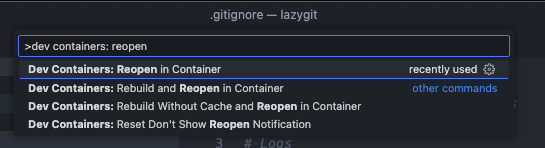
|
||||
|
||||
This requires that:
|
||||
|
||||
- you have docker installed
|
||||
- you have the dev containers extension installed in VSCode
|
||||
|
||||
See [here](https://code.visualstudio.com/docs/devcontainers/containers) for more info about dev containers.
|
||||
|
||||
## Running in a Github Codespace
|
||||
|
||||
If you want to start contributing to Lazygit with the click of a button, you can open the lazygit codebase in a Codespace. First fork the repo, then click to create a codespace:
|
||||
|
||||

|
||||
|
||||
To run lazygit from within the integrated terminal just go `go run main.go`
|
||||
|
||||
This allows you to contribute to Lazygit without needing to install anything on your local machine. The Codespace has all the necessary tools and extensions pre-installed.
|
||||
|
||||
## Using Nix for development
|
||||
|
||||
If you use Nix, you can leverage the included flake to set up a complete development environment with all necessary dependencies:
|
||||
|
||||
```sh
|
||||
nix develop
|
||||
```
|
||||
|
||||
This will drop you into a development shell that includes:
|
||||
|
||||
- Latest Go toolchain
|
||||
- golangci-lint for code linting
|
||||
- git and make
|
||||
|
||||
You can also build and run lazygit using nix:
|
||||
|
||||
```sh
|
||||
# Build lazygit
|
||||
nix build
|
||||
|
||||
# Run lazygit directly
|
||||
nix run
|
||||
```
|
||||
|
||||
The nix flake supports multiple architectures (x86_64-linux, aarch64-linux, x86_64-darwin, aarch64-darwin) and provides a consistent development environment across different systems.
|
||||
|
||||
## Code of conduct
|
||||
|
||||
Please note by participating in this project, you agree to abide by the [code of conduct].
|
||||
|
||||
[code of conduct]: https://github.com/jesseduffield/lazygit/blob/master/CODE-OF-CONDUCT.md
|
||||
|
||||
## Any contributions you make will be under the MIT Software License
|
||||
|
||||
In short, when you submit code changes, your submissions are understood to be
|
||||
under the same [MIT License](http://choosealicense.com/licenses/mit/) that
|
||||
covers the project. Feel free to contact the maintainers if that's a concern.
|
||||
|
||||
## Report bugs using Github's [issues](https://github.com/jesseduffield/lazygit/issues)
|
||||
|
||||
We use GitHub issues to track public bugs. Report a bug by [opening a new
|
||||
issue](https://github.com/jesseduffield/lazygit/issues/new); it's that easy!
|
||||
|
||||
## Go
|
||||
|
||||
This project is written in Go. Go is an opinionated language with strict idioms, but some of those idioms are a little extreme. Some things we do differently:
|
||||
|
||||
1. There is no shame in using `self` as a receiver name in a struct method. In fact we encourage it
|
||||
2. There is no shame in prefixing an interface with 'I' instead of suffixing with 'er' when there are several methods on the interface.
|
||||
3. If a struct implements an interface, we make it explicit with something like:
|
||||
|
||||
```go
|
||||
var _ MyInterface = &MyStruct{}
|
||||
```
|
||||
|
||||
This makes the intent clearer and means that if we fail to satisfy the interface we'll get an error in the file that needs fixing.
|
||||
|
||||
### Code Formatting
|
||||
|
||||
To check code formatting [gofumpt](https://pkg.go.dev/mvdan.cc/gofumpt#section-readme) (which is a bit stricter than [gofmt](https://pkg.go.dev/cmd/gofmt)) is used.
|
||||
VSCode will format the code correctly if you tell the Go extension to use `gofumpt` via your [`settings.json`](https://code.visualstudio.com/docs/getstarted/settings#_settingsjson)
|
||||
by setting [`formatting.gofumpt`](https://github.com/golang/tools/blob/master/gopls/doc/settings.md#gofumpt-bool) to `true`:
|
||||
|
||||
```jsonc
|
||||
// .vscode/settings.json
|
||||
{
|
||||
"gopls": {
|
||||
"formatting.gofumpt": true
|
||||
}
|
||||
}
|
||||
```
|
||||
|
||||
To run gofumpt from your terminal go:
|
||||
|
||||
```
|
||||
go install mvdan.cc/gofumpt@latest && gofumpt -l -w .
|
||||
```
|
||||
|
||||
## Programming Font
|
||||
|
||||
Lazygit supports [Nerd Fonts](https://www.nerdfonts.com) to render certain icons. Sometimes we use some of these icons verbatim in string literals in the code (mainly in tests), so you need to set your development environment to use a nerd font to see these.
|
||||
|
||||
## Internationalisation
|
||||
|
||||
Boy that's a hard word to spell. Anyway, lazygit is translated into several languages within the pkg/i18n package.
|
||||
|
||||
### For developers adding new text
|
||||
|
||||
If you need to render text to the user, you should add a new field to the TranslationSet struct in `pkg/i18n/english.go` and add the actual content within the `EnglishTranslationSet()` method in the same file. Then you can access via `gui.Tr.YourNewText` (or `self.c.Tr.YourNewText`, etc).
|
||||
|
||||
Note, we use 'Sentence case' for everything (so no 'Title Case' or 'whatever-it's-called-when-there's-no-capital-letters-case')
|
||||
|
||||
### For translators
|
||||
|
||||
Lazygit translations are managed through [Crowdin](https://crowdin.com/project/lazygit/). If you'd like to contribute translations:
|
||||
|
||||
1. Join the Crowdin project at https://crowdin.com/project/lazygit/
|
||||
2. Select your target language and help translate missing strings
|
||||
3. The translation files in `pkg/i18n/translations/` are managed by the maintainers - please don't edit them directly
|
||||
|
||||
For detailed information about the translation process, including how maintainers sync translations, see `pkg/i18n/translations/README.md`.
|
||||
|
||||
## Debugging
|
||||
|
||||
The easiest way to debug lazygit is to have two terminal tabs open at once: one for running lazygit (via `go run main.go -debug` in the project root) and one for viewing lazygit's logs (which can be done via `go run main.go --logs` or just `lazygit --logs`).
|
||||
|
||||
From most places in the codebase you have access to a logger e.g. `gui.Log.Warn("blah")` or `self.c.Log.Warn("blah")`.
|
||||
|
||||
If you find that the existing logs are too noisy, you can set the log level with e.g. `LOG_LEVEL=warn go run main.go -debug` and then only use `Warn` logs yourself.
|
||||
|
||||
If you need to log from code in the vendor directory (e.g. the `gocui` package), you won't have access to the logger, but you can easily add logging support by setting the `LAZYGIT_LOG_PATH` environment variable and using `logs.Global.Warn("blah")`. This is a global logger that's only intended for development purposes.
|
||||
|
||||
If you keep having to do some setup steps to reproduce an issue, read the Testing section below to see how to create an integration test by recording a lazygit session. It's pretty easy!
|
||||
|
||||
### VSCode debugger
|
||||
|
||||
If you want to trigger a debug session from VSCode, you can use the following snippet. Note that the `console` key is, at the time of writing, still an experimental feature.
|
||||
|
||||
```jsonc
|
||||
// .vscode/launch.json
|
||||
{
|
||||
"version": "0.2.0",
|
||||
"configurations": [
|
||||
{
|
||||
"name": "debug lazygit",
|
||||
"type": "go",
|
||||
"request": "launch",
|
||||
"mode": "auto",
|
||||
"program": "main.go",
|
||||
"args": ["--debug"],
|
||||
"console": "externalTerminal" // <-- you need this to actually see the lazygit UI in a window while debugging
|
||||
}
|
||||
]
|
||||
}
|
||||
```
|
||||
|
||||
## Profiling
|
||||
|
||||
If you want to investigate what's contributing to CPU or memory usage, see [this separate document](docs/dev/Profiling.md).
|
||||
|
||||
## Testing
|
||||
|
||||
Lazygit has two kinds of tests: unit tests and integration tests. Unit tests go in files that end in `_test.go`, and are written in Go. For integration tests, see [here](https://github.com/jesseduffield/lazygit/blob/master/pkg/integration/README.md)
|
||||
|
||||
## Updating Gocui
|
||||
|
||||
Sometimes you will need to make a change in the gocui fork (https://github.com/jesseduffield/gocui). Gocui is the package responsible for rendering windows and handling user input. Here's the typical process to follow:
|
||||
|
||||
1. Make the changes in gocui inside lazygit's vendor directory so it's easy to test against lazygit
|
||||
2. Copy the changes over to the actual gocui repo (clone it if you haven't already, and use the `awesome` branch, not `master`)
|
||||
3. Raise a PR on the gocui repo with your changes
|
||||
4. After that PR is merged, make a PR in lazygit bumping the gocui version. You can bump the version by running the following at the lazygit repo root:
|
||||
|
||||
```sh
|
||||
./scripts/bump_gocui.sh
|
||||
```
|
||||
|
||||
5. Raise a PR in lazygit with those changes
|
||||
|
||||
## Updating Lazycore
|
||||
|
||||
[Lazycore](https://github.com/jesseduffield/lazycore) is a repo containing shared functionality between lazygit and lazydocker. Sometimes you will need to make a change to that repo and import the changes into lazygit. Similar to updating Gocui, here's what you do:
|
||||
|
||||
1. Make the changes in lazycore inside lazygit's vendor directory so it's easy to test against lazygit
|
||||
2. Copy the changes over to the actual lazycore repo (clone it if you haven't already, and use the `master` branch)
|
||||
3. Raise a PR on the lazycore repo with your changes
|
||||
4. After that PR is merged, make a PR in lazygit bumping the lazycore version. You can bump the version by running the following at the lazygit repo root:
|
||||
|
||||
```sh
|
||||
./scripts/bump_lazycore.sh
|
||||
```
|
||||
|
||||
Or if you're using VSCode, there is a bump lazycore task you can find by going `cmd+shift+p` and typing 'Run task'
|
||||
|
||||
5. Raise a PR in lazygit with those changes
|
||||
|
||||
## Improvements
|
||||
|
||||
If you can think of any way to improve these docs let us know.
|
||||
|
|
|
|||
5
Makefile
5
Makefile
|
|
@ -36,11 +36,10 @@ generate:
|
|||
|
||||
.PHONY: format
|
||||
format:
|
||||
go tool gofumpt -l -w .
|
||||
gofumpt -l -w .
|
||||
|
||||
.PHONY: lint
|
||||
lint:
|
||||
./scripts/gofumpt-check.sh
|
||||
./scripts/golangci-lint-shim.sh run
|
||||
|
||||
# For more details about integration test, see https://github.com/jesseduffield/lazygit/blob/master/pkg/integration/README.md.
|
||||
|
|
@ -70,4 +69,4 @@ record-demo:
|
|||
|
||||
.PHONY: vendor
|
||||
vendor:
|
||||
go mod tidy && go mod vendor
|
||||
go mod vendor && go mod tidy
|
||||
|
|
|
|||
12
README.md
12
README.md
|
|
@ -118,7 +118,7 @@ If you're a mere mortal like me and you're tired of hearing how powerful git is
|
|||
- [Changing Directory On Exit](#changing-directory-on-exit)
|
||||
- [Undo/Redo](#undoredo)
|
||||
- [Configuration](#configuration)
|
||||
- [Custom Diff Renderers](#custom-diff-renderers)
|
||||
- [Custom Pagers](#custom-pagers)
|
||||
- [Custom Commands](#custom-commands)
|
||||
- [Git flow support](#git-flow-support)
|
||||
- [Contributing](#contributing)
|
||||
|
|
@ -423,7 +423,6 @@ nix-shell -p lazygit
|
|||
# or with flakes enabled
|
||||
nix run nixpkgs#lazygit
|
||||
```
|
||||
|
||||
Or you can add lazygit to your `configuration.nix` using the `environment.systemPackages` option.
|
||||
More details can be found via NixOS search [page](https://search.nixos.org/).
|
||||
|
||||
|
|
@ -432,7 +431,6 @@ More details can be found via NixOS search [page](https://search.nixos.org/).
|
|||
This repository includes a nix flake that provides the latest development version and additional development tools:
|
||||
|
||||
**Run lazygit directly from the repository:**
|
||||
|
||||
```sh
|
||||
nix run github:jesseduffield/lazygit
|
||||
# or from a local clone
|
||||
|
|
@ -440,7 +438,6 @@ nix run .
|
|||
```
|
||||
|
||||
**Build lazygit from source:**
|
||||
|
||||
```sh
|
||||
nix build github:jesseduffield/lazygit
|
||||
# or from a local clone
|
||||
|
|
@ -449,7 +446,6 @@ nix build .
|
|||
|
||||
**Development environment:**
|
||||
For contributors, the flake provides a development shell with Go toolchain, development tools, and dependencies:
|
||||
|
||||
```sh
|
||||
nix develop github:jesseduffield/lazygit
|
||||
# or from a local clone
|
||||
|
|
@ -457,14 +453,12 @@ nix develop
|
|||
```
|
||||
|
||||
The development shell includes:
|
||||
|
||||
- Go toolchain
|
||||
- git and make
|
||||
- Proper environment variables for development
|
||||
|
||||
**Using in other flakes:**
|
||||
The flake also provides an overlay for easy integration into other flake-based projects:
|
||||
|
||||
```nix
|
||||
{
|
||||
inputs.lazygit.url = "github:jesseduffield/lazygit";
|
||||
|
|
@ -590,9 +584,9 @@ See the [docs](/docs/Undoing.md)
|
|||
|
||||
Check out the [configuration docs](docs/Config.md).
|
||||
|
||||
### Custom Diff Renderers
|
||||
### Custom Pagers
|
||||
|
||||
See the [docs](docs/Custom_DiffRenderers.md)
|
||||
See the [docs](docs/Custom_Pagers.md)
|
||||
|
||||
### Custom Commands
|
||||
|
||||
|
|
|
|||
|
|
@ -66,8 +66,8 @@ gui:
|
|||
|
||||
# The number of spaces per tab; used for everything that's shown in the main
|
||||
# view, but probably mostly relevant for diffs.
|
||||
# Note that when using a diff renderer, the renderer has its own tab width
|
||||
# setting, so you need to pass it separately in the renderer command.
|
||||
# Note that when using a pager, the pager has its own tab width setting, so you
|
||||
# need to pass it separately in the pager command.
|
||||
tabWidth: 4
|
||||
|
||||
# If true, capture mouse events.
|
||||
|
|
@ -110,26 +110,6 @@ gui:
|
|||
# is true.
|
||||
expandedSidePanelWeight: 2
|
||||
|
||||
# If true, don't give a side panel more height than it needs to show its
|
||||
# content; when all panels fit, the leftover height is shared among them so that
|
||||
# they still fill the screen.
|
||||
shrinkSidePanelsToContent: false
|
||||
|
||||
# The side panels, in the order they appear from top to bottom.
|
||||
# Each entry is a list of one or more names that share a single panel as tabs
|
||||
# (cycle through them with the next-tab/previous-tab keys).
|
||||
# Omit a name to hide it; give a name its own one-element list to promote a tab
|
||||
# to a top-level panel.
|
||||
# Valid names are: 'status', 'files', 'worktrees', 'submodules', 'branches',
|
||||
# 'remotes', 'tags', 'commits', 'reflog', 'stash'. 'files', 'branches', and
|
||||
# 'commits' must always be included; they can't be hidden.
|
||||
sidePanels:
|
||||
- [status]
|
||||
- [files, worktrees, submodules]
|
||||
- [branches, remotes, tags]
|
||||
- [commits, reflog]
|
||||
- [stash]
|
||||
|
||||
# Sometimes the main window is split in two (e.g. when the selected file has
|
||||
# both staged and unstaged changes). This setting controls how the two sections
|
||||
# are split.
|
||||
|
|
@ -336,13 +316,13 @@ gui:
|
|||
spinner:
|
||||
# The frames of the spinner animation.
|
||||
frames:
|
||||
- ●∙∙
|
||||
- ∙●∙
|
||||
- ∙∙●
|
||||
- ∙●∙
|
||||
- '|'
|
||||
- /
|
||||
- '-'
|
||||
- \
|
||||
|
||||
# The "speed" of the spinner in milliseconds.
|
||||
rate: 180
|
||||
rate: 50
|
||||
|
||||
# Status panel view.
|
||||
# One of 'dashboard' (default) | 'allBranchesLog'
|
||||
|
|
@ -360,39 +340,30 @@ gui:
|
|||
|
||||
# Config relating to git
|
||||
git:
|
||||
# Array of diff renderers. Each entry has the following format:
|
||||
# Array of pagers. Each entry has the following format:
|
||||
#
|
||||
# # The type of diff renderer. One of: 'stdinFilter' (default) | 'extDiff'
|
||||
# # | 'rawGit'
|
||||
# type: "stdinFilter"
|
||||
#
|
||||
# # A name for the diff renderer, shown in the notification when cycling
|
||||
# # renderers. If not set, the name is derived from the first word of the
|
||||
# # renderer command.
|
||||
# name: ""
|
||||
#
|
||||
# # Value of the --color arg in the git diff command. Only used for type
|
||||
# # 'stdinFilter'. Some renderers want this to be set to 'always' and some
|
||||
# # want it set to 'never'.
|
||||
# # Value of the --color arg in the git diff command. Some pagers want
|
||||
# # this to be set to 'always' and some want it set to 'never'
|
||||
# colorArg: "always"
|
||||
#
|
||||
# # The command to use for rendering diffs. This is either a stdinFilter or
|
||||
# # an external diff command, depending on the type field; not applicable if
|
||||
# # the type is 'rawGit'.
|
||||
# # e.g.
|
||||
# # diff-so-fancy
|
||||
# # delta --dark --paging=never
|
||||
# # ydiff -p cat
|
||||
# # difft --color=always
|
||||
# command: ""
|
||||
# # ydiff -p cat -s --wrap --width={{columnWidth}}
|
||||
# pager: ""
|
||||
#
|
||||
# # Extra arguments (array of strings) passed to the git command. Only
|
||||
# # applicable if the type is 'rawGit'.
|
||||
# args: []
|
||||
# # e.g. 'difft --color=always'
|
||||
# externalDiffCommand: ""
|
||||
#
|
||||
# See https://github.com/jesseduffield/lazygit/blob/master/docs/Custom_DiffRenderers.md
|
||||
# # If true, Lazygit will use git's `diff.external` config for paging.
|
||||
# # The advantage over `externalDiffCommand` is that this can be
|
||||
# # configured per file type in .gitattributes; see
|
||||
# # https://git-scm.com/docs/gitattributes#_defining_an_external_diff_driver.
|
||||
# useExternalDiffGitConfig: false
|
||||
#
|
||||
# See https://github.com/jesseduffield/lazygit/blob/master/docs/Custom_Pagers.md
|
||||
# for more information.
|
||||
diffRenderers: []
|
||||
pagers: []
|
||||
|
||||
# Config relating to committing
|
||||
commit:
|
||||
|
|
@ -435,11 +406,6 @@ git:
|
|||
# If true, periodically refresh files and submodules
|
||||
autoRefresh: true
|
||||
|
||||
# If true, poll the repo periodically for external ref changes (commits, branch
|
||||
# updates, checkouts made outside lazygit) and refresh when one is detected.
|
||||
# Independent of autoRefresh, which only governs the files panel.
|
||||
autoDetectExternalChanges: true
|
||||
|
||||
# If not "none", lazygit will automatically fast-forward local branches to match
|
||||
# their upstream after fetching. Applies to branches that are not the currently
|
||||
# checked out branch, and only to those that are strictly behind their upstream
|
||||
|
|
@ -533,15 +499,6 @@ git:
|
|||
# to 40 to disable truncation.
|
||||
truncateCopiedCommitHashesTo: 12
|
||||
|
||||
# Config relating to git worktrees
|
||||
worktree:
|
||||
# Default parent directory for new worktrees. It is offered as a candidate
|
||||
# location alongside the parent directories of any worktrees you already have.
|
||||
# A relative path is resolved against the repository's root directory, so
|
||||
# "../worktrees" sits beside the repo and ".worktrees" sits inside it.
|
||||
# A leading "~" is expanded to your home directory, so "~/worktrees" works.
|
||||
defaultPath: ""
|
||||
|
||||
# Periodic update checks
|
||||
update:
|
||||
# One of: 'prompt' (default) | 'background' | 'never'
|
||||
|
|
@ -560,11 +517,6 @@ refresher:
|
|||
# Auto-fetch can be disabled via option 'git.autoFetch'.
|
||||
fetchInterval: 60
|
||||
|
||||
# Interval in seconds at which lazygit polls for external ref changes (commits,
|
||||
# branch updates, checkouts made outside lazygit).
|
||||
# Detection can be disabled via option 'git.autoDetectExternalChanges'.
|
||||
externalChangeCheckInterval: 2
|
||||
|
||||
# If true, show a confirmation popup before quitting Lazygit
|
||||
confirmOnQuit: false
|
||||
|
||||
|
|
@ -696,7 +648,6 @@ keybinding:
|
|||
confirmInEditor: [<ctrl+enter>, <ctrl+s>]
|
||||
remove: d
|
||||
new: "n"
|
||||
newWorktree: w
|
||||
edit: e
|
||||
openFile: o
|
||||
scrollUpMain: [<pgup>, K, <ctrl+u>]
|
||||
|
|
@ -715,8 +666,7 @@ keybinding:
|
|||
prevTab: '['
|
||||
nextScreenMode: +
|
||||
prevScreenMode: _
|
||||
cycleDiffRenderers: '|'
|
||||
cycleDiffRenderersReverse: \
|
||||
cyclePagers: '|'
|
||||
undo: z
|
||||
redo: Z
|
||||
filteringMenu: <ctrl+s>
|
||||
|
|
@ -731,7 +681,6 @@ keybinding:
|
|||
increaseRenameSimilarityThreshold: )
|
||||
decreaseRenameSimilarityThreshold: (
|
||||
openDiffTool: <ctrl+t>
|
||||
editConfig: <alt+shift+c>
|
||||
status:
|
||||
checkForUpdate: u
|
||||
recentRepos: <enter>
|
||||
|
|
@ -777,6 +726,8 @@ keybinding:
|
|||
fetchRemote: f
|
||||
addForkRemote: F
|
||||
sortOrder: s
|
||||
worktrees:
|
||||
viewWorktreeOptions: w
|
||||
commits:
|
||||
squashDown: s
|
||||
renameCommit: r
|
||||
|
|
@ -1108,12 +1059,6 @@ keybinding:
|
|||
edit: <disabled> # disable 'edit file'
|
||||
```
|
||||
|
||||
### Overriding the platform for default keybindings
|
||||
|
||||
A few keybindings have different defaults on macOS than on Linux and Windows (e.g. word-wise cursor movement in text inputs uses `alt` on macOS but `ctrl` elsewhere). Lazygit picks these based on the OS it's running on, but you can override that with the `LAZYGIT_KEYBINDING_PLATFORM` environment variable. Set it to `darwin`, `linux`, or `windows`; any other value is ignored and the actual OS is used.
|
||||
|
||||
This is useful when running lazygit in a Linux container that you access over ssh from a Mac, where you'd rather use the macOS keybindings.
|
||||
|
||||
### Example Keybindings For Colemak Users
|
||||
|
||||
```yaml
|
||||
|
|
|
|||
|
|
@ -1,84 +0,0 @@
|
|||
# Custom Diff Renderers
|
||||
|
||||
Custom diff renderers are useful for showing a better rendering of a diff than git's builtin raw diff, and using one is strongly recommended (I personally prefer delta myself, but that's a matter of personal preference). There are three types of diff renderers that lazygit supports:
|
||||
|
||||
- **stdin filters**, e.g. [delta](#delta) and [diff-so-fancy](#diff-so-fancy). They take git's raw output as stdin and produce something nicer on stdout, and they are hooked up using git's GIT_PAGER mechanism. (These used to be called "custom pagers" in earlier lazygit versions.)
|
||||
- **external diff programs**, e.g. difftastic; these are called using git's `--ext-diff` flag, and they take over diff generation from git completely rather than post-processing git's output.
|
||||
- **git's raw output using custom arguments**; mainly useful for `--color-words` (or `--word-diff` if you are color blind).
|
||||
|
||||
Diff renderers are configured with the `diffRenderers` array in the `git` section of lazygit's config file; it is an array because you can have multiple entries that you can cycle through with the `|` key. This can be useful if you usually prefer a particular diff renderer, but want to use a different one for certain kinds of diffs.
|
||||
|
||||
Fields that are shared by all renderer types:
|
||||
|
||||
- **type** The type of diff renderer; choices are `stdinFilter`, `extDiff`, or `rawGit`. `stdinFilter` is the default, because it's the most common one; so you can omit this if you use delta.
|
||||
- **name** A name that is shown in the status bar toast when cycling renderers; defaults to the first word of the renderer command, but can be useful e.g. to distinguish "delta" from "delta side-by-side" if you have entries for both.
|
||||
|
||||
Fields only for `stdinFilter`:
|
||||
|
||||
- **command** The command line to use for `GIT_PAGER`.
|
||||
|
||||
- **colorArg** whether you want the `--color=always` arg in your `git diff` command. Some diff renderers want it set to `always`, others want it set to `never`. The default is `always`, since that's what most renderers need.
|
||||
|
||||
Fields only for `extDiff`:
|
||||
|
||||
- **command** The command line to use for the `diff.external` git config. If left empty, it uses the global value of git's `diff.external` config; this can be useful if you also want to use it for diffs on the command line, and it also has the advantage that you can configure it per file type in `.gitattributes`; see https://git-scm.com/docs/gitattributes#_defining_an_external_diff_driver.
|
||||
|
||||
You can include the `{{diffContext}}` template variable to pass lazygit's current diff context size (the value controlled by the `{`/`}` keybindings) to the diff tool.
|
||||
|
||||
Fields only for `rawGit`:
|
||||
|
||||
- **args** The additional arguments to use in the `git diff` or `git show` call (e.g. `--color-words`), as an array of strings.
|
||||
|
||||
Here's an example for a multi-renderer setup:
|
||||
|
||||
```yaml
|
||||
git:
|
||||
diffRenderers:
|
||||
- command: delta --dark --paging=never
|
||||
- command: ydiff -p cat
|
||||
colorArg: never
|
||||
- type: extDiff
|
||||
command: difft --color=always --context={{diffContext}}
|
||||
- type: rawGit
|
||||
args: [--color-words]
|
||||
name: color-words
|
||||
- type: rawGit # git's default diff
|
||||
name: default
|
||||
```
|
||||
|
||||
## Delta:
|
||||
|
||||
```yaml
|
||||
git:
|
||||
diffRenderers:
|
||||
- command: delta --dark --paging=never
|
||||
```
|
||||
|
||||

|
||||
|
||||
A cool feature of delta is --hyperlinks, which renders clickable links for the line numbers in the left margin, and lazygit supports these. To use them, set the `command:` field to `delta --dark --paging=never --line-numbers --hyperlinks --hyperlinks-file-link-format="lazygit-edit://{path}:{line}"`; this allows you to click on an underlined line number in the diff to jump right to that same line in your editor.
|
||||
|
||||
Note that delta's `--navigate` option doesn't work in lazygit, for technical reasons.
|
||||
|
||||
## Diff-so-fancy
|
||||
|
||||
```yaml
|
||||
git:
|
||||
diffRenderers:
|
||||
- command: diff-so-fancy
|
||||
```
|
||||
|
||||

|
||||
|
||||
## ydiff
|
||||
|
||||
```yaml
|
||||
gui:
|
||||
sidePanelWidth: 0.2 # gives you more space to show things side-by-side
|
||||
git:
|
||||
diffRenderers:
|
||||
- colorArg: never
|
||||
command: ydiff -p cat
|
||||
```
|
||||
|
||||

|
||||
119
docs-master/Custom_Pagers.md
Normal file
119
docs-master/Custom_Pagers.md
Normal file
|
|
@ -0,0 +1,119 @@
|
|||
# Custom Pagers
|
||||
|
||||
Lazygit supports custom pagers, [configured](/docs/Config.md) in the config.yml file (which can be opened by pressing `e` in the Status panel).
|
||||
|
||||
Support does not extend to Windows users, because we're making use of a package which doesn't have Windows support. However, see [below](#emulating-custom-pagers-on-windows) for a workaround.
|
||||
|
||||
Multiple pagers are supported; you can cycle through them with the `|` key. This can be useful if you usually prefer a particular pager, but want to use a different one for certain kinds of diffs.
|
||||
|
||||
Pagers are configured with the `pagers` array in the git section; here's an example for a multi-pager setup (use an empty object `{}` for the default builtin diff display that doesn't use a pager):
|
||||
|
||||
```yaml
|
||||
git:
|
||||
pagers:
|
||||
- pager: delta --dark --paging=never
|
||||
- pager: ydiff -p cat -s --wrap --width={{columnWidth}}
|
||||
colorArg: never
|
||||
- externalDiffCommand: difft --color=always
|
||||
- {} # default, no pager used
|
||||
```
|
||||
|
||||
The `colorArg` key is for whether you want the `--color=always` arg in your `git diff` command. Some pagers want it set to `always`, others want it set to `never`. The default is `always`, since that's what most pagers need.
|
||||
|
||||
## Delta:
|
||||
|
||||
```yaml
|
||||
git:
|
||||
pagers:
|
||||
- pager: delta --dark --paging=never
|
||||
```
|
||||
|
||||

|
||||
|
||||
A cool feature of delta is --hyperlinks, which renders clickable links for the line numbers in the left margin, and lazygit supports these. To use them, set the `pager:` config to `delta --dark --paging=never --line-numbers --hyperlinks --hyperlinks-file-link-format="lazygit-edit://{path}:{line}"`; this allows you to click on an underlined line number in the diff to jump right to that same line in your editor.
|
||||
|
||||
Note that delta's `--navigate` option doesn't work in lazygit, for technical reasons.
|
||||
|
||||
## Diff-so-fancy
|
||||
|
||||
```yaml
|
||||
git:
|
||||
pagers:
|
||||
- pager: diff-so-fancy
|
||||
```
|
||||
|
||||

|
||||
|
||||
## ydiff
|
||||
|
||||
```yaml
|
||||
gui:
|
||||
sidePanelWidth: 0.2 # gives you more space to show things side-by-side
|
||||
git:
|
||||
pagers:
|
||||
- colorArg: never
|
||||
pager: ydiff -p cat -s --wrap --width={{columnWidth}}
|
||||
```
|
||||
|
||||

|
||||
|
||||
Be careful with this one, I think the homebrew and pip versions are behind master. I needed to directly download the ydiff script to get the no-pager functionality working.
|
||||
|
||||
## Using external diff commands
|
||||
|
||||
Some diff tools can't work as a simple pager like the ones above do, because they need access to the entire diff, so just post-processing git's diff is not enough for them. The most notable example is probably [difftastic](https://difftastic.wilfred.me.uk).
|
||||
|
||||
These can be used in lazygit by using the `externalDiffCommand` config; in the case of difftastic, that could be
|
||||
|
||||
```yaml
|
||||
git:
|
||||
pagers:
|
||||
- externalDiffCommand: difft --color=always
|
||||
```
|
||||
|
||||
The `colorArg` and `pager` options are not used in this case.
|
||||
|
||||
You can add whatever extra arguments you prefer for your difftool; for instance
|
||||
|
||||
```yaml
|
||||
git:
|
||||
pagers:
|
||||
- externalDiffCommand: difft --color=always --display=inline --syntax-highlight=off
|
||||
```
|
||||
|
||||
Instead of setting this command in lazygit's `externalDiffCommand` config, you can also tell lazygit to use the external diff command that is configured in git itself (`diff.external`), by using
|
||||
|
||||
```yaml
|
||||
git:
|
||||
pagers:
|
||||
- useExternalDiffGitConfig: true
|
||||
```
|
||||
|
||||
This can be useful if you also want to use it for diffs on the command line, and it also has the advantage that you can configure it per file type in `.gitattributes`; see https://git-scm.com/docs/gitattributes#_defining_an_external_diff_driver.
|
||||
|
||||
## Emulating custom pagers on Windows
|
||||
|
||||
There is a trick to emulate custom pagers on Windows using a Powershell script configured as an external diff command. It's not perfect, but certainly better than nothing. To do this, save the following script as `lazygit-pager.ps1` at a convenient place on your disk:
|
||||
|
||||
```pwsh
|
||||
#!/usr/bin/env pwsh
|
||||
|
||||
$old = $args[1].Replace('\', '/')
|
||||
$new = $args[4].Replace('\', '/')
|
||||
$path = $args[0]
|
||||
git diff --no-index --no-ext-diff $old $new
|
||||
| %{ $_.Replace($old, $path).Replace($new, $path) }
|
||||
| delta --width=$env:LAZYGIT_COLUMNS
|
||||
```
|
||||
|
||||
Use the pager of your choice with the arguments you like in the last line of the script. Personally I wouldn't want to use lazygit anymore without delta's `--hyperlinks --hyperlinks-file-link-format="lazygit-edit://{path}:{line}"` args, see [above](#delta).
|
||||
|
||||
In your lazygit config, use
|
||||
|
||||
```yml
|
||||
git:
|
||||
pagers:
|
||||
- externalDiffCommand: "C:/wherever/lazygit-pager.ps1"
|
||||
```
|
||||
|
||||
The main limitation of this approach compared to a "real" pager is that renames are not displayed correctly; they are shown as if they were modifications of the old file. (This affects only the hunk headers; the diff itself is always correct.)
|
||||
|
|
@ -2,7 +2,7 @@
|
|||
|
||||
* [Configuration](./Config.md).
|
||||
* [Custom Commands](./Custom_Command_Keybindings.md)
|
||||
* [Custom Diff Renderers](./Custom_DiffRenderers.md)
|
||||
* [Custom Pagers](./Custom_Pagers.md)
|
||||
* [Dev docs](./dev)
|
||||
* [Keybindings](./keybindings)
|
||||
* [Undo/Redo](./Undoing.md)
|
||||
|
|
|
|||
|
|
@ -4,14 +4,10 @@
|
|||
|
||||
Depending on the currently focused view, hitting '/' will bring up a filter or search prompt. When filtering, the contents of the view will be filtered down to only those lines which match the query string. When searching, the contents of the view are not filtered, but matching lines are highlighted and you can iterate through matches with `n`/`N`.
|
||||
|
||||
In the commits view we don't filter, but search; this is deliberate because you typically care about the commits that come before/after a matching commit.
|
||||
We intend to support filtering for the files view soon, but at the moment it uses searching. We intend to continue using search for the commits view because you typically care about the commits that come before/after a matching commit.
|
||||
|
||||
If you would like both filtering and searching to be enabled on a given view, please raise an issue for this.
|
||||
|
||||
## Menu filtering
|
||||
|
||||
The keybindings (`?`) and recent repositories menus can be filtered simply by typing. The filter field appears at the bottom of the menu while you type; there is no need to press `/` or confirm the filter before navigating the results.
|
||||
|
||||
## Filtering files by status
|
||||
|
||||
You can filter the files view to only show staged/unstaged files by pressing `<c-b>` in the files view.
|
||||
|
|
|
|||
|
|
@ -22,8 +22,7 @@ _This file is auto-generated. To update, make the changes in the pkg/i18n direct
|
|||
| `` R `` | Refresh | Refresh the git state (i.e. run `git status`, `git branch`, etc in background to update the contents of panels). This does not run `git fetch`. |
|
||||
| `` + `` | Next screen mode (normal/half/fullscreen) | |
|
||||
| `` _ `` | Prev screen mode | |
|
||||
| `` \| `` | Cycle diff renderers | Choose the next renderer in the list of configured diff renderers. |
|
||||
| `` \ `` | Cycle diff renderers (reverse) | Choose the previous renderer in the list of configured diff renderers. |
|
||||
| `` \| `` | Cycle pagers | Choose the next pager in the list of configured pagers |
|
||||
| `` <esc> `` | Cancel | |
|
||||
| `` ? `` | Open keybindings menu | |
|
||||
| `` <ctrl+s> `` | View filter options | View options for filtering the commit log, so that only commits matching the filter are shown. |
|
||||
|
|
@ -31,7 +30,6 @@ _This file is auto-generated. To update, make the changes in the pkg/i18n direct
|
|||
| `` q, <ctrl+c> `` | Quit | |
|
||||
| `` <ctrl+z> `` | Suspend the application | |
|
||||
| `` <ctrl+w> `` | Toggle whitespace | Toggle whether or not whitespace changes are shown in the diff view.<br><br>The default can be changed in the config file with the key 'git.ignoreWhitespaceInDiffView'. |
|
||||
| `` <alt+shift+c> `` | Edit config file | Open file in external editor. |
|
||||
| `` z `` | Undo | The reflog will be used to determine what git command to run to undo the last git command. This does not include changes to the working tree; only commits are taken into consideration. |
|
||||
| `` Z `` | Redo | The reflog will be used to determine what git command to run to redo the last git command. This does not include changes to the working tree; only commits are taken into consideration. |
|
||||
|
||||
|
|
@ -112,13 +110,13 @@ _This file is auto-generated. To update, make the changes in the pkg/i18n direct
|
|||
| `` o `` | Open commit in browser | |
|
||||
| `` n `` | Create new branch off of commit | |
|
||||
| `` N `` | Move commits to new branch | Create a new branch and move the unpushed commits of the current branch to it. Useful if you meant to start new work and forgot to create a new branch first.<br><br>Note that this disregards the selection, the new branch is always created either from the main branch or stacked on top of the current branch (you get to choose which). |
|
||||
| `` w `` | New worktree | |
|
||||
| `` g `` | Reset | View reset options (soft/mixed/hard) for resetting onto selected item. |
|
||||
| `` C `` | Copy (cherry-pick) | Mark commit as copied. Then, within the local commits view, you can press `V` to paste (cherry-pick) the copied commit(s) into your checked out branch. At any time you can press `<esc>` to cancel the selection. |
|
||||
| `` <ctrl+t> `` | Open external diff tool (git difftool) | |
|
||||
| `` * `` | Select commits of current branch | |
|
||||
| `` 0 `` | Focus main view | |
|
||||
| `` <enter> `` | View files | |
|
||||
| `` w `` | View worktree options | |
|
||||
| `` / `` | Search the current view by text | |
|
||||
|
||||
## Confirmation panel
|
||||
|
|
@ -178,7 +176,6 @@ _This file is auto-generated. To update, make the changes in the pkg/i18n direct
|
|||
| `` <space> `` | Checkout | Checkout selected item. |
|
||||
| `` n `` | New branch | |
|
||||
| `` N `` | Move commits to new branch | Create a new branch and move the unpushed commits of the current branch to it. Useful if you meant to start new work and forgot to create a new branch first.<br><br>Note that this disregards the selection, the new branch is always created either from the main branch or stacked on top of the current branch (you get to choose which). |
|
||||
| `` w `` | New worktree | |
|
||||
| `` o `` | Create pull request | |
|
||||
| `` O `` | View create pull request options | |
|
||||
| `` G `` | Open pull request in browser | |
|
||||
|
|
@ -198,6 +195,7 @@ _This file is auto-generated. To update, make the changes in the pkg/i18n direct
|
|||
| `` <ctrl+t> `` | Open external diff tool (git difftool) | |
|
||||
| `` 0 `` | Focus main view | |
|
||||
| `` <enter> `` | View commits | |
|
||||
| `` w `` | View worktree options | |
|
||||
| `` / `` | Filter the current view by text | |
|
||||
|
||||
## Main panel (merging)
|
||||
|
|
@ -205,7 +203,7 @@ _This file is auto-generated. To update, make the changes in the pkg/i18n direct
|
|||
| Key | Action | Info |
|
||||
|-----|--------|-------------|
|
||||
| `` <space> `` | Pick hunk | |
|
||||
| `` b `` | Pick both hunks | |
|
||||
| `` b `` | Pick all hunks | |
|
||||
| `` <up>, k `` | Previous hunk | |
|
||||
| `` <down>, j `` | Next hunk | |
|
||||
| `` <left>, h `` | Previous conflict | |
|
||||
|
|
@ -282,7 +280,6 @@ _This file is auto-generated. To update, make the changes in the pkg/i18n direct
|
|||
| `` o `` | Open commit in browser | |
|
||||
| `` n `` | Create new branch off of commit | |
|
||||
| `` N `` | Move commits to new branch | Create a new branch and move the unpushed commits of the current branch to it. Useful if you meant to start new work and forgot to create a new branch first.<br><br>Note that this disregards the selection, the new branch is always created either from the main branch or stacked on top of the current branch (you get to choose which). |
|
||||
| `` w `` | New worktree | |
|
||||
| `` g `` | Reset | View reset options (soft/mixed/hard) for resetting onto selected item. |
|
||||
| `` C `` | Copy (cherry-pick) | Mark commit as copied. Then, within the local commits view, you can press `V` to paste (cherry-pick) the copied commit(s) into your checked out branch. At any time you can press `<esc>` to cancel the selection. |
|
||||
| `` <ctrl+r> `` | Reset copied (cherry-picked) commits selection | |
|
||||
|
|
@ -290,6 +287,7 @@ _This file is auto-generated. To update, make the changes in the pkg/i18n direct
|
|||
| `` * `` | Select commits of current branch | |
|
||||
| `` 0 `` | Focus main view | |
|
||||
| `` <enter> `` | View commits | |
|
||||
| `` w `` | View worktree options | |
|
||||
| `` / `` | Filter the current view by text | |
|
||||
|
||||
## Remote branches
|
||||
|
|
@ -299,7 +297,6 @@ _This file is auto-generated. To update, make the changes in the pkg/i18n direct
|
|||
| `` <ctrl+o> `` | Copy branch name to clipboard | |
|
||||
| `` <space> `` | Checkout | Checkout a new local branch based on the selected remote branch, or the remote branch as a detached head. |
|
||||
| `` n `` | New branch | |
|
||||
| `` w `` | New worktree | |
|
||||
| `` M `` | Merge | View options for merging the selected item into the current branch (regular merge, squash merge) |
|
||||
| `` r `` | Rebase | Rebase the checked-out branch onto the selected branch. |
|
||||
| `` d `` | Delete | Delete the remote branch from the remote. |
|
||||
|
|
@ -309,6 +306,7 @@ _This file is auto-generated. To update, make the changes in the pkg/i18n direct
|
|||
| `` <ctrl+t> `` | Open external diff tool (git difftool) | |
|
||||
| `` 0 `` | Focus main view | |
|
||||
| `` <enter> `` | View commits | |
|
||||
| `` w `` | View worktree options | |
|
||||
| `` / `` | Filter the current view by text | |
|
||||
|
||||
## Remotes
|
||||
|
|
@ -339,16 +337,17 @@ _This file is auto-generated. To update, make the changes in the pkg/i18n direct
|
|||
| `` g `` | Pop | Apply the stash entry to your working directory and remove the stash entry. |
|
||||
| `` d `` | Drop | Remove the stash entry from the stash list. |
|
||||
| `` n `` | New branch | Create a new branch from the selected stash entry. This works by git checking out the commit that the stash entry was created from, creating a new branch from that commit, then applying the stash entry to the new branch as an additional commit. |
|
||||
| `` w `` | New worktree | |
|
||||
| `` r `` | Rename stash | |
|
||||
| `` 0 `` | Focus main view | |
|
||||
| `` <enter> `` | View files | |
|
||||
| `` w `` | View worktree options | |
|
||||
| `` / `` | Filter the current view by text | |
|
||||
|
||||
## Status
|
||||
|
||||
| Key | Action | Info |
|
||||
|-----|--------|-------------|
|
||||
| `` o `` | Open config file | Open file in default application. |
|
||||
| `` e `` | Edit config file | Open file in external editor. |
|
||||
| `` u `` | Check for update | |
|
||||
| `` <enter> `` | Switch to a recent repo | |
|
||||
|
|
@ -366,7 +365,6 @@ _This file is auto-generated. To update, make the changes in the pkg/i18n direct
|
|||
| `` o `` | Open commit in browser | |
|
||||
| `` n `` | Create new branch off of commit | |
|
||||
| `` N `` | Move commits to new branch | Create a new branch and move the unpushed commits of the current branch to it. Useful if you meant to start new work and forgot to create a new branch first.<br><br>Note that this disregards the selection, the new branch is always created either from the main branch or stacked on top of the current branch (you get to choose which). |
|
||||
| `` w `` | New worktree | |
|
||||
| `` g `` | Reset | View reset options (soft/mixed/hard) for resetting onto selected item. |
|
||||
| `` C `` | Copy (cherry-pick) | Mark commit as copied. Then, within the local commits view, you can press `V` to paste (cherry-pick) the copied commit(s) into your checked out branch. At any time you can press `<esc>` to cancel the selection. |
|
||||
| `` <ctrl+r> `` | Reset copied (cherry-picked) commits selection | |
|
||||
|
|
@ -374,6 +372,7 @@ _This file is auto-generated. To update, make the changes in the pkg/i18n direct
|
|||
| `` * `` | Select commits of current branch | |
|
||||
| `` 0 `` | Focus main view | |
|
||||
| `` <enter> `` | View files | |
|
||||
| `` w `` | View worktree options | |
|
||||
| `` / `` | Search the current view by text | |
|
||||
|
||||
## Submodules
|
||||
|
|
@ -397,13 +396,13 @@ _This file is auto-generated. To update, make the changes in the pkg/i18n direct
|
|||
| `` <ctrl+o> `` | Copy tag to clipboard | |
|
||||
| `` <space> `` | Checkout | Checkout the selected tag as a detached HEAD. |
|
||||
| `` n `` | New tag | Create new tag from current commit. You'll be prompted to enter a tag name and optional description. |
|
||||
| `` w `` | New worktree | |
|
||||
| `` d `` | Delete | View delete options for local/remote tag. |
|
||||
| `` P `` | Push tag | Push the selected tag to a remote. You'll be prompted to select a remote. |
|
||||
| `` g `` | Reset | View reset options (soft/mixed/hard) for resetting onto selected item. |
|
||||
| `` <ctrl+t> `` | Open external diff tool (git difftool) | |
|
||||
| `` 0 `` | Focus main view | |
|
||||
| `` <enter> `` | View commits | |
|
||||
| `` w `` | View worktree options | |
|
||||
| `` / `` | Filter the current view by text | |
|
||||
|
||||
## Worktrees
|
||||
|
|
|
|||
|
|
@ -22,8 +22,7 @@ _This file is auto-generated. To update, make the changes in the pkg/i18n direct
|
|||
| `` R `` | 更新 | Gitの状態を更新します(`git status`、`git branch`などをバックグラウンドで実行してパネルの内容を更新します)。これは`git fetch`を実行しません。 |
|
||||
| `` + `` | 次の画面モード(通常/半分/全画面) | |
|
||||
| `` _ `` | 前の画面モード | |
|
||||
| `` \| `` | Cycle diff renderers | Choose the next renderer in the list of configured diff renderers. |
|
||||
| `` \ `` | Cycle diff renderers (reverse) | Choose the previous renderer in the list of configured diff renderers. |
|
||||
| `` \| `` | Cycle pagers | Choose the next pager in the list of configured pagers |
|
||||
| `` <esc> `` | キャンセル | |
|
||||
| `` ? `` | キーバインディングメニューを開く | |
|
||||
| `` <ctrl+s> `` | フィルターオプションを表示 | コミットログのフィルタリングオプションを表示し、フィルタに一致するコミットのみを表示します。 |
|
||||
|
|
@ -31,7 +30,6 @@ _This file is auto-generated. To update, make the changes in the pkg/i18n direct
|
|||
| `` q, <ctrl+c> `` | 終了 | |
|
||||
| `` <ctrl+z> `` | Suspend the application | |
|
||||
| `` <ctrl+w> `` | 空白表示の切り替え | Toggle whether or not whitespace changes are shown in the diff view.<br><br>The default can be changed in the config file with the key 'git.ignoreWhitespaceInDiffView'. |
|
||||
| `` <alt+shift+c> `` | 設定ファイルを編集 | 外部エディタでファイルを開きます。 |
|
||||
| `` z `` | 元に戻す | 最後のgitコマンドを元に戻すために実行するgitコマンドを決定するためにreflogが使用されます。これにはワーキングツリーへの変更は含まれません。コミットのみが考慮されます。 |
|
||||
| `` Z `` | やり直す | 最後のgitコマンドをやり直すために実行するgitコマンドを決定するためにreflogが使用されます。これにはワーキングツリーへの変更は含まれません。コミットのみが考慮されます。 |
|
||||
|
||||
|
|
@ -92,13 +90,13 @@ _This file is auto-generated. To update, make the changes in the pkg/i18n direct
|
|||
| `` o `` | ブラウザでコミットを開く | |
|
||||
| `` n `` | コミットから新しいブランチを作成 | |
|
||||
| `` N `` | コミットを新しいブランチに移動 | Create a new branch and move the unpushed commits of the current branch to it. Useful if you meant to start new work and forgot to create a new branch first.<br><br>Note that this disregards the selection, the new branch is always created either from the main branch or stacked on top of the current branch (you get to choose which). |
|
||||
| `` w `` | 新しいワークツリー | |
|
||||
| `` g `` | リセット | 選択した項目へのリセットオプション(ソフト/ミックス/ハード)を表示します。各リセットタイプの詳細は次の通りです:<br>- ソフトリセット:変更を保持し、ステージされた状態にします<br>- ミックスリセット:変更を保持し、ステージされていない状態にします<br>- ハードリセット:すべての変更を破棄します |
|
||||
| `` C `` | コピー(チェリーピック) | コミットをコピーとしてマークします。ローカルコミットビューで `V` を押すと、コピーしたコミットをチェックアウトしたブランチにペースト(チェリーピック)できます。いつでも `<esc>` を押して選択をキャンセルできます。 |
|
||||
| `` <ctrl+t> `` | 外部差分ツールを開く(git difftool) | |
|
||||
| `` * `` | 現在のブランチのコミットを選択 | |
|
||||
| `` 0 `` | メインビューにフォーカス | |
|
||||
| `` <enter> `` | ファイルを表示 | |
|
||||
| `` w `` | ワークツリーオプションを表示 | |
|
||||
| `` / `` | 現在のビューをテキストで検索 | |
|
||||
|
||||
## コミットファイル
|
||||
|
|
@ -138,7 +136,6 @@ _This file is auto-generated. To update, make the changes in the pkg/i18n direct
|
|||
| `` o `` | ブラウザでコミットを開く | |
|
||||
| `` n `` | コミットから新しいブランチを作成 | |
|
||||
| `` N `` | コミットを新しいブランチに移動 | Create a new branch and move the unpushed commits of the current branch to it. Useful if you meant to start new work and forgot to create a new branch first.<br><br>Note that this disregards the selection, the new branch is always created either from the main branch or stacked on top of the current branch (you get to choose which). |
|
||||
| `` w `` | 新しいワークツリー | |
|
||||
| `` g `` | リセット | 選択した項目へのリセットオプション(ソフト/ミックス/ハード)を表示します。各リセットタイプの詳細は次の通りです:<br>- ソフトリセット:変更を保持し、ステージされた状態にします<br>- ミックスリセット:変更を保持し、ステージされていない状態にします<br>- ハードリセット:すべての変更を破棄します |
|
||||
| `` C `` | コピー(チェリーピック) | コミットをコピーとしてマークします。ローカルコミットビューで `V` を押すと、コピーしたコミットをチェックアウトしたブランチにペースト(チェリーピック)できます。いつでも `<esc>` を押して選択をキャンセルできます。 |
|
||||
| `` <ctrl+r> `` | コピーされた(チェリーピックされた)コミットの選択をリセット | |
|
||||
|
|
@ -146,6 +143,7 @@ _This file is auto-generated. To update, make the changes in the pkg/i18n direct
|
|||
| `` * `` | 現在のブランチのコミットを選択 | |
|
||||
| `` 0 `` | メインビューにフォーカス | |
|
||||
| `` <enter> `` | ファイルを表示 | |
|
||||
| `` w `` | ワークツリーオプションを表示 | |
|
||||
| `` / `` | 現在のビューをテキストで検索 | |
|
||||
|
||||
## サブモジュール
|
||||
|
|
@ -170,16 +168,17 @@ _This file is auto-generated. To update, make the changes in the pkg/i18n direct
|
|||
| `` g `` | ポップ | スタッシュエントリをワーキングディレクトリに適用し、スタッシュエントリを削除します。 |
|
||||
| `` d `` | 削除 | スタッシュリストからスタッシュエントリを削除します。 |
|
||||
| `` n `` | 新しいブランチ | 選択したスタッシュエントリから新しいブランチを作成します。これは、スタッシュエントリが作成されたコミットをgitがチェックアウトし、そのコミットから新しいブランチを作成した後、スタッシュエントリを追加のコミットとして新しいブランチに適用することで機能します。 |
|
||||
| `` w `` | 新しいワークツリー | |
|
||||
| `` r `` | スタッシュの名前を変更 | |
|
||||
| `` 0 `` | メインビューにフォーカス | |
|
||||
| `` <enter> `` | ファイルを表示 | |
|
||||
| `` w `` | ワークツリーオプションを表示 | |
|
||||
| `` / `` | 現在のビューをテキストでフィルタリング | |
|
||||
|
||||
## ステータス
|
||||
|
||||
| Key | Action | Info |
|
||||
|-----|--------|-------------|
|
||||
| `` o `` | 設定ファイルを開く | デフォルトのアプリケーションでファイルを開きます。 |
|
||||
| `` e `` | 設定ファイルを編集 | 外部エディタでファイルを開きます。 |
|
||||
| `` u `` | 更新を確認 | |
|
||||
| `` <enter> `` | 最近のリポジトリをチェックアウト | |
|
||||
|
|
@ -202,13 +201,13 @@ _This file is auto-generated. To update, make the changes in the pkg/i18n direct
|
|||
| `` <ctrl+o> `` | タグをクリップボードにコピー | |
|
||||
| `` <space> `` | チェックアウト(ブランチの切り替え) | 選択したタグをデタッチドHEADとしてチェックアウトします。 |
|
||||
| `` n `` | 新しいタグを作成 | 現在のコミットから新しいタグを作成します。タグ名とオプションの説明を入力するよう促されます。 |
|
||||
| `` w `` | 新しいワークツリー | |
|
||||
| `` d `` | 削除 | ローカル/リモートタグの削除オプションを表示します。 |
|
||||
| `` P `` | タグをプッシュ | 選択したタグをリモートにプッシュします。リモートを選択するよう促されます。 |
|
||||
| `` g `` | リセット | 選択した項目へのリセットオプション(ソフト/ミックス/ハード)を表示します。各リセットタイプの詳細は次の通りです:<br>- ソフトリセット:変更を保持し、ステージされた状態にします<br>- ミックスリセット:変更を保持し、ステージされていない状態にします<br>- ハードリセット:すべての変更を破棄します |
|
||||
| `` <ctrl+t> `` | 外部差分ツールを開く(git difftool) | |
|
||||
| `` 0 `` | メインビューにフォーカス | |
|
||||
| `` <enter> `` | コミットを表示 | |
|
||||
| `` w `` | ワークツリーオプションを表示 | |
|
||||
| `` / `` | 現在のビューをテキストでフィルタリング | |
|
||||
|
||||
## ファイル
|
||||
|
|
@ -287,7 +286,7 @@ _This file is auto-generated. To update, make the changes in the pkg/i18n direct
|
|||
| Key | Action | Info |
|
||||
|-----|--------|-------------|
|
||||
| `` <space> `` | ハンクを選択 | |
|
||||
| `` b `` | Pick both hunks | |
|
||||
| `` b `` | すべてのハンクを選択 | |
|
||||
| `` <up>, k `` | 前のハンク | |
|
||||
| `` <down>, j `` | 次のハンク | |
|
||||
| `` <left>, h `` | 前のコンフリクト | |
|
||||
|
|
@ -326,7 +325,6 @@ _This file is auto-generated. To update, make the changes in the pkg/i18n direct
|
|||
| `` o `` | ブラウザでコミットを開く | |
|
||||
| `` n `` | コミットから新しいブランチを作成 | |
|
||||
| `` N `` | コミットを新しいブランチに移動 | Create a new branch and move the unpushed commits of the current branch to it. Useful if you meant to start new work and forgot to create a new branch first.<br><br>Note that this disregards the selection, the new branch is always created either from the main branch or stacked on top of the current branch (you get to choose which). |
|
||||
| `` w `` | 新しいワークツリー | |
|
||||
| `` g `` | リセット | 選択した項目へのリセットオプション(ソフト/ミックス/ハード)を表示します。各リセットタイプの詳細は次の通りです:<br>- ソフトリセット:変更を保持し、ステージされた状態にします<br>- ミックスリセット:変更を保持し、ステージされていない状態にします<br>- ハードリセット:すべての変更を破棄します |
|
||||
| `` C `` | コピー(チェリーピック) | コミットをコピーとしてマークします。ローカルコミットビューで `V` を押すと、コピーしたコミットをチェックアウトしたブランチにペースト(チェリーピック)できます。いつでも `<esc>` を押して選択をキャンセルできます。 |
|
||||
| `` <ctrl+r> `` | コピーされた(チェリーピックされた)コミットの選択をリセット | |
|
||||
|
|
@ -334,6 +332,7 @@ _This file is auto-generated. To update, make the changes in the pkg/i18n direct
|
|||
| `` * `` | 現在のブランチのコミットを選択 | |
|
||||
| `` 0 `` | メインビューにフォーカス | |
|
||||
| `` <enter> `` | コミットを表示 | |
|
||||
| `` w `` | ワークツリーオプションを表示 | |
|
||||
| `` / `` | 現在のビューをテキストでフィルタリング | |
|
||||
|
||||
## リモート
|
||||
|
|
@ -355,7 +354,6 @@ _This file is auto-generated. To update, make the changes in the pkg/i18n direct
|
|||
| `` <ctrl+o> `` | ブランチ名をクリップボードにコピー | |
|
||||
| `` <space> `` | チェックアウト(ブランチの切り替え) | 選択したリモートブランチに基づいて新しいローカルブランチをチェックアウトするか、リモートブランチをデタッチドヘッドとしてチェックアウトします。 |
|
||||
| `` n `` | 新しいブランチ | |
|
||||
| `` w `` | 新しいワークツリー | |
|
||||
| `` M `` | マージ | 選択した項目を現在のブランチにマージするためのオプションを表示します(通常のマージ、スカッシュマージ) |
|
||||
| `` r `` | リベース | チェックアウトしたブランチを選択したブランチ上にリベースします。 |
|
||||
| `` d `` | 削除 | リモートからリモートブランチを削除します。 |
|
||||
|
|
@ -365,6 +363,7 @@ _This file is auto-generated. To update, make the changes in the pkg/i18n direct
|
|||
| `` <ctrl+t> `` | 外部差分ツールを開く(git difftool) | |
|
||||
| `` 0 `` | メインビューにフォーカス | |
|
||||
| `` <enter> `` | コミットを表示 | |
|
||||
| `` w `` | ワークツリーオプションを表示 | |
|
||||
| `` / `` | 現在のビューをテキストでフィルタリング | |
|
||||
|
||||
## ローカルブランチ
|
||||
|
|
@ -376,7 +375,6 @@ _This file is auto-generated. To update, make the changes in the pkg/i18n direct
|
|||
| `` <space> `` | チェックアウト(ブランチの切り替え) | 選択した項目をチェックアウトします。 |
|
||||
| `` n `` | 新しいブランチ | |
|
||||
| `` N `` | コミットを新しいブランチに移動 | Create a new branch and move the unpushed commits of the current branch to it. Useful if you meant to start new work and forgot to create a new branch first.<br><br>Note that this disregards the selection, the new branch is always created either from the main branch or stacked on top of the current branch (you get to choose which). |
|
||||
| `` w `` | 新しいワークツリー | |
|
||||
| `` o `` | プルリクエストを作成 | |
|
||||
| `` O `` | プルリクエスト作成オプションを表示 | |
|
||||
| `` G `` | Open pull request in browser | |
|
||||
|
|
@ -396,6 +394,7 @@ _This file is auto-generated. To update, make the changes in the pkg/i18n direct
|
|||
| `` <ctrl+t> `` | 外部差分ツールを開く(git difftool) | |
|
||||
| `` 0 `` | メインビューにフォーカス | |
|
||||
| `` <enter> `` | コミットを表示 | |
|
||||
| `` w `` | ワークツリーオプションを表示 | |
|
||||
| `` / `` | 現在のビューをテキストでフィルタリング | |
|
||||
|
||||
## ワークツリー
|
||||
|
|
|
|||
|
|
@ -22,8 +22,7 @@ _This file is auto-generated. To update, make the changes in the pkg/i18n direct
|
|||
| `` R `` | 새로고침 | Refresh the git state (i.e. run `git status`, `git branch`, etc in background to update the contents of panels). This does not run `git fetch`. |
|
||||
| `` + `` | 다음 스크린 모드 (normal/half/fullscreen) | |
|
||||
| `` _ `` | 이전 스크린 모드 | |
|
||||
| `` \| `` | Cycle diff renderers | Choose the next renderer in the list of configured diff renderers. |
|
||||
| `` \ `` | Cycle diff renderers (reverse) | Choose the previous renderer in the list of configured diff renderers. |
|
||||
| `` \| `` | Cycle pagers | Choose the next pager in the list of configured pagers |
|
||||
| `` <esc> `` | 취소 | |
|
||||
| `` ? `` | 매뉴 열기 | |
|
||||
| `` <ctrl+s> `` | View filter-by-path options | View options for filtering the commit log, so that only commits matching the filter are shown. |
|
||||
|
|
@ -31,7 +30,6 @@ _This file is auto-generated. To update, make the changes in the pkg/i18n direct
|
|||
| `` q, <ctrl+c> `` | 종료 | |
|
||||
| `` <ctrl+z> `` | Suspend the application | |
|
||||
| `` <ctrl+w> `` | 공백문자를 Diff 뷰에서 표시 여부 전환 | Toggle whether or not whitespace changes are shown in the diff view.<br><br>The default can be changed in the config file with the key 'git.ignoreWhitespaceInDiffView'. |
|
||||
| `` <alt+shift+c> `` | 설정 파일 수정 | Open file in external editor. |
|
||||
| `` z `` | 되돌리기 (reflog) (실험적) | The reflog will be used to determine what git command to run to undo the last git command. This does not include changes to the working tree; only commits are taken into consideration. |
|
||||
| `` Z `` | 다시 실행 (reflog) (실험적) | The reflog will be used to determine what git command to run to redo the last git command. This does not include changes to the working tree; only commits are taken into consideration. |
|
||||
|
||||
|
|
@ -69,7 +67,6 @@ _This file is auto-generated. To update, make the changes in the pkg/i18n direct
|
|||
| `` o `` | 브라우저에서 커밋 열기 | |
|
||||
| `` n `` | 커밋에서 새 브랜치를 만듭니다. | |
|
||||
| `` N `` | Move commits to new branch | Create a new branch and move the unpushed commits of the current branch to it. Useful if you meant to start new work and forgot to create a new branch first.<br><br>Note that this disregards the selection, the new branch is always created either from the main branch or stacked on top of the current branch (you get to choose which). |
|
||||
| `` w `` | New worktree | |
|
||||
| `` g `` | View reset options | View reset options (soft/mixed/hard) for resetting onto selected item. |
|
||||
| `` C `` | 커밋을 복사 (cherry-pick) | Mark commit as copied. Then, within the local commits view, you can press `V` to paste (cherry-pick) the copied commit(s) into your checked out branch. At any time you can press `<esc>` to cancel the selection. |
|
||||
| `` <ctrl+r> `` | Reset cherry-picked (copied) commits selection | |
|
||||
|
|
@ -77,6 +74,7 @@ _This file is auto-generated. To update, make the changes in the pkg/i18n direct
|
|||
| `` * `` | Select commits of current branch | |
|
||||
| `` 0 `` | Focus main view | |
|
||||
| `` <enter> `` | 커밋 보기 | |
|
||||
| `` w `` | View worktree options | |
|
||||
| `` / `` | Filter the current view by text | |
|
||||
|
||||
## Secondary
|
||||
|
|
@ -95,10 +93,10 @@ _This file is auto-generated. To update, make the changes in the pkg/i18n direct
|
|||
| `` g `` | Pop | Apply the stash entry to your working directory and remove the stash entry. |
|
||||
| `` d `` | Drop | Remove the stash entry from the stash list. |
|
||||
| `` n `` | 새 브랜치 생성 | Create a new branch from the selected stash entry. This works by git checking out the commit that the stash entry was created from, creating a new branch from that commit, then applying the stash entry to the new branch as an additional commit. |
|
||||
| `` w `` | New worktree | |
|
||||
| `` r `` | Rename stash | |
|
||||
| `` 0 `` | Focus main view | |
|
||||
| `` <enter> `` | View selected item's files | |
|
||||
| `` w `` | View worktree options | |
|
||||
| `` / `` | Filter the current view by text | |
|
||||
|
||||
## Sub-commits
|
||||
|
|
@ -111,7 +109,6 @@ _This file is auto-generated. To update, make the changes in the pkg/i18n direct
|
|||
| `` o `` | 브라우저에서 커밋 열기 | |
|
||||
| `` n `` | 커밋에서 새 브랜치를 만듭니다. | |
|
||||
| `` N `` | Move commits to new branch | Create a new branch and move the unpushed commits of the current branch to it. Useful if you meant to start new work and forgot to create a new branch first.<br><br>Note that this disregards the selection, the new branch is always created either from the main branch or stacked on top of the current branch (you get to choose which). |
|
||||
| `` w `` | New worktree | |
|
||||
| `` g `` | View reset options | View reset options (soft/mixed/hard) for resetting onto selected item. |
|
||||
| `` C `` | 커밋을 복사 (cherry-pick) | Mark commit as copied. Then, within the local commits view, you can press `V` to paste (cherry-pick) the copied commit(s) into your checked out branch. At any time you can press `<esc>` to cancel the selection. |
|
||||
| `` <ctrl+r> `` | Reset cherry-picked (copied) commits selection | |
|
||||
|
|
@ -119,6 +116,7 @@ _This file is auto-generated. To update, make the changes in the pkg/i18n direct
|
|||
| `` * `` | Select commits of current branch | |
|
||||
| `` 0 `` | Focus main view | |
|
||||
| `` <enter> `` | View selected item's files | |
|
||||
| `` w `` | View worktree options | |
|
||||
| `` / `` | 검색 시작 | |
|
||||
|
||||
## Worktrees
|
||||
|
|
@ -144,7 +142,7 @@ _This file is auto-generated. To update, make the changes in the pkg/i18n direct
|
|||
| Key | Action | Info |
|
||||
|-----|--------|-------------|
|
||||
| `` <space> `` | Pick hunk | |
|
||||
| `` b `` | Pick both hunks | |
|
||||
| `` b `` | Pick all hunks | |
|
||||
| `` <up>, k `` | 이전 hunk를 선택 | |
|
||||
| `` <down>, j `` | 다음 hunk를 선택 | |
|
||||
| `` <left>, h `` | 이전 충돌을 선택 | |
|
||||
|
|
@ -212,7 +210,6 @@ _This file is auto-generated. To update, make the changes in the pkg/i18n direct
|
|||
| `` <space> `` | 체크아웃 | Checkout selected item. |
|
||||
| `` n `` | 새 브랜치 생성 | |
|
||||
| `` N `` | Move commits to new branch | Create a new branch and move the unpushed commits of the current branch to it. Useful if you meant to start new work and forgot to create a new branch first.<br><br>Note that this disregards the selection, the new branch is always created either from the main branch or stacked on top of the current branch (you get to choose which). |
|
||||
| `` w `` | New worktree | |
|
||||
| `` o `` | 풀 리퀘스트 생성 | |
|
||||
| `` O `` | 풀 리퀘스트 생성 옵션 | |
|
||||
| `` G `` | Open pull request in browser | |
|
||||
|
|
@ -232,12 +229,14 @@ _This file is auto-generated. To update, make the changes in the pkg/i18n direct
|
|||
| `` <ctrl+t> `` | Open external diff tool (git difftool) | |
|
||||
| `` 0 `` | Focus main view | |
|
||||
| `` <enter> `` | 커밋 보기 | |
|
||||
| `` w `` | View worktree options | |
|
||||
| `` / `` | Filter the current view by text | |
|
||||
|
||||
## 상태
|
||||
|
||||
| Key | Action | Info |
|
||||
|-----|--------|-------------|
|
||||
| `` o `` | 설정 파일 열기 | Open file in default application. |
|
||||
| `` e `` | 설정 파일 수정 | Open file in external editor. |
|
||||
| `` u `` | 업데이트 확인 | |
|
||||
| `` <enter> `` | 최근에 사용한 저장소로 전환 | |
|
||||
|
|
@ -278,7 +277,6 @@ _This file is auto-generated. To update, make the changes in the pkg/i18n direct
|
|||
| `` <ctrl+o> `` | 브랜치명을 클립보드에 복사 | |
|
||||
| `` <space> `` | 체크아웃 | Checkout a new local branch based on the selected remote branch, or the remote branch as a detached head. |
|
||||
| `` n `` | 새 브랜치 생성 | |
|
||||
| `` w `` | New worktree | |
|
||||
| `` M `` | 현재 브랜치에 병합 | View options for merging the selected item into the current branch (regular merge, squash merge) |
|
||||
| `` r `` | 체크아웃된 브랜치를 이 브랜치에 리베이스 | Rebase the checked-out branch onto the selected branch. |
|
||||
| `` d `` | 삭제 | Delete the remote branch from the remote. |
|
||||
|
|
@ -288,6 +286,7 @@ _This file is auto-generated. To update, make the changes in the pkg/i18n direct
|
|||
| `` <ctrl+t> `` | Open external diff tool (git difftool) | |
|
||||
| `` 0 `` | Focus main view | |
|
||||
| `` <enter> `` | 커밋 보기 | |
|
||||
| `` w `` | View worktree options | |
|
||||
| `` / `` | Filter the current view by text | |
|
||||
|
||||
## 커밋
|
||||
|
|
@ -323,13 +322,13 @@ _This file is auto-generated. To update, make the changes in the pkg/i18n direct
|
|||
| `` o `` | 브라우저에서 커밋 열기 | |
|
||||
| `` n `` | 커밋에서 새 브랜치를 만듭니다. | |
|
||||
| `` N `` | Move commits to new branch | Create a new branch and move the unpushed commits of the current branch to it. Useful if you meant to start new work and forgot to create a new branch first.<br><br>Note that this disregards the selection, the new branch is always created either from the main branch or stacked on top of the current branch (you get to choose which). |
|
||||
| `` w `` | New worktree | |
|
||||
| `` g `` | View reset options | View reset options (soft/mixed/hard) for resetting onto selected item. |
|
||||
| `` C `` | 커밋을 복사 (cherry-pick) | Mark commit as copied. Then, within the local commits view, you can press `V` to paste (cherry-pick) the copied commit(s) into your checked out branch. At any time you can press `<esc>` to cancel the selection. |
|
||||
| `` <ctrl+t> `` | Open external diff tool (git difftool) | |
|
||||
| `` * `` | Select commits of current branch | |
|
||||
| `` 0 `` | Focus main view | |
|
||||
| `` <enter> `` | View selected item's files | |
|
||||
| `` w `` | View worktree options | |
|
||||
| `` / `` | 검색 시작 | |
|
||||
|
||||
## 커밋 파일
|
||||
|
|
@ -366,13 +365,13 @@ _This file is auto-generated. To update, make the changes in the pkg/i18n direct
|
|||
| `` <ctrl+o> `` | Copy tag to clipboard | |
|
||||
| `` <space> `` | 체크아웃 | Checkout the selected tag as a detached HEAD. |
|
||||
| `` n `` | 태그를 생성 | Create new tag from current commit. You'll be prompted to enter a tag name and optional description. |
|
||||
| `` w `` | New worktree | |
|
||||
| `` d `` | 삭제 | View delete options for local/remote tag. |
|
||||
| `` P `` | 태그를 push | Push the selected tag to a remote. You'll be prompted to select a remote. |
|
||||
| `` g `` | 초기화 | View reset options (soft/mixed/hard) for resetting onto selected item. |
|
||||
| `` <ctrl+t> `` | Open external diff tool (git difftool) | |
|
||||
| `` 0 `` | Focus main view | |
|
||||
| `` <enter> `` | 커밋 보기 | |
|
||||
| `` w `` | View worktree options | |
|
||||
| `` / `` | Filter the current view by text | |
|
||||
|
||||
## 파일
|
||||
|
|
|
|||
|
|
@ -9,31 +9,29 @@ _This file is auto-generated. To update, make the changes in the pkg/i18n direct
|
|||
| `` <ctrl+r> `` | Wissel naar een recente repo | |
|
||||
| `` <pgup>, K, <ctrl+u> (fn+up/shift+k) `` | Scroll naar beneden vanaf hoofdpaneel | |
|
||||
| `` <pgdown>, J, <ctrl+d> (fn+down/shift+j) `` | Scroll naar beneden vanaf hoofdpaneel | |
|
||||
| `` @ `` | Commandolog opties weergeven | Bekijk commandolog opties, bijv. commandolog tonen/verbergen en focus. |
|
||||
| `` P `` | Push | Push de huidige branch naar de bijbehorende upstream-branch. Als er geen upstream is geconfigureerd wordt er gevraagd om een upstream-branch te configureren. |
|
||||
| `` p `` | Pull | Pull wijzigingen van de remote voor de huidige branch. Als er geen upstream is geconfigureerd wordt er gevraagd om een upstream-branch te configureren. |
|
||||
| `` @ `` | View command log options | View options for the command log e.g. show/hide the command log and focus the command log. |
|
||||
| `` P `` | Push | Push the current branch to its upstream branch. If no upstream is configured, you will be prompted to configure an upstream branch. |
|
||||
| `` p `` | Pull | Pull changes from the remote for the current branch. If no upstream is configured, you will be prompted to configure an upstream branch. |
|
||||
| `` ) `` | Increase rename similarity threshold | Increase the similarity threshold for a deletion and addition pair to be treated as a rename.<br><br>The default can be changed in the config file with the key 'git.renameSimilarityThreshold'. |
|
||||
| `` ( `` | Decrease rename similarity threshold | Decrease the similarity threshold for a deletion and addition pair to be treated as a rename.<br><br>The default can be changed in the config file with the key 'git.renameSimilarityThreshold'. |
|
||||
| `` } `` | Increase diff context size | Increase the amount of the context shown around changes in the diff view.<br><br>The default can be changed in the config file with the key 'git.diffContextSize'. |
|
||||
| `` { `` | Decrease diff context size | Decrease the amount of the context shown around changes in the diff view.<br><br>The default can be changed in the config file with the key 'git.diffContextSize'. |
|
||||
| `` : `` | Voer shellcommando uit | Bring up a prompt where you can enter a shell command to execute. |
|
||||
| `` : `` | Execute shell command | Bring up a prompt where you can enter a shell command to execute. |
|
||||
| `` <ctrl+p> `` | Bekijk aangepaste patch opties | |
|
||||
| `` m `` | Bekijk merge/rebase opties | Toon abort/continue/skip opties voor huidige merge/rebase. |
|
||||
| `` m `` | Bekijk merge/rebase opties | View options to abort/continue/skip the current merge/rebase. |
|
||||
| `` R `` | Verversen | Refresh the git state (i.e. run `git status`, `git branch`, etc in background to update the contents of panels). This does not run `git fetch`. |
|
||||
| `` + `` | Volgende scherm modus (normaal/half/groot) | |
|
||||
| `` _ `` | Vorige scherm modus | |
|
||||
| `` \| `` | Cycle diff renderers | Choose the next renderer in the list of configured diff renderers. |
|
||||
| `` \ `` | Cycle diff renderers (reverse) | Choose the previous renderer in the list of configured diff renderers. |
|
||||
| `` \| `` | Cycle pagers | Choose the next pager in the list of configured pagers |
|
||||
| `` <esc> `` | Annuleren | |
|
||||
| `` ? `` | Open menu | |
|
||||
| `` <ctrl+s> `` | Bekijk scoping opties | View options for filtering the commit log, so that only commits matching the filter are shown. |
|
||||
| `` W, <ctrl+e> `` | Open diff menu | View options relating to diffing two refs e.g. diffing against selected ref, entering ref to diff against, and reversing the diff direction. |
|
||||
| `` q, <ctrl+c> `` | Afsluiten | |
|
||||
| `` <ctrl+z> `` | Pauzeer de applicatie | |
|
||||
| `` <ctrl+w> `` | Witruimte weergeven in-/uitschakelen | Toggle whether or not whitespace changes are shown in the diff view.<br><br>The default can be changed in the config file with the key 'git.ignoreWhitespaceInDiffView'. |
|
||||
| `` <alt+shift+c> `` | Verander config bestand | Open bestand in externe editor. |
|
||||
| `` q, <ctrl+c> `` | Quit | |
|
||||
| `` <ctrl+z> `` | Suspend the application | |
|
||||
| `` <ctrl+w> `` | Toggle whitespace | Toggle whether or not whitespace changes are shown in the diff view.<br><br>The default can be changed in the config file with the key 'git.ignoreWhitespaceInDiffView'. |
|
||||
| `` z `` | Ongedaan maken (via reflog) (experimenteel) | The reflog will be used to determine what git command to run to undo the last git command. This does not include changes to the working tree; only commits are taken into consideration. |
|
||||
| `` Z `` | Redo (via reflog) (experimenteel) | Het reflog wordt gebruikt om te bepalen welk git commando moet worden gebruikt om het laatste git commando te herhalen. Wijzigingen aan de working tree worden niet meegenomen, alleen command's zijn kandidaten. |
|
||||
| `` Z `` | Redo (via reflog) (experimenteel) | The reflog will be used to determine what git command to run to redo the last git command. This does not include changes to the working tree; only commits are taken into consideration. |
|
||||
|
||||
## Lijstpaneel navigatie
|
||||
|
||||
|
|
@ -47,8 +45,8 @@ _This file is auto-generated. To update, make the changes in the pkg/i18n direct
|
|||
| `` <shift+down> `` | Range select down | |
|
||||
| `` <shift+up> `` | Range select up | |
|
||||
| `` / `` | Start met zoeken | |
|
||||
| `` H `` | Scroll naar links | |
|
||||
| `` L `` | Scroll naar rechts | |
|
||||
| `` H `` | Scroll left | |
|
||||
| `` L `` | Scroll right | |
|
||||
| `` ] `` | Volgende tabblad | |
|
||||
| `` [ `` | Vorige tabblad | |
|
||||
|
||||
|
|
@ -58,15 +56,15 @@ _This file is auto-generated. To update, make the changes in the pkg/i18n direct
|
|||
|-----|--------|-------------|
|
||||
| `` <ctrl+o> `` | Kopieer de bestandsnaam naar het klembord | |
|
||||
| `` <space> `` | Toggle staged | Toggle staged for selected file. |
|
||||
| `` <ctrl+b> `` | Filter bestanden op status | |
|
||||
| `` y `` | Kopieer naar klembord | |
|
||||
| `` c `` | Commit veranderingen | Commit gestagede wijzigingen. |
|
||||
| `` <ctrl+b> `` | Filter files by status | |
|
||||
| `` y `` | Copy to clipboard | |
|
||||
| `` c `` | Commit veranderingen | Commit staged changes. |
|
||||
| `` w `` | Commit veranderingen zonder pre-commit hook | |
|
||||
| `` A `` | Wijzig laatste commit | |
|
||||
| `` C `` | Commit veranderingen met de git editor | |
|
||||
| `` <ctrl+f> `` | Find base commit for fixup | Vind de commit waar je huidige wijzigingen bovenop zijn gebouwd met als doel die commit te amenden/fixen. Hierdoor hoef je dit niet met de hand te doen. Zie: <https://github.com/jesseduffield/lazygit/tree/master/docs/Fixup_Commits.md> |
|
||||
| `` e `` | Edit | Open bestand in externe editor. |
|
||||
| `` o `` | Open bestand | Open bestand in standaardapplicatie. |
|
||||
| `` <ctrl+f> `` | Find base commit for fixup | Find the commit that your current changes are building upon, for the sake of amending/fixing up the commit. This spares you from having to look through your branch's commits one-by-one to see which commit should be amended/fixed up. See docs: <https://github.com/jesseduffield/lazygit/tree/master/docs/Fixup_Commits.md> |
|
||||
| `` e `` | Edit | Open file in external editor. |
|
||||
| `` o `` | Open bestand | Open file in default application. |
|
||||
| `` i `` | Ignore or exclude file | |
|
||||
| `` r `` | Refresh bestanden | |
|
||||
| `` s `` | Stash | Stash all changes. For other variations of stashing, use the view stash options keybinding. |
|
||||
|
|
@ -75,13 +73,13 @@ _This file is auto-generated. To update, make the changes in the pkg/i18n direct
|
|||
| `` <enter> `` | Stage individuele hunks/lijnen | If the selected item is a file, focus the staging view so you can stage individual hunks/lines. If the selected item is a directory, collapse/expand it. |
|
||||
| `` d `` | Bekijk 'veranderingen ongedaan maken' opties | View options for discarding changes to the selected file. |
|
||||
| `` g `` | Bekijk upstream reset opties | |
|
||||
| `` D `` | Resetten | View reset options for working tree (e.g. nuking the working tree). |
|
||||
| `` D `` | Reset | View reset options for working tree (e.g. nuking the working tree). |
|
||||
| `` ` `` | Toggle bestandsboom weergave | Toggle file view between flat and tree layout. Flat layout shows all file paths in a single list, tree layout groups files by directory.<br><br>The default can be changed in the config file with the key 'gui.showFileTree'. |
|
||||
| `` <ctrl+t> `` | Open externe diff applicatie (git difftool) | |
|
||||
| `` M `` | Bekijk merge conflict opties | Bekijk opties voor het oplossen van mergeconflicten. |
|
||||
| `` <ctrl+t> `` | Open external diff tool (git difftool) | |
|
||||
| `` M `` | View merge conflict options | View options for resolving merge conflicts. |
|
||||
| `` f `` | Fetch | Fetch changes from remote. |
|
||||
| `` - `` | Collapse all files | Collapse all directories in the files tree |
|
||||
| `` = `` | Vouw alle bestanden uit | Vouw alle mappen in de bestandsstructuur uit |
|
||||
| `` = `` | Expand all files | Expand all directories in the file tree |
|
||||
| `` 0 `` | Focus main view | |
|
||||
| `` / `` | Filter the current view by text | |
|
||||
|
||||
|
|
@ -91,7 +89,7 @@ _This file is auto-generated. To update, make the changes in the pkg/i18n direct
|
|||
|-----|--------|-------------|
|
||||
| `` <enter> `` | Bevestig | |
|
||||
| `` <esc> `` | Sluiten | |
|
||||
| `` <ctrl+o> `` | Kopieer naar klembord | |
|
||||
| `` <ctrl+o> `` | Copy to clipboard | |
|
||||
|
||||
## Branches
|
||||
|
||||
|
|
@ -99,19 +97,18 @@ _This file is auto-generated. To update, make the changes in the pkg/i18n direct
|
|||
|-----|--------|-------------|
|
||||
| `` <ctrl+o> `` | Kopieer branch name naar klembord | |
|
||||
| `` i `` | Laat git-flow opties zien | |
|
||||
| `` <space> `` | Uitchecken | Geselecteerd item uitchecken. |
|
||||
| `` <space> `` | Uitchecken | Checkout selected item. |
|
||||
| `` n `` | Nieuwe branch | |
|
||||
| `` N `` | Verplaats commits naar nieuwe branch | Maak een nieuwe branch en verplaats niet-gepushte commits van de huidige branch hier naar toe. Gebruik dit in het geval dat je deze commits eigenlijk op een nieuwe branch had willen maken.<br><br>Let op dat de selectie genegeerd wordt. De nieuwe branch komt ofwel bovenop de main branch, of bovenop de huidige branch (je kan kiezen). |
|
||||
| `` w `` | New worktree | |
|
||||
| `` N `` | Move commits to new branch | Create a new branch and move the unpushed commits of the current branch to it. Useful if you meant to start new work and forgot to create a new branch first.<br><br>Note that this disregards the selection, the new branch is always created either from the main branch or stacked on top of the current branch (you get to choose which). |
|
||||
| `` o `` | Maak een pull-request | |
|
||||
| `` O `` | Bekijk opties voor pull-aanvraag | |
|
||||
| `` G `` | Open pull request in browser | |
|
||||
| `` <ctrl+y> `` | Kopieer de URL van het pull-verzoek naar het klembord | |
|
||||
| `` c `` | Uitchecken bij naam | Checkout by name. In the input box you can enter '-' to switch to the previous branch. |
|
||||
| `` - `` | Vorige branch uitchecken | |
|
||||
| `` - `` | Checkout previous branch | |
|
||||
| `` F `` | Forceer checkout | Force checkout selected branch. This will discard all local changes in your working directory before checking out the selected branch. |
|
||||
| `` d `` | Verwijderen | View delete options for local/remote branch. |
|
||||
| `` r `` | Rebase branch | Rebase de uitgecheckte branch bovenop de geselecteerde branch. |
|
||||
| `` d `` | Delete | View delete options for local/remote branch. |
|
||||
| `` r `` | Rebase branch | Rebase the checked-out branch onto the selected branch. |
|
||||
| `` M `` | Merge in met huidige checked out branch | View options for merging the selected item into the current branch (regular merge, squash merge) |
|
||||
| `` f `` | Fast-forward deze branch vanaf zijn upstream | Fast-forward selected branch from its upstream. |
|
||||
| `` T `` | Creëer tag | |
|
||||
|
|
@ -119,9 +116,10 @@ _This file is auto-generated. To update, make the changes in the pkg/i18n direct
|
|||
| `` g `` | Bekijk reset opties | |
|
||||
| `` R `` | Hernoem branch | |
|
||||
| `` u `` | View upstream options | View options relating to the branch's upstream e.g. setting/unsetting the upstream and resetting to the upstream. |
|
||||
| `` <ctrl+t> `` | Open externe diff applicatie (git difftool) | |
|
||||
| `` <ctrl+t> `` | Open external diff tool (git difftool) | |
|
||||
| `` 0 `` | Focus main view | |
|
||||
| `` <enter> `` | Bekijk commits | |
|
||||
| `` w `` | View worktree options | |
|
||||
| `` / `` | Filter the current view by text | |
|
||||
|
||||
## Commit bericht
|
||||
|
|
@ -136,18 +134,18 @@ _This file is auto-generated. To update, make the changes in the pkg/i18n direct
|
|||
| Key | Action | Info |
|
||||
|-----|--------|-------------|
|
||||
| `` <ctrl+o> `` | Kopieer de bestandsnaam naar het klembord | |
|
||||
| `` y `` | Kopieer naar klembord | |
|
||||
| `` y `` | Copy to clipboard | |
|
||||
| `` c `` | Uitchecken | Bestand uitchecken |
|
||||
| `` d `` | Bekijk 'veranderingen ongedaan maken' opties | Uitsluit deze commit zijn veranderingen aan dit bestand |
|
||||
| `` o `` | Open bestand | Open bestand in standaardapplicatie. |
|
||||
| `` e `` | Edit | Open bestand in externe editor. |
|
||||
| `` <ctrl+t> `` | Open externe diff applicatie (git difftool) | |
|
||||
| `` o `` | Open bestand | Open file in default application. |
|
||||
| `` e `` | Edit | Open file in external editor. |
|
||||
| `` <ctrl+t> `` | Open external diff tool (git difftool) | |
|
||||
| `` <space> `` | Toggle bestand inbegrepen in patch | Toggle whether the file is included in the custom patch. See https://github.com/jesseduffield/lazygit#rebase-magic-custom-patches. |
|
||||
| `` a `` | Toggle all files | Add/remove all commit's files to custom patch. See https://github.com/jesseduffield/lazygit#rebase-magic-custom-patches. |
|
||||
| `` <enter> `` | Enter bestand om geselecteerde regels toe te voegen aan de patch | If a file is selected, enter the file so that you can add/remove individual lines to the custom patch. If a directory is selected, toggle the directory. |
|
||||
| `` ` `` | Toggle bestandsboom weergave | Toggle file view between flat and tree layout. Flat layout shows all file paths in a single list, tree layout groups files by directory.<br><br>The default can be changed in the config file with the key 'gui.showFileTree'. |
|
||||
| `` - `` | Collapse all files | Collapse all directories in the files tree |
|
||||
| `` = `` | Vouw alle bestanden uit | Vouw alle mappen in de bestandsstructuur uit |
|
||||
| `` = `` | Expand all files | Expand all directories in the file tree |
|
||||
| `` 0 `` | Focus main view | |
|
||||
| `` / `` | Filter the current view by text | |
|
||||
|
||||
|
|
@ -161,36 +159,36 @@ _This file is auto-generated. To update, make the changes in the pkg/i18n direct
|
|||
| `` s `` | Squash | Squash the selected commit into the commit below it. The selected commit's message will be appended to the commit below it. |
|
||||
| `` f `` | Fixup | Meld the selected commit into the commit below it. Similar to squash, but the selected commit's message will be discarded. |
|
||||
| `` c `` | Set fixup message | Set the message option for the fixup commit. The -C option means to use this commit's message instead of the target commit's message. |
|
||||
| `` r `` | Hernoem commit | Herschrijf de commit message van de geselecteerde commit. |
|
||||
| `` r `` | Hernoem commit | Reword the selected commit's message. |
|
||||
| `` R `` | Hernoem commit met editor | |
|
||||
| `` d `` | Verwijder commit | Drop the selected commit. This will remove the commit from the branch via a rebase. If the commit makes changes that later commits depend on, you may need to resolve merge conflicts. |
|
||||
| `` e `` | Bewerken (start interactieve rebase) | Wijzig commit |
|
||||
| `` i `` | Start interactieve rebase | Start an interactive rebase for the commits on your branch. This will include all commits from the HEAD commit down to the first merge commit or main branch commit.<br>If you would instead like to start an interactive rebase from the selected commit, press `e`. |
|
||||
| `` e `` | Edit (start interactive rebase) | Wijzig commit |
|
||||
| `` i `` | Start interactive rebase | Start an interactive rebase for the commits on your branch. This will include all commits from the HEAD commit down to the first merge commit or main branch commit.<br>If you would instead like to start an interactive rebase from the selected commit, press `e`. |
|
||||
| `` p `` | Pick | Kies commit (wanneer midden in rebase) |
|
||||
| `` F `` | Creëer fixup commit | Creëer fixup commit |
|
||||
| `` S `` | Apply fixup commits | Squash bovenstaande commits |
|
||||
| `` <ctrl+j>, <alt+down> `` | Verplaats commit 1 naar beneden | |
|
||||
| `` <ctrl+k>, <alt+up> `` | Verplaats commit 1 naar boven | |
|
||||
| `` V `` | Plak commits (cherry-pick) | |
|
||||
| `` B `` | Markeer als basiscommit voor rebase | Selecteer een basiscommit voor de volgende rebase. Als je rebased op een branch worden alleen commits boven de basiscommit meegenomen. Hiervoor wordt het `git rebase --onto` commando gebruikt. |
|
||||
| `` B `` | Mark as base commit for rebase | Select a base commit for the next rebase. When you rebase onto a branch, only commits above the base commit will be brought across. This uses the `git rebase --onto` command. |
|
||||
| `` A `` | Amend | Wijzig commit met staged veranderingen |
|
||||
| `` a `` | Amend commit attribute | Set/Reset commit author or set co-author. |
|
||||
| `` t `` | Revert | Maak een revert commit voor de geselecteerde commit, die de wijzigingen in deze commit terugdraait. |
|
||||
| `` T `` | Tag commit | Maak een nieuwe tag die naar de geselecteerde commit wijst. Je wordt gevraagd om een tag naam en optionele omschrijving. |
|
||||
| `` <ctrl+l> `` | Log opties weergeven | View options for commit log e.g. changing sort order, hiding the git graph, showing the whole git graph. |
|
||||
| `` t `` | Revert | Create a revert commit for the selected commit, which applies the selected commit's changes in reverse. |
|
||||
| `` T `` | Tag commit | Create a new tag pointing at the selected commit. You'll be prompted to enter a tag name and optional description. |
|
||||
| `` <ctrl+l> `` | View log options | View options for commit log e.g. changing sort order, hiding the git graph, showing the whole git graph. |
|
||||
| `` G `` | Open pull request in browser | |
|
||||
| `` <space> `` | Uitchecken | Check de geselecteerde branch uit als een detached HEAD. |
|
||||
| `` <space> `` | Uitchecken | Checkout the selected commit as a detached HEAD. |
|
||||
| `` y `` | Copy commit attribute to clipboard | Copy commit attribute to clipboard (e.g. hash, URL, diff, message, author). |
|
||||
| `` o `` | Open commit in browser | |
|
||||
| `` n `` | Creëer nieuwe branch van commit | |
|
||||
| `` N `` | Verplaats commits naar nieuwe branch | Maak een nieuwe branch en verplaats niet-gepushte commits van de huidige branch hier naar toe. Gebruik dit in het geval dat je deze commits eigenlijk op een nieuwe branch had willen maken.<br><br>Let op dat de selectie genegeerd wordt. De nieuwe branch komt ofwel bovenop de main branch, of bovenop de huidige branch (je kan kiezen). |
|
||||
| `` w `` | New worktree | |
|
||||
| `` N `` | Move commits to new branch | Create a new branch and move the unpushed commits of the current branch to it. Useful if you meant to start new work and forgot to create a new branch first.<br><br>Note that this disregards the selection, the new branch is always created either from the main branch or stacked on top of the current branch (you get to choose which). |
|
||||
| `` g `` | Bekijk reset opties | View reset options (soft/mixed/hard) for resetting onto selected item. |
|
||||
| `` C `` | Kopieer commit (cherry-pick) | Mark commit as copied. Then, within the local commits view, you can press `V` to paste (cherry-pick) the copied commit(s) into your checked out branch. At any time you can press `<esc>` to cancel the selection. |
|
||||
| `` <ctrl+t> `` | Open externe diff applicatie (git difftool) | |
|
||||
| `` <ctrl+t> `` | Open external diff tool (git difftool) | |
|
||||
| `` * `` | Select commits of current branch | |
|
||||
| `` 0 `` | Focus main view | |
|
||||
| `` <enter> `` | Bekijk gecommite bestanden | |
|
||||
| `` w `` | View worktree options | |
|
||||
| `` / `` | Start met zoeken | |
|
||||
|
||||
## Input prompt
|
||||
|
|
@ -213,15 +211,15 @@ _This file is auto-generated. To update, make the changes in the pkg/i18n direct
|
|||
| Key | Action | Info |
|
||||
|-----|--------|-------------|
|
||||
| `` <space> `` | Kies stuk | |
|
||||
| `` b `` | Pick both hunks | |
|
||||
| `` b `` | Kies beide stukken | |
|
||||
| `` <up>, k `` | Selecteer bovenste hunk | |
|
||||
| `` <down>, j `` | Selecteer onderste hunk | |
|
||||
| `` <left>, h `` | Selecteer voorgaand conflict | |
|
||||
| `` <right>, l `` | Selecteer volgende conflict | |
|
||||
| `` z `` | Ongedaan maken | Undo last merge conflict resolution. |
|
||||
| `` e `` | Verander bestand | Open bestand in externe editor. |
|
||||
| `` o `` | Open bestand | Open bestand in standaardapplicatie. |
|
||||
| `` M `` | Bekijk merge conflict opties | Bekijk opties voor het oplossen van mergeconflicten. |
|
||||
| `` e `` | Verander bestand | Open file in external editor. |
|
||||
| `` o `` | Open bestand | Open file in default application. |
|
||||
| `` M `` | View merge conflict options | View options for resolving merge conflicts. |
|
||||
| `` <esc> `` | Ga terug naar het bestanden paneel | |
|
||||
|
||||
## Normaal
|
||||
|
|
@ -241,10 +239,10 @@ _This file is auto-generated. To update, make the changes in the pkg/i18n direct
|
|||
| `` <left>, h `` | Selecteer de vorige hunk | |
|
||||
| `` <right>, l `` | Selecteer de volgende hunk | |
|
||||
| `` v `` | Toggle drag selecteer | |
|
||||
| `` a `` | Wissel tussen hunk selectie aan of uit | Wissel tussen regel-voor-regel of hunk selectie modus. |
|
||||
| `` a `` | Toggle hunk selection | Toggle line-by-line vs. hunk selection mode. |
|
||||
| `` <ctrl+o> `` | Copy selected text to clipboard | |
|
||||
| `` o `` | Open bestand | Open bestand in standaardapplicatie. |
|
||||
| `` e `` | Verander bestand | Open bestand in externe editor. |
|
||||
| `` o `` | Open bestand | Open file in default application. |
|
||||
| `` e `` | Verander bestand | Open file in external editor. |
|
||||
| `` <space> `` | Voeg toe/verwijder lijn(en) in patch | |
|
||||
| `` d `` | Remove lines from commit | Remove the selected lines from this commit. This runs an interactive rebase in the background, so you may get a merge conflict if a later commit also changes these lines. |
|
||||
| `` <esc> `` | Sluit lijn-bij-lijn modus | |
|
||||
|
|
@ -255,19 +253,19 @@ _This file is auto-generated. To update, make the changes in the pkg/i18n direct
|
|||
| Key | Action | Info |
|
||||
|-----|--------|-------------|
|
||||
| `` <ctrl+o> `` | Copy abbreviated commit hash to clipboard | |
|
||||
| `` <space> `` | Uitchecken | Check de geselecteerde branch uit als een detached HEAD. |
|
||||
| `` <space> `` | Uitchecken | Checkout the selected commit as a detached HEAD. |
|
||||
| `` y `` | Copy commit attribute to clipboard | Copy commit attribute to clipboard (e.g. hash, URL, diff, message, author). |
|
||||
| `` o `` | Open commit in browser | |
|
||||
| `` n `` | Creëer nieuwe branch van commit | |
|
||||
| `` N `` | Verplaats commits naar nieuwe branch | Maak een nieuwe branch en verplaats niet-gepushte commits van de huidige branch hier naar toe. Gebruik dit in het geval dat je deze commits eigenlijk op een nieuwe branch had willen maken.<br><br>Let op dat de selectie genegeerd wordt. De nieuwe branch komt ofwel bovenop de main branch, of bovenop de huidige branch (je kan kiezen). |
|
||||
| `` w `` | New worktree | |
|
||||
| `` N `` | Move commits to new branch | Create a new branch and move the unpushed commits of the current branch to it. Useful if you meant to start new work and forgot to create a new branch first.<br><br>Note that this disregards the selection, the new branch is always created either from the main branch or stacked on top of the current branch (you get to choose which). |
|
||||
| `` g `` | Bekijk reset opties | View reset options (soft/mixed/hard) for resetting onto selected item. |
|
||||
| `` C `` | Kopieer commit (cherry-pick) | Mark commit as copied. Then, within the local commits view, you can press `V` to paste (cherry-pick) the copied commit(s) into your checked out branch. At any time you can press `<esc>` to cancel the selection. |
|
||||
| `` <ctrl+r> `` | Reset cherry-picked (gekopieerde) commits selectie | |
|
||||
| `` <ctrl+t> `` | Open externe diff applicatie (git difftool) | |
|
||||
| `` <ctrl+t> `` | Open external diff tool (git difftool) | |
|
||||
| `` * `` | Select commits of current branch | |
|
||||
| `` 0 `` | Focus main view | |
|
||||
| `` <enter> `` | Bekijk commits | |
|
||||
| `` w `` | View worktree options | |
|
||||
| `` / `` | Filter the current view by text | |
|
||||
|
||||
## Remote branches
|
||||
|
|
@ -275,27 +273,27 @@ _This file is auto-generated. To update, make the changes in the pkg/i18n direct
|
|||
| Key | Action | Info |
|
||||
|-----|--------|-------------|
|
||||
| `` <ctrl+o> `` | Kopieer branch name naar klembord | |
|
||||
| `` <space> `` | Uitchecken | Geselecteerde remote branch uitchecken als nieuwe locale branch of als detached head. |
|
||||
| `` <space> `` | Uitchecken | Checkout a new local branch based on the selected remote branch, or the remote branch as a detached head. |
|
||||
| `` n `` | Nieuwe branch | |
|
||||
| `` w `` | New worktree | |
|
||||
| `` M `` | Merge in met huidige checked out branch | View options for merging the selected item into the current branch (regular merge, squash merge) |
|
||||
| `` r `` | Rebase branch | Rebase de uitgecheckte branch bovenop de geselecteerde branch. |
|
||||
| `` d `` | Verwijderen | Verwijder de remote branch van de remote. |
|
||||
| `` u `` | Instellen als upstream | Stel in als upstream van uitgecheckte branch |
|
||||
| `` r `` | Rebase branch | Rebase the checked-out branch onto the selected branch. |
|
||||
| `` d `` | Delete | Delete the remote branch from the remote. |
|
||||
| `` u `` | Set as upstream | Stel in als upstream van uitgecheckte branch |
|
||||
| `` s `` | Sort order | |
|
||||
| `` g `` | Bekijk reset opties | View reset options (soft/mixed/hard) for resetting onto selected item. |
|
||||
| `` <ctrl+t> `` | Open externe diff applicatie (git difftool) | |
|
||||
| `` <ctrl+t> `` | Open external diff tool (git difftool) | |
|
||||
| `` 0 `` | Focus main view | |
|
||||
| `` <enter> `` | Bekijk commits | |
|
||||
| `` w `` | View worktree options | |
|
||||
| `` / `` | Filter the current view by text | |
|
||||
|
||||
## Remotes
|
||||
|
||||
| Key | Action | Info |
|
||||
|-----|--------|-------------|
|
||||
| `` <enter> `` | Bekijk branches | |
|
||||
| `` <enter> `` | View branches | |
|
||||
| `` n `` | Voeg een nieuwe remote toe | |
|
||||
| `` d `` | Verwijderen | Verwijder de geselecteerde remote. Locale branches die een branch tracken van de remote worden niet aangepast. |
|
||||
| `` d `` | Remove | Remove the selected remote. Any local branches tracking a remote branch from the remote will be unaffected. |
|
||||
| `` e `` | Edit | Wijzig remote |
|
||||
| `` f `` | Fetch | Fetch remote |
|
||||
| `` F `` | Add fork remote | Quickly add a fork remote by replacing the owner in the origin URL and optionally check out a branch from new remote. |
|
||||
|
|
@ -316,19 +314,19 @@ _This file is auto-generated. To update, make the changes in the pkg/i18n direct
|
|||
| `` <left>, h `` | Selecteer de vorige hunk | |
|
||||
| `` <right>, l `` | Selecteer de volgende hunk | |
|
||||
| `` v `` | Toggle drag selecteer | |
|
||||
| `` a `` | Wissel tussen hunk selectie aan of uit | Wissel tussen regel-voor-regel of hunk selectie modus. |
|
||||
| `` a `` | Toggle hunk selection | Toggle line-by-line vs. hunk selection mode. |
|
||||
| `` <ctrl+o> `` | Copy selected text to clipboard | |
|
||||
| `` <space> `` | Toggle staged | Toggle lijnen staged / unstaged |
|
||||
| `` d `` | Verwijdert change (git reset) | When unstaged change is selected, discard the change using `git reset`. When staged change is selected, unstage the change. |
|
||||
| `` o `` | Open bestand | Open bestand in standaardapplicatie. |
|
||||
| `` e `` | Verander bestand | Open bestand in externe editor. |
|
||||
| `` o `` | Open bestand | Open file in default application. |
|
||||
| `` e `` | Verander bestand | Open file in external editor. |
|
||||
| `` <esc> `` | Ga terug naar het bestanden paneel | |
|
||||
| `` <tab> `` | Ga naar een ander paneel | Switch to other view (staged/unstaged changes). |
|
||||
| `` E `` | Edit hunk | Edit selected hunk in external editor. |
|
||||
| `` c `` | Commit veranderingen | Commit gestagede wijzigingen. |
|
||||
| `` c `` | Commit veranderingen | Commit staged changes. |
|
||||
| `` w `` | Commit veranderingen zonder pre-commit hook | |
|
||||
| `` C `` | Commit veranderingen met de git editor | |
|
||||
| `` <ctrl+f> `` | Find base commit for fixup | Vind de commit waar je huidige wijzigingen bovenop zijn gebouwd met als doel die commit te amenden/fixen. Hierdoor hoef je dit niet met de hand te doen. Zie: <https://github.com/jesseduffield/lazygit/tree/master/docs/Fixup_Commits.md> |
|
||||
| `` <ctrl+f> `` | Find base commit for fixup | Find the commit that your current changes are building upon, for the sake of amending/fixing up the commit. This spares you from having to look through your branch's commits one-by-one to see which commit should be amended/fixed up. See docs: <https://github.com/jesseduffield/lazygit/tree/master/docs/Fixup_Commits.md> |
|
||||
| `` / `` | Start met zoeken | |
|
||||
|
||||
## Stash
|
||||
|
|
@ -339,17 +337,18 @@ _This file is auto-generated. To update, make the changes in the pkg/i18n direct
|
|||
| `` g `` | Pop | Apply the stash entry to your working directory and remove the stash entry. |
|
||||
| `` d `` | Laten vallen | Remove the stash entry from the stash list. |
|
||||
| `` n `` | Nieuwe branch | Create a new branch from the selected stash entry. This works by git checking out the commit that the stash entry was created from, creating a new branch from that commit, then applying the stash entry to the new branch as an additional commit. |
|
||||
| `` w `` | New worktree | |
|
||||
| `` r `` | Hernoem stash | |
|
||||
| `` r `` | Rename stash | |
|
||||
| `` 0 `` | Focus main view | |
|
||||
| `` <enter> `` | Bekijk gecommite bestanden | |
|
||||
| `` w `` | View worktree options | |
|
||||
| `` / `` | Filter the current view by text | |
|
||||
|
||||
## Status
|
||||
|
||||
| Key | Action | Info |
|
||||
|-----|--------|-------------|
|
||||
| `` e `` | Verander config bestand | Open bestand in externe editor. |
|
||||
| `` o `` | Open config bestand | Open file in default application. |
|
||||
| `` e `` | Verander config bestand | Open file in external editor. |
|
||||
| `` u `` | Check voor updates | |
|
||||
| `` <enter> `` | Wissel naar een recente repo | |
|
||||
| `` a `` | Show/cycle all branch logs | |
|
||||
|
|
@ -361,19 +360,19 @@ _This file is auto-generated. To update, make the changes in the pkg/i18n direct
|
|||
| Key | Action | Info |
|
||||
|-----|--------|-------------|
|
||||
| `` <ctrl+o> `` | Copy abbreviated commit hash to clipboard | |
|
||||
| `` <space> `` | Uitchecken | Check de geselecteerde branch uit als een detached HEAD. |
|
||||
| `` <space> `` | Uitchecken | Checkout the selected commit as a detached HEAD. |
|
||||
| `` y `` | Copy commit attribute to clipboard | Copy commit attribute to clipboard (e.g. hash, URL, diff, message, author). |
|
||||
| `` o `` | Open commit in browser | |
|
||||
| `` n `` | Creëer nieuwe branch van commit | |
|
||||
| `` N `` | Verplaats commits naar nieuwe branch | Maak een nieuwe branch en verplaats niet-gepushte commits van de huidige branch hier naar toe. Gebruik dit in het geval dat je deze commits eigenlijk op een nieuwe branch had willen maken.<br><br>Let op dat de selectie genegeerd wordt. De nieuwe branch komt ofwel bovenop de main branch, of bovenop de huidige branch (je kan kiezen). |
|
||||
| `` w `` | New worktree | |
|
||||
| `` N `` | Move commits to new branch | Create a new branch and move the unpushed commits of the current branch to it. Useful if you meant to start new work and forgot to create a new branch first.<br><br>Note that this disregards the selection, the new branch is always created either from the main branch or stacked on top of the current branch (you get to choose which). |
|
||||
| `` g `` | Bekijk reset opties | View reset options (soft/mixed/hard) for resetting onto selected item. |
|
||||
| `` C `` | Kopieer commit (cherry-pick) | Mark commit as copied. Then, within the local commits view, you can press `V` to paste (cherry-pick) the copied commit(s) into your checked out branch. At any time you can press `<esc>` to cancel the selection. |
|
||||
| `` <ctrl+r> `` | Reset cherry-picked (gekopieerde) commits selectie | |
|
||||
| `` <ctrl+t> `` | Open externe diff applicatie (git difftool) | |
|
||||
| `` <ctrl+t> `` | Open external diff tool (git difftool) | |
|
||||
| `` * `` | Select commits of current branch | |
|
||||
| `` 0 `` | Focus main view | |
|
||||
| `` <enter> `` | Bekijk gecommite bestanden | |
|
||||
| `` w `` | View worktree options | |
|
||||
| `` / `` | Start met zoeken | |
|
||||
|
||||
## Submodules
|
||||
|
|
@ -382,7 +381,7 @@ _This file is auto-generated. To update, make the changes in the pkg/i18n direct
|
|||
|-----|--------|-------------|
|
||||
| `` <ctrl+o> `` | Kopieer submodule naam naar klembord | |
|
||||
| `` <enter> `` | Enter | Enter submodule |
|
||||
| `` d `` | Verwijderen | Remove the selected submodule and its corresponding directory. |
|
||||
| `` d `` | Remove | Remove the selected submodule and its corresponding directory. |
|
||||
| `` u `` | Update | Update selected submodule. |
|
||||
| `` n `` | Voeg nieuwe submodule toe | |
|
||||
| `` e `` | Update submodule URL | |
|
||||
|
|
@ -395,15 +394,15 @@ _This file is auto-generated. To update, make the changes in the pkg/i18n direct
|
|||
| Key | Action | Info |
|
||||
|-----|--------|-------------|
|
||||
| `` <ctrl+o> `` | Copy tag to clipboard | |
|
||||
| `` <space> `` | Uitchecken | Geselecteerde tag uitchecken als detached HEAD. |
|
||||
| `` n `` | Creëer tag | Maak een nieuwe tag die naar de huidige commit wijst. Je wordt gevraagd om een tag naam en optionele beschrijving. |
|
||||
| `` w `` | New worktree | |
|
||||
| `` d `` | Verwijderen | View delete options for local/remote tag. |
|
||||
| `` P `` | Tag pushen | Push de geselecteerde tag naar een remote. Je krijgt de optie een remote te selecteren. |
|
||||
| `` g `` | Resetten | View reset options (soft/mixed/hard) for resetting onto selected item. |
|
||||
| `` <ctrl+t> `` | Open externe diff applicatie (git difftool) | |
|
||||
| `` <space> `` | Uitchecken | Checkout the selected tag as a detached HEAD. |
|
||||
| `` n `` | Creëer tag | Create new tag from current commit. You'll be prompted to enter a tag name and optional description. |
|
||||
| `` d `` | Delete | View delete options for local/remote tag. |
|
||||
| `` P `` | Push tag | Push the selected tag to a remote. You'll be prompted to select a remote. |
|
||||
| `` g `` | Reset | View reset options (soft/mixed/hard) for resetting onto selected item. |
|
||||
| `` <ctrl+t> `` | Open external diff tool (git difftool) | |
|
||||
| `` 0 `` | Focus main view | |
|
||||
| `` <enter> `` | Bekijk commits | |
|
||||
| `` w `` | View worktree options | |
|
||||
| `` / `` | Filter the current view by text | |
|
||||
|
||||
## Worktrees
|
||||
|
|
@ -412,6 +411,6 @@ _This file is auto-generated. To update, make the changes in the pkg/i18n direct
|
|||
|-----|--------|-------------|
|
||||
| `` n `` | New worktree | |
|
||||
| `` <space> `` | Switch | Switch to the selected worktree. |
|
||||
| `` o `` | Openen in editor | |
|
||||
| `` d `` | Verwijderen | Remove the selected worktree. This will both delete the worktree's directory, as well as metadata about the worktree in the .git directory. |
|
||||
| `` o `` | Open in editor | |
|
||||
| `` d `` | Remove | Remove the selected worktree. This will both delete the worktree's directory, as well as metadata about the worktree in the .git directory. |
|
||||
| `` / `` | Filter the current view by text | |
|
||||
|
|
|
|||
|
|
@ -22,8 +22,7 @@ _This file is auto-generated. To update, make the changes in the pkg/i18n direct
|
|||
| `` R `` | Odśwież | Odśwież stan git (tj. uruchom `git status`, `git branch`, itp. w tle, aby zaktualizować zawartość paneli). To nie uruchamia `git fetch`. |
|
||||
| `` + `` | Następny tryb ekranu (normalny/półpełny/pełnoekranowy) | |
|
||||
| `` _ `` | Poprzedni tryb ekranu | |
|
||||
| `` \| `` | Cycle diff renderers | Choose the next renderer in the list of configured diff renderers. |
|
||||
| `` \ `` | Cycle diff renderers (reverse) | Choose the previous renderer in the list of configured diff renderers. |
|
||||
| `` \| `` | Cycle pagers | Choose the next pager in the list of configured pagers |
|
||||
| `` <esc> `` | Anuluj | |
|
||||
| `` ? `` | Otwórz menu przypisań klawiszy | |
|
||||
| `` <ctrl+s> `` | Pokaż opcje filtrowania | Pokaż opcje filtrowania dziennika commitów, tak aby pokazywane były tylko commity pasujące do filtra. |
|
||||
|
|
@ -31,7 +30,6 @@ _This file is auto-generated. To update, make the changes in the pkg/i18n direct
|
|||
| `` q, <ctrl+c> `` | Wyjdź | |
|
||||
| `` <ctrl+z> `` | Suspend the application | |
|
||||
| `` <ctrl+w> `` | Przełącz białe znaki | Toggle whether or not whitespace changes are shown in the diff view.<br><br>The default can be changed in the config file with the key 'git.ignoreWhitespaceInDiffView'. |
|
||||
| `` <alt+shift+c> `` | Edytuj plik konfiguracyjny | Otwórz plik w zewnętrznym edytorze. |
|
||||
| `` z `` | Cofnij | Dziennik reflog zostanie użyty do określenia, jakie polecenie git należy uruchomić, aby cofnąć ostatnie polecenie git. Nie obejmuje to zmian w drzewie roboczym; brane są pod uwagę tylko commity. |
|
||||
| `` Z `` | Ponów | Dziennik reflog zostanie użyty do określenia, jakie polecenie git należy uruchomić, aby ponowić ostatnie polecenie git. Nie obejmuje to zmian w drzewie roboczym; brane są pod uwagę tylko commity. |
|
||||
|
||||
|
|
@ -85,13 +83,13 @@ _This file is auto-generated. To update, make the changes in the pkg/i18n direct
|
|||
| `` o `` | Otwórz commit w przeglądarce | |
|
||||
| `` n `` | Utwórz nową gałąź z commita | |
|
||||
| `` N `` | Przenieś commity do nowej gałęzi | Create a new branch and move the unpushed commits of the current branch to it. Useful if you meant to start new work and forgot to create a new branch first.<br><br>Note that this disregards the selection, the new branch is always created either from the main branch or stacked on top of the current branch (you get to choose which). |
|
||||
| `` w `` | Nowe drzewo pracy | |
|
||||
| `` g `` | Reset | Wyświetl opcje resetu (miękki/mieszany/twardy) do wybranego elementu. |
|
||||
| `` C `` | Kopiuj (cherry-pick) | Oznacz commit jako skopiowany. Następnie, w widoku lokalnych commitów, możesz nacisnąć `V`, aby wkleić (cherry-pick) skopiowane commity do sprawdzonej gałęzi. W dowolnym momencie możesz nacisnąć `<esc>`, aby anulować zaznaczenie. |
|
||||
| `` <ctrl+t> `` | Otwórz zewnętrzne narzędzie różnic (git difftool) | |
|
||||
| `` * `` | Select commits of current branch | |
|
||||
| `` 0 `` | Focus main view | |
|
||||
| `` <enter> `` | Wyświetl pliki | |
|
||||
| `` w `` | Zobacz opcje drzewa pracy | |
|
||||
| `` / `` | Szukaj w bieżącym widoku po tekście | |
|
||||
|
||||
## Dodatkowy
|
||||
|
|
@ -122,7 +120,6 @@ _This file is auto-generated. To update, make the changes in the pkg/i18n direct
|
|||
| `` o `` | Otwórz commit w przeglądarce | |
|
||||
| `` n `` | Utwórz nową gałąź z commita | |
|
||||
| `` N `` | Przenieś commity do nowej gałęzi | Create a new branch and move the unpushed commits of the current branch to it. Useful if you meant to start new work and forgot to create a new branch first.<br><br>Note that this disregards the selection, the new branch is always created either from the main branch or stacked on top of the current branch (you get to choose which). |
|
||||
| `` w `` | Nowe drzewo pracy | |
|
||||
| `` g `` | Reset | Wyświetl opcje resetu (miękki/mieszany/twardy) do wybranego elementu. |
|
||||
| `` C `` | Kopiuj (cherry-pick) | Oznacz commit jako skopiowany. Następnie, w widoku lokalnych commitów, możesz nacisnąć `V`, aby wkleić (cherry-pick) skopiowane commity do sprawdzonej gałęzi. W dowolnym momencie możesz nacisnąć `<esc>`, aby anulować zaznaczenie. |
|
||||
| `` <ctrl+r> `` | Resetuj wybrane (cherry-picked) commity | |
|
||||
|
|
@ -130,6 +127,7 @@ _This file is auto-generated. To update, make the changes in the pkg/i18n direct
|
|||
| `` * `` | Select commits of current branch | |
|
||||
| `` 0 `` | Focus main view | |
|
||||
| `` <enter> `` | Pokaż commity | |
|
||||
| `` w `` | Zobacz opcje drzewa pracy | |
|
||||
| `` / `` | Filtruj bieżący widok po tekście | |
|
||||
|
||||
## Główny panel (budowanie łatki)
|
||||
|
|
@ -164,7 +162,6 @@ _This file is auto-generated. To update, make the changes in the pkg/i18n direct
|
|||
| `` <space> `` | Przełącz | Przełącz wybrany element. |
|
||||
| `` n `` | Nowa gałąź | |
|
||||
| `` N `` | Przenieś commity do nowej gałęzi | Create a new branch and move the unpushed commits of the current branch to it. Useful if you meant to start new work and forgot to create a new branch first.<br><br>Note that this disregards the selection, the new branch is always created either from the main branch or stacked on top of the current branch (you get to choose which). |
|
||||
| `` w `` | Nowe drzewo pracy | |
|
||||
| `` o `` | Utwórz żądanie ściągnięcia | |
|
||||
| `` O `` | Zobacz opcje tworzenia pull requesta | |
|
||||
| `` G `` | Otwórz żądanie ściągnięcia w przeglądarce | |
|
||||
|
|
@ -184,6 +181,7 @@ _This file is auto-generated. To update, make the changes in the pkg/i18n direct
|
|||
| `` <ctrl+t> `` | Otwórz zewnętrzne narzędzie różnic (git difftool) | |
|
||||
| `` 0 `` | Focus main view | |
|
||||
| `` <enter> `` | Pokaż commity | |
|
||||
| `` w `` | Zobacz opcje drzewa pracy | |
|
||||
| `` / `` | Filtruj bieżący widok po tekście | |
|
||||
|
||||
## Menu
|
||||
|
|
@ -209,7 +207,7 @@ _This file is auto-generated. To update, make the changes in the pkg/i18n direct
|
|||
| Key | Action | Info |
|
||||
|-----|--------|-------------|
|
||||
| `` <space> `` | Wybierz fragment | |
|
||||
| `` b `` | Pick both hunks | |
|
||||
| `` b `` | Wybierz wszystkie fragmenty | |
|
||||
| `` <up>, k `` | Poprzedni fragment | |
|
||||
| `` <down>, j `` | Następny fragment | |
|
||||
| `` <left>, h `` | Poprzedni konflikt | |
|
||||
|
|
@ -318,16 +316,17 @@ _This file is auto-generated. To update, make the changes in the pkg/i18n direct
|
|||
| `` g `` | Wyciągnij | Zastosuj wpis schowka do katalogu roboczego i usuń wpis schowka. |
|
||||
| `` d `` | Usuń | Usuń wpis schowka z listy schowka. |
|
||||
| `` n `` | Nowa gałąź | Utwórz nową gałąź z wybranego wpisu schowka. Działa poprzez przełączenie git na commit, na którym wpis schowka został utworzony, tworzenie nowej gałęzi z tego commita, a następnie zastosowanie wpisu schowka do nowej gałęzi jako dodatkowego commita. |
|
||||
| `` w `` | Nowe drzewo pracy | |
|
||||
| `` r `` | Zmień nazwę schowka | |
|
||||
| `` 0 `` | Focus main view | |
|
||||
| `` <enter> `` | Wyświetl pliki | |
|
||||
| `` w `` | Zobacz opcje drzewa pracy | |
|
||||
| `` / `` | Filtruj bieżący widok po tekście | |
|
||||
|
||||
## Status
|
||||
|
||||
| Key | Action | Info |
|
||||
|-----|--------|-------------|
|
||||
| `` o `` | Otwórz plik konfiguracyjny | Otwórz plik w domyślnej aplikacji. |
|
||||
| `` e `` | Edytuj plik konfiguracyjny | Otwórz plik w zewnętrznym edytorze. |
|
||||
| `` u `` | Sprawdź aktualizacje | |
|
||||
| `` <enter> `` | Przełącz na ostatnie repozytorium | |
|
||||
|
|
@ -345,7 +344,6 @@ _This file is auto-generated. To update, make the changes in the pkg/i18n direct
|
|||
| `` o `` | Otwórz commit w przeglądarce | |
|
||||
| `` n `` | Utwórz nową gałąź z commita | |
|
||||
| `` N `` | Przenieś commity do nowej gałęzi | Create a new branch and move the unpushed commits of the current branch to it. Useful if you meant to start new work and forgot to create a new branch first.<br><br>Note that this disregards the selection, the new branch is always created either from the main branch or stacked on top of the current branch (you get to choose which). |
|
||||
| `` w `` | Nowe drzewo pracy | |
|
||||
| `` g `` | Reset | Wyświetl opcje resetu (miękki/mieszany/twardy) do wybranego elementu. |
|
||||
| `` C `` | Kopiuj (cherry-pick) | Oznacz commit jako skopiowany. Następnie, w widoku lokalnych commitów, możesz nacisnąć `V`, aby wkleić (cherry-pick) skopiowane commity do sprawdzonej gałęzi. W dowolnym momencie możesz nacisnąć `<esc>`, aby anulować zaznaczenie. |
|
||||
| `` <ctrl+r> `` | Resetuj wybrane (cherry-picked) commity | |
|
||||
|
|
@ -353,6 +351,7 @@ _This file is auto-generated. To update, make the changes in the pkg/i18n direct
|
|||
| `` * `` | Select commits of current branch | |
|
||||
| `` 0 `` | Focus main view | |
|
||||
| `` <enter> `` | Wyświetl pliki | |
|
||||
| `` w `` | Zobacz opcje drzewa pracy | |
|
||||
| `` / `` | Szukaj w bieżącym widoku po tekście | |
|
||||
|
||||
## Submoduły
|
||||
|
|
@ -376,13 +375,13 @@ _This file is auto-generated. To update, make the changes in the pkg/i18n direct
|
|||
| `` <ctrl+o> `` | Skopiuj tag do schowka | |
|
||||
| `` <space> `` | Przełącz | Przełącz wybrany tag jako odłączoną głowę (detached HEAD). |
|
||||
| `` n `` | Nowy tag | Utwórz nowy tag z bieżącego commita. Zostaniesz poproszony o wprowadzenie nazwy tagu i opcjonalnego opisu. |
|
||||
| `` w `` | Nowe drzewo pracy | |
|
||||
| `` d `` | Usuń | Wyświetl opcje usuwania lokalnego/odległego tagu. |
|
||||
| `` P `` | Wyślij tag | Wyślij wybrany tag do zdalnego. Zostaniesz poproszony o wybranie zdalnego. |
|
||||
| `` g `` | Reset | Wyświetl opcje resetu (miękki/mieszany/twardy) do wybranego elementu. |
|
||||
| `` <ctrl+t> `` | Otwórz zewnętrzne narzędzie różnic (git difftool) | |
|
||||
| `` 0 `` | Focus main view | |
|
||||
| `` <enter> `` | Pokaż commity | |
|
||||
| `` w `` | Zobacz opcje drzewa pracy | |
|
||||
| `` / `` | Filtruj bieżący widok po tekście | |
|
||||
|
||||
## Zdalne
|
||||
|
|
@ -404,7 +403,6 @@ _This file is auto-generated. To update, make the changes in the pkg/i18n direct
|
|||
| `` <ctrl+o> `` | Kopiuj nazwę gałęzi do schowka | |
|
||||
| `` <space> `` | Przełącz | Przełącz na nową lokalną gałąź na podstawie wybranej gałęzi zdalnej. Nowa gałąź będzie śledzić gałąź zdalną. |
|
||||
| `` n `` | Nowa gałąź | |
|
||||
| `` w `` | Nowe drzewo pracy | |
|
||||
| `` M `` | Scal | Scal wybraną gałąź z aktualnie sprawdzoną gałęzią. |
|
||||
| `` r `` | Przebazuj | Przebazuj przełączoną gałąź na wybraną gałąź. |
|
||||
| `` d `` | Usuń | Usuń gałąź zdalną ze zdalnego. |
|
||||
|
|
@ -414,4 +412,5 @@ _This file is auto-generated. To update, make the changes in the pkg/i18n direct
|
|||
| `` <ctrl+t> `` | Otwórz zewnętrzne narzędzie różnic (git difftool) | |
|
||||
| `` 0 `` | Focus main view | |
|
||||
| `` <enter> `` | Pokaż commity | |
|
||||
| `` w `` | Zobacz opcje drzewa pracy | |
|
||||
| `` / `` | Filtruj bieżący widok po tekście | |
|
||||
|
|
|
|||
|
|
@ -22,8 +22,7 @@ _This file is auto-generated. To update, make the changes in the pkg/i18n direct
|
|||
| `` R `` | Atualizar | Atualize o estado do git (ou seja, execute `git status`, `git branch`, etc em segundo plano para atualizar o conteúdo de painéis). Isso não executa `git fetch`. |
|
||||
| `` + `` | Modo de tela seguinte (normal/metade/tela cheia) | |
|
||||
| `` _ `` | Modo de tela anterior | |
|
||||
| `` \| `` | Cycle diff renderers | Choose the next renderer in the list of configured diff renderers. |
|
||||
| `` \ `` | Cycle diff renderers (reverse) | Choose the previous renderer in the list of configured diff renderers. |
|
||||
| `` \| `` | Cycle pagers | Choose the next pager in the list of configured pagers |
|
||||
| `` <esc> `` | Cancelar | |
|
||||
| `` ? `` | Abrir o menu de atalhos do teclado | |
|
||||
| `` <ctrl+s> `` | Ver opções de filtro | View options for filtering the commit log, so that only commits matching the filter are shown. |
|
||||
|
|
@ -31,7 +30,6 @@ _This file is auto-generated. To update, make the changes in the pkg/i18n direct
|
|||
| `` q, <ctrl+c> `` | Sair | |
|
||||
| `` <ctrl+z> `` | Suspender a aplicação | |
|
||||
| `` <ctrl+w> `` | Toggle whitespace | Toggle whether or not whitespace changes are shown in the diff view.<br><br>The default can be changed in the config file with the key 'git.ignoreWhitespaceInDiffView'. |
|
||||
| `` <alt+shift+c> `` | Editar arquivo de configuração | Abrir arquivo no editor externo. |
|
||||
| `` z `` | Desfazer | O reflog será usado para determinar qual comando git para executar para desfazer o último comando git. Isto não inclui mudanças na árvore de trabalho; apenas compromissos são tidos em consideração. |
|
||||
| `` Z `` | Refazer | O reflog será usado para determinar qual comando git para executar para refazer o último comando git. Isto não inclui mudanças na árvore de trabalho; apenas compromissos são tidos em consideração. |
|
||||
|
||||
|
|
@ -94,7 +92,6 @@ _This file is auto-generated. To update, make the changes in the pkg/i18n direct
|
|||
| `` <space> `` | Verificar | Checar item selecionado |
|
||||
| `` n `` | Nova branch | |
|
||||
| `` N `` | Mover commits para uma nova branch | Create a new branch and move the unpushed commits of the current branch to it. Useful if you meant to start new work and forgot to create a new branch first.<br><br>Note that this disregards the selection, the new branch is always created either from the main branch or stacked on top of the current branch (you get to choose which). |
|
||||
| `` w `` | Nova árvore de trabalho | |
|
||||
| `` o `` | Criar solicitação de pull | |
|
||||
| `` O `` | View create pull request options | |
|
||||
| `` G `` | Open pull request in browser | |
|
||||
|
|
@ -114,6 +111,7 @@ _This file is auto-generated. To update, make the changes in the pkg/i18n direct
|
|||
| `` <ctrl+t> `` | Abrir ferramenta de diff externa (git difftool) | |
|
||||
| `` 0 `` | Focar visualização principal | |
|
||||
| `` <enter> `` | Ver commits | |
|
||||
| `` w `` | Ver opções da árvore de trabalho | |
|
||||
| `` / `` | Filtrar a visualização atual por texto | |
|
||||
|
||||
## Branches remotos
|
||||
|
|
@ -123,7 +121,6 @@ _This file is auto-generated. To update, make the changes in the pkg/i18n direct
|
|||
| `` <ctrl+o> `` | Copiar nome da branch para área de transferência | |
|
||||
| `` <space> `` | Verificar | Checar a nova branch baseada na brach remota selecionada, ou a branch remota como HEAD, desanexado |
|
||||
| `` n `` | Nova branch | |
|
||||
| `` w `` | Nova árvore de trabalho | |
|
||||
| `` M `` | Mesclar | Ver opções para mesclar o item selecionado no branch atual (mesclar regularmente, mesclar squash) |
|
||||
| `` r `` | Refazer | Refazer a branch checada na branch selecionada |
|
||||
| `` d `` | Apagar | Excluir o branch remoto do controle remoto. |
|
||||
|
|
@ -133,6 +130,7 @@ _This file is auto-generated. To update, make the changes in the pkg/i18n direct
|
|||
| `` <ctrl+t> `` | Abrir ferramenta de diff externa (git difftool) | |
|
||||
| `` 0 `` | Focar visualização principal | |
|
||||
| `` <enter> `` | Ver commits | |
|
||||
| `` w `` | Ver opções da árvore de trabalho | |
|
||||
| `` / `` | Filtrar a visualização atual por texto | |
|
||||
|
||||
## Commit arquivos
|
||||
|
|
@ -188,13 +186,13 @@ _This file is auto-generated. To update, make the changes in the pkg/i18n direct
|
|||
| `` o `` | Abrir commit no navegador | |
|
||||
| `` n `` | Create new branch off of commit | |
|
||||
| `` N `` | Mover commits para uma nova branch | Create a new branch and move the unpushed commits of the current branch to it. Useful if you meant to start new work and forgot to create a new branch first.<br><br>Note that this disregards the selection, the new branch is always created either from the main branch or stacked on top of the current branch (you get to choose which). |
|
||||
| `` w `` | Nova árvore de trabalho | |
|
||||
| `` g `` | Restaurar | Ver opções de redefinição (soft/mixed/hard) para redefinir para o item selecionado. |
|
||||
| `` C `` | Copiar (cherry-pick) | Marcar commit como copiado. Então, dentro da visualização local de commits, você pode pressionar `V` para colar (cherry-pick) o(s) commit(s) copiado(s) em seu branch de check-out. A qualquer momento você pode pressionar `<esc>` para cancelar a seleção. |
|
||||
| `` <ctrl+t> `` | Abrir ferramenta de diff externa (git difftool) | |
|
||||
| `` * `` | Select commits of current branch | |
|
||||
| `` 0 `` | Focar visualização principal | |
|
||||
| `` <enter> `` | Ver arquivos | |
|
||||
| `` w `` | Ver opções da árvore de trabalho | |
|
||||
| `` / `` | Pesquisar na visualização atual por texto | |
|
||||
|
||||
## Etiquetas
|
||||
|
|
@ -204,13 +202,13 @@ _This file is auto-generated. To update, make the changes in the pkg/i18n direct
|
|||
| `` <ctrl+o> `` | Copiar etiqueta para área de transferência | |
|
||||
| `` <space> `` | Verificar | Checar a tag selecionada como um HEAD, desanexado |
|
||||
| `` n `` | Nova etiqueta | Crie uma nova etiqueta a partir do commit atual. Você será solicitado a digitar um nome e uma descrição opcional. |
|
||||
| `` w `` | Nova árvore de trabalho | |
|
||||
| `` d `` | Apagar | Ver opções de exclusão para tag local/remoto. |
|
||||
| `` P `` | Empurrar etiqueta | Push the selected tag to a remote. You'll be prompted to select a remote. |
|
||||
| `` g `` | Restaurar | Ver opções de redefinição (soft/mixed/hard) para redefinir para o item selecionado. |
|
||||
| `` <ctrl+t> `` | Abrir ferramenta de diff externa (git difftool) | |
|
||||
| `` 0 `` | Focar visualização principal | |
|
||||
| `` <enter> `` | Ver commits | |
|
||||
| `` w `` | Ver opções da árvore de trabalho | |
|
||||
| `` / `` | Filtrar a visualização atual por texto | |
|
||||
|
||||
## Input prompt
|
||||
|
|
@ -273,7 +271,7 @@ _This file is auto-generated. To update, make the changes in the pkg/i18n direct
|
|||
| Key | Action | Info |
|
||||
|-----|--------|-------------|
|
||||
| `` <space> `` | Escolha o local | |
|
||||
| `` b `` | Pick both hunks | |
|
||||
| `` b `` | Pegar todos os pedaços | |
|
||||
| `` <up>, k `` | Trecho anterior | |
|
||||
| `` <down>, j `` | Próximo trecho | |
|
||||
| `` <left>, h `` | Conflito anterior | |
|
||||
|
|
@ -310,7 +308,6 @@ _This file is auto-generated. To update, make the changes in the pkg/i18n direct
|
|||
| `` o `` | Abrir commit no navegador | |
|
||||
| `` n `` | Create new branch off of commit | |
|
||||
| `` N `` | Mover commits para uma nova branch | Create a new branch and move the unpushed commits of the current branch to it. Useful if you meant to start new work and forgot to create a new branch first.<br><br>Note that this disregards the selection, the new branch is always created either from the main branch or stacked on top of the current branch (you get to choose which). |
|
||||
| `` w `` | Nova árvore de trabalho | |
|
||||
| `` g `` | Restaurar | Ver opções de redefinição (soft/mixed/hard) para redefinir para o item selecionado. |
|
||||
| `` C `` | Copiar (cherry-pick) | Marcar commit como copiado. Então, dentro da visualização local de commits, você pode pressionar `V` para colar (cherry-pick) o(s) commit(s) copiado(s) em seu branch de check-out. A qualquer momento você pode pressionar `<esc>` para cancelar a seleção. |
|
||||
| `` <ctrl+r> `` | Reset copied (cherry-picked) commits selection | |
|
||||
|
|
@ -318,6 +315,7 @@ _This file is auto-generated. To update, make the changes in the pkg/i18n direct
|
|||
| `` * `` | Select commits of current branch | |
|
||||
| `` 0 `` | Focar visualização principal | |
|
||||
| `` <enter> `` | Ver commits | |
|
||||
| `` w `` | Ver opções da árvore de trabalho | |
|
||||
| `` / `` | Filtrar a visualização atual por texto | |
|
||||
|
||||
## Remotes
|
||||
|
|
@ -348,16 +346,17 @@ _This file is auto-generated. To update, make the changes in the pkg/i18n direct
|
|||
| `` g `` | Pop | Aplique a entrada de stash no seu diretório de trabalho e remova a entrada de stash. |
|
||||
| `` d `` | Descartar | Remova a entrada do stash da lista de armazenamento. |
|
||||
| `` n `` | Nova branch | Criar um novo ramo a partir da entrada de lixo selecionada. Isso funciona verificando o commit do qual a entrada de lixo foi criada, criar um novo branch a partir desse commit e, em seguida, aplicar a entrada de lixo ao novo branch como um commit adicional. |
|
||||
| `` w `` | Nova árvore de trabalho | |
|
||||
| `` r `` | Renomear o stash | |
|
||||
| `` 0 `` | Focar visualização principal | |
|
||||
| `` <enter> `` | Ver arquivos | |
|
||||
| `` w `` | Ver opções da árvore de trabalho | |
|
||||
| `` / `` | Filtrar a visualização atual por texto | |
|
||||
|
||||
## Status
|
||||
|
||||
| Key | Action | Info |
|
||||
|-----|--------|-------------|
|
||||
| `` o `` | Abrir o ficheiro de config | Abrir arquivo no aplicativo padrão. |
|
||||
| `` e `` | Editar arquivo de configuração | Abrir arquivo no editor externo. |
|
||||
| `` u `` | Verificar atualização | |
|
||||
| `` <enter> `` | Mudar para um repositório recente | |
|
||||
|
|
@ -375,7 +374,6 @@ _This file is auto-generated. To update, make the changes in the pkg/i18n direct
|
|||
| `` o `` | Abrir commit no navegador | |
|
||||
| `` n `` | Create new branch off of commit | |
|
||||
| `` N `` | Mover commits para uma nova branch | Create a new branch and move the unpushed commits of the current branch to it. Useful if you meant to start new work and forgot to create a new branch first.<br><br>Note that this disregards the selection, the new branch is always created either from the main branch or stacked on top of the current branch (you get to choose which). |
|
||||
| `` w `` | Nova árvore de trabalho | |
|
||||
| `` g `` | Restaurar | Ver opções de redefinição (soft/mixed/hard) para redefinir para o item selecionado. |
|
||||
| `` C `` | Copiar (cherry-pick) | Marcar commit como copiado. Então, dentro da visualização local de commits, você pode pressionar `V` para colar (cherry-pick) o(s) commit(s) copiado(s) em seu branch de check-out. A qualquer momento você pode pressionar `<esc>` para cancelar a seleção. |
|
||||
| `` <ctrl+r> `` | Reset copied (cherry-picked) commits selection | |
|
||||
|
|
@ -383,6 +381,7 @@ _This file is auto-generated. To update, make the changes in the pkg/i18n direct
|
|||
| `` * `` | Select commits of current branch | |
|
||||
| `` 0 `` | Focar visualização principal | |
|
||||
| `` <enter> `` | Ver arquivos | |
|
||||
| `` w `` | Ver opções da árvore de trabalho | |
|
||||
| `` / `` | Pesquisar na visualização atual por texto | |
|
||||
|
||||
## Submódulos
|
||||
|
|
|
|||
|
|
@ -22,8 +22,7 @@ _This file is auto-generated. To update, make the changes in the pkg/i18n direct
|
|||
| `` R `` | Обновить | Refresh the git state (i.e. run `git status`, `git branch`, etc in background to update the contents of panels). This does not run `git fetch`. |
|
||||
| `` + `` | Следующий режим экрана (нормальный/полуэкранный/полноэкранный) | |
|
||||
| `` _ `` | Предыдущий режим экрана | |
|
||||
| `` \| `` | Cycle diff renderers | Choose the next renderer in the list of configured diff renderers. |
|
||||
| `` \ `` | Cycle diff renderers (reverse) | Choose the previous renderer in the list of configured diff renderers. |
|
||||
| `` \| `` | Cycle pagers | Choose the next pager in the list of configured pagers |
|
||||
| `` <esc> `` | Отменить | |
|
||||
| `` ? `` | Открыть меню | |
|
||||
| `` <ctrl+s> `` | Просмотреть параметры фильтрации по пути | View options for filtering the commit log, so that only commits matching the filter are shown. |
|
||||
|
|
@ -31,7 +30,6 @@ _This file is auto-generated. To update, make the changes in the pkg/i18n direct
|
|||
| `` q, <ctrl+c> `` | Выйти | |
|
||||
| `` <ctrl+z> `` | Suspend the application | |
|
||||
| `` <ctrl+w> `` | Переключить отображение изменении пробелов в просмотрщике сравнении | Toggle whether or not whitespace changes are shown in the diff view.<br><br>The default can be changed in the config file with the key 'git.ignoreWhitespaceInDiffView'. |
|
||||
| `` <alt+shift+c> `` | Редактировать файл конфигурации | Open file in external editor. |
|
||||
| `` z `` | Отменить (через reflog) (экспериментальный) | Журнал ссылок (reflog) будет использоваться для определения того, какую команду git запустить, чтобы отменить последнюю команду git. Сюда не входят изменения в рабочем дереве; учитываются только коммиты. |
|
||||
| `` Z `` | Повторить (через reflog) (экспериментальный) | Журнал ссылок (reflog) будет использоваться для определения того, какую команду git нужно запустить, чтобы повторить последнюю команду git. Сюда не входят изменения в рабочем дереве; учитываются только коммиты. |
|
||||
|
||||
|
|
@ -114,7 +112,7 @@ _This file is auto-generated. To update, make the changes in the pkg/i18n direct
|
|||
| Key | Action | Info |
|
||||
|-----|--------|-------------|
|
||||
| `` <space> `` | Выбрать эту часть | |
|
||||
| `` b `` | Pick both hunks | |
|
||||
| `` b `` | Выбрать все части | |
|
||||
| `` <up>, k `` | Выбрать предыдущую часть | |
|
||||
| `` <down>, j `` | Выбрать следующую часть | |
|
||||
| `` <left>, h `` | Выбрать предыдущий конфликт | |
|
||||
|
|
@ -151,7 +149,6 @@ _This file is auto-generated. To update, make the changes in the pkg/i18n direct
|
|||
| `` o `` | Открыть коммит в браузере | |
|
||||
| `` n `` | Создать новую ветку с этого коммита | |
|
||||
| `` N `` | Move commits to new branch | Create a new branch and move the unpushed commits of the current branch to it. Useful if you meant to start new work and forgot to create a new branch first.<br><br>Note that this disregards the selection, the new branch is always created either from the main branch or stacked on top of the current branch (you get to choose which). |
|
||||
| `` w `` | New worktree | |
|
||||
| `` g `` | Просмотреть параметры сброса | View reset options (soft/mixed/hard) for resetting onto selected item. |
|
||||
| `` C `` | Скопировать отобранные коммит (cherry-pick) | Mark commit as copied. Then, within the local commits view, you can press `V` to paste (cherry-pick) the copied commit(s) into your checked out branch. At any time you can press `<esc>` to cancel the selection. |
|
||||
| `` <ctrl+r> `` | Сбросить отобранную (скопированную \| cherry-picked) выборку коммитов | |
|
||||
|
|
@ -159,6 +156,7 @@ _This file is auto-generated. To update, make the changes in the pkg/i18n direct
|
|||
| `` * `` | Select commits of current branch | |
|
||||
| `` 0 `` | Focus main view | |
|
||||
| `` <enter> `` | Просмотреть коммиты | |
|
||||
| `` w `` | View worktree options | |
|
||||
| `` / `` | Filter the current view by text | |
|
||||
|
||||
## Коммиты
|
||||
|
|
@ -194,13 +192,13 @@ _This file is auto-generated. To update, make the changes in the pkg/i18n direct
|
|||
| `` o `` | Открыть коммит в браузере | |
|
||||
| `` n `` | Создать новую ветку с этого коммита | |
|
||||
| `` N `` | Move commits to new branch | Create a new branch and move the unpushed commits of the current branch to it. Useful if you meant to start new work and forgot to create a new branch first.<br><br>Note that this disregards the selection, the new branch is always created either from the main branch or stacked on top of the current branch (you get to choose which). |
|
||||
| `` w `` | New worktree | |
|
||||
| `` g `` | Просмотреть параметры сброса | View reset options (soft/mixed/hard) for resetting onto selected item. |
|
||||
| `` C `` | Скопировать отобранные коммит (cherry-pick) | Mark commit as copied. Then, within the local commits view, you can press `V` to paste (cherry-pick) the copied commit(s) into your checked out branch. At any time you can press `<esc>` to cancel the selection. |
|
||||
| `` <ctrl+t> `` | Open external diff tool (git difftool) | |
|
||||
| `` * `` | Select commits of current branch | |
|
||||
| `` 0 `` | Focus main view | |
|
||||
| `` <enter> `` | Просмотреть файлы выбранного элемента | |
|
||||
| `` w `` | View worktree options | |
|
||||
| `` / `` | Найти | |
|
||||
|
||||
## Локальные Ветки
|
||||
|
|
@ -212,7 +210,6 @@ _This file is auto-generated. To update, make the changes in the pkg/i18n direct
|
|||
| `` <space> `` | Переключить | Checkout selected item. |
|
||||
| `` n `` | Новая ветка | |
|
||||
| `` N `` | Move commits to new branch | Create a new branch and move the unpushed commits of the current branch to it. Useful if you meant to start new work and forgot to create a new branch first.<br><br>Note that this disregards the selection, the new branch is always created either from the main branch or stacked on top of the current branch (you get to choose which). |
|
||||
| `` w `` | New worktree | |
|
||||
| `` o `` | Создать запрос на принятие изменений | |
|
||||
| `` O `` | Создать параметры запроса принятие изменений | |
|
||||
| `` G `` | Open pull request in browser | |
|
||||
|
|
@ -232,6 +229,7 @@ _This file is auto-generated. To update, make the changes in the pkg/i18n direct
|
|||
| `` <ctrl+t> `` | Open external diff tool (git difftool) | |
|
||||
| `` 0 `` | Focus main view | |
|
||||
| `` <enter> `` | Просмотреть коммиты | |
|
||||
| `` w `` | View worktree options | |
|
||||
| `` / `` | Filter the current view by text | |
|
||||
|
||||
## Меню
|
||||
|
|
@ -260,7 +258,6 @@ _This file is auto-generated. To update, make the changes in the pkg/i18n direct
|
|||
| `` o `` | Открыть коммит в браузере | |
|
||||
| `` n `` | Создать новую ветку с этого коммита | |
|
||||
| `` N `` | Move commits to new branch | Create a new branch and move the unpushed commits of the current branch to it. Useful if you meant to start new work and forgot to create a new branch first.<br><br>Note that this disregards the selection, the new branch is always created either from the main branch or stacked on top of the current branch (you get to choose which). |
|
||||
| `` w `` | New worktree | |
|
||||
| `` g `` | Просмотреть параметры сброса | View reset options (soft/mixed/hard) for resetting onto selected item. |
|
||||
| `` C `` | Скопировать отобранные коммит (cherry-pick) | Mark commit as copied. Then, within the local commits view, you can press `V` to paste (cherry-pick) the copied commit(s) into your checked out branch. At any time you can press `<esc>` to cancel the selection. |
|
||||
| `` <ctrl+r> `` | Сбросить отобранную (скопированную \| cherry-picked) выборку коммитов | |
|
||||
|
|
@ -268,6 +265,7 @@ _This file is auto-generated. To update, make the changes in the pkg/i18n direct
|
|||
| `` * `` | Select commits of current branch | |
|
||||
| `` 0 `` | Focus main view | |
|
||||
| `` <enter> `` | Просмотреть файлы выбранного элемента | |
|
||||
| `` w `` | View worktree options | |
|
||||
| `` / `` | Найти | |
|
||||
|
||||
## Подмодули
|
||||
|
|
@ -315,6 +313,7 @@ _This file is auto-generated. To update, make the changes in the pkg/i18n direct
|
|||
|
||||
| Key | Action | Info |
|
||||
|-----|--------|-------------|
|
||||
| `` o `` | Открыть файл конфигурации | Open file in default application. |
|
||||
| `` e `` | Редактировать файл конфигурации | Open file in external editor. |
|
||||
| `` u `` | Проверить обновления | |
|
||||
| `` <enter> `` | Переключиться на последний репозиторий | |
|
||||
|
|
@ -329,13 +328,13 @@ _This file is auto-generated. To update, make the changes in the pkg/i18n direct
|
|||
| `` <ctrl+o> `` | Copy tag to clipboard | |
|
||||
| `` <space> `` | Переключить | Checkout the selected tag as a detached HEAD. |
|
||||
| `` n `` | Создать тег | Create new tag from current commit. You'll be prompted to enter a tag name and optional description. |
|
||||
| `` w `` | New worktree | |
|
||||
| `` d `` | Delete | View delete options for local/remote tag. |
|
||||
| `` P `` | Отправить тег | Push the selected tag to a remote. You'll be prompted to select a remote. |
|
||||
| `` g `` | Reset | View reset options (soft/mixed/hard) for resetting onto selected item. |
|
||||
| `` <ctrl+t> `` | Open external diff tool (git difftool) | |
|
||||
| `` 0 `` | Focus main view | |
|
||||
| `` <enter> `` | Просмотреть коммиты | |
|
||||
| `` w `` | View worktree options | |
|
||||
| `` / `` | Filter the current view by text | |
|
||||
|
||||
## Удалённые ветки
|
||||
|
|
@ -345,7 +344,6 @@ _This file is auto-generated. To update, make the changes in the pkg/i18n direct
|
|||
| `` <ctrl+o> `` | Скопировать название ветки в буфер обмена | |
|
||||
| `` <space> `` | Переключить | Checkout a new local branch based on the selected remote branch, or the remote branch as a detached head. |
|
||||
| `` n `` | Новая ветка | |
|
||||
| `` w `` | New worktree | |
|
||||
| `` M `` | Слияние с текущей переключённой веткой | View options for merging the selected item into the current branch (regular merge, squash merge) |
|
||||
| `` r `` | Перебазировать переключённую ветку на эту ветку | Rebase the checked-out branch onto the selected branch. |
|
||||
| `` d `` | Delete | Delete the remote branch from the remote. |
|
||||
|
|
@ -355,6 +353,7 @@ _This file is auto-generated. To update, make the changes in the pkg/i18n direct
|
|||
| `` <ctrl+t> `` | Open external diff tool (git difftool) | |
|
||||
| `` 0 `` | Focus main view | |
|
||||
| `` <enter> `` | Просмотреть коммиты | |
|
||||
| `` w `` | View worktree options | |
|
||||
| `` / `` | Filter the current view by text | |
|
||||
|
||||
## Удалённые репозитории
|
||||
|
|
@ -410,8 +409,8 @@ _This file is auto-generated. To update, make the changes in the pkg/i18n direct
|
|||
| `` g `` | Применить припрятанные изменения и тут же удалить их из хранилища | Apply the stash entry to your working directory and remove the stash entry. |
|
||||
| `` d `` | Удалить припрятанные изменения из хранилища | Remove the stash entry from the stash list. |
|
||||
| `` n `` | Новая ветка | Create a new branch from the selected stash entry. This works by git checking out the commit that the stash entry was created from, creating a new branch from that commit, then applying the stash entry to the new branch as an additional commit. |
|
||||
| `` w `` | New worktree | |
|
||||
| `` r `` | Переименовать хранилище | |
|
||||
| `` 0 `` | Focus main view | |
|
||||
| `` <enter> `` | Просмотреть файлы выбранного элемента | |
|
||||
| `` w `` | View worktree options | |
|
||||
| `` / `` | Filter the current view by text | |
|
||||
|
|
|
|||
|
|
@ -22,8 +22,7 @@ _This file is auto-generated. To update, make the changes in the pkg/i18n direct
|
|||
| `` R `` | 刷新 | 刷新Git状态(即在后台运行`git status`、`git branch`等命令以更新面板内容)。此操作不会执行`git fetch`。 |
|
||||
| `` + `` | 下一屏模式(正常/半屏/全屏) | |
|
||||
| `` _ `` | 上一屏模式 | |
|
||||
| `` \| `` | Cycle diff renderers | Choose the next renderer in the list of configured diff renderers. |
|
||||
| `` \ `` | Cycle diff renderers (reverse) | Choose the previous renderer in the list of configured diff renderers. |
|
||||
| `` \| `` | 切换分页器 | 从已配置的分页器列表中选择下一个分页器 |
|
||||
| `` <esc> `` | 取消 | |
|
||||
| `` ? `` | 打开菜单 | |
|
||||
| `` <ctrl+s> `` | 查看按路径过滤选项 | 查看用于过滤提交日志的选项,以便仅显示与过滤器匹配的提交。 |
|
||||
|
|
@ -31,7 +30,6 @@ _This file is auto-generated. To update, make the changes in the pkg/i18n direct
|
|||
| `` q, <ctrl+c> `` | 退出 | |
|
||||
| `` <ctrl+z> `` | 挂起应用程序 | |
|
||||
| `` <ctrl+w> `` | 切换是否在差异视图中显示空白字符差异 | 切换是否在差异视图中显示空白字符更改。<br><br>默认值可在配置文件中通过键 'git.ignoreWhitespaceInDiffView' 更改。 |
|
||||
| `` <alt+shift+c> `` | 编辑配置文件 | 使用外部编辑器打开文件 |
|
||||
| `` z `` | 撤销 | Reflog将用于确定运行哪个git命令来撤消最后一个git命令。这并不包括对工作树的更改,只考虑提交。 |
|
||||
| `` Z `` | 重做 | Reflog将用于确定运行哪个git命令来重做上一个git命令。这并不包括对工作树的更改,只考虑提交。 |
|
||||
|
||||
|
|
@ -62,7 +60,6 @@ _This file is auto-generated. To update, make the changes in the pkg/i18n direct
|
|||
| `` o `` | 在浏览器中打开提交 | |
|
||||
| `` n `` | 从提交创建新分支 | |
|
||||
| `` N `` | 移动提交至新分支 | 创建一个新分支,并将当前分支未推送的提交移动到该分支。如果您打算开始新工作但忘记先创建新分支,这会很有用。<br><br>请注意,此操作忽略选择,新分支总是从主分支创建或堆叠在当前分支之上(您可以选择哪种方式)。 |
|
||||
| `` w `` | 新建工作树 | |
|
||||
| `` g `` | 查看重置选项 | 查看重置选项 (soft/mixed/hard) 用于重置到选择项 |
|
||||
| `` C `` | 复制提交(拣选) | 标记提交为已复制。然后,在本地提交视图中,您可以按 `V` (Cherry-Pick) 将已复制的提交粘贴到已检出的分支中。任何时候都可以按 `<esc>` 来取消选择。 |
|
||||
| `` <ctrl+r> `` | 重置已拣选(复制)的提交 | |
|
||||
|
|
@ -70,6 +67,7 @@ _This file is auto-generated. To update, make the changes in the pkg/i18n direct
|
|||
| `` * `` | 选择当前分支的提交 | |
|
||||
| `` 0 `` | 聚焦主视图 | |
|
||||
| `` <enter> `` | 查看提交的文件 | |
|
||||
| `` w `` | 查看工作区选项 | |
|
||||
| `` / `` | 开始搜索 | |
|
||||
|
||||
## 子模块
|
||||
|
|
@ -106,7 +104,6 @@ _This file is auto-generated. To update, make the changes in the pkg/i18n direct
|
|||
| `` o `` | 在浏览器中打开提交 | |
|
||||
| `` n `` | 从提交创建新分支 | |
|
||||
| `` N `` | 移动提交至新分支 | 创建一个新分支,并将当前分支未推送的提交移动到该分支。如果您打算开始新工作但忘记先创建新分支,这会很有用。<br><br>请注意,此操作忽略选择,新分支总是从主分支创建或堆叠在当前分支之上(您可以选择哪种方式)。 |
|
||||
| `` w `` | 新建工作树 | |
|
||||
| `` g `` | 查看重置选项 | 查看重置选项 (soft/mixed/hard) 用于重置到选择项 |
|
||||
| `` C `` | 复制提交(拣选) | 标记提交为已复制。然后,在本地提交视图中,您可以按 `V` (Cherry-Pick) 将已复制的提交粘贴到已检出的分支中。任何时候都可以按 `<esc>` 来取消选择。 |
|
||||
| `` <ctrl+r> `` | 重置已拣选(复制)的提交 | |
|
||||
|
|
@ -114,6 +111,7 @@ _This file is auto-generated. To update, make the changes in the pkg/i18n direct
|
|||
| `` * `` | 选择当前分支的提交 | |
|
||||
| `` 0 `` | 聚焦主视图 | |
|
||||
| `` <enter> `` | 查看提交 | |
|
||||
| `` w `` | 查看工作区选项 | |
|
||||
| `` / `` | 通过文本过滤当前视图 | |
|
||||
|
||||
## 提交
|
||||
|
|
@ -149,13 +147,13 @@ _This file is auto-generated. To update, make the changes in the pkg/i18n direct
|
|||
| `` o `` | 在浏览器中打开提交 | |
|
||||
| `` n `` | 从提交创建新分支 | |
|
||||
| `` N `` | 移动提交至新分支 | 创建一个新分支,并将当前分支未推送的提交移动到该分支。如果您打算开始新工作但忘记先创建新分支,这会很有用。<br><br>请注意,此操作忽略选择,新分支总是从主分支创建或堆叠在当前分支之上(您可以选择哪种方式)。 |
|
||||
| `` w `` | 新建工作树 | |
|
||||
| `` g `` | 查看重置选项 | 查看重置选项 (soft/mixed/hard) 用于重置到选择项 |
|
||||
| `` C `` | 复制提交(拣选) | 标记提交为已复制。然后,在本地提交视图中,您可以按 `V` (Cherry-Pick) 将已复制的提交粘贴到已检出的分支中。任何时候都可以按 `<esc>` 来取消选择。 |
|
||||
| `` <ctrl+t> `` | 使用外部差异比较工具(git difftool) | |
|
||||
| `` * `` | 选择当前分支的提交 | |
|
||||
| `` 0 `` | 聚焦主视图 | |
|
||||
| `` <enter> `` | 查看提交的文件 | |
|
||||
| `` w `` | 查看工作区选项 | |
|
||||
| `` / `` | 开始搜索 | |
|
||||
|
||||
## 提交信息
|
||||
|
|
@ -227,7 +225,6 @@ _This file is auto-generated. To update, make the changes in the pkg/i18n direct
|
|||
| `` <space> `` | 检出 | 检出选中的项目 |
|
||||
| `` n `` | 新分支 | |
|
||||
| `` N `` | 移动提交至新分支 | 创建一个新分支,并将当前分支未推送的提交移动到该分支。如果您打算开始新工作但忘记先创建新分支,这会很有用。<br><br>请注意,此操作忽略选择,新分支总是从主分支创建或堆叠在当前分支之上(您可以选择哪种方式)。 |
|
||||
| `` w `` | 新建工作树 | |
|
||||
| `` o `` | 创建拉取请求 | |
|
||||
| `` O `` | 创建拉取请求选项 | |
|
||||
| `` G `` | 在浏览器中打开拉取请求 | |
|
||||
|
|
@ -247,6 +244,7 @@ _This file is auto-generated. To update, make the changes in the pkg/i18n direct
|
|||
| `` <ctrl+t> `` | 使用外部差异比较工具(git difftool) | |
|
||||
| `` 0 `` | 聚焦主视图 | |
|
||||
| `` <enter> `` | 查看提交 | |
|
||||
| `` w `` | 查看工作区选项 | |
|
||||
| `` / `` | 通过文本过滤当前视图 | |
|
||||
|
||||
## 构建补丁中
|
||||
|
|
@ -272,13 +270,13 @@ _This file is auto-generated. To update, make the changes in the pkg/i18n direct
|
|||
| `` <ctrl+o> `` | 复制标签到剪贴板 | |
|
||||
| `` <space> `` | 检出 | 检出选择的标签作为分离的HEAD |
|
||||
| `` n `` | 创建标签 | 基于当前提交创建一个新标签。您将在弹窗中输入标签名称和描述(可选)。 |
|
||||
| `` w `` | 新建工作树 | |
|
||||
| `` d `` | 删除 | 查看本地/远程标签的删除选项 |
|
||||
| `` P `` | 推送标签 | 推送选择的标签到远端。您将在弹窗中选择一个远端。 |
|
||||
| `` g `` | 重置 | 查看重置选项 (soft/mixed/hard) 用于重置到选择项 |
|
||||
| `` <ctrl+t> `` | 使用外部差异比较工具(git difftool) | |
|
||||
| `` 0 `` | 聚焦主视图 | |
|
||||
| `` <enter> `` | 查看提交 | |
|
||||
| `` w `` | 查看工作区选项 | |
|
||||
| `` / `` | 通过文本过滤当前视图 | |
|
||||
|
||||
## 次要
|
||||
|
|
@ -294,7 +292,7 @@ _This file is auto-generated. To update, make the changes in the pkg/i18n direct
|
|||
| Key | Action | Info |
|
||||
|-----|--------|-------------|
|
||||
| `` <space> `` | 选中区块 | |
|
||||
| `` b `` | Pick both hunks | |
|
||||
| `` b `` | 选中所有区块 | |
|
||||
| `` <up>, k `` | 选择顶部块 | |
|
||||
| `` <down>, j `` | 选择底部块 | |
|
||||
| `` <left>, h `` | 选择上一个冲突 | |
|
||||
|
|
@ -341,6 +339,7 @@ _This file is auto-generated. To update, make the changes in the pkg/i18n direct
|
|||
|
||||
| Key | Action | Info |
|
||||
|-----|--------|-------------|
|
||||
| `` o `` | 打开配置文件 | 使用默认程序打开该文件 |
|
||||
| `` e `` | 编辑配置文件 | 使用外部编辑器打开文件 |
|
||||
| `` u `` | 检查更新 | |
|
||||
| `` <enter> `` | 切换到最近的仓库 | |
|
||||
|
|
@ -372,10 +371,10 @@ _This file is auto-generated. To update, make the changes in the pkg/i18n direct
|
|||
| `` g `` | 应用并删除 | 将存储项应用到工作目录并删除存储项。 |
|
||||
| `` d `` | 删除 | 从贮藏列表中删除该贮藏项 |
|
||||
| `` n `` | 新分支 | 从选定的贮藏项创建一个新分支。这是通过 git 检查创建贮藏项的提交,从该提交创建一个新分支,然后将贮藏项作为附加提交应用到新分支来实现的。 |
|
||||
| `` w `` | 新建工作树 | |
|
||||
| `` r `` | 重命名贮藏 | |
|
||||
| `` 0 `` | 聚焦主视图 | |
|
||||
| `` <enter> `` | 查看提交的文件 | |
|
||||
| `` w `` | 查看工作区选项 | |
|
||||
| `` / `` | 通过文本过滤当前视图 | |
|
||||
|
||||
## 输入提示
|
||||
|
|
@ -404,7 +403,6 @@ _This file is auto-generated. To update, make the changes in the pkg/i18n direct
|
|||
| `` <ctrl+o> `` | 复制分支名称到剪贴板 | |
|
||||
| `` <space> `` | 检出 | 基于当前选中的远程分支检出一个新的本地分支,或者将远程分支作分离的HEAD。 |
|
||||
| `` n `` | 新分支 | |
|
||||
| `` w `` | 新建工作树 | |
|
||||
| `` M `` | 合并到当前检出的分支 | 查看将选中项合并到当前分支的选项(正常合并,压缩合并) |
|
||||
| `` r `` | 变基 | 将检出的分支变基到所选的分支上。 |
|
||||
| `` d `` | 删除 | 从远程删除远程分支。 |
|
||||
|
|
@ -414,4 +412,5 @@ _This file is auto-generated. To update, make the changes in the pkg/i18n direct
|
|||
| `` <ctrl+t> `` | 使用外部差异比较工具(git difftool) | |
|
||||
| `` 0 `` | 聚焦主视图 | |
|
||||
| `` <enter> `` | 查看提交 | |
|
||||
| `` w `` | 查看工作区选项 | |
|
||||
| `` / `` | 通过文本过滤当前视图 | |
|
||||
|
|
|
|||
|
|
@ -9,29 +9,27 @@ _This file is auto-generated. To update, make the changes in the pkg/i18n direct
|
|||
| `` <ctrl+r> `` | 切換到最近使用的版本庫 | |
|
||||
| `` <pgup>, K, <ctrl+u> (fn+up/shift+k) `` | 向上捲動主面板 | |
|
||||
| `` <pgdown>, J, <ctrl+d> (fn+down/shift+j) `` | 向下捲動主面板 | |
|
||||
| `` @ `` | 開啟命令記錄選單 | 檢視命令日誌的選項,例如顯示/隱藏命令日誌以及聚焦命令日誌。 |
|
||||
| `` @ `` | 開啟命令記錄選單 | View options for the command log e.g. show/hide the command log and focus the command log. |
|
||||
| `` P `` | 推送 | 推送到遠端。如果沒有設定遠端,會開啟設定視窗。 |
|
||||
| `` p `` | 拉取 | 從遠端同步當前分支。如果沒有設定遠端,會開啟設定視窗。 |
|
||||
| `` ) `` | 提高重新命名相似度閾值 | 提高將刪除和新增對視為重新命名所需的相似度閾值。<br><br>預設值可在設定檔中透過鍵 'git.renameSimilarityThreshold' 更改。 |
|
||||
| `` ( `` | 降低重新命名相似度閾值 | 降低將刪除和新增對視為重新命名所需的相似度閾值。<br><br>預設值可在設定檔中透過鍵 'git.renameSimilarityThreshold' 更改。 |
|
||||
| `` } `` | 增加差異檢視中顯示變更周圍上下文的大小 | 增加差異檢視中變更周圍顯示的上下文量。<br><br>預設值可在設定檔中透過鍵 'git.diffContextSize' 更改。 |
|
||||
| `` { `` | 減小差異檢視中顯示變更周圍上下文的大小 | 減少差異檢視中變更周圍顯示的上下文量。<br><br>預設值可在設定檔中透過鍵 'git.diffContextSize' 更改。 |
|
||||
| `` : `` | 執行 Shell 命令 | 調出可輸入shell命令執行的提示符。 |
|
||||
| `` ) `` | Increase rename similarity threshold | Increase the similarity threshold for a deletion and addition pair to be treated as a rename.<br><br>The default can be changed in the config file with the key 'git.renameSimilarityThreshold'. |
|
||||
| `` ( `` | Decrease rename similarity threshold | Decrease the similarity threshold for a deletion and addition pair to be treated as a rename.<br><br>The default can be changed in the config file with the key 'git.renameSimilarityThreshold'. |
|
||||
| `` } `` | 增加差異檢視中顯示變更周圍上下文的大小 | Increase the amount of the context shown around changes in the diff view.<br><br>The default can be changed in the config file with the key 'git.diffContextSize'. |
|
||||
| `` { `` | 減小差異檢視中顯示變更周圍上下文的大小 | Decrease the amount of the context shown around changes in the diff view.<br><br>The default can be changed in the config file with the key 'git.diffContextSize'. |
|
||||
| `` : `` | Execute shell command | Bring up a prompt where you can enter a shell command to execute. |
|
||||
| `` <ctrl+p> `` | 檢視自訂補丁選項 | |
|
||||
| `` m `` | 查看合併/變基選項 | 檢視目前合併或變基的中止、繼續、跳過選項。 |
|
||||
| `` R `` | 重新整理 | 重新整理Git狀態(即在背景執行`git status`、`git branch`等命令以更新面板內容)。此操作不會執行`git fetch`。 |
|
||||
| `` m `` | 查看合併/變基選項 | View options to abort/continue/skip the current merge/rebase. |
|
||||
| `` R `` | 重新整理 | Refresh the git state (i.e. run `git status`, `git branch`, etc in background to update the contents of panels). This does not run `git fetch`. |
|
||||
| `` + `` | 下一個螢幕模式(常規/半螢幕/全螢幕) | |
|
||||
| `` _ `` | 上一個螢幕模式 | |
|
||||
| `` \| `` | 切換差異渲染器 | 選擇已設定的差異渲染器清單中的下一個渲染器。 |
|
||||
| `` \ `` | 切換差異渲染器(反向) | 選擇已設定的差異渲染器清單中的上一個渲染器。 |
|
||||
| `` \| `` | Cycle pagers | Choose the next pager in the list of configured pagers |
|
||||
| `` <esc> `` | 取消 | |
|
||||
| `` ? `` | 開啟選單 | |
|
||||
| `` <ctrl+s> `` | 檢視篩選路徑選項 | 檢視用於過濾提交日誌的選項,以便僅顯示與過濾器匹配的提交。 |
|
||||
| `` W, <ctrl+e> `` | 開啟差異比較選單 | 檢視與比較兩個引用相關的選項,例如與選定的 ref 進行比較,輸入要比較的 ref,然後反轉比較方向。 |
|
||||
| `` <ctrl+s> `` | 檢視篩選路徑選項 | View options for filtering the commit log, so that only commits matching the filter are shown. |
|
||||
| `` W, <ctrl+e> `` | 開啟差異比較選單 | View options relating to diffing two refs e.g. diffing against selected ref, entering ref to diff against, and reversing the diff direction. |
|
||||
| `` q, <ctrl+c> `` | 結束 | |
|
||||
| `` <ctrl+z> `` | 掛起應用程式 | |
|
||||
| `` <ctrl+w> `` | 切換是否在差異檢視中顯示空格變更 | 切換是否在差異檢視中顯示空白字元更改。<br><br>預設值可在設定檔中透過鍵 'git.ignoreWhitespaceInDiffView' 更改。 |
|
||||
| `` <alt+shift+c> `` | 編輯設定檔案 | 使用外部編輯器開啟 |
|
||||
| `` <ctrl+z> `` | Suspend the application | |
|
||||
| `` <ctrl+w> `` | 切換是否在差異檢視中顯示空格變更 | Toggle whether or not whitespace changes are shown in the diff view.<br><br>The default can be changed in the config file with the key 'git.ignoreWhitespaceInDiffView'. |
|
||||
| `` z `` | 復原 | 將使用 reflog 確任 git 指令以復原。這不包括工作區更改;只考慮提交。 |
|
||||
| `` Z `` | 取消復原 | 將使用 reflog 確任 git 指令以重作。這不包括工作區更改;只考慮提交。 |
|
||||
|
||||
|
|
@ -44,14 +42,21 @@ _This file is auto-generated. To update, make the changes in the pkg/i18n direct
|
|||
| `` <, <home> `` | 捲動到頂部 | |
|
||||
| `` >, <end> `` | 捲動到底部 | |
|
||||
| `` v `` | 切換拖曳選擇 | |
|
||||
| `` <shift+down> `` | 向下擴充套件選擇範圍 | |
|
||||
| `` <shift+up> `` | 向上擴充套件選擇範圍 | |
|
||||
| `` <shift+down> `` | Range select down | |
|
||||
| `` <shift+up> `` | Range select up | |
|
||||
| `` / `` | 搜尋 | |
|
||||
| `` H `` | 向左捲動 | |
|
||||
| `` L `` | 向右捲動 | |
|
||||
| `` ] `` | 下一個索引標籤 | |
|
||||
| `` [ `` | 上一個索引標籤 | |
|
||||
|
||||
## Input prompt
|
||||
|
||||
| Key | Action | Info |
|
||||
|-----|--------|-------------|
|
||||
| `` <enter> `` | 確認 | |
|
||||
| `` <esc> `` | 關閉/取消 | |
|
||||
|
||||
## 主面板 (補丁生成)
|
||||
|
||||
| Key | Action | Info |
|
||||
|
|
@ -59,12 +64,12 @@ _This file is auto-generated. To update, make the changes in the pkg/i18n direct
|
|||
| `` <left>, h `` | 選擇上一段 | |
|
||||
| `` <right>, l `` | 選擇下一段 | |
|
||||
| `` v `` | 切換拖曳選擇 | |
|
||||
| `` a `` | 切換程式碼塊選擇 | 切換逐行選擇與程式碼塊選擇模式。 |
|
||||
| `` a `` | Toggle hunk selection | Toggle line-by-line vs. hunk selection mode. |
|
||||
| `` <ctrl+o> `` | 複製所選文本至剪貼簿 | |
|
||||
| `` o `` | 開啟檔案 | 使用預設軟體開啟 |
|
||||
| `` e `` | 編輯檔案 | 使用外部編輯器開啟 |
|
||||
| `` <space> `` | 向 (或從) 補丁中添加/刪除行 | |
|
||||
| `` d `` | 從提交中移除行 | 從本次提交中移除所選行。此操作會在背景執行互動式變基,因此如果後續提交也修改了這些行,您可能會遇到合併衝突。 |
|
||||
| `` d `` | Remove lines from commit | Remove the selected lines from this commit. This runs an interactive rebase in the background, so you may get a merge conflict if a later commit also changes these lines. |
|
||||
| `` <esc> `` | 退出自訂補丁建立器 | |
|
||||
| `` / `` | 搜尋 | |
|
||||
|
||||
|
|
@ -74,8 +79,8 @@ _This file is auto-generated. To update, make the changes in the pkg/i18n direct
|
|||
|-----|--------|-------------|
|
||||
| `` <mouse wheel down> (fn+up) `` | 向下捲動 | |
|
||||
| `` <mouse wheel up> (fn+down) `` | 向上捲動 | |
|
||||
| `` <tab> `` | 切換至另一個面板 (已預存/未預存更改) | 切換到其他檢視(已暫存/未暫存的變更)。 |
|
||||
| `` <esc> `` | 退出回到側邊面板 | |
|
||||
| `` <tab> `` | 切換至另一個面板 (已預存/未預存更改) | Switch to other view (staged/unstaged changes). |
|
||||
| `` <esc> `` | Exit back to side panel | |
|
||||
| `` / `` | 搜尋 | |
|
||||
|
||||
## 主面板(合併)
|
||||
|
|
@ -83,15 +88,15 @@ _This file is auto-generated. To update, make the changes in the pkg/i18n direct
|
|||
| Key | Action | Info |
|
||||
|-----|--------|-------------|
|
||||
| `` <space> `` | 挑選程式碼片段 | |
|
||||
| `` b `` | 選取兩個區塊 | |
|
||||
| `` b `` | 挑選所有程式碼片段 | |
|
||||
| `` <up>, k `` | 選擇上一段 | |
|
||||
| `` <down>, j `` | 選擇下一段 | |
|
||||
| `` <left>, h `` | 選擇上一個衝突 | |
|
||||
| `` <right>, l `` | 選擇下一個衝突 | |
|
||||
| `` z `` | 復原 | 撤消上次合併衝突解決。 |
|
||||
| `` z `` | 復原 | Undo last merge conflict resolution. |
|
||||
| `` e `` | 編輯檔案 | 使用外部編輯器開啟 |
|
||||
| `` o `` | 開啟檔案 | 使用預設軟體開啟 |
|
||||
| `` M `` | 檢視合併衝突選項 | 檢視用於解決合併衝突的選項。 |
|
||||
| `` M `` | View merge conflict options | View options for resolving merge conflicts. |
|
||||
| `` <esc> `` | 返回檔案面板 | |
|
||||
|
||||
## 主面板(預存)
|
||||
|
|
@ -101,19 +106,19 @@ _This file is auto-generated. To update, make the changes in the pkg/i18n direct
|
|||
| `` <left>, h `` | 選擇上一段 | |
|
||||
| `` <right>, l `` | 選擇下一段 | |
|
||||
| `` v `` | 切換拖曳選擇 | |
|
||||
| `` a `` | 切換程式碼塊選擇 | 切換逐行選擇與程式碼塊選擇模式。 |
|
||||
| `` a `` | Toggle hunk selection | Toggle line-by-line vs. hunk selection mode. |
|
||||
| `` <ctrl+o> `` | 複製所選文本至剪貼簿 | |
|
||||
| `` <space> `` | 切換預存 | 切換現有行的狀態 (已預存/未預存) |
|
||||
| `` d `` | 刪除變更 (git reset) | 選取未暫存的變更時,使用 `git reset` 捨棄變更。選取已暫存的變更時,取消暫存變更。 |
|
||||
| `` d `` | 刪除變更 (git reset) | When unstaged change is selected, discard the change using `git reset`. When staged change is selected, unstage the change. |
|
||||
| `` o `` | 開啟檔案 | 使用預設軟體開啟 |
|
||||
| `` e `` | 編輯檔案 | 使用外部編輯器開啟 |
|
||||
| `` <esc> `` | 返回檔案面板 | |
|
||||
| `` <tab> `` | 切換至另一個面板 (已預存/未預存更改) | 切換到其他檢視(已暫存/未暫存的變更)。 |
|
||||
| `` E `` | 編輯程式碼塊 | 在外部編輯器中編輯選中的程式碼塊。 |
|
||||
| `` <tab> `` | 切換至另一個面板 (已預存/未預存更改) | Switch to other view (staged/unstaged changes). |
|
||||
| `` E `` | 編輯程式碼塊 | Edit selected hunk in external editor. |
|
||||
| `` c `` | 提交變更 | 提交暫存區變更 |
|
||||
| `` w `` | 沒有預提交 hook 就提交更改 | |
|
||||
| `` C `` | 使用 git 編輯器提交變更 | |
|
||||
| `` <ctrl+f> `` | 尋找 fixup 的基礎提交 | 找出目前變更所依據的提交,以便 amend/fixup。這樣不必逐一檢視分支中的提交來找出要 amend/fixup 的提交。請見文件:<https://github.com/jesseduffield/lazygit/tree/master/docs/Fixup_Commits.md> |
|
||||
| `` <ctrl+f> `` | Find base commit for fixup | Find the commit that your current changes are building upon, for the sake of amending/fixing up the commit. This spares you from having to look through your branch's commits one-by-one to see which commit should be amended/fixed up. See docs: <https://github.com/jesseduffield/lazygit/tree/master/docs/Fixup_Commits.md> |
|
||||
| `` / `` | 搜尋 | |
|
||||
|
||||
## 功能表
|
||||
|
|
@ -128,20 +133,20 @@ _This file is auto-generated. To update, make the changes in the pkg/i18n direct
|
|||
|
||||
| Key | Action | Info |
|
||||
|-----|--------|-------------|
|
||||
| `` <ctrl+o> `` | 複製縮略提交雜湊值到剪貼簿 | |
|
||||
| `` <space> `` | 檢出 | 檢出所選擇的提交作為分離HEAD。 |
|
||||
| `` y `` | 複製提交屬性 | 複製提交屬性到剪貼簿(如hash、URL、diff、訊息、作者)。 |
|
||||
| `` <ctrl+o> `` | Copy abbreviated commit hash to clipboard | |
|
||||
| `` <space> `` | 檢出 | Checkout the selected commit as a detached HEAD. |
|
||||
| `` y `` | 複製提交屬性 | Copy commit attribute to clipboard (e.g. hash, URL, diff, message, author). |
|
||||
| `` o `` | 在瀏覽器中開啟提交 | |
|
||||
| `` n `` | 從提交建立新分支 | |
|
||||
| `` N `` | 移動提交至新分支 | 建立一個新分支,並將目前分支未推送的提交移動到該分支。如果您打算開始新工作但忘記先建立新分支,這會很有用。<br><br>請注意,此操作忽略選擇,新分支總是從主分支建立或堆疊在目前分支之上(您可以選擇哪種方式)。 |
|
||||
| `` w `` | 新建工作樹 | |
|
||||
| `` g `` | 檢視重設選項 | 檢視重置選項 (soft/mixed/hard) 用於重置到選擇項。 |
|
||||
| `` C `` | 複製提交 (揀選) | 標記提交為已複製。然後,在本地提交檢視中,您可以按 `V` (Cherry-Pick) 將已複製的提交貼上到已檢出的分支中。任何時候都可以按 `<esc>` 來取消選擇。 |
|
||||
| `` N `` | Move commits to new branch | Create a new branch and move the unpushed commits of the current branch to it. Useful if you meant to start new work and forgot to create a new branch first.<br><br>Note that this disregards the selection, the new branch is always created either from the main branch or stacked on top of the current branch (you get to choose which). |
|
||||
| `` g `` | 檢視重設選項 | View reset options (soft/mixed/hard) for resetting onto selected item. |
|
||||
| `` C `` | 複製提交 (揀選) | Mark commit as copied. Then, within the local commits view, you can press `V` to paste (cherry-pick) the copied commit(s) into your checked out branch. At any time you can press `<esc>` to cancel the selection. |
|
||||
| `` <ctrl+r> `` | 重設選定的揀選 (複製) 提交 | |
|
||||
| `` <ctrl+t> `` | 開啟外部差異工具 (git difftool) | |
|
||||
| `` * `` | 選擇目前分支的提交 | |
|
||||
| `` 0 `` | 聚焦主檢視 | |
|
||||
| `` * `` | Select commits of current branch | |
|
||||
| `` 0 `` | Focus main view | |
|
||||
| `` <enter> `` | 檢視所選項目的檔案 | |
|
||||
| `` w `` | 檢視工作目錄選項 | |
|
||||
| `` / `` | 搜尋 | |
|
||||
|
||||
## 子模組
|
||||
|
|
@ -149,12 +154,12 @@ _This file is auto-generated. To update, make the changes in the pkg/i18n direct
|
|||
| Key | Action | Info |
|
||||
|-----|--------|-------------|
|
||||
| `` <ctrl+o> `` | 複製子模組名稱到剪貼簿 | |
|
||||
| `` <enter> `` | 進入 | 進入子模組 |
|
||||
| `` d `` | 刪除 | 刪除選定的子模組及其相應的目錄。 |
|
||||
| `` u `` | 更新 | 更新子模組 |
|
||||
| `` <enter> `` | Enter | 進入子模組 |
|
||||
| `` d `` | Remove | Remove the selected submodule and its corresponding directory. |
|
||||
| `` u `` | Update | 更新子模組 |
|
||||
| `` n `` | 新增子模組 | |
|
||||
| `` e `` | 更新子模組 URL | |
|
||||
| `` i `` | 初始化 | 初始化子模組 |
|
||||
| `` i `` | Initialize | 初始化子模組 |
|
||||
| `` b `` | 查看批量子模組選項 | |
|
||||
| `` / `` | 搜尋 | |
|
||||
|
||||
|
|
@ -162,27 +167,27 @@ _This file is auto-generated. To update, make the changes in the pkg/i18n direct
|
|||
|
||||
| Key | Action | Info |
|
||||
|-----|--------|-------------|
|
||||
| `` n `` | 新建工作樹 | |
|
||||
| `` <space> `` | 切換 | 切換到選中的工作樹。 |
|
||||
| `` n `` | New worktree | |
|
||||
| `` <space> `` | Switch | Switch to the selected worktree. |
|
||||
| `` o `` | 在編輯器中開啟 | |
|
||||
| `` d `` | 刪除 | 刪除選定的工作樹。這將刪除工作樹的目錄以及 .git 目錄中有關工作樹的後設資料。 |
|
||||
| `` d `` | Remove | Remove the selected worktree. This will both delete the worktree's directory, as well as metadata about the worktree in the .git directory. |
|
||||
| `` / `` | 搜尋 | |
|
||||
|
||||
## 提交
|
||||
|
||||
| Key | Action | Info |
|
||||
|-----|--------|-------------|
|
||||
| `` <ctrl+o> `` | 複製縮略提交雜湊值到剪貼簿 | |
|
||||
| `` <ctrl+o> `` | Copy abbreviated commit hash to clipboard | |
|
||||
| `` <ctrl+r> `` | 重設選定的揀選 (複製) 提交 | |
|
||||
| `` b `` | 查看二分選項 | |
|
||||
| `` s `` | 壓縮 (Squash) | 將已選提交壓縮到該提交之下。這些選定的提交的訊息會附加到該提交的訊息之下。 |
|
||||
| `` f `` | 修復 (Fixup) | 將選定的提交合併到其下面的提交中。與壓縮類似,但所選提交的訊息將被丟棄。 |
|
||||
| `` c `` | 設定修復提交資訊 | 設定修復提交的資訊選項。-C 選項表示使用此提交的資訊,而非目標提交的資訊。 |
|
||||
| `` s `` | 壓縮 (Squash) | Squash the selected commit into the commit below it. The selected commit's message will be appended to the commit below it. |
|
||||
| `` f `` | 修復 (Fixup) | Meld the selected commit into the commit below it. Similar to squash, but the selected commit's message will be discarded. |
|
||||
| `` c `` | Set fixup message | Set the message option for the fixup commit. The -C option means to use this commit's message instead of the target commit's message. |
|
||||
| `` r `` | 改寫提交 | 改寫選中的提交訊息 |
|
||||
| `` R `` | 使用編輯器改寫提交 | |
|
||||
| `` d `` | 刪除提交 | 刪除選中的提交。這將透過變基從分支中刪除該提交,如果該提交修改的內容依賴於後續的提交,則需要解決合併衝突。 |
|
||||
| `` d `` | 刪除提交 | Drop the selected commit. This will remove the commit from the branch via a rebase. If the commit makes changes that later commits depend on, you may need to resolve merge conflicts. |
|
||||
| `` e `` | 編輯(開始互動變基) | 編輯提交 |
|
||||
| `` i `` | 開始互動變基 | 為分支上的提交啟動互動式變基。這將包括從 HEAD 提交到第一個合併提交或主分支提交的所有提交。<br>如果您想從所選提交啟動互動式變基,請按 `e`。 |
|
||||
| `` i `` | 開始互動變基 | Start an interactive rebase for the commits on your branch. This will include all commits from the HEAD commit down to the first merge commit or main branch commit.<br>If you would instead like to start an interactive rebase from the selected commit, press `e`. |
|
||||
| `` p `` | 挑選 | 挑選提交 (於變基過程中) |
|
||||
| `` F `` | 建立修復提交 | 為此提交建立修復提交 |
|
||||
| `` S `` | 壓縮上方所有「fixup」提交(自動壓縮) | 是否壓縮上方 {{.commit}} 所有「fixup」提交? |
|
||||
|
|
@ -191,23 +196,23 @@ _This file is auto-generated. To update, make the changes in the pkg/i18n direct
|
|||
| `` V `` | 貼上提交 (揀選) | |
|
||||
| `` B `` | 為了變基已標注提交為基準提交 | 請為了下一次變基選擇一項基準提交;此將執行 `git rebase --onto`。 |
|
||||
| `` A `` | 修改 | 使用已預存的更改修正提交 |
|
||||
| `` a `` | 設定/重設提交作者 | 設定或重置提交的作者,或新增其他作者。 |
|
||||
| `` t `` | 還原 | 為所選提交建立還原提交,這會反向應用所選提交的更改。 |
|
||||
| `` T `` | 打標籤到提交 | 建立一個新標籤指向所選提交。您可以在彈窗中輸入標籤名稱和描述(可選)。 |
|
||||
| `` <ctrl+l> `` | 開啟記錄選單 | 檢視提交日誌的選項,例如更改排序順序、隱藏 git graph、顯示整個 git graph。 |
|
||||
| `` G `` | 在瀏覽器中開啟拉取請求 | |
|
||||
| `` <space> `` | 檢出 | 檢出所選擇的提交作為分離HEAD。 |
|
||||
| `` y `` | 複製提交屬性 | 複製提交屬性到剪貼簿(如hash、URL、diff、訊息、作者)。 |
|
||||
| `` a `` | 設定/重設提交作者 | Set/Reset commit author or set co-author. |
|
||||
| `` t `` | 還原 | Create a revert commit for the selected commit, which applies the selected commit's changes in reverse. |
|
||||
| `` T `` | 打標籤到提交 | Create a new tag pointing at the selected commit. You'll be prompted to enter a tag name and optional description. |
|
||||
| `` <ctrl+l> `` | 開啟記錄選單 | View options for commit log e.g. changing sort order, hiding the git graph, showing the whole git graph. |
|
||||
| `` G `` | Open pull request in browser | |
|
||||
| `` <space> `` | 檢出 | Checkout the selected commit as a detached HEAD. |
|
||||
| `` y `` | 複製提交屬性 | Copy commit attribute to clipboard (e.g. hash, URL, diff, message, author). |
|
||||
| `` o `` | 在瀏覽器中開啟提交 | |
|
||||
| `` n `` | 從提交建立新分支 | |
|
||||
| `` N `` | 移動提交至新分支 | 建立一個新分支,並將目前分支未推送的提交移動到該分支。如果您打算開始新工作但忘記先建立新分支,這會很有用。<br><br>請注意,此操作忽略選擇,新分支總是從主分支建立或堆疊在目前分支之上(您可以選擇哪種方式)。 |
|
||||
| `` w `` | 新建工作樹 | |
|
||||
| `` g `` | 檢視重設選項 | 檢視重置選項 (soft/mixed/hard) 用於重置到選擇項。 |
|
||||
| `` C `` | 複製提交 (揀選) | 標記提交為已複製。然後,在本地提交檢視中,您可以按 `V` (Cherry-Pick) 將已複製的提交貼上到已檢出的分支中。任何時候都可以按 `<esc>` 來取消選擇。 |
|
||||
| `` N `` | Move commits to new branch | Create a new branch and move the unpushed commits of the current branch to it. Useful if you meant to start new work and forgot to create a new branch first.<br><br>Note that this disregards the selection, the new branch is always created either from the main branch or stacked on top of the current branch (you get to choose which). |
|
||||
| `` g `` | 檢視重設選項 | View reset options (soft/mixed/hard) for resetting onto selected item. |
|
||||
| `` C `` | 複製提交 (揀選) | Mark commit as copied. Then, within the local commits view, you can press `V` to paste (cherry-pick) the copied commit(s) into your checked out branch. At any time you can press `<esc>` to cancel the selection. |
|
||||
| `` <ctrl+t> `` | 開啟外部差異工具 (git difftool) | |
|
||||
| `` * `` | 選擇目前分支的提交 | |
|
||||
| `` 0 `` | 聚焦主檢視 | |
|
||||
| `` * `` | Select commits of current branch | |
|
||||
| `` 0 `` | Focus main view | |
|
||||
| `` <enter> `` | 檢視所選項目的檔案 | |
|
||||
| `` w `` | 檢視工作目錄選項 | |
|
||||
| `` / `` | 搜尋 | |
|
||||
|
||||
## 提交摘要
|
||||
|
|
@ -224,51 +229,51 @@ _This file is auto-generated. To update, make the changes in the pkg/i18n direct
|
|||
| `` <ctrl+o> `` | 複製檔案名稱到剪貼簿 | |
|
||||
| `` y `` | 複製到剪貼簿 | |
|
||||
| `` c `` | 檢出 | 檢出檔案 |
|
||||
| `` d `` | 捨棄 | 放棄對此檔案的提交變更。 |
|
||||
| `` d `` | 捨棄 | Discard this commit's changes to this file. This runs an interactive rebase in the background, so you may get a merge conflict if a later commit also changes this file. |
|
||||
| `` o `` | 開啟檔案 | 使用預設軟體開啟 |
|
||||
| `` e `` | 編輯 | 使用外部編輯器開啟 |
|
||||
| `` <ctrl+t> `` | 開啟外部差異工具 (git difftool) | |
|
||||
| `` <space> `` | 切換檔案是否包含在補丁中 | 切換檔案是否包含在自定義補丁中。請參閱 https://github.com/jesseduffield/lazygit#rebase-magic-custom-patches。 |
|
||||
| `` a `` | 切換所有檔案是否包含在補丁中 | 新增或刪除所有提交中的檔案到自定義的補丁中。請參閱 https://github.com/jesseduffield/lazygit#rebase-magic-custom-patches。 |
|
||||
| `` <enter> `` | 輸入檔案以將選定的行添加至補丁(或切換目錄折疊) | 如果已選擇一個檔案,則Enter進入該檔案,以便您可以向自定義補丁新增/刪除單獨的行。如果選擇了目錄,則切換目錄。 |
|
||||
| `` ` `` | 顯示檔案樹狀視圖 | 在平面佈局和樹佈局之間切換檔案檢視。平面佈局在單個列表中顯示所有檔案路徑,樹佈局按目錄分組檔案。<br><br>可以在設定檔中使用 'gui.showFileTree' 鍵更改預設設定。 |
|
||||
| `` - `` | 摺疊全部檔案 | 摺疊檔案樹中的全部目錄 |
|
||||
| `` = `` | 展開全部檔案 | 展開檔案樹中的全部目錄 |
|
||||
| `` 0 `` | 聚焦主檢視 | |
|
||||
| `` <space> `` | 切換檔案是否包含在補丁中 | Toggle whether the file is included in the custom patch. See https://github.com/jesseduffield/lazygit#rebase-magic-custom-patches. |
|
||||
| `` a `` | 切換所有檔案是否包含在補丁中 | Add/remove all commit's files to custom patch. See https://github.com/jesseduffield/lazygit#rebase-magic-custom-patches. |
|
||||
| `` <enter> `` | 輸入檔案以將選定的行添加至補丁(或切換目錄折疊) | If a file is selected, enter the file so that you can add/remove individual lines to the custom patch. If a directory is selected, toggle the directory. |
|
||||
| `` ` `` | 顯示檔案樹狀視圖 | Toggle file view between flat and tree layout. Flat layout shows all file paths in a single list, tree layout groups files by directory.<br><br>The default can be changed in the config file with the key 'gui.showFileTree'. |
|
||||
| `` - `` | Collapse all files | Collapse all directories in the files tree |
|
||||
| `` = `` | Expand all files | Expand all directories in the file tree |
|
||||
| `` 0 `` | Focus main view | |
|
||||
| `` / `` | 搜尋 | |
|
||||
|
||||
## 收藏 (Stash)
|
||||
|
||||
| Key | Action | Info |
|
||||
|-----|--------|-------------|
|
||||
| `` <space> `` | 套用 | 將貯藏項應用到您的工作目錄。 |
|
||||
| `` g `` | 還原 | 將儲存項應用到工作目錄並刪除儲存項。 |
|
||||
| `` d `` | 捨棄 | 從貯藏列表中刪除該貯藏項。 |
|
||||
| `` n `` | 新分支 | 從選定的貯藏項建立一個新分支。這是透過 git 檢查建立貯藏項的提交,從該提交建立一個新分支,然後將貯藏項作為附加提交應用到新分支來實現的。 |
|
||||
| `` w `` | 新建工作樹 | |
|
||||
| `` <space> `` | 套用 | Apply the stash entry to your working directory. |
|
||||
| `` g `` | 還原 | Apply the stash entry to your working directory and remove the stash entry. |
|
||||
| `` d `` | 捨棄 | Remove the stash entry from the stash list. |
|
||||
| `` n `` | 新分支 | Create a new branch from the selected stash entry. This works by git checking out the commit that the stash entry was created from, creating a new branch from that commit, then applying the stash entry to the new branch as an additional commit. |
|
||||
| `` r `` | 重新命名收藏 | |
|
||||
| `` 0 `` | 聚焦主檢視 | |
|
||||
| `` 0 `` | Focus main view | |
|
||||
| `` <enter> `` | 檢視所選項目的檔案 | |
|
||||
| `` w `` | 檢視工作目錄選項 | |
|
||||
| `` / `` | 搜尋 | |
|
||||
|
||||
## 日誌
|
||||
|
||||
| Key | Action | Info |
|
||||
|-----|--------|-------------|
|
||||
| `` <ctrl+o> `` | 複製縮略提交雜湊值到剪貼簿 | |
|
||||
| `` <space> `` | 檢出 | 檢出所選擇的提交作為分離HEAD。 |
|
||||
| `` y `` | 複製提交屬性 | 複製提交屬性到剪貼簿(如hash、URL、diff、訊息、作者)。 |
|
||||
| `` <ctrl+o> `` | Copy abbreviated commit hash to clipboard | |
|
||||
| `` <space> `` | 檢出 | Checkout the selected commit as a detached HEAD. |
|
||||
| `` y `` | 複製提交屬性 | Copy commit attribute to clipboard (e.g. hash, URL, diff, message, author). |
|
||||
| `` o `` | 在瀏覽器中開啟提交 | |
|
||||
| `` n `` | 從提交建立新分支 | |
|
||||
| `` N `` | 移動提交至新分支 | 建立一個新分支,並將目前分支未推送的提交移動到該分支。如果您打算開始新工作但忘記先建立新分支,這會很有用。<br><br>請注意,此操作忽略選擇,新分支總是從主分支建立或堆疊在目前分支之上(您可以選擇哪種方式)。 |
|
||||
| `` w `` | 新建工作樹 | |
|
||||
| `` g `` | 檢視重設選項 | 檢視重置選項 (soft/mixed/hard) 用於重置到選擇項。 |
|
||||
| `` C `` | 複製提交 (揀選) | 標記提交為已複製。然後,在本地提交檢視中,您可以按 `V` (Cherry-Pick) 將已複製的提交貼上到已檢出的分支中。任何時候都可以按 `<esc>` 來取消選擇。 |
|
||||
| `` N `` | Move commits to new branch | Create a new branch and move the unpushed commits of the current branch to it. Useful if you meant to start new work and forgot to create a new branch first.<br><br>Note that this disregards the selection, the new branch is always created either from the main branch or stacked on top of the current branch (you get to choose which). |
|
||||
| `` g `` | 檢視重設選項 | View reset options (soft/mixed/hard) for resetting onto selected item. |
|
||||
| `` C `` | 複製提交 (揀選) | Mark commit as copied. Then, within the local commits view, you can press `V` to paste (cherry-pick) the copied commit(s) into your checked out branch. At any time you can press `<esc>` to cancel the selection. |
|
||||
| `` <ctrl+r> `` | 重設選定的揀選 (複製) 提交 | |
|
||||
| `` <ctrl+t> `` | 開啟外部差異工具 (git difftool) | |
|
||||
| `` * `` | 選擇目前分支的提交 | |
|
||||
| `` 0 `` | 聚焦主檢視 | |
|
||||
| `` * `` | Select commits of current branch | |
|
||||
| `` 0 `` | Focus main view | |
|
||||
| `` <enter> `` | 檢視提交 | |
|
||||
| `` w `` | 檢視工作目錄選項 | |
|
||||
| `` / `` | 搜尋 | |
|
||||
|
||||
## 本地分支
|
||||
|
|
@ -279,18 +284,17 @@ _This file is auto-generated. To update, make the changes in the pkg/i18n direct
|
|||
| `` i `` | 顯示 git-flow 選項 | |
|
||||
| `` <space> `` | 檢出 | 檢出選定的項目。 |
|
||||
| `` n `` | 新分支 | |
|
||||
| `` N `` | 移動提交至新分支 | 建立一個新分支,並將目前分支未推送的提交移動到該分支。如果您打算開始新工作但忘記先建立新分支,這會很有用。<br><br>請注意,此操作忽略選擇,新分支總是從主分支建立或堆疊在目前分支之上(您可以選擇哪種方式)。 |
|
||||
| `` w `` | 新建工作樹 | |
|
||||
| `` N `` | Move commits to new branch | Create a new branch and move the unpushed commits of the current branch to it. Useful if you meant to start new work and forgot to create a new branch first.<br><br>Note that this disregards the selection, the new branch is always created either from the main branch or stacked on top of the current branch (you get to choose which). |
|
||||
| `` o `` | 建立拉取請求 | |
|
||||
| `` O `` | 建立拉取請求選項 | |
|
||||
| `` G `` | 在瀏覽器中開啟拉取請求 | |
|
||||
| `` G `` | Open pull request in browser | |
|
||||
| `` <ctrl+y> `` | 複製拉取請求的 URL 到剪貼板 | |
|
||||
| `` c `` | 根據名稱檢出 | 按名稱檢出。在輸入框中,您可以輸入'-' 來切換到最後一個分支。 |
|
||||
| `` - `` | 簽出上一個分支 | |
|
||||
| `` F `` | 強制檢出 | 強制檢出所選分支。這將在檢出所選分支之前放棄工作目錄中的所有本地更改。 |
|
||||
| `` d `` | 刪除 | 檢視本地/遠端分支的刪除選項。 |
|
||||
| `` r `` | 將已檢出的分支變基至此分支 | 將檢出的分支變基到所選的分支上。 |
|
||||
| `` M `` | 合併到當前檢出的分支 | 檢視將選中項合併到目前分支的選項(正常合併,壓縮合並) |
|
||||
| `` c `` | 根據名稱檢出 | Checkout by name. In the input box you can enter '-' to switch to the previous branch. |
|
||||
| `` - `` | Checkout previous branch | |
|
||||
| `` F `` | 強制檢出 | Force checkout selected branch. This will discard all local changes in your working directory before checking out the selected branch. |
|
||||
| `` d `` | 刪除 | View delete options for local/remote branch. |
|
||||
| `` r `` | 將已檢出的分支變基至此分支 | Rebase the checked-out branch onto the selected branch. |
|
||||
| `` M `` | 合併到當前檢出的分支 | View options for merging the selected item into the current branch (regular merge, squash merge) |
|
||||
| `` f `` | 從上游快進此分支 | 從遠端快進所選的分支 |
|
||||
| `` T `` | 建立標籤 | |
|
||||
| `` s `` | 排序規則 | |
|
||||
|
|
@ -298,24 +302,25 @@ _This file is auto-generated. To update, make the changes in the pkg/i18n direct
|
|||
| `` R `` | 重新命名分支 | |
|
||||
| `` u `` | 檢視遠端設定 | 檢視有關遠端分支的設定(例如重設至遠端) |
|
||||
| `` <ctrl+t> `` | 開啟外部差異工具 (git difftool) | |
|
||||
| `` 0 `` | 聚焦主檢視 | |
|
||||
| `` 0 `` | Focus main view | |
|
||||
| `` <enter> `` | 檢視提交 | |
|
||||
| `` w `` | 檢視工作目錄選項 | |
|
||||
| `` / `` | 搜尋 | |
|
||||
|
||||
## 標籤
|
||||
|
||||
| Key | Action | Info |
|
||||
|-----|--------|-------------|
|
||||
| `` <ctrl+o> `` | 複製標籤到剪貼簿 | |
|
||||
| `` <space> `` | 檢出 | 檢出選擇的標籤作為分離的HEAD。 |
|
||||
| `` n `` | 建立標籤 | 基於目前提交建立一個新標籤。您將在彈窗中輸入標籤名稱和描述(可選)。 |
|
||||
| `` w `` | 新建工作樹 | |
|
||||
| `` d `` | 刪除 | 檢視本機/遠端標籤的刪除選項。 |
|
||||
| `` P `` | 推送標籤 | 推送選擇的標籤到遠端。您將在彈窗中選擇一個遠端。 |
|
||||
| `` g `` | 重設 | 檢視重置選項 (soft/mixed/hard) 用於重置到選擇項。 |
|
||||
| `` <ctrl+o> `` | Copy tag to clipboard | |
|
||||
| `` <space> `` | 檢出 | Checkout the selected tag as a detached HEAD. |
|
||||
| `` n `` | 建立標籤 | Create new tag from current commit. You'll be prompted to enter a tag name and optional description. |
|
||||
| `` d `` | 刪除 | View delete options for local/remote tag. |
|
||||
| `` P `` | 推送標籤 | Push the selected tag to a remote. You'll be prompted to select a remote. |
|
||||
| `` g `` | 重設 | View reset options (soft/mixed/hard) for resetting onto selected item. |
|
||||
| `` <ctrl+t> `` | 開啟外部差異工具 (git difftool) | |
|
||||
| `` 0 `` | 聚焦主檢視 | |
|
||||
| `` 0 `` | Focus main view | |
|
||||
| `` <enter> `` | 檢視提交 | |
|
||||
| `` w `` | 檢視工作目錄選項 | |
|
||||
| `` / `` | 搜尋 | |
|
||||
|
||||
## 檔案
|
||||
|
|
@ -323,52 +328,53 @@ _This file is auto-generated. To update, make the changes in the pkg/i18n direct
|
|||
| Key | Action | Info |
|
||||
|-----|--------|-------------|
|
||||
| `` <ctrl+o> `` | 複製檔案名稱到剪貼簿 | |
|
||||
| `` <space> `` | 切換預存 | 切換所選檔案的暫存狀態。 |
|
||||
| `` <space> `` | 切換預存 | Toggle staged for selected file. |
|
||||
| `` <ctrl+b> `` | 篩選檔案 (預存/未預存) | |
|
||||
| `` y `` | 複製到剪貼簿 | |
|
||||
| `` c `` | 提交變更 | 提交暫存區變更 |
|
||||
| `` w `` | 沒有預提交 hook 就提交更改 | |
|
||||
| `` A `` | 修改上次提交 | |
|
||||
| `` C `` | 使用 git 編輯器提交變更 | |
|
||||
| `` <ctrl+f> `` | 尋找 fixup 的基礎提交 | 找出目前變更所依據的提交,以便 amend/fixup。這樣不必逐一檢視分支中的提交來找出要 amend/fixup 的提交。請見文件:<https://github.com/jesseduffield/lazygit/tree/master/docs/Fixup_Commits.md> |
|
||||
| `` <ctrl+f> `` | Find base commit for fixup | Find the commit that your current changes are building upon, for the sake of amending/fixing up the commit. This spares you from having to look through your branch's commits one-by-one to see which commit should be amended/fixed up. See docs: <https://github.com/jesseduffield/lazygit/tree/master/docs/Fixup_Commits.md> |
|
||||
| `` e `` | 編輯 | 使用外部編輯器開啟 |
|
||||
| `` o `` | 開啟檔案 | 使用預設軟體開啟 |
|
||||
| `` i `` | 忽略或排除檔案 | |
|
||||
| `` r `` | 重新整理檔案 | |
|
||||
| `` s `` | 收藏 | 貯藏所有變更.若要使用其他貯藏變體,請使用檢視貯藏選項快捷鍵。 |
|
||||
| `` S `` | 檢視收藏選項 | 檢視貯藏選項(例如:貯藏所有、貯藏已暫存變更、貯藏未暫存變更)。 |
|
||||
| `` a `` | 全部預存/取消預存 | 切換工作區中所有檔案的已暫存/未暫存狀態。 |
|
||||
| `` <enter> `` | 選擇檔案中的單個程式碼塊/行,或展開/折疊目錄 | 如果選中的是一個檔案,則會進入到暫存檢視,以便可以暫存單個程式碼塊/行。如果選中的是一個目錄,則會摺疊/展開這個目錄。 |
|
||||
| `` s `` | 收藏 | Stash all changes. For other variations of stashing, use the view stash options keybinding. |
|
||||
| `` S `` | 檢視收藏選項 | View stash options (e.g. stash all, stash staged, stash unstaged). |
|
||||
| `` a `` | 全部預存/取消預存 | Toggle staged/unstaged for all files in working tree. |
|
||||
| `` <enter> `` | 選擇檔案中的單個程式碼塊/行,或展開/折疊目錄 | If the selected item is a file, focus the staging view so you can stage individual hunks/lines. If the selected item is a directory, collapse/expand it. |
|
||||
| `` d `` | 捨棄 | 檢視選中變動進行捨棄復原 |
|
||||
| `` g `` | 檢視遠端重設選項 | |
|
||||
| `` D `` | 重設 | 檢視工作樹的重置選項(例如:清除工作樹)。 |
|
||||
| `` ` `` | 顯示檔案樹狀視圖 | 在平面佈局和樹佈局之間切換檔案檢視。平面佈局在單個列表中顯示所有檔案路徑,樹佈局按目錄分組檔案。<br><br>可以在設定檔中使用 'gui.showFileTree' 鍵更改預設設定。 |
|
||||
| `` D `` | 重設 | View reset options for working tree (e.g. nuking the working tree). |
|
||||
| `` ` `` | 顯示檔案樹狀視圖 | Toggle file view between flat and tree layout. Flat layout shows all file paths in a single list, tree layout groups files by directory.<br><br>The default can be changed in the config file with the key 'gui.showFileTree'. |
|
||||
| `` <ctrl+t> `` | 開啟外部差異工具 (git difftool) | |
|
||||
| `` M `` | 檢視合併衝突選項 | 檢視用於解決合併衝突的選項。 |
|
||||
| `` M `` | View merge conflict options | View options for resolving merge conflicts. |
|
||||
| `` f `` | 擷取 | 同步遠端異動 |
|
||||
| `` - `` | 摺疊全部檔案 | 摺疊檔案樹中的全部目錄 |
|
||||
| `` = `` | 展開全部檔案 | 展開檔案樹中的全部目錄 |
|
||||
| `` 0 `` | 聚焦主檢視 | |
|
||||
| `` - `` | Collapse all files | Collapse all directories in the files tree |
|
||||
| `` = `` | Expand all files | Expand all directories in the file tree |
|
||||
| `` 0 `` | Focus main view | |
|
||||
| `` / `` | 搜尋 | |
|
||||
|
||||
## 次要
|
||||
|
||||
| Key | Action | Info |
|
||||
|-----|--------|-------------|
|
||||
| `` <tab> `` | 切換至另一個面板 (已預存/未預存更改) | 切換到其他檢視(已暫存/未暫存的變更)。 |
|
||||
| `` <esc> `` | 退出回到側邊面板 | |
|
||||
| `` <tab> `` | 切換至另一個面板 (已預存/未預存更改) | Switch to other view (staged/unstaged changes). |
|
||||
| `` <esc> `` | Exit back to side panel | |
|
||||
| `` / `` | 搜尋 | |
|
||||
|
||||
## 狀態
|
||||
|
||||
| Key | Action | Info |
|
||||
|-----|--------|-------------|
|
||||
| `` o `` | 開啟設定檔案 | 使用預設軟體開啟 |
|
||||
| `` e `` | 編輯設定檔案 | 使用外部編輯器開啟 |
|
||||
| `` u `` | 檢查更新 | |
|
||||
| `` <enter> `` | 切換到最近使用的版本庫 | |
|
||||
| `` a `` | 顯示/迴圈所有分支日誌 | |
|
||||
| `` A `` | 顯示/迴圈所有分支日誌(反向) | |
|
||||
| `` 0 `` | 聚焦主檢視 | |
|
||||
| `` a `` | Show/cycle all branch logs | |
|
||||
| `` A `` | Show/cycle all branch logs (reverse) | |
|
||||
| `` 0 `` | Focus main view | |
|
||||
|
||||
## 確認面板
|
||||
|
||||
|
|
@ -378,23 +384,16 @@ _This file is auto-generated. To update, make the changes in the pkg/i18n direct
|
|||
| `` <esc> `` | 關閉/取消 | |
|
||||
| `` <ctrl+o> `` | 複製到剪貼簿 | |
|
||||
|
||||
## 輸入提示
|
||||
|
||||
| Key | Action | Info |
|
||||
|-----|--------|-------------|
|
||||
| `` <enter> `` | 確認 | |
|
||||
| `` <esc> `` | 關閉/取消 | |
|
||||
|
||||
## 遠端
|
||||
|
||||
| Key | Action | Info |
|
||||
|-----|--------|-------------|
|
||||
| `` <enter> `` | 檢視分支 | |
|
||||
| `` <enter> `` | View branches | |
|
||||
| `` n `` | 新增遠端 | |
|
||||
| `` d `` | 刪除 | 刪除選中的遠端。從遠端跟蹤遠端分支的任何本地分支都不會受到影響。 |
|
||||
| `` d `` | Remove | Remove the selected remote. Any local branches tracking a remote branch from the remote will be unaffected. |
|
||||
| `` e `` | 編輯 | 編輯遠端 |
|
||||
| `` f `` | 擷取 | 擷取遠端 |
|
||||
| `` F `` | 新增復刻遠端倉庫 | 透過替換 origin URL 中的所有者來快速新增復刻遠端倉庫,並可選擇從新遠端倉庫檢出分支。 |
|
||||
| `` F `` | Add fork remote | Quickly add a fork remote by replacing the owner in the origin URL and optionally check out a branch from new remote. |
|
||||
| `` / `` | 搜尋 | |
|
||||
|
||||
## 遠端分支
|
||||
|
|
@ -402,16 +401,16 @@ _This file is auto-generated. To update, make the changes in the pkg/i18n direct
|
|||
| Key | Action | Info |
|
||||
|-----|--------|-------------|
|
||||
| `` <ctrl+o> `` | 複製分支名稱到剪貼簿 | |
|
||||
| `` <space> `` | 檢出 | 基於目前選中的遠端分支檢出一個新的本地分支,或者將遠端分支作分離的HEAD。 |
|
||||
| `` <space> `` | 檢出 | Checkout a new local branch based on the selected remote branch, or the remote branch as a detached head. |
|
||||
| `` n `` | 新分支 | |
|
||||
| `` w `` | 新建工作樹 | |
|
||||
| `` M `` | 合併到當前檢出的分支 | 檢視將選中項合併到目前分支的選項(正常合併,壓縮合並) |
|
||||
| `` r `` | 將已檢出的分支變基至此分支 | 將檢出的分支變基到所選的分支上。 |
|
||||
| `` d `` | 刪除 | 從遠端刪除遠端分支。 |
|
||||
| `` M `` | 合併到當前檢出的分支 | View options for merging the selected item into the current branch (regular merge, squash merge) |
|
||||
| `` r `` | 將已檢出的分支變基至此分支 | Rebase the checked-out branch onto the selected branch. |
|
||||
| `` d `` | 刪除 | Delete the remote branch from the remote. |
|
||||
| `` u `` | 設置為遠端 | 將此分支設為當前分支之遠端 |
|
||||
| `` s `` | 排序規則 | |
|
||||
| `` g `` | 檢視重設選項 | 檢視重置選項 (soft/mixed/hard) 用於重置到選擇項。 |
|
||||
| `` g `` | 檢視重設選項 | View reset options (soft/mixed/hard) for resetting onto selected item. |
|
||||
| `` <ctrl+t> `` | 開啟外部差異工具 (git difftool) | |
|
||||
| `` 0 `` | 聚焦主檢視 | |
|
||||
| `` 0 `` | Focus main view | |
|
||||
| `` <enter> `` | 檢視提交 | |
|
||||
| `` w `` | 檢視工作目錄選項 | |
|
||||
| `` / `` | 搜尋 | |
|
||||
|
|
|
|||
105
docs/Config.md
105
docs/Config.md
|
|
@ -66,8 +66,8 @@ gui:
|
|||
|
||||
# The number of spaces per tab; used for everything that's shown in the main
|
||||
# view, but probably mostly relevant for diffs.
|
||||
# Note that when using a diff renderer, the renderer has its own tab width
|
||||
# setting, so you need to pass it separately in the renderer command.
|
||||
# Note that when using a pager, the pager has its own tab width setting, so you
|
||||
# need to pass it separately in the pager command.
|
||||
tabWidth: 4
|
||||
|
||||
# If true, capture mouse events.
|
||||
|
|
@ -110,26 +110,6 @@ gui:
|
|||
# is true.
|
||||
expandedSidePanelWeight: 2
|
||||
|
||||
# If true, don't give a side panel more height than it needs to show its
|
||||
# content; when all panels fit, the leftover height is shared among them so that
|
||||
# they still fill the screen.
|
||||
shrinkSidePanelsToContent: false
|
||||
|
||||
# The side panels, in the order they appear from top to bottom.
|
||||
# Each entry is a list of one or more names that share a single panel as tabs
|
||||
# (cycle through them with the next-tab/previous-tab keys).
|
||||
# Omit a name to hide it; give a name its own one-element list to promote a tab
|
||||
# to a top-level panel.
|
||||
# Valid names are: 'status', 'files', 'worktrees', 'submodules', 'branches',
|
||||
# 'remotes', 'tags', 'commits', 'reflog', 'stash'. 'files', 'branches', and
|
||||
# 'commits' must always be included; they can't be hidden.
|
||||
sidePanels:
|
||||
- [status]
|
||||
- [files, worktrees, submodules]
|
||||
- [branches, remotes, tags]
|
||||
- [commits, reflog]
|
||||
- [stash]
|
||||
|
||||
# Sometimes the main window is split in two (e.g. when the selected file has
|
||||
# both staged and unstaged changes). This setting controls how the two sections
|
||||
# are split.
|
||||
|
|
@ -336,13 +316,13 @@ gui:
|
|||
spinner:
|
||||
# The frames of the spinner animation.
|
||||
frames:
|
||||
- ●∙∙
|
||||
- ∙●∙
|
||||
- ∙∙●
|
||||
- ∙●∙
|
||||
- '|'
|
||||
- /
|
||||
- '-'
|
||||
- \
|
||||
|
||||
# The "speed" of the spinner in milliseconds.
|
||||
rate: 180
|
||||
rate: 50
|
||||
|
||||
# Status panel view.
|
||||
# One of 'dashboard' (default) | 'allBranchesLog'
|
||||
|
|
@ -360,39 +340,30 @@ gui:
|
|||
|
||||
# Config relating to git
|
||||
git:
|
||||
# Array of diff renderers. Each entry has the following format:
|
||||
# Array of pagers. Each entry has the following format:
|
||||
#
|
||||
# # The type of diff renderer. One of: 'stdinFilter' (default) | 'extDiff'
|
||||
# # | 'rawGit'
|
||||
# type: "stdinFilter"
|
||||
#
|
||||
# # A name for the diff renderer, shown in the notification when cycling
|
||||
# # renderers. If not set, the name is derived from the first word of the
|
||||
# # renderer command.
|
||||
# name: ""
|
||||
#
|
||||
# # Value of the --color arg in the git diff command. Only used for type
|
||||
# # 'stdinFilter'. Some renderers want this to be set to 'always' and some
|
||||
# # want it set to 'never'.
|
||||
# # Value of the --color arg in the git diff command. Some pagers want
|
||||
# # this to be set to 'always' and some want it set to 'never'
|
||||
# colorArg: "always"
|
||||
#
|
||||
# # The command to use for rendering diffs. This is either a stdinFilter or
|
||||
# # an external diff command, depending on the type field; not applicable if
|
||||
# # the type is 'rawGit'.
|
||||
# # e.g.
|
||||
# # diff-so-fancy
|
||||
# # delta --dark --paging=never
|
||||
# # ydiff -p cat
|
||||
# # difft --color=always
|
||||
# command: ""
|
||||
# # ydiff -p cat -s --wrap --width={{columnWidth}}
|
||||
# pager: ""
|
||||
#
|
||||
# # Extra arguments (array of strings) passed to the git command. Only
|
||||
# # applicable if the type is 'rawGit'.
|
||||
# args: []
|
||||
# # e.g. 'difft --color=always'
|
||||
# externalDiffCommand: ""
|
||||
#
|
||||
# See https://github.com/jesseduffield/lazygit/blob/master/docs/Custom_DiffRenderers.md
|
||||
# # If true, Lazygit will use git's `diff.external` config for paging.
|
||||
# # The advantage over `externalDiffCommand` is that this can be
|
||||
# # configured per file type in .gitattributes; see
|
||||
# # https://git-scm.com/docs/gitattributes#_defining_an_external_diff_driver.
|
||||
# useExternalDiffGitConfig: false
|
||||
#
|
||||
# See https://github.com/jesseduffield/lazygit/blob/master/docs/Custom_Pagers.md
|
||||
# for more information.
|
||||
diffRenderers: []
|
||||
pagers: []
|
||||
|
||||
# Config relating to committing
|
||||
commit:
|
||||
|
|
@ -435,11 +406,6 @@ git:
|
|||
# If true, periodically refresh files and submodules
|
||||
autoRefresh: true
|
||||
|
||||
# If true, poll the repo periodically for external ref changes (commits, branch
|
||||
# updates, checkouts made outside lazygit) and refresh when one is detected.
|
||||
# Independent of autoRefresh, which only governs the files panel.
|
||||
autoDetectExternalChanges: true
|
||||
|
||||
# If not "none", lazygit will automatically fast-forward local branches to match
|
||||
# their upstream after fetching. Applies to branches that are not the currently
|
||||
# checked out branch, and only to those that are strictly behind their upstream
|
||||
|
|
@ -533,15 +499,6 @@ git:
|
|||
# to 40 to disable truncation.
|
||||
truncateCopiedCommitHashesTo: 12
|
||||
|
||||
# Config relating to git worktrees
|
||||
worktree:
|
||||
# Default parent directory for new worktrees. It is offered as a candidate
|
||||
# location alongside the parent directories of any worktrees you already have.
|
||||
# A relative path is resolved against the repository's root directory, so
|
||||
# "../worktrees" sits beside the repo and ".worktrees" sits inside it.
|
||||
# A leading "~" is expanded to your home directory, so "~/worktrees" works.
|
||||
defaultPath: ""
|
||||
|
||||
# Periodic update checks
|
||||
update:
|
||||
# One of: 'prompt' (default) | 'background' | 'never'
|
||||
|
|
@ -560,11 +517,6 @@ refresher:
|
|||
# Auto-fetch can be disabled via option 'git.autoFetch'.
|
||||
fetchInterval: 60
|
||||
|
||||
# Interval in seconds at which lazygit polls for external ref changes (commits,
|
||||
# branch updates, checkouts made outside lazygit).
|
||||
# Detection can be disabled via option 'git.autoDetectExternalChanges'.
|
||||
externalChangeCheckInterval: 2
|
||||
|
||||
# If true, show a confirmation popup before quitting Lazygit
|
||||
confirmOnQuit: false
|
||||
|
||||
|
|
@ -696,7 +648,6 @@ keybinding:
|
|||
confirmInEditor: [<ctrl+enter>, <ctrl+s>]
|
||||
remove: d
|
||||
new: "n"
|
||||
newWorktree: w
|
||||
edit: e
|
||||
openFile: o
|
||||
scrollUpMain: [<pgup>, K, <ctrl+u>]
|
||||
|
|
@ -715,8 +666,7 @@ keybinding:
|
|||
prevTab: '['
|
||||
nextScreenMode: +
|
||||
prevScreenMode: _
|
||||
cycleDiffRenderers: '|'
|
||||
cycleDiffRenderersReverse: \
|
||||
cyclePagers: '|'
|
||||
undo: z
|
||||
redo: Z
|
||||
filteringMenu: <ctrl+s>
|
||||
|
|
@ -731,7 +681,6 @@ keybinding:
|
|||
increaseRenameSimilarityThreshold: )
|
||||
decreaseRenameSimilarityThreshold: (
|
||||
openDiffTool: <ctrl+t>
|
||||
editConfig: <alt+shift+c>
|
||||
status:
|
||||
checkForUpdate: u
|
||||
recentRepos: <enter>
|
||||
|
|
@ -777,6 +726,8 @@ keybinding:
|
|||
fetchRemote: f
|
||||
addForkRemote: F
|
||||
sortOrder: s
|
||||
worktrees:
|
||||
viewWorktreeOptions: w
|
||||
commits:
|
||||
squashDown: s
|
||||
renameCommit: r
|
||||
|
|
@ -1108,12 +1059,6 @@ keybinding:
|
|||
edit: <disabled> # disable 'edit file'
|
||||
```
|
||||
|
||||
### Overriding the platform for default keybindings
|
||||
|
||||
A few keybindings have different defaults on macOS than on Linux and Windows (e.g. word-wise cursor movement in text inputs uses `alt` on macOS but `ctrl` elsewhere). Lazygit picks these based on the OS it's running on, but you can override that with the `LAZYGIT_KEYBINDING_PLATFORM` environment variable. Set it to `darwin`, `linux`, or `windows`; any other value is ignored and the actual OS is used.
|
||||
|
||||
This is useful when running lazygit in a Linux container that you access over ssh from a Mac, where you'd rather use the macOS keybindings.
|
||||
|
||||
### Example Keybindings For Colemak Users
|
||||
|
||||
```yaml
|
||||
|
|
|
|||
|
|
@ -1,84 +0,0 @@
|
|||
# Custom Diff Renderers
|
||||
|
||||
Custom diff renderers are useful for showing a better rendering of a diff than git's builtin raw diff, and using one is strongly recommended (I personally prefer delta myself, but that's a matter of personal preference). There are three types of diff renderers that lazygit supports:
|
||||
|
||||
- **stdin filters**, e.g. [delta](#delta) and [diff-so-fancy](#diff-so-fancy). They take git's raw output as stdin and produce something nicer on stdout, and they are hooked up using git's GIT_PAGER mechanism. (These used to be called "custom pagers" in earlier lazygit versions.)
|
||||
- **external diff programs**, e.g. difftastic; these are called using git's `--ext-diff` flag, and they take over diff generation from git completely rather than post-processing git's output.
|
||||
- **git's raw output using custom arguments**; mainly useful for `--color-words` (or `--word-diff` if you are color blind).
|
||||
|
||||
Diff renderers are configured with the `diffRenderers` array in the `git` section of lazygit's config file; it is an array because you can have multiple entries that you can cycle through with the `|` key. This can be useful if you usually prefer a particular diff renderer, but want to use a different one for certain kinds of diffs.
|
||||
|
||||
Fields that are shared by all renderer types:
|
||||
|
||||
- **type** The type of diff renderer; choices are `stdinFilter`, `extDiff`, or `rawGit`. `stdinFilter` is the default, because it's the most common one; so you can omit this if you use delta.
|
||||
- **name** A name that is shown in the status bar toast when cycling renderers; defaults to the first word of the renderer command, but can be useful e.g. to distinguish "delta" from "delta side-by-side" if you have entries for both.
|
||||
|
||||
Fields only for `stdinFilter`:
|
||||
|
||||
- **command** The command line to use for `GIT_PAGER`.
|
||||
|
||||
- **colorArg** whether you want the `--color=always` arg in your `git diff` command. Some diff renderers want it set to `always`, others want it set to `never`. The default is `always`, since that's what most renderers need.
|
||||
|
||||
Fields only for `extDiff`:
|
||||
|
||||
- **command** The command line to use for the `diff.external` git config. If left empty, it uses the global value of git's `diff.external` config; this can be useful if you also want to use it for diffs on the command line, and it also has the advantage that you can configure it per file type in `.gitattributes`; see https://git-scm.com/docs/gitattributes#_defining_an_external_diff_driver.
|
||||
|
||||
You can include the `{{diffContext}}` template variable to pass lazygit's current diff context size (the value controlled by the `{`/`}` keybindings) to the diff tool.
|
||||
|
||||
Fields only for `rawGit`:
|
||||
|
||||
- **args** The additional arguments to use in the `git diff` or `git show` call (e.g. `--color-words`), as an array of strings.
|
||||
|
||||
Here's an example for a multi-renderer setup:
|
||||
|
||||
```yaml
|
||||
git:
|
||||
diffRenderers:
|
||||
- command: delta --dark --paging=never
|
||||
- command: ydiff -p cat
|
||||
colorArg: never
|
||||
- type: extDiff
|
||||
command: difft --color=always --context={{diffContext}}
|
||||
- type: rawGit
|
||||
args: [--color-words]
|
||||
name: color-words
|
||||
- type: rawGit # git's default diff
|
||||
name: default
|
||||
```
|
||||
|
||||
## Delta:
|
||||
|
||||
```yaml
|
||||
git:
|
||||
diffRenderers:
|
||||
- command: delta --dark --paging=never
|
||||
```
|
||||
|
||||

|
||||
|
||||
A cool feature of delta is --hyperlinks, which renders clickable links for the line numbers in the left margin, and lazygit supports these. To use them, set the `command:` field to `delta --dark --paging=never --line-numbers --hyperlinks --hyperlinks-file-link-format="lazygit-edit://{path}:{line}"`; this allows you to click on an underlined line number in the diff to jump right to that same line in your editor.
|
||||
|
||||
Note that delta's `--navigate` option doesn't work in lazygit, for technical reasons.
|
||||
|
||||
## Diff-so-fancy
|
||||
|
||||
```yaml
|
||||
git:
|
||||
diffRenderers:
|
||||
- command: diff-so-fancy
|
||||
```
|
||||
|
||||

|
||||
|
||||
## ydiff
|
||||
|
||||
```yaml
|
||||
gui:
|
||||
sidePanelWidth: 0.2 # gives you more space to show things side-by-side
|
||||
git:
|
||||
diffRenderers:
|
||||
- colorArg: never
|
||||
command: ydiff -p cat
|
||||
```
|
||||
|
||||

|
||||
119
docs/Custom_Pagers.md
Normal file
119
docs/Custom_Pagers.md
Normal file
|
|
@ -0,0 +1,119 @@
|
|||
# Custom Pagers
|
||||
|
||||
Lazygit supports custom pagers, [configured](/docs/Config.md) in the config.yml file (which can be opened by pressing `e` in the Status panel).
|
||||
|
||||
Support does not extend to Windows users, because we're making use of a package which doesn't have Windows support. However, see [below](#emulating-custom-pagers-on-windows) for a workaround.
|
||||
|
||||
Multiple pagers are supported; you can cycle through them with the `|` key. This can be useful if you usually prefer a particular pager, but want to use a different one for certain kinds of diffs.
|
||||
|
||||
Pagers are configured with the `pagers` array in the git section; here's an example for a multi-pager setup (use an empty object `{}` for the default builtin diff display that doesn't use a pager):
|
||||
|
||||
```yaml
|
||||
git:
|
||||
pagers:
|
||||
- pager: delta --dark --paging=never
|
||||
- pager: ydiff -p cat -s --wrap --width={{columnWidth}}
|
||||
colorArg: never
|
||||
- externalDiffCommand: difft --color=always
|
||||
- {} # default, no pager used
|
||||
```
|
||||
|
||||
The `colorArg` key is for whether you want the `--color=always` arg in your `git diff` command. Some pagers want it set to `always`, others want it set to `never`. The default is `always`, since that's what most pagers need.
|
||||
|
||||
## Delta:
|
||||
|
||||
```yaml
|
||||
git:
|
||||
pagers:
|
||||
- pager: delta --dark --paging=never
|
||||
```
|
||||
|
||||

|
||||
|
||||
A cool feature of delta is --hyperlinks, which renders clickable links for the line numbers in the left margin, and lazygit supports these. To use them, set the `pager:` config to `delta --dark --paging=never --line-numbers --hyperlinks --hyperlinks-file-link-format="lazygit-edit://{path}:{line}"`; this allows you to click on an underlined line number in the diff to jump right to that same line in your editor.
|
||||
|
||||
Note that delta's `--navigate` option doesn't work in lazygit, for technical reasons.
|
||||
|
||||
## Diff-so-fancy
|
||||
|
||||
```yaml
|
||||
git:
|
||||
pagers:
|
||||
- pager: diff-so-fancy
|
||||
```
|
||||
|
||||

|
||||
|
||||
## ydiff
|
||||
|
||||
```yaml
|
||||
gui:
|
||||
sidePanelWidth: 0.2 # gives you more space to show things side-by-side
|
||||
git:
|
||||
pagers:
|
||||
- colorArg: never
|
||||
pager: ydiff -p cat -s --wrap --width={{columnWidth}}
|
||||
```
|
||||
|
||||

|
||||
|
||||
Be careful with this one, I think the homebrew and pip versions are behind master. I needed to directly download the ydiff script to get the no-pager functionality working.
|
||||
|
||||
## Using external diff commands
|
||||
|
||||
Some diff tools can't work as a simple pager like the ones above do, because they need access to the entire diff, so just post-processing git's diff is not enough for them. The most notable example is probably [difftastic](https://difftastic.wilfred.me.uk).
|
||||
|
||||
These can be used in lazygit by using the `externalDiffCommand` config; in the case of difftastic, that could be
|
||||
|
||||
```yaml
|
||||
git:
|
||||
pagers:
|
||||
- externalDiffCommand: difft --color=always
|
||||
```
|
||||
|
||||
The `colorArg` and `pager` options are not used in this case.
|
||||
|
||||
You can add whatever extra arguments you prefer for your difftool; for instance
|
||||
|
||||
```yaml
|
||||
git:
|
||||
pagers:
|
||||
- externalDiffCommand: difft --color=always --display=inline --syntax-highlight=off
|
||||
```
|
||||
|
||||
Instead of setting this command in lazygit's `externalDiffCommand` config, you can also tell lazygit to use the external diff command that is configured in git itself (`diff.external`), by using
|
||||
|
||||
```yaml
|
||||
git:
|
||||
pagers:
|
||||
- useExternalDiffGitConfig: true
|
||||
```
|
||||
|
||||
This can be useful if you also want to use it for diffs on the command line, and it also has the advantage that you can configure it per file type in `.gitattributes`; see https://git-scm.com/docs/gitattributes#_defining_an_external_diff_driver.
|
||||
|
||||
## Emulating custom pagers on Windows
|
||||
|
||||
There is a trick to emulate custom pagers on Windows using a Powershell script configured as an external diff command. It's not perfect, but certainly better than nothing. To do this, save the following script as `lazygit-pager.ps1` at a convenient place on your disk:
|
||||
|
||||
```pwsh
|
||||
#!/usr/bin/env pwsh
|
||||
|
||||
$old = $args[1].Replace('\', '/')
|
||||
$new = $args[4].Replace('\', '/')
|
||||
$path = $args[0]
|
||||
git diff --no-index --no-ext-diff $old $new
|
||||
| %{ $_.Replace($old, $path).Replace($new, $path) }
|
||||
| delta --width=$env:LAZYGIT_COLUMNS
|
||||
```
|
||||
|
||||
Use the pager of your choice with the arguments you like in the last line of the script. Personally I wouldn't want to use lazygit anymore without delta's `--hyperlinks --hyperlinks-file-link-format="lazygit-edit://{path}:{line}"` args, see [above](#delta).
|
||||
|
||||
In your lazygit config, use
|
||||
|
||||
```yml
|
||||
git:
|
||||
pagers:
|
||||
- externalDiffCommand: "C:/wherever/lazygit-pager.ps1"
|
||||
```
|
||||
|
||||
The main limitation of this approach compared to a "real" pager is that renames are not displayed correctly; they are shown as if they were modifications of the old file. (This affects only the hunk headers; the diff itself is always correct.)
|
||||
|
|
@ -2,7 +2,7 @@
|
|||
|
||||
* [Configuration](./Config.md).
|
||||
* [Custom Commands](./Custom_Command_Keybindings.md)
|
||||
* [Custom Diff Renderers](./Custom_DiffRenderers.md)
|
||||
* [Custom Pagers](./Custom_Pagers.md)
|
||||
* [Dev docs](./dev)
|
||||
* [Keybindings](./keybindings)
|
||||
* [Undo/Redo](./Undoing.md)
|
||||
|
|
|
|||
|
|
@ -4,14 +4,10 @@
|
|||
|
||||
Depending on the currently focused view, hitting '/' will bring up a filter or search prompt. When filtering, the contents of the view will be filtered down to only those lines which match the query string. When searching, the contents of the view are not filtered, but matching lines are highlighted and you can iterate through matches with `n`/`N`.
|
||||
|
||||
In the commits view we don't filter, but search; this is deliberate because you typically care about the commits that come before/after a matching commit.
|
||||
We intend to support filtering for the files view soon, but at the moment it uses searching. We intend to continue using search for the commits view because you typically care about the commits that come before/after a matching commit.
|
||||
|
||||
If you would like both filtering and searching to be enabled on a given view, please raise an issue for this.
|
||||
|
||||
## Menu filtering
|
||||
|
||||
The keybindings (`?`) and recent repositories menus can be filtered simply by typing. The filter field appears at the bottom of the menu while you type; there is no need to press `/` or confirm the filter before navigating the results.
|
||||
|
||||
## Filtering files by status
|
||||
|
||||
You can filter the files view to only show staged/unstaged files by pressing `<c-b>` in the files view.
|
||||
|
|
|
|||
|
|
@ -22,8 +22,7 @@ _This file is auto-generated. To update, make the changes in the pkg/i18n direct
|
|||
| `` R `` | Refresh | Refresh the git state (i.e. run `git status`, `git branch`, etc in background to update the contents of panels). This does not run `git fetch`. |
|
||||
| `` + `` | Next screen mode (normal/half/fullscreen) | |
|
||||
| `` _ `` | Prev screen mode | |
|
||||
| `` \| `` | Cycle diff renderers | Choose the next renderer in the list of configured diff renderers. |
|
||||
| `` \ `` | Cycle diff renderers (reverse) | Choose the previous renderer in the list of configured diff renderers. |
|
||||
| `` \| `` | Cycle pagers | Choose the next pager in the list of configured pagers |
|
||||
| `` <esc> `` | Cancel | |
|
||||
| `` ? `` | Open keybindings menu | |
|
||||
| `` <ctrl+s> `` | View filter options | View options for filtering the commit log, so that only commits matching the filter are shown. |
|
||||
|
|
@ -31,7 +30,6 @@ _This file is auto-generated. To update, make the changes in the pkg/i18n direct
|
|||
| `` q, <ctrl+c> `` | Quit | |
|
||||
| `` <ctrl+z> `` | Suspend the application | |
|
||||
| `` <ctrl+w> `` | Toggle whitespace | Toggle whether or not whitespace changes are shown in the diff view.<br><br>The default can be changed in the config file with the key 'git.ignoreWhitespaceInDiffView'. |
|
||||
| `` <alt+shift+c> `` | Edit config file | Open file in external editor. |
|
||||
| `` z `` | Undo | The reflog will be used to determine what git command to run to undo the last git command. This does not include changes to the working tree; only commits are taken into consideration. |
|
||||
| `` Z `` | Redo | The reflog will be used to determine what git command to run to redo the last git command. This does not include changes to the working tree; only commits are taken into consideration. |
|
||||
|
||||
|
|
@ -112,13 +110,13 @@ _This file is auto-generated. To update, make the changes in the pkg/i18n direct
|
|||
| `` o `` | Open commit in browser | |
|
||||
| `` n `` | Create new branch off of commit | |
|
||||
| `` N `` | Move commits to new branch | Create a new branch and move the unpushed commits of the current branch to it. Useful if you meant to start new work and forgot to create a new branch first.<br><br>Note that this disregards the selection, the new branch is always created either from the main branch or stacked on top of the current branch (you get to choose which). |
|
||||
| `` w `` | New worktree | |
|
||||
| `` g `` | Reset | View reset options (soft/mixed/hard) for resetting onto selected item. |
|
||||
| `` C `` | Copy (cherry-pick) | Mark commit as copied. Then, within the local commits view, you can press `V` to paste (cherry-pick) the copied commit(s) into your checked out branch. At any time you can press `<esc>` to cancel the selection. |
|
||||
| `` <ctrl+t> `` | Open external diff tool (git difftool) | |
|
||||
| `` * `` | Select commits of current branch | |
|
||||
| `` 0 `` | Focus main view | |
|
||||
| `` <enter> `` | View files | |
|
||||
| `` w `` | View worktree options | |
|
||||
| `` / `` | Search the current view by text | |
|
||||
|
||||
## Confirmation panel
|
||||
|
|
@ -178,7 +176,6 @@ _This file is auto-generated. To update, make the changes in the pkg/i18n direct
|
|||
| `` <space> `` | Checkout | Checkout selected item. |
|
||||
| `` n `` | New branch | |
|
||||
| `` N `` | Move commits to new branch | Create a new branch and move the unpushed commits of the current branch to it. Useful if you meant to start new work and forgot to create a new branch first.<br><br>Note that this disregards the selection, the new branch is always created either from the main branch or stacked on top of the current branch (you get to choose which). |
|
||||
| `` w `` | New worktree | |
|
||||
| `` o `` | Create pull request | |
|
||||
| `` O `` | View create pull request options | |
|
||||
| `` G `` | Open pull request in browser | |
|
||||
|
|
@ -198,6 +195,7 @@ _This file is auto-generated. To update, make the changes in the pkg/i18n direct
|
|||
| `` <ctrl+t> `` | Open external diff tool (git difftool) | |
|
||||
| `` 0 `` | Focus main view | |
|
||||
| `` <enter> `` | View commits | |
|
||||
| `` w `` | View worktree options | |
|
||||
| `` / `` | Filter the current view by text | |
|
||||
|
||||
## Main panel (merging)
|
||||
|
|
@ -205,7 +203,7 @@ _This file is auto-generated. To update, make the changes in the pkg/i18n direct
|
|||
| Key | Action | Info |
|
||||
|-----|--------|-------------|
|
||||
| `` <space> `` | Pick hunk | |
|
||||
| `` b `` | Pick both hunks | |
|
||||
| `` b `` | Pick all hunks | |
|
||||
| `` <up>, k `` | Previous hunk | |
|
||||
| `` <down>, j `` | Next hunk | |
|
||||
| `` <left>, h `` | Previous conflict | |
|
||||
|
|
@ -282,7 +280,6 @@ _This file is auto-generated. To update, make the changes in the pkg/i18n direct
|
|||
| `` o `` | Open commit in browser | |
|
||||
| `` n `` | Create new branch off of commit | |
|
||||
| `` N `` | Move commits to new branch | Create a new branch and move the unpushed commits of the current branch to it. Useful if you meant to start new work and forgot to create a new branch first.<br><br>Note that this disregards the selection, the new branch is always created either from the main branch or stacked on top of the current branch (you get to choose which). |
|
||||
| `` w `` | New worktree | |
|
||||
| `` g `` | Reset | View reset options (soft/mixed/hard) for resetting onto selected item. |
|
||||
| `` C `` | Copy (cherry-pick) | Mark commit as copied. Then, within the local commits view, you can press `V` to paste (cherry-pick) the copied commit(s) into your checked out branch. At any time you can press `<esc>` to cancel the selection. |
|
||||
| `` <ctrl+r> `` | Reset copied (cherry-picked) commits selection | |
|
||||
|
|
@ -290,6 +287,7 @@ _This file is auto-generated. To update, make the changes in the pkg/i18n direct
|
|||
| `` * `` | Select commits of current branch | |
|
||||
| `` 0 `` | Focus main view | |
|
||||
| `` <enter> `` | View commits | |
|
||||
| `` w `` | View worktree options | |
|
||||
| `` / `` | Filter the current view by text | |
|
||||
|
||||
## Remote branches
|
||||
|
|
@ -299,7 +297,6 @@ _This file is auto-generated. To update, make the changes in the pkg/i18n direct
|
|||
| `` <ctrl+o> `` | Copy branch name to clipboard | |
|
||||
| `` <space> `` | Checkout | Checkout a new local branch based on the selected remote branch, or the remote branch as a detached head. |
|
||||
| `` n `` | New branch | |
|
||||
| `` w `` | New worktree | |
|
||||
| `` M `` | Merge | View options for merging the selected item into the current branch (regular merge, squash merge) |
|
||||
| `` r `` | Rebase | Rebase the checked-out branch onto the selected branch. |
|
||||
| `` d `` | Delete | Delete the remote branch from the remote. |
|
||||
|
|
@ -309,6 +306,7 @@ _This file is auto-generated. To update, make the changes in the pkg/i18n direct
|
|||
| `` <ctrl+t> `` | Open external diff tool (git difftool) | |
|
||||
| `` 0 `` | Focus main view | |
|
||||
| `` <enter> `` | View commits | |
|
||||
| `` w `` | View worktree options | |
|
||||
| `` / `` | Filter the current view by text | |
|
||||
|
||||
## Remotes
|
||||
|
|
@ -339,16 +337,17 @@ _This file is auto-generated. To update, make the changes in the pkg/i18n direct
|
|||
| `` g `` | Pop | Apply the stash entry to your working directory and remove the stash entry. |
|
||||
| `` d `` | Drop | Remove the stash entry from the stash list. |
|
||||
| `` n `` | New branch | Create a new branch from the selected stash entry. This works by git checking out the commit that the stash entry was created from, creating a new branch from that commit, then applying the stash entry to the new branch as an additional commit. |
|
||||
| `` w `` | New worktree | |
|
||||
| `` r `` | Rename stash | |
|
||||
| `` 0 `` | Focus main view | |
|
||||
| `` <enter> `` | View files | |
|
||||
| `` w `` | View worktree options | |
|
||||
| `` / `` | Filter the current view by text | |
|
||||
|
||||
## Status
|
||||
|
||||
| Key | Action | Info |
|
||||
|-----|--------|-------------|
|
||||
| `` o `` | Open config file | Open file in default application. |
|
||||
| `` e `` | Edit config file | Open file in external editor. |
|
||||
| `` u `` | Check for update | |
|
||||
| `` <enter> `` | Switch to a recent repo | |
|
||||
|
|
@ -366,7 +365,6 @@ _This file is auto-generated. To update, make the changes in the pkg/i18n direct
|
|||
| `` o `` | Open commit in browser | |
|
||||
| `` n `` | Create new branch off of commit | |
|
||||
| `` N `` | Move commits to new branch | Create a new branch and move the unpushed commits of the current branch to it. Useful if you meant to start new work and forgot to create a new branch first.<br><br>Note that this disregards the selection, the new branch is always created either from the main branch or stacked on top of the current branch (you get to choose which). |
|
||||
| `` w `` | New worktree | |
|
||||
| `` g `` | Reset | View reset options (soft/mixed/hard) for resetting onto selected item. |
|
||||
| `` C `` | Copy (cherry-pick) | Mark commit as copied. Then, within the local commits view, you can press `V` to paste (cherry-pick) the copied commit(s) into your checked out branch. At any time you can press `<esc>` to cancel the selection. |
|
||||
| `` <ctrl+r> `` | Reset copied (cherry-picked) commits selection | |
|
||||
|
|
@ -374,6 +372,7 @@ _This file is auto-generated. To update, make the changes in the pkg/i18n direct
|
|||
| `` * `` | Select commits of current branch | |
|
||||
| `` 0 `` | Focus main view | |
|
||||
| `` <enter> `` | View files | |
|
||||
| `` w `` | View worktree options | |
|
||||
| `` / `` | Search the current view by text | |
|
||||
|
||||
## Submodules
|
||||
|
|
@ -397,13 +396,13 @@ _This file is auto-generated. To update, make the changes in the pkg/i18n direct
|
|||
| `` <ctrl+o> `` | Copy tag to clipboard | |
|
||||
| `` <space> `` | Checkout | Checkout the selected tag as a detached HEAD. |
|
||||
| `` n `` | New tag | Create new tag from current commit. You'll be prompted to enter a tag name and optional description. |
|
||||
| `` w `` | New worktree | |
|
||||
| `` d `` | Delete | View delete options for local/remote tag. |
|
||||
| `` P `` | Push tag | Push the selected tag to a remote. You'll be prompted to select a remote. |
|
||||
| `` g `` | Reset | View reset options (soft/mixed/hard) for resetting onto selected item. |
|
||||
| `` <ctrl+t> `` | Open external diff tool (git difftool) | |
|
||||
| `` 0 `` | Focus main view | |
|
||||
| `` <enter> `` | View commits | |
|
||||
| `` w `` | View worktree options | |
|
||||
| `` / `` | Filter the current view by text | |
|
||||
|
||||
## Worktrees
|
||||
|
|
|
|||
|
|
@ -22,8 +22,7 @@ _This file is auto-generated. To update, make the changes in the pkg/i18n direct
|
|||
| `` R `` | 更新 | Gitの状態を更新します(`git status`、`git branch`などをバックグラウンドで実行してパネルの内容を更新します)。これは`git fetch`を実行しません。 |
|
||||
| `` + `` | 次の画面モード(通常/半分/全画面) | |
|
||||
| `` _ `` | 前の画面モード | |
|
||||
| `` \| `` | Cycle diff renderers | Choose the next renderer in the list of configured diff renderers. |
|
||||
| `` \ `` | Cycle diff renderers (reverse) | Choose the previous renderer in the list of configured diff renderers. |
|
||||
| `` \| `` | Cycle pagers | Choose the next pager in the list of configured pagers |
|
||||
| `` <esc> `` | キャンセル | |
|
||||
| `` ? `` | キーバインディングメニューを開く | |
|
||||
| `` <ctrl+s> `` | フィルターオプションを表示 | コミットログのフィルタリングオプションを表示し、フィルタに一致するコミットのみを表示します。 |
|
||||
|
|
@ -31,7 +30,6 @@ _This file is auto-generated. To update, make the changes in the pkg/i18n direct
|
|||
| `` q, <ctrl+c> `` | 終了 | |
|
||||
| `` <ctrl+z> `` | Suspend the application | |
|
||||
| `` <ctrl+w> `` | 空白表示の切り替え | Toggle whether or not whitespace changes are shown in the diff view.<br><br>The default can be changed in the config file with the key 'git.ignoreWhitespaceInDiffView'. |
|
||||
| `` <alt+shift+c> `` | 設定ファイルを編集 | 外部エディタでファイルを開きます。 |
|
||||
| `` z `` | 元に戻す | 最後のgitコマンドを元に戻すために実行するgitコマンドを決定するためにreflogが使用されます。これにはワーキングツリーへの変更は含まれません。コミットのみが考慮されます。 |
|
||||
| `` Z `` | やり直す | 最後のgitコマンドをやり直すために実行するgitコマンドを決定するためにreflogが使用されます。これにはワーキングツリーへの変更は含まれません。コミットのみが考慮されます。 |
|
||||
|
||||
|
|
@ -92,13 +90,13 @@ _This file is auto-generated. To update, make the changes in the pkg/i18n direct
|
|||
| `` o `` | ブラウザでコミットを開く | |
|
||||
| `` n `` | コミットから新しいブランチを作成 | |
|
||||
| `` N `` | コミットを新しいブランチに移動 | Create a new branch and move the unpushed commits of the current branch to it. Useful if you meant to start new work and forgot to create a new branch first.<br><br>Note that this disregards the selection, the new branch is always created either from the main branch or stacked on top of the current branch (you get to choose which). |
|
||||
| `` w `` | 新しいワークツリー | |
|
||||
| `` g `` | リセット | 選択した項目へのリセットオプション(ソフト/ミックス/ハード)を表示します。各リセットタイプの詳細は次の通りです:<br>- ソフトリセット:変更を保持し、ステージされた状態にします<br>- ミックスリセット:変更を保持し、ステージされていない状態にします<br>- ハードリセット:すべての変更を破棄します |
|
||||
| `` C `` | コピー(チェリーピック) | コミットをコピーとしてマークします。ローカルコミットビューで `V` を押すと、コピーしたコミットをチェックアウトしたブランチにペースト(チェリーピック)できます。いつでも `<esc>` を押して選択をキャンセルできます。 |
|
||||
| `` <ctrl+t> `` | 外部差分ツールを開く(git difftool) | |
|
||||
| `` * `` | 現在のブランチのコミットを選択 | |
|
||||
| `` 0 `` | メインビューにフォーカス | |
|
||||
| `` <enter> `` | ファイルを表示 | |
|
||||
| `` w `` | ワークツリーオプションを表示 | |
|
||||
| `` / `` | 現在のビューをテキストで検索 | |
|
||||
|
||||
## コミットファイル
|
||||
|
|
@ -138,7 +136,6 @@ _This file is auto-generated. To update, make the changes in the pkg/i18n direct
|
|||
| `` o `` | ブラウザでコミットを開く | |
|
||||
| `` n `` | コミットから新しいブランチを作成 | |
|
||||
| `` N `` | コミットを新しいブランチに移動 | Create a new branch and move the unpushed commits of the current branch to it. Useful if you meant to start new work and forgot to create a new branch first.<br><br>Note that this disregards the selection, the new branch is always created either from the main branch or stacked on top of the current branch (you get to choose which). |
|
||||
| `` w `` | 新しいワークツリー | |
|
||||
| `` g `` | リセット | 選択した項目へのリセットオプション(ソフト/ミックス/ハード)を表示します。各リセットタイプの詳細は次の通りです:<br>- ソフトリセット:変更を保持し、ステージされた状態にします<br>- ミックスリセット:変更を保持し、ステージされていない状態にします<br>- ハードリセット:すべての変更を破棄します |
|
||||
| `` C `` | コピー(チェリーピック) | コミットをコピーとしてマークします。ローカルコミットビューで `V` を押すと、コピーしたコミットをチェックアウトしたブランチにペースト(チェリーピック)できます。いつでも `<esc>` を押して選択をキャンセルできます。 |
|
||||
| `` <ctrl+r> `` | コピーされた(チェリーピックされた)コミットの選択をリセット | |
|
||||
|
|
@ -146,6 +143,7 @@ _This file is auto-generated. To update, make the changes in the pkg/i18n direct
|
|||
| `` * `` | 現在のブランチのコミットを選択 | |
|
||||
| `` 0 `` | メインビューにフォーカス | |
|
||||
| `` <enter> `` | ファイルを表示 | |
|
||||
| `` w `` | ワークツリーオプションを表示 | |
|
||||
| `` / `` | 現在のビューをテキストで検索 | |
|
||||
|
||||
## サブモジュール
|
||||
|
|
@ -170,16 +168,17 @@ _This file is auto-generated. To update, make the changes in the pkg/i18n direct
|
|||
| `` g `` | ポップ | スタッシュエントリをワーキングディレクトリに適用し、スタッシュエントリを削除します。 |
|
||||
| `` d `` | 削除 | スタッシュリストからスタッシュエントリを削除します。 |
|
||||
| `` n `` | 新しいブランチ | 選択したスタッシュエントリから新しいブランチを作成します。これは、スタッシュエントリが作成されたコミットをgitがチェックアウトし、そのコミットから新しいブランチを作成した後、スタッシュエントリを追加のコミットとして新しいブランチに適用することで機能します。 |
|
||||
| `` w `` | 新しいワークツリー | |
|
||||
| `` r `` | スタッシュの名前を変更 | |
|
||||
| `` 0 `` | メインビューにフォーカス | |
|
||||
| `` <enter> `` | ファイルを表示 | |
|
||||
| `` w `` | ワークツリーオプションを表示 | |
|
||||
| `` / `` | 現在のビューをテキストでフィルタリング | |
|
||||
|
||||
## ステータス
|
||||
|
||||
| Key | Action | Info |
|
||||
|-----|--------|-------------|
|
||||
| `` o `` | 設定ファイルを開く | デフォルトのアプリケーションでファイルを開きます。 |
|
||||
| `` e `` | 設定ファイルを編集 | 外部エディタでファイルを開きます。 |
|
||||
| `` u `` | 更新を確認 | |
|
||||
| `` <enter> `` | 最近のリポジトリをチェックアウト | |
|
||||
|
|
@ -202,13 +201,13 @@ _This file is auto-generated. To update, make the changes in the pkg/i18n direct
|
|||
| `` <ctrl+o> `` | タグをクリップボードにコピー | |
|
||||
| `` <space> `` | チェックアウト(ブランチの切り替え) | 選択したタグをデタッチドHEADとしてチェックアウトします。 |
|
||||
| `` n `` | 新しいタグを作成 | 現在のコミットから新しいタグを作成します。タグ名とオプションの説明を入力するよう促されます。 |
|
||||
| `` w `` | 新しいワークツリー | |
|
||||
| `` d `` | 削除 | ローカル/リモートタグの削除オプションを表示します。 |
|
||||
| `` P `` | タグをプッシュ | 選択したタグをリモートにプッシュします。リモートを選択するよう促されます。 |
|
||||
| `` g `` | リセット | 選択した項目へのリセットオプション(ソフト/ミックス/ハード)を表示します。各リセットタイプの詳細は次の通りです:<br>- ソフトリセット:変更を保持し、ステージされた状態にします<br>- ミックスリセット:変更を保持し、ステージされていない状態にします<br>- ハードリセット:すべての変更を破棄します |
|
||||
| `` <ctrl+t> `` | 外部差分ツールを開く(git difftool) | |
|
||||
| `` 0 `` | メインビューにフォーカス | |
|
||||
| `` <enter> `` | コミットを表示 | |
|
||||
| `` w `` | ワークツリーオプションを表示 | |
|
||||
| `` / `` | 現在のビューをテキストでフィルタリング | |
|
||||
|
||||
## ファイル
|
||||
|
|
@ -287,7 +286,7 @@ _This file is auto-generated. To update, make the changes in the pkg/i18n direct
|
|||
| Key | Action | Info |
|
||||
|-----|--------|-------------|
|
||||
| `` <space> `` | ハンクを選択 | |
|
||||
| `` b `` | Pick both hunks | |
|
||||
| `` b `` | すべてのハンクを選択 | |
|
||||
| `` <up>, k `` | 前のハンク | |
|
||||
| `` <down>, j `` | 次のハンク | |
|
||||
| `` <left>, h `` | 前のコンフリクト | |
|
||||
|
|
@ -326,7 +325,6 @@ _This file is auto-generated. To update, make the changes in the pkg/i18n direct
|
|||
| `` o `` | ブラウザでコミットを開く | |
|
||||
| `` n `` | コミットから新しいブランチを作成 | |
|
||||
| `` N `` | コミットを新しいブランチに移動 | Create a new branch and move the unpushed commits of the current branch to it. Useful if you meant to start new work and forgot to create a new branch first.<br><br>Note that this disregards the selection, the new branch is always created either from the main branch or stacked on top of the current branch (you get to choose which). |
|
||||
| `` w `` | 新しいワークツリー | |
|
||||
| `` g `` | リセット | 選択した項目へのリセットオプション(ソフト/ミックス/ハード)を表示します。各リセットタイプの詳細は次の通りです:<br>- ソフトリセット:変更を保持し、ステージされた状態にします<br>- ミックスリセット:変更を保持し、ステージされていない状態にします<br>- ハードリセット:すべての変更を破棄します |
|
||||
| `` C `` | コピー(チェリーピック) | コミットをコピーとしてマークします。ローカルコミットビューで `V` を押すと、コピーしたコミットをチェックアウトしたブランチにペースト(チェリーピック)できます。いつでも `<esc>` を押して選択をキャンセルできます。 |
|
||||
| `` <ctrl+r> `` | コピーされた(チェリーピックされた)コミットの選択をリセット | |
|
||||
|
|
@ -334,6 +332,7 @@ _This file is auto-generated. To update, make the changes in the pkg/i18n direct
|
|||
| `` * `` | 現在のブランチのコミットを選択 | |
|
||||
| `` 0 `` | メインビューにフォーカス | |
|
||||
| `` <enter> `` | コミットを表示 | |
|
||||
| `` w `` | ワークツリーオプションを表示 | |
|
||||
| `` / `` | 現在のビューをテキストでフィルタリング | |
|
||||
|
||||
## リモート
|
||||
|
|
@ -355,7 +354,6 @@ _This file is auto-generated. To update, make the changes in the pkg/i18n direct
|
|||
| `` <ctrl+o> `` | ブランチ名をクリップボードにコピー | |
|
||||
| `` <space> `` | チェックアウト(ブランチの切り替え) | 選択したリモートブランチに基づいて新しいローカルブランチをチェックアウトするか、リモートブランチをデタッチドヘッドとしてチェックアウトします。 |
|
||||
| `` n `` | 新しいブランチ | |
|
||||
| `` w `` | 新しいワークツリー | |
|
||||
| `` M `` | マージ | 選択した項目を現在のブランチにマージするためのオプションを表示します(通常のマージ、スカッシュマージ) |
|
||||
| `` r `` | リベース | チェックアウトしたブランチを選択したブランチ上にリベースします。 |
|
||||
| `` d `` | 削除 | リモートからリモートブランチを削除します。 |
|
||||
|
|
@ -365,6 +363,7 @@ _This file is auto-generated. To update, make the changes in the pkg/i18n direct
|
|||
| `` <ctrl+t> `` | 外部差分ツールを開く(git difftool) | |
|
||||
| `` 0 `` | メインビューにフォーカス | |
|
||||
| `` <enter> `` | コミットを表示 | |
|
||||
| `` w `` | ワークツリーオプションを表示 | |
|
||||
| `` / `` | 現在のビューをテキストでフィルタリング | |
|
||||
|
||||
## ローカルブランチ
|
||||
|
|
@ -376,7 +375,6 @@ _This file is auto-generated. To update, make the changes in the pkg/i18n direct
|
|||
| `` <space> `` | チェックアウト(ブランチの切り替え) | 選択した項目をチェックアウトします。 |
|
||||
| `` n `` | 新しいブランチ | |
|
||||
| `` N `` | コミットを新しいブランチに移動 | Create a new branch and move the unpushed commits of the current branch to it. Useful if you meant to start new work and forgot to create a new branch first.<br><br>Note that this disregards the selection, the new branch is always created either from the main branch or stacked on top of the current branch (you get to choose which). |
|
||||
| `` w `` | 新しいワークツリー | |
|
||||
| `` o `` | プルリクエストを作成 | |
|
||||
| `` O `` | プルリクエスト作成オプションを表示 | |
|
||||
| `` G `` | Open pull request in browser | |
|
||||
|
|
@ -396,6 +394,7 @@ _This file is auto-generated. To update, make the changes in the pkg/i18n direct
|
|||
| `` <ctrl+t> `` | 外部差分ツールを開く(git difftool) | |
|
||||
| `` 0 `` | メインビューにフォーカス | |
|
||||
| `` <enter> `` | コミットを表示 | |
|
||||
| `` w `` | ワークツリーオプションを表示 | |
|
||||
| `` / `` | 現在のビューをテキストでフィルタリング | |
|
||||
|
||||
## ワークツリー
|
||||
|
|
|
|||
|
|
@ -22,8 +22,7 @@ _This file is auto-generated. To update, make the changes in the pkg/i18n direct
|
|||
| `` R `` | 새로고침 | Refresh the git state (i.e. run `git status`, `git branch`, etc in background to update the contents of panels). This does not run `git fetch`. |
|
||||
| `` + `` | 다음 스크린 모드 (normal/half/fullscreen) | |
|
||||
| `` _ `` | 이전 스크린 모드 | |
|
||||
| `` \| `` | Cycle diff renderers | Choose the next renderer in the list of configured diff renderers. |
|
||||
| `` \ `` | Cycle diff renderers (reverse) | Choose the previous renderer in the list of configured diff renderers. |
|
||||
| `` \| `` | Cycle pagers | Choose the next pager in the list of configured pagers |
|
||||
| `` <esc> `` | 취소 | |
|
||||
| `` ? `` | 매뉴 열기 | |
|
||||
| `` <ctrl+s> `` | View filter-by-path options | View options for filtering the commit log, so that only commits matching the filter are shown. |
|
||||
|
|
@ -31,7 +30,6 @@ _This file is auto-generated. To update, make the changes in the pkg/i18n direct
|
|||
| `` q, <ctrl+c> `` | 종료 | |
|
||||
| `` <ctrl+z> `` | Suspend the application | |
|
||||
| `` <ctrl+w> `` | 공백문자를 Diff 뷰에서 표시 여부 전환 | Toggle whether or not whitespace changes are shown in the diff view.<br><br>The default can be changed in the config file with the key 'git.ignoreWhitespaceInDiffView'. |
|
||||
| `` <alt+shift+c> `` | 설정 파일 수정 | Open file in external editor. |
|
||||
| `` z `` | 되돌리기 (reflog) (실험적) | The reflog will be used to determine what git command to run to undo the last git command. This does not include changes to the working tree; only commits are taken into consideration. |
|
||||
| `` Z `` | 다시 실행 (reflog) (실험적) | The reflog will be used to determine what git command to run to redo the last git command. This does not include changes to the working tree; only commits are taken into consideration. |
|
||||
|
||||
|
|
@ -69,7 +67,6 @@ _This file is auto-generated. To update, make the changes in the pkg/i18n direct
|
|||
| `` o `` | 브라우저에서 커밋 열기 | |
|
||||
| `` n `` | 커밋에서 새 브랜치를 만듭니다. | |
|
||||
| `` N `` | Move commits to new branch | Create a new branch and move the unpushed commits of the current branch to it. Useful if you meant to start new work and forgot to create a new branch first.<br><br>Note that this disregards the selection, the new branch is always created either from the main branch or stacked on top of the current branch (you get to choose which). |
|
||||
| `` w `` | New worktree | |
|
||||
| `` g `` | View reset options | View reset options (soft/mixed/hard) for resetting onto selected item. |
|
||||
| `` C `` | 커밋을 복사 (cherry-pick) | Mark commit as copied. Then, within the local commits view, you can press `V` to paste (cherry-pick) the copied commit(s) into your checked out branch. At any time you can press `<esc>` to cancel the selection. |
|
||||
| `` <ctrl+r> `` | Reset cherry-picked (copied) commits selection | |
|
||||
|
|
@ -77,6 +74,7 @@ _This file is auto-generated. To update, make the changes in the pkg/i18n direct
|
|||
| `` * `` | Select commits of current branch | |
|
||||
| `` 0 `` | Focus main view | |
|
||||
| `` <enter> `` | 커밋 보기 | |
|
||||
| `` w `` | View worktree options | |
|
||||
| `` / `` | Filter the current view by text | |
|
||||
|
||||
## Secondary
|
||||
|
|
@ -95,10 +93,10 @@ _This file is auto-generated. To update, make the changes in the pkg/i18n direct
|
|||
| `` g `` | Pop | Apply the stash entry to your working directory and remove the stash entry. |
|
||||
| `` d `` | Drop | Remove the stash entry from the stash list. |
|
||||
| `` n `` | 새 브랜치 생성 | Create a new branch from the selected stash entry. This works by git checking out the commit that the stash entry was created from, creating a new branch from that commit, then applying the stash entry to the new branch as an additional commit. |
|
||||
| `` w `` | New worktree | |
|
||||
| `` r `` | Rename stash | |
|
||||
| `` 0 `` | Focus main view | |
|
||||
| `` <enter> `` | View selected item's files | |
|
||||
| `` w `` | View worktree options | |
|
||||
| `` / `` | Filter the current view by text | |
|
||||
|
||||
## Sub-commits
|
||||
|
|
@ -111,7 +109,6 @@ _This file is auto-generated. To update, make the changes in the pkg/i18n direct
|
|||
| `` o `` | 브라우저에서 커밋 열기 | |
|
||||
| `` n `` | 커밋에서 새 브랜치를 만듭니다. | |
|
||||
| `` N `` | Move commits to new branch | Create a new branch and move the unpushed commits of the current branch to it. Useful if you meant to start new work and forgot to create a new branch first.<br><br>Note that this disregards the selection, the new branch is always created either from the main branch or stacked on top of the current branch (you get to choose which). |
|
||||
| `` w `` | New worktree | |
|
||||
| `` g `` | View reset options | View reset options (soft/mixed/hard) for resetting onto selected item. |
|
||||
| `` C `` | 커밋을 복사 (cherry-pick) | Mark commit as copied. Then, within the local commits view, you can press `V` to paste (cherry-pick) the copied commit(s) into your checked out branch. At any time you can press `<esc>` to cancel the selection. |
|
||||
| `` <ctrl+r> `` | Reset cherry-picked (copied) commits selection | |
|
||||
|
|
@ -119,6 +116,7 @@ _This file is auto-generated. To update, make the changes in the pkg/i18n direct
|
|||
| `` * `` | Select commits of current branch | |
|
||||
| `` 0 `` | Focus main view | |
|
||||
| `` <enter> `` | View selected item's files | |
|
||||
| `` w `` | View worktree options | |
|
||||
| `` / `` | 검색 시작 | |
|
||||
|
||||
## Worktrees
|
||||
|
|
@ -144,7 +142,7 @@ _This file is auto-generated. To update, make the changes in the pkg/i18n direct
|
|||
| Key | Action | Info |
|
||||
|-----|--------|-------------|
|
||||
| `` <space> `` | Pick hunk | |
|
||||
| `` b `` | Pick both hunks | |
|
||||
| `` b `` | Pick all hunks | |
|
||||
| `` <up>, k `` | 이전 hunk를 선택 | |
|
||||
| `` <down>, j `` | 다음 hunk를 선택 | |
|
||||
| `` <left>, h `` | 이전 충돌을 선택 | |
|
||||
|
|
@ -212,7 +210,6 @@ _This file is auto-generated. To update, make the changes in the pkg/i18n direct
|
|||
| `` <space> `` | 체크아웃 | Checkout selected item. |
|
||||
| `` n `` | 새 브랜치 생성 | |
|
||||
| `` N `` | Move commits to new branch | Create a new branch and move the unpushed commits of the current branch to it. Useful if you meant to start new work and forgot to create a new branch first.<br><br>Note that this disregards the selection, the new branch is always created either from the main branch or stacked on top of the current branch (you get to choose which). |
|
||||
| `` w `` | New worktree | |
|
||||
| `` o `` | 풀 리퀘스트 생성 | |
|
||||
| `` O `` | 풀 리퀘스트 생성 옵션 | |
|
||||
| `` G `` | Open pull request in browser | |
|
||||
|
|
@ -232,12 +229,14 @@ _This file is auto-generated. To update, make the changes in the pkg/i18n direct
|
|||
| `` <ctrl+t> `` | Open external diff tool (git difftool) | |
|
||||
| `` 0 `` | Focus main view | |
|
||||
| `` <enter> `` | 커밋 보기 | |
|
||||
| `` w `` | View worktree options | |
|
||||
| `` / `` | Filter the current view by text | |
|
||||
|
||||
## 상태
|
||||
|
||||
| Key | Action | Info |
|
||||
|-----|--------|-------------|
|
||||
| `` o `` | 설정 파일 열기 | Open file in default application. |
|
||||
| `` e `` | 설정 파일 수정 | Open file in external editor. |
|
||||
| `` u `` | 업데이트 확인 | |
|
||||
| `` <enter> `` | 최근에 사용한 저장소로 전환 | |
|
||||
|
|
@ -278,7 +277,6 @@ _This file is auto-generated. To update, make the changes in the pkg/i18n direct
|
|||
| `` <ctrl+o> `` | 브랜치명을 클립보드에 복사 | |
|
||||
| `` <space> `` | 체크아웃 | Checkout a new local branch based on the selected remote branch, or the remote branch as a detached head. |
|
||||
| `` n `` | 새 브랜치 생성 | |
|
||||
| `` w `` | New worktree | |
|
||||
| `` M `` | 현재 브랜치에 병합 | View options for merging the selected item into the current branch (regular merge, squash merge) |
|
||||
| `` r `` | 체크아웃된 브랜치를 이 브랜치에 리베이스 | Rebase the checked-out branch onto the selected branch. |
|
||||
| `` d `` | 삭제 | Delete the remote branch from the remote. |
|
||||
|
|
@ -288,6 +286,7 @@ _This file is auto-generated. To update, make the changes in the pkg/i18n direct
|
|||
| `` <ctrl+t> `` | Open external diff tool (git difftool) | |
|
||||
| `` 0 `` | Focus main view | |
|
||||
| `` <enter> `` | 커밋 보기 | |
|
||||
| `` w `` | View worktree options | |
|
||||
| `` / `` | Filter the current view by text | |
|
||||
|
||||
## 커밋
|
||||
|
|
@ -323,13 +322,13 @@ _This file is auto-generated. To update, make the changes in the pkg/i18n direct
|
|||
| `` o `` | 브라우저에서 커밋 열기 | |
|
||||
| `` n `` | 커밋에서 새 브랜치를 만듭니다. | |
|
||||
| `` N `` | Move commits to new branch | Create a new branch and move the unpushed commits of the current branch to it. Useful if you meant to start new work and forgot to create a new branch first.<br><br>Note that this disregards the selection, the new branch is always created either from the main branch or stacked on top of the current branch (you get to choose which). |
|
||||
| `` w `` | New worktree | |
|
||||
| `` g `` | View reset options | View reset options (soft/mixed/hard) for resetting onto selected item. |
|
||||
| `` C `` | 커밋을 복사 (cherry-pick) | Mark commit as copied. Then, within the local commits view, you can press `V` to paste (cherry-pick) the copied commit(s) into your checked out branch. At any time you can press `<esc>` to cancel the selection. |
|
||||
| `` <ctrl+t> `` | Open external diff tool (git difftool) | |
|
||||
| `` * `` | Select commits of current branch | |
|
||||
| `` 0 `` | Focus main view | |
|
||||
| `` <enter> `` | View selected item's files | |
|
||||
| `` w `` | View worktree options | |
|
||||
| `` / `` | 검색 시작 | |
|
||||
|
||||
## 커밋 파일
|
||||
|
|
@ -366,13 +365,13 @@ _This file is auto-generated. To update, make the changes in the pkg/i18n direct
|
|||
| `` <ctrl+o> `` | Copy tag to clipboard | |
|
||||
| `` <space> `` | 체크아웃 | Checkout the selected tag as a detached HEAD. |
|
||||
| `` n `` | 태그를 생성 | Create new tag from current commit. You'll be prompted to enter a tag name and optional description. |
|
||||
| `` w `` | New worktree | |
|
||||
| `` d `` | 삭제 | View delete options for local/remote tag. |
|
||||
| `` P `` | 태그를 push | Push the selected tag to a remote. You'll be prompted to select a remote. |
|
||||
| `` g `` | 초기화 | View reset options (soft/mixed/hard) for resetting onto selected item. |
|
||||
| `` <ctrl+t> `` | Open external diff tool (git difftool) | |
|
||||
| `` 0 `` | Focus main view | |
|
||||
| `` <enter> `` | 커밋 보기 | |
|
||||
| `` w `` | View worktree options | |
|
||||
| `` / `` | Filter the current view by text | |
|
||||
|
||||
## 파일
|
||||
|
|
|
|||
|
|
@ -9,31 +9,29 @@ _This file is auto-generated. To update, make the changes in the pkg/i18n direct
|
|||
| `` <ctrl+r> `` | Wissel naar een recente repo | |
|
||||
| `` <pgup>, K, <ctrl+u> (fn+up/shift+k) `` | Scroll naar beneden vanaf hoofdpaneel | |
|
||||
| `` <pgdown>, J, <ctrl+d> (fn+down/shift+j) `` | Scroll naar beneden vanaf hoofdpaneel | |
|
||||
| `` @ `` | Commandolog opties weergeven | Bekijk commandolog opties, bijv. commandolog tonen/verbergen en focus. |
|
||||
| `` P `` | Push | Push de huidige branch naar de bijbehorende upstream-branch. Als er geen upstream is geconfigureerd wordt er gevraagd om een upstream-branch te configureren. |
|
||||
| `` p `` | Pull | Pull wijzigingen van de remote voor de huidige branch. Als er geen upstream is geconfigureerd wordt er gevraagd om een upstream-branch te configureren. |
|
||||
| `` @ `` | View command log options | View options for the command log e.g. show/hide the command log and focus the command log. |
|
||||
| `` P `` | Push | Push the current branch to its upstream branch. If no upstream is configured, you will be prompted to configure an upstream branch. |
|
||||
| `` p `` | Pull | Pull changes from the remote for the current branch. If no upstream is configured, you will be prompted to configure an upstream branch. |
|
||||
| `` ) `` | Increase rename similarity threshold | Increase the similarity threshold for a deletion and addition pair to be treated as a rename.<br><br>The default can be changed in the config file with the key 'git.renameSimilarityThreshold'. |
|
||||
| `` ( `` | Decrease rename similarity threshold | Decrease the similarity threshold for a deletion and addition pair to be treated as a rename.<br><br>The default can be changed in the config file with the key 'git.renameSimilarityThreshold'. |
|
||||
| `` } `` | Increase diff context size | Increase the amount of the context shown around changes in the diff view.<br><br>The default can be changed in the config file with the key 'git.diffContextSize'. |
|
||||
| `` { `` | Decrease diff context size | Decrease the amount of the context shown around changes in the diff view.<br><br>The default can be changed in the config file with the key 'git.diffContextSize'. |
|
||||
| `` : `` | Voer shellcommando uit | Bring up a prompt where you can enter a shell command to execute. |
|
||||
| `` : `` | Execute shell command | Bring up a prompt where you can enter a shell command to execute. |
|
||||
| `` <ctrl+p> `` | Bekijk aangepaste patch opties | |
|
||||
| `` m `` | Bekijk merge/rebase opties | Toon abort/continue/skip opties voor huidige merge/rebase. |
|
||||
| `` m `` | Bekijk merge/rebase opties | View options to abort/continue/skip the current merge/rebase. |
|
||||
| `` R `` | Verversen | Refresh the git state (i.e. run `git status`, `git branch`, etc in background to update the contents of panels). This does not run `git fetch`. |
|
||||
| `` + `` | Volgende scherm modus (normaal/half/groot) | |
|
||||
| `` _ `` | Vorige scherm modus | |
|
||||
| `` \| `` | Cycle diff renderers | Choose the next renderer in the list of configured diff renderers. |
|
||||
| `` \ `` | Cycle diff renderers (reverse) | Choose the previous renderer in the list of configured diff renderers. |
|
||||
| `` \| `` | Cycle pagers | Choose the next pager in the list of configured pagers |
|
||||
| `` <esc> `` | Annuleren | |
|
||||
| `` ? `` | Open menu | |
|
||||
| `` <ctrl+s> `` | Bekijk scoping opties | View options for filtering the commit log, so that only commits matching the filter are shown. |
|
||||
| `` W, <ctrl+e> `` | Open diff menu | View options relating to diffing two refs e.g. diffing against selected ref, entering ref to diff against, and reversing the diff direction. |
|
||||
| `` q, <ctrl+c> `` | Afsluiten | |
|
||||
| `` <ctrl+z> `` | Pauzeer de applicatie | |
|
||||
| `` <ctrl+w> `` | Witruimte weergeven in-/uitschakelen | Toggle whether or not whitespace changes are shown in the diff view.<br><br>The default can be changed in the config file with the key 'git.ignoreWhitespaceInDiffView'. |
|
||||
| `` <alt+shift+c> `` | Verander config bestand | Open bestand in externe editor. |
|
||||
| `` q, <ctrl+c> `` | Quit | |
|
||||
| `` <ctrl+z> `` | Suspend the application | |
|
||||
| `` <ctrl+w> `` | Toggle whitespace | Toggle whether or not whitespace changes are shown in the diff view.<br><br>The default can be changed in the config file with the key 'git.ignoreWhitespaceInDiffView'. |
|
||||
| `` z `` | Ongedaan maken (via reflog) (experimenteel) | The reflog will be used to determine what git command to run to undo the last git command. This does not include changes to the working tree; only commits are taken into consideration. |
|
||||
| `` Z `` | Redo (via reflog) (experimenteel) | Het reflog wordt gebruikt om te bepalen welk git commando moet worden gebruikt om het laatste git commando te herhalen. Wijzigingen aan de working tree worden niet meegenomen, alleen command's zijn kandidaten. |
|
||||
| `` Z `` | Redo (via reflog) (experimenteel) | The reflog will be used to determine what git command to run to redo the last git command. This does not include changes to the working tree; only commits are taken into consideration. |
|
||||
|
||||
## Lijstpaneel navigatie
|
||||
|
||||
|
|
@ -47,8 +45,8 @@ _This file is auto-generated. To update, make the changes in the pkg/i18n direct
|
|||
| `` <shift+down> `` | Range select down | |
|
||||
| `` <shift+up> `` | Range select up | |
|
||||
| `` / `` | Start met zoeken | |
|
||||
| `` H `` | Scroll naar links | |
|
||||
| `` L `` | Scroll naar rechts | |
|
||||
| `` H `` | Scroll left | |
|
||||
| `` L `` | Scroll right | |
|
||||
| `` ] `` | Volgende tabblad | |
|
||||
| `` [ `` | Vorige tabblad | |
|
||||
|
||||
|
|
@ -58,15 +56,15 @@ _This file is auto-generated. To update, make the changes in the pkg/i18n direct
|
|||
|-----|--------|-------------|
|
||||
| `` <ctrl+o> `` | Kopieer de bestandsnaam naar het klembord | |
|
||||
| `` <space> `` | Toggle staged | Toggle staged for selected file. |
|
||||
| `` <ctrl+b> `` | Filter bestanden op status | |
|
||||
| `` y `` | Kopieer naar klembord | |
|
||||
| `` c `` | Commit veranderingen | Commit gestagede wijzigingen. |
|
||||
| `` <ctrl+b> `` | Filter files by status | |
|
||||
| `` y `` | Copy to clipboard | |
|
||||
| `` c `` | Commit veranderingen | Commit staged changes. |
|
||||
| `` w `` | Commit veranderingen zonder pre-commit hook | |
|
||||
| `` A `` | Wijzig laatste commit | |
|
||||
| `` C `` | Commit veranderingen met de git editor | |
|
||||
| `` <ctrl+f> `` | Find base commit for fixup | Vind de commit waar je huidige wijzigingen bovenop zijn gebouwd met als doel die commit te amenden/fixen. Hierdoor hoef je dit niet met de hand te doen. Zie: <https://github.com/jesseduffield/lazygit/tree/master/docs/Fixup_Commits.md> |
|
||||
| `` e `` | Edit | Open bestand in externe editor. |
|
||||
| `` o `` | Open bestand | Open bestand in standaardapplicatie. |
|
||||
| `` <ctrl+f> `` | Find base commit for fixup | Find the commit that your current changes are building upon, for the sake of amending/fixing up the commit. This spares you from having to look through your branch's commits one-by-one to see which commit should be amended/fixed up. See docs: <https://github.com/jesseduffield/lazygit/tree/master/docs/Fixup_Commits.md> |
|
||||
| `` e `` | Edit | Open file in external editor. |
|
||||
| `` o `` | Open bestand | Open file in default application. |
|
||||
| `` i `` | Ignore or exclude file | |
|
||||
| `` r `` | Refresh bestanden | |
|
||||
| `` s `` | Stash | Stash all changes. For other variations of stashing, use the view stash options keybinding. |
|
||||
|
|
@ -75,13 +73,13 @@ _This file is auto-generated. To update, make the changes in the pkg/i18n direct
|
|||
| `` <enter> `` | Stage individuele hunks/lijnen | If the selected item is a file, focus the staging view so you can stage individual hunks/lines. If the selected item is a directory, collapse/expand it. |
|
||||
| `` d `` | Bekijk 'veranderingen ongedaan maken' opties | View options for discarding changes to the selected file. |
|
||||
| `` g `` | Bekijk upstream reset opties | |
|
||||
| `` D `` | Resetten | View reset options for working tree (e.g. nuking the working tree). |
|
||||
| `` D `` | Reset | View reset options for working tree (e.g. nuking the working tree). |
|
||||
| `` ` `` | Toggle bestandsboom weergave | Toggle file view between flat and tree layout. Flat layout shows all file paths in a single list, tree layout groups files by directory.<br><br>The default can be changed in the config file with the key 'gui.showFileTree'. |
|
||||
| `` <ctrl+t> `` | Open externe diff applicatie (git difftool) | |
|
||||
| `` M `` | Bekijk merge conflict opties | Bekijk opties voor het oplossen van mergeconflicten. |
|
||||
| `` <ctrl+t> `` | Open external diff tool (git difftool) | |
|
||||
| `` M `` | View merge conflict options | View options for resolving merge conflicts. |
|
||||
| `` f `` | Fetch | Fetch changes from remote. |
|
||||
| `` - `` | Collapse all files | Collapse all directories in the files tree |
|
||||
| `` = `` | Vouw alle bestanden uit | Vouw alle mappen in de bestandsstructuur uit |
|
||||
| `` = `` | Expand all files | Expand all directories in the file tree |
|
||||
| `` 0 `` | Focus main view | |
|
||||
| `` / `` | Filter the current view by text | |
|
||||
|
||||
|
|
@ -91,7 +89,7 @@ _This file is auto-generated. To update, make the changes in the pkg/i18n direct
|
|||
|-----|--------|-------------|
|
||||
| `` <enter> `` | Bevestig | |
|
||||
| `` <esc> `` | Sluiten | |
|
||||
| `` <ctrl+o> `` | Kopieer naar klembord | |
|
||||
| `` <ctrl+o> `` | Copy to clipboard | |
|
||||
|
||||
## Branches
|
||||
|
||||
|
|
@ -99,19 +97,18 @@ _This file is auto-generated. To update, make the changes in the pkg/i18n direct
|
|||
|-----|--------|-------------|
|
||||
| `` <ctrl+o> `` | Kopieer branch name naar klembord | |
|
||||
| `` i `` | Laat git-flow opties zien | |
|
||||
| `` <space> `` | Uitchecken | Geselecteerd item uitchecken. |
|
||||
| `` <space> `` | Uitchecken | Checkout selected item. |
|
||||
| `` n `` | Nieuwe branch | |
|
||||
| `` N `` | Verplaats commits naar nieuwe branch | Maak een nieuwe branch en verplaats niet-gepushte commits van de huidige branch hier naar toe. Gebruik dit in het geval dat je deze commits eigenlijk op een nieuwe branch had willen maken.<br><br>Let op dat de selectie genegeerd wordt. De nieuwe branch komt ofwel bovenop de main branch, of bovenop de huidige branch (je kan kiezen). |
|
||||
| `` w `` | New worktree | |
|
||||
| `` N `` | Move commits to new branch | Create a new branch and move the unpushed commits of the current branch to it. Useful if you meant to start new work and forgot to create a new branch first.<br><br>Note that this disregards the selection, the new branch is always created either from the main branch or stacked on top of the current branch (you get to choose which). |
|
||||
| `` o `` | Maak een pull-request | |
|
||||
| `` O `` | Bekijk opties voor pull-aanvraag | |
|
||||
| `` G `` | Open pull request in browser | |
|
||||
| `` <ctrl+y> `` | Kopieer de URL van het pull-verzoek naar het klembord | |
|
||||
| `` c `` | Uitchecken bij naam | Checkout by name. In the input box you can enter '-' to switch to the previous branch. |
|
||||
| `` - `` | Vorige branch uitchecken | |
|
||||
| `` - `` | Checkout previous branch | |
|
||||
| `` F `` | Forceer checkout | Force checkout selected branch. This will discard all local changes in your working directory before checking out the selected branch. |
|
||||
| `` d `` | Verwijderen | View delete options for local/remote branch. |
|
||||
| `` r `` | Rebase branch | Rebase de uitgecheckte branch bovenop de geselecteerde branch. |
|
||||
| `` d `` | Delete | View delete options for local/remote branch. |
|
||||
| `` r `` | Rebase branch | Rebase the checked-out branch onto the selected branch. |
|
||||
| `` M `` | Merge in met huidige checked out branch | View options for merging the selected item into the current branch (regular merge, squash merge) |
|
||||
| `` f `` | Fast-forward deze branch vanaf zijn upstream | Fast-forward selected branch from its upstream. |
|
||||
| `` T `` | Creëer tag | |
|
||||
|
|
@ -119,9 +116,10 @@ _This file is auto-generated. To update, make the changes in the pkg/i18n direct
|
|||
| `` g `` | Bekijk reset opties | |
|
||||
| `` R `` | Hernoem branch | |
|
||||
| `` u `` | View upstream options | View options relating to the branch's upstream e.g. setting/unsetting the upstream and resetting to the upstream. |
|
||||
| `` <ctrl+t> `` | Open externe diff applicatie (git difftool) | |
|
||||
| `` <ctrl+t> `` | Open external diff tool (git difftool) | |
|
||||
| `` 0 `` | Focus main view | |
|
||||
| `` <enter> `` | Bekijk commits | |
|
||||
| `` w `` | View worktree options | |
|
||||
| `` / `` | Filter the current view by text | |
|
||||
|
||||
## Commit bericht
|
||||
|
|
@ -136,18 +134,18 @@ _This file is auto-generated. To update, make the changes in the pkg/i18n direct
|
|||
| Key | Action | Info |
|
||||
|-----|--------|-------------|
|
||||
| `` <ctrl+o> `` | Kopieer de bestandsnaam naar het klembord | |
|
||||
| `` y `` | Kopieer naar klembord | |
|
||||
| `` y `` | Copy to clipboard | |
|
||||
| `` c `` | Uitchecken | Bestand uitchecken |
|
||||
| `` d `` | Bekijk 'veranderingen ongedaan maken' opties | Uitsluit deze commit zijn veranderingen aan dit bestand |
|
||||
| `` o `` | Open bestand | Open bestand in standaardapplicatie. |
|
||||
| `` e `` | Edit | Open bestand in externe editor. |
|
||||
| `` <ctrl+t> `` | Open externe diff applicatie (git difftool) | |
|
||||
| `` o `` | Open bestand | Open file in default application. |
|
||||
| `` e `` | Edit | Open file in external editor. |
|
||||
| `` <ctrl+t> `` | Open external diff tool (git difftool) | |
|
||||
| `` <space> `` | Toggle bestand inbegrepen in patch | Toggle whether the file is included in the custom patch. See https://github.com/jesseduffield/lazygit#rebase-magic-custom-patches. |
|
||||
| `` a `` | Toggle all files | Add/remove all commit's files to custom patch. See https://github.com/jesseduffield/lazygit#rebase-magic-custom-patches. |
|
||||
| `` <enter> `` | Enter bestand om geselecteerde regels toe te voegen aan de patch | If a file is selected, enter the file so that you can add/remove individual lines to the custom patch. If a directory is selected, toggle the directory. |
|
||||
| `` ` `` | Toggle bestandsboom weergave | Toggle file view between flat and tree layout. Flat layout shows all file paths in a single list, tree layout groups files by directory.<br><br>The default can be changed in the config file with the key 'gui.showFileTree'. |
|
||||
| `` - `` | Collapse all files | Collapse all directories in the files tree |
|
||||
| `` = `` | Vouw alle bestanden uit | Vouw alle mappen in de bestandsstructuur uit |
|
||||
| `` = `` | Expand all files | Expand all directories in the file tree |
|
||||
| `` 0 `` | Focus main view | |
|
||||
| `` / `` | Filter the current view by text | |
|
||||
|
||||
|
|
@ -161,36 +159,36 @@ _This file is auto-generated. To update, make the changes in the pkg/i18n direct
|
|||
| `` s `` | Squash | Squash the selected commit into the commit below it. The selected commit's message will be appended to the commit below it. |
|
||||
| `` f `` | Fixup | Meld the selected commit into the commit below it. Similar to squash, but the selected commit's message will be discarded. |
|
||||
| `` c `` | Set fixup message | Set the message option for the fixup commit. The -C option means to use this commit's message instead of the target commit's message. |
|
||||
| `` r `` | Hernoem commit | Herschrijf de commit message van de geselecteerde commit. |
|
||||
| `` r `` | Hernoem commit | Reword the selected commit's message. |
|
||||
| `` R `` | Hernoem commit met editor | |
|
||||
| `` d `` | Verwijder commit | Drop the selected commit. This will remove the commit from the branch via a rebase. If the commit makes changes that later commits depend on, you may need to resolve merge conflicts. |
|
||||
| `` e `` | Bewerken (start interactieve rebase) | Wijzig commit |
|
||||
| `` i `` | Start interactieve rebase | Start an interactive rebase for the commits on your branch. This will include all commits from the HEAD commit down to the first merge commit or main branch commit.<br>If you would instead like to start an interactive rebase from the selected commit, press `e`. |
|
||||
| `` e `` | Edit (start interactive rebase) | Wijzig commit |
|
||||
| `` i `` | Start interactive rebase | Start an interactive rebase for the commits on your branch. This will include all commits from the HEAD commit down to the first merge commit or main branch commit.<br>If you would instead like to start an interactive rebase from the selected commit, press `e`. |
|
||||
| `` p `` | Pick | Kies commit (wanneer midden in rebase) |
|
||||
| `` F `` | Creëer fixup commit | Creëer fixup commit |
|
||||
| `` S `` | Apply fixup commits | Squash bovenstaande commits |
|
||||
| `` <ctrl+j>, <alt+down> `` | Verplaats commit 1 naar beneden | |
|
||||
| `` <ctrl+k>, <alt+up> `` | Verplaats commit 1 naar boven | |
|
||||
| `` V `` | Plak commits (cherry-pick) | |
|
||||
| `` B `` | Markeer als basiscommit voor rebase | Selecteer een basiscommit voor de volgende rebase. Als je rebased op een branch worden alleen commits boven de basiscommit meegenomen. Hiervoor wordt het `git rebase --onto` commando gebruikt. |
|
||||
| `` B `` | Mark as base commit for rebase | Select a base commit for the next rebase. When you rebase onto a branch, only commits above the base commit will be brought across. This uses the `git rebase --onto` command. |
|
||||
| `` A `` | Amend | Wijzig commit met staged veranderingen |
|
||||
| `` a `` | Amend commit attribute | Set/Reset commit author or set co-author. |
|
||||
| `` t `` | Revert | Maak een revert commit voor de geselecteerde commit, die de wijzigingen in deze commit terugdraait. |
|
||||
| `` T `` | Tag commit | Maak een nieuwe tag die naar de geselecteerde commit wijst. Je wordt gevraagd om een tag naam en optionele omschrijving. |
|
||||
| `` <ctrl+l> `` | Log opties weergeven | View options for commit log e.g. changing sort order, hiding the git graph, showing the whole git graph. |
|
||||
| `` t `` | Revert | Create a revert commit for the selected commit, which applies the selected commit's changes in reverse. |
|
||||
| `` T `` | Tag commit | Create a new tag pointing at the selected commit. You'll be prompted to enter a tag name and optional description. |
|
||||
| `` <ctrl+l> `` | View log options | View options for commit log e.g. changing sort order, hiding the git graph, showing the whole git graph. |
|
||||
| `` G `` | Open pull request in browser | |
|
||||
| `` <space> `` | Uitchecken | Check de geselecteerde branch uit als een detached HEAD. |
|
||||
| `` <space> `` | Uitchecken | Checkout the selected commit as a detached HEAD. |
|
||||
| `` y `` | Copy commit attribute to clipboard | Copy commit attribute to clipboard (e.g. hash, URL, diff, message, author). |
|
||||
| `` o `` | Open commit in browser | |
|
||||
| `` n `` | Creëer nieuwe branch van commit | |
|
||||
| `` N `` | Verplaats commits naar nieuwe branch | Maak een nieuwe branch en verplaats niet-gepushte commits van de huidige branch hier naar toe. Gebruik dit in het geval dat je deze commits eigenlijk op een nieuwe branch had willen maken.<br><br>Let op dat de selectie genegeerd wordt. De nieuwe branch komt ofwel bovenop de main branch, of bovenop de huidige branch (je kan kiezen). |
|
||||
| `` w `` | New worktree | |
|
||||
| `` N `` | Move commits to new branch | Create a new branch and move the unpushed commits of the current branch to it. Useful if you meant to start new work and forgot to create a new branch first.<br><br>Note that this disregards the selection, the new branch is always created either from the main branch or stacked on top of the current branch (you get to choose which). |
|
||||
| `` g `` | Bekijk reset opties | View reset options (soft/mixed/hard) for resetting onto selected item. |
|
||||
| `` C `` | Kopieer commit (cherry-pick) | Mark commit as copied. Then, within the local commits view, you can press `V` to paste (cherry-pick) the copied commit(s) into your checked out branch. At any time you can press `<esc>` to cancel the selection. |
|
||||
| `` <ctrl+t> `` | Open externe diff applicatie (git difftool) | |
|
||||
| `` <ctrl+t> `` | Open external diff tool (git difftool) | |
|
||||
| `` * `` | Select commits of current branch | |
|
||||
| `` 0 `` | Focus main view | |
|
||||
| `` <enter> `` | Bekijk gecommite bestanden | |
|
||||
| `` w `` | View worktree options | |
|
||||
| `` / `` | Start met zoeken | |
|
||||
|
||||
## Input prompt
|
||||
|
|
@ -213,15 +211,15 @@ _This file is auto-generated. To update, make the changes in the pkg/i18n direct
|
|||
| Key | Action | Info |
|
||||
|-----|--------|-------------|
|
||||
| `` <space> `` | Kies stuk | |
|
||||
| `` b `` | Pick both hunks | |
|
||||
| `` b `` | Kies beide stukken | |
|
||||
| `` <up>, k `` | Selecteer bovenste hunk | |
|
||||
| `` <down>, j `` | Selecteer onderste hunk | |
|
||||
| `` <left>, h `` | Selecteer voorgaand conflict | |
|
||||
| `` <right>, l `` | Selecteer volgende conflict | |
|
||||
| `` z `` | Ongedaan maken | Undo last merge conflict resolution. |
|
||||
| `` e `` | Verander bestand | Open bestand in externe editor. |
|
||||
| `` o `` | Open bestand | Open bestand in standaardapplicatie. |
|
||||
| `` M `` | Bekijk merge conflict opties | Bekijk opties voor het oplossen van mergeconflicten. |
|
||||
| `` e `` | Verander bestand | Open file in external editor. |
|
||||
| `` o `` | Open bestand | Open file in default application. |
|
||||
| `` M `` | View merge conflict options | View options for resolving merge conflicts. |
|
||||
| `` <esc> `` | Ga terug naar het bestanden paneel | |
|
||||
|
||||
## Normaal
|
||||
|
|
@ -241,10 +239,10 @@ _This file is auto-generated. To update, make the changes in the pkg/i18n direct
|
|||
| `` <left>, h `` | Selecteer de vorige hunk | |
|
||||
| `` <right>, l `` | Selecteer de volgende hunk | |
|
||||
| `` v `` | Toggle drag selecteer | |
|
||||
| `` a `` | Wissel tussen hunk selectie aan of uit | Wissel tussen regel-voor-regel of hunk selectie modus. |
|
||||
| `` a `` | Toggle hunk selection | Toggle line-by-line vs. hunk selection mode. |
|
||||
| `` <ctrl+o> `` | Copy selected text to clipboard | |
|
||||
| `` o `` | Open bestand | Open bestand in standaardapplicatie. |
|
||||
| `` e `` | Verander bestand | Open bestand in externe editor. |
|
||||
| `` o `` | Open bestand | Open file in default application. |
|
||||
| `` e `` | Verander bestand | Open file in external editor. |
|
||||
| `` <space> `` | Voeg toe/verwijder lijn(en) in patch | |
|
||||
| `` d `` | Remove lines from commit | Remove the selected lines from this commit. This runs an interactive rebase in the background, so you may get a merge conflict if a later commit also changes these lines. |
|
||||
| `` <esc> `` | Sluit lijn-bij-lijn modus | |
|
||||
|
|
@ -255,19 +253,19 @@ _This file is auto-generated. To update, make the changes in the pkg/i18n direct
|
|||
| Key | Action | Info |
|
||||
|-----|--------|-------------|
|
||||
| `` <ctrl+o> `` | Copy abbreviated commit hash to clipboard | |
|
||||
| `` <space> `` | Uitchecken | Check de geselecteerde branch uit als een detached HEAD. |
|
||||
| `` <space> `` | Uitchecken | Checkout the selected commit as a detached HEAD. |
|
||||
| `` y `` | Copy commit attribute to clipboard | Copy commit attribute to clipboard (e.g. hash, URL, diff, message, author). |
|
||||
| `` o `` | Open commit in browser | |
|
||||
| `` n `` | Creëer nieuwe branch van commit | |
|
||||
| `` N `` | Verplaats commits naar nieuwe branch | Maak een nieuwe branch en verplaats niet-gepushte commits van de huidige branch hier naar toe. Gebruik dit in het geval dat je deze commits eigenlijk op een nieuwe branch had willen maken.<br><br>Let op dat de selectie genegeerd wordt. De nieuwe branch komt ofwel bovenop de main branch, of bovenop de huidige branch (je kan kiezen). |
|
||||
| `` w `` | New worktree | |
|
||||
| `` N `` | Move commits to new branch | Create a new branch and move the unpushed commits of the current branch to it. Useful if you meant to start new work and forgot to create a new branch first.<br><br>Note that this disregards the selection, the new branch is always created either from the main branch or stacked on top of the current branch (you get to choose which). |
|
||||
| `` g `` | Bekijk reset opties | View reset options (soft/mixed/hard) for resetting onto selected item. |
|
||||
| `` C `` | Kopieer commit (cherry-pick) | Mark commit as copied. Then, within the local commits view, you can press `V` to paste (cherry-pick) the copied commit(s) into your checked out branch. At any time you can press `<esc>` to cancel the selection. |
|
||||
| `` <ctrl+r> `` | Reset cherry-picked (gekopieerde) commits selectie | |
|
||||
| `` <ctrl+t> `` | Open externe diff applicatie (git difftool) | |
|
||||
| `` <ctrl+t> `` | Open external diff tool (git difftool) | |
|
||||
| `` * `` | Select commits of current branch | |
|
||||
| `` 0 `` | Focus main view | |
|
||||
| `` <enter> `` | Bekijk commits | |
|
||||
| `` w `` | View worktree options | |
|
||||
| `` / `` | Filter the current view by text | |
|
||||
|
||||
## Remote branches
|
||||
|
|
@ -275,27 +273,27 @@ _This file is auto-generated. To update, make the changes in the pkg/i18n direct
|
|||
| Key | Action | Info |
|
||||
|-----|--------|-------------|
|
||||
| `` <ctrl+o> `` | Kopieer branch name naar klembord | |
|
||||
| `` <space> `` | Uitchecken | Geselecteerde remote branch uitchecken als nieuwe locale branch of als detached head. |
|
||||
| `` <space> `` | Uitchecken | Checkout a new local branch based on the selected remote branch, or the remote branch as a detached head. |
|
||||
| `` n `` | Nieuwe branch | |
|
||||
| `` w `` | New worktree | |
|
||||
| `` M `` | Merge in met huidige checked out branch | View options for merging the selected item into the current branch (regular merge, squash merge) |
|
||||
| `` r `` | Rebase branch | Rebase de uitgecheckte branch bovenop de geselecteerde branch. |
|
||||
| `` d `` | Verwijderen | Verwijder de remote branch van de remote. |
|
||||
| `` u `` | Instellen als upstream | Stel in als upstream van uitgecheckte branch |
|
||||
| `` r `` | Rebase branch | Rebase the checked-out branch onto the selected branch. |
|
||||
| `` d `` | Delete | Delete the remote branch from the remote. |
|
||||
| `` u `` | Set as upstream | Stel in als upstream van uitgecheckte branch |
|
||||
| `` s `` | Sort order | |
|
||||
| `` g `` | Bekijk reset opties | View reset options (soft/mixed/hard) for resetting onto selected item. |
|
||||
| `` <ctrl+t> `` | Open externe diff applicatie (git difftool) | |
|
||||
| `` <ctrl+t> `` | Open external diff tool (git difftool) | |
|
||||
| `` 0 `` | Focus main view | |
|
||||
| `` <enter> `` | Bekijk commits | |
|
||||
| `` w `` | View worktree options | |
|
||||
| `` / `` | Filter the current view by text | |
|
||||
|
||||
## Remotes
|
||||
|
||||
| Key | Action | Info |
|
||||
|-----|--------|-------------|
|
||||
| `` <enter> `` | Bekijk branches | |
|
||||
| `` <enter> `` | View branches | |
|
||||
| `` n `` | Voeg een nieuwe remote toe | |
|
||||
| `` d `` | Verwijderen | Verwijder de geselecteerde remote. Locale branches die een branch tracken van de remote worden niet aangepast. |
|
||||
| `` d `` | Remove | Remove the selected remote. Any local branches tracking a remote branch from the remote will be unaffected. |
|
||||
| `` e `` | Edit | Wijzig remote |
|
||||
| `` f `` | Fetch | Fetch remote |
|
||||
| `` F `` | Add fork remote | Quickly add a fork remote by replacing the owner in the origin URL and optionally check out a branch from new remote. |
|
||||
|
|
@ -316,19 +314,19 @@ _This file is auto-generated. To update, make the changes in the pkg/i18n direct
|
|||
| `` <left>, h `` | Selecteer de vorige hunk | |
|
||||
| `` <right>, l `` | Selecteer de volgende hunk | |
|
||||
| `` v `` | Toggle drag selecteer | |
|
||||
| `` a `` | Wissel tussen hunk selectie aan of uit | Wissel tussen regel-voor-regel of hunk selectie modus. |
|
||||
| `` a `` | Toggle hunk selection | Toggle line-by-line vs. hunk selection mode. |
|
||||
| `` <ctrl+o> `` | Copy selected text to clipboard | |
|
||||
| `` <space> `` | Toggle staged | Toggle lijnen staged / unstaged |
|
||||
| `` d `` | Verwijdert change (git reset) | When unstaged change is selected, discard the change using `git reset`. When staged change is selected, unstage the change. |
|
||||
| `` o `` | Open bestand | Open bestand in standaardapplicatie. |
|
||||
| `` e `` | Verander bestand | Open bestand in externe editor. |
|
||||
| `` o `` | Open bestand | Open file in default application. |
|
||||
| `` e `` | Verander bestand | Open file in external editor. |
|
||||
| `` <esc> `` | Ga terug naar het bestanden paneel | |
|
||||
| `` <tab> `` | Ga naar een ander paneel | Switch to other view (staged/unstaged changes). |
|
||||
| `` E `` | Edit hunk | Edit selected hunk in external editor. |
|
||||
| `` c `` | Commit veranderingen | Commit gestagede wijzigingen. |
|
||||
| `` c `` | Commit veranderingen | Commit staged changes. |
|
||||
| `` w `` | Commit veranderingen zonder pre-commit hook | |
|
||||
| `` C `` | Commit veranderingen met de git editor | |
|
||||
| `` <ctrl+f> `` | Find base commit for fixup | Vind de commit waar je huidige wijzigingen bovenop zijn gebouwd met als doel die commit te amenden/fixen. Hierdoor hoef je dit niet met de hand te doen. Zie: <https://github.com/jesseduffield/lazygit/tree/master/docs/Fixup_Commits.md> |
|
||||
| `` <ctrl+f> `` | Find base commit for fixup | Find the commit that your current changes are building upon, for the sake of amending/fixing up the commit. This spares you from having to look through your branch's commits one-by-one to see which commit should be amended/fixed up. See docs: <https://github.com/jesseduffield/lazygit/tree/master/docs/Fixup_Commits.md> |
|
||||
| `` / `` | Start met zoeken | |
|
||||
|
||||
## Stash
|
||||
|
|
@ -339,17 +337,18 @@ _This file is auto-generated. To update, make the changes in the pkg/i18n direct
|
|||
| `` g `` | Pop | Apply the stash entry to your working directory and remove the stash entry. |
|
||||
| `` d `` | Laten vallen | Remove the stash entry from the stash list. |
|
||||
| `` n `` | Nieuwe branch | Create a new branch from the selected stash entry. This works by git checking out the commit that the stash entry was created from, creating a new branch from that commit, then applying the stash entry to the new branch as an additional commit. |
|
||||
| `` w `` | New worktree | |
|
||||
| `` r `` | Hernoem stash | |
|
||||
| `` r `` | Rename stash | |
|
||||
| `` 0 `` | Focus main view | |
|
||||
| `` <enter> `` | Bekijk gecommite bestanden | |
|
||||
| `` w `` | View worktree options | |
|
||||
| `` / `` | Filter the current view by text | |
|
||||
|
||||
## Status
|
||||
|
||||
| Key | Action | Info |
|
||||
|-----|--------|-------------|
|
||||
| `` e `` | Verander config bestand | Open bestand in externe editor. |
|
||||
| `` o `` | Open config bestand | Open file in default application. |
|
||||
| `` e `` | Verander config bestand | Open file in external editor. |
|
||||
| `` u `` | Check voor updates | |
|
||||
| `` <enter> `` | Wissel naar een recente repo | |
|
||||
| `` a `` | Show/cycle all branch logs | |
|
||||
|
|
@ -361,19 +360,19 @@ _This file is auto-generated. To update, make the changes in the pkg/i18n direct
|
|||
| Key | Action | Info |
|
||||
|-----|--------|-------------|
|
||||
| `` <ctrl+o> `` | Copy abbreviated commit hash to clipboard | |
|
||||
| `` <space> `` | Uitchecken | Check de geselecteerde branch uit als een detached HEAD. |
|
||||
| `` <space> `` | Uitchecken | Checkout the selected commit as a detached HEAD. |
|
||||
| `` y `` | Copy commit attribute to clipboard | Copy commit attribute to clipboard (e.g. hash, URL, diff, message, author). |
|
||||
| `` o `` | Open commit in browser | |
|
||||
| `` n `` | Creëer nieuwe branch van commit | |
|
||||
| `` N `` | Verplaats commits naar nieuwe branch | Maak een nieuwe branch en verplaats niet-gepushte commits van de huidige branch hier naar toe. Gebruik dit in het geval dat je deze commits eigenlijk op een nieuwe branch had willen maken.<br><br>Let op dat de selectie genegeerd wordt. De nieuwe branch komt ofwel bovenop de main branch, of bovenop de huidige branch (je kan kiezen). |
|
||||
| `` w `` | New worktree | |
|
||||
| `` N `` | Move commits to new branch | Create a new branch and move the unpushed commits of the current branch to it. Useful if you meant to start new work and forgot to create a new branch first.<br><br>Note that this disregards the selection, the new branch is always created either from the main branch or stacked on top of the current branch (you get to choose which). |
|
||||
| `` g `` | Bekijk reset opties | View reset options (soft/mixed/hard) for resetting onto selected item. |
|
||||
| `` C `` | Kopieer commit (cherry-pick) | Mark commit as copied. Then, within the local commits view, you can press `V` to paste (cherry-pick) the copied commit(s) into your checked out branch. At any time you can press `<esc>` to cancel the selection. |
|
||||
| `` <ctrl+r> `` | Reset cherry-picked (gekopieerde) commits selectie | |
|
||||
| `` <ctrl+t> `` | Open externe diff applicatie (git difftool) | |
|
||||
| `` <ctrl+t> `` | Open external diff tool (git difftool) | |
|
||||
| `` * `` | Select commits of current branch | |
|
||||
| `` 0 `` | Focus main view | |
|
||||
| `` <enter> `` | Bekijk gecommite bestanden | |
|
||||
| `` w `` | View worktree options | |
|
||||
| `` / `` | Start met zoeken | |
|
||||
|
||||
## Submodules
|
||||
|
|
@ -382,7 +381,7 @@ _This file is auto-generated. To update, make the changes in the pkg/i18n direct
|
|||
|-----|--------|-------------|
|
||||
| `` <ctrl+o> `` | Kopieer submodule naam naar klembord | |
|
||||
| `` <enter> `` | Enter | Enter submodule |
|
||||
| `` d `` | Verwijderen | Remove the selected submodule and its corresponding directory. |
|
||||
| `` d `` | Remove | Remove the selected submodule and its corresponding directory. |
|
||||
| `` u `` | Update | Update selected submodule. |
|
||||
| `` n `` | Voeg nieuwe submodule toe | |
|
||||
| `` e `` | Update submodule URL | |
|
||||
|
|
@ -395,15 +394,15 @@ _This file is auto-generated. To update, make the changes in the pkg/i18n direct
|
|||
| Key | Action | Info |
|
||||
|-----|--------|-------------|
|
||||
| `` <ctrl+o> `` | Copy tag to clipboard | |
|
||||
| `` <space> `` | Uitchecken | Geselecteerde tag uitchecken als detached HEAD. |
|
||||
| `` n `` | Creëer tag | Maak een nieuwe tag die naar de huidige commit wijst. Je wordt gevraagd om een tag naam en optionele beschrijving. |
|
||||
| `` w `` | New worktree | |
|
||||
| `` d `` | Verwijderen | View delete options for local/remote tag. |
|
||||
| `` P `` | Tag pushen | Push de geselecteerde tag naar een remote. Je krijgt de optie een remote te selecteren. |
|
||||
| `` g `` | Resetten | View reset options (soft/mixed/hard) for resetting onto selected item. |
|
||||
| `` <ctrl+t> `` | Open externe diff applicatie (git difftool) | |
|
||||
| `` <space> `` | Uitchecken | Checkout the selected tag as a detached HEAD. |
|
||||
| `` n `` | Creëer tag | Create new tag from current commit. You'll be prompted to enter a tag name and optional description. |
|
||||
| `` d `` | Delete | View delete options for local/remote tag. |
|
||||
| `` P `` | Push tag | Push the selected tag to a remote. You'll be prompted to select a remote. |
|
||||
| `` g `` | Reset | View reset options (soft/mixed/hard) for resetting onto selected item. |
|
||||
| `` <ctrl+t> `` | Open external diff tool (git difftool) | |
|
||||
| `` 0 `` | Focus main view | |
|
||||
| `` <enter> `` | Bekijk commits | |
|
||||
| `` w `` | View worktree options | |
|
||||
| `` / `` | Filter the current view by text | |
|
||||
|
||||
## Worktrees
|
||||
|
|
@ -412,6 +411,6 @@ _This file is auto-generated. To update, make the changes in the pkg/i18n direct
|
|||
|-----|--------|-------------|
|
||||
| `` n `` | New worktree | |
|
||||
| `` <space> `` | Switch | Switch to the selected worktree. |
|
||||
| `` o `` | Openen in editor | |
|
||||
| `` d `` | Verwijderen | Remove the selected worktree. This will both delete the worktree's directory, as well as metadata about the worktree in the .git directory. |
|
||||
| `` o `` | Open in editor | |
|
||||
| `` d `` | Remove | Remove the selected worktree. This will both delete the worktree's directory, as well as metadata about the worktree in the .git directory. |
|
||||
| `` / `` | Filter the current view by text | |
|
||||
|
|
|
|||
|
|
@ -22,8 +22,7 @@ _This file is auto-generated. To update, make the changes in the pkg/i18n direct
|
|||
| `` R `` | Odśwież | Odśwież stan git (tj. uruchom `git status`, `git branch`, itp. w tle, aby zaktualizować zawartość paneli). To nie uruchamia `git fetch`. |
|
||||
| `` + `` | Następny tryb ekranu (normalny/półpełny/pełnoekranowy) | |
|
||||
| `` _ `` | Poprzedni tryb ekranu | |
|
||||
| `` \| `` | Cycle diff renderers | Choose the next renderer in the list of configured diff renderers. |
|
||||
| `` \ `` | Cycle diff renderers (reverse) | Choose the previous renderer in the list of configured diff renderers. |
|
||||
| `` \| `` | Cycle pagers | Choose the next pager in the list of configured pagers |
|
||||
| `` <esc> `` | Anuluj | |
|
||||
| `` ? `` | Otwórz menu przypisań klawiszy | |
|
||||
| `` <ctrl+s> `` | Pokaż opcje filtrowania | Pokaż opcje filtrowania dziennika commitów, tak aby pokazywane były tylko commity pasujące do filtra. |
|
||||
|
|
@ -31,7 +30,6 @@ _This file is auto-generated. To update, make the changes in the pkg/i18n direct
|
|||
| `` q, <ctrl+c> `` | Wyjdź | |
|
||||
| `` <ctrl+z> `` | Suspend the application | |
|
||||
| `` <ctrl+w> `` | Przełącz białe znaki | Toggle whether or not whitespace changes are shown in the diff view.<br><br>The default can be changed in the config file with the key 'git.ignoreWhitespaceInDiffView'. |
|
||||
| `` <alt+shift+c> `` | Edytuj plik konfiguracyjny | Otwórz plik w zewnętrznym edytorze. |
|
||||
| `` z `` | Cofnij | Dziennik reflog zostanie użyty do określenia, jakie polecenie git należy uruchomić, aby cofnąć ostatnie polecenie git. Nie obejmuje to zmian w drzewie roboczym; brane są pod uwagę tylko commity. |
|
||||
| `` Z `` | Ponów | Dziennik reflog zostanie użyty do określenia, jakie polecenie git należy uruchomić, aby ponowić ostatnie polecenie git. Nie obejmuje to zmian w drzewie roboczym; brane są pod uwagę tylko commity. |
|
||||
|
||||
|
|
@ -85,13 +83,13 @@ _This file is auto-generated. To update, make the changes in the pkg/i18n direct
|
|||
| `` o `` | Otwórz commit w przeglądarce | |
|
||||
| `` n `` | Utwórz nową gałąź z commita | |
|
||||
| `` N `` | Przenieś commity do nowej gałęzi | Create a new branch and move the unpushed commits of the current branch to it. Useful if you meant to start new work and forgot to create a new branch first.<br><br>Note that this disregards the selection, the new branch is always created either from the main branch or stacked on top of the current branch (you get to choose which). |
|
||||
| `` w `` | Nowe drzewo pracy | |
|
||||
| `` g `` | Reset | Wyświetl opcje resetu (miękki/mieszany/twardy) do wybranego elementu. |
|
||||
| `` C `` | Kopiuj (cherry-pick) | Oznacz commit jako skopiowany. Następnie, w widoku lokalnych commitów, możesz nacisnąć `V`, aby wkleić (cherry-pick) skopiowane commity do sprawdzonej gałęzi. W dowolnym momencie możesz nacisnąć `<esc>`, aby anulować zaznaczenie. |
|
||||
| `` <ctrl+t> `` | Otwórz zewnętrzne narzędzie różnic (git difftool) | |
|
||||
| `` * `` | Select commits of current branch | |
|
||||
| `` 0 `` | Focus main view | |
|
||||
| `` <enter> `` | Wyświetl pliki | |
|
||||
| `` w `` | Zobacz opcje drzewa pracy | |
|
||||
| `` / `` | Szukaj w bieżącym widoku po tekście | |
|
||||
|
||||
## Dodatkowy
|
||||
|
|
@ -122,7 +120,6 @@ _This file is auto-generated. To update, make the changes in the pkg/i18n direct
|
|||
| `` o `` | Otwórz commit w przeglądarce | |
|
||||
| `` n `` | Utwórz nową gałąź z commita | |
|
||||
| `` N `` | Przenieś commity do nowej gałęzi | Create a new branch and move the unpushed commits of the current branch to it. Useful if you meant to start new work and forgot to create a new branch first.<br><br>Note that this disregards the selection, the new branch is always created either from the main branch or stacked on top of the current branch (you get to choose which). |
|
||||
| `` w `` | Nowe drzewo pracy | |
|
||||
| `` g `` | Reset | Wyświetl opcje resetu (miękki/mieszany/twardy) do wybranego elementu. |
|
||||
| `` C `` | Kopiuj (cherry-pick) | Oznacz commit jako skopiowany. Następnie, w widoku lokalnych commitów, możesz nacisnąć `V`, aby wkleić (cherry-pick) skopiowane commity do sprawdzonej gałęzi. W dowolnym momencie możesz nacisnąć `<esc>`, aby anulować zaznaczenie. |
|
||||
| `` <ctrl+r> `` | Resetuj wybrane (cherry-picked) commity | |
|
||||
|
|
@ -130,6 +127,7 @@ _This file is auto-generated. To update, make the changes in the pkg/i18n direct
|
|||
| `` * `` | Select commits of current branch | |
|
||||
| `` 0 `` | Focus main view | |
|
||||
| `` <enter> `` | Pokaż commity | |
|
||||
| `` w `` | Zobacz opcje drzewa pracy | |
|
||||
| `` / `` | Filtruj bieżący widok po tekście | |
|
||||
|
||||
## Główny panel (budowanie łatki)
|
||||
|
|
@ -164,7 +162,6 @@ _This file is auto-generated. To update, make the changes in the pkg/i18n direct
|
|||
| `` <space> `` | Przełącz | Przełącz wybrany element. |
|
||||
| `` n `` | Nowa gałąź | |
|
||||
| `` N `` | Przenieś commity do nowej gałęzi | Create a new branch and move the unpushed commits of the current branch to it. Useful if you meant to start new work and forgot to create a new branch first.<br><br>Note that this disregards the selection, the new branch is always created either from the main branch or stacked on top of the current branch (you get to choose which). |
|
||||
| `` w `` | Nowe drzewo pracy | |
|
||||
| `` o `` | Utwórz żądanie ściągnięcia | |
|
||||
| `` O `` | Zobacz opcje tworzenia pull requesta | |
|
||||
| `` G `` | Otwórz żądanie ściągnięcia w przeglądarce | |
|
||||
|
|
@ -184,6 +181,7 @@ _This file is auto-generated. To update, make the changes in the pkg/i18n direct
|
|||
| `` <ctrl+t> `` | Otwórz zewnętrzne narzędzie różnic (git difftool) | |
|
||||
| `` 0 `` | Focus main view | |
|
||||
| `` <enter> `` | Pokaż commity | |
|
||||
| `` w `` | Zobacz opcje drzewa pracy | |
|
||||
| `` / `` | Filtruj bieżący widok po tekście | |
|
||||
|
||||
## Menu
|
||||
|
|
@ -209,7 +207,7 @@ _This file is auto-generated. To update, make the changes in the pkg/i18n direct
|
|||
| Key | Action | Info |
|
||||
|-----|--------|-------------|
|
||||
| `` <space> `` | Wybierz fragment | |
|
||||
| `` b `` | Pick both hunks | |
|
||||
| `` b `` | Wybierz wszystkie fragmenty | |
|
||||
| `` <up>, k `` | Poprzedni fragment | |
|
||||
| `` <down>, j `` | Następny fragment | |
|
||||
| `` <left>, h `` | Poprzedni konflikt | |
|
||||
|
|
@ -318,16 +316,17 @@ _This file is auto-generated. To update, make the changes in the pkg/i18n direct
|
|||
| `` g `` | Wyciągnij | Zastosuj wpis schowka do katalogu roboczego i usuń wpis schowka. |
|
||||
| `` d `` | Usuń | Usuń wpis schowka z listy schowka. |
|
||||
| `` n `` | Nowa gałąź | Utwórz nową gałąź z wybranego wpisu schowka. Działa poprzez przełączenie git na commit, na którym wpis schowka został utworzony, tworzenie nowej gałęzi z tego commita, a następnie zastosowanie wpisu schowka do nowej gałęzi jako dodatkowego commita. |
|
||||
| `` w `` | Nowe drzewo pracy | |
|
||||
| `` r `` | Zmień nazwę schowka | |
|
||||
| `` 0 `` | Focus main view | |
|
||||
| `` <enter> `` | Wyświetl pliki | |
|
||||
| `` w `` | Zobacz opcje drzewa pracy | |
|
||||
| `` / `` | Filtruj bieżący widok po tekście | |
|
||||
|
||||
## Status
|
||||
|
||||
| Key | Action | Info |
|
||||
|-----|--------|-------------|
|
||||
| `` o `` | Otwórz plik konfiguracyjny | Otwórz plik w domyślnej aplikacji. |
|
||||
| `` e `` | Edytuj plik konfiguracyjny | Otwórz plik w zewnętrznym edytorze. |
|
||||
| `` u `` | Sprawdź aktualizacje | |
|
||||
| `` <enter> `` | Przełącz na ostatnie repozytorium | |
|
||||
|
|
@ -345,7 +344,6 @@ _This file is auto-generated. To update, make the changes in the pkg/i18n direct
|
|||
| `` o `` | Otwórz commit w przeglądarce | |
|
||||
| `` n `` | Utwórz nową gałąź z commita | |
|
||||
| `` N `` | Przenieś commity do nowej gałęzi | Create a new branch and move the unpushed commits of the current branch to it. Useful if you meant to start new work and forgot to create a new branch first.<br><br>Note that this disregards the selection, the new branch is always created either from the main branch or stacked on top of the current branch (you get to choose which). |
|
||||
| `` w `` | Nowe drzewo pracy | |
|
||||
| `` g `` | Reset | Wyświetl opcje resetu (miękki/mieszany/twardy) do wybranego elementu. |
|
||||
| `` C `` | Kopiuj (cherry-pick) | Oznacz commit jako skopiowany. Następnie, w widoku lokalnych commitów, możesz nacisnąć `V`, aby wkleić (cherry-pick) skopiowane commity do sprawdzonej gałęzi. W dowolnym momencie możesz nacisnąć `<esc>`, aby anulować zaznaczenie. |
|
||||
| `` <ctrl+r> `` | Resetuj wybrane (cherry-picked) commity | |
|
||||
|
|
@ -353,6 +351,7 @@ _This file is auto-generated. To update, make the changes in the pkg/i18n direct
|
|||
| `` * `` | Select commits of current branch | |
|
||||
| `` 0 `` | Focus main view | |
|
||||
| `` <enter> `` | Wyświetl pliki | |
|
||||
| `` w `` | Zobacz opcje drzewa pracy | |
|
||||
| `` / `` | Szukaj w bieżącym widoku po tekście | |
|
||||
|
||||
## Submoduły
|
||||
|
|
@ -376,13 +375,13 @@ _This file is auto-generated. To update, make the changes in the pkg/i18n direct
|
|||
| `` <ctrl+o> `` | Skopiuj tag do schowka | |
|
||||
| `` <space> `` | Przełącz | Przełącz wybrany tag jako odłączoną głowę (detached HEAD). |
|
||||
| `` n `` | Nowy tag | Utwórz nowy tag z bieżącego commita. Zostaniesz poproszony o wprowadzenie nazwy tagu i opcjonalnego opisu. |
|
||||
| `` w `` | Nowe drzewo pracy | |
|
||||
| `` d `` | Usuń | Wyświetl opcje usuwania lokalnego/odległego tagu. |
|
||||
| `` P `` | Wyślij tag | Wyślij wybrany tag do zdalnego. Zostaniesz poproszony o wybranie zdalnego. |
|
||||
| `` g `` | Reset | Wyświetl opcje resetu (miękki/mieszany/twardy) do wybranego elementu. |
|
||||
| `` <ctrl+t> `` | Otwórz zewnętrzne narzędzie różnic (git difftool) | |
|
||||
| `` 0 `` | Focus main view | |
|
||||
| `` <enter> `` | Pokaż commity | |
|
||||
| `` w `` | Zobacz opcje drzewa pracy | |
|
||||
| `` / `` | Filtruj bieżący widok po tekście | |
|
||||
|
||||
## Zdalne
|
||||
|
|
@ -404,7 +403,6 @@ _This file is auto-generated. To update, make the changes in the pkg/i18n direct
|
|||
| `` <ctrl+o> `` | Kopiuj nazwę gałęzi do schowka | |
|
||||
| `` <space> `` | Przełącz | Przełącz na nową lokalną gałąź na podstawie wybranej gałęzi zdalnej. Nowa gałąź będzie śledzić gałąź zdalną. |
|
||||
| `` n `` | Nowa gałąź | |
|
||||
| `` w `` | Nowe drzewo pracy | |
|
||||
| `` M `` | Scal | Scal wybraną gałąź z aktualnie sprawdzoną gałęzią. |
|
||||
| `` r `` | Przebazuj | Przebazuj przełączoną gałąź na wybraną gałąź. |
|
||||
| `` d `` | Usuń | Usuń gałąź zdalną ze zdalnego. |
|
||||
|
|
@ -414,4 +412,5 @@ _This file is auto-generated. To update, make the changes in the pkg/i18n direct
|
|||
| `` <ctrl+t> `` | Otwórz zewnętrzne narzędzie różnic (git difftool) | |
|
||||
| `` 0 `` | Focus main view | |
|
||||
| `` <enter> `` | Pokaż commity | |
|
||||
| `` w `` | Zobacz opcje drzewa pracy | |
|
||||
| `` / `` | Filtruj bieżący widok po tekście | |
|
||||
|
|
|
|||
|
|
@ -22,8 +22,7 @@ _This file is auto-generated. To update, make the changes in the pkg/i18n direct
|
|||
| `` R `` | Atualizar | Atualize o estado do git (ou seja, execute `git status`, `git branch`, etc em segundo plano para atualizar o conteúdo de painéis). Isso não executa `git fetch`. |
|
||||
| `` + `` | Modo de tela seguinte (normal/metade/tela cheia) | |
|
||||
| `` _ `` | Modo de tela anterior | |
|
||||
| `` \| `` | Cycle diff renderers | Choose the next renderer in the list of configured diff renderers. |
|
||||
| `` \ `` | Cycle diff renderers (reverse) | Choose the previous renderer in the list of configured diff renderers. |
|
||||
| `` \| `` | Cycle pagers | Choose the next pager in the list of configured pagers |
|
||||
| `` <esc> `` | Cancelar | |
|
||||
| `` ? `` | Abrir o menu de atalhos do teclado | |
|
||||
| `` <ctrl+s> `` | Ver opções de filtro | View options for filtering the commit log, so that only commits matching the filter are shown. |
|
||||
|
|
@ -31,7 +30,6 @@ _This file is auto-generated. To update, make the changes in the pkg/i18n direct
|
|||
| `` q, <ctrl+c> `` | Sair | |
|
||||
| `` <ctrl+z> `` | Suspender a aplicação | |
|
||||
| `` <ctrl+w> `` | Toggle whitespace | Toggle whether or not whitespace changes are shown in the diff view.<br><br>The default can be changed in the config file with the key 'git.ignoreWhitespaceInDiffView'. |
|
||||
| `` <alt+shift+c> `` | Editar arquivo de configuração | Abrir arquivo no editor externo. |
|
||||
| `` z `` | Desfazer | O reflog será usado para determinar qual comando git para executar para desfazer o último comando git. Isto não inclui mudanças na árvore de trabalho; apenas compromissos são tidos em consideração. |
|
||||
| `` Z `` | Refazer | O reflog será usado para determinar qual comando git para executar para refazer o último comando git. Isto não inclui mudanças na árvore de trabalho; apenas compromissos são tidos em consideração. |
|
||||
|
||||
|
|
@ -94,7 +92,6 @@ _This file is auto-generated. To update, make the changes in the pkg/i18n direct
|
|||
| `` <space> `` | Verificar | Checar item selecionado |
|
||||
| `` n `` | Nova branch | |
|
||||
| `` N `` | Mover commits para uma nova branch | Create a new branch and move the unpushed commits of the current branch to it. Useful if you meant to start new work and forgot to create a new branch first.<br><br>Note that this disregards the selection, the new branch is always created either from the main branch or stacked on top of the current branch (you get to choose which). |
|
||||
| `` w `` | Nova árvore de trabalho | |
|
||||
| `` o `` | Criar solicitação de pull | |
|
||||
| `` O `` | View create pull request options | |
|
||||
| `` G `` | Open pull request in browser | |
|
||||
|
|
@ -114,6 +111,7 @@ _This file is auto-generated. To update, make the changes in the pkg/i18n direct
|
|||
| `` <ctrl+t> `` | Abrir ferramenta de diff externa (git difftool) | |
|
||||
| `` 0 `` | Focar visualização principal | |
|
||||
| `` <enter> `` | Ver commits | |
|
||||
| `` w `` | Ver opções da árvore de trabalho | |
|
||||
| `` / `` | Filtrar a visualização atual por texto | |
|
||||
|
||||
## Branches remotos
|
||||
|
|
@ -123,7 +121,6 @@ _This file is auto-generated. To update, make the changes in the pkg/i18n direct
|
|||
| `` <ctrl+o> `` | Copiar nome da branch para área de transferência | |
|
||||
| `` <space> `` | Verificar | Checar a nova branch baseada na brach remota selecionada, ou a branch remota como HEAD, desanexado |
|
||||
| `` n `` | Nova branch | |
|
||||
| `` w `` | Nova árvore de trabalho | |
|
||||
| `` M `` | Mesclar | Ver opções para mesclar o item selecionado no branch atual (mesclar regularmente, mesclar squash) |
|
||||
| `` r `` | Refazer | Refazer a branch checada na branch selecionada |
|
||||
| `` d `` | Apagar | Excluir o branch remoto do controle remoto. |
|
||||
|
|
@ -133,6 +130,7 @@ _This file is auto-generated. To update, make the changes in the pkg/i18n direct
|
|||
| `` <ctrl+t> `` | Abrir ferramenta de diff externa (git difftool) | |
|
||||
| `` 0 `` | Focar visualização principal | |
|
||||
| `` <enter> `` | Ver commits | |
|
||||
| `` w `` | Ver opções da árvore de trabalho | |
|
||||
| `` / `` | Filtrar a visualização atual por texto | |
|
||||
|
||||
## Commit arquivos
|
||||
|
|
@ -188,13 +186,13 @@ _This file is auto-generated. To update, make the changes in the pkg/i18n direct
|
|||
| `` o `` | Abrir commit no navegador | |
|
||||
| `` n `` | Create new branch off of commit | |
|
||||
| `` N `` | Mover commits para uma nova branch | Create a new branch and move the unpushed commits of the current branch to it. Useful if you meant to start new work and forgot to create a new branch first.<br><br>Note that this disregards the selection, the new branch is always created either from the main branch or stacked on top of the current branch (you get to choose which). |
|
||||
| `` w `` | Nova árvore de trabalho | |
|
||||
| `` g `` | Restaurar | Ver opções de redefinição (soft/mixed/hard) para redefinir para o item selecionado. |
|
||||
| `` C `` | Copiar (cherry-pick) | Marcar commit como copiado. Então, dentro da visualização local de commits, você pode pressionar `V` para colar (cherry-pick) o(s) commit(s) copiado(s) em seu branch de check-out. A qualquer momento você pode pressionar `<esc>` para cancelar a seleção. |
|
||||
| `` <ctrl+t> `` | Abrir ferramenta de diff externa (git difftool) | |
|
||||
| `` * `` | Select commits of current branch | |
|
||||
| `` 0 `` | Focar visualização principal | |
|
||||
| `` <enter> `` | Ver arquivos | |
|
||||
| `` w `` | Ver opções da árvore de trabalho | |
|
||||
| `` / `` | Pesquisar na visualização atual por texto | |
|
||||
|
||||
## Etiquetas
|
||||
|
|
@ -204,13 +202,13 @@ _This file is auto-generated. To update, make the changes in the pkg/i18n direct
|
|||
| `` <ctrl+o> `` | Copiar etiqueta para área de transferência | |
|
||||
| `` <space> `` | Verificar | Checar a tag selecionada como um HEAD, desanexado |
|
||||
| `` n `` | Nova etiqueta | Crie uma nova etiqueta a partir do commit atual. Você será solicitado a digitar um nome e uma descrição opcional. |
|
||||
| `` w `` | Nova árvore de trabalho | |
|
||||
| `` d `` | Apagar | Ver opções de exclusão para tag local/remoto. |
|
||||
| `` P `` | Empurrar etiqueta | Push the selected tag to a remote. You'll be prompted to select a remote. |
|
||||
| `` g `` | Restaurar | Ver opções de redefinição (soft/mixed/hard) para redefinir para o item selecionado. |
|
||||
| `` <ctrl+t> `` | Abrir ferramenta de diff externa (git difftool) | |
|
||||
| `` 0 `` | Focar visualização principal | |
|
||||
| `` <enter> `` | Ver commits | |
|
||||
| `` w `` | Ver opções da árvore de trabalho | |
|
||||
| `` / `` | Filtrar a visualização atual por texto | |
|
||||
|
||||
## Input prompt
|
||||
|
|
@ -273,7 +271,7 @@ _This file is auto-generated. To update, make the changes in the pkg/i18n direct
|
|||
| Key | Action | Info |
|
||||
|-----|--------|-------------|
|
||||
| `` <space> `` | Escolha o local | |
|
||||
| `` b `` | Pick both hunks | |
|
||||
| `` b `` | Pegar todos os pedaços | |
|
||||
| `` <up>, k `` | Trecho anterior | |
|
||||
| `` <down>, j `` | Próximo trecho | |
|
||||
| `` <left>, h `` | Conflito anterior | |
|
||||
|
|
@ -310,7 +308,6 @@ _This file is auto-generated. To update, make the changes in the pkg/i18n direct
|
|||
| `` o `` | Abrir commit no navegador | |
|
||||
| `` n `` | Create new branch off of commit | |
|
||||
| `` N `` | Mover commits para uma nova branch | Create a new branch and move the unpushed commits of the current branch to it. Useful if you meant to start new work and forgot to create a new branch first.<br><br>Note that this disregards the selection, the new branch is always created either from the main branch or stacked on top of the current branch (you get to choose which). |
|
||||
| `` w `` | Nova árvore de trabalho | |
|
||||
| `` g `` | Restaurar | Ver opções de redefinição (soft/mixed/hard) para redefinir para o item selecionado. |
|
||||
| `` C `` | Copiar (cherry-pick) | Marcar commit como copiado. Então, dentro da visualização local de commits, você pode pressionar `V` para colar (cherry-pick) o(s) commit(s) copiado(s) em seu branch de check-out. A qualquer momento você pode pressionar `<esc>` para cancelar a seleção. |
|
||||
| `` <ctrl+r> `` | Reset copied (cherry-picked) commits selection | |
|
||||
|
|
@ -318,6 +315,7 @@ _This file is auto-generated. To update, make the changes in the pkg/i18n direct
|
|||
| `` * `` | Select commits of current branch | |
|
||||
| `` 0 `` | Focar visualização principal | |
|
||||
| `` <enter> `` | Ver commits | |
|
||||
| `` w `` | Ver opções da árvore de trabalho | |
|
||||
| `` / `` | Filtrar a visualização atual por texto | |
|
||||
|
||||
## Remotes
|
||||
|
|
@ -348,16 +346,17 @@ _This file is auto-generated. To update, make the changes in the pkg/i18n direct
|
|||
| `` g `` | Pop | Aplique a entrada de stash no seu diretório de trabalho e remova a entrada de stash. |
|
||||
| `` d `` | Descartar | Remova a entrada do stash da lista de armazenamento. |
|
||||
| `` n `` | Nova branch | Criar um novo ramo a partir da entrada de lixo selecionada. Isso funciona verificando o commit do qual a entrada de lixo foi criada, criar um novo branch a partir desse commit e, em seguida, aplicar a entrada de lixo ao novo branch como um commit adicional. |
|
||||
| `` w `` | Nova árvore de trabalho | |
|
||||
| `` r `` | Renomear o stash | |
|
||||
| `` 0 `` | Focar visualização principal | |
|
||||
| `` <enter> `` | Ver arquivos | |
|
||||
| `` w `` | Ver opções da árvore de trabalho | |
|
||||
| `` / `` | Filtrar a visualização atual por texto | |
|
||||
|
||||
## Status
|
||||
|
||||
| Key | Action | Info |
|
||||
|-----|--------|-------------|
|
||||
| `` o `` | Abrir o ficheiro de config | Abrir arquivo no aplicativo padrão. |
|
||||
| `` e `` | Editar arquivo de configuração | Abrir arquivo no editor externo. |
|
||||
| `` u `` | Verificar atualização | |
|
||||
| `` <enter> `` | Mudar para um repositório recente | |
|
||||
|
|
@ -375,7 +374,6 @@ _This file is auto-generated. To update, make the changes in the pkg/i18n direct
|
|||
| `` o `` | Abrir commit no navegador | |
|
||||
| `` n `` | Create new branch off of commit | |
|
||||
| `` N `` | Mover commits para uma nova branch | Create a new branch and move the unpushed commits of the current branch to it. Useful if you meant to start new work and forgot to create a new branch first.<br><br>Note that this disregards the selection, the new branch is always created either from the main branch or stacked on top of the current branch (you get to choose which). |
|
||||
| `` w `` | Nova árvore de trabalho | |
|
||||
| `` g `` | Restaurar | Ver opções de redefinição (soft/mixed/hard) para redefinir para o item selecionado. |
|
||||
| `` C `` | Copiar (cherry-pick) | Marcar commit como copiado. Então, dentro da visualização local de commits, você pode pressionar `V` para colar (cherry-pick) o(s) commit(s) copiado(s) em seu branch de check-out. A qualquer momento você pode pressionar `<esc>` para cancelar a seleção. |
|
||||
| `` <ctrl+r> `` | Reset copied (cherry-picked) commits selection | |
|
||||
|
|
@ -383,6 +381,7 @@ _This file is auto-generated. To update, make the changes in the pkg/i18n direct
|
|||
| `` * `` | Select commits of current branch | |
|
||||
| `` 0 `` | Focar visualização principal | |
|
||||
| `` <enter> `` | Ver arquivos | |
|
||||
| `` w `` | Ver opções da árvore de trabalho | |
|
||||
| `` / `` | Pesquisar na visualização atual por texto | |
|
||||
|
||||
## Submódulos
|
||||
|
|
|
|||
|
|
@ -22,8 +22,7 @@ _This file is auto-generated. To update, make the changes in the pkg/i18n direct
|
|||
| `` R `` | Обновить | Refresh the git state (i.e. run `git status`, `git branch`, etc in background to update the contents of panels). This does not run `git fetch`. |
|
||||
| `` + `` | Следующий режим экрана (нормальный/полуэкранный/полноэкранный) | |
|
||||
| `` _ `` | Предыдущий режим экрана | |
|
||||
| `` \| `` | Cycle diff renderers | Choose the next renderer in the list of configured diff renderers. |
|
||||
| `` \ `` | Cycle diff renderers (reverse) | Choose the previous renderer in the list of configured diff renderers. |
|
||||
| `` \| `` | Cycle pagers | Choose the next pager in the list of configured pagers |
|
||||
| `` <esc> `` | Отменить | |
|
||||
| `` ? `` | Открыть меню | |
|
||||
| `` <ctrl+s> `` | Просмотреть параметры фильтрации по пути | View options for filtering the commit log, so that only commits matching the filter are shown. |
|
||||
|
|
@ -31,7 +30,6 @@ _This file is auto-generated. To update, make the changes in the pkg/i18n direct
|
|||
| `` q, <ctrl+c> `` | Выйти | |
|
||||
| `` <ctrl+z> `` | Suspend the application | |
|
||||
| `` <ctrl+w> `` | Переключить отображение изменении пробелов в просмотрщике сравнении | Toggle whether or not whitespace changes are shown in the diff view.<br><br>The default can be changed in the config file with the key 'git.ignoreWhitespaceInDiffView'. |
|
||||
| `` <alt+shift+c> `` | Редактировать файл конфигурации | Open file in external editor. |
|
||||
| `` z `` | Отменить (через reflog) (экспериментальный) | Журнал ссылок (reflog) будет использоваться для определения того, какую команду git запустить, чтобы отменить последнюю команду git. Сюда не входят изменения в рабочем дереве; учитываются только коммиты. |
|
||||
| `` Z `` | Повторить (через reflog) (экспериментальный) | Журнал ссылок (reflog) будет использоваться для определения того, какую команду git нужно запустить, чтобы повторить последнюю команду git. Сюда не входят изменения в рабочем дереве; учитываются только коммиты. |
|
||||
|
||||
|
|
@ -114,7 +112,7 @@ _This file is auto-generated. To update, make the changes in the pkg/i18n direct
|
|||
| Key | Action | Info |
|
||||
|-----|--------|-------------|
|
||||
| `` <space> `` | Выбрать эту часть | |
|
||||
| `` b `` | Pick both hunks | |
|
||||
| `` b `` | Выбрать все части | |
|
||||
| `` <up>, k `` | Выбрать предыдущую часть | |
|
||||
| `` <down>, j `` | Выбрать следующую часть | |
|
||||
| `` <left>, h `` | Выбрать предыдущий конфликт | |
|
||||
|
|
@ -151,7 +149,6 @@ _This file is auto-generated. To update, make the changes in the pkg/i18n direct
|
|||
| `` o `` | Открыть коммит в браузере | |
|
||||
| `` n `` | Создать новую ветку с этого коммита | |
|
||||
| `` N `` | Move commits to new branch | Create a new branch and move the unpushed commits of the current branch to it. Useful if you meant to start new work and forgot to create a new branch first.<br><br>Note that this disregards the selection, the new branch is always created either from the main branch or stacked on top of the current branch (you get to choose which). |
|
||||
| `` w `` | New worktree | |
|
||||
| `` g `` | Просмотреть параметры сброса | View reset options (soft/mixed/hard) for resetting onto selected item. |
|
||||
| `` C `` | Скопировать отобранные коммит (cherry-pick) | Mark commit as copied. Then, within the local commits view, you can press `V` to paste (cherry-pick) the copied commit(s) into your checked out branch. At any time you can press `<esc>` to cancel the selection. |
|
||||
| `` <ctrl+r> `` | Сбросить отобранную (скопированную \| cherry-picked) выборку коммитов | |
|
||||
|
|
@ -159,6 +156,7 @@ _This file is auto-generated. To update, make the changes in the pkg/i18n direct
|
|||
| `` * `` | Select commits of current branch | |
|
||||
| `` 0 `` | Focus main view | |
|
||||
| `` <enter> `` | Просмотреть коммиты | |
|
||||
| `` w `` | View worktree options | |
|
||||
| `` / `` | Filter the current view by text | |
|
||||
|
||||
## Коммиты
|
||||
|
|
@ -194,13 +192,13 @@ _This file is auto-generated. To update, make the changes in the pkg/i18n direct
|
|||
| `` o `` | Открыть коммит в браузере | |
|
||||
| `` n `` | Создать новую ветку с этого коммита | |
|
||||
| `` N `` | Move commits to new branch | Create a new branch and move the unpushed commits of the current branch to it. Useful if you meant to start new work and forgot to create a new branch first.<br><br>Note that this disregards the selection, the new branch is always created either from the main branch or stacked on top of the current branch (you get to choose which). |
|
||||
| `` w `` | New worktree | |
|
||||
| `` g `` | Просмотреть параметры сброса | View reset options (soft/mixed/hard) for resetting onto selected item. |
|
||||
| `` C `` | Скопировать отобранные коммит (cherry-pick) | Mark commit as copied. Then, within the local commits view, you can press `V` to paste (cherry-pick) the copied commit(s) into your checked out branch. At any time you can press `<esc>` to cancel the selection. |
|
||||
| `` <ctrl+t> `` | Open external diff tool (git difftool) | |
|
||||
| `` * `` | Select commits of current branch | |
|
||||
| `` 0 `` | Focus main view | |
|
||||
| `` <enter> `` | Просмотреть файлы выбранного элемента | |
|
||||
| `` w `` | View worktree options | |
|
||||
| `` / `` | Найти | |
|
||||
|
||||
## Локальные Ветки
|
||||
|
|
@ -212,7 +210,6 @@ _This file is auto-generated. To update, make the changes in the pkg/i18n direct
|
|||
| `` <space> `` | Переключить | Checkout selected item. |
|
||||
| `` n `` | Новая ветка | |
|
||||
| `` N `` | Move commits to new branch | Create a new branch and move the unpushed commits of the current branch to it. Useful if you meant to start new work and forgot to create a new branch first.<br><br>Note that this disregards the selection, the new branch is always created either from the main branch or stacked on top of the current branch (you get to choose which). |
|
||||
| `` w `` | New worktree | |
|
||||
| `` o `` | Создать запрос на принятие изменений | |
|
||||
| `` O `` | Создать параметры запроса принятие изменений | |
|
||||
| `` G `` | Open pull request in browser | |
|
||||
|
|
@ -232,6 +229,7 @@ _This file is auto-generated. To update, make the changes in the pkg/i18n direct
|
|||
| `` <ctrl+t> `` | Open external diff tool (git difftool) | |
|
||||
| `` 0 `` | Focus main view | |
|
||||
| `` <enter> `` | Просмотреть коммиты | |
|
||||
| `` w `` | View worktree options | |
|
||||
| `` / `` | Filter the current view by text | |
|
||||
|
||||
## Меню
|
||||
|
|
@ -260,7 +258,6 @@ _This file is auto-generated. To update, make the changes in the pkg/i18n direct
|
|||
| `` o `` | Открыть коммит в браузере | |
|
||||
| `` n `` | Создать новую ветку с этого коммита | |
|
||||
| `` N `` | Move commits to new branch | Create a new branch and move the unpushed commits of the current branch to it. Useful if you meant to start new work and forgot to create a new branch first.<br><br>Note that this disregards the selection, the new branch is always created either from the main branch or stacked on top of the current branch (you get to choose which). |
|
||||
| `` w `` | New worktree | |
|
||||
| `` g `` | Просмотреть параметры сброса | View reset options (soft/mixed/hard) for resetting onto selected item. |
|
||||
| `` C `` | Скопировать отобранные коммит (cherry-pick) | Mark commit as copied. Then, within the local commits view, you can press `V` to paste (cherry-pick) the copied commit(s) into your checked out branch. At any time you can press `<esc>` to cancel the selection. |
|
||||
| `` <ctrl+r> `` | Сбросить отобранную (скопированную \| cherry-picked) выборку коммитов | |
|
||||
|
|
@ -268,6 +265,7 @@ _This file is auto-generated. To update, make the changes in the pkg/i18n direct
|
|||
| `` * `` | Select commits of current branch | |
|
||||
| `` 0 `` | Focus main view | |
|
||||
| `` <enter> `` | Просмотреть файлы выбранного элемента | |
|
||||
| `` w `` | View worktree options | |
|
||||
| `` / `` | Найти | |
|
||||
|
||||
## Подмодули
|
||||
|
|
@ -315,6 +313,7 @@ _This file is auto-generated. To update, make the changes in the pkg/i18n direct
|
|||
|
||||
| Key | Action | Info |
|
||||
|-----|--------|-------------|
|
||||
| `` o `` | Открыть файл конфигурации | Open file in default application. |
|
||||
| `` e `` | Редактировать файл конфигурации | Open file in external editor. |
|
||||
| `` u `` | Проверить обновления | |
|
||||
| `` <enter> `` | Переключиться на последний репозиторий | |
|
||||
|
|
@ -329,13 +328,13 @@ _This file is auto-generated. To update, make the changes in the pkg/i18n direct
|
|||
| `` <ctrl+o> `` | Copy tag to clipboard | |
|
||||
| `` <space> `` | Переключить | Checkout the selected tag as a detached HEAD. |
|
||||
| `` n `` | Создать тег | Create new tag from current commit. You'll be prompted to enter a tag name and optional description. |
|
||||
| `` w `` | New worktree | |
|
||||
| `` d `` | Delete | View delete options for local/remote tag. |
|
||||
| `` P `` | Отправить тег | Push the selected tag to a remote. You'll be prompted to select a remote. |
|
||||
| `` g `` | Reset | View reset options (soft/mixed/hard) for resetting onto selected item. |
|
||||
| `` <ctrl+t> `` | Open external diff tool (git difftool) | |
|
||||
| `` 0 `` | Focus main view | |
|
||||
| `` <enter> `` | Просмотреть коммиты | |
|
||||
| `` w `` | View worktree options | |
|
||||
| `` / `` | Filter the current view by text | |
|
||||
|
||||
## Удалённые ветки
|
||||
|
|
@ -345,7 +344,6 @@ _This file is auto-generated. To update, make the changes in the pkg/i18n direct
|
|||
| `` <ctrl+o> `` | Скопировать название ветки в буфер обмена | |
|
||||
| `` <space> `` | Переключить | Checkout a new local branch based on the selected remote branch, or the remote branch as a detached head. |
|
||||
| `` n `` | Новая ветка | |
|
||||
| `` w `` | New worktree | |
|
||||
| `` M `` | Слияние с текущей переключённой веткой | View options for merging the selected item into the current branch (regular merge, squash merge) |
|
||||
| `` r `` | Перебазировать переключённую ветку на эту ветку | Rebase the checked-out branch onto the selected branch. |
|
||||
| `` d `` | Delete | Delete the remote branch from the remote. |
|
||||
|
|
@ -355,6 +353,7 @@ _This file is auto-generated. To update, make the changes in the pkg/i18n direct
|
|||
| `` <ctrl+t> `` | Open external diff tool (git difftool) | |
|
||||
| `` 0 `` | Focus main view | |
|
||||
| `` <enter> `` | Просмотреть коммиты | |
|
||||
| `` w `` | View worktree options | |
|
||||
| `` / `` | Filter the current view by text | |
|
||||
|
||||
## Удалённые репозитории
|
||||
|
|
@ -410,8 +409,8 @@ _This file is auto-generated. To update, make the changes in the pkg/i18n direct
|
|||
| `` g `` | Применить припрятанные изменения и тут же удалить их из хранилища | Apply the stash entry to your working directory and remove the stash entry. |
|
||||
| `` d `` | Удалить припрятанные изменения из хранилища | Remove the stash entry from the stash list. |
|
||||
| `` n `` | Новая ветка | Create a new branch from the selected stash entry. This works by git checking out the commit that the stash entry was created from, creating a new branch from that commit, then applying the stash entry to the new branch as an additional commit. |
|
||||
| `` w `` | New worktree | |
|
||||
| `` r `` | Переименовать хранилище | |
|
||||
| `` 0 `` | Focus main view | |
|
||||
| `` <enter> `` | Просмотреть файлы выбранного элемента | |
|
||||
| `` w `` | View worktree options | |
|
||||
| `` / `` | Filter the current view by text | |
|
||||
|
|
|
|||
|
|
@ -22,8 +22,7 @@ _This file is auto-generated. To update, make the changes in the pkg/i18n direct
|
|||
| `` R `` | 刷新 | 刷新Git状态(即在后台运行`git status`、`git branch`等命令以更新面板内容)。此操作不会执行`git fetch`。 |
|
||||
| `` + `` | 下一屏模式(正常/半屏/全屏) | |
|
||||
| `` _ `` | 上一屏模式 | |
|
||||
| `` \| `` | Cycle diff renderers | Choose the next renderer in the list of configured diff renderers. |
|
||||
| `` \ `` | Cycle diff renderers (reverse) | Choose the previous renderer in the list of configured diff renderers. |
|
||||
| `` \| `` | 切换分页器 | 从已配置的分页器列表中选择下一个分页器 |
|
||||
| `` <esc> `` | 取消 | |
|
||||
| `` ? `` | 打开菜单 | |
|
||||
| `` <ctrl+s> `` | 查看按路径过滤选项 | 查看用于过滤提交日志的选项,以便仅显示与过滤器匹配的提交。 |
|
||||
|
|
@ -31,7 +30,6 @@ _This file is auto-generated. To update, make the changes in the pkg/i18n direct
|
|||
| `` q, <ctrl+c> `` | 退出 | |
|
||||
| `` <ctrl+z> `` | 挂起应用程序 | |
|
||||
| `` <ctrl+w> `` | 切换是否在差异视图中显示空白字符差异 | 切换是否在差异视图中显示空白字符更改。<br><br>默认值可在配置文件中通过键 'git.ignoreWhitespaceInDiffView' 更改。 |
|
||||
| `` <alt+shift+c> `` | 编辑配置文件 | 使用外部编辑器打开文件 |
|
||||
| `` z `` | 撤销 | Reflog将用于确定运行哪个git命令来撤消最后一个git命令。这并不包括对工作树的更改,只考虑提交。 |
|
||||
| `` Z `` | 重做 | Reflog将用于确定运行哪个git命令来重做上一个git命令。这并不包括对工作树的更改,只考虑提交。 |
|
||||
|
||||
|
|
@ -62,7 +60,6 @@ _This file is auto-generated. To update, make the changes in the pkg/i18n direct
|
|||
| `` o `` | 在浏览器中打开提交 | |
|
||||
| `` n `` | 从提交创建新分支 | |
|
||||
| `` N `` | 移动提交至新分支 | 创建一个新分支,并将当前分支未推送的提交移动到该分支。如果您打算开始新工作但忘记先创建新分支,这会很有用。<br><br>请注意,此操作忽略选择,新分支总是从主分支创建或堆叠在当前分支之上(您可以选择哪种方式)。 |
|
||||
| `` w `` | 新建工作树 | |
|
||||
| `` g `` | 查看重置选项 | 查看重置选项 (soft/mixed/hard) 用于重置到选择项 |
|
||||
| `` C `` | 复制提交(拣选) | 标记提交为已复制。然后,在本地提交视图中,您可以按 `V` (Cherry-Pick) 将已复制的提交粘贴到已检出的分支中。任何时候都可以按 `<esc>` 来取消选择。 |
|
||||
| `` <ctrl+r> `` | 重置已拣选(复制)的提交 | |
|
||||
|
|
@ -70,6 +67,7 @@ _This file is auto-generated. To update, make the changes in the pkg/i18n direct
|
|||
| `` * `` | 选择当前分支的提交 | |
|
||||
| `` 0 `` | 聚焦主视图 | |
|
||||
| `` <enter> `` | 查看提交的文件 | |
|
||||
| `` w `` | 查看工作区选项 | |
|
||||
| `` / `` | 开始搜索 | |
|
||||
|
||||
## 子模块
|
||||
|
|
@ -106,7 +104,6 @@ _This file is auto-generated. To update, make the changes in the pkg/i18n direct
|
|||
| `` o `` | 在浏览器中打开提交 | |
|
||||
| `` n `` | 从提交创建新分支 | |
|
||||
| `` N `` | 移动提交至新分支 | 创建一个新分支,并将当前分支未推送的提交移动到该分支。如果您打算开始新工作但忘记先创建新分支,这会很有用。<br><br>请注意,此操作忽略选择,新分支总是从主分支创建或堆叠在当前分支之上(您可以选择哪种方式)。 |
|
||||
| `` w `` | 新建工作树 | |
|
||||
| `` g `` | 查看重置选项 | 查看重置选项 (soft/mixed/hard) 用于重置到选择项 |
|
||||
| `` C `` | 复制提交(拣选) | 标记提交为已复制。然后,在本地提交视图中,您可以按 `V` (Cherry-Pick) 将已复制的提交粘贴到已检出的分支中。任何时候都可以按 `<esc>` 来取消选择。 |
|
||||
| `` <ctrl+r> `` | 重置已拣选(复制)的提交 | |
|
||||
|
|
@ -114,6 +111,7 @@ _This file is auto-generated. To update, make the changes in the pkg/i18n direct
|
|||
| `` * `` | 选择当前分支的提交 | |
|
||||
| `` 0 `` | 聚焦主视图 | |
|
||||
| `` <enter> `` | 查看提交 | |
|
||||
| `` w `` | 查看工作区选项 | |
|
||||
| `` / `` | 通过文本过滤当前视图 | |
|
||||
|
||||
## 提交
|
||||
|
|
@ -149,13 +147,13 @@ _This file is auto-generated. To update, make the changes in the pkg/i18n direct
|
|||
| `` o `` | 在浏览器中打开提交 | |
|
||||
| `` n `` | 从提交创建新分支 | |
|
||||
| `` N `` | 移动提交至新分支 | 创建一个新分支,并将当前分支未推送的提交移动到该分支。如果您打算开始新工作但忘记先创建新分支,这会很有用。<br><br>请注意,此操作忽略选择,新分支总是从主分支创建或堆叠在当前分支之上(您可以选择哪种方式)。 |
|
||||
| `` w `` | 新建工作树 | |
|
||||
| `` g `` | 查看重置选项 | 查看重置选项 (soft/mixed/hard) 用于重置到选择项 |
|
||||
| `` C `` | 复制提交(拣选) | 标记提交为已复制。然后,在本地提交视图中,您可以按 `V` (Cherry-Pick) 将已复制的提交粘贴到已检出的分支中。任何时候都可以按 `<esc>` 来取消选择。 |
|
||||
| `` <ctrl+t> `` | 使用外部差异比较工具(git difftool) | |
|
||||
| `` * `` | 选择当前分支的提交 | |
|
||||
| `` 0 `` | 聚焦主视图 | |
|
||||
| `` <enter> `` | 查看提交的文件 | |
|
||||
| `` w `` | 查看工作区选项 | |
|
||||
| `` / `` | 开始搜索 | |
|
||||
|
||||
## 提交信息
|
||||
|
|
@ -227,7 +225,6 @@ _This file is auto-generated. To update, make the changes in the pkg/i18n direct
|
|||
| `` <space> `` | 检出 | 检出选中的项目 |
|
||||
| `` n `` | 新分支 | |
|
||||
| `` N `` | 移动提交至新分支 | 创建一个新分支,并将当前分支未推送的提交移动到该分支。如果您打算开始新工作但忘记先创建新分支,这会很有用。<br><br>请注意,此操作忽略选择,新分支总是从主分支创建或堆叠在当前分支之上(您可以选择哪种方式)。 |
|
||||
| `` w `` | 新建工作树 | |
|
||||
| `` o `` | 创建拉取请求 | |
|
||||
| `` O `` | 创建拉取请求选项 | |
|
||||
| `` G `` | 在浏览器中打开拉取请求 | |
|
||||
|
|
@ -247,6 +244,7 @@ _This file is auto-generated. To update, make the changes in the pkg/i18n direct
|
|||
| `` <ctrl+t> `` | 使用外部差异比较工具(git difftool) | |
|
||||
| `` 0 `` | 聚焦主视图 | |
|
||||
| `` <enter> `` | 查看提交 | |
|
||||
| `` w `` | 查看工作区选项 | |
|
||||
| `` / `` | 通过文本过滤当前视图 | |
|
||||
|
||||
## 构建补丁中
|
||||
|
|
@ -272,13 +270,13 @@ _This file is auto-generated. To update, make the changes in the pkg/i18n direct
|
|||
| `` <ctrl+o> `` | 复制标签到剪贴板 | |
|
||||
| `` <space> `` | 检出 | 检出选择的标签作为分离的HEAD |
|
||||
| `` n `` | 创建标签 | 基于当前提交创建一个新标签。您将在弹窗中输入标签名称和描述(可选)。 |
|
||||
| `` w `` | 新建工作树 | |
|
||||
| `` d `` | 删除 | 查看本地/远程标签的删除选项 |
|
||||
| `` P `` | 推送标签 | 推送选择的标签到远端。您将在弹窗中选择一个远端。 |
|
||||
| `` g `` | 重置 | 查看重置选项 (soft/mixed/hard) 用于重置到选择项 |
|
||||
| `` <ctrl+t> `` | 使用外部差异比较工具(git difftool) | |
|
||||
| `` 0 `` | 聚焦主视图 | |
|
||||
| `` <enter> `` | 查看提交 | |
|
||||
| `` w `` | 查看工作区选项 | |
|
||||
| `` / `` | 通过文本过滤当前视图 | |
|
||||
|
||||
## 次要
|
||||
|
|
@ -294,7 +292,7 @@ _This file is auto-generated. To update, make the changes in the pkg/i18n direct
|
|||
| Key | Action | Info |
|
||||
|-----|--------|-------------|
|
||||
| `` <space> `` | 选中区块 | |
|
||||
| `` b `` | Pick both hunks | |
|
||||
| `` b `` | 选中所有区块 | |
|
||||
| `` <up>, k `` | 选择顶部块 | |
|
||||
| `` <down>, j `` | 选择底部块 | |
|
||||
| `` <left>, h `` | 选择上一个冲突 | |
|
||||
|
|
@ -341,6 +339,7 @@ _This file is auto-generated. To update, make the changes in the pkg/i18n direct
|
|||
|
||||
| Key | Action | Info |
|
||||
|-----|--------|-------------|
|
||||
| `` o `` | 打开配置文件 | 使用默认程序打开该文件 |
|
||||
| `` e `` | 编辑配置文件 | 使用外部编辑器打开文件 |
|
||||
| `` u `` | 检查更新 | |
|
||||
| `` <enter> `` | 切换到最近的仓库 | |
|
||||
|
|
@ -372,10 +371,10 @@ _This file is auto-generated. To update, make the changes in the pkg/i18n direct
|
|||
| `` g `` | 应用并删除 | 将存储项应用到工作目录并删除存储项。 |
|
||||
| `` d `` | 删除 | 从贮藏列表中删除该贮藏项 |
|
||||
| `` n `` | 新分支 | 从选定的贮藏项创建一个新分支。这是通过 git 检查创建贮藏项的提交,从该提交创建一个新分支,然后将贮藏项作为附加提交应用到新分支来实现的。 |
|
||||
| `` w `` | 新建工作树 | |
|
||||
| `` r `` | 重命名贮藏 | |
|
||||
| `` 0 `` | 聚焦主视图 | |
|
||||
| `` <enter> `` | 查看提交的文件 | |
|
||||
| `` w `` | 查看工作区选项 | |
|
||||
| `` / `` | 通过文本过滤当前视图 | |
|
||||
|
||||
## 输入提示
|
||||
|
|
@ -404,7 +403,6 @@ _This file is auto-generated. To update, make the changes in the pkg/i18n direct
|
|||
| `` <ctrl+o> `` | 复制分支名称到剪贴板 | |
|
||||
| `` <space> `` | 检出 | 基于当前选中的远程分支检出一个新的本地分支,或者将远程分支作分离的HEAD。 |
|
||||
| `` n `` | 新分支 | |
|
||||
| `` w `` | 新建工作树 | |
|
||||
| `` M `` | 合并到当前检出的分支 | 查看将选中项合并到当前分支的选项(正常合并,压缩合并) |
|
||||
| `` r `` | 变基 | 将检出的分支变基到所选的分支上。 |
|
||||
| `` d `` | 删除 | 从远程删除远程分支。 |
|
||||
|
|
@ -414,4 +412,5 @@ _This file is auto-generated. To update, make the changes in the pkg/i18n direct
|
|||
| `` <ctrl+t> `` | 使用外部差异比较工具(git difftool) | |
|
||||
| `` 0 `` | 聚焦主视图 | |
|
||||
| `` <enter> `` | 查看提交 | |
|
||||
| `` w `` | 查看工作区选项 | |
|
||||
| `` / `` | 通过文本过滤当前视图 | |
|
||||
|
|
|
|||
|
|
@ -9,29 +9,27 @@ _This file is auto-generated. To update, make the changes in the pkg/i18n direct
|
|||
| `` <ctrl+r> `` | 切換到最近使用的版本庫 | |
|
||||
| `` <pgup>, K, <ctrl+u> (fn+up/shift+k) `` | 向上捲動主面板 | |
|
||||
| `` <pgdown>, J, <ctrl+d> (fn+down/shift+j) `` | 向下捲動主面板 | |
|
||||
| `` @ `` | 開啟命令記錄選單 | 檢視命令日誌的選項,例如顯示/隱藏命令日誌以及聚焦命令日誌。 |
|
||||
| `` @ `` | 開啟命令記錄選單 | View options for the command log e.g. show/hide the command log and focus the command log. |
|
||||
| `` P `` | 推送 | 推送到遠端。如果沒有設定遠端,會開啟設定視窗。 |
|
||||
| `` p `` | 拉取 | 從遠端同步當前分支。如果沒有設定遠端,會開啟設定視窗。 |
|
||||
| `` ) `` | 提高重新命名相似度閾值 | 提高將刪除和新增對視為重新命名所需的相似度閾值。<br><br>預設值可在設定檔中透過鍵 'git.renameSimilarityThreshold' 更改。 |
|
||||
| `` ( `` | 降低重新命名相似度閾值 | 降低將刪除和新增對視為重新命名所需的相似度閾值。<br><br>預設值可在設定檔中透過鍵 'git.renameSimilarityThreshold' 更改。 |
|
||||
| `` } `` | 增加差異檢視中顯示變更周圍上下文的大小 | 增加差異檢視中變更周圍顯示的上下文量。<br><br>預設值可在設定檔中透過鍵 'git.diffContextSize' 更改。 |
|
||||
| `` { `` | 減小差異檢視中顯示變更周圍上下文的大小 | 減少差異檢視中變更周圍顯示的上下文量。<br><br>預設值可在設定檔中透過鍵 'git.diffContextSize' 更改。 |
|
||||
| `` : `` | 執行 Shell 命令 | 調出可輸入shell命令執行的提示符。 |
|
||||
| `` ) `` | Increase rename similarity threshold | Increase the similarity threshold for a deletion and addition pair to be treated as a rename.<br><br>The default can be changed in the config file with the key 'git.renameSimilarityThreshold'. |
|
||||
| `` ( `` | Decrease rename similarity threshold | Decrease the similarity threshold for a deletion and addition pair to be treated as a rename.<br><br>The default can be changed in the config file with the key 'git.renameSimilarityThreshold'. |
|
||||
| `` } `` | 增加差異檢視中顯示變更周圍上下文的大小 | Increase the amount of the context shown around changes in the diff view.<br><br>The default can be changed in the config file with the key 'git.diffContextSize'. |
|
||||
| `` { `` | 減小差異檢視中顯示變更周圍上下文的大小 | Decrease the amount of the context shown around changes in the diff view.<br><br>The default can be changed in the config file with the key 'git.diffContextSize'. |
|
||||
| `` : `` | Execute shell command | Bring up a prompt where you can enter a shell command to execute. |
|
||||
| `` <ctrl+p> `` | 檢視自訂補丁選項 | |
|
||||
| `` m `` | 查看合併/變基選項 | 檢視目前合併或變基的中止、繼續、跳過選項。 |
|
||||
| `` R `` | 重新整理 | 重新整理Git狀態(即在背景執行`git status`、`git branch`等命令以更新面板內容)。此操作不會執行`git fetch`。 |
|
||||
| `` m `` | 查看合併/變基選項 | View options to abort/continue/skip the current merge/rebase. |
|
||||
| `` R `` | 重新整理 | Refresh the git state (i.e. run `git status`, `git branch`, etc in background to update the contents of panels). This does not run `git fetch`. |
|
||||
| `` + `` | 下一個螢幕模式(常規/半螢幕/全螢幕) | |
|
||||
| `` _ `` | 上一個螢幕模式 | |
|
||||
| `` \| `` | 切換差異渲染器 | 選擇已設定的差異渲染器清單中的下一個渲染器。 |
|
||||
| `` \ `` | 切換差異渲染器(反向) | 選擇已設定的差異渲染器清單中的上一個渲染器。 |
|
||||
| `` \| `` | Cycle pagers | Choose the next pager in the list of configured pagers |
|
||||
| `` <esc> `` | 取消 | |
|
||||
| `` ? `` | 開啟選單 | |
|
||||
| `` <ctrl+s> `` | 檢視篩選路徑選項 | 檢視用於過濾提交日誌的選項,以便僅顯示與過濾器匹配的提交。 |
|
||||
| `` W, <ctrl+e> `` | 開啟差異比較選單 | 檢視與比較兩個引用相關的選項,例如與選定的 ref 進行比較,輸入要比較的 ref,然後反轉比較方向。 |
|
||||
| `` <ctrl+s> `` | 檢視篩選路徑選項 | View options for filtering the commit log, so that only commits matching the filter are shown. |
|
||||
| `` W, <ctrl+e> `` | 開啟差異比較選單 | View options relating to diffing two refs e.g. diffing against selected ref, entering ref to diff against, and reversing the diff direction. |
|
||||
| `` q, <ctrl+c> `` | 結束 | |
|
||||
| `` <ctrl+z> `` | 掛起應用程式 | |
|
||||
| `` <ctrl+w> `` | 切換是否在差異檢視中顯示空格變更 | 切換是否在差異檢視中顯示空白字元更改。<br><br>預設值可在設定檔中透過鍵 'git.ignoreWhitespaceInDiffView' 更改。 |
|
||||
| `` <alt+shift+c> `` | 編輯設定檔案 | 使用外部編輯器開啟 |
|
||||
| `` <ctrl+z> `` | Suspend the application | |
|
||||
| `` <ctrl+w> `` | 切換是否在差異檢視中顯示空格變更 | Toggle whether or not whitespace changes are shown in the diff view.<br><br>The default can be changed in the config file with the key 'git.ignoreWhitespaceInDiffView'. |
|
||||
| `` z `` | 復原 | 將使用 reflog 確任 git 指令以復原。這不包括工作區更改;只考慮提交。 |
|
||||
| `` Z `` | 取消復原 | 將使用 reflog 確任 git 指令以重作。這不包括工作區更改;只考慮提交。 |
|
||||
|
||||
|
|
@ -44,14 +42,21 @@ _This file is auto-generated. To update, make the changes in the pkg/i18n direct
|
|||
| `` <, <home> `` | 捲動到頂部 | |
|
||||
| `` >, <end> `` | 捲動到底部 | |
|
||||
| `` v `` | 切換拖曳選擇 | |
|
||||
| `` <shift+down> `` | 向下擴充套件選擇範圍 | |
|
||||
| `` <shift+up> `` | 向上擴充套件選擇範圍 | |
|
||||
| `` <shift+down> `` | Range select down | |
|
||||
| `` <shift+up> `` | Range select up | |
|
||||
| `` / `` | 搜尋 | |
|
||||
| `` H `` | 向左捲動 | |
|
||||
| `` L `` | 向右捲動 | |
|
||||
| `` ] `` | 下一個索引標籤 | |
|
||||
| `` [ `` | 上一個索引標籤 | |
|
||||
|
||||
## Input prompt
|
||||
|
||||
| Key | Action | Info |
|
||||
|-----|--------|-------------|
|
||||
| `` <enter> `` | 確認 | |
|
||||
| `` <esc> `` | 關閉/取消 | |
|
||||
|
||||
## 主面板 (補丁生成)
|
||||
|
||||
| Key | Action | Info |
|
||||
|
|
@ -59,12 +64,12 @@ _This file is auto-generated. To update, make the changes in the pkg/i18n direct
|
|||
| `` <left>, h `` | 選擇上一段 | |
|
||||
| `` <right>, l `` | 選擇下一段 | |
|
||||
| `` v `` | 切換拖曳選擇 | |
|
||||
| `` a `` | 切換程式碼塊選擇 | 切換逐行選擇與程式碼塊選擇模式。 |
|
||||
| `` a `` | Toggle hunk selection | Toggle line-by-line vs. hunk selection mode. |
|
||||
| `` <ctrl+o> `` | 複製所選文本至剪貼簿 | |
|
||||
| `` o `` | 開啟檔案 | 使用預設軟體開啟 |
|
||||
| `` e `` | 編輯檔案 | 使用外部編輯器開啟 |
|
||||
| `` <space> `` | 向 (或從) 補丁中添加/刪除行 | |
|
||||
| `` d `` | 從提交中移除行 | 從本次提交中移除所選行。此操作會在背景執行互動式變基,因此如果後續提交也修改了這些行,您可能會遇到合併衝突。 |
|
||||
| `` d `` | Remove lines from commit | Remove the selected lines from this commit. This runs an interactive rebase in the background, so you may get a merge conflict if a later commit also changes these lines. |
|
||||
| `` <esc> `` | 退出自訂補丁建立器 | |
|
||||
| `` / `` | 搜尋 | |
|
||||
|
||||
|
|
@ -74,8 +79,8 @@ _This file is auto-generated. To update, make the changes in the pkg/i18n direct
|
|||
|-----|--------|-------------|
|
||||
| `` <mouse wheel down> (fn+up) `` | 向下捲動 | |
|
||||
| `` <mouse wheel up> (fn+down) `` | 向上捲動 | |
|
||||
| `` <tab> `` | 切換至另一個面板 (已預存/未預存更改) | 切換到其他檢視(已暫存/未暫存的變更)。 |
|
||||
| `` <esc> `` | 退出回到側邊面板 | |
|
||||
| `` <tab> `` | 切換至另一個面板 (已預存/未預存更改) | Switch to other view (staged/unstaged changes). |
|
||||
| `` <esc> `` | Exit back to side panel | |
|
||||
| `` / `` | 搜尋 | |
|
||||
|
||||
## 主面板(合併)
|
||||
|
|
@ -83,15 +88,15 @@ _This file is auto-generated. To update, make the changes in the pkg/i18n direct
|
|||
| Key | Action | Info |
|
||||
|-----|--------|-------------|
|
||||
| `` <space> `` | 挑選程式碼片段 | |
|
||||
| `` b `` | 選取兩個區塊 | |
|
||||
| `` b `` | 挑選所有程式碼片段 | |
|
||||
| `` <up>, k `` | 選擇上一段 | |
|
||||
| `` <down>, j `` | 選擇下一段 | |
|
||||
| `` <left>, h `` | 選擇上一個衝突 | |
|
||||
| `` <right>, l `` | 選擇下一個衝突 | |
|
||||
| `` z `` | 復原 | 撤消上次合併衝突解決。 |
|
||||
| `` z `` | 復原 | Undo last merge conflict resolution. |
|
||||
| `` e `` | 編輯檔案 | 使用外部編輯器開啟 |
|
||||
| `` o `` | 開啟檔案 | 使用預設軟體開啟 |
|
||||
| `` M `` | 檢視合併衝突選項 | 檢視用於解決合併衝突的選項。 |
|
||||
| `` M `` | View merge conflict options | View options for resolving merge conflicts. |
|
||||
| `` <esc> `` | 返回檔案面板 | |
|
||||
|
||||
## 主面板(預存)
|
||||
|
|
@ -101,19 +106,19 @@ _This file is auto-generated. To update, make the changes in the pkg/i18n direct
|
|||
| `` <left>, h `` | 選擇上一段 | |
|
||||
| `` <right>, l `` | 選擇下一段 | |
|
||||
| `` v `` | 切換拖曳選擇 | |
|
||||
| `` a `` | 切換程式碼塊選擇 | 切換逐行選擇與程式碼塊選擇模式。 |
|
||||
| `` a `` | Toggle hunk selection | Toggle line-by-line vs. hunk selection mode. |
|
||||
| `` <ctrl+o> `` | 複製所選文本至剪貼簿 | |
|
||||
| `` <space> `` | 切換預存 | 切換現有行的狀態 (已預存/未預存) |
|
||||
| `` d `` | 刪除變更 (git reset) | 選取未暫存的變更時,使用 `git reset` 捨棄變更。選取已暫存的變更時,取消暫存變更。 |
|
||||
| `` d `` | 刪除變更 (git reset) | When unstaged change is selected, discard the change using `git reset`. When staged change is selected, unstage the change. |
|
||||
| `` o `` | 開啟檔案 | 使用預設軟體開啟 |
|
||||
| `` e `` | 編輯檔案 | 使用外部編輯器開啟 |
|
||||
| `` <esc> `` | 返回檔案面板 | |
|
||||
| `` <tab> `` | 切換至另一個面板 (已預存/未預存更改) | 切換到其他檢視(已暫存/未暫存的變更)。 |
|
||||
| `` E `` | 編輯程式碼塊 | 在外部編輯器中編輯選中的程式碼塊。 |
|
||||
| `` <tab> `` | 切換至另一個面板 (已預存/未預存更改) | Switch to other view (staged/unstaged changes). |
|
||||
| `` E `` | 編輯程式碼塊 | Edit selected hunk in external editor. |
|
||||
| `` c `` | 提交變更 | 提交暫存區變更 |
|
||||
| `` w `` | 沒有預提交 hook 就提交更改 | |
|
||||
| `` C `` | 使用 git 編輯器提交變更 | |
|
||||
| `` <ctrl+f> `` | 尋找 fixup 的基礎提交 | 找出目前變更所依據的提交,以便 amend/fixup。這樣不必逐一檢視分支中的提交來找出要 amend/fixup 的提交。請見文件:<https://github.com/jesseduffield/lazygit/tree/master/docs/Fixup_Commits.md> |
|
||||
| `` <ctrl+f> `` | Find base commit for fixup | Find the commit that your current changes are building upon, for the sake of amending/fixing up the commit. This spares you from having to look through your branch's commits one-by-one to see which commit should be amended/fixed up. See docs: <https://github.com/jesseduffield/lazygit/tree/master/docs/Fixup_Commits.md> |
|
||||
| `` / `` | 搜尋 | |
|
||||
|
||||
## 功能表
|
||||
|
|
@ -128,20 +133,20 @@ _This file is auto-generated. To update, make the changes in the pkg/i18n direct
|
|||
|
||||
| Key | Action | Info |
|
||||
|-----|--------|-------------|
|
||||
| `` <ctrl+o> `` | 複製縮略提交雜湊值到剪貼簿 | |
|
||||
| `` <space> `` | 檢出 | 檢出所選擇的提交作為分離HEAD。 |
|
||||
| `` y `` | 複製提交屬性 | 複製提交屬性到剪貼簿(如hash、URL、diff、訊息、作者)。 |
|
||||
| `` <ctrl+o> `` | Copy abbreviated commit hash to clipboard | |
|
||||
| `` <space> `` | 檢出 | Checkout the selected commit as a detached HEAD. |
|
||||
| `` y `` | 複製提交屬性 | Copy commit attribute to clipboard (e.g. hash, URL, diff, message, author). |
|
||||
| `` o `` | 在瀏覽器中開啟提交 | |
|
||||
| `` n `` | 從提交建立新分支 | |
|
||||
| `` N `` | 移動提交至新分支 | 建立一個新分支,並將目前分支未推送的提交移動到該分支。如果您打算開始新工作但忘記先建立新分支,這會很有用。<br><br>請注意,此操作忽略選擇,新分支總是從主分支建立或堆疊在目前分支之上(您可以選擇哪種方式)。 |
|
||||
| `` w `` | 新建工作樹 | |
|
||||
| `` g `` | 檢視重設選項 | 檢視重置選項 (soft/mixed/hard) 用於重置到選擇項。 |
|
||||
| `` C `` | 複製提交 (揀選) | 標記提交為已複製。然後,在本地提交檢視中,您可以按 `V` (Cherry-Pick) 將已複製的提交貼上到已檢出的分支中。任何時候都可以按 `<esc>` 來取消選擇。 |
|
||||
| `` N `` | Move commits to new branch | Create a new branch and move the unpushed commits of the current branch to it. Useful if you meant to start new work and forgot to create a new branch first.<br><br>Note that this disregards the selection, the new branch is always created either from the main branch or stacked on top of the current branch (you get to choose which). |
|
||||
| `` g `` | 檢視重設選項 | View reset options (soft/mixed/hard) for resetting onto selected item. |
|
||||
| `` C `` | 複製提交 (揀選) | Mark commit as copied. Then, within the local commits view, you can press `V` to paste (cherry-pick) the copied commit(s) into your checked out branch. At any time you can press `<esc>` to cancel the selection. |
|
||||
| `` <ctrl+r> `` | 重設選定的揀選 (複製) 提交 | |
|
||||
| `` <ctrl+t> `` | 開啟外部差異工具 (git difftool) | |
|
||||
| `` * `` | 選擇目前分支的提交 | |
|
||||
| `` 0 `` | 聚焦主檢視 | |
|
||||
| `` * `` | Select commits of current branch | |
|
||||
| `` 0 `` | Focus main view | |
|
||||
| `` <enter> `` | 檢視所選項目的檔案 | |
|
||||
| `` w `` | 檢視工作目錄選項 | |
|
||||
| `` / `` | 搜尋 | |
|
||||
|
||||
## 子模組
|
||||
|
|
@ -149,12 +154,12 @@ _This file is auto-generated. To update, make the changes in the pkg/i18n direct
|
|||
| Key | Action | Info |
|
||||
|-----|--------|-------------|
|
||||
| `` <ctrl+o> `` | 複製子模組名稱到剪貼簿 | |
|
||||
| `` <enter> `` | 進入 | 進入子模組 |
|
||||
| `` d `` | 刪除 | 刪除選定的子模組及其相應的目錄。 |
|
||||
| `` u `` | 更新 | 更新子模組 |
|
||||
| `` <enter> `` | Enter | 進入子模組 |
|
||||
| `` d `` | Remove | Remove the selected submodule and its corresponding directory. |
|
||||
| `` u `` | Update | 更新子模組 |
|
||||
| `` n `` | 新增子模組 | |
|
||||
| `` e `` | 更新子模組 URL | |
|
||||
| `` i `` | 初始化 | 初始化子模組 |
|
||||
| `` i `` | Initialize | 初始化子模組 |
|
||||
| `` b `` | 查看批量子模組選項 | |
|
||||
| `` / `` | 搜尋 | |
|
||||
|
||||
|
|
@ -162,27 +167,27 @@ _This file is auto-generated. To update, make the changes in the pkg/i18n direct
|
|||
|
||||
| Key | Action | Info |
|
||||
|-----|--------|-------------|
|
||||
| `` n `` | 新建工作樹 | |
|
||||
| `` <space> `` | 切換 | 切換到選中的工作樹。 |
|
||||
| `` n `` | New worktree | |
|
||||
| `` <space> `` | Switch | Switch to the selected worktree. |
|
||||
| `` o `` | 在編輯器中開啟 | |
|
||||
| `` d `` | 刪除 | 刪除選定的工作樹。這將刪除工作樹的目錄以及 .git 目錄中有關工作樹的後設資料。 |
|
||||
| `` d `` | Remove | Remove the selected worktree. This will both delete the worktree's directory, as well as metadata about the worktree in the .git directory. |
|
||||
| `` / `` | 搜尋 | |
|
||||
|
||||
## 提交
|
||||
|
||||
| Key | Action | Info |
|
||||
|-----|--------|-------------|
|
||||
| `` <ctrl+o> `` | 複製縮略提交雜湊值到剪貼簿 | |
|
||||
| `` <ctrl+o> `` | Copy abbreviated commit hash to clipboard | |
|
||||
| `` <ctrl+r> `` | 重設選定的揀選 (複製) 提交 | |
|
||||
| `` b `` | 查看二分選項 | |
|
||||
| `` s `` | 壓縮 (Squash) | 將已選提交壓縮到該提交之下。這些選定的提交的訊息會附加到該提交的訊息之下。 |
|
||||
| `` f `` | 修復 (Fixup) | 將選定的提交合併到其下面的提交中。與壓縮類似,但所選提交的訊息將被丟棄。 |
|
||||
| `` c `` | 設定修復提交資訊 | 設定修復提交的資訊選項。-C 選項表示使用此提交的資訊,而非目標提交的資訊。 |
|
||||
| `` s `` | 壓縮 (Squash) | Squash the selected commit into the commit below it. The selected commit's message will be appended to the commit below it. |
|
||||
| `` f `` | 修復 (Fixup) | Meld the selected commit into the commit below it. Similar to squash, but the selected commit's message will be discarded. |
|
||||
| `` c `` | Set fixup message | Set the message option for the fixup commit. The -C option means to use this commit's message instead of the target commit's message. |
|
||||
| `` r `` | 改寫提交 | 改寫選中的提交訊息 |
|
||||
| `` R `` | 使用編輯器改寫提交 | |
|
||||
| `` d `` | 刪除提交 | 刪除選中的提交。這將透過變基從分支中刪除該提交,如果該提交修改的內容依賴於後續的提交,則需要解決合併衝突。 |
|
||||
| `` d `` | 刪除提交 | Drop the selected commit. This will remove the commit from the branch via a rebase. If the commit makes changes that later commits depend on, you may need to resolve merge conflicts. |
|
||||
| `` e `` | 編輯(開始互動變基) | 編輯提交 |
|
||||
| `` i `` | 開始互動變基 | 為分支上的提交啟動互動式變基。這將包括從 HEAD 提交到第一個合併提交或主分支提交的所有提交。<br>如果您想從所選提交啟動互動式變基,請按 `e`。 |
|
||||
| `` i `` | 開始互動變基 | Start an interactive rebase for the commits on your branch. This will include all commits from the HEAD commit down to the first merge commit or main branch commit.<br>If you would instead like to start an interactive rebase from the selected commit, press `e`. |
|
||||
| `` p `` | 挑選 | 挑選提交 (於變基過程中) |
|
||||
| `` F `` | 建立修復提交 | 為此提交建立修復提交 |
|
||||
| `` S `` | 壓縮上方所有「fixup」提交(自動壓縮) | 是否壓縮上方 {{.commit}} 所有「fixup」提交? |
|
||||
|
|
@ -191,23 +196,23 @@ _This file is auto-generated. To update, make the changes in the pkg/i18n direct
|
|||
| `` V `` | 貼上提交 (揀選) | |
|
||||
| `` B `` | 為了變基已標注提交為基準提交 | 請為了下一次變基選擇一項基準提交;此將執行 `git rebase --onto`。 |
|
||||
| `` A `` | 修改 | 使用已預存的更改修正提交 |
|
||||
| `` a `` | 設定/重設提交作者 | 設定或重置提交的作者,或新增其他作者。 |
|
||||
| `` t `` | 還原 | 為所選提交建立還原提交,這會反向應用所選提交的更改。 |
|
||||
| `` T `` | 打標籤到提交 | 建立一個新標籤指向所選提交。您可以在彈窗中輸入標籤名稱和描述(可選)。 |
|
||||
| `` <ctrl+l> `` | 開啟記錄選單 | 檢視提交日誌的選項,例如更改排序順序、隱藏 git graph、顯示整個 git graph。 |
|
||||
| `` G `` | 在瀏覽器中開啟拉取請求 | |
|
||||
| `` <space> `` | 檢出 | 檢出所選擇的提交作為分離HEAD。 |
|
||||
| `` y `` | 複製提交屬性 | 複製提交屬性到剪貼簿(如hash、URL、diff、訊息、作者)。 |
|
||||
| `` a `` | 設定/重設提交作者 | Set/Reset commit author or set co-author. |
|
||||
| `` t `` | 還原 | Create a revert commit for the selected commit, which applies the selected commit's changes in reverse. |
|
||||
| `` T `` | 打標籤到提交 | Create a new tag pointing at the selected commit. You'll be prompted to enter a tag name and optional description. |
|
||||
| `` <ctrl+l> `` | 開啟記錄選單 | View options for commit log e.g. changing sort order, hiding the git graph, showing the whole git graph. |
|
||||
| `` G `` | Open pull request in browser | |
|
||||
| `` <space> `` | 檢出 | Checkout the selected commit as a detached HEAD. |
|
||||
| `` y `` | 複製提交屬性 | Copy commit attribute to clipboard (e.g. hash, URL, diff, message, author). |
|
||||
| `` o `` | 在瀏覽器中開啟提交 | |
|
||||
| `` n `` | 從提交建立新分支 | |
|
||||
| `` N `` | 移動提交至新分支 | 建立一個新分支,並將目前分支未推送的提交移動到該分支。如果您打算開始新工作但忘記先建立新分支,這會很有用。<br><br>請注意,此操作忽略選擇,新分支總是從主分支建立或堆疊在目前分支之上(您可以選擇哪種方式)。 |
|
||||
| `` w `` | 新建工作樹 | |
|
||||
| `` g `` | 檢視重設選項 | 檢視重置選項 (soft/mixed/hard) 用於重置到選擇項。 |
|
||||
| `` C `` | 複製提交 (揀選) | 標記提交為已複製。然後,在本地提交檢視中,您可以按 `V` (Cherry-Pick) 將已複製的提交貼上到已檢出的分支中。任何時候都可以按 `<esc>` 來取消選擇。 |
|
||||
| `` N `` | Move commits to new branch | Create a new branch and move the unpushed commits of the current branch to it. Useful if you meant to start new work and forgot to create a new branch first.<br><br>Note that this disregards the selection, the new branch is always created either from the main branch or stacked on top of the current branch (you get to choose which). |
|
||||
| `` g `` | 檢視重設選項 | View reset options (soft/mixed/hard) for resetting onto selected item. |
|
||||
| `` C `` | 複製提交 (揀選) | Mark commit as copied. Then, within the local commits view, you can press `V` to paste (cherry-pick) the copied commit(s) into your checked out branch. At any time you can press `<esc>` to cancel the selection. |
|
||||
| `` <ctrl+t> `` | 開啟外部差異工具 (git difftool) | |
|
||||
| `` * `` | 選擇目前分支的提交 | |
|
||||
| `` 0 `` | 聚焦主檢視 | |
|
||||
| `` * `` | Select commits of current branch | |
|
||||
| `` 0 `` | Focus main view | |
|
||||
| `` <enter> `` | 檢視所選項目的檔案 | |
|
||||
| `` w `` | 檢視工作目錄選項 | |
|
||||
| `` / `` | 搜尋 | |
|
||||
|
||||
## 提交摘要
|
||||
|
|
@ -224,51 +229,51 @@ _This file is auto-generated. To update, make the changes in the pkg/i18n direct
|
|||
| `` <ctrl+o> `` | 複製檔案名稱到剪貼簿 | |
|
||||
| `` y `` | 複製到剪貼簿 | |
|
||||
| `` c `` | 檢出 | 檢出檔案 |
|
||||
| `` d `` | 捨棄 | 放棄對此檔案的提交變更。 |
|
||||
| `` d `` | 捨棄 | Discard this commit's changes to this file. This runs an interactive rebase in the background, so you may get a merge conflict if a later commit also changes this file. |
|
||||
| `` o `` | 開啟檔案 | 使用預設軟體開啟 |
|
||||
| `` e `` | 編輯 | 使用外部編輯器開啟 |
|
||||
| `` <ctrl+t> `` | 開啟外部差異工具 (git difftool) | |
|
||||
| `` <space> `` | 切換檔案是否包含在補丁中 | 切換檔案是否包含在自定義補丁中。請參閱 https://github.com/jesseduffield/lazygit#rebase-magic-custom-patches。 |
|
||||
| `` a `` | 切換所有檔案是否包含在補丁中 | 新增或刪除所有提交中的檔案到自定義的補丁中。請參閱 https://github.com/jesseduffield/lazygit#rebase-magic-custom-patches。 |
|
||||
| `` <enter> `` | 輸入檔案以將選定的行添加至補丁(或切換目錄折疊) | 如果已選擇一個檔案,則Enter進入該檔案,以便您可以向自定義補丁新增/刪除單獨的行。如果選擇了目錄,則切換目錄。 |
|
||||
| `` ` `` | 顯示檔案樹狀視圖 | 在平面佈局和樹佈局之間切換檔案檢視。平面佈局在單個列表中顯示所有檔案路徑,樹佈局按目錄分組檔案。<br><br>可以在設定檔中使用 'gui.showFileTree' 鍵更改預設設定。 |
|
||||
| `` - `` | 摺疊全部檔案 | 摺疊檔案樹中的全部目錄 |
|
||||
| `` = `` | 展開全部檔案 | 展開檔案樹中的全部目錄 |
|
||||
| `` 0 `` | 聚焦主檢視 | |
|
||||
| `` <space> `` | 切換檔案是否包含在補丁中 | Toggle whether the file is included in the custom patch. See https://github.com/jesseduffield/lazygit#rebase-magic-custom-patches. |
|
||||
| `` a `` | 切換所有檔案是否包含在補丁中 | Add/remove all commit's files to custom patch. See https://github.com/jesseduffield/lazygit#rebase-magic-custom-patches. |
|
||||
| `` <enter> `` | 輸入檔案以將選定的行添加至補丁(或切換目錄折疊) | If a file is selected, enter the file so that you can add/remove individual lines to the custom patch. If a directory is selected, toggle the directory. |
|
||||
| `` ` `` | 顯示檔案樹狀視圖 | Toggle file view between flat and tree layout. Flat layout shows all file paths in a single list, tree layout groups files by directory.<br><br>The default can be changed in the config file with the key 'gui.showFileTree'. |
|
||||
| `` - `` | Collapse all files | Collapse all directories in the files tree |
|
||||
| `` = `` | Expand all files | Expand all directories in the file tree |
|
||||
| `` 0 `` | Focus main view | |
|
||||
| `` / `` | 搜尋 | |
|
||||
|
||||
## 收藏 (Stash)
|
||||
|
||||
| Key | Action | Info |
|
||||
|-----|--------|-------------|
|
||||
| `` <space> `` | 套用 | 將貯藏項應用到您的工作目錄。 |
|
||||
| `` g `` | 還原 | 將儲存項應用到工作目錄並刪除儲存項。 |
|
||||
| `` d `` | 捨棄 | 從貯藏列表中刪除該貯藏項。 |
|
||||
| `` n `` | 新分支 | 從選定的貯藏項建立一個新分支。這是透過 git 檢查建立貯藏項的提交,從該提交建立一個新分支,然後將貯藏項作為附加提交應用到新分支來實現的。 |
|
||||
| `` w `` | 新建工作樹 | |
|
||||
| `` <space> `` | 套用 | Apply the stash entry to your working directory. |
|
||||
| `` g `` | 還原 | Apply the stash entry to your working directory and remove the stash entry. |
|
||||
| `` d `` | 捨棄 | Remove the stash entry from the stash list. |
|
||||
| `` n `` | 新分支 | Create a new branch from the selected stash entry. This works by git checking out the commit that the stash entry was created from, creating a new branch from that commit, then applying the stash entry to the new branch as an additional commit. |
|
||||
| `` r `` | 重新命名收藏 | |
|
||||
| `` 0 `` | 聚焦主檢視 | |
|
||||
| `` 0 `` | Focus main view | |
|
||||
| `` <enter> `` | 檢視所選項目的檔案 | |
|
||||
| `` w `` | 檢視工作目錄選項 | |
|
||||
| `` / `` | 搜尋 | |
|
||||
|
||||
## 日誌
|
||||
|
||||
| Key | Action | Info |
|
||||
|-----|--------|-------------|
|
||||
| `` <ctrl+o> `` | 複製縮略提交雜湊值到剪貼簿 | |
|
||||
| `` <space> `` | 檢出 | 檢出所選擇的提交作為分離HEAD。 |
|
||||
| `` y `` | 複製提交屬性 | 複製提交屬性到剪貼簿(如hash、URL、diff、訊息、作者)。 |
|
||||
| `` <ctrl+o> `` | Copy abbreviated commit hash to clipboard | |
|
||||
| `` <space> `` | 檢出 | Checkout the selected commit as a detached HEAD. |
|
||||
| `` y `` | 複製提交屬性 | Copy commit attribute to clipboard (e.g. hash, URL, diff, message, author). |
|
||||
| `` o `` | 在瀏覽器中開啟提交 | |
|
||||
| `` n `` | 從提交建立新分支 | |
|
||||
| `` N `` | 移動提交至新分支 | 建立一個新分支,並將目前分支未推送的提交移動到該分支。如果您打算開始新工作但忘記先建立新分支,這會很有用。<br><br>請注意,此操作忽略選擇,新分支總是從主分支建立或堆疊在目前分支之上(您可以選擇哪種方式)。 |
|
||||
| `` w `` | 新建工作樹 | |
|
||||
| `` g `` | 檢視重設選項 | 檢視重置選項 (soft/mixed/hard) 用於重置到選擇項。 |
|
||||
| `` C `` | 複製提交 (揀選) | 標記提交為已複製。然後,在本地提交檢視中,您可以按 `V` (Cherry-Pick) 將已複製的提交貼上到已檢出的分支中。任何時候都可以按 `<esc>` 來取消選擇。 |
|
||||
| `` N `` | Move commits to new branch | Create a new branch and move the unpushed commits of the current branch to it. Useful if you meant to start new work and forgot to create a new branch first.<br><br>Note that this disregards the selection, the new branch is always created either from the main branch or stacked on top of the current branch (you get to choose which). |
|
||||
| `` g `` | 檢視重設選項 | View reset options (soft/mixed/hard) for resetting onto selected item. |
|
||||
| `` C `` | 複製提交 (揀選) | Mark commit as copied. Then, within the local commits view, you can press `V` to paste (cherry-pick) the copied commit(s) into your checked out branch. At any time you can press `<esc>` to cancel the selection. |
|
||||
| `` <ctrl+r> `` | 重設選定的揀選 (複製) 提交 | |
|
||||
| `` <ctrl+t> `` | 開啟外部差異工具 (git difftool) | |
|
||||
| `` * `` | 選擇目前分支的提交 | |
|
||||
| `` 0 `` | 聚焦主檢視 | |
|
||||
| `` * `` | Select commits of current branch | |
|
||||
| `` 0 `` | Focus main view | |
|
||||
| `` <enter> `` | 檢視提交 | |
|
||||
| `` w `` | 檢視工作目錄選項 | |
|
||||
| `` / `` | 搜尋 | |
|
||||
|
||||
## 本地分支
|
||||
|
|
@ -279,18 +284,17 @@ _This file is auto-generated. To update, make the changes in the pkg/i18n direct
|
|||
| `` i `` | 顯示 git-flow 選項 | |
|
||||
| `` <space> `` | 檢出 | 檢出選定的項目。 |
|
||||
| `` n `` | 新分支 | |
|
||||
| `` N `` | 移動提交至新分支 | 建立一個新分支,並將目前分支未推送的提交移動到該分支。如果您打算開始新工作但忘記先建立新分支,這會很有用。<br><br>請注意,此操作忽略選擇,新分支總是從主分支建立或堆疊在目前分支之上(您可以選擇哪種方式)。 |
|
||||
| `` w `` | 新建工作樹 | |
|
||||
| `` N `` | Move commits to new branch | Create a new branch and move the unpushed commits of the current branch to it. Useful if you meant to start new work and forgot to create a new branch first.<br><br>Note that this disregards the selection, the new branch is always created either from the main branch or stacked on top of the current branch (you get to choose which). |
|
||||
| `` o `` | 建立拉取請求 | |
|
||||
| `` O `` | 建立拉取請求選項 | |
|
||||
| `` G `` | 在瀏覽器中開啟拉取請求 | |
|
||||
| `` G `` | Open pull request in browser | |
|
||||
| `` <ctrl+y> `` | 複製拉取請求的 URL 到剪貼板 | |
|
||||
| `` c `` | 根據名稱檢出 | 按名稱檢出。在輸入框中,您可以輸入'-' 來切換到最後一個分支。 |
|
||||
| `` - `` | 簽出上一個分支 | |
|
||||
| `` F `` | 強制檢出 | 強制檢出所選分支。這將在檢出所選分支之前放棄工作目錄中的所有本地更改。 |
|
||||
| `` d `` | 刪除 | 檢視本地/遠端分支的刪除選項。 |
|
||||
| `` r `` | 將已檢出的分支變基至此分支 | 將檢出的分支變基到所選的分支上。 |
|
||||
| `` M `` | 合併到當前檢出的分支 | 檢視將選中項合併到目前分支的選項(正常合併,壓縮合並) |
|
||||
| `` c `` | 根據名稱檢出 | Checkout by name. In the input box you can enter '-' to switch to the previous branch. |
|
||||
| `` - `` | Checkout previous branch | |
|
||||
| `` F `` | 強制檢出 | Force checkout selected branch. This will discard all local changes in your working directory before checking out the selected branch. |
|
||||
| `` d `` | 刪除 | View delete options for local/remote branch. |
|
||||
| `` r `` | 將已檢出的分支變基至此分支 | Rebase the checked-out branch onto the selected branch. |
|
||||
| `` M `` | 合併到當前檢出的分支 | View options for merging the selected item into the current branch (regular merge, squash merge) |
|
||||
| `` f `` | 從上游快進此分支 | 從遠端快進所選的分支 |
|
||||
| `` T `` | 建立標籤 | |
|
||||
| `` s `` | 排序規則 | |
|
||||
|
|
@ -298,24 +302,25 @@ _This file is auto-generated. To update, make the changes in the pkg/i18n direct
|
|||
| `` R `` | 重新命名分支 | |
|
||||
| `` u `` | 檢視遠端設定 | 檢視有關遠端分支的設定(例如重設至遠端) |
|
||||
| `` <ctrl+t> `` | 開啟外部差異工具 (git difftool) | |
|
||||
| `` 0 `` | 聚焦主檢視 | |
|
||||
| `` 0 `` | Focus main view | |
|
||||
| `` <enter> `` | 檢視提交 | |
|
||||
| `` w `` | 檢視工作目錄選項 | |
|
||||
| `` / `` | 搜尋 | |
|
||||
|
||||
## 標籤
|
||||
|
||||
| Key | Action | Info |
|
||||
|-----|--------|-------------|
|
||||
| `` <ctrl+o> `` | 複製標籤到剪貼簿 | |
|
||||
| `` <space> `` | 檢出 | 檢出選擇的標籤作為分離的HEAD。 |
|
||||
| `` n `` | 建立標籤 | 基於目前提交建立一個新標籤。您將在彈窗中輸入標籤名稱和描述(可選)。 |
|
||||
| `` w `` | 新建工作樹 | |
|
||||
| `` d `` | 刪除 | 檢視本機/遠端標籤的刪除選項。 |
|
||||
| `` P `` | 推送標籤 | 推送選擇的標籤到遠端。您將在彈窗中選擇一個遠端。 |
|
||||
| `` g `` | 重設 | 檢視重置選項 (soft/mixed/hard) 用於重置到選擇項。 |
|
||||
| `` <ctrl+o> `` | Copy tag to clipboard | |
|
||||
| `` <space> `` | 檢出 | Checkout the selected tag as a detached HEAD. |
|
||||
| `` n `` | 建立標籤 | Create new tag from current commit. You'll be prompted to enter a tag name and optional description. |
|
||||
| `` d `` | 刪除 | View delete options for local/remote tag. |
|
||||
| `` P `` | 推送標籤 | Push the selected tag to a remote. You'll be prompted to select a remote. |
|
||||
| `` g `` | 重設 | View reset options (soft/mixed/hard) for resetting onto selected item. |
|
||||
| `` <ctrl+t> `` | 開啟外部差異工具 (git difftool) | |
|
||||
| `` 0 `` | 聚焦主檢視 | |
|
||||
| `` 0 `` | Focus main view | |
|
||||
| `` <enter> `` | 檢視提交 | |
|
||||
| `` w `` | 檢視工作目錄選項 | |
|
||||
| `` / `` | 搜尋 | |
|
||||
|
||||
## 檔案
|
||||
|
|
@ -323,52 +328,53 @@ _This file is auto-generated. To update, make the changes in the pkg/i18n direct
|
|||
| Key | Action | Info |
|
||||
|-----|--------|-------------|
|
||||
| `` <ctrl+o> `` | 複製檔案名稱到剪貼簿 | |
|
||||
| `` <space> `` | 切換預存 | 切換所選檔案的暫存狀態。 |
|
||||
| `` <space> `` | 切換預存 | Toggle staged for selected file. |
|
||||
| `` <ctrl+b> `` | 篩選檔案 (預存/未預存) | |
|
||||
| `` y `` | 複製到剪貼簿 | |
|
||||
| `` c `` | 提交變更 | 提交暫存區變更 |
|
||||
| `` w `` | 沒有預提交 hook 就提交更改 | |
|
||||
| `` A `` | 修改上次提交 | |
|
||||
| `` C `` | 使用 git 編輯器提交變更 | |
|
||||
| `` <ctrl+f> `` | 尋找 fixup 的基礎提交 | 找出目前變更所依據的提交,以便 amend/fixup。這樣不必逐一檢視分支中的提交來找出要 amend/fixup 的提交。請見文件:<https://github.com/jesseduffield/lazygit/tree/master/docs/Fixup_Commits.md> |
|
||||
| `` <ctrl+f> `` | Find base commit for fixup | Find the commit that your current changes are building upon, for the sake of amending/fixing up the commit. This spares you from having to look through your branch's commits one-by-one to see which commit should be amended/fixed up. See docs: <https://github.com/jesseduffield/lazygit/tree/master/docs/Fixup_Commits.md> |
|
||||
| `` e `` | 編輯 | 使用外部編輯器開啟 |
|
||||
| `` o `` | 開啟檔案 | 使用預設軟體開啟 |
|
||||
| `` i `` | 忽略或排除檔案 | |
|
||||
| `` r `` | 重新整理檔案 | |
|
||||
| `` s `` | 收藏 | 貯藏所有變更.若要使用其他貯藏變體,請使用檢視貯藏選項快捷鍵。 |
|
||||
| `` S `` | 檢視收藏選項 | 檢視貯藏選項(例如:貯藏所有、貯藏已暫存變更、貯藏未暫存變更)。 |
|
||||
| `` a `` | 全部預存/取消預存 | 切換工作區中所有檔案的已暫存/未暫存狀態。 |
|
||||
| `` <enter> `` | 選擇檔案中的單個程式碼塊/行,或展開/折疊目錄 | 如果選中的是一個檔案,則會進入到暫存檢視,以便可以暫存單個程式碼塊/行。如果選中的是一個目錄,則會摺疊/展開這個目錄。 |
|
||||
| `` s `` | 收藏 | Stash all changes. For other variations of stashing, use the view stash options keybinding. |
|
||||
| `` S `` | 檢視收藏選項 | View stash options (e.g. stash all, stash staged, stash unstaged). |
|
||||
| `` a `` | 全部預存/取消預存 | Toggle staged/unstaged for all files in working tree. |
|
||||
| `` <enter> `` | 選擇檔案中的單個程式碼塊/行,或展開/折疊目錄 | If the selected item is a file, focus the staging view so you can stage individual hunks/lines. If the selected item is a directory, collapse/expand it. |
|
||||
| `` d `` | 捨棄 | 檢視選中變動進行捨棄復原 |
|
||||
| `` g `` | 檢視遠端重設選項 | |
|
||||
| `` D `` | 重設 | 檢視工作樹的重置選項(例如:清除工作樹)。 |
|
||||
| `` ` `` | 顯示檔案樹狀視圖 | 在平面佈局和樹佈局之間切換檔案檢視。平面佈局在單個列表中顯示所有檔案路徑,樹佈局按目錄分組檔案。<br><br>可以在設定檔中使用 'gui.showFileTree' 鍵更改預設設定。 |
|
||||
| `` D `` | 重設 | View reset options for working tree (e.g. nuking the working tree). |
|
||||
| `` ` `` | 顯示檔案樹狀視圖 | Toggle file view between flat and tree layout. Flat layout shows all file paths in a single list, tree layout groups files by directory.<br><br>The default can be changed in the config file with the key 'gui.showFileTree'. |
|
||||
| `` <ctrl+t> `` | 開啟外部差異工具 (git difftool) | |
|
||||
| `` M `` | 檢視合併衝突選項 | 檢視用於解決合併衝突的選項。 |
|
||||
| `` M `` | View merge conflict options | View options for resolving merge conflicts. |
|
||||
| `` f `` | 擷取 | 同步遠端異動 |
|
||||
| `` - `` | 摺疊全部檔案 | 摺疊檔案樹中的全部目錄 |
|
||||
| `` = `` | 展開全部檔案 | 展開檔案樹中的全部目錄 |
|
||||
| `` 0 `` | 聚焦主檢視 | |
|
||||
| `` - `` | Collapse all files | Collapse all directories in the files tree |
|
||||
| `` = `` | Expand all files | Expand all directories in the file tree |
|
||||
| `` 0 `` | Focus main view | |
|
||||
| `` / `` | 搜尋 | |
|
||||
|
||||
## 次要
|
||||
|
||||
| Key | Action | Info |
|
||||
|-----|--------|-------------|
|
||||
| `` <tab> `` | 切換至另一個面板 (已預存/未預存更改) | 切換到其他檢視(已暫存/未暫存的變更)。 |
|
||||
| `` <esc> `` | 退出回到側邊面板 | |
|
||||
| `` <tab> `` | 切換至另一個面板 (已預存/未預存更改) | Switch to other view (staged/unstaged changes). |
|
||||
| `` <esc> `` | Exit back to side panel | |
|
||||
| `` / `` | 搜尋 | |
|
||||
|
||||
## 狀態
|
||||
|
||||
| Key | Action | Info |
|
||||
|-----|--------|-------------|
|
||||
| `` o `` | 開啟設定檔案 | 使用預設軟體開啟 |
|
||||
| `` e `` | 編輯設定檔案 | 使用外部編輯器開啟 |
|
||||
| `` u `` | 檢查更新 | |
|
||||
| `` <enter> `` | 切換到最近使用的版本庫 | |
|
||||
| `` a `` | 顯示/迴圈所有分支日誌 | |
|
||||
| `` A `` | 顯示/迴圈所有分支日誌(反向) | |
|
||||
| `` 0 `` | 聚焦主檢視 | |
|
||||
| `` a `` | Show/cycle all branch logs | |
|
||||
| `` A `` | Show/cycle all branch logs (reverse) | |
|
||||
| `` 0 `` | Focus main view | |
|
||||
|
||||
## 確認面板
|
||||
|
||||
|
|
@ -378,23 +384,16 @@ _This file is auto-generated. To update, make the changes in the pkg/i18n direct
|
|||
| `` <esc> `` | 關閉/取消 | |
|
||||
| `` <ctrl+o> `` | 複製到剪貼簿 | |
|
||||
|
||||
## 輸入提示
|
||||
|
||||
| Key | Action | Info |
|
||||
|-----|--------|-------------|
|
||||
| `` <enter> `` | 確認 | |
|
||||
| `` <esc> `` | 關閉/取消 | |
|
||||
|
||||
## 遠端
|
||||
|
||||
| Key | Action | Info |
|
||||
|-----|--------|-------------|
|
||||
| `` <enter> `` | 檢視分支 | |
|
||||
| `` <enter> `` | View branches | |
|
||||
| `` n `` | 新增遠端 | |
|
||||
| `` d `` | 刪除 | 刪除選中的遠端。從遠端跟蹤遠端分支的任何本地分支都不會受到影響。 |
|
||||
| `` d `` | Remove | Remove the selected remote. Any local branches tracking a remote branch from the remote will be unaffected. |
|
||||
| `` e `` | 編輯 | 編輯遠端 |
|
||||
| `` f `` | 擷取 | 擷取遠端 |
|
||||
| `` F `` | 新增復刻遠端倉庫 | 透過替換 origin URL 中的所有者來快速新增復刻遠端倉庫,並可選擇從新遠端倉庫檢出分支。 |
|
||||
| `` F `` | Add fork remote | Quickly add a fork remote by replacing the owner in the origin URL and optionally check out a branch from new remote. |
|
||||
| `` / `` | 搜尋 | |
|
||||
|
||||
## 遠端分支
|
||||
|
|
@ -402,16 +401,16 @@ _This file is auto-generated. To update, make the changes in the pkg/i18n direct
|
|||
| Key | Action | Info |
|
||||
|-----|--------|-------------|
|
||||
| `` <ctrl+o> `` | 複製分支名稱到剪貼簿 | |
|
||||
| `` <space> `` | 檢出 | 基於目前選中的遠端分支檢出一個新的本地分支,或者將遠端分支作分離的HEAD。 |
|
||||
| `` <space> `` | 檢出 | Checkout a new local branch based on the selected remote branch, or the remote branch as a detached head. |
|
||||
| `` n `` | 新分支 | |
|
||||
| `` w `` | 新建工作樹 | |
|
||||
| `` M `` | 合併到當前檢出的分支 | 檢視將選中項合併到目前分支的選項(正常合併,壓縮合並) |
|
||||
| `` r `` | 將已檢出的分支變基至此分支 | 將檢出的分支變基到所選的分支上。 |
|
||||
| `` d `` | 刪除 | 從遠端刪除遠端分支。 |
|
||||
| `` M `` | 合併到當前檢出的分支 | View options for merging the selected item into the current branch (regular merge, squash merge) |
|
||||
| `` r `` | 將已檢出的分支變基至此分支 | Rebase the checked-out branch onto the selected branch. |
|
||||
| `` d `` | 刪除 | Delete the remote branch from the remote. |
|
||||
| `` u `` | 設置為遠端 | 將此分支設為當前分支之遠端 |
|
||||
| `` s `` | 排序規則 | |
|
||||
| `` g `` | 檢視重設選項 | 檢視重置選項 (soft/mixed/hard) 用於重置到選擇項。 |
|
||||
| `` g `` | 檢視重設選項 | View reset options (soft/mixed/hard) for resetting onto selected item. |
|
||||
| `` <ctrl+t> `` | 開啟外部差異工具 (git difftool) | |
|
||||
| `` 0 `` | 聚焦主檢視 | |
|
||||
| `` 0 `` | Focus main view | |
|
||||
| `` <enter> `` | 檢視提交 | |
|
||||
| `` w `` | 檢視工作目錄選項 | |
|
||||
| `` / `` | 搜尋 | |
|
||||
|
|
|
|||
32
flake.lock
32
flake.lock
|
|
@ -7,7 +7,7 @@
|
|||
"rev": "ff81ac966bb2cae68946d5ed5fc4994f96d0ffec",
|
||||
"revCount": 69,
|
||||
"type": "tarball",
|
||||
"url": "https://api.flakehub.com/f/pinned/edolstra/flake-compat/1.1.0/01948eb7-9cba-704f-bbf3-3fa956735b52/source.tar.gz?rev=ff81ac966bb2cae68946d5ed5fc4994f96d0ffec&revCount=69"
|
||||
"url": "https://api.flakehub.com/f/pinned/edolstra/flake-compat/1.1.0/01948eb7-9cba-704f-bbf3-3fa956735b52/source.tar.gz"
|
||||
},
|
||||
"original": {
|
||||
"type": "tarball",
|
||||
|
|
@ -19,11 +19,11 @@
|
|||
"nixpkgs-lib": "nixpkgs-lib"
|
||||
},
|
||||
"locked": {
|
||||
"lastModified": 1785627969,
|
||||
"narHash": "sha256-4dtXQk/NMePegK/nWp5NSeuZKLATItOq61lpEvmXqGw=",
|
||||
"lastModified": 1759362264,
|
||||
"narHash": "sha256-wfG0S7pltlYyZTM+qqlhJ7GMw2fTF4mLKCIVhLii/4M=",
|
||||
"owner": "hercules-ci",
|
||||
"repo": "flake-parts",
|
||||
"rev": "427bf4bd9435fdf21321c8cc628c24efc14c0f7a",
|
||||
"rev": "758cf7296bee11f1706a574c77d072b8a7baa881",
|
||||
"type": "github"
|
||||
},
|
||||
"original": {
|
||||
|
|
@ -34,11 +34,11 @@
|
|||
},
|
||||
"nixpkgs": {
|
||||
"locked": {
|
||||
"lastModified": 1785828668,
|
||||
"narHash": "sha256-8fsyqeO+mJqvIzeO4xIpgJe/f7MTbbVTEC6RT6WSXNs=",
|
||||
"lastModified": 1759831965,
|
||||
"narHash": "sha256-vgPm2xjOmKdZ0xKA6yLXPJpjOtQPHfaZDRtH+47XEBo=",
|
||||
"owner": "NixOS",
|
||||
"repo": "nixpkgs",
|
||||
"rev": "e72e4f299401a3689d4b3d5fc6496b11db7064eb",
|
||||
"rev": "c9b6fb798541223bbb396d287d16f43520250518",
|
||||
"type": "github"
|
||||
},
|
||||
"original": {
|
||||
|
|
@ -50,11 +50,11 @@
|
|||
},
|
||||
"nixpkgs-lib": {
|
||||
"locked": {
|
||||
"lastModified": 1785031560,
|
||||
"narHash": "sha256-OmshNvn2vupOFpYinLUu+1Dnpu4n7Q5N3ggGVNHpkUI=",
|
||||
"lastModified": 1754788789,
|
||||
"narHash": "sha256-x2rJ+Ovzq0sCMpgfgGaaqgBSwY+LST+WbZ6TytnT9Rk=",
|
||||
"owner": "nix-community",
|
||||
"repo": "nixpkgs.lib",
|
||||
"rev": "0e79af5e3d4dcfcd676ab5ba3f95d2e3352e078c",
|
||||
"rev": "a73b9c743612e4244d865a2fdee11865283c04e6",
|
||||
"type": "github"
|
||||
},
|
||||
"original": {
|
||||
|
|
@ -65,11 +65,11 @@
|
|||
},
|
||||
"nixpkgs_2": {
|
||||
"locked": {
|
||||
"lastModified": 1770107345,
|
||||
"narHash": "sha256-tbS0Ebx2PiA1FRW8mt8oejR0qMXmziJmPaU1d4kYY9g=",
|
||||
"lastModified": 1754340878,
|
||||
"narHash": "sha256-lgmUyVQL9tSnvvIvBp7x1euhkkCho7n3TMzgjdvgPoU=",
|
||||
"owner": "nixos",
|
||||
"repo": "nixpkgs",
|
||||
"rev": "4533d9293756b63904b7238acb84ac8fe4c8c2c4",
|
||||
"rev": "cab778239e705082fe97bb4990e0d24c50924c04",
|
||||
"type": "github"
|
||||
},
|
||||
"original": {
|
||||
|
|
@ -108,11 +108,11 @@
|
|||
"nixpkgs": "nixpkgs_2"
|
||||
},
|
||||
"locked": {
|
||||
"lastModified": 1785360170,
|
||||
"narHash": "sha256-XE1lKgQ3eIO3E7zWryqcRsax+mYXod/5RHBn4YaR9YE=",
|
||||
"lastModified": 1758728421,
|
||||
"narHash": "sha256-ySNJ008muQAds2JemiyrWYbwbG+V7S5wg3ZVKGHSFu8=",
|
||||
"owner": "numtide",
|
||||
"repo": "treefmt-nix",
|
||||
"rev": "d1187f8bc71fb8aab02395869ec3f5c1920f75c0",
|
||||
"rev": "5eda4ee8121f97b218f7cc73f5172098d458f1d1",
|
||||
"type": "github"
|
||||
},
|
||||
"original": {
|
||||
|
|
|
|||
|
|
@ -101,7 +101,6 @@
|
|||
# Development tools
|
||||
git
|
||||
gnumake
|
||||
just
|
||||
];
|
||||
|
||||
# Environment variables for development
|
||||
|
|
@ -109,8 +108,8 @@
|
|||
};
|
||||
|
||||
treefmt = {
|
||||
programs.nixfmt.enable = pkgs.lib.meta.availableOn pkgs.stdenv.buildPlatform pkgs.nixfmt.compiler;
|
||||
programs.nixfmt.package = pkgs.nixfmt;
|
||||
programs.nixfmt.enable = pkgs.lib.meta.availableOn pkgs.stdenv.buildPlatform pkgs.nixfmt-rfc-style.compiler;
|
||||
programs.nixfmt.package = pkgs.nixfmt-rfc-style;
|
||||
programs.gofmt.enable = true;
|
||||
};
|
||||
|
||||
|
|
|
|||
39
go.mod
39
go.mod
|
|
@ -5,9 +5,6 @@ go 1.25.0
|
|||
// This is necessary to ignore test files when executing gofumpt.
|
||||
ignore ./test
|
||||
|
||||
// Likewise for worktrees that are nested in the main tree.
|
||||
ignore ./.worktrees
|
||||
|
||||
require (
|
||||
dario.cat/mergo v1.0.2
|
||||
github.com/adrg/xdg v0.5.3
|
||||
|
|
@ -16,7 +13,7 @@ require (
|
|||
github.com/cli/go-gh/v2 v2.13.0
|
||||
github.com/cloudfoundry/jibber_jabber v0.0.0-20151120183258-bcc4c8345a21
|
||||
github.com/creack/pty v1.1.24
|
||||
github.com/gdamore/tcell/v3 v3.4.2
|
||||
github.com/gdamore/tcell/v3 v3.4.0
|
||||
github.com/go-errors/errors v1.5.1
|
||||
github.com/gookit/color v1.6.1
|
||||
github.com/integrii/flaggy v1.8.0
|
||||
|
|
@ -24,25 +21,24 @@ require (
|
|||
github.com/jesseduffield/lazycore v0.0.0-20221012050358-03d2e40243c5
|
||||
github.com/kardianos/osext v0.0.0-20190222173326-2bc1f35cddc0
|
||||
github.com/karimkhaleel/jsonschema v0.0.0-20231001195015-d933f0d94ea3
|
||||
github.com/kyokomi/emoji/v2 v2.2.14
|
||||
github.com/lucasb-eyer/go-colorful v1.4.1
|
||||
github.com/kyokomi/emoji/v2 v2.2.13
|
||||
github.com/lucasb-eyer/go-colorful v1.4.0
|
||||
github.com/mgutz/str v1.2.0
|
||||
github.com/mitchellh/go-ps v1.0.0
|
||||
github.com/petermattis/goid v0.0.0-20250813065127-a731cc31b4fe
|
||||
github.com/rivo/uniseg v0.4.7
|
||||
github.com/sahilm/fuzzy v0.1.3
|
||||
github.com/sahilm/fuzzy v0.1.2
|
||||
github.com/samber/lo v1.53.0
|
||||
github.com/sanity-io/litter v1.5.8
|
||||
github.com/sasha-s/go-deadlock v0.3.9
|
||||
github.com/sirupsen/logrus v1.10.2
|
||||
github.com/sirupsen/logrus v1.9.4
|
||||
github.com/spf13/afero v1.15.0
|
||||
github.com/spkg/bom v1.0.1
|
||||
github.com/stefanhaller/git-todo-parser v0.0.7-0.20250905083220-c50528f08304
|
||||
github.com/stretchr/testify v1.12.1
|
||||
github.com/xo/terminfo v1.0.0
|
||||
github.com/stretchr/testify v1.11.1
|
||||
github.com/xo/terminfo v0.0.0-20220910002029-abceb7e1c41e
|
||||
golang.org/x/exp v0.0.0-20240719175910-8a7402abbf56
|
||||
golang.org/x/sync v0.22.0
|
||||
golang.org/x/sys v0.47.0
|
||||
golang.org/x/sync v0.20.0
|
||||
golang.org/x/sys v0.45.0
|
||||
gopkg.in/ozeidan/fuzzy-patricia.v3 v3.0.0
|
||||
gopkg.in/yaml.v3 v3.0.1
|
||||
)
|
||||
|
|
@ -53,27 +49,28 @@ require (
|
|||
github.com/cli/safeexec v1.0.1 // indirect
|
||||
github.com/clipperhouse/displaywidth v0.11.0 // indirect
|
||||
github.com/clipperhouse/uax29/v2 v2.7.0 // indirect
|
||||
github.com/davecgh/go-spew v1.1.1 // indirect
|
||||
github.com/fatih/color v1.9.0 // indirect
|
||||
github.com/gdamore/encoding v1.0.1 // indirect
|
||||
github.com/go-logfmt/logfmt v0.5.0 // indirect
|
||||
github.com/google/go-cmp v0.7.0 // indirect
|
||||
github.com/hpcloud/tail v1.0.0 // indirect
|
||||
github.com/invopop/jsonschema v0.10.0 // indirect
|
||||
github.com/kr/logfmt v0.0.0-20140226030751-b84e30acd515 // indirect
|
||||
github.com/kr/pretty v0.3.1 // indirect
|
||||
github.com/mailru/easyjson v0.7.7 // indirect
|
||||
github.com/mattn/go-colorable v0.1.13 // indirect
|
||||
github.com/mattn/go-isatty v0.0.20 // indirect
|
||||
github.com/onsi/ginkgo v1.10.3 // indirect
|
||||
github.com/onsi/gomega v1.34.1 // indirect
|
||||
github.com/petermattis/goid v0.0.0-20250813065127-a731cc31b4fe // indirect
|
||||
github.com/pmezard/go-difflib v1.0.0 // indirect
|
||||
github.com/rogpeppe/go-internal v1.14.1 // indirect
|
||||
github.com/wk8/go-ordered-map/v2 v2.1.8 // indirect
|
||||
go.yaml.in/yaml/v3 v3.0.5 // indirect
|
||||
golang.org/x/mod v0.38.0 // indirect
|
||||
golang.org/x/term v0.45.0 // indirect
|
||||
golang.org/x/text v0.41.0 // indirect
|
||||
golang.org/x/tools v0.48.0 // indirect
|
||||
golang.org/x/net v0.47.0 // indirect
|
||||
golang.org/x/term v0.43.0 // indirect
|
||||
golang.org/x/text v0.37.0 // indirect
|
||||
gopkg.in/check.v1 v1.0.0-20201130134442-10cb98267c6c // indirect
|
||||
gopkg.in/fsnotify.v1 v1.4.7 // indirect
|
||||
gopkg.in/tomb.v1 v1.0.0-20141024135613-dd632973f1e7 // indirect
|
||||
mvdan.cc/gofumpt v0.11.0 // indirect
|
||||
)
|
||||
|
||||
tool mvdan.cc/gofumpt
|
||||
|
|
|
|||
68
go.sum
68
go.sum
|
|
@ -21,24 +21,25 @@ github.com/clipperhouse/uax29/v2 v2.7.0 h1:+gs4oBZ2gPfVrKPthwbMzWZDaAFPGYK72F0NJ
|
|||
github.com/clipperhouse/uax29/v2 v2.7.0/go.mod h1:EFJ2TJMRUaplDxHKj1qAEhCtQPW2tJSwu5BF98AuoVM=
|
||||
github.com/cloudfoundry/jibber_jabber v0.0.0-20151120183258-bcc4c8345a21 h1:tuijfIjZyjZaHq9xDUh0tNitwXshJpbLkqMOJv4H3do=
|
||||
github.com/cloudfoundry/jibber_jabber v0.0.0-20151120183258-bcc4c8345a21/go.mod h1:po7NpZ/QiTKzBKyrsEAxwnTamCoh8uDk/egRpQ7siIc=
|
||||
github.com/creack/pty v1.1.9/go.mod h1:oKZEueFk5CKHvIhNR5MUki03XCEU+Q6VDXinZuGJ33E=
|
||||
github.com/creack/pty v1.1.24 h1:bJrF4RRfyJnbTJqzRLHzcGaZK1NeM5kTC9jGgovnR1s=
|
||||
github.com/creack/pty v1.1.24/go.mod h1:08sCNb52WyoAwi2QDyzUCTgcvVFhUzewun7wtTfvcwE=
|
||||
github.com/davecgh/go-spew v0.0.0-20161028175848-04cdfd42973b/go.mod h1:J7Y8YcW2NihsgmVo/mv3lAwl/skON4iLHjSsI+c5H38=
|
||||
github.com/davecgh/go-spew v1.1.0/go.mod h1:J7Y8YcW2NihsgmVo/mv3lAwl/skON4iLHjSsI+c5H38=
|
||||
github.com/davecgh/go-spew v1.1.1 h1:vj9j/u1bqnvCEfJOwUhtlOARqs3+rkHYY13jYWTU97c=
|
||||
github.com/davecgh/go-spew v1.1.1/go.mod h1:J7Y8YcW2NihsgmVo/mv3lAwl/skON4iLHjSsI+c5H38=
|
||||
github.com/fatih/color v1.7.1-0.20180516100307-2d684516a886/go.mod h1:Zm6kSWBoL9eyXnKyktHP6abPY2pDugNf5KwzbycvMj4=
|
||||
github.com/fatih/color v1.9.0 h1:8xPHl4/q1VyqGIPif1F+1V3Y3lSmrq01EabUW3CoW5s=
|
||||
github.com/fatih/color v1.9.0/go.mod h1:eQcE1qtQxscV5RaZvpXrrb8Drkc3/DdQ+uUYCNjL+zU=
|
||||
github.com/gdamore/encoding v1.0.1 h1:YzKZckdBL6jVt2Gc+5p82qhrGiqMdG/eNs6Wy0u3Uhw=
|
||||
github.com/gdamore/encoding v1.0.1/go.mod h1:0Z0cMFinngz9kS1QfMjCP8TY7em3bZYeeklsSDPivEo=
|
||||
github.com/gdamore/tcell/v3 v3.4.2 h1:gGW+6z2Bz5Wl2mNwFlm9+eRmg2JQrWcKjSkL1LRfpNU=
|
||||
github.com/gdamore/tcell/v3 v3.4.2/go.mod h1:Oe5U3S3jm3NzypswDNUhe+LUnF5CoFq2b4sepD++QHo=
|
||||
github.com/gdamore/tcell/v3 v3.4.0 h1:VUym1HQZiYodA5PGQrqLxF7QwqQndcAUwQD7G7XUy5E=
|
||||
github.com/gdamore/tcell/v3 v3.4.0/go.mod h1:fjKxNiIFwbzTxDU+i+AAMz+xPOgXVaZq5tbShsKseHc=
|
||||
github.com/go-errors/errors v1.5.1 h1:ZwEMSLRCapFLflTpT7NKaAc7ukJ8ZPEjzlxt8rPN8bk=
|
||||
github.com/go-errors/errors v1.5.1/go.mod h1:sIVyrIiJhuEF+Pj9Ebtd6P/rEYROXFi3BopGUQ5a5Og=
|
||||
github.com/go-logfmt/logfmt v0.4.0/go.mod h1:3RMwSq7FuexP4Kalkev3ejPJsZTpXXBr9+V4qmtdjCk=
|
||||
github.com/go-logfmt/logfmt v0.5.0 h1:TrB8swr/68K7m9CcGut2g3UOihhbcbiMAYiuTXdEih4=
|
||||
github.com/go-logfmt/logfmt v0.5.0/go.mod h1:wCYkCAKZfumFQihp8CzCvQ3paCTfi41vtzG1KdI/P7A=
|
||||
github.com/go-quicktest/qt v1.102.0 h1:HSQxCeh5YZH3EL3W39ixjtyaEhcWSXQHtHnMBzSs474=
|
||||
github.com/go-quicktest/qt v1.102.0/go.mod h1:p4lGIVX+8Wa6ZPNDvqcxq36XpUDLh42FLetFU7odllI=
|
||||
github.com/google/go-cmp v0.7.0 h1:wk8382ETsv4JYUZwIsn6YpYiWiBsYLSJiTsyBybVuN8=
|
||||
github.com/google/go-cmp v0.7.0/go.mod h1:pXiqmnSA92OHEEa9HXL2W4E7lf9JzCmGVUdgjX3N/iU=
|
||||
github.com/gookit/assert v0.1.1 h1:lh3GcawXe/p+cU7ESTZ5Ui3Sm/x8JWpIis4/1aF0mY0=
|
||||
|
|
@ -71,10 +72,10 @@ github.com/kr/text v0.2.0 h1:5Nx0Ya0ZqY2ygV366QzturHI13Jq95ApcVaJBhpS+AY=
|
|||
github.com/kr/text v0.2.0/go.mod h1:eLer722TekiGuMkidMxC/pM04lWEeraHUUmBw8l2grE=
|
||||
github.com/kylelemons/godebug v1.1.0 h1:RPNrshWIDI6G2gRW9EHilWtl7Z6Sb1BR0xunSBf0SNc=
|
||||
github.com/kylelemons/godebug v1.1.0/go.mod h1:9/0rRGxNHcop5bhtWyNeEfOS8JIWk580+fNqagV/RAw=
|
||||
github.com/kyokomi/emoji/v2 v2.2.14 h1:YOF6VL52613M0Qr9v4puJDD9QQPmyyjXedDDlrGzH80=
|
||||
github.com/kyokomi/emoji/v2 v2.2.14/go.mod h1:1AnYl9IgmJZXKd5m1PEijyyUw85SqYsuAr8lpU/s+9s=
|
||||
github.com/lucasb-eyer/go-colorful v1.4.1 h1:1EO+WB73+EH8EVbzlrG3KLAfEypQWVHIBqlTf+2hNss=
|
||||
github.com/lucasb-eyer/go-colorful v1.4.1/go.mod h1:R4dSotOR9KMtayYi1e77YzuveK+i7ruzyGqttikkLy0=
|
||||
github.com/kyokomi/emoji/v2 v2.2.13 h1:GhTfQa67venUUvmleTNFnb+bi7S3aocF7ZCXU9fSO7U=
|
||||
github.com/kyokomi/emoji/v2 v2.2.13/go.mod h1:JUcn42DTdsXJo1SWanHh4HKDEyPaR5CqkmoirZZP9qE=
|
||||
github.com/lucasb-eyer/go-colorful v1.4.0 h1:UtrWVfLdarDgc44HcS7pYloGHJUjHV/4FwW4TvVgFr4=
|
||||
github.com/lucasb-eyer/go-colorful v1.4.0/go.mod h1:R4dSotOR9KMtayYi1e77YzuveK+i7ruzyGqttikkLy0=
|
||||
github.com/mailru/easyjson v0.7.7 h1:UGYAvKxe3sBsEDzO8ZeWOSlIQfWFlxbzLZe7hwFURr0=
|
||||
github.com/mailru/easyjson v0.7.7/go.mod h1:xzfreul335JAWq5oZzymOObrkdz5UnU4kGfJJLY9Nlc=
|
||||
github.com/mattn/go-colorable v0.1.0/go.mod h1:9vuHe8Xs5qXnSaW/c/ABM9alt+Vo+STaOChaDxuIBZU=
|
||||
|
|
@ -97,22 +98,25 @@ github.com/onsi/gomega v1.34.1 h1:EUMJIKUjM8sKjYbtxQI9A4z2o+rruxnzNvpknOXie6k=
|
|||
github.com/onsi/gomega v1.34.1/go.mod h1:kU1QgUvBDLXBJq618Xvm2LUX6rSAfRaFRTcdOeDLwwY=
|
||||
github.com/petermattis/goid v0.0.0-20250813065127-a731cc31b4fe h1:vHpqOnPlnkba8iSxU4j/CvDSS9J4+F4473esQsYLGoE=
|
||||
github.com/petermattis/goid v0.0.0-20250813065127-a731cc31b4fe/go.mod h1:pxMtw7cyUw6B2bRH0ZBANSPg+AoSud1I1iyJHI69jH4=
|
||||
github.com/pkg/diff v0.0.0-20210226163009-20ebb0f2a09e/go.mod h1:pJLUxLENpZxwdsKMEsNbx1VGcRFpLqf3715MtcvvzbA=
|
||||
github.com/pmezard/go-difflib v0.0.0-20151028094244-d8ed2627bdf0/go.mod h1:iKH77koFhYxTK1pcRnkKkqfTogsbg7gZNVY4sRDYZ/4=
|
||||
github.com/pmezard/go-difflib v1.0.0 h1:4DBwDE0NGyQoBHbLQYPwSUPoCMWR5BEzIk/f1lZbAQM=
|
||||
github.com/pmezard/go-difflib v1.0.0/go.mod h1:iKH77koFhYxTK1pcRnkKkqfTogsbg7gZNVY4sRDYZ/4=
|
||||
github.com/rivo/uniseg v0.4.7 h1:WUdvkW8uEhrYfLC4ZzdpI2ztxP1I582+49Oc5Mq64VQ=
|
||||
github.com/rivo/uniseg v0.4.7/go.mod h1:FN3SvrM+Zdj16jyLfmOkMNblXMcoc8DfTHruCPUcx88=
|
||||
github.com/rogpeppe/go-internal v1.15.0 h1:D0RCU5rMAp+SpgkiNdrjfJ+LX4J1M32V2NeCY7EJ6hc=
|
||||
github.com/rogpeppe/go-internal v1.15.0/go.mod h1:DrUVZyrJU+txYW5/1kwtXQSMFio52ZOxX7yM1VHvnxs=
|
||||
github.com/sahilm/fuzzy v0.1.3 h1:juByESSS32nVD81vr6tHmKmA/8zde7gE+x5CLxrzXPU=
|
||||
github.com/sahilm/fuzzy v0.1.3/go.mod h1:au6//VbVSqu6DFrkL2CfjlJ5iURpNCPeE+1GwY3XsT8=
|
||||
github.com/rogpeppe/go-internal v1.9.0/go.mod h1:WtVeX8xhTBvf0smdhujwtBcq4Qrzq/fJaraNFVN+nFs=
|
||||
github.com/rogpeppe/go-internal v1.14.1 h1:UQB4HGPB6osV0SQTLymcB4TgvyWu6ZyliaW0tI/otEQ=
|
||||
github.com/rogpeppe/go-internal v1.14.1/go.mod h1:MaRKkUm5W0goXpeCfT7UZI6fk/L7L7so1lCWt35ZSgc=
|
||||
github.com/sahilm/fuzzy v0.1.2 h1:kdSkz23lx1meNjEl+SLJULeSbjTI4Dn14K/YxdGrIww=
|
||||
github.com/sahilm/fuzzy v0.1.2/go.mod h1:au6//VbVSqu6DFrkL2CfjlJ5iURpNCPeE+1GwY3XsT8=
|
||||
github.com/samber/lo v1.53.0 h1:t975lj2py4kJPQ6haz1QMgtId2gtmfktACxIXArw3HM=
|
||||
github.com/samber/lo v1.53.0/go.mod h1:4+MXEGsJzbKGaUEQFKBq2xtfuznW9oz/WrgyzMzRoM0=
|
||||
github.com/sanity-io/litter v1.5.8 h1:uM/2lKrWdGbRXDrIq08Lh9XtVYoeGtcQxk9rtQ7+rYg=
|
||||
github.com/sanity-io/litter v1.5.8/go.mod h1:9gzJgR2i4ZpjZHsKvUXIRQVk7P+yM3e+jAF7bU2UI5U=
|
||||
github.com/sasha-s/go-deadlock v0.3.9 h1:fiaT9rB7g5sr5ddNZvlwheclN9IP86eFW9WgqlEQV+w=
|
||||
github.com/sasha-s/go-deadlock v0.3.9/go.mod h1:KuZj51ZFmx42q/mPaYbRk0P1xcwe697zsJKE03vD4/Y=
|
||||
github.com/sirupsen/logrus v1.10.2 h1:G2SED73/qrAu6YwbdxOD6peLkCBI3z7L+ykJFTXJBBo=
|
||||
github.com/sirupsen/logrus v1.10.2/go.mod h1:SLEg8TqYulVKKfIGHldVp2K2aYz2DKSVBq4g/H5bR7Q=
|
||||
github.com/sirupsen/logrus v1.9.4 h1:TsZE7l11zFCLZnZ+teH4Umoq5BhEIfIzfRDZ1Uzql2w=
|
||||
github.com/sirupsen/logrus v1.9.4/go.mod h1:ftWc9WdOfJ0a92nsE2jF5u5ZwH8Bv2zdeOC42RjbV2g=
|
||||
github.com/spf13/afero v1.15.0 h1:b/YBCLWAJdFWJTN9cLhiXXcD7mzKn9Dm86dNnfyQw1I=
|
||||
github.com/spf13/afero v1.15.0/go.mod h1:NC2ByUVxtQs4b3sIUphxK0NioZnmxgyCrfzeuq8lxMg=
|
||||
github.com/spkg/bom v1.0.1 h1:tl8kQ2sufL/wDEJa9me1jnQYEpDB7LqYGNkwCVR5GLs=
|
||||
|
|
@ -122,35 +126,31 @@ github.com/stefanhaller/git-todo-parser v0.0.7-0.20250905083220-c50528f08304/go.
|
|||
github.com/stretchr/objx v0.1.0/go.mod h1:HFkY916IF+rwdDfMAkV7OtwuqBVzrE8GR6GFx+wExME=
|
||||
github.com/stretchr/testify v0.0.0-20161117074351-18a02ba4a312/go.mod h1:a8OnRcib4nhh0OaRAV+Yts87kKdq0PP7pXfy6kDkUVs=
|
||||
github.com/stretchr/testify v1.7.0/go.mod h1:6Fq8oRcR53rry900zMqJjRRixrwX3KX962/h/Wwjteg=
|
||||
github.com/stretchr/testify v1.12.1 h1:EuwCh5fleGS7H32xRwO3wRGT7DxrDhLAT6FF8MpWDWE=
|
||||
github.com/stretchr/testify v1.12.1/go.mod h1:MDEgiDPPsNp5cuIrHPPCyornHKgEVbtFUmoNlxoYthg=
|
||||
github.com/stretchr/testify v1.11.1 h1:7s2iGBzp5EwR7/aIZr8ao5+dra3wiQyKjjFuvgVKu7U=
|
||||
github.com/stretchr/testify v1.11.1/go.mod h1:wZwfW3scLgRK+23gO65QZefKpKQRnfz6sD981Nm4B6U=
|
||||
github.com/urfave/cli v1.20.1-0.20180226030253-8e01ec4cd3e2/go.mod h1:70zkFmudgCuE/ngEzBv17Jvp/497gISqfk5gWijbERA=
|
||||
github.com/wk8/go-ordered-map/v2 v2.1.8 h1:5h/BUHu93oj4gIdvHHHGsScSTMijfx5PeYkE/fJgbpc=
|
||||
github.com/wk8/go-ordered-map/v2 v2.1.8/go.mod h1:5nJHM5DyteebpVlHnWMV0rPz6Zp7+xBAnxjb1X5vnTw=
|
||||
github.com/xo/terminfo v1.0.0 h1:2ZpYzqWzyyytjk3TP6aJVDhkMAkc99/1xKQdA3TDTBY=
|
||||
github.com/xo/terminfo v1.0.0/go.mod h1:RbqR21r5mrJuqunuUZ/Dhy/avygyECGrLceyNeo4LiM=
|
||||
github.com/xo/terminfo v0.0.0-20220910002029-abceb7e1c41e h1:JVG44RsyaB9T2KIHavMF/ppJZNG9ZpyihvCd0w101no=
|
||||
github.com/xo/terminfo v0.0.0-20220910002029-abceb7e1c41e/go.mod h1:RbqR21r5mrJuqunuUZ/Dhy/avygyECGrLceyNeo4LiM=
|
||||
github.com/yuin/goldmark v1.4.13/go.mod h1:6yULJ656Px+3vBD8DxQVa3kxgyrAnzto9xy5taEt/CY=
|
||||
go.yaml.in/yaml/v3 v3.0.5 h1:N6y/pJk8buWs9NY5ERU2HSMfm+IuD/OtfdAnq6kESPw=
|
||||
go.yaml.in/yaml/v3 v3.0.5/go.mod h1:HVTZu1O7/Vkt2N+BFy8Zza+lnLsABggaTM2ZpNIGuKg=
|
||||
golang.org/x/crypto v0.0.0-20190308221718-c2843e01d9a2/go.mod h1:djNgcEr1/C05ACkg1iLfiJU5Ep61QUkGW8qpdssI0+w=
|
||||
golang.org/x/crypto v0.0.0-20210921155107-089bfa567519/go.mod h1:GvvjBRRGRdwPK5ydBHafDWAxML/pGHZbMvKqRZ5+Abc=
|
||||
golang.org/x/exp v0.0.0-20240719175910-8a7402abbf56 h1:2dVuKD2vS7b0QIHQbpyTISPd0LeHDbnYEryqj5Q1ug8=
|
||||
golang.org/x/exp v0.0.0-20240719175910-8a7402abbf56/go.mod h1:M4RDyNAINzryxdtnbRXRL/OHtkFuWGRjvuhBJpk2IlY=
|
||||
golang.org/x/mod v0.6.0-dev.0.20220419223038-86c51ed26bb4/go.mod h1:jJ57K6gSWd91VN4djpZkiMVwK6gcyfeH4XE8wZrZaV4=
|
||||
golang.org/x/mod v0.8.0/go.mod h1:iBbtSCu2XBx23ZKBPSOrRkjjQPZFPuis4dIYUhu/chs=
|
||||
golang.org/x/mod v0.38.0 h1:MECBjubtXD7yj4HrhIUcywNaGeNVUdfVnxmPajOk4yk=
|
||||
golang.org/x/mod v0.38.0/go.mod h1:V6Xz0pq8TQ3dGqVQ1FVHuelZpAL0uNhSkk9ogYP3c40=
|
||||
golang.org/x/net v0.0.0-20190620200207-3b0461eec859/go.mod h1:z5CRVTTTmAJ677TzLLGU+0bjPO0LkuOLi4/5GtJWs/s=
|
||||
golang.org/x/net v0.0.0-20210226172049-e18ecbb05110/go.mod h1:m0MpNAwzfU5UDzcl9v0D8zg8gWTRqZa9RBIspLL5mdg=
|
||||
golang.org/x/net v0.0.0-20220722155237-a158d28d115b/go.mod h1:XRhObCWvk6IyKnWLug+ECip1KBveYUHfp+8e9klMJ9c=
|
||||
golang.org/x/net v0.6.0/go.mod h1:2Tu9+aMcznHK/AK1HMvgo6xiTLG5rD5rZLDS+rp2Bjs=
|
||||
golang.org/x/net v0.57.0 h1:K5+3DljvIuDG9/Jv9rvyMywYNFCQ9RSUY6OOTTkT+tE=
|
||||
golang.org/x/net v0.57.0/go.mod h1:KpXc8iv+r3XplLAG/f7Jsf9RPszJzdR0f58q9vGOuEU=
|
||||
golang.org/x/net v0.47.0 h1:Mx+4dIFzqraBXUugkia1OOvlD6LemFo1ALMHjrXDOhY=
|
||||
golang.org/x/net v0.47.0/go.mod h1:/jNxtkgq5yWUGYkaZGqo27cfGZ1c5Nen03aYrrKpVRU=
|
||||
golang.org/x/sync v0.0.0-20190423024810-112230192c58/go.mod h1:RxMgew5VJxzue5/jJTE5uejpjVlOe/izrB70Jof72aM=
|
||||
golang.org/x/sync v0.0.0-20220722155255-886fb9371eb4/go.mod h1:RxMgew5VJxzue5/jJTE5uejpjVlOe/izrB70Jof72aM=
|
||||
golang.org/x/sync v0.1.0/go.mod h1:RxMgew5VJxzue5/jJTE5uejpjVlOe/izrB70Jof72aM=
|
||||
golang.org/x/sync v0.22.0 h1:SZjpbeLmrCk4xhRSZFNZW5gFUeCeFgjekvI/+gfScek=
|
||||
golang.org/x/sync v0.22.0/go.mod h1:9xrNwdLfx4jkKbNva9FpL6vEN7evnE43NNNJQ2LF3+0=
|
||||
golang.org/x/sync v0.20.0 h1:e0PTpb7pjO8GAtTs2dQ6jYa5BWYlMuX047Dco/pItO4=
|
||||
golang.org/x/sync v0.20.0/go.mod h1:9xrNwdLfx4jkKbNva9FpL6vEN7evnE43NNNJQ2LF3+0=
|
||||
golang.org/x/sys v0.0.0-20170407050850-f3918c30c5c2/go.mod h1:STP8DvDyc/dI5b8T5hshtkjS+E42TnysNCUPdjciGhY=
|
||||
golang.org/x/sys v0.0.0-20190215142949-d0b11bdaac8a/go.mod h1:STP8DvDyc/dI5b8T5hshtkjS+E42TnysNCUPdjciGhY=
|
||||
golang.org/x/sys v0.0.0-20190222072716-a9d3bda3a223/go.mod h1:STP8DvDyc/dI5b8T5hshtkjS+E42TnysNCUPdjciGhY=
|
||||
|
|
@ -162,26 +162,24 @@ golang.org/x/sys v0.0.0-20220722155257-8c9f86f7a55f/go.mod h1:oPkhp1MJrh7nUepCBc
|
|||
golang.org/x/sys v0.0.0-20220811171246-fbc7d0a398ab/go.mod h1:oPkhp1MJrh7nUepCBck5+mAzfO9JrbApNNgaTdGDITg=
|
||||
golang.org/x/sys v0.5.0/go.mod h1:oPkhp1MJrh7nUepCBck5+mAzfO9JrbApNNgaTdGDITg=
|
||||
golang.org/x/sys v0.6.0/go.mod h1:oPkhp1MJrh7nUepCBck5+mAzfO9JrbApNNgaTdGDITg=
|
||||
golang.org/x/sys v0.47.0 h1:o7XGOvZQCADBQQ4Y7VNq2dRWQR7JmOUW8Kxx4ZsNgWs=
|
||||
golang.org/x/sys v0.47.0/go.mod h1:4GL1E5IUh+htKOUEOaiffhrAeqysfVGipDYzABqnCmw=
|
||||
golang.org/x/sys v0.45.0 h1:dO4czNzziLiiXplLQgBCEpCvXQ3dnkn0SdaZSYdQ+FY=
|
||||
golang.org/x/sys v0.45.0/go.mod h1:4GL1E5IUh+htKOUEOaiffhrAeqysfVGipDYzABqnCmw=
|
||||
golang.org/x/term v0.0.0-20201126162022-7de9c90e9dd1/go.mod h1:bj7SfCRtBDWHUb9snDiAeCFNEtKQo2Wmx5Cou7ajbmo=
|
||||
golang.org/x/term v0.0.0-20210927222741-03fcf44c2211/go.mod h1:jbD1KX2456YbFQfuXm/mYQcufACuNUgVhRMnK/tPxf8=
|
||||
golang.org/x/term v0.5.0/go.mod h1:jMB1sMXY+tzblOD4FWmEbocvup2/aLOaQEp7JmGp78k=
|
||||
golang.org/x/term v0.45.0 h1:NwWyBmoJCbfTHpxrWoZ9C6/VxOf7ic219I8xZZFdrf0=
|
||||
golang.org/x/term v0.45.0/go.mod h1:9aqxs0blBcrm/n0L9QW0aRVD+ktan8ssZromtqJC43w=
|
||||
golang.org/x/term v0.43.0 h1:S4RLU2sB31O/NCl+zFN9Aru9A/Cq2aqKpTZJ6B+DwT4=
|
||||
golang.org/x/term v0.43.0/go.mod h1:lrhlHNdQJHO+1qVYiHfFKVuVioJIheAc3fBSMFYEIsk=
|
||||
golang.org/x/text v0.3.0/go.mod h1:NqM8EUOU14njkJ3fqMW+pc6Ldnwhi/IjpwHt7yyuwOQ=
|
||||
golang.org/x/text v0.3.3/go.mod h1:5Zoc/QRtKVWzQhOtBMvqHzDpF6irO9z98xDceosuGiQ=
|
||||
golang.org/x/text v0.3.7/go.mod h1:u+2+/6zg+i71rQMx5EYifcz6MCKuco9NR6JIITiCfzQ=
|
||||
golang.org/x/text v0.7.0/go.mod h1:mrYo+phRRbMaCq/xk9113O4dZlRixOauAjOtrjsXDZ8=
|
||||
golang.org/x/text v0.14.0/go.mod h1:18ZOQIKpY8NJVqYksKHtTdi31H5itFRjB5/qKTNYzSU=
|
||||
golang.org/x/text v0.41.0 h1:vz/seA0lnX87Othu2f/0L24RcgrXD9/YFTSuGjj3rH8=
|
||||
golang.org/x/text v0.41.0/go.mod h1:jvf1O8ajNzZqhSrQBPbutR/EB83Cc0CFrezNQIwbb5M=
|
||||
golang.org/x/text v0.37.0 h1:Cqjiwd9eSg8e0QAkyCaQTNHFIIzWtidPahFWR83rTrc=
|
||||
golang.org/x/text v0.37.0/go.mod h1:a5sjxXGs9hsn/AJVwuElvCAo9v8QYLzvavO5z2PiM38=
|
||||
golang.org/x/tools v0.0.0-20180917221912-90fa682c2a6e/go.mod h1:n7NCudcB/nEzxVGmLbDWY5pfWTLqBcC2KZ6jyYvM4mQ=
|
||||
golang.org/x/tools v0.0.0-20191119224855-298f0cb1881e/go.mod h1:b+2E5dAYhXwXZwtnZ6UAqBI28+e2cm9otk0dWdXHAEo=
|
||||
golang.org/x/tools v0.1.12/go.mod h1:hNGJHUnrk76NpqgfD5Aqm5Crs+Hm0VOH/i9J2+nxYbc=
|
||||
golang.org/x/tools v0.6.0/go.mod h1:Xwgl3UAJ/d3gWutnCtw505GrjyAbvKui8lOU390QaIU=
|
||||
golang.org/x/tools v0.48.0 h1:3+hClM1aLL5mjMKm5ovokw9epgRXPuu2tILgismM6RE=
|
||||
golang.org/x/tools v0.48.0/go.mod h1:08xX0orndb/F7jJxGDicx061tyd5pcMto75YMAXr6lk=
|
||||
golang.org/x/xerrors v0.0.0-20190717185122-a985d3407aa7/go.mod h1:I/5z698sn9Ka8TeJc9MKroUUfqBBauWjQqLJ2OPfmY0=
|
||||
gopkg.in/check.v1 v0.0.0-20161208181325-20d25e280405/go.mod h1:Co6ibVJAznAaIkqp8huTwlJQCZ016jof/cbN4VW5Yz0=
|
||||
gopkg.in/check.v1 v1.0.0-20201130134442-10cb98267c6c h1:Hei/4ADfdWqJk1ZMxUNpqntNwaWcugrBjAiHlqqRiVk=
|
||||
|
|
@ -195,5 +193,3 @@ gopkg.in/tomb.v1 v1.0.0-20141024135613-dd632973f1e7/go.mod h1:dt/ZhP58zS4L8KSrWD
|
|||
gopkg.in/yaml.v3 v3.0.0-20200313102051-9f266ea9e77c/go.mod h1:K4uyk7z7BCEPqu6E+C64Yfv1cQ7kz7rIZviUmN+EgEM=
|
||||
gopkg.in/yaml.v3 v3.0.1 h1:fxVm/GzAzEWqLHuvctI91KS9hhNmmWOoWu0XTYJS7CA=
|
||||
gopkg.in/yaml.v3 v3.0.1/go.mod h1:K4uyk7z7BCEPqu6E+C64Yfv1cQ7kz7rIZviUmN+EgEM=
|
||||
mvdan.cc/gofumpt v0.11.0 h1:0H01XB95PnN2QgCSR9ELdZyTlJqNZ7181B0BTMh5VZc=
|
||||
mvdan.cc/gofumpt v0.11.0/go.mod h1:BeT5wCsOJt6J9zT2MZIOGszjUHzFkn1/l9g6xAzqsXo=
|
||||
|
|
|
|||
35
justfile
35
justfile
|
|
@ -22,50 +22,29 @@ unit-test:
|
|||
go test ./... -short
|
||||
|
||||
# Run both unit tests and integration tests.
|
||||
[unix]
|
||||
test: unit-test e2e
|
||||
|
||||
# On Windows, integration tests are not supported right now
|
||||
[windows]
|
||||
test: unit-test
|
||||
test: unit-test e2e-all
|
||||
|
||||
# Generate all our auto-generated files (test list, cheatsheets, json schema, maybe other things in the future)
|
||||
generate:
|
||||
go generate ./...
|
||||
|
||||
format:
|
||||
go tool gofumpt -l -w .
|
||||
gofumpt -l -w .
|
||||
|
||||
lint:
|
||||
./scripts/gofumpt-check.sh
|
||||
./scripts/golangci-lint-shim.sh run
|
||||
|
||||
e2e-test-command := "go test -timeout 30m pkg/integration/clients/*.go"
|
||||
|
||||
# Run integration tests headlessly: no args runs all tests, a test name (or path) runs just that one. Use e2e-cli for a visible UI.
|
||||
# Run integration tests with a visible UI. Most useful for running a single test; for running all tests, use `e2e-all` instead.
|
||||
e2e *args:
|
||||
{{ if args == "" { e2e-test-command } else { \
|
||||
e2e-test-command + " -run 'TestIntegration/" + \
|
||||
replace( \
|
||||
replace_regex( \
|
||||
replace_regex(args, '\S*pkg/integration/tests/', ''), \
|
||||
'\.go( |$)', '${1}' \
|
||||
), \
|
||||
" ", "$' && " + e2e-test-command + " -run 'TestIntegration/" \
|
||||
) + "$'" \
|
||||
} }}
|
||||
|
||||
# Run a single integration test with a visible UI; most useful with --sandbox or --slow.
|
||||
e2e-cli *args:
|
||||
go run cmd/integration_test/main.go cli {{ args }}
|
||||
|
||||
# Open the TUI for running integration tests.
|
||||
e2e-tui *args:
|
||||
go run cmd/integration_test/main.go tui {{ args }}
|
||||
|
||||
# Run some tests on the current commit, similar to what CI does.
|
||||
check:
|
||||
./scripts/check_commit.sh
|
||||
# Run all integration tests headlessly (without a visible UI).
|
||||
e2e-all:
|
||||
go test pkg/integration/clients/*.go
|
||||
|
||||
bump-gocui:
|
||||
scripts/bump_gocui.sh
|
||||
|
|
@ -75,4 +54,4 @@ demo *args:
|
|||
demo/record_demo.sh {{ args }}
|
||||
|
||||
vendor:
|
||||
go mod tidy && go mod vendor
|
||||
go mod vendor && go mod tidy
|
||||
|
|
|
|||
|
|
@ -14,7 +14,6 @@ import (
|
|||
"github.com/spf13/afero"
|
||||
|
||||
appTypes "github.com/jesseduffield/lazygit/pkg/app/types"
|
||||
"github.com/jesseduffield/lazygit/pkg/commands/direnv"
|
||||
"github.com/jesseduffield/lazygit/pkg/commands/git_commands"
|
||||
"github.com/jesseduffield/lazygit/pkg/commands/oscommands"
|
||||
"github.com/jesseduffield/lazygit/pkg/common"
|
||||
|
|
@ -172,17 +171,6 @@ func openRecentRepo(app *App) bool {
|
|||
for _, repoDir := range app.Config.GetAppState().RecentRepos {
|
||||
if isRepo, _ := isDirectoryAGitRepository(repoDir); isRepo {
|
||||
if err := os.Chdir(repoDir); err == nil {
|
||||
// We're still in setup, before the gui exists, so we can't show the approval popup
|
||||
// that DispatchSwitchTo offers for blocked .envrc files; just log and move on.
|
||||
// Also, the logs only go to the debug log, not the Command Log, because that's not
|
||||
// available yet, either.
|
||||
result := direnv.Load(app.OSCommand.Cmd)
|
||||
if result.Message != "" {
|
||||
app.Log.WithField("message", result.Message).Info("direnv")
|
||||
}
|
||||
if result.Err != nil {
|
||||
app.Log.WithError(result.Err).Warn("direnv load failed")
|
||||
}
|
||||
return true
|
||||
}
|
||||
}
|
||||
|
|
@ -251,8 +239,12 @@ func (app *App) setupRepo(
|
|||
}
|
||||
|
||||
// check if we have a recent repo we can open
|
||||
if openRecentRepo(app) {
|
||||
return true, nil
|
||||
for _, repoDir := range app.Config.GetAppState().RecentRepos {
|
||||
if isRepo, _ := isDirectoryAGitRepository(repoDir); isRepo {
|
||||
if err := os.Chdir(repoDir); err == nil {
|
||||
return true, nil
|
||||
}
|
||||
}
|
||||
}
|
||||
|
||||
fmt.Fprintln(os.Stderr, app.Tr.NoRecentRepositories)
|
||||
|
|
@ -270,7 +262,7 @@ func (app *App) setupRepo(
|
|||
os.Exit(0)
|
||||
}
|
||||
|
||||
if openRecentRepo(app) {
|
||||
if didOpenRepo := openRecentRepo(app); didOpenRepo {
|
||||
return true, nil
|
||||
}
|
||||
|
||||
|
|
|
|||
|
|
@ -263,14 +263,12 @@ func (self *MoveFixupCommitDownInstruction) run(common *common.Common) error {
|
|||
}
|
||||
|
||||
type MoveTodosUpInstruction struct {
|
||||
Hashes []string
|
||||
Distance int
|
||||
Hashes []string
|
||||
}
|
||||
|
||||
func NewMoveTodosUpInstruction(hashes []string, distance int) Instruction {
|
||||
func NewMoveTodosUpInstruction(hashes []string) Instruction {
|
||||
return &MoveTodosUpInstruction{
|
||||
Hashes: hashes,
|
||||
Distance: distance,
|
||||
Hashes: hashes,
|
||||
}
|
||||
}
|
||||
|
||||
|
|
@ -290,19 +288,17 @@ func (self *MoveTodosUpInstruction) run(common *common.Common) error {
|
|||
})
|
||||
|
||||
return handleInteractiveRebase(common, func(path string) error {
|
||||
return utils.MoveTodos(path, todosToMove, false, -self.Distance, getCommentChar())
|
||||
return utils.MoveTodosUp(path, todosToMove, false, getCommentChar())
|
||||
})
|
||||
}
|
||||
|
||||
type MoveTodosDownInstruction struct {
|
||||
Hashes []string
|
||||
Distance int
|
||||
Hashes []string
|
||||
}
|
||||
|
||||
func NewMoveTodosDownInstruction(hashes []string, distance int) Instruction {
|
||||
func NewMoveTodosDownInstruction(hashes []string) Instruction {
|
||||
return &MoveTodosDownInstruction{
|
||||
Hashes: hashes,
|
||||
Distance: distance,
|
||||
Hashes: hashes,
|
||||
}
|
||||
}
|
||||
|
||||
|
|
@ -322,7 +318,7 @@ func (self *MoveTodosDownInstruction) run(common *common.Common) error {
|
|||
})
|
||||
|
||||
return handleInteractiveRebase(common, func(path string) error {
|
||||
return utils.MoveTodos(path, todosToMove, false, self.Distance, getCommentChar())
|
||||
return utils.MoveTodosDown(path, todosToMove, false, getCommentChar())
|
||||
})
|
||||
}
|
||||
|
||||
|
|
|
|||
|
|
@ -102,7 +102,7 @@ func Start(buildInfo *BuildInfo, integrationTest integrationTypes.IntegrationTes
|
|||
if cliArgs.PrintDefaultConfig {
|
||||
var buf bytes.Buffer
|
||||
encoder := yaml.NewEncoder(&buf)
|
||||
err := encoder.Encode(config.GetDefaultConfigForPlatform(config.KeybindingPlatform()))
|
||||
err := encoder.Encode(config.GetDefaultConfigForPlatform(runtime.GOOS))
|
||||
if err != nil {
|
||||
log.Fatal(err.Error())
|
||||
}
|
||||
|
|
|
|||
|
|
@ -16,7 +16,7 @@ type errorMapping struct {
|
|||
func knownError(tr *i18n.TranslationSet, err error) (string, bool) {
|
||||
errorMessage := err.Error()
|
||||
|
||||
knownErrorMessages := []string{minGitVersionErrorMessage(tr), tr.BareRepoNotSupported}
|
||||
knownErrorMessages := []string{minGitVersionErrorMessage(tr)}
|
||||
|
||||
if lo.Contains(knownErrorMessages, errorMessage) {
|
||||
return errorMessage, true
|
||||
|
|
|
|||
|
|
@ -19,12 +19,12 @@ import (
|
|||
"strings"
|
||||
|
||||
"github.com/jesseduffield/generics/maps"
|
||||
"github.com/jesseduffield/lazycore/pkg/utils"
|
||||
"github.com/jesseduffield/lazygit/pkg/app"
|
||||
"github.com/jesseduffield/lazygit/pkg/config"
|
||||
"github.com/jesseduffield/lazygit/pkg/gocui"
|
||||
"github.com/jesseduffield/lazygit/pkg/gui/types"
|
||||
"github.com/jesseduffield/lazygit/pkg/i18n"
|
||||
"github.com/jesseduffield/lazygit/pkg/utils"
|
||||
"github.com/samber/lo"
|
||||
)
|
||||
|
||||
|
|
@ -49,7 +49,7 @@ func CommandToRun() string {
|
|||
}
|
||||
|
||||
func GetKeybindingsDir() string {
|
||||
return utils.MustFindLazygitRootDirectory() + "/docs-master/keybindings"
|
||||
return utils.GetLazyRootDirectory() + "/docs-master/keybindings"
|
||||
}
|
||||
|
||||
func generateAtDir(cheatsheetDir string) {
|
||||
|
|
@ -196,7 +196,7 @@ func getHeader(binding *types.Binding, tr *i18n.TranslationSet) header {
|
|||
|
||||
func formatSections(tr *i18n.TranslationSet, bindingSections []*bindingSection) string {
|
||||
var content strings.Builder
|
||||
fmt.Fprintf(&content, "# Lazygit %s\n", tr.Keybindings)
|
||||
content.WriteString(fmt.Sprintf("# Lazygit %s\n", tr.Keybindings))
|
||||
|
||||
for _, section := range bindingSections {
|
||||
content.WriteString(formatTitle(section.title))
|
||||
|
|
|
|||
|
|
@ -1,130 +0,0 @@
|
|||
package direnv
|
||||
|
||||
import (
|
||||
"bytes"
|
||||
"encoding/json"
|
||||
"os"
|
||||
"os/exec"
|
||||
"strings"
|
||||
|
||||
"github.com/jesseduffield/lazygit/pkg/commands/oscommands"
|
||||
)
|
||||
|
||||
// LoadResult bundles everything callers might want to know about a direnv
|
||||
// invocation. The env-var delta has already been applied to the process by
|
||||
// the time Load returns.
|
||||
type LoadResult struct {
|
||||
// Message is whatever direnv printed to stderr — useful to log
|
||||
// (success: "direnv: loading .envrc"; error: the error text).
|
||||
Message string
|
||||
|
||||
// Err is non-nil when direnv exited non-zero or its stdout could
|
||||
// not be parsed.
|
||||
Err error
|
||||
|
||||
// Blocked is true when the target .envrc exists but hasn't been
|
||||
// approved with `direnv allow` yet. EnvrcPath then holds the path
|
||||
// direnv said was blocked, suitable for passing to Allow.
|
||||
Blocked bool
|
||||
EnvrcPath string
|
||||
}
|
||||
|
||||
// Load runs `direnv export json` for the current working directory and applies
|
||||
// the resulting env-var delta to the current process. If direnv isn't on PATH,
|
||||
// it's a no-op — users who don't use direnv pay nothing, and users who do need
|
||||
// no config to opt in.
|
||||
func Load(cmd oscommands.ICmdObjBuilder) LoadResult {
|
||||
if _, lookupErr := exec.LookPath("direnv"); lookupErr != nil {
|
||||
return LoadResult{}
|
||||
}
|
||||
|
||||
stdout, stderr, runErr := cmd.New([]string{
|
||||
"direnv", "export", "json",
|
||||
}).DontLog().RunWithOutputs()
|
||||
|
||||
result := LoadResult{Message: strings.TrimRight(stderr, "\n")}
|
||||
|
||||
// Apply whatever delta direnv produced even if it exited non-zero.
|
||||
// When the new dir's .envrc is blocked, direnv still emits a valid
|
||||
// JSON delta on stdout that unloads vars from the previous dir;
|
||||
// without applying it the old env would leak into the new repo.
|
||||
delta, parseErr := parseDirenvExport([]byte(stdout))
|
||||
for k, v := range delta {
|
||||
if v == nil {
|
||||
_ = os.Unsetenv(k)
|
||||
} else {
|
||||
_ = os.Setenv(k, *v)
|
||||
}
|
||||
}
|
||||
|
||||
// Prefer the runtime error (whose Error() text is direnv's stderr)
|
||||
// over a parse error, since it's the more actionable signal.
|
||||
if runErr != nil {
|
||||
result.Err = runErr
|
||||
if envrcPath := queryBlockedEnvrc(cmd); envrcPath != "" {
|
||||
result.Blocked = true
|
||||
result.EnvrcPath = envrcPath
|
||||
}
|
||||
} else {
|
||||
result.Err = parseErr
|
||||
}
|
||||
return result
|
||||
}
|
||||
|
||||
// Allow runs `direnv allow <envrcPath>` to approve a .envrc file so the next
|
||||
// Load can read it.
|
||||
func Allow(cmd oscommands.ICmdObjBuilder, envrcPath string) error {
|
||||
return cmd.New([]string{"direnv", "allow", envrcPath}).DontLog().Run()
|
||||
}
|
||||
|
||||
func parseDirenvExport(stdout []byte) (map[string]*string, error) {
|
||||
trimmed := bytes.TrimSpace(stdout)
|
||||
if len(trimmed) == 0 || bytes.Equal(trimmed, []byte("null")) {
|
||||
return nil, nil
|
||||
}
|
||||
var delta map[string]*string
|
||||
if err := json.Unmarshal(trimmed, &delta); err != nil {
|
||||
return nil, err
|
||||
}
|
||||
return delta, nil
|
||||
}
|
||||
|
||||
// queryBlockedEnvrc asks direnv (via `status --json`) whether the current
|
||||
// directory has a found-but-not-yet-allowed .envrc, and returns its path
|
||||
// if so. We use direnv's structured output rather than parsing the
|
||||
// human-readable "is blocked" line because the status output is more
|
||||
// stable across versions and locales.
|
||||
func queryBlockedEnvrc(cmd oscommands.ICmdObjBuilder) string {
|
||||
stdout, _, err := cmd.New([]string{
|
||||
"direnv", "status", "--json",
|
||||
}).DontLog().RunWithOutputs()
|
||||
if err != nil {
|
||||
return ""
|
||||
}
|
||||
return parseDirenvStatus([]byte(stdout))
|
||||
}
|
||||
|
||||
func parseDirenvStatus(stdout []byte) string {
|
||||
var status struct {
|
||||
State struct {
|
||||
FoundRC *struct {
|
||||
Allowed int `json:"allowed"`
|
||||
Path string `json:"path"`
|
||||
} `json:"foundRC"`
|
||||
} `json:"state"`
|
||||
}
|
||||
if err := json.Unmarshal(stdout, &status); err != nil {
|
||||
return ""
|
||||
}
|
||||
if status.State.FoundRC == nil {
|
||||
return ""
|
||||
}
|
||||
// direnv's AllowStatus enum (`internal/cmd/rc.go`): 0=Allowed,
|
||||
// 1=NotAllowed, 2=Denied. Only NotAllowed is something the user
|
||||
// can approve; Denied means they already said no.
|
||||
const notAllowed = 1
|
||||
if status.State.FoundRC.Allowed != notAllowed {
|
||||
return ""
|
||||
}
|
||||
return status.State.FoundRC.Path
|
||||
}
|
||||
|
|
@ -1,88 +0,0 @@
|
|||
package direnv
|
||||
|
||||
import (
|
||||
"testing"
|
||||
|
||||
"github.com/stretchr/testify/assert"
|
||||
)
|
||||
|
||||
func TestParseDirenvExport(t *testing.T) {
|
||||
hello := "hello"
|
||||
empty := ""
|
||||
|
||||
scenarios := []struct {
|
||||
name string
|
||||
input string
|
||||
want map[string]*string
|
||||
wantErr bool
|
||||
}{
|
||||
{name: "empty stdout means no .envrc was loaded", input: "", want: nil},
|
||||
{name: "literal null from direnv means no delta", input: "null", want: nil},
|
||||
{name: "empty object means no delta", input: "{}", want: map[string]*string{}},
|
||||
{name: "string value is a set", input: `{"FOO":"hello"}`, want: map[string]*string{"FOO": &hello}},
|
||||
{name: "null value is an unset", input: `{"FOO":null}`, want: map[string]*string{"FOO": nil}},
|
||||
{
|
||||
name: "set and unset can coexist",
|
||||
input: `{"FOO":"hello","BAR":null,"BAZ":""}`,
|
||||
want: map[string]*string{"FOO": &hello, "BAR": nil, "BAZ": &empty},
|
||||
},
|
||||
{name: "malformed JSON is an error", input: `{not json`, wantErr: true},
|
||||
}
|
||||
|
||||
for _, s := range scenarios {
|
||||
t.Run(s.name, func(t *testing.T) {
|
||||
got, err := parseDirenvExport([]byte(s.input))
|
||||
if s.wantErr {
|
||||
assert.Error(t, err)
|
||||
} else {
|
||||
assert.NoError(t, err)
|
||||
assert.Equal(t, s.want, got)
|
||||
}
|
||||
})
|
||||
}
|
||||
}
|
||||
|
||||
func TestParseDirenvStatus(t *testing.T) {
|
||||
scenarios := []struct {
|
||||
name string
|
||||
input string
|
||||
want string
|
||||
}{
|
||||
{
|
||||
name: "no .envrc found",
|
||||
input: `{"state":{"foundRC":null}}`,
|
||||
want: "",
|
||||
},
|
||||
{
|
||||
name: "found and allowed (0)",
|
||||
input: `{"state":{"foundRC":{"allowed":0,"path":"/repo/.envrc"}}}`,
|
||||
want: "",
|
||||
},
|
||||
{
|
||||
name: "found but not allowed (1) — eligible for approval",
|
||||
input: `{"state":{"foundRC":{"allowed":1,"path":"/repo/.envrc"}}}`,
|
||||
want: "/repo/.envrc",
|
||||
},
|
||||
{
|
||||
name: "found but denied (2) — user already said no",
|
||||
input: `{"state":{"foundRC":{"allowed":2,"path":"/repo/.envrc"}}}`,
|
||||
want: "",
|
||||
},
|
||||
{
|
||||
name: "malformed JSON",
|
||||
input: `{not json`,
|
||||
want: "",
|
||||
},
|
||||
{
|
||||
name: "empty input",
|
||||
input: "",
|
||||
want: "",
|
||||
},
|
||||
}
|
||||
|
||||
for _, s := range scenarios {
|
||||
t.Run(s.name, func(t *testing.T) {
|
||||
assert.Equal(t, s.want, parseDirenvStatus([]byte(s.input)))
|
||||
})
|
||||
}
|
||||
}
|
||||
|
|
@ -11,7 +11,6 @@ import (
|
|||
"github.com/jesseduffield/lazygit/pkg/commands/patch"
|
||||
"github.com/jesseduffield/lazygit/pkg/common"
|
||||
"github.com/jesseduffield/lazygit/pkg/config"
|
||||
"github.com/jesseduffield/lazygit/pkg/env"
|
||||
"github.com/jesseduffield/lazygit/pkg/utils"
|
||||
)
|
||||
|
||||
|
|
@ -61,42 +60,25 @@ func NewGitCommand(
|
|||
version *git_commands.GitVersion,
|
||||
osCommand *oscommands.OSCommand,
|
||||
gitConfig git_config.IGitConfig,
|
||||
diffRendererConfigManager *config.DiffRendererConfigManager,
|
||||
pagerConfig *config.PagerConfig,
|
||||
) (*GitCommand, error) {
|
||||
repoPaths, err := git_commands.GetRepoPaths(osCommand.Cmd, version)
|
||||
if err != nil {
|
||||
return nil, errors.Errorf("Error getting repo paths: %v", err)
|
||||
}
|
||||
|
||||
// A bare repo has no worktree for us to work in. Callers that can offer the
|
||||
// user something better (app.setupRepo) check for this first; getting here
|
||||
// means nobody could, e.g. because --git-dir was pointed at a bare repo.
|
||||
if repoPaths.IsBareRepo() {
|
||||
return nil, errors.New(cmn.Tr.BareRepoNotSupported)
|
||||
}
|
||||
|
||||
err = os.Chdir(repoPaths.WorktreePath())
|
||||
if err != nil {
|
||||
return nil, utils.WrapError(err)
|
||||
}
|
||||
|
||||
// Everything we run through the command builder gets told where the repo is
|
||||
// by the builder itself, but subprocesses don't go through it: user-defined
|
||||
// custom commands, an editor, and the lazygit we re-enter as git's sequence
|
||||
// editor during a rebase. Put it in the process env for those.
|
||||
env.SetGitLocationEnvVars(repoPaths.GitLocationEnvVars())
|
||||
|
||||
// Pin the config reads to the repo directory like all other git commands
|
||||
// (see NewGitCmdObjBuilder); the config commands run outside that builder.
|
||||
gitConfig.SetDir(repoPaths.WorktreePath())
|
||||
|
||||
return NewGitCommandAux(
|
||||
cmn,
|
||||
version,
|
||||
osCommand,
|
||||
gitConfig,
|
||||
repoPaths,
|
||||
diffRendererConfigManager,
|
||||
pagerConfig,
|
||||
), nil
|
||||
}
|
||||
|
||||
|
|
@ -106,9 +88,9 @@ func NewGitCommandAux(
|
|||
osCommand *oscommands.OSCommand,
|
||||
gitConfig git_config.IGitConfig,
|
||||
repoPaths *git_commands.RepoPaths,
|
||||
diffRendererConfigManager *config.DiffRendererConfigManager,
|
||||
pagerConfig *config.PagerConfig,
|
||||
) *GitCommand {
|
||||
cmd := NewGitCmdObjBuilder(cmn.Log, osCommand.Cmd, repoPaths.WorktreePath(), repoPaths.GitLocationEnvVars())
|
||||
cmd := NewGitCmdObjBuilder(cmn.Log, osCommand.Cmd)
|
||||
|
||||
// here we're doing a bunch of dependency injection for each of our commands structs.
|
||||
// This is admittedly messy, but allows us to test each command struct in isolation,
|
||||
|
|
@ -117,7 +99,7 @@ func NewGitCommandAux(
|
|||
// common ones are: cmn, osCommand, dotGitDir, configCommands
|
||||
configCommands := git_commands.NewConfigCommands(cmn, gitConfig)
|
||||
|
||||
gitCommon := git_commands.NewGitCommon(cmn, version, cmd, osCommand, repoPaths, configCommands, diffRendererConfigManager)
|
||||
gitCommon := git_commands.NewGitCommon(cmn, version, cmd, osCommand, repoPaths, configCommands, pagerConfig)
|
||||
|
||||
fileLoader := git_commands.NewFileLoader(gitCommon, cmd, configCommands)
|
||||
statusCommands := git_commands.NewStatusCommands(gitCommon)
|
||||
|
|
@ -135,8 +117,8 @@ func NewGitCommandAux(
|
|||
rebaseCommands := git_commands.NewRebaseCommands(gitCommon, commitCommands, workingTreeCommands)
|
||||
stashCommands := git_commands.NewStashCommands(gitCommon, fileLoader, workingTreeCommands)
|
||||
patchBuilder := patch.NewPatchBuilder(cmn.Log,
|
||||
func(from string, to string, reverse bool, filename string, previousPath string, plain bool) (string, error) {
|
||||
return workingTreeCommands.ShowFileDiff(from, to, reverse, filename, previousPath, plain)
|
||||
func(from string, to string, reverse bool, filename string, plain bool) (string, error) {
|
||||
return workingTreeCommands.ShowFileDiff(from, to, reverse, filename, plain)
|
||||
})
|
||||
patchCommands := git_commands.NewPatchCommands(gitCommon, rebaseCommands, commitCommands, statusCommands, stashCommands, patchBuilder)
|
||||
bisectCommands := git_commands.NewBisectCommands(gitCommon)
|
||||
|
|
|
|||
|
|
@ -1,7 +1,6 @@
|
|||
package commands
|
||||
|
||||
import (
|
||||
"github.com/jesseduffield/lazygit/pkg/commands/git_commands"
|
||||
"github.com/jesseduffield/lazygit/pkg/commands/oscommands"
|
||||
"github.com/sirupsen/logrus"
|
||||
)
|
||||
|
|
@ -11,55 +10,32 @@ import (
|
|||
|
||||
type gitCmdObjBuilder struct {
|
||||
innerBuilder *oscommands.CmdObjBuilder
|
||||
|
||||
// The directory of the repo (or worktree) this builder was created for;
|
||||
// every command we produce runs there, regardless of the process's current
|
||||
// working directory. The two are the same until the user switches to
|
||||
// another repo: lazygit chdirs on a switch, but work still in flight for
|
||||
// the previous repo (e.g. a background refresh spawning commands through
|
||||
// the old builder) must keep running its commands against the repo it
|
||||
// started in, not whichever one the process has since moved to.
|
||||
repoDir string
|
||||
|
||||
// The env vars every command we produce gets: the optional-locks one below,
|
||||
// plus the repo's git location if it has one (see
|
||||
// RepoPaths.GitLocationEnvVars). Those are in the process env too, but for
|
||||
// the same reason as repoDir we don't rely on that: the process env belongs
|
||||
// to whichever repo lazygit has since switched to.
|
||||
envVars []string
|
||||
}
|
||||
|
||||
var _ oscommands.ICmdObjBuilder = &gitCmdObjBuilder{}
|
||||
|
||||
// We disable git's optional locks on every command by default so that our git
|
||||
// invocations never contend for index.lock. See git_commands.OptionalLocksEnvVar
|
||||
// for the full rationale. Individual commands that do want the lock (currently
|
||||
// only the foreground files refresh) opt back in via CmdObj.RemoveEnvVar.
|
||||
var defaultEnvVar = git_commands.OptionalLocksEnvVar + "=0"
|
||||
|
||||
func NewGitCmdObjBuilder(log *logrus.Entry, innerBuilder *oscommands.CmdObjBuilder, repoDir string, gitLocationEnvVars []string) *gitCmdObjBuilder {
|
||||
func NewGitCmdObjBuilder(log *logrus.Entry, innerBuilder *oscommands.CmdObjBuilder) *gitCmdObjBuilder {
|
||||
// the price of having a convenient interface where we can say .New(...).Run() is that our builder now depends on our runner, so when we want to wrap the default builder/runner in new functionality we need to jump through some hoops. We could avoid the use of a decorator function here by just exporting the runner field on the default builder but that would be misleading because we don't want anybody using that to run commands (i.e. we want there to be a single API used across the codebase)
|
||||
updatedBuilder := innerBuilder.CloneWithNewRunner(func(runner oscommands.ICmdObjRunner) oscommands.ICmdObjRunner {
|
||||
return &gitCmdObjRunner{
|
||||
log: log,
|
||||
innerRunner: runner,
|
||||
initialRetryDelay: defaultInitialRetryDelay,
|
||||
log: log,
|
||||
innerRunner: runner,
|
||||
}
|
||||
})
|
||||
|
||||
return &gitCmdObjBuilder{
|
||||
innerBuilder: updatedBuilder,
|
||||
repoDir: repoDir,
|
||||
envVars: append([]string{defaultEnvVar}, gitLocationEnvVars...),
|
||||
}
|
||||
}
|
||||
|
||||
var defaultEnvVar = "GIT_OPTIONAL_LOCKS=0"
|
||||
|
||||
func (self *gitCmdObjBuilder) New(args []string) *oscommands.CmdObj {
|
||||
return self.innerBuilder.New(args).AddEnvVars(self.envVars...).SetWd(self.repoDir)
|
||||
return self.innerBuilder.New(args).AddEnvVars(defaultEnvVar)
|
||||
}
|
||||
|
||||
func (self *gitCmdObjBuilder) NewShell(cmdStr string, shellFunctionsFile string) *oscommands.CmdObj {
|
||||
return self.innerBuilder.NewShell(cmdStr, shellFunctionsFile).AddEnvVars(self.envVars...).SetWd(self.repoDir)
|
||||
return self.innerBuilder.NewShell(cmdStr, shellFunctionsFile).AddEnvVars(defaultEnvVar)
|
||||
}
|
||||
|
||||
func (self *gitCmdObjBuilder) Quote(str string) string {
|
||||
|
|
|
|||
|
|
@ -1,61 +0,0 @@
|
|||
package commands
|
||||
|
||||
import (
|
||||
"testing"
|
||||
|
||||
"github.com/jesseduffield/lazygit/pkg/commands/git_commands"
|
||||
"github.com/jesseduffield/lazygit/pkg/commands/oscommands"
|
||||
"github.com/jesseduffield/lazygit/pkg/utils"
|
||||
"github.com/stretchr/testify/assert"
|
||||
)
|
||||
|
||||
// Every git command we build disables optional locks by default, so that our
|
||||
// invocations never contend for index.lock (see git_commands.OptionalLocksEnvVar
|
||||
// for the rationale). Commands that want the lock opt back in with
|
||||
// CmdObj.RemoveEnvVar.
|
||||
func TestGitCmdObjBuilderDisablesOptionalLocksByDefault(t *testing.T) {
|
||||
builder := NewGitCmdObjBuilder(
|
||||
utils.NewDummyLog(),
|
||||
oscommands.NewDummyCmdObjBuilder(oscommands.NewFakeRunner(t)),
|
||||
"/path/to/repo",
|
||||
nil,
|
||||
)
|
||||
|
||||
assert.Contains(t, builder.New([]string{"git", "status"}).GetEnvVars(), git_commands.OptionalLocksEnvVar+"=0")
|
||||
assert.Contains(t, builder.NewShell("git status", "").GetEnvVars(), git_commands.OptionalLocksEnvVar+"=0")
|
||||
}
|
||||
|
||||
// Every command the builder produces runs in the directory of the repo the
|
||||
// builder was created for, not in the process's current directory: lazygit
|
||||
// chdirs when switching repos, and commands built for the previous repo after
|
||||
// that (e.g. by a background refresh still in flight) must keep addressing the
|
||||
// repo they were built for.
|
||||
func TestGitCmdObjBuilderPinsCommandsToRepoDir(t *testing.T) {
|
||||
builder := NewGitCmdObjBuilder(
|
||||
utils.NewDummyLog(),
|
||||
oscommands.NewDummyCmdObjBuilder(oscommands.NewFakeRunner(t)),
|
||||
"/path/to/repo",
|
||||
nil,
|
||||
)
|
||||
|
||||
assert.Equal(t, "/path/to/repo", builder.New([]string{"git", "status"}).GetCmd().Dir)
|
||||
assert.Equal(t, "/path/to/repo", builder.NewShell("git status", "").GetCmd().Dir)
|
||||
}
|
||||
|
||||
// A repo whose git dir isn't in its worktree can't be found by running a
|
||||
// command there, so the builder has to tell every command where it is; see
|
||||
// RepoPaths.GitLocationEnvVars. The process env says the same thing, but only
|
||||
// for the repo lazygit is in right now, which isn't necessarily this one.
|
||||
func TestGitCmdObjBuilderPinsCommandsToGitLocation(t *testing.T) {
|
||||
builder := NewGitCmdObjBuilder(
|
||||
utils.NewDummyLog(),
|
||||
oscommands.NewDummyCmdObjBuilder(oscommands.NewFakeRunner(t)),
|
||||
"/path/to/worktree",
|
||||
[]string{"GIT_DIR=/path/to/repo/.git", "GIT_WORK_TREE=/path/to/worktree"},
|
||||
)
|
||||
|
||||
assert.Subset(t, builder.New([]string{"git", "status"}).GetEnvVars(),
|
||||
[]string{"GIT_DIR=/path/to/repo/.git", "GIT_WORK_TREE=/path/to/worktree"})
|
||||
assert.Subset(t, builder.NewShell("git status", "").GetEnvVars(),
|
||||
[]string{"GIT_DIR=/path/to/repo/.git", "GIT_WORK_TREE=/path/to/worktree"})
|
||||
}
|
||||
|
|
@ -11,42 +11,20 @@ import (
|
|||
// here we're wrapping the default command runner in some git-specific stuff e.g. retry logic if we get an error due to the presence of .git/index.lock
|
||||
|
||||
const (
|
||||
// defaultInitialRetryDelay is how long we wait before the first retry of a
|
||||
// command that failed with a transient lock error. We double it before each
|
||||
// subsequent retry (see retryOnLockError), so across maxRetries attempts we
|
||||
// wait for a bit over a second in total. That's long enough to outlast the
|
||||
// brief window during which another git process holds a lock we need —
|
||||
// typically our own foreground `git status` refresh, which takes index.lock
|
||||
// to persist its refreshed stat-cache.
|
||||
defaultInitialRetryDelay = 20 * time.Millisecond
|
||||
maxRetries = 7
|
||||
WaitTime = 50 * time.Millisecond
|
||||
RetryCount = 5
|
||||
)
|
||||
|
||||
type gitCmdObjRunner struct {
|
||||
log *logrus.Entry
|
||||
innerRunner oscommands.ICmdObjRunner
|
||||
// initialRetryDelay is the wait before the first lock-error retry. It's a
|
||||
// field rather than the constant directly so tests can set it to zero and
|
||||
// not actually sleep.
|
||||
initialRetryDelay time.Duration
|
||||
}
|
||||
|
||||
// isRetryableError returns true if a failed command hit a transient
|
||||
// lock-related condition that may succeed on retry. The lock message can reach
|
||||
// us either in the command's captured output or, for streamed commands whose
|
||||
// output we don't capture, only in the returned error, so we check both.
|
||||
//
|
||||
// We match the bare "index.lock" fragment rather than a fuller path or message
|
||||
// so we catch the lock wherever git puts it: the main .git dir, a linked
|
||||
// worktree's git dir (.git/worktrees/<name>/index.lock), or a submodule's git
|
||||
// dir.
|
||||
func isRetryableError(output string, err error) bool {
|
||||
text := output
|
||||
if err != nil {
|
||||
text += "\n" + err.Error()
|
||||
}
|
||||
return strings.Contains(text, "index.lock") ||
|
||||
strings.Contains(text, "cannot lock ref")
|
||||
// isRetryableError returns true if the error output indicates a transient
|
||||
// lock-related error that may succeed on retry
|
||||
func isRetryableError(output string) bool {
|
||||
return strings.Contains(output, ".git/index.lock") ||
|
||||
strings.Contains(output, "cannot lock ref")
|
||||
}
|
||||
|
||||
func (self *gitCmdObjRunner) Run(cmdObj *oscommands.CmdObj) error {
|
||||
|
|
@ -55,44 +33,41 @@ func (self *gitCmdObjRunner) Run(cmdObj *oscommands.CmdObj) error {
|
|||
}
|
||||
|
||||
func (self *gitCmdObjRunner) RunWithOutput(cmdObj *oscommands.CmdObj) (string, error) {
|
||||
return self.retryOnLockError(func() (string, error) {
|
||||
return self.innerRunner.RunWithOutput(cmdObj.Clone())
|
||||
})
|
||||
var output string
|
||||
var err error
|
||||
for range RetryCount {
|
||||
newCmdObj := cmdObj.Clone()
|
||||
output, err = self.innerRunner.RunWithOutput(newCmdObj)
|
||||
|
||||
if err == nil || !isRetryableError(output) {
|
||||
return output, err
|
||||
}
|
||||
|
||||
// if we have an error based on a lock, we should wait a bit and then retry
|
||||
self.log.Warn("lock error prevented command from running. Retrying command after a small wait")
|
||||
time.Sleep(WaitTime)
|
||||
}
|
||||
|
||||
return output, err
|
||||
}
|
||||
|
||||
func (self *gitCmdObjRunner) RunWithOutputs(cmdObj *oscommands.CmdObj) (string, string, error) {
|
||||
var stdout, stderr string
|
||||
_, err := self.retryOnLockError(func() (string, error) {
|
||||
var runErr error
|
||||
stdout, stderr, runErr = self.innerRunner.RunWithOutputs(cmdObj.Clone())
|
||||
return stdout + stderr, runErr
|
||||
})
|
||||
return stdout, stderr, err
|
||||
}
|
||||
|
||||
// retryOnLockError runs the given function, retrying if it fails with a
|
||||
// transient lock error (see isRetryableError). The string returned by run is
|
||||
// the command output we inspect to classify the failure. We clone the command
|
||||
// for each attempt (inside run) because an *exec.Cmd can only be run once.
|
||||
func (self *gitCmdObjRunner) retryOnLockError(run func() (string, error)) (string, error) {
|
||||
delay := self.initialRetryDelay
|
||||
var output string
|
||||
var err error
|
||||
for attempt := range maxRetries {
|
||||
output, err = run()
|
||||
for range RetryCount {
|
||||
newCmdObj := cmdObj.Clone()
|
||||
stdout, stderr, err = self.innerRunner.RunWithOutputs(newCmdObj)
|
||||
|
||||
if err == nil || !isRetryableError(output, err) {
|
||||
break
|
||||
if err == nil || !isRetryableError(stdout+stderr) {
|
||||
return stdout, stderr, err
|
||||
}
|
||||
|
||||
if attempt < maxRetries-1 {
|
||||
self.log.Warnf("lock error prevented command from running; retrying in %s", delay)
|
||||
time.Sleep(delay)
|
||||
delay *= 2
|
||||
}
|
||||
// if we have an error based on a lock, we should wait a bit and then retry
|
||||
self.log.Warn("lock error prevented command from running. Retrying command after a small wait")
|
||||
time.Sleep(WaitTime)
|
||||
}
|
||||
|
||||
return output, err
|
||||
return stdout, stderr, err
|
||||
}
|
||||
|
||||
// Retry logic not implemented here, but these commands typically don't need to obtain a lock.
|
||||
|
|
|
|||
|
|
@ -1,137 +0,0 @@
|
|||
package commands
|
||||
|
||||
import (
|
||||
"errors"
|
||||
"testing"
|
||||
|
||||
"github.com/jesseduffield/lazygit/pkg/commands/oscommands"
|
||||
"github.com/jesseduffield/lazygit/pkg/utils"
|
||||
"github.com/stretchr/testify/assert"
|
||||
)
|
||||
|
||||
type runnerResult struct {
|
||||
output string
|
||||
err error
|
||||
}
|
||||
|
||||
// scriptedRunner is an ICmdObjRunner stub that returns a preconfigured result
|
||||
// for each successive call, letting us drive the retry loop deterministically.
|
||||
// It counts calls so tests can assert whether a command was retried.
|
||||
type scriptedRunner struct {
|
||||
results []runnerResult
|
||||
calls int
|
||||
}
|
||||
|
||||
func (self *scriptedRunner) next() (string, error) {
|
||||
result := self.results[self.calls]
|
||||
self.calls++
|
||||
return result.output, result.err
|
||||
}
|
||||
|
||||
func (self *scriptedRunner) Run(*oscommands.CmdObj) error {
|
||||
_, err := self.next()
|
||||
return err
|
||||
}
|
||||
|
||||
func (self *scriptedRunner) RunWithOutput(*oscommands.CmdObj) (string, error) {
|
||||
return self.next()
|
||||
}
|
||||
|
||||
func (self *scriptedRunner) RunWithOutputs(*oscommands.CmdObj) (string, string, error) {
|
||||
output, err := self.next()
|
||||
return output, "", err
|
||||
}
|
||||
|
||||
func (self *scriptedRunner) RunAndProcessLines(*oscommands.CmdObj, func(string) (bool, error)) error {
|
||||
panic("not implemented")
|
||||
}
|
||||
|
||||
func newTestRunner(inner *scriptedRunner) *gitCmdObjRunner {
|
||||
return &gitCmdObjRunner{
|
||||
log: utils.NewDummyLog(),
|
||||
innerRunner: inner,
|
||||
// don't actually sleep between retries
|
||||
initialRetryDelay: 0,
|
||||
}
|
||||
}
|
||||
|
||||
// dummyCmdObj returns a throwaway command; only its clonability matters, since
|
||||
// the scriptedRunner ignores it and returns preconfigured results.
|
||||
func dummyCmdObj() *oscommands.CmdObj {
|
||||
return oscommands.NewDummyCmdObjBuilder(nil).New([]string{"git", "status"})
|
||||
}
|
||||
|
||||
func TestRunWithOutputReturnsSuccessWithoutRetrying(t *testing.T) {
|
||||
inner := &scriptedRunner{results: []runnerResult{{output: "done", err: nil}}}
|
||||
|
||||
output, err := newTestRunner(inner).RunWithOutput(dummyCmdObj())
|
||||
|
||||
assert.NoError(t, err)
|
||||
assert.Equal(t, "done", output)
|
||||
assert.Equal(t, 1, inner.calls)
|
||||
}
|
||||
|
||||
func TestRunWithOutputDoesNotRetryNonLockError(t *testing.T) {
|
||||
inner := &scriptedRunner{results: []runnerResult{{output: "boom", err: errors.New("boom")}}}
|
||||
|
||||
_, err := newTestRunner(inner).RunWithOutput(dummyCmdObj())
|
||||
|
||||
assert.Error(t, err)
|
||||
assert.Equal(t, 1, inner.calls)
|
||||
}
|
||||
|
||||
func TestRunWithOutputRetriesWhenLockErrorIsInOutput(t *testing.T) {
|
||||
inner := &scriptedRunner{results: []runnerResult{
|
||||
{output: "fatal: Unable to create '/repo/.git/index.lock': File exists.", err: errors.New("exit status 128")},
|
||||
{output: "done", err: nil},
|
||||
}}
|
||||
|
||||
output, err := newTestRunner(inner).RunWithOutput(dummyCmdObj())
|
||||
|
||||
assert.NoError(t, err)
|
||||
assert.Equal(t, "done", output)
|
||||
assert.Equal(t, 2, inner.calls)
|
||||
}
|
||||
|
||||
func TestRunWithOutputRetriesWhenLockErrorIsOnlyInError(t *testing.T) {
|
||||
// A streamed command (e.g. an amend run through the gpg helper) doesn't
|
||||
// capture its output, so a lock failure surfaces only in the returned error
|
||||
// with an empty output string. The retry logic must still recognize it.
|
||||
inner := &scriptedRunner{results: []runnerResult{
|
||||
{output: "", err: errors.New("fatal: Unable to create '/repo/.git/index.lock': File exists.")},
|
||||
{output: "", err: nil},
|
||||
}}
|
||||
|
||||
_, err := newTestRunner(inner).RunWithOutput(dummyCmdObj())
|
||||
|
||||
assert.NoError(t, err)
|
||||
assert.Equal(t, 2, inner.calls)
|
||||
}
|
||||
|
||||
func TestRunWithOutputGivesUpAfterMaxRetries(t *testing.T) {
|
||||
results := make([]runnerResult, maxRetries)
|
||||
for i := range results {
|
||||
results[i] = runnerResult{err: errors.New("fatal: Unable to create '/repo/.git/index.lock': File exists.")}
|
||||
}
|
||||
inner := &scriptedRunner{results: results}
|
||||
|
||||
_, err := newTestRunner(inner).RunWithOutput(dummyCmdObj())
|
||||
|
||||
assert.Error(t, err)
|
||||
assert.Equal(t, maxRetries, inner.calls)
|
||||
}
|
||||
|
||||
func TestRunWithOutputRetriesLockErrorInLinkedWorktree(t *testing.T) {
|
||||
// In a linked worktree the lock lives at .git/worktrees/<name>/index.lock
|
||||
// rather than .git/index.lock, so only matching the bare "index.lock"
|
||||
// fragment lets the retry fire there too.
|
||||
inner := &scriptedRunner{results: []runnerResult{
|
||||
{output: "", err: errors.New("fatal: Unable to create '/repo/.git/worktrees/feature/index.lock': File exists.")},
|
||||
{output: "", err: nil},
|
||||
}}
|
||||
|
||||
_, err := newTestRunner(inner).RunWithOutput(dummyCmdObj())
|
||||
|
||||
assert.NoError(t, err)
|
||||
assert.Equal(t, 2, inner.calls)
|
||||
}
|
||||
|
|
@ -29,5 +29,5 @@ func (self *BlameCommands) BlameLineRange(filename string, commit string, firstL
|
|||
Arg("--").
|
||||
Arg(filename)
|
||||
|
||||
return self.cmd.New(cmdArgs.ToArgv()).DontLog().RunWithOutput()
|
||||
return self.cmd.New(cmdArgs.ToArgv()).RunWithOutput()
|
||||
}
|
||||
|
|
|
|||
|
|
@ -241,15 +241,23 @@ func (self *CommitCommands) AmendHeadCmdObj() *oscommands.CmdObj {
|
|||
}
|
||||
|
||||
func (self *CommitCommands) ShowCmdObj(hash string, filterPaths []string) *oscommands.CmdObj {
|
||||
contextSize := self.UserConfig().Git.DiffContextSize
|
||||
|
||||
extDiffCmd := self.pagerConfig.GetExternalDiffCommand()
|
||||
useExtDiffGitConfig := self.pagerConfig.GetUseExternalDiffGitConfig()
|
||||
cmdArgs := NewGitCmd("show").
|
||||
Config("diff.noprefix=false").
|
||||
AddCommonDiffArgs(self.diffRendererConfigManager, self.UserConfig(), true).
|
||||
ConfigIf(extDiffCmd != "", "diff.external="+extDiffCmd).
|
||||
ArgIfElse(extDiffCmd != "" || useExtDiffGitConfig, "--ext-diff", "--no-ext-diff").
|
||||
Arg("--submodule").
|
||||
Arg("--color=" + self.diffRendererConfigManager.GetColorArg()).
|
||||
Arg("--color="+self.pagerConfig.GetColorArg()).
|
||||
Arg(fmt.Sprintf("--unified=%d", contextSize)).
|
||||
Arg("--stat").
|
||||
Arg("--decorate").
|
||||
Arg("-p").
|
||||
Arg(hash).
|
||||
ArgIf(self.UserConfig().Git.IgnoreWhitespaceInDiffView, "--ignore-all-space").
|
||||
Arg(fmt.Sprintf("--find-renames=%d%%", self.UserConfig().Git.RenameSimilarityThreshold)).
|
||||
Arg("--").
|
||||
Arg(filterPaths...).
|
||||
Dir(self.repoPaths.worktreePath).
|
||||
|
|
|
|||
|
|
@ -1,12 +1,12 @@
|
|||
package git_commands
|
||||
|
||||
import (
|
||||
"fmt"
|
||||
"strings"
|
||||
|
||||
"github.com/jesseduffield/lazygit/pkg/commands/models"
|
||||
"github.com/jesseduffield/lazygit/pkg/commands/oscommands"
|
||||
"github.com/jesseduffield/lazygit/pkg/common"
|
||||
"github.com/samber/lo"
|
||||
)
|
||||
|
||||
type CommitFileLoader struct {
|
||||
|
|
@ -29,7 +29,7 @@ func (self *CommitFileLoader) GetFilesInDiff(from string, to string, reverse boo
|
|||
Arg("--no-ext-diff").
|
||||
Arg("--name-status").
|
||||
Arg("-z").
|
||||
Arg(fmt.Sprintf("--find-renames=%d%%", self.UserConfig().Git.RenameSimilarityThreshold)).
|
||||
Arg("--no-renames").
|
||||
ArgIf(reverse, "-R").
|
||||
Arg(from).
|
||||
Arg(to).
|
||||
|
|
@ -44,37 +44,18 @@ func (self *CommitFileLoader) GetFilesInDiff(from string, to string, reverse boo
|
|||
}
|
||||
|
||||
// filenames string is something like "MM\x00file1\x00MU\x00file2\x00AA\x00file3\x00"
|
||||
// so we need to split it by the null character and then map each status-name pair
|
||||
// to a commit file. Renames (and copies) are special: their status is followed by
|
||||
// two paths (the old one and the new one) rather than one, e.g.
|
||||
// "R100\x00old\x00new\x00".
|
||||
// so we need to split it by the null character and then map each status-name pair to a commit file
|
||||
func getCommitFilesFromFilenames(filenames string) []*models.CommitFile {
|
||||
fields := strings.Split(strings.TrimRight(filenames, "\x00"), "\x00")
|
||||
if len(fields) == 1 {
|
||||
lines := strings.Split(strings.TrimRight(filenames, "\x00"), "\x00")
|
||||
if len(lines) == 1 {
|
||||
return []*models.CommitFile{}
|
||||
}
|
||||
|
||||
commitFiles := make([]*models.CommitFile, 0, len(fields)/2)
|
||||
for i := 0; i < len(fields)-1; {
|
||||
changeStatus := fields[i]
|
||||
if changeStatus[0] == 'R' || changeStatus[0] == 'C' {
|
||||
// The status has a similarity score appended (e.g. "R100"); drop it
|
||||
// so the rest of the code only has to deal with a plain "R" or "C".
|
||||
commitFiles = append(commitFiles, &models.CommitFile{
|
||||
ChangeStatus: changeStatus[:1],
|
||||
PreviousPath: fields[i+1],
|
||||
Path: fields[i+2],
|
||||
})
|
||||
i += 3
|
||||
} else {
|
||||
// typical result looks like 'A my_file' meaning my_file was added
|
||||
commitFiles = append(commitFiles, &models.CommitFile{
|
||||
ChangeStatus: changeStatus,
|
||||
Path: fields[i+1],
|
||||
})
|
||||
i += 2
|
||||
// typical result looks like 'A my_file' meaning my_file was added
|
||||
return lo.Map(lo.Chunk(lines, 2), func(chunk []string, _ int) *models.CommitFile {
|
||||
return &models.CommitFile{
|
||||
ChangeStatus: chunk[0],
|
||||
Path: chunk[1],
|
||||
}
|
||||
}
|
||||
|
||||
return commitFiles
|
||||
})
|
||||
}
|
||||
|
|
|
|||
|
|
@ -60,25 +60,6 @@ func TestGetCommitFilesFromFilenames(t *testing.T) {
|
|||
},
|
||||
},
|
||||
},
|
||||
{
|
||||
testName: "a rename among regular files",
|
||||
input: "M\x00Myfile\x00R100\x00before\x00after\x00A\x00Added\x00",
|
||||
output: []*models.CommitFile{
|
||||
{
|
||||
Path: "Myfile",
|
||||
ChangeStatus: "M",
|
||||
},
|
||||
{
|
||||
Path: "after",
|
||||
PreviousPath: "before",
|
||||
ChangeStatus: "R",
|
||||
},
|
||||
{
|
||||
Path: "Added",
|
||||
ChangeStatus: "A",
|
||||
},
|
||||
},
|
||||
},
|
||||
}
|
||||
|
||||
for _, test := range tests {
|
||||
|
|
|
|||
|
|
@ -174,7 +174,7 @@ func (self *CommitLoader) MergeRebasingCommits(hashPool *utils.StringPool, commi
|
|||
}
|
||||
|
||||
if workingTreeState.Rebasing {
|
||||
rebasingCommits, err := self.getHydratedRebasingCommits(hashPool, commits, addConflictedRebasingCommit)
|
||||
rebasingCommits, err := self.getHydratedRebasingCommits(hashPool, addConflictedRebasingCommit)
|
||||
if err != nil {
|
||||
return nil, err
|
||||
}
|
||||
|
|
@ -251,8 +251,8 @@ func (self *CommitLoader) extractCommitFromLine(hashPool *utils.StringPool, line
|
|||
})
|
||||
}
|
||||
|
||||
func (self *CommitLoader) getHydratedRebasingCommits(hashPool *utils.StringPool, existingCommits []*models.Commit, addConflictingCommit bool) ([]*models.Commit, error) {
|
||||
return self.getHydratedTodoCommits(hashPool, self.getRebasingCommits(hashPool, addConflictingCommit), existingCommits, false)
|
||||
func (self *CommitLoader) getHydratedRebasingCommits(hashPool *utils.StringPool, addConflictingCommit bool) ([]*models.Commit, error) {
|
||||
return self.getHydratedTodoCommits(hashPool, self.getRebasingCommits(hashPool, addConflictingCommit), false)
|
||||
}
|
||||
|
||||
func (self *CommitLoader) getHydratedSequencerCommits(hashPool *utils.StringPool, workingTreeState models.WorkingTreeState) ([]*models.Commit, error) {
|
||||
|
|
@ -271,56 +271,39 @@ func (self *CommitLoader) getHydratedSequencerCommits(hashPool *utils.StringPool
|
|||
}
|
||||
}
|
||||
|
||||
return self.getHydratedTodoCommits(hashPool, commits, nil, true)
|
||||
return self.getHydratedTodoCommits(hashPool, commits, true)
|
||||
}
|
||||
|
||||
func (self *CommitLoader) getHydratedTodoCommits(
|
||||
hashPool *utils.StringPool,
|
||||
todoCommits []*models.Commit,
|
||||
existingCommits []*models.Commit,
|
||||
todoFileHasShortHashes bool,
|
||||
) ([]*models.Commit, error) {
|
||||
func (self *CommitLoader) getHydratedTodoCommits(hashPool *utils.StringPool, todoCommits []*models.Commit, todoFileHasShortHashes bool) ([]*models.Commit, error) {
|
||||
if len(todoCommits) == 0 {
|
||||
return nil, nil
|
||||
}
|
||||
|
||||
// A refresh of only the rebasing todos should reuse the already loaded todos to avoid
|
||||
// unnecessary git show calls.
|
||||
fullCommits := map[string]*models.Commit{}
|
||||
for _, commit := range existingCommits {
|
||||
if commit.IsTODO() && commit.Hash() != "" {
|
||||
// Make a copy of the commit; that's necessary to avoid mutating the original commit
|
||||
// when we later reuse it in the loop at the end of this function.
|
||||
fullCommits[commit.Hash()] = lo.ToPtr(*commit)
|
||||
}
|
||||
}
|
||||
|
||||
commitHashesToFetch := lo.FilterMap(todoCommits, func(commit *models.Commit, _ int) (string, bool) {
|
||||
return commit.Hash(), commit.Hash() != "" && fullCommits[commit.Hash()] == nil
|
||||
commitHashes := lo.FilterMap(todoCommits, func(commit *models.Commit, _ int) (string, bool) {
|
||||
return commit.Hash(), commit.Hash() != ""
|
||||
})
|
||||
|
||||
if len(commitHashesToFetch) > 0 {
|
||||
// note that we're not filtering these as we do non-rebasing commits just because
|
||||
// I suspect that will cause some damage
|
||||
cmdObj := self.cmd.New(
|
||||
NewGitCmd("show").
|
||||
Config("log.showSignature=false").
|
||||
Arg("--no-patch", "--oneline", "--abbrev=20", prettyFormat).
|
||||
Arg(commitHashesToFetch...).
|
||||
ToArgv(),
|
||||
).DontLog()
|
||||
// note that we're not filtering these as we do non-rebasing commits just because
|
||||
// I suspect that will cause some damage
|
||||
cmdObj := self.cmd.New(
|
||||
NewGitCmd("show").
|
||||
Config("log.showSignature=false").
|
||||
Arg("--no-patch", "--oneline", "--abbrev=20", prettyFormat).
|
||||
Arg(commitHashes...).
|
||||
ToArgv(),
|
||||
).DontLog()
|
||||
|
||||
err := cmdObj.RunAndProcessLines(func(line string) (bool, error) {
|
||||
if line == "" || line[0] != '+' {
|
||||
return false, nil
|
||||
}
|
||||
commit := self.extractCommitFromLine(hashPool, line[1:], false)
|
||||
fullCommits[commit.Hash()] = commit
|
||||
fullCommits := map[string]*models.Commit{}
|
||||
err := cmdObj.RunAndProcessLines(func(line string) (bool, error) {
|
||||
if line == "" || line[0] != '+' {
|
||||
return false, nil
|
||||
})
|
||||
if err != nil {
|
||||
return nil, err
|
||||
}
|
||||
commit := self.extractCommitFromLine(hashPool, line[1:], false)
|
||||
fullCommits[commit.Hash()] = commit
|
||||
return false, nil
|
||||
})
|
||||
if err != nil {
|
||||
return nil, err
|
||||
}
|
||||
|
||||
findFullCommit := lo.Ternary(todoFileHasShortHashes,
|
||||
|
|
|
|||
|
|
@ -538,110 +538,6 @@ func TestCommitLoader_getConflictedCommitImpl(t *testing.T) {
|
|||
}
|
||||
}
|
||||
|
||||
func TestCommitLoaderGetHydratedTodoCommitsReusesExistingCommit(t *testing.T) {
|
||||
hashPool := &utils.StringPool{}
|
||||
runner := oscommands.NewFakeRunner(t)
|
||||
loader := &CommitLoader{
|
||||
cmd: oscommands.NewDummyCmdObjBuilder(runner),
|
||||
}
|
||||
existingCommit := models.NewCommit(hashPool, models.NewCommitOpts{
|
||||
Hash: "0123456789012345678901234567890123456789",
|
||||
Name: "hydrated subject",
|
||||
AuthorName: "Jane Doe",
|
||||
AuthorEmail: "jane@example.com",
|
||||
UnixTimestamp: 1234,
|
||||
Parents: []string{"1123456789012345678901234567890123456789"},
|
||||
Status: models.StatusRebasing,
|
||||
Action: todo.Pick,
|
||||
})
|
||||
refreshedTodo := models.NewCommit(hashPool, models.NewCommitOpts{
|
||||
Hash: existingCommit.Hash(),
|
||||
Name: "subject from the todo file",
|
||||
Status: models.StatusConflicted,
|
||||
Action: todo.Fixup,
|
||||
ActionFlag: "-C",
|
||||
})
|
||||
|
||||
commits, err := loader.getHydratedTodoCommits(
|
||||
hashPool,
|
||||
[]*models.Commit{refreshedTodo},
|
||||
[]*models.Commit{existingCommit},
|
||||
false,
|
||||
)
|
||||
|
||||
assert.NoError(t, err)
|
||||
assert.Equal(t, []*models.Commit{
|
||||
models.NewCommit(hashPool, models.NewCommitOpts{
|
||||
Hash: existingCommit.Hash(),
|
||||
Name: "hydrated subject",
|
||||
AuthorName: "Jane Doe",
|
||||
AuthorEmail: "jane@example.com",
|
||||
UnixTimestamp: 1234,
|
||||
Parents: []string{"1123456789012345678901234567890123456789"},
|
||||
Status: models.StatusConflicted,
|
||||
Action: todo.Fixup,
|
||||
ActionFlag: "-C",
|
||||
}),
|
||||
}, commits)
|
||||
assert.Equal(t, todo.Pick, existingCommit.Action)
|
||||
assert.Equal(t, models.StatusRebasing, existingCommit.Status)
|
||||
runner.CheckForMissingCalls()
|
||||
}
|
||||
|
||||
func TestCommitLoaderGetHydratedTodoCommitsLoadsMissingCommit(t *testing.T) {
|
||||
hashPool := &utils.StringPool{}
|
||||
existingHash := "0123456789012345678901234567890123456789"
|
||||
missingHash := "2123456789012345678901234567890123456789"
|
||||
missingCommitOutput := strings.ReplaceAll(
|
||||
`+2123456789012345678901234567890123456789|1235|John Doe|john@example.com||>|tag: new|new subject`,
|
||||
"|",
|
||||
"\x00",
|
||||
)
|
||||
runner := oscommands.NewFakeRunner(t).ExpectGitArgs(
|
||||
[]string{
|
||||
"-c", "log.showSignature=false", "show", "--no-patch", "--oneline", "--abbrev=20",
|
||||
prettyFormat, missingHash,
|
||||
},
|
||||
missingCommitOutput,
|
||||
nil,
|
||||
)
|
||||
loader := &CommitLoader{
|
||||
cmd: oscommands.NewDummyCmdObjBuilder(runner),
|
||||
}
|
||||
existingCommit := models.NewCommit(hashPool, models.NewCommitOpts{
|
||||
Hash: existingHash,
|
||||
Name: "existing subject",
|
||||
Status: models.StatusRebasing,
|
||||
Action: todo.Pick,
|
||||
})
|
||||
refreshedTodos := []*models.Commit{
|
||||
models.NewCommit(hashPool, models.NewCommitOpts{
|
||||
Hash: existingHash,
|
||||
Status: models.StatusRebasing,
|
||||
Action: todo.Pick,
|
||||
}),
|
||||
models.NewCommit(hashPool, models.NewCommitOpts{
|
||||
Hash: missingHash,
|
||||
Status: models.StatusRebasing,
|
||||
Action: todo.Edit,
|
||||
}),
|
||||
}
|
||||
|
||||
commits, err := loader.getHydratedTodoCommits(
|
||||
hashPool,
|
||||
refreshedTodos,
|
||||
[]*models.Commit{existingCommit},
|
||||
false,
|
||||
)
|
||||
|
||||
assert.NoError(t, err)
|
||||
assert.Len(t, commits, 2)
|
||||
assert.Equal(t, "existing subject", commits[0].Name)
|
||||
assert.Equal(t, "new subject", commits[1].Name)
|
||||
assert.Equal(t, todo.Edit, commits[1].Action)
|
||||
runner.CheckForMissingCalls()
|
||||
}
|
||||
|
||||
func TestCommitLoader_setCommitStatuses(t *testing.T) {
|
||||
type scenario struct {
|
||||
testName string
|
||||
|
|
|
|||
|
|
@ -255,7 +255,7 @@ func TestCommitShowCmdObj(t *testing.T) {
|
|||
contextSize uint64
|
||||
similarityThreshold int
|
||||
ignoreWhitespace bool
|
||||
diffRendererConfig *config.DiffRendererConfig
|
||||
pagerConfig *config.PagingConfig
|
||||
expected []string
|
||||
}
|
||||
|
||||
|
|
@ -266,8 +266,8 @@ func TestCommitShowCmdObj(t *testing.T) {
|
|||
contextSize: 3,
|
||||
similarityThreshold: 50,
|
||||
ignoreWhitespace: false,
|
||||
diffRendererConfig: nil,
|
||||
expected: []string{"-C", "/path/to/worktree", "-c", "diff.noprefix=false", "show", "--no-ext-diff", "--unified=3", "--find-renames=50%", "--submodule", "--color=always", "--stat", "--decorate", "-p", "1234567890", "--"},
|
||||
pagerConfig: nil,
|
||||
expected: []string{"-C", "/path/to/worktree", "-c", "diff.noprefix=false", "show", "--no-ext-diff", "--submodule", "--color=always", "--unified=3", "--stat", "--decorate", "-p", "1234567890", "--find-renames=50%", "--"},
|
||||
},
|
||||
{
|
||||
testName: "Default case with filter path",
|
||||
|
|
@ -275,8 +275,8 @@ func TestCommitShowCmdObj(t *testing.T) {
|
|||
contextSize: 3,
|
||||
similarityThreshold: 50,
|
||||
ignoreWhitespace: false,
|
||||
diffRendererConfig: nil,
|
||||
expected: []string{"-C", "/path/to/worktree", "-c", "diff.noprefix=false", "show", "--no-ext-diff", "--unified=3", "--find-renames=50%", "--submodule", "--color=always", "--stat", "--decorate", "-p", "1234567890", "--", "file.txt"},
|
||||
pagerConfig: nil,
|
||||
expected: []string{"-C", "/path/to/worktree", "-c", "diff.noprefix=false", "show", "--no-ext-diff", "--submodule", "--color=always", "--unified=3", "--stat", "--decorate", "-p", "1234567890", "--find-renames=50%", "--", "file.txt"},
|
||||
},
|
||||
{
|
||||
testName: "Show diff with custom context size",
|
||||
|
|
@ -284,8 +284,8 @@ func TestCommitShowCmdObj(t *testing.T) {
|
|||
contextSize: 77,
|
||||
similarityThreshold: 50,
|
||||
ignoreWhitespace: false,
|
||||
diffRendererConfig: nil,
|
||||
expected: []string{"-C", "/path/to/worktree", "-c", "diff.noprefix=false", "show", "--no-ext-diff", "--unified=77", "--find-renames=50%", "--submodule", "--color=always", "--stat", "--decorate", "-p", "1234567890", "--"},
|
||||
pagerConfig: nil,
|
||||
expected: []string{"-C", "/path/to/worktree", "-c", "diff.noprefix=false", "show", "--no-ext-diff", "--submodule", "--color=always", "--unified=77", "--stat", "--decorate", "-p", "1234567890", "--find-renames=50%", "--"},
|
||||
},
|
||||
{
|
||||
testName: "Show diff with custom similarity threshold",
|
||||
|
|
@ -293,8 +293,8 @@ func TestCommitShowCmdObj(t *testing.T) {
|
|||
contextSize: 3,
|
||||
similarityThreshold: 33,
|
||||
ignoreWhitespace: false,
|
||||
diffRendererConfig: nil,
|
||||
expected: []string{"-C", "/path/to/worktree", "-c", "diff.noprefix=false", "show", "--no-ext-diff", "--unified=3", "--find-renames=33%", "--submodule", "--color=always", "--stat", "--decorate", "-p", "1234567890", "--"},
|
||||
pagerConfig: nil,
|
||||
expected: []string{"-C", "/path/to/worktree", "-c", "diff.noprefix=false", "show", "--no-ext-diff", "--submodule", "--color=always", "--unified=3", "--stat", "--decorate", "-p", "1234567890", "--find-renames=33%", "--"},
|
||||
},
|
||||
{
|
||||
testName: "Show diff, ignoring whitespace",
|
||||
|
|
@ -302,8 +302,8 @@ func TestCommitShowCmdObj(t *testing.T) {
|
|||
contextSize: 77,
|
||||
similarityThreshold: 50,
|
||||
ignoreWhitespace: true,
|
||||
diffRendererConfig: nil,
|
||||
expected: []string{"-C", "/path/to/worktree", "-c", "diff.noprefix=false", "show", "--no-ext-diff", "--unified=77", "--ignore-all-space", "--find-renames=50%", "--submodule", "--color=always", "--stat", "--decorate", "-p", "1234567890", "--"},
|
||||
pagerConfig: nil,
|
||||
expected: []string{"-C", "/path/to/worktree", "-c", "diff.noprefix=false", "show", "--no-ext-diff", "--submodule", "--color=always", "--unified=77", "--stat", "--decorate", "-p", "1234567890", "--ignore-all-space", "--find-renames=50%", "--"},
|
||||
},
|
||||
{
|
||||
testName: "Show diff with external diff command",
|
||||
|
|
@ -311,8 +311,8 @@ func TestCommitShowCmdObj(t *testing.T) {
|
|||
contextSize: 3,
|
||||
similarityThreshold: 50,
|
||||
ignoreWhitespace: false,
|
||||
diffRendererConfig: &config.DiffRendererConfig{Type: "extDiff", Command: "difft --color=always"},
|
||||
expected: []string{"-C", "/path/to/worktree", "-c", "diff.external=difft --color=always", "-c", "diff.noprefix=false", "show", "--ext-diff", "--unified=3", "--find-renames=50%", "--submodule", "--color=always", "--stat", "--decorate", "-p", "1234567890", "--"},
|
||||
pagerConfig: &config.PagingConfig{ExternalDiffCommand: "difft --color=always"},
|
||||
expected: []string{"-C", "/path/to/worktree", "-c", "diff.external=difft --color=always", "-c", "diff.noprefix=false", "show", "--ext-diff", "--submodule", "--color=always", "--unified=3", "--stat", "--decorate", "-p", "1234567890", "--find-renames=50%", "--"},
|
||||
},
|
||||
{
|
||||
testName: "Show diff using git's external diff config",
|
||||
|
|
@ -320,16 +320,16 @@ func TestCommitShowCmdObj(t *testing.T) {
|
|||
contextSize: 3,
|
||||
similarityThreshold: 50,
|
||||
ignoreWhitespace: false,
|
||||
diffRendererConfig: &config.DiffRendererConfig{Type: "extDiff"},
|
||||
expected: []string{"-C", "/path/to/worktree", "-c", "diff.noprefix=false", "show", "--ext-diff", "--unified=3", "--find-renames=50%", "--submodule", "--color=always", "--stat", "--decorate", "-p", "1234567890", "--"},
|
||||
pagerConfig: &config.PagingConfig{UseExternalDiffGitConfig: true},
|
||||
expected: []string{"-C", "/path/to/worktree", "-c", "diff.noprefix=false", "show", "--ext-diff", "--submodule", "--color=always", "--unified=3", "--stat", "--decorate", "-p", "1234567890", "--find-renames=50%", "--"},
|
||||
},
|
||||
}
|
||||
|
||||
for _, s := range scenarios {
|
||||
t.Run(s.testName, func(t *testing.T) {
|
||||
userConfig := config.GetDefaultConfig()
|
||||
if s.diffRendererConfig != nil {
|
||||
userConfig.Git.DiffRenderers = []config.DiffRendererConfig{*s.diffRendererConfig}
|
||||
if s.pagerConfig != nil {
|
||||
userConfig.Git.Pagers = []config.PagingConfig{*s.pagerConfig}
|
||||
}
|
||||
userConfig.Git.IgnoreWhitespaceInDiffView = s.ignoreWhitespace
|
||||
userConfig.Git.DiffContextSize = s.contextSize
|
||||
|
|
|
|||
|
|
@ -8,12 +8,12 @@ import (
|
|||
|
||||
type GitCommon struct {
|
||||
*common.Common
|
||||
version *GitVersion
|
||||
cmd oscommands.ICmdObjBuilder
|
||||
os *oscommands.OSCommand
|
||||
repoPaths *RepoPaths
|
||||
config *ConfigCommands
|
||||
diffRendererConfigManager *config.DiffRendererConfigManager
|
||||
version *GitVersion
|
||||
cmd oscommands.ICmdObjBuilder
|
||||
os *oscommands.OSCommand
|
||||
repoPaths *RepoPaths
|
||||
config *ConfigCommands
|
||||
pagerConfig *config.PagerConfig
|
||||
}
|
||||
|
||||
func NewGitCommon(
|
||||
|
|
@ -23,15 +23,15 @@ func NewGitCommon(
|
|||
osCommand *oscommands.OSCommand,
|
||||
repoPaths *RepoPaths,
|
||||
config *ConfigCommands,
|
||||
diffRendererConfigManager *config.DiffRendererConfigManager,
|
||||
pagerConfig *config.PagerConfig,
|
||||
) *GitCommon {
|
||||
return &GitCommon{
|
||||
Common: cmn,
|
||||
version: version,
|
||||
cmd: cmd,
|
||||
os: osCommand,
|
||||
repoPaths: repoPaths,
|
||||
config: config,
|
||||
diffRendererConfigManager: diffRendererConfigManager,
|
||||
Common: cmn,
|
||||
version: version,
|
||||
cmd: cmd,
|
||||
os: osCommand,
|
||||
repoPaths: repoPaths,
|
||||
config: config,
|
||||
pagerConfig: pagerConfig,
|
||||
}
|
||||
}
|
||||
|
|
|
|||
|
|
@ -62,7 +62,7 @@ func buildGitCommon(deps commonDeps) *GitCommon {
|
|||
gitCommon.Common.SetUserConfig(config.GetDefaultConfig())
|
||||
}
|
||||
|
||||
gitCommon.diffRendererConfigManager = config.NewDiffRendererConfigManager(func() *config.UserConfig {
|
||||
gitCommon.pagerConfig = config.NewPagerConfig(func() *config.UserConfig {
|
||||
return gitCommon.Common.UserConfig()
|
||||
})
|
||||
|
||||
|
|
@ -168,12 +168,6 @@ func buildBranchCommands(deps commonDeps) *BranchCommands {
|
|||
return NewBranchCommands(gitCommon)
|
||||
}
|
||||
|
||||
func buildStatusCommands(deps commonDeps) *StatusCommands {
|
||||
gitCommon := buildGitCommon(deps)
|
||||
|
||||
return NewStatusCommands(gitCommon)
|
||||
}
|
||||
|
||||
func buildFlowCommands(deps commonDeps) *FlowCommands {
|
||||
gitCommon := buildGitCommon(deps)
|
||||
|
||||
|
|
|
|||
|
|
@ -17,14 +17,22 @@ func NewDiffCommands(gitCommon *GitCommon) *DiffCommands {
|
|||
}
|
||||
|
||||
// This is for generating diffs to be shown in the UI (e.g. rendering a range
|
||||
// diff to the main view). It uses a custom diff renderer if one is configured.
|
||||
// diff to the main view). It uses a custom pager if one is configured.
|
||||
func (self *DiffCommands) DiffCmdObj(diffArgs []string) *oscommands.CmdObj {
|
||||
extDiffCmd := self.pagerConfig.GetExternalDiffCommand()
|
||||
useExtDiff := extDiffCmd != ""
|
||||
useExtDiffGitConfig := self.pagerConfig.GetUseExternalDiffGitConfig()
|
||||
ignoreWhitespace := self.UserConfig().Git.IgnoreWhitespaceInDiffView
|
||||
|
||||
return self.cmd.New(
|
||||
NewGitCmd("diff").
|
||||
Config("diff.noprefix=false").
|
||||
AddCommonDiffArgs(self.diffRendererConfigManager, self.UserConfig(), true).
|
||||
ConfigIf(useExtDiff, "diff.external="+extDiffCmd).
|
||||
ArgIfElse(useExtDiff || useExtDiffGitConfig, "--ext-diff", "--no-ext-diff").
|
||||
Arg("--submodule").
|
||||
Arg(fmt.Sprintf("--color=%s", self.diffRendererConfigManager.GetColorArg())).
|
||||
Arg(fmt.Sprintf("--color=%s", self.pagerConfig.GetColorArg())).
|
||||
ArgIf(ignoreWhitespace, "--ignore-all-space").
|
||||
Arg(fmt.Sprintf("--unified=%d", self.UserConfig().Git.DiffContextSize)).
|
||||
Arg(diffArgs...).
|
||||
Dir(self.repoPaths.worktreePath).
|
||||
ToArgv(),
|
||||
|
|
@ -32,8 +40,8 @@ func (self *DiffCommands) DiffCmdObj(diffArgs []string) *oscommands.CmdObj {
|
|||
}
|
||||
|
||||
// This is a basic generic diff command that can be used for any diff operation
|
||||
// (e.g. copying a diff to the clipboard). It will not use a custom diff renderer,
|
||||
// and does not use user configs such as ignore whitespace.
|
||||
// (e.g. copying a diff to the clipboard). It will not use a custom pager, and
|
||||
// does not use user configs such as ignore whitespace.
|
||||
// If you want to diff specific refs (one or two), you need to add them yourself
|
||||
// in additionalArgs; it is recommended to also pass `--` after that. If you
|
||||
// want to restrict the diff to specific paths, pass them in additionalArgs
|
||||
|
|
|
|||
|
|
@ -2,7 +2,6 @@ package git_commands
|
|||
|
||||
import (
|
||||
"os"
|
||||
"path/filepath"
|
||||
"strconv"
|
||||
"strings"
|
||||
|
||||
|
|
@ -94,7 +93,7 @@ func (self *FileCommands) guessDefaultEditor() string {
|
|||
// At this point, it might be more than just the name of the editor;
|
||||
// e.g. it might be "code -w" or "vim -u myvim.rc". So assume that
|
||||
// everything up to the first space is the editor name.
|
||||
editor = filepath.Base(strings.Split(editor, " ")[0])
|
||||
editor = strings.Split(editor, " ")[0]
|
||||
}
|
||||
|
||||
return editor
|
||||
|
|
|
|||
|
|
@ -2,12 +2,12 @@ package git_commands
|
|||
|
||||
import (
|
||||
"fmt"
|
||||
"path/filepath"
|
||||
"strconv"
|
||||
"strings"
|
||||
|
||||
"github.com/jesseduffield/lazygit/pkg/commands/models"
|
||||
"github.com/jesseduffield/lazygit/pkg/commands/oscommands"
|
||||
"github.com/samber/lo"
|
||||
)
|
||||
|
||||
type FileLoaderConfig interface {
|
||||
|
|
@ -36,12 +36,6 @@ type GetStatusFileOptions struct {
|
|||
// This is useful for users with bare repos for dotfiles who default to hiding untracked files,
|
||||
// but want to occasionally see them to `git add` a new file.
|
||||
ForceShowUntracked bool
|
||||
// When true, this status is part of an unattended background refresh, so it
|
||||
// keeps the default suppression of optional locks (avoiding index.lock
|
||||
// contention with git commands the user runs in a terminal, at the cost of
|
||||
// not persisting git's refreshed stat-cache). A foreground status opts back
|
||||
// in; see gitStatus.
|
||||
Background bool
|
||||
}
|
||||
|
||||
func (self *FileLoader) GetStatusFiles(opts GetStatusFileOptions) []*models.File {
|
||||
|
|
@ -53,7 +47,7 @@ func (self *FileLoader) GetStatusFiles(opts GetStatusFileOptions) []*models.File
|
|||
}
|
||||
untrackedFilesArg := fmt.Sprintf("--untracked-files=%s", untrackedFilesSetting)
|
||||
|
||||
statuses, err := self.gitStatus(GitStatusOptions{NoRenames: opts.NoRenames, UntrackedFilesArg: untrackedFilesArg, Background: opts.Background})
|
||||
statuses, err := self.gitStatus(GitStatusOptions{NoRenames: opts.NoRenames, UntrackedFilesArg: untrackedFilesArg})
|
||||
if err != nil {
|
||||
self.Log.Error(err)
|
||||
}
|
||||
|
|
@ -88,66 +82,27 @@ func (self *FileLoader) GetStatusFiles(opts GetStatusFileOptions) []*models.File
|
|||
files = append(files, file)
|
||||
}
|
||||
|
||||
self.setConflictMarkerSizes(files)
|
||||
|
||||
return files
|
||||
}
|
||||
|
||||
// Looks up how long the conflict markers in the conflicted files are. We ask
|
||||
// git for all of them at once, because spawning a process per file would be
|
||||
// painfully slow when hundreds of files are conflicted (especially on Windows).
|
||||
func (self *FileLoader) setConflictMarkerSizes(files []*models.File) {
|
||||
conflictedFiles := lo.Filter(files, func(file *models.File, _ int) bool {
|
||||
return file.HasInlineMergeConflicts
|
||||
})
|
||||
if len(conflictedFiles) == 0 {
|
||||
return
|
||||
}
|
||||
|
||||
paths := lo.Map(conflictedFiles, func(file *models.File, _ int) string {
|
||||
return file.Path
|
||||
})
|
||||
|
||||
markerSizes, err := self.getConflictMarkerSizes(paths)
|
||||
if err != nil {
|
||||
self.Log.Error(err)
|
||||
return
|
||||
}
|
||||
|
||||
for _, file := range conflictedFiles {
|
||||
file.ConflictMarkerSize = markerSizes[file.Path]
|
||||
}
|
||||
}
|
||||
|
||||
func (self *FileLoader) getConflictMarkerSizes(paths []string) (map[string]int, error) {
|
||||
cmdArgs := NewGitCmd("check-attr").
|
||||
Arg("-z").
|
||||
Arg("--stdin").
|
||||
Arg("conflict-marker-size").
|
||||
ToArgv()
|
||||
|
||||
// -z makes git both read the paths and write its output NUL-separated, so
|
||||
// that paths containing newlines don't throw us off.
|
||||
output, _, err := self.cmd.New(cmdArgs).
|
||||
SetStdin(strings.Join(paths, "\x00")).
|
||||
DontLog().
|
||||
RunWithOutputs()
|
||||
if err != nil {
|
||||
return nil, err
|
||||
}
|
||||
|
||||
markerSizes := map[string]int{}
|
||||
fields := strings.Split(output, "\x00")
|
||||
// Each path yields a path/attribute/value triple; the value is either a
|
||||
// number or something like "unspecified", in which case we leave the marker
|
||||
// size at 0 to say that git's default applies.
|
||||
for i := 0; i+2 < len(fields); i += 3 {
|
||||
if markerSize, err := strconv.Atoi(fields[i+2]); err == nil && markerSize > 0 {
|
||||
markerSizes[fields[i]] = markerSize
|
||||
// Go through the files to see if any of these files are actually worktrees
|
||||
// so that we can render them correctly
|
||||
worktreePaths := linkedWortkreePaths(self.Fs, self.repoPaths.RepoGitDirPath())
|
||||
for _, file := range files {
|
||||
for _, worktreePath := range worktreePaths {
|
||||
absFilePath, err := filepath.Abs(file.Path)
|
||||
if err != nil {
|
||||
self.Log.Error(err)
|
||||
continue
|
||||
}
|
||||
if absFilePath == worktreePath {
|
||||
file.IsWorktree = true
|
||||
// `git status` renders this worktree as a folder with a trailing slash but we'll represent it as a singular worktree
|
||||
// If we include the slash, it will be rendered as a folder with a null file inside.
|
||||
file.Path = strings.TrimSuffix(file.Path, "/")
|
||||
break
|
||||
}
|
||||
}
|
||||
}
|
||||
|
||||
return markerSizes, nil
|
||||
return files
|
||||
}
|
||||
|
||||
type FileDiff struct {
|
||||
|
|
@ -193,7 +148,6 @@ func (self *FileLoader) getFileDiffs() (map[string]FileDiff, error) {
|
|||
type GitStatusOptions struct {
|
||||
NoRenames bool
|
||||
UntrackedFilesArg string
|
||||
Background bool
|
||||
}
|
||||
|
||||
type FileStatus struct {
|
||||
|
|
@ -225,17 +179,7 @@ func (self *FileLoader) gitStatus(opts GitStatusOptions) ([]FileStatus, error) {
|
|||
).
|
||||
ToArgv()
|
||||
|
||||
cmdObj := self.cmd.New(cmdArgs).DontLog()
|
||||
if !opts.Background {
|
||||
// Every git command suppresses optional locks by default (see
|
||||
// OptionalLocksEnvVar). A foreground refresh is the one exception: we let
|
||||
// it take the lock so it persists git's refreshed stat-cache, which keeps
|
||||
// subsequent status calls fast. Background refreshes leave it suppressed so
|
||||
// they can't contend for index.lock.
|
||||
cmdObj.RemoveEnvVar(OptionalLocksEnvVar)
|
||||
}
|
||||
|
||||
statusLines, _, err := cmdObj.RunWithOutputs()
|
||||
statusLines, _, err := self.cmd.New(cmdArgs).DontLog().RunWithOutputs()
|
||||
if err != nil {
|
||||
return []FileStatus{}, err
|
||||
}
|
||||
|
|
|
|||
|
|
@ -37,10 +37,6 @@ func TestFileGetStatusFiles(t *testing.T) {
|
|||
ExpectGitArgs([]string{"diff", "--numstat", "-z", "HEAD"},
|
||||
"4\t1\tfile1.txt\x001\t0\tfile2.txt\x002\t2\tfile3.txt\x000\t2\tfile4.txt\x002\t2\tfile5.txt",
|
||||
nil,
|
||||
).
|
||||
ExpectGitArgs([]string{"check-attr", "-z", "--stdin", "conflict-marker-size"},
|
||||
"file5.txt\x00conflict-marker-size\x00unspecified\x00",
|
||||
nil,
|
||||
),
|
||||
showNumstatInFilesView: true,
|
||||
expectedFiles: []*models.File{
|
||||
|
|
@ -116,58 +112,6 @@ func TestFileGetStatusFiles(t *testing.T) {
|
|||
},
|
||||
},
|
||||
},
|
||||
{
|
||||
testName: "Conflicted files with a conflict-marker-size attribute",
|
||||
similarityThreshold: 50,
|
||||
runner: oscommands.NewFakeRunner(t).
|
||||
ExpectGitArgs([]string{"status", "--untracked-files=yes", "--porcelain", "-z", "--find-renames=50%"},
|
||||
"UU file1.txt\x00UU file2.txt\x00UU file3.txt\x00 M file4.txt",
|
||||
nil,
|
||||
).
|
||||
ExpectGitArgs([]string{"check-attr", "-z", "--stdin", "conflict-marker-size"},
|
||||
"file1.txt\x00conflict-marker-size\x0032\x00"+
|
||||
"file2.txt\x00conflict-marker-size\x00unspecified\x00"+
|
||||
"file3.txt\x00conflict-marker-size\x00nonsense\x00",
|
||||
nil,
|
||||
),
|
||||
expectedFiles: []*models.File{
|
||||
{
|
||||
Path: "file1.txt",
|
||||
HasUnstagedChanges: true,
|
||||
Tracked: true,
|
||||
HasMergeConflicts: true,
|
||||
HasInlineMergeConflicts: true,
|
||||
ConflictMarkerSize: 32,
|
||||
DisplayString: "UU file1.txt",
|
||||
ShortStatus: "UU",
|
||||
},
|
||||
{
|
||||
Path: "file2.txt",
|
||||
HasUnstagedChanges: true,
|
||||
Tracked: true,
|
||||
HasMergeConflicts: true,
|
||||
HasInlineMergeConflicts: true,
|
||||
DisplayString: "UU file2.txt",
|
||||
ShortStatus: "UU",
|
||||
},
|
||||
{
|
||||
Path: "file3.txt",
|
||||
HasUnstagedChanges: true,
|
||||
Tracked: true,
|
||||
HasMergeConflicts: true,
|
||||
HasInlineMergeConflicts: true,
|
||||
DisplayString: "UU file3.txt",
|
||||
ShortStatus: "UU",
|
||||
},
|
||||
{
|
||||
Path: "file4.txt",
|
||||
HasUnstagedChanges: true,
|
||||
Tracked: true,
|
||||
DisplayString: " M file4.txt",
|
||||
ShortStatus: " M",
|
||||
},
|
||||
},
|
||||
},
|
||||
{
|
||||
testName: "File with new line char",
|
||||
similarityThreshold: 50,
|
||||
|
|
|
|||
|
|
@ -203,17 +203,6 @@ func TestGuessDefaultEditor(t *testing.T) {
|
|||
},
|
||||
expectedResult: "bbedit",
|
||||
},
|
||||
{
|
||||
gitConfigMockResponses: nil,
|
||||
getenv: func(env string) string {
|
||||
if env == "EDITOR" {
|
||||
return "/usr/bin/nvim"
|
||||
}
|
||||
|
||||
return ""
|
||||
},
|
||||
expectedResult: "nvim",
|
||||
},
|
||||
}
|
||||
|
||||
for _, s := range scenarios {
|
||||
|
|
|
|||
|
|
@ -1,33 +1,11 @@
|
|||
package git_commands
|
||||
|
||||
import (
|
||||
"fmt"
|
||||
"strings"
|
||||
|
||||
"github.com/jesseduffield/lazygit/pkg/commands/oscommands"
|
||||
"github.com/jesseduffield/lazygit/pkg/config"
|
||||
"github.com/jesseduffield/lazygit/pkg/env"
|
||||
)
|
||||
|
||||
// OptionalLocksEnvVar is the name of the environment variable that tells git
|
||||
// whether it may take "optional" locks — chiefly the index.lock that `git
|
||||
// status` grabs to write back a refreshed stat-cache. We set it to 0 on every
|
||||
// git command by default (see NewGitCmdObjBuilder) so our invocations never
|
||||
// contend for index.lock, neither with each other (e.g. a main-view `git diff
|
||||
// --submodule`, which runs `git status` inside submodules, racing a submodule
|
||||
// action) nor with git commands the user runs in a terminal. The one command
|
||||
// that opts back in is the foreground files refresh; see FileLoader.gitStatus.
|
||||
const OptionalLocksEnvVar = "GIT_OPTIONAL_LOCKS"
|
||||
|
||||
// forOtherRepo prepares a command that operates on a repo other than the one
|
||||
// we have open — a submodule, or another worktree. GIT_DIR and GIT_WORK_TREE
|
||||
// say where our repo is, and every command we run inherits them, so a command
|
||||
// pointed at a different repo would be resolved against ours instead: `git -C
|
||||
// <submodule> log` would silently log the superproject's commits.
|
||||
func forOtherRepo(cmdObj *oscommands.CmdObj) *oscommands.CmdObj {
|
||||
return cmdObj.RemoveEnvVar(env.GitDirEnvVar).RemoveEnvVar(env.GitWorkTreeEnvVar)
|
||||
}
|
||||
|
||||
// convenience struct for building git commands. Especially useful when
|
||||
// including conditional args
|
||||
type GitCommandBuilder struct {
|
||||
|
|
@ -123,20 +101,6 @@ func (self *GitCommandBuilder) GitDirIf(condition bool, path string) *GitCommand
|
|||
return self
|
||||
}
|
||||
|
||||
func (self *GitCommandBuilder) AddCommonDiffArgs(diffRendererConfigManager *config.DiffRendererConfigManager, userConfig *config.UserConfig, forUI bool) *GitCommandBuilder {
|
||||
contextSize := userConfig.Git.DiffContextSize
|
||||
extDiffCmd := diffRendererConfigManager.GetExternalDiffCommand(contextSize)
|
||||
useExtDiff := forUI && diffRendererConfigManager.GetDiffRendererType() == config.DiffRendererType_ExtDiff
|
||||
|
||||
return self.
|
||||
ConfigIf(forUI && extDiffCmd != "", "diff.external="+extDiffCmd).
|
||||
ArgIfElse(useExtDiff, "--ext-diff", "--no-ext-diff").
|
||||
Arg(fmt.Sprintf("--unified=%d", contextSize)).
|
||||
ArgIf(forUI && userConfig.Git.IgnoreWhitespaceInDiffView, "--ignore-all-space").
|
||||
Arg(fmt.Sprintf("--find-renames=%d%%", userConfig.Git.RenameSimilarityThreshold)).
|
||||
ArgIf(forUI, diffRendererConfigManager.GetRawGitArgs()...)
|
||||
}
|
||||
|
||||
func (self *GitCommandBuilder) ToArgv() []string {
|
||||
return append([]string{"git"}, self.args...)
|
||||
}
|
||||
|
|
|
|||
|
|
@ -6,8 +6,6 @@ import (
|
|||
"fmt"
|
||||
"io"
|
||||
"net/http"
|
||||
"os"
|
||||
"os/exec"
|
||||
"regexp"
|
||||
"strings"
|
||||
"time"
|
||||
|
|
@ -87,25 +85,12 @@ type PullRequestNode struct {
|
|||
HeadRepositoryOwner GithubRepositoryOwner `json:"headRepositoryOwner"`
|
||||
State string `json:"state"`
|
||||
IsDraft bool `json:"isDraft"`
|
||||
HeadRef GithubRef `json:"headRef"`
|
||||
}
|
||||
|
||||
type GithubRepositoryOwner struct {
|
||||
Login string `json:"login"`
|
||||
}
|
||||
|
||||
type GithubRef struct {
|
||||
Target GithubGitObject `json:"target"`
|
||||
}
|
||||
|
||||
type GithubGitObject struct {
|
||||
StatusCheckRollup GithubStatusCheckRollup `json:"statusCheckRollup"`
|
||||
}
|
||||
|
||||
type GithubStatusCheckRollup struct {
|
||||
State string `json:"state"`
|
||||
}
|
||||
|
||||
type graphQLRequest struct {
|
||||
Query string `json:"query"`
|
||||
Variables map[string]string `json:"variables"`
|
||||
|
|
@ -136,15 +121,6 @@ func fetchPullRequestsQuery(branches []string, owner string, repo string) (strin
|
|||
number
|
||||
url
|
||||
isDraft
|
||||
headRef {
|
||||
target {
|
||||
... on Commit {
|
||||
statusCheckRollup {
|
||||
state
|
||||
}
|
||||
}
|
||||
}
|
||||
}
|
||||
headRepositoryOwner {
|
||||
login
|
||||
}
|
||||
|
|
@ -162,51 +138,9 @@ func fetchPullRequestsQuery(branches []string, owner string, repo string) (strin
|
|||
return queryString, variables
|
||||
}
|
||||
|
||||
// GetAuthToken returns the token to authenticate against the given host with,
|
||||
// or an empty string if there is none.
|
||||
//
|
||||
// The token has to come from gh itself rather than from an in-process lookup
|
||||
// with go-gh: that reads gh's config file once per process and answers from
|
||||
// that snapshot ever after, whereas gh rewrites the file whenever the active
|
||||
// account changes, and keeps the active account's token either there or in the
|
||||
// system keyring. Under a long-running lazygit the snapshot therefore drifts
|
||||
// out of date, leaving us with a token for an account that is no longer active,
|
||||
// or with no token at all.
|
||||
func (self *GitHubCommands) GetAuthToken(host string) string {
|
||||
ghExe := ghExecutable()
|
||||
if ghExe == "" {
|
||||
// Without gh installed, the environment variables and config file that
|
||||
// gh would have consulted are still worth a look.
|
||||
token, _ := auth.TokenFromEnvOrConfig(host)
|
||||
return token
|
||||
}
|
||||
|
||||
cmdArgs := []string{ghExe, "auth", "token", "--hostname", host}
|
||||
output, _, err := self.cmd.New(cmdArgs).DontLog().RunWithOutputs()
|
||||
if err != nil {
|
||||
// Not being logged in to this host is a normal state rather than
|
||||
// something to report; the runner logs gh's stderr for the rest.
|
||||
return ""
|
||||
}
|
||||
|
||||
return strings.TrimSpace(output)
|
||||
}
|
||||
|
||||
// ghExecutable returns the path of the gh binary, or an empty string if it
|
||||
// isn't installed.
|
||||
func ghExecutable() string {
|
||||
if ghExe := os.Getenv("GH_PATH"); ghExe != "" {
|
||||
return ghExe
|
||||
}
|
||||
|
||||
// A gh found in the current directory rather than on PATH comes back as
|
||||
// exec.ErrDot, which we treat as not having found one at all.
|
||||
ghExe, err := exec.LookPath("gh")
|
||||
if err != nil {
|
||||
return ""
|
||||
}
|
||||
|
||||
return ghExe
|
||||
token, _ := auth.TokenForHost(host)
|
||||
return token
|
||||
}
|
||||
|
||||
// FetchRecentPRs fetches recent pull requests using GraphQL. serviceInfo
|
||||
|
|
@ -276,10 +210,7 @@ func (self *GitHubCommands) fetchRecentPRsAux(endpoint string, repoOwner string,
|
|||
req.Header.Set("Authorization", "token "+token)
|
||||
req.Header.Set("Content-Type", "application/json")
|
||||
|
||||
// Bound the request so that a dead or extremely slow network can't leave
|
||||
// the pull-request refresh in flight for minutes. The data is auxiliary,
|
||||
// so giving up and retrying on the next refresh beats waiting.
|
||||
client := &http.Client{Timeout: 10 * time.Second}
|
||||
client := &http.Client{}
|
||||
resp, err := client.Do(req)
|
||||
if err != nil {
|
||||
return nil, err
|
||||
|
|
@ -297,12 +228,9 @@ func (self *GitHubCommands) fetchRecentPRsAux(endpoint string, repoOwner string,
|
|||
return nil, err
|
||||
}
|
||||
|
||||
return parsePullRequestsResponse(respBytes)
|
||||
}
|
||||
|
||||
func parsePullRequestsResponse(respBytes []byte) ([]*models.GithubPullRequest, error) {
|
||||
var result Response
|
||||
if err := json.Unmarshal(respBytes, &result); err != nil {
|
||||
err = json.Unmarshal(respBytes, &result)
|
||||
if err != nil {
|
||||
return nil, err
|
||||
}
|
||||
|
||||
|
|
@ -315,7 +243,6 @@ func parsePullRequestsResponse(respBytes []byte) ([]*models.GithubPullRequest, e
|
|||
Number: node.Number,
|
||||
Title: node.Title,
|
||||
State: lo.Ternary(node.IsDraft && node.State != "CLOSED", "DRAFT", node.State),
|
||||
ChecksState: node.HeadRef.Target.StatusCheckRollup.State,
|
||||
Url: node.Url,
|
||||
HeadRepositoryOwner: models.GithubRepositoryOwner{
|
||||
Login: node.HeadRepositoryOwner.Login,
|
||||
|
|
|
|||
|
|
@ -76,104 +76,6 @@ func TestGraphQLEndpoint(t *testing.T) {
|
|||
}
|
||||
}
|
||||
|
||||
func TestFetchPullRequestsQueryFetchesOnlyAggregateCheckState(t *testing.T) {
|
||||
query, variables := fetchPullRequestsQuery([]string{"feature"}, "owner", "repo")
|
||||
|
||||
assert.Contains(t, query, "headRef {")
|
||||
assert.Contains(t, query, "... on Commit {")
|
||||
assert.Contains(t, query, "statusCheckRollup {")
|
||||
assert.NotContains(t, query, "contexts")
|
||||
assert.Equal(t, map[string]string{
|
||||
"owner": "owner",
|
||||
"repo": "repo",
|
||||
"branch1": "feature",
|
||||
}, variables)
|
||||
}
|
||||
|
||||
func TestParsePullRequestsResponse(t *testing.T) {
|
||||
t.Run("flattens aliases and normalizes drafts", func(t *testing.T) {
|
||||
response := []byte(`{
|
||||
"data": {
|
||||
"repository": {
|
||||
"a1": {
|
||||
"edges": [
|
||||
{
|
||||
"node": {
|
||||
"title": "Add feature",
|
||||
"headRefName": "feature",
|
||||
"number": 42,
|
||||
"url": "https://github.com/jesseduffield/lazygit/pull/42",
|
||||
"headRepositoryOwner": {"login": "contributor"},
|
||||
"state": "OPEN",
|
||||
"isDraft": false,
|
||||
"headRef": {
|
||||
"target": {
|
||||
"statusCheckRollup": {"state": "SUCCESS"}
|
||||
}
|
||||
}
|
||||
}
|
||||
}
|
||||
]
|
||||
},
|
||||
"a2": {
|
||||
"edges": [
|
||||
{
|
||||
"node": {
|
||||
"title": "Draft feature",
|
||||
"headRefName": "draft-feature",
|
||||
"number": 43,
|
||||
"url": "https://github.com/jesseduffield/lazygit/pull/43",
|
||||
"headRepositoryOwner": {"login": "contributor"},
|
||||
"state": "OPEN",
|
||||
"isDraft": true,
|
||||
"headRef": null
|
||||
}
|
||||
}
|
||||
]
|
||||
}
|
||||
}
|
||||
}
|
||||
}`)
|
||||
|
||||
prs, err := parsePullRequestsResponse(response)
|
||||
|
||||
assert.NoError(t, err)
|
||||
assert.ElementsMatch(t, []*models.GithubPullRequest{
|
||||
{
|
||||
HeadRefName: "feature",
|
||||
Number: 42,
|
||||
Title: "Add feature",
|
||||
State: "OPEN",
|
||||
ChecksState: "SUCCESS",
|
||||
Url: "https://github.com/jesseduffield/lazygit/pull/42",
|
||||
HeadRepositoryOwner: models.GithubRepositoryOwner{Login: "contributor"},
|
||||
},
|
||||
{
|
||||
HeadRefName: "draft-feature",
|
||||
Number: 43,
|
||||
Title: "Draft feature",
|
||||
State: "DRAFT",
|
||||
Url: "https://github.com/jesseduffield/lazygit/pull/43",
|
||||
HeadRepositoryOwner: models.GithubRepositoryOwner{Login: "contributor"},
|
||||
},
|
||||
}, prs)
|
||||
})
|
||||
|
||||
t.Run("returns an empty slice for an empty result", func(t *testing.T) {
|
||||
prs, err := parsePullRequestsResponse([]byte(`{"data":{"repository":{}}}`))
|
||||
|
||||
assert.NoError(t, err)
|
||||
assert.Empty(t, prs)
|
||||
})
|
||||
|
||||
t.Run("rejects malformed JSON", func(t *testing.T) {
|
||||
prs, err := parsePullRequestsResponse([]byte(`{"data":`))
|
||||
|
||||
assert.Error(t, err)
|
||||
assert.Nil(t, prs)
|
||||
})
|
||||
}
|
||||
|
||||
func TestGenerateGithubPullRequestMap(t *testing.T) {
|
||||
cases := []struct {
|
||||
name string
|
||||
|
|
@ -197,7 +99,6 @@ func TestGenerateGithubPullRequestMap(t *testing.T) {
|
|||
Number: 42,
|
||||
Title: "Add feature",
|
||||
State: "OPEN",
|
||||
ChecksState: "PENDING",
|
||||
Url: "https://github.com/jesseduffield/lazygit/pull/42",
|
||||
HeadRepositoryOwner: models.GithubRepositoryOwner{Login: "jesseduffield"},
|
||||
},
|
||||
|
|
@ -221,7 +122,6 @@ func TestGenerateGithubPullRequestMap(t *testing.T) {
|
|||
Number: 42,
|
||||
Title: "Add feature",
|
||||
State: "OPEN",
|
||||
ChecksState: "PENDING",
|
||||
Url: "https://github.com/jesseduffield/lazygit/pull/42",
|
||||
HeadRepositoryOwner: models.GithubRepositoryOwner{Login: "jesseduffield"},
|
||||
},
|
||||
|
|
|
|||
|
|
@ -112,30 +112,29 @@ func (self *RebaseCommands) GenericAmend(commits []*models.Commit, start, end in
|
|||
}
|
||||
|
||||
func (self *RebaseCommands) MoveCommitsDown(commits []*models.Commit, startIdx int, endIdx int) error {
|
||||
return self.MoveCommits(commits, startIdx, endIdx, 1)
|
||||
}
|
||||
|
||||
func (self *RebaseCommands) MoveCommitsUp(commits []*models.Commit, startIdx int, endIdx int) error {
|
||||
return self.MoveCommits(commits, startIdx, endIdx, -1)
|
||||
}
|
||||
|
||||
func (self *RebaseCommands) MoveCommits(commits []*models.Commit, startIdx int, endIdx int, offset int) error {
|
||||
baseHashOrRoot := getBaseHashOrRoot(commits, endIdx+max(offset, 0)+1)
|
||||
baseHashOrRoot := getBaseHashOrRoot(commits, endIdx+2)
|
||||
|
||||
hashes := lo.Map(commits[startIdx:endIdx+1], func(commit *models.Commit, _ int) string {
|
||||
return commit.Hash()
|
||||
})
|
||||
|
||||
var instruction daemon.Instruction
|
||||
if offset > 0 {
|
||||
instruction = daemon.NewMoveTodosDownInstruction(hashes, offset)
|
||||
} else {
|
||||
instruction = daemon.NewMoveTodosUpInstruction(hashes, -offset)
|
||||
}
|
||||
return self.PrepareInteractiveRebaseCommand(PrepareInteractiveRebaseCommandOpts{
|
||||
baseHashOrRoot: baseHashOrRoot,
|
||||
instruction: daemon.NewMoveTodosDownInstruction(hashes),
|
||||
overrideEditor: true,
|
||||
}).Run()
|
||||
}
|
||||
|
||||
func (self *RebaseCommands) MoveCommitsUp(commits []*models.Commit, startIdx int, endIdx int) error {
|
||||
baseHashOrRoot := getBaseHashOrRoot(commits, endIdx+1)
|
||||
|
||||
hashes := lo.Map(commits[startIdx:endIdx+1], func(commit *models.Commit, _ int) string {
|
||||
return commit.Hash()
|
||||
})
|
||||
|
||||
return self.PrepareInteractiveRebaseCommand(PrepareInteractiveRebaseCommandOpts{
|
||||
baseHashOrRoot: baseHashOrRoot,
|
||||
instruction: instruction,
|
||||
instruction: daemon.NewMoveTodosUpInstruction(hashes),
|
||||
overrideEditor: true,
|
||||
}).Run()
|
||||
}
|
||||
|
|
@ -370,20 +369,21 @@ func (self *RebaseCommands) DeleteUpdateRefTodos(commits []*models.Commit) error
|
|||
}
|
||||
|
||||
func (self *RebaseCommands) MoveTodosDown(commits []*models.Commit) error {
|
||||
return self.MoveTodos(commits, 1)
|
||||
}
|
||||
|
||||
func (self *RebaseCommands) MoveTodosUp(commits []*models.Commit) error {
|
||||
return self.MoveTodos(commits, -1)
|
||||
}
|
||||
|
||||
func (self *RebaseCommands) MoveTodos(commits []*models.Commit, offset int) error {
|
||||
fileName := filepath.Join(self.repoPaths.WorktreeGitDirPath(), "rebase-merge/git-rebase-todo")
|
||||
todosToMove := lo.Map(commits, func(commit *models.Commit, _ int) utils.Todo {
|
||||
return todoFromCommit(commit)
|
||||
})
|
||||
|
||||
return utils.MoveTodos(fileName, todosToMove, true, offset, self.config.GetCoreCommentChar())
|
||||
return utils.MoveTodosDown(fileName, todosToMove, true, self.config.GetCoreCommentChar())
|
||||
}
|
||||
|
||||
func (self *RebaseCommands) MoveTodosUp(commits []*models.Commit) error {
|
||||
fileName := filepath.Join(self.repoPaths.WorktreeGitDirPath(), "rebase-merge/git-rebase-todo")
|
||||
todosToMove := lo.Map(commits, func(commit *models.Commit, _ int) utils.Todo {
|
||||
return todoFromCommit(commit)
|
||||
})
|
||||
|
||||
return utils.MoveTodosUp(fileName, todosToMove, true, self.config.GetCoreCommentChar())
|
||||
}
|
||||
|
||||
// SquashAllAboveFixupCommits squashes all fixup! commits above the given one
|
||||
|
|
|
|||
|
|
@ -1,14 +1,15 @@
|
|||
package git_commands
|
||||
|
||||
import (
|
||||
ioFs "io/fs"
|
||||
"os"
|
||||
"path/filepath"
|
||||
"strings"
|
||||
|
||||
"github.com/go-errors/errors"
|
||||
"github.com/jesseduffield/lazygit/pkg/commands/oscommands"
|
||||
"github.com/jesseduffield/lazygit/pkg/env"
|
||||
"github.com/jesseduffield/lazygit/pkg/utils"
|
||||
"github.com/spf13/afero"
|
||||
)
|
||||
|
||||
type RepoPaths struct {
|
||||
|
|
@ -18,12 +19,10 @@ type RepoPaths struct {
|
|||
repoGitDirPath string
|
||||
repoName string
|
||||
isBareRepo bool
|
||||
gitLocationEnvVars []string
|
||||
}
|
||||
|
||||
// Path to the current worktree. If we're in the main worktree, this will
|
||||
// be the same as RepoPath(). It is empty for a bare repo, which has no
|
||||
// worktree at all.
|
||||
// be the same as RepoPath()
|
||||
func (self *RepoPaths) WorktreePath() string {
|
||||
return self.worktreePath
|
||||
}
|
||||
|
|
@ -54,33 +53,10 @@ func (self *RepoPaths) RepoName() string {
|
|||
return self.repoName
|
||||
}
|
||||
|
||||
// Whether we found no worktree, so that there is nothing for lazygit to show.
|
||||
// Note that this isn't quite git's core.bare: a repo that calls itself non-bare
|
||||
// but whose worktree we couldn't find counts as bare for us too. Concretely,
|
||||
// this is true when we're in
|
||||
//
|
||||
// - a genuinely bare repo;
|
||||
// - the git dir of a linked worktree (.git/worktrees/x), whose worktree is
|
||||
// recorded but not somewhere we look;
|
||||
// - a repo that keeps its worktree somewhere only GIT_WORK_TREE knows, such
|
||||
// as a vcsh-style dotfiles repo that hasn't been given core.worktree.
|
||||
//
|
||||
// The .git dir of an ordinary repo is not one of them: GetRepoPathsForDir
|
||||
// notices the worktree holding it and hands back that repo instead.
|
||||
func (self *RepoPaths) IsBareRepo() bool {
|
||||
return self.isBareRepo
|
||||
}
|
||||
|
||||
// The environment that tells git where this repo is, as "NAME=value" entries.
|
||||
// It is empty for the vast majority of repos, which git finds for itself by
|
||||
// looking for a .git in the directory a command runs in. It is only non-empty
|
||||
// when that doesn't work — when the git dir lives somewhere else entirely,
|
||||
// because of core.worktree or --work-tree — and then every command addressing
|
||||
// the repo has to carry it.
|
||||
func (self *RepoPaths) GitLocationEnvVars() []string {
|
||||
return self.gitLocationEnvVars
|
||||
}
|
||||
|
||||
// Returns the repo paths for a typical repo
|
||||
func MockRepoPaths(currentPath string) *RepoPaths {
|
||||
return &RepoPaths{
|
||||
|
|
@ -108,76 +84,26 @@ func GetRepoPathsForDir(
|
|||
dir string,
|
||||
cmd oscommands.ICmdObjBuilder,
|
||||
) (*RepoPaths, error) {
|
||||
repoPaths, err := repoPathsForDir(dir, cmd)
|
||||
if err != nil || !repoPaths.IsBareRepo() {
|
||||
return repoPaths, err
|
||||
}
|
||||
|
||||
// We're in a git dir rather than in a working tree, which usually just means
|
||||
// somebody ran lazygit in the .git of an ordinary repo. git's convention is
|
||||
// that a git dir called .git belongs to the directory holding it, so look
|
||||
// there: if that is a working tree, it is the repo we were asked about, and
|
||||
// there's no reason to make the user go up a directory and try again.
|
||||
//
|
||||
// The git dirs that aren't called .git keep the paths we have. A linked
|
||||
// worktree's (.git/worktrees/x) and a submodule's (.git/modules/x) do have a
|
||||
// working tree, but only the directory holding a .git tells us where, so we
|
||||
// would be guessing. A bare repo's has none to find.
|
||||
if filepath.Base(repoPaths.WorktreeGitDirPath()) != ".git" {
|
||||
return repoPaths, nil
|
||||
}
|
||||
|
||||
pathsFromWorkTree, err := repoPathsForDir(filepath.Dir(repoPaths.WorktreeGitDirPath()), cmd)
|
||||
if err != nil || pathsFromWorkTree.IsBareRepo() {
|
||||
return repoPaths, nil
|
||||
}
|
||||
return pathsFromWorkTree, nil
|
||||
}
|
||||
|
||||
// repoPathsForDir asks git about the repo at dir, and reports a bare repo when
|
||||
// there is no working tree there. Unlike GetRepoPathsForDir it never looks
|
||||
// anywhere but dir, which is what keeps that one from going round in circles.
|
||||
func repoPathsForDir(
|
||||
dir string,
|
||||
cmd oscommands.ICmdObjBuilder,
|
||||
) (*RepoPaths, error) {
|
||||
gitDirOutput, err := callGitRevParseWithDir(cmd, dir, "--show-toplevel", "--absolute-git-dir", "--git-common-dir", "--show-superproject-working-tree")
|
||||
gitDirOutput, err := callGitRevParseWithDir(cmd, dir, "--show-toplevel", "--absolute-git-dir", "--git-common-dir", "--is-bare-repository", "--show-superproject-working-tree")
|
||||
if err != nil {
|
||||
// --show-toplevel is the only one of these that needs a work tree, and
|
||||
// git makes it fatal when there isn't one. So this may just mean we're in
|
||||
// a repo that has no work tree.
|
||||
return getBareRepoPathsForDir(dir, cmd, err)
|
||||
return nil, err
|
||||
}
|
||||
|
||||
gitDirResults := strings.Split(utils.NormalizeLinefeeds(gitDirOutput), "\n")
|
||||
worktreePath := gitDirResults[0]
|
||||
worktreeGitDirPath := gitDirResults[1]
|
||||
repoGitDirPath := gitDirResults[2]
|
||||
isBareRepo := gitDirResults[3] == "true"
|
||||
|
||||
// A worktree that has the repo's common git dir to itself is the repo's main
|
||||
// worktree, so it is the repoPath. That holds for a submodule as well: its
|
||||
// git dir lives under the superproject's .git/modules, but it is still the
|
||||
// submodule's own common dir.
|
||||
isMainWorktree := worktreeGitDirPath == repoGitDirPath
|
||||
// If we're in a submodule, --show-superproject-working-tree will return
|
||||
// a value, meaning gitDirResults will be length 5. In that case
|
||||
// return the worktree path as the repoPath. Otherwise we're in a
|
||||
// normal repo or a worktree so return the parent of the git common
|
||||
// dir (repoGitDirPath)
|
||||
isSubmodule := len(gitDirResults) == 5
|
||||
|
||||
// If we're in a submodule, --show-superproject-working-tree will return a
|
||||
// value, meaning gitDirResults will be length 4. That only tells us anything
|
||||
// new for a linked worktree of a submodule, which isMainWorktree misses.
|
||||
isSubmodule := len(gitDirResults) == 4
|
||||
|
||||
// Otherwise we're in a linked worktree, and the repoPath is the repo's main
|
||||
// worktree. git won't tell us where that is: `git worktree list` reports it
|
||||
// as the common git dir with a trailing "/.git" removed, which is this same
|
||||
// derivation. So take the directory holding the common git dir. That is the
|
||||
// main worktree of an ordinary repo, and of a bare one it is the directory
|
||||
// its worktrees live in. It is not the main worktree of a repo that moved
|
||||
// that elsewhere with core.worktree; there we end up naming the git dir's
|
||||
// directory, which means that the repo name we display in the status panel
|
||||
// isn't correct, and we start looking for .lazygit.yml in the wrong place.
|
||||
// Both of those are not severe enough to justify the extra git call to get
|
||||
// the real main worktree, so we accept this for this rather niche use case.
|
||||
var repoPath string
|
||||
if isMainWorktree || isSubmodule {
|
||||
if isSubmodule {
|
||||
repoPath = worktreePath
|
||||
} else {
|
||||
repoPath = filepath.Dir(repoGitDirPath)
|
||||
|
|
@ -190,113 +116,62 @@ func repoPathsForDir(
|
|||
repoPath: repoPath,
|
||||
repoGitDirPath: repoGitDirPath,
|
||||
repoName: repoName,
|
||||
isBareRepo: false,
|
||||
gitLocationEnvVars: gitLocationEnvVars(cmd, worktreePath, worktreeGitDirPath),
|
||||
isBareRepo: isBareRepo,
|
||||
}, nil
|
||||
}
|
||||
|
||||
// gitLocationEnvVars works out whether git can find the repo by itself when a
|
||||
// command runs in its worktree, and if it can't, returns the environment that
|
||||
// tells git where it is. See RepoPaths.GitLocationEnvVars.
|
||||
func gitLocationEnvVars(
|
||||
cmd oscommands.ICmdObjBuilder,
|
||||
worktreePath string,
|
||||
worktreeGitDirPath string,
|
||||
) []string {
|
||||
// The ordinary repo, where the git dir sits in the worktree. Both paths are
|
||||
// git's own answers from the same invocation, so they are spelled alike and
|
||||
// comparing them is safe.
|
||||
if worktreeGitDirPath == filepath.Join(worktreePath, ".git") {
|
||||
return nil
|
||||
}
|
||||
|
||||
// A linked worktree or a submodule instead has a .git file naming its git
|
||||
// dir, and git follows that just as happily. We could read the file, but the
|
||||
// path in it may well name the same directory differently than git did
|
||||
// above, so ask git to resolve it — from the worktree and nothing else.
|
||||
discoveredGitDirPath, err := callGitRevParseInOtherRepo(cmd, worktreePath, "--absolute-git-dir")
|
||||
if err == nil && discoveredGitDirPath == worktreeGitDirPath {
|
||||
return nil
|
||||
}
|
||||
|
||||
return []string{
|
||||
env.GitDirEnvVar + "=" + worktreeGitDirPath,
|
||||
env.GitWorkTreeEnvVar + "=" + worktreePath,
|
||||
}
|
||||
}
|
||||
|
||||
// getBareRepoPathsForDir is the fallback for when we couldn't ask git for the
|
||||
// work tree. Everything but --show-toplevel works fine without one, so if the
|
||||
// remaining queries succeed we are in a bare repo, and we return what we know
|
||||
// about it with an empty worktreePath. If they fail too we simply aren't in a
|
||||
// repo, and the caller's original error says so better than ours would.
|
||||
func getBareRepoPathsForDir(
|
||||
dir string,
|
||||
cmd oscommands.ICmdObjBuilder,
|
||||
errWithWorktree error,
|
||||
) (*RepoPaths, error) {
|
||||
output, err := callGitRevParseWithDir(cmd, dir, "--absolute-git-dir", "--git-common-dir")
|
||||
if err != nil {
|
||||
return nil, errWithWorktree
|
||||
}
|
||||
|
||||
results := strings.Split(utils.NormalizeLinefeeds(output), "\n")
|
||||
repoGitDirPath := results[1]
|
||||
// A bare repo has no worktree, and so no repo path in the sense the caller
|
||||
// with a worktree means. It doesn't matter much what we say here, because
|
||||
// nobody reads it: whoever is handed a bare repo either offers to open a
|
||||
// recent one instead (app.setupRepo) or is turned away by NewGitCommand. The
|
||||
// directory holding the git dir is the nearest thing there is to a repo
|
||||
// path.
|
||||
repoPath := filepath.Dir(repoGitDirPath)
|
||||
|
||||
return &RepoPaths{
|
||||
worktreePath: "",
|
||||
worktreeGitDirPath: results[0],
|
||||
repoPath: repoPath,
|
||||
repoGitDirPath: repoGitDirPath,
|
||||
repoName: filepath.Base(repoPath),
|
||||
isBareRepo: true,
|
||||
}, nil
|
||||
}
|
||||
|
||||
// Asks git about the repo at dir. This is how we find our own repo, so it has
|
||||
// to be answered the way git itself would answer it there, GIT_DIR and
|
||||
// GIT_WORK_TREE included.
|
||||
func callGitRevParseWithDir(
|
||||
cmd oscommands.ICmdObjBuilder,
|
||||
dir string,
|
||||
gitRevArgs ...string,
|
||||
) (string, error) {
|
||||
return runGitRevParse(newGitRevParseCmd(cmd, dir, gitRevArgs...))
|
||||
}
|
||||
|
||||
// Asks git about a repo that isn't the one we have open; see forOtherRepo.
|
||||
func callGitRevParseInOtherRepo(
|
||||
cmd oscommands.ICmdObjBuilder,
|
||||
dir string,
|
||||
gitRevArgs ...string,
|
||||
) (string, error) {
|
||||
return runGitRevParse(forOtherRepo(newGitRevParseCmd(cmd, dir, gitRevArgs...)))
|
||||
}
|
||||
|
||||
func newGitRevParseCmd(
|
||||
cmd oscommands.ICmdObjBuilder,
|
||||
dir string,
|
||||
gitRevArgs ...string,
|
||||
) *oscommands.CmdObj {
|
||||
gitRevParse := NewGitCmd("rev-parse").Arg("--path-format=absolute").Arg(gitRevArgs...)
|
||||
if dir != "" {
|
||||
gitRevParse.Dir(dir)
|
||||
}
|
||||
|
||||
return cmd.New(gitRevParse.ToArgv()).DontLog()
|
||||
}
|
||||
|
||||
func runGitRevParse(gitCmd *oscommands.CmdObj) (string, error) {
|
||||
gitCmd := cmd.New(gitRevParse.ToArgv()).DontLog()
|
||||
res, err := gitCmd.RunWithOutput()
|
||||
if err != nil {
|
||||
return "", errors.Errorf("'%s' failed: %v", gitCmd.ToString(), err)
|
||||
}
|
||||
return strings.TrimSpace(res), nil
|
||||
}
|
||||
|
||||
// Returns the paths of linked worktrees
|
||||
func linkedWortkreePaths(fs afero.Fs, repoGitDirPath string) []string {
|
||||
result := []string{}
|
||||
// For each directory in this path we're going to cat the `gitdir` file and append its contents to our result
|
||||
// That file points us to the `.git` file in the worktree.
|
||||
worktreeGitDirsPath := filepath.Join(repoGitDirPath, "worktrees")
|
||||
|
||||
// ensure the directory exists
|
||||
_, err := fs.Stat(worktreeGitDirsPath)
|
||||
if err != nil {
|
||||
return result
|
||||
}
|
||||
|
||||
_ = afero.Walk(fs, worktreeGitDirsPath, func(currPath string, info ioFs.FileInfo, err error) error {
|
||||
if err != nil {
|
||||
return err
|
||||
}
|
||||
|
||||
if !info.IsDir() {
|
||||
return nil
|
||||
}
|
||||
|
||||
gitDirPath := filepath.Join(currPath, "gitdir")
|
||||
gitDirBytes, err := afero.ReadFile(fs, gitDirPath)
|
||||
if err != nil {
|
||||
// ignoring error
|
||||
return nil
|
||||
}
|
||||
trimmedGitDir := strings.TrimSpace(string(gitDirBytes))
|
||||
// removing the .git part
|
||||
worktreeDir := filepath.Dir(trimmedGitDir)
|
||||
result = append(result, worktreeDir)
|
||||
return nil
|
||||
})
|
||||
|
||||
return result
|
||||
}
|
||||
|
|
|
|||
|
|
@ -38,6 +38,8 @@ func TestGetRepoPaths(t *testing.T) {
|
|||
`C:\path\to\repo\.git`,
|
||||
// --git-common-dir
|
||||
`C:\path\to\repo\.git`,
|
||||
// --is-bare-repository
|
||||
"false",
|
||||
// --show-superproject-working-tree
|
||||
}, []string{
|
||||
// --show-toplevel
|
||||
|
|
@ -46,10 +48,12 @@ func TestGetRepoPaths(t *testing.T) {
|
|||
"/path/to/repo/.git",
|
||||
// --git-common-dir
|
||||
"/path/to/repo/.git",
|
||||
// --is-bare-repository
|
||||
"false",
|
||||
// --show-superproject-working-tree
|
||||
})
|
||||
runner.ExpectGitArgs(
|
||||
append(getRevParseArgs(), "--show-toplevel", "--absolute-git-dir", "--git-common-dir", "--show-superproject-working-tree"),
|
||||
append(getRevParseArgs(), "--show-toplevel", "--absolute-git-dir", "--git-common-dir", "--is-bare-repository", "--show-superproject-working-tree"),
|
||||
strings.Join(mockOutput, "\n"),
|
||||
nil)
|
||||
},
|
||||
|
|
@ -72,144 +76,50 @@ func TestGetRepoPaths(t *testing.T) {
|
|||
Err: nil,
|
||||
},
|
||||
{
|
||||
// git refuses to answer --show-toplevel when there's no work tree, so
|
||||
// we have to ask a second time without it.
|
||||
Name: "bare repo",
|
||||
BeforeFunc: func(runner *oscommands.FakeCmdObjRunner, getRevParseArgs argFn) {
|
||||
runner.ExpectGitArgs(
|
||||
append(getRevParseArgs(), "--show-toplevel", "--absolute-git-dir", "--git-common-dir", "--show-superproject-working-tree"),
|
||||
"",
|
||||
errors.New("fatal: this operation must be run in a work tree"))
|
||||
|
||||
mockOutput := lo.Ternary(runtime.GOOS == "windows", []string{
|
||||
// --git-dir
|
||||
`C:\path\to\project\bare.git`,
|
||||
// --git-common-dir
|
||||
`C:\path\to\project\bare.git`,
|
||||
}, []string{
|
||||
// --git-dir
|
||||
"/path/to/project/bare.git",
|
||||
// --git-common-dir
|
||||
"/path/to/project/bare.git",
|
||||
})
|
||||
runner.ExpectGitArgs(
|
||||
append(getRevParseArgs(), "--absolute-git-dir", "--git-common-dir"),
|
||||
strings.Join(mockOutput, "\n"),
|
||||
nil)
|
||||
},
|
||||
Path: "/path/to/project",
|
||||
Expected: lo.Ternary(runtime.GOOS == "windows", &RepoPaths{
|
||||
worktreePath: "",
|
||||
worktreeGitDirPath: `C:\path\to\project\bare.git`,
|
||||
repoPath: `C:\path\to\project`,
|
||||
repoGitDirPath: `C:\path\to\project\bare.git`,
|
||||
repoName: `project`,
|
||||
isBareRepo: true,
|
||||
}, &RepoPaths{
|
||||
worktreePath: "",
|
||||
worktreeGitDirPath: "/path/to/project/bare.git",
|
||||
repoPath: "/path/to/project",
|
||||
repoGitDirPath: "/path/to/project/bare.git",
|
||||
repoName: "project",
|
||||
isBareRepo: true,
|
||||
}),
|
||||
Err: nil,
|
||||
},
|
||||
{
|
||||
// Standing in the .git dir of an ordinary repo: git refuses to name a
|
||||
// work tree, but the directory holding the .git is one, so we open the
|
||||
// repo from there.
|
||||
Name: "in a repo's .git dir",
|
||||
BeforeFunc: func(runner *oscommands.FakeCmdObjRunner, getRevParseArgs argFn) {
|
||||
gitDir := lo.Ternary(runtime.GOOS == "windows", `C:\path\to\repo\.git`, "/path/to/repo/.git")
|
||||
worktree := lo.Ternary(runtime.GOOS == "windows", `C:\path\to\repo`, "/path/to/repo")
|
||||
|
||||
runner.ExpectGitArgs(
|
||||
append(getRevParseArgs(), "--show-toplevel", "--absolute-git-dir", "--git-common-dir", "--show-superproject-working-tree"),
|
||||
"",
|
||||
errors.New("fatal: this operation must be run in a work tree"))
|
||||
runner.ExpectGitArgs(
|
||||
append(getRevParseArgs(), "--absolute-git-dir", "--git-common-dir"),
|
||||
strings.Join([]string{gitDir, gitDir}, "\n"),
|
||||
nil)
|
||||
|
||||
// asking again from the directory holding the .git
|
||||
runner.ExpectGitArgs(
|
||||
append(append([]string{"-C", worktree}, getRevParseArgs()...), "--show-toplevel", "--absolute-git-dir", "--git-common-dir", "--show-superproject-working-tree"),
|
||||
strings.Join([]string{worktree, gitDir, gitDir}, "\n"),
|
||||
nil)
|
||||
},
|
||||
Path: "/path/to/repo/.git",
|
||||
Expected: lo.Ternary(runtime.GOOS == "windows", &RepoPaths{
|
||||
worktreePath: `C:\path\to\repo`,
|
||||
worktreeGitDirPath: `C:\path\to\repo\.git`,
|
||||
repoPath: `C:\path\to\repo`,
|
||||
repoGitDirPath: `C:\path\to\repo\.git`,
|
||||
repoName: `repo`,
|
||||
isBareRepo: false,
|
||||
}, &RepoPaths{
|
||||
worktreePath: "/path/to/repo",
|
||||
worktreeGitDirPath: "/path/to/repo/.git",
|
||||
repoPath: "/path/to/repo",
|
||||
repoGitDirPath: "/path/to/repo/.git",
|
||||
repoName: "repo",
|
||||
isBareRepo: false,
|
||||
}),
|
||||
Err: nil,
|
||||
},
|
||||
{
|
||||
// A repo whose work tree lives somewhere else entirely, as set up by
|
||||
// core.worktree or by --work-tree. We're in the main worktree, but the
|
||||
// git dir is not inside it.
|
||||
Name: "repo with a separate work tree",
|
||||
BeforeFunc: func(runner *oscommands.FakeCmdObjRunner, getRevParseArgs argFn) {
|
||||
// setup for main worktree
|
||||
mockOutput := lo.Ternary(runtime.GOOS == "windows", []string{
|
||||
// --show-toplevel
|
||||
`C:\path\to\worktree`,
|
||||
`C:\path\to\repo`,
|
||||
// --git-dir
|
||||
`C:\path\to\repo\.git`,
|
||||
`C:\path\to\bare_repo\bare.git`,
|
||||
// --git-common-dir
|
||||
`C:\path\to\repo\.git`,
|
||||
`C:\path\to\bare_repo\bare.git`,
|
||||
// --is-bare-repository
|
||||
`true`,
|
||||
// --show-superproject-working-tree
|
||||
}, []string{
|
||||
// --show-toplevel
|
||||
"/path/to/worktree",
|
||||
"/path/to/repo",
|
||||
// --git-dir
|
||||
"/path/to/repo/.git",
|
||||
"/path/to/bare_repo/bare.git",
|
||||
// --git-common-dir
|
||||
"/path/to/repo/.git",
|
||||
"/path/to/bare_repo/bare.git",
|
||||
// --is-bare-repository
|
||||
"true",
|
||||
// --show-superproject-working-tree
|
||||
})
|
||||
runner.ExpectGitArgs(
|
||||
append(getRevParseArgs(), "--show-toplevel", "--absolute-git-dir", "--git-common-dir", "--show-superproject-working-tree"),
|
||||
append(getRevParseArgs(), "--show-toplevel", "--absolute-git-dir", "--git-common-dir", "--is-bare-repository", "--show-superproject-working-tree"),
|
||||
strings.Join(mockOutput, "\n"),
|
||||
nil)
|
||||
|
||||
// asking git to find the repo from the work tree gets us nowhere,
|
||||
// because there is no .git there
|
||||
worktree := lo.Ternary(runtime.GOOS == "windows", `C:\path\to\worktree`, "/path/to/worktree")
|
||||
runner.ExpectGitArgs(
|
||||
append([]string{"-C", worktree}, append(getRevParseArgs(), "--absolute-git-dir")...),
|
||||
"",
|
||||
errors.New("fatal: not a git repository (or any of the parent directories): .git"))
|
||||
},
|
||||
Path: "/path/to/repo",
|
||||
Expected: lo.Ternary(runtime.GOOS == "windows", &RepoPaths{
|
||||
worktreePath: `C:\path\to\worktree`,
|
||||
worktreeGitDirPath: `C:\path\to\repo\.git`,
|
||||
repoPath: `C:\path\to\worktree`,
|
||||
repoGitDirPath: `C:\path\to\repo\.git`,
|
||||
repoName: `worktree`,
|
||||
isBareRepo: false,
|
||||
gitLocationEnvVars: []string{`GIT_DIR=C:\path\to\repo\.git`, `GIT_WORK_TREE=C:\path\to\worktree`},
|
||||
worktreePath: `C:\path\to\repo`,
|
||||
worktreeGitDirPath: `C:\path\to\bare_repo\bare.git`,
|
||||
repoPath: `C:\path\to\bare_repo`,
|
||||
repoGitDirPath: `C:\path\to\bare_repo\bare.git`,
|
||||
repoName: `bare_repo`,
|
||||
isBareRepo: true,
|
||||
}, &RepoPaths{
|
||||
worktreePath: "/path/to/worktree",
|
||||
worktreeGitDirPath: "/path/to/repo/.git",
|
||||
repoPath: "/path/to/worktree",
|
||||
repoGitDirPath: "/path/to/repo/.git",
|
||||
repoName: "worktree",
|
||||
isBareRepo: false,
|
||||
gitLocationEnvVars: []string{"GIT_DIR=/path/to/repo/.git", "GIT_WORK_TREE=/path/to/worktree"},
|
||||
worktreePath: "/path/to/repo",
|
||||
worktreeGitDirPath: "/path/to/bare_repo/bare.git",
|
||||
repoPath: "/path/to/bare_repo",
|
||||
repoGitDirPath: "/path/to/bare_repo/bare.git",
|
||||
repoName: "bare_repo",
|
||||
isBareRepo: true,
|
||||
}),
|
||||
Err: nil,
|
||||
},
|
||||
|
|
@ -223,6 +133,8 @@ func TestGetRepoPaths(t *testing.T) {
|
|||
`C:\path\to\repo\.git\modules\submodule1`,
|
||||
// --git-common-dir
|
||||
`C:\path\to\repo\.git\modules\submodule1`,
|
||||
// --is-bare-repository
|
||||
`false`,
|
||||
// --show-superproject-working-tree
|
||||
`C:\path\to\repo`,
|
||||
}, []string{
|
||||
|
|
@ -232,22 +144,15 @@ func TestGetRepoPaths(t *testing.T) {
|
|||
"/path/to/repo/.git/modules/submodule1",
|
||||
// --git-common-dir
|
||||
"/path/to/repo/.git/modules/submodule1",
|
||||
// --is-bare-repository
|
||||
"false",
|
||||
// --show-superproject-working-tree
|
||||
"/path/to/repo",
|
||||
})
|
||||
runner.ExpectGitArgs(
|
||||
append(getRevParseArgs(), "--show-toplevel", "--absolute-git-dir", "--git-common-dir", "--show-superproject-working-tree"),
|
||||
append(getRevParseArgs(), "--show-toplevel", "--absolute-git-dir", "--git-common-dir", "--is-bare-repository", "--show-superproject-working-tree"),
|
||||
strings.Join(mockOutput, "\n"),
|
||||
nil)
|
||||
|
||||
// git finds the submodule's git dir from its work tree, via the
|
||||
// .git file there
|
||||
worktree := lo.Ternary(runtime.GOOS == "windows", `C:\path\to\repo\submodule1`, "/path/to/repo/submodule1")
|
||||
gitDir := lo.Ternary(runtime.GOOS == "windows", `C:\path\to\repo\.git\modules\submodule1`, "/path/to/repo/.git/modules/submodule1")
|
||||
runner.ExpectGitArgs(
|
||||
append([]string{"-C", worktree}, append(getRevParseArgs(), "--absolute-git-dir")...),
|
||||
gitDir,
|
||||
nil)
|
||||
},
|
||||
Path: "/path/to/repo/submodule1",
|
||||
Expected: lo.Ternary(runtime.GOOS == "windows", &RepoPaths{
|
||||
|
|
@ -271,12 +176,7 @@ func TestGetRepoPaths(t *testing.T) {
|
|||
Name: "git rev-parse returns an error",
|
||||
BeforeFunc: func(runner *oscommands.FakeCmdObjRunner, getRevParseArgs argFn) {
|
||||
runner.ExpectGitArgs(
|
||||
append(getRevParseArgs(), "--show-toplevel", "--absolute-git-dir", "--git-common-dir", "--show-superproject-working-tree"),
|
||||
"",
|
||||
errors.New("fatal: invalid gitfile format: /path/to/repo/worktree2/.git"))
|
||||
// we're not in a repo at all, so asking about a bare one fails too
|
||||
runner.ExpectGitArgs(
|
||||
append(getRevParseArgs(), "--absolute-git-dir", "--git-common-dir"),
|
||||
append(getRevParseArgs(), "--show-toplevel", "--absolute-git-dir", "--git-common-dir", "--is-bare-repository", "--show-superproject-working-tree"),
|
||||
"",
|
||||
errors.New("fatal: invalid gitfile format: /path/to/repo/worktree2/.git"))
|
||||
},
|
||||
|
|
@ -284,7 +184,7 @@ func TestGetRepoPaths(t *testing.T) {
|
|||
Expected: nil,
|
||||
Err: func(getRevParseArgs argFn) error {
|
||||
args := strings.Join(getRevParseArgs(), " ")
|
||||
return fmt.Errorf("'git %v --show-toplevel --absolute-git-dir --git-common-dir --show-superproject-working-tree' failed: fatal: invalid gitfile format: /path/to/repo/worktree2/.git", args)
|
||||
return fmt.Errorf("'git %v --show-toplevel --absolute-git-dir --git-common-dir --is-bare-repository --show-superproject-working-tree' failed: fatal: invalid gitfile format: /path/to/repo/worktree2/.git", args)
|
||||
},
|
||||
},
|
||||
}
|
||||
|
|
|
|||
|
|
@ -81,13 +81,20 @@ func (self *StashCommands) Hash(index int) (string, error) {
|
|||
}
|
||||
|
||||
func (self *StashCommands) ShowStashEntryCmdObj(index int) *oscommands.CmdObj {
|
||||
extDiffCmd := self.pagerConfig.GetExternalDiffCommand()
|
||||
useExtDiffGitConfig := self.pagerConfig.GetUseExternalDiffGitConfig()
|
||||
|
||||
// "-u" is the same as "--include-untracked", but the latter fails in older git versions for some reason
|
||||
cmdArgs := NewGitCmd("stash").Arg("show").
|
||||
AddCommonDiffArgs(self.diffRendererConfigManager, self.UserConfig(), true).
|
||||
Arg("-p").
|
||||
Arg("--stat").
|
||||
Arg("-u").
|
||||
Arg(fmt.Sprintf("--color=%s", self.diffRendererConfigManager.GetColorArg())).
|
||||
ConfigIf(extDiffCmd != "", "diff.external="+extDiffCmd).
|
||||
ArgIfElse(extDiffCmd != "" || useExtDiffGitConfig, "--ext-diff", "--no-ext-diff").
|
||||
Arg(fmt.Sprintf("--color=%s", self.pagerConfig.GetColorArg())).
|
||||
Arg(fmt.Sprintf("--unified=%d", self.UserConfig().Git.DiffContextSize)).
|
||||
ArgIf(self.UserConfig().Git.IgnoreWhitespaceInDiffView, "--ignore-all-space").
|
||||
Arg(fmt.Sprintf("--find-renames=%d%%", self.UserConfig().Git.RenameSimilarityThreshold)).
|
||||
Arg(fmt.Sprintf("refs/stash@{%d}", index)).
|
||||
Dir(self.repoPaths.worktreePath).
|
||||
ToArgv()
|
||||
|
|
|
|||
|
|
@ -103,7 +103,7 @@ func TestStashStashEntryCmdObj(t *testing.T) {
|
|||
contextSize uint64
|
||||
similarityThreshold int
|
||||
ignoreWhitespace bool
|
||||
diffRendererConfig *config.DiffRendererConfig
|
||||
pagerConfig *config.PagingConfig
|
||||
expected []string
|
||||
}
|
||||
|
||||
|
|
@ -114,7 +114,7 @@ func TestStashStashEntryCmdObj(t *testing.T) {
|
|||
contextSize: 3,
|
||||
similarityThreshold: 50,
|
||||
ignoreWhitespace: false,
|
||||
expected: []string{"git", "-C", "/path/to/worktree", "stash", "show", "--no-ext-diff", "--unified=3", "--find-renames=50%", "-p", "--stat", "-u", "--color=always", "refs/stash@{5}"},
|
||||
expected: []string{"git", "-C", "/path/to/worktree", "stash", "show", "-p", "--stat", "-u", "--no-ext-diff", "--color=always", "--unified=3", "--find-renames=50%", "refs/stash@{5}"},
|
||||
},
|
||||
{
|
||||
testName: "Show diff with custom context size",
|
||||
|
|
@ -122,7 +122,7 @@ func TestStashStashEntryCmdObj(t *testing.T) {
|
|||
contextSize: 77,
|
||||
similarityThreshold: 50,
|
||||
ignoreWhitespace: false,
|
||||
expected: []string{"git", "-C", "/path/to/worktree", "stash", "show", "--no-ext-diff", "--unified=77", "--find-renames=50%", "-p", "--stat", "-u", "--color=always", "refs/stash@{5}"},
|
||||
expected: []string{"git", "-C", "/path/to/worktree", "stash", "show", "-p", "--stat", "-u", "--no-ext-diff", "--color=always", "--unified=77", "--find-renames=50%", "refs/stash@{5}"},
|
||||
},
|
||||
{
|
||||
testName: "Show diff with custom similarity threshold",
|
||||
|
|
@ -130,7 +130,7 @@ func TestStashStashEntryCmdObj(t *testing.T) {
|
|||
contextSize: 3,
|
||||
similarityThreshold: 33,
|
||||
ignoreWhitespace: false,
|
||||
expected: []string{"git", "-C", "/path/to/worktree", "stash", "show", "--no-ext-diff", "--unified=3", "--find-renames=33%", "-p", "--stat", "-u", "--color=always", "refs/stash@{5}"},
|
||||
expected: []string{"git", "-C", "/path/to/worktree", "stash", "show", "-p", "--stat", "-u", "--no-ext-diff", "--color=always", "--unified=3", "--find-renames=33%", "refs/stash@{5}"},
|
||||
},
|
||||
{
|
||||
testName: "Show diff with external diff command",
|
||||
|
|
@ -138,8 +138,8 @@ func TestStashStashEntryCmdObj(t *testing.T) {
|
|||
contextSize: 3,
|
||||
similarityThreshold: 50,
|
||||
ignoreWhitespace: false,
|
||||
diffRendererConfig: &config.DiffRendererConfig{Type: "extDiff", Command: "difft --color=always"},
|
||||
expected: []string{"git", "-C", "/path/to/worktree", "-c", "diff.external=difft --color=always", "stash", "show", "--ext-diff", "--unified=3", "--find-renames=50%", "-p", "--stat", "-u", "--color=always", "refs/stash@{5}"},
|
||||
pagerConfig: &config.PagingConfig{ExternalDiffCommand: "difft --color=always"},
|
||||
expected: []string{"git", "-C", "/path/to/worktree", "-c", "diff.external=difft --color=always", "stash", "show", "-p", "--stat", "-u", "--ext-diff", "--color=always", "--unified=3", "--find-renames=50%", "refs/stash@{5}"},
|
||||
},
|
||||
{
|
||||
testName: "Show diff using git's external diff config",
|
||||
|
|
@ -147,16 +147,16 @@ func TestStashStashEntryCmdObj(t *testing.T) {
|
|||
contextSize: 3,
|
||||
similarityThreshold: 50,
|
||||
ignoreWhitespace: false,
|
||||
diffRendererConfig: &config.DiffRendererConfig{Type: "extDiff"},
|
||||
expected: []string{"git", "-C", "/path/to/worktree", "stash", "show", "--ext-diff", "--unified=3", "--find-renames=50%", "-p", "--stat", "-u", "--color=always", "refs/stash@{5}"},
|
||||
pagerConfig: &config.PagingConfig{UseExternalDiffGitConfig: true},
|
||||
expected: []string{"git", "-C", "/path/to/worktree", "stash", "show", "-p", "--stat", "-u", "--ext-diff", "--color=always", "--unified=3", "--find-renames=50%", "refs/stash@{5}"},
|
||||
},
|
||||
{
|
||||
testName: "Ignore whitespace",
|
||||
testName: "Default case",
|
||||
index: 5,
|
||||
contextSize: 3,
|
||||
similarityThreshold: 50,
|
||||
ignoreWhitespace: true,
|
||||
expected: []string{"git", "-C", "/path/to/worktree", "stash", "show", "--no-ext-diff", "--unified=3", "--ignore-all-space", "--find-renames=50%", "-p", "--stat", "-u", "--color=always", "refs/stash@{5}"},
|
||||
expected: []string{"git", "-C", "/path/to/worktree", "stash", "show", "-p", "--stat", "-u", "--no-ext-diff", "--color=always", "--unified=3", "--ignore-all-space", "--find-renames=50%", "refs/stash@{5}"},
|
||||
},
|
||||
}
|
||||
|
||||
|
|
@ -166,8 +166,8 @@ func TestStashStashEntryCmdObj(t *testing.T) {
|
|||
userConfig.Git.IgnoreWhitespaceInDiffView = s.ignoreWhitespace
|
||||
userConfig.Git.DiffContextSize = s.contextSize
|
||||
userConfig.Git.RenameSimilarityThreshold = s.similarityThreshold
|
||||
if s.diffRendererConfig != nil {
|
||||
userConfig.Git.DiffRenderers = []config.DiffRendererConfig{*s.diffRendererConfig}
|
||||
if s.pagerConfig != nil {
|
||||
userConfig.Git.Pagers = []config.PagingConfig{*s.pagerConfig}
|
||||
}
|
||||
repoPaths := RepoPaths{
|
||||
worktreePath: "/path/to/worktree",
|
||||
|
|
|
|||
|
|
@ -4,10 +4,8 @@ import (
|
|||
"os"
|
||||
"path/filepath"
|
||||
"strings"
|
||||
"time"
|
||||
|
||||
"github.com/jesseduffield/lazygit/pkg/commands/models"
|
||||
"github.com/spf13/afero"
|
||||
)
|
||||
|
||||
type StatusCommands struct {
|
||||
|
|
@ -84,66 +82,6 @@ func (self *StatusCommands) IsInRevert() (bool, error) {
|
|||
return self.os.FileExists(filepath.Join(self.repoPaths.WorktreeGitDirPath(), "REVERT_HEAD"))
|
||||
}
|
||||
|
||||
// RefsSnapshot returns a string fingerprint of the current state of local
|
||||
// branches and HEAD. Comparing two snapshots byte-for-byte tells us whether
|
||||
// any local ref or HEAD has moved since the last snapshot.
|
||||
func (self *StatusCommands) RefsSnapshot() (string, error) {
|
||||
t := time.Now()
|
||||
defer func() { self.Log.Infof("RefsSnapshot took %s", time.Since(t)) }()
|
||||
|
||||
refsArgs := NewGitCmd("for-each-ref").
|
||||
Arg("--format=%(objectname) %(refname)").
|
||||
Arg("refs/heads").
|
||||
ToArgv()
|
||||
refs, err := self.cmd.New(refsArgs).DontLog().RunWithOutput()
|
||||
if err != nil {
|
||||
return "", err
|
||||
}
|
||||
|
||||
head, err := self.headSnapshot()
|
||||
if err != nil {
|
||||
return "", err
|
||||
}
|
||||
|
||||
return refs + head, nil
|
||||
}
|
||||
|
||||
// headSnapshot returns a fingerprint of HEAD that distinguishes "detached at
|
||||
// commit X" from "on a branch that points at X". The commit hash alone can't
|
||||
// tell those apart, which matters at the end of a rebase: HEAD reattaches to
|
||||
// the branch without the hash changing, and we'd otherwise miss that refresh.
|
||||
//
|
||||
// We read .git/HEAD directly rather than shelling out: it's faster (no child
|
||||
// process) and its content is exactly the symref-or-hash distinction we want
|
||||
// ("ref: refs/heads/foo" when attached, the raw hash when detached). The
|
||||
// reftable backend, however, doesn't keep a real .git/HEAD — it writes a fixed
|
||||
// stub ("ref: refs/heads/.invalid") that never reflects the actual HEAD. When
|
||||
// we see that stub (or the file is missing/unreadable) we fall back to
|
||||
// porcelain commands, which are backend-agnostic.
|
||||
func (self *StatusCommands) headSnapshot() (string, error) {
|
||||
headPath := filepath.Join(self.repoPaths.WorktreeGitDirPath(), "HEAD")
|
||||
if content, err := afero.ReadFile(self.Fs, headPath); err == nil {
|
||||
head := strings.TrimSpace(string(content))
|
||||
if head != "" && head != "ref: refs/heads/.invalid" {
|
||||
return head, nil
|
||||
}
|
||||
}
|
||||
|
||||
// symbolic-ref gives the branch when HEAD is attached and fails when it's
|
||||
// detached, in which case rev-parse gives the commit HEAD points at.
|
||||
symbolicRefArgs := NewGitCmd("symbolic-ref").Arg("HEAD").ToArgv()
|
||||
if symref, err := self.cmd.New(symbolicRefArgs).DontLog().RunWithOutput(); err == nil {
|
||||
return strings.TrimSpace(symref), nil
|
||||
}
|
||||
|
||||
revParseArgs := NewGitCmd("rev-parse").Arg("HEAD").ToArgv()
|
||||
head, err := self.cmd.New(revParseArgs).DontLog().RunWithOutput()
|
||||
if err != nil {
|
||||
return "", err
|
||||
}
|
||||
return strings.TrimSpace(head), nil
|
||||
}
|
||||
|
||||
// Full ref (e.g. "refs/heads/mybranch") of the branch that is currently
|
||||
// being rebased, or empty string when we're not in a rebase
|
||||
func (self *StatusCommands) BranchBeingRebased() string {
|
||||
|
|
|
|||
|
|
@ -1,91 +0,0 @@
|
|||
package git_commands
|
||||
|
||||
import (
|
||||
"testing"
|
||||
|
||||
"github.com/go-errors/errors"
|
||||
"github.com/jesseduffield/lazygit/pkg/commands/oscommands"
|
||||
"github.com/samber/lo"
|
||||
"github.com/spf13/afero"
|
||||
"github.com/stretchr/testify/assert"
|
||||
)
|
||||
|
||||
func TestStatusRefsSnapshot(t *testing.T) {
|
||||
const forEachRefOutput = "aaaa refs/heads/main\nbbbb refs/heads/topic\n"
|
||||
forEachRefArgs := []string{"for-each-ref", "--format=%(objectname) %(refname)", "refs/heads"}
|
||||
|
||||
scenarios := []struct {
|
||||
testName string
|
||||
headFile *string // nil means: don't create a .git/HEAD file (simulates it being unreadable).
|
||||
runner *oscommands.FakeCmdObjRunner
|
||||
expectedHead string
|
||||
}{
|
||||
{
|
||||
// files backend, on a branch: read straight from .git/HEAD, no
|
||||
// child process for HEAD.
|
||||
testName: "attached, read from HEAD file",
|
||||
headFile: lo.ToPtr("ref: refs/heads/main\n"),
|
||||
runner: oscommands.NewFakeRunner(t).
|
||||
ExpectGitArgs(forEachRefArgs, forEachRefOutput, nil),
|
||||
expectedHead: "ref: refs/heads/main",
|
||||
},
|
||||
{
|
||||
// files backend, detached: .git/HEAD holds the raw hash.
|
||||
testName: "detached, read from HEAD file",
|
||||
headFile: lo.ToPtr("aaaa\n"),
|
||||
runner: oscommands.NewFakeRunner(t).
|
||||
ExpectGitArgs(forEachRefArgs, forEachRefOutput, nil),
|
||||
expectedHead: "aaaa",
|
||||
},
|
||||
{
|
||||
// reftable backend (HEAD is a fixed stub), attached: fall back to
|
||||
// symbolic-ref, which succeeds.
|
||||
testName: "reftable stub, attached, fall back to symbolic-ref",
|
||||
headFile: lo.ToPtr("ref: refs/heads/.invalid\n"),
|
||||
runner: oscommands.NewFakeRunner(t).
|
||||
ExpectGitArgs(forEachRefArgs, forEachRefOutput, nil).
|
||||
ExpectGitArgs([]string{"symbolic-ref", "HEAD"}, "refs/heads/main\n", nil),
|
||||
expectedHead: "refs/heads/main",
|
||||
},
|
||||
{
|
||||
// reftable backend, detached: symbolic-ref fails, fall back to
|
||||
// rev-parse.
|
||||
testName: "reftable stub, detached, fall back to rev-parse",
|
||||
headFile: lo.ToPtr("ref: refs/heads/.invalid\n"),
|
||||
runner: oscommands.NewFakeRunner(t).
|
||||
ExpectGitArgs(forEachRefArgs, forEachRefOutput, nil).
|
||||
ExpectGitArgs([]string{"symbolic-ref", "HEAD"}, "", errors.New("fatal: ref HEAD is not a symbolic ref")).
|
||||
ExpectGitArgs([]string{"rev-parse", "HEAD"}, "aaaa\n", nil),
|
||||
expectedHead: "aaaa",
|
||||
},
|
||||
{
|
||||
// HEAD file missing/unreadable: same fallback as reftable.
|
||||
testName: "no HEAD file, fall back to symbolic-ref",
|
||||
headFile: nil,
|
||||
runner: oscommands.NewFakeRunner(t).
|
||||
ExpectGitArgs(forEachRefArgs, forEachRefOutput, nil).
|
||||
ExpectGitArgs([]string{"symbolic-ref", "HEAD"}, "refs/heads/main\n", nil),
|
||||
expectedHead: "refs/heads/main",
|
||||
},
|
||||
}
|
||||
|
||||
for _, s := range scenarios {
|
||||
t.Run(s.testName, func(t *testing.T) {
|
||||
fs := afero.NewMemMapFs()
|
||||
if s.headFile != nil {
|
||||
assert.NoError(t, afero.WriteFile(fs, "/repo/.git/HEAD", []byte(*s.headFile), 0o600))
|
||||
}
|
||||
|
||||
instance := buildStatusCommands(commonDeps{
|
||||
runner: s.runner,
|
||||
fs: fs,
|
||||
repoPaths: MockRepoPaths("/repo"),
|
||||
})
|
||||
|
||||
snapshot, err := instance.RefsSnapshot()
|
||||
assert.NoError(t, err)
|
||||
assert.Equal(t, forEachRefOutput+s.expectedHead, snapshot)
|
||||
s.runner.CheckForMissingCalls()
|
||||
})
|
||||
}
|
||||
}
|
||||
|
|
@ -9,7 +9,6 @@ import (
|
|||
|
||||
"github.com/jesseduffield/lazygit/pkg/commands/models"
|
||||
"github.com/jesseduffield/lazygit/pkg/commands/oscommands"
|
||||
"github.com/samber/lo"
|
||||
)
|
||||
|
||||
// .gitmodules looks like this:
|
||||
|
|
@ -28,15 +27,10 @@ func NewSubmoduleCommands(gitCommon *GitCommon) *SubmoduleCommands {
|
|||
}
|
||||
|
||||
func (self *SubmoduleCommands) GetConfigs(parentModule *models.SubmoduleConfig) ([]*models.SubmoduleConfig, error) {
|
||||
// Resolve the path against the repo this commands object was created for
|
||||
// rather than the process working directory, so that a read from a
|
||||
// still-running refresh keeps addressing that repo after the user
|
||||
// switched to another one.
|
||||
dir := self.repoPaths.WorktreePath()
|
||||
gitModulesPath := ".gitmodules"
|
||||
if parentModule != nil {
|
||||
dir = filepath.Join(dir, parentModule.FullPath())
|
||||
gitModulesPath = filepath.Join(parentModule.FullPath(), gitModulesPath)
|
||||
}
|
||||
gitModulesPath := filepath.Join(dir, ".gitmodules")
|
||||
file, err := os.Open(gitModulesPath)
|
||||
if err != nil {
|
||||
if os.IsNotExist(err) {
|
||||
|
|
@ -92,100 +86,10 @@ func (self *SubmoduleCommands) GetConfigs(parentModule *models.SubmoduleConfig)
|
|||
return configs, nil
|
||||
}
|
||||
|
||||
// AnyHaveStageableChanges reports whether any of the given submodule paths has
|
||||
// a checked-out commit that differs from the one recorded in the
|
||||
// superproject's index, i.e. a change that `git add <path>` would actually
|
||||
// stage. A submodule that only has dirty or untracked content (with no new
|
||||
// commit) can't be staged from the superproject, so it won't be reported here.
|
||||
func (self *SubmoduleCommands) AnyHaveStageableChanges(paths []string) (bool, error) {
|
||||
if len(paths) == 0 {
|
||||
return false, nil
|
||||
}
|
||||
|
||||
cmdArgs := NewGitCmd("submodule").Arg("status", "--").Arg(paths...).ToArgv()
|
||||
output, err := self.cmd.New(cmdArgs).DontLog().RunWithOutput()
|
||||
if err != nil {
|
||||
return false, err
|
||||
}
|
||||
|
||||
// Each line looks like "<prefix><sha> <path> (<describe>)". A '+' prefix
|
||||
// means the checked-out commit differs from the index, i.e. there's a
|
||||
// commit change to stage.
|
||||
return lo.SomeBy(strings.Split(output, "\n"), func(line string) bool {
|
||||
return strings.HasPrefix(line, "+")
|
||||
}), nil
|
||||
}
|
||||
|
||||
// GetConflictCommits returns the three gitlink commits of a conflicted submodule
|
||||
// from the index: the merge base, our (current) commit, and their (incoming)
|
||||
// commit. Any of them can be empty if that stage is absent (e.g. a submodule
|
||||
// that was added on only one side). The path is relative to the repo root.
|
||||
func (self *SubmoduleCommands) GetConflictCommits(path string) (base string, ours string, theirs string, err error) {
|
||||
cmdArgs := NewGitCmd("ls-files").Arg("-u", "-z", "--", path).ToArgv()
|
||||
output, err := self.cmd.New(cmdArgs).DontLog().RunWithOutput()
|
||||
if err != nil {
|
||||
return "", "", "", err
|
||||
}
|
||||
|
||||
// Each NUL-terminated entry looks like "<mode> <sha> <stage>\t<path>".
|
||||
for _, entry := range strings.Split(output, "\x00") {
|
||||
// fields are split on the tab and the spaces, so the leading three are
|
||||
// always mode, sha, stage regardless of what the path contains.
|
||||
fields := strings.Fields(entry)
|
||||
if len(fields) < 3 {
|
||||
continue
|
||||
}
|
||||
switch fields[2] {
|
||||
case "1":
|
||||
base = fields[1]
|
||||
case "2":
|
||||
ours = fields[1]
|
||||
case "3":
|
||||
theirs = fields[1]
|
||||
}
|
||||
}
|
||||
|
||||
return base, ours, theirs, nil
|
||||
}
|
||||
|
||||
// GetCommitSummary returns "<short-sha> <subject>" for a commit inside the
|
||||
// submodule at the given path, for display in the conflict menu.
|
||||
func (self *SubmoduleCommands) GetCommitSummary(path string, sha string) (string, error) {
|
||||
cmdArgs := NewGitCmd("log").
|
||||
Dir(path).
|
||||
Arg("--format=%h %s", "--max-count=1", sha).
|
||||
Config("log.showsignature=false").
|
||||
ToArgv()
|
||||
|
||||
summary, err := forOtherRepo(self.cmd.New(cmdArgs)).DontLog().RunWithOutput()
|
||||
return strings.TrimSpace(summary), err
|
||||
}
|
||||
|
||||
// CheckoutConflictCommit resolves a submodule conflict by checking the submodule
|
||||
// out at the given commit. `git checkout --ours/--theirs` is a no-op on
|
||||
// gitlinks, so we check out the chosen commit in the submodule itself; the
|
||||
// caller then stages the submodule to record the resolution.
|
||||
func (self *SubmoduleCommands) CheckoutConflictCommit(path string, sha string) error {
|
||||
cmdArgs := NewGitCmd("checkout").Dir(path).Arg(sha).ToArgv()
|
||||
return forOtherRepo(self.cmd.New(cmdArgs)).Run()
|
||||
}
|
||||
|
||||
// ConflictSideLog returns a oneline log, run inside the submodule, of the commits
|
||||
// that `side` has but `otherSide` does not (i.e. `otherSide..side`) — the commits
|
||||
// unique to one side of a commit conflict, relative to their common ancestor. It
|
||||
// is empty if `side` is an ancestor of `otherSide` (e.g. that side was rewound).
|
||||
func (self *SubmoduleCommands) ConflictSideLog(path string, side string, otherSide string) (string, error) {
|
||||
cmdArgs := NewGitCmd("log").Dir(path).
|
||||
Arg("--oneline", "--color=always", otherSide+".."+side).
|
||||
ToArgv()
|
||||
|
||||
return forOtherRepo(self.cmd.New(cmdArgs)).DontLog().RunWithOutput()
|
||||
}
|
||||
|
||||
func (self *SubmoduleCommands) Stash(submodule *models.SubmoduleConfig) error {
|
||||
// if the path does not exist then it hasn't yet been initialized so we'll swallow the error
|
||||
// because the intention here is to have no dirty worktree state
|
||||
if _, err := os.Stat(filepath.Join(self.repoPaths.WorktreePath(), submodule.FullPath())); os.IsNotExist(err) {
|
||||
if _, err := os.Stat(submodule.Path); os.IsNotExist(err) {
|
||||
self.Log.Infof("submodule path %s does not exist, returning", submodule.FullPath())
|
||||
return nil
|
||||
}
|
||||
|
|
@ -195,15 +99,20 @@ func (self *SubmoduleCommands) Stash(submodule *models.SubmoduleConfig) error {
|
|||
Arg("--include-untracked").
|
||||
ToArgv()
|
||||
|
||||
return forOtherRepo(self.cmd.New(cmdArgs)).Run()
|
||||
return self.cmd.New(cmdArgs).Run()
|
||||
}
|
||||
|
||||
func (self *SubmoduleCommands) Reset(submodule *models.SubmoduleConfig) error {
|
||||
parentDir := ""
|
||||
if submodule.ParentModule != nil {
|
||||
parentDir = submodule.ParentModule.FullPath()
|
||||
}
|
||||
cmdArgs := NewGitCmd("submodule").
|
||||
Arg("update", "--init", "--force", "--", submodule.Path).
|
||||
DirIf(parentDir != "", parentDir).
|
||||
ToArgv()
|
||||
|
||||
return self.runInParentModule(submodule, self.cmd.New(cmdArgs))
|
||||
return self.cmd.New(cmdArgs).Run()
|
||||
}
|
||||
|
||||
func (self *SubmoduleCommands) UpdateAll() error {
|
||||
|
|
@ -213,58 +122,51 @@ func (self *SubmoduleCommands) UpdateAll() error {
|
|||
return self.cmd.New(cmdArgs).Run()
|
||||
}
|
||||
|
||||
// runInParentModule runs the given command in the submodule's parent module's
|
||||
// directory when the submodule is nested: its path arguments (and the
|
||||
// .gitmodules file the config commands touch) are relative to the parent
|
||||
// module. The directory is set on the command itself rather than by
|
||||
// temporarily chdir-ing the process there, which would leak the parent
|
||||
// module's directory into whatever other commands run concurrently (e.g. a
|
||||
// background refresh's).
|
||||
//
|
||||
// That directory is relative, so it resolves against the process working
|
||||
// directory rather than against the repo directory the command builder
|
||||
// otherwise pins commands to. Only foreground commands the user issued end up
|
||||
// here, and lazygit won't switch repos while one of those is in flight, so the
|
||||
// two are the same directory; don't call this from background work, where they
|
||||
// need not be.
|
||||
func (self *SubmoduleCommands) runInParentModule(submodule *models.SubmoduleConfig, cmdObj *oscommands.CmdObj) error {
|
||||
if submodule.ParentModule != nil {
|
||||
forOtherRepo(cmdObj.SetWd(submodule.ParentModule.FullPath()))
|
||||
}
|
||||
return cmdObj.Run()
|
||||
}
|
||||
|
||||
func (self *SubmoduleCommands) Delete(submodule *models.SubmoduleConfig) error {
|
||||
// based on https://gist.github.com/myusuf3/7f645819ded92bda6677
|
||||
|
||||
if err := self.runInParentModule(submodule, self.cmd.New(
|
||||
if submodule.ParentModule != nil {
|
||||
wd, err := os.Getwd()
|
||||
if err != nil {
|
||||
return err
|
||||
}
|
||||
|
||||
err = os.Chdir(submodule.ParentModule.FullPath())
|
||||
if err != nil {
|
||||
return err
|
||||
}
|
||||
|
||||
defer func() { _ = os.Chdir(wd) }()
|
||||
}
|
||||
|
||||
if err := self.cmd.New(
|
||||
NewGitCmd("submodule").
|
||||
Arg("deinit", "--force", "--", submodule.Path).ToArgv(),
|
||||
)); err != nil {
|
||||
).Run(); err != nil {
|
||||
if !strings.Contains(err.Error(), "did not match any file(s) known to git") {
|
||||
return err
|
||||
}
|
||||
|
||||
if err := self.runInParentModule(submodule, self.cmd.New(
|
||||
if err := self.cmd.New(
|
||||
NewGitCmd("config").
|
||||
Arg("--file", ".gitmodules", "--remove-section", "submodule."+submodule.Path).
|
||||
ToArgv(),
|
||||
)); err != nil {
|
||||
).Run(); err != nil {
|
||||
return err
|
||||
}
|
||||
|
||||
if err := self.runInParentModule(submodule, self.cmd.New(
|
||||
if err := self.cmd.New(
|
||||
NewGitCmd("config").
|
||||
Arg("--remove-section", "submodule."+submodule.Path).
|
||||
ToArgv(),
|
||||
)); err != nil {
|
||||
).Run(); err != nil {
|
||||
return err
|
||||
}
|
||||
}
|
||||
|
||||
if err := self.runInParentModule(submodule, self.cmd.New(
|
||||
if err := self.cmd.New(
|
||||
NewGitCmd("rm").Arg("--force", "-r", submodule.Path).ToArgv(),
|
||||
)); err != nil {
|
||||
).Run(); err != nil {
|
||||
// if the directory isn't there then that's fine
|
||||
self.Log.Error(err)
|
||||
}
|
||||
|
|
@ -289,6 +191,20 @@ func (self *SubmoduleCommands) Add(name string, path string, url string) error {
|
|||
}
|
||||
|
||||
func (self *SubmoduleCommands) UpdateUrl(submodule *models.SubmoduleConfig, newUrl string) error {
|
||||
if submodule.ParentModule != nil {
|
||||
wd, err := os.Getwd()
|
||||
if err != nil {
|
||||
return err
|
||||
}
|
||||
|
||||
err = os.Chdir(submodule.ParentModule.FullPath())
|
||||
if err != nil {
|
||||
return err
|
||||
}
|
||||
|
||||
defer func() { _ = os.Chdir(wd) }()
|
||||
}
|
||||
|
||||
setUrlCmdStr := NewGitCmd("config").
|
||||
Arg(
|
||||
"--file", ".gitmodules", "submodule."+submodule.Name+".url", newUrl,
|
||||
|
|
@ -296,14 +212,14 @@ func (self *SubmoduleCommands) UpdateUrl(submodule *models.SubmoduleConfig, newU
|
|||
ToArgv()
|
||||
|
||||
// the set-url command is only for later git versions so we're doing it manually here
|
||||
if err := self.runInParentModule(submodule, self.cmd.New(setUrlCmdStr)); err != nil {
|
||||
if err := self.cmd.New(setUrlCmdStr).Run(); err != nil {
|
||||
return err
|
||||
}
|
||||
|
||||
syncCmdStr := NewGitCmd("submodule").Arg("sync", "--", submodule.Path).
|
||||
ToArgv()
|
||||
|
||||
if err := self.runInParentModule(submodule, self.cmd.New(syncCmdStr)); err != nil {
|
||||
if err := self.cmd.New(syncCmdStr).Run(); err != nil {
|
||||
return err
|
||||
}
|
||||
|
||||
|
|
|
|||
|
|
@ -1,116 +0,0 @@
|
|||
package git_commands
|
||||
|
||||
import (
|
||||
"strings"
|
||||
"testing"
|
||||
|
||||
"github.com/go-errors/errors"
|
||||
"github.com/jesseduffield/lazygit/pkg/commands/oscommands"
|
||||
"github.com/jesseduffield/lazygit/pkg/env"
|
||||
"github.com/samber/lo"
|
||||
"github.com/stretchr/testify/assert"
|
||||
)
|
||||
|
||||
func TestSubmoduleGetConflictCommits(t *testing.T) {
|
||||
type scenario struct {
|
||||
testName string
|
||||
output string
|
||||
expectedBase string
|
||||
expectedOurs string
|
||||
expectedTheirs string
|
||||
}
|
||||
|
||||
scenarios := []scenario{
|
||||
{
|
||||
testName: "all three stages present (both modified)",
|
||||
output: "160000 aaaaaaa 1\tmysub\x00160000 bbbbbbb 2\tmysub\x00160000 ccccccc 3\tmysub\x00",
|
||||
expectedBase: "aaaaaaa",
|
||||
expectedOurs: "bbbbbbb",
|
||||
expectedTheirs: "ccccccc",
|
||||
},
|
||||
{
|
||||
testName: "only our and their stages (added on both sides)",
|
||||
output: "160000 bbbbbbb 2\tmysub\x00160000 ccccccc 3\tmysub\x00",
|
||||
expectedBase: "",
|
||||
expectedOurs: "bbbbbbb",
|
||||
expectedTheirs: "ccccccc",
|
||||
},
|
||||
}
|
||||
|
||||
for _, s := range scenarios {
|
||||
t.Run(s.testName, func(t *testing.T) {
|
||||
runner := oscommands.NewFakeRunner(t).
|
||||
ExpectGitArgs([]string{"ls-files", "-u", "-z", "--", "mysub"}, s.output, nil)
|
||||
instance := buildSubmoduleCommands(commonDeps{runner: runner})
|
||||
|
||||
base, ours, theirs, err := instance.GetConflictCommits("mysub")
|
||||
assert.NoError(t, err)
|
||||
assert.Equal(t, s.expectedBase, base)
|
||||
assert.Equal(t, s.expectedOurs, ours)
|
||||
assert.Equal(t, s.expectedTheirs, theirs)
|
||||
runner.CheckForMissingCalls()
|
||||
})
|
||||
}
|
||||
}
|
||||
|
||||
func TestSubmoduleGetConflictCommitsError(t *testing.T) {
|
||||
runner := oscommands.NewFakeRunner(t).
|
||||
ExpectGitArgs([]string{"ls-files", "-u", "-z", "--", "mysub"}, "", errors.New("error"))
|
||||
instance := buildSubmoduleCommands(commonDeps{runner: runner})
|
||||
|
||||
_, _, _, err := instance.GetConflictCommits("mysub")
|
||||
assert.Error(t, err)
|
||||
runner.CheckForMissingCalls()
|
||||
}
|
||||
|
||||
func TestSubmoduleGetCommitSummary(t *testing.T) {
|
||||
runner := oscommands.NewFakeRunner(t).
|
||||
ExpectGitArgs([]string{"-c", "log.showsignature=false", "-C", "mysub", "log", "--format=%h %s", "--max-count=1", "bbbbbbb"}, "bbbbbbb the subject\n", nil)
|
||||
instance := buildSubmoduleCommands(commonDeps{runner: runner})
|
||||
|
||||
summary, err := instance.GetCommitSummary("mysub", "bbbbbbb")
|
||||
assert.NoError(t, err)
|
||||
assert.Equal(t, "bbbbbbb the subject", summary)
|
||||
runner.CheckForMissingCalls()
|
||||
}
|
||||
|
||||
func TestSubmoduleCheckoutConflictCommit(t *testing.T) {
|
||||
runner := oscommands.NewFakeRunner(t).
|
||||
ExpectGitArgs([]string{"-C", "mysub", "checkout", "bbbbbbb"}, "", nil)
|
||||
instance := buildSubmoduleCommands(commonDeps{runner: runner})
|
||||
|
||||
assert.NoError(t, instance.CheckoutConflictCommit("mysub", "bbbbbbb"))
|
||||
runner.CheckForMissingCalls()
|
||||
}
|
||||
|
||||
// A command that runs inside a submodule mustn't inherit the GIT_DIR and
|
||||
// GIT_WORK_TREE that say where the superproject is; git would answer it from
|
||||
// there instead, and the answer would look perfectly plausible.
|
||||
func TestSubmoduleCommandDoesntUseOurGitLocation(t *testing.T) {
|
||||
t.Setenv(env.GitDirEnvVar, "/path/to/repo/.git")
|
||||
t.Setenv(env.GitWorkTreeEnvVar, "/path/to/repo")
|
||||
|
||||
runner := oscommands.NewFakeRunner(t).
|
||||
ExpectFunc("has neither GIT_DIR nor GIT_WORK_TREE", func(cmdObj *oscommands.CmdObj) bool {
|
||||
return lo.NoneBy(cmdObj.GetEnvVars(), func(envVar string) bool {
|
||||
return strings.HasPrefix(envVar, env.GitDirEnvVar+"=") ||
|
||||
strings.HasPrefix(envVar, env.GitWorkTreeEnvVar+"=")
|
||||
})
|
||||
}, "bbbbbbb the subject\n", nil)
|
||||
instance := buildSubmoduleCommands(commonDeps{runner: runner})
|
||||
|
||||
_, err := instance.GetCommitSummary("mysub", "bbbbbbb")
|
||||
assert.NoError(t, err)
|
||||
runner.CheckForMissingCalls()
|
||||
}
|
||||
|
||||
func TestSubmoduleConflictSideLog(t *testing.T) {
|
||||
runner := oscommands.NewFakeRunner(t).
|
||||
ExpectGitArgs([]string{"-C", "mysub", "log", "--oneline", "--color=always", "ccccccc..bbbbbbb"}, "bbbbbbb left\n", nil)
|
||||
instance := buildSubmoduleCommands(commonDeps{runner: runner})
|
||||
|
||||
output, err := instance.ConflictSideLog("mysub", "bbbbbbb", "ccccccc")
|
||||
assert.NoError(t, err)
|
||||
assert.Equal(t, "bbbbbbb left\n", output)
|
||||
runner.CheckForMissingCalls()
|
||||
}
|
||||
|
|
@ -43,7 +43,7 @@ func (self *TagCommands) HasTag(tagName string) bool {
|
|||
Arg("refs/tags/" + tagName).
|
||||
ToArgv()
|
||||
|
||||
return self.cmd.New(cmdArgs).DontLog().Run() == nil
|
||||
return self.cmd.New(cmdArgs).Run() == nil
|
||||
}
|
||||
|
||||
func (self *TagCommands) LocalDelete(tagName string) error {
|
||||
|
|
@ -74,7 +74,7 @@ func (self *TagCommands) ShowAnnotationInfo(tagName string) (string, error) {
|
|||
Arg("refs/tags/" + tagName).
|
||||
ToArgv()
|
||||
|
||||
return self.cmd.New(cmdArgs).DontLog().RunWithOutput()
|
||||
return self.cmd.New(cmdArgs).RunWithOutput()
|
||||
}
|
||||
|
||||
func (self *TagCommands) IsTagAnnotated(tagName string) (bool, error) {
|
||||
|
|
@ -83,6 +83,6 @@ func (self *TagCommands) IsTagAnnotated(tagName string) (bool, error) {
|
|||
Arg("refs/tags/" + tagName).
|
||||
ToArgv()
|
||||
|
||||
output, err := self.cmd.New(cmdArgs).DontLog().RunWithOutput()
|
||||
output, err := self.cmd.New(cmdArgs).RunWithOutput()
|
||||
return strings.TrimSpace(output) == "tag", err
|
||||
}
|
||||
|
|
|
|||
|
|
@ -385,31 +385,45 @@ func (self *WorkingTreeCommands) Exclude(filename string) error {
|
|||
// WorktreeFileDiff returns the diff of a file
|
||||
func (self *WorkingTreeCommands) WorktreeFileDiff(file *models.File, plain bool, cached bool) string {
|
||||
// for now we assume an error means the file was deleted
|
||||
s, _ := self.WorktreeFileDiffCmdObj(file, plain, cached, file.Names()).RunWithOutput()
|
||||
s, _ := self.WorktreeFileDiffCmdObj(file, plain, cached, nil).RunWithOutput()
|
||||
return s
|
||||
}
|
||||
|
||||
// WorktreeFileDiffCmdObj returns a command object for diffing the given paths
|
||||
// in the working tree. node is the item they belong to; all it decides is
|
||||
// whether git has to compare against /dev/null, which is the case for a file
|
||||
// that isn't in the index yet.
|
||||
func (self *WorkingTreeCommands) WorktreeFileDiffCmdObj(node models.IFile, plain bool, cached bool, paths []string) *oscommands.CmdObj {
|
||||
colorArg := self.diffRendererConfigManager.GetColorArg()
|
||||
// WorktreeFileDiffCmdObj returns a command object for diffing a file or directory
|
||||
// in the working tree. When pathOverrides is non-empty, those paths are used instead of
|
||||
// the node's path (used to diff only filtered/visible files within a directory).
|
||||
func (self *WorkingTreeCommands) WorktreeFileDiffCmdObj(node models.IFile, plain bool, cached bool, pathOverrides []string) *oscommands.CmdObj {
|
||||
colorArg := self.pagerConfig.GetColorArg()
|
||||
if plain {
|
||||
colorArg = "never"
|
||||
}
|
||||
|
||||
contextSize := self.UserConfig().Git.DiffContextSize
|
||||
prevPath := node.GetPreviousPath()
|
||||
noIndex := !node.GetIsTracked() && !node.GetHasStagedChanges() && !cached && node.GetIsFile()
|
||||
extDiffCmd := self.pagerConfig.GetExternalDiffCommand()
|
||||
useExtDiff := extDiffCmd != "" && !plain
|
||||
useExtDiffGitConfig := self.pagerConfig.GetUseExternalDiffGitConfig() && !plain
|
||||
|
||||
paths := pathOverrides
|
||||
if len(paths) == 0 {
|
||||
paths = []string{node.GetPath()}
|
||||
}
|
||||
|
||||
cmdArgs := NewGitCmd("diff").
|
||||
AddCommonDiffArgs(self.diffRendererConfigManager, self.UserConfig(), !plain).
|
||||
ConfigIf(useExtDiff, "diff.external="+extDiffCmd).
|
||||
ArgIfElse(useExtDiff || useExtDiffGitConfig, "--ext-diff", "--no-ext-diff").
|
||||
Arg("--submodule").
|
||||
Arg(fmt.Sprintf("--unified=%d", contextSize)).
|
||||
Arg(fmt.Sprintf("--color=%s", colorArg)).
|
||||
ArgIf(!plain && self.UserConfig().Git.IgnoreWhitespaceInDiffView, "--ignore-all-space").
|
||||
Arg(fmt.Sprintf("--find-renames=%d%%", self.UserConfig().Git.RenameSimilarityThreshold)).
|
||||
ArgIf(cached, "--cached").
|
||||
ArgIf(noIndex, "--no-index").
|
||||
Arg("--").
|
||||
ArgIf(noIndex, "/dev/null").
|
||||
Arg(paths...).
|
||||
ArgIf(prevPath != "", prevPath).
|
||||
Dir(self.repoPaths.worktreePath).
|
||||
ToArgv()
|
||||
|
||||
|
|
@ -418,30 +432,34 @@ func (self *WorkingTreeCommands) WorktreeFileDiffCmdObj(node models.IFile, plain
|
|||
|
||||
// ShowFileDiff get the diff of specified from and to. Typically this will be used for a single commit so it'll be 123abc^..123abc
|
||||
// but when we're in diff mode it could be any 'from' to any 'to'. The reverse flag is also here thanks to diff mode.
|
||||
// For a renamed file, previousPath is the path it was renamed from (empty otherwise);
|
||||
// both paths must be passed to git for the rename to be detected.
|
||||
func (self *WorkingTreeCommands) ShowFileDiff(from string, to string, reverse bool, fileName string, previousPath string, plain bool) (string, error) {
|
||||
fileNames := []string{fileName}
|
||||
if previousPath != "" {
|
||||
fileNames = append(fileNames, previousPath)
|
||||
}
|
||||
return self.ShowFileDiffCmdObj(from, to, reverse, fileNames, plain).RunWithOutput()
|
||||
func (self *WorkingTreeCommands) ShowFileDiff(from string, to string, reverse bool, fileName string, plain bool) (string, error) {
|
||||
return self.ShowFileDiffCmdObj(from, to, reverse, []string{fileName}, plain).RunWithOutput()
|
||||
}
|
||||
|
||||
func (self *WorkingTreeCommands) ShowFileDiffCmdObj(from string, to string, reverse bool, fileNames []string, plain bool) *oscommands.CmdObj {
|
||||
colorArg := self.diffRendererConfigManager.GetColorArg()
|
||||
contextSize := self.UserConfig().Git.DiffContextSize
|
||||
|
||||
colorArg := self.pagerConfig.GetColorArg()
|
||||
if plain {
|
||||
colorArg = "never"
|
||||
}
|
||||
|
||||
extDiffCmd := self.pagerConfig.GetExternalDiffCommand()
|
||||
useExtDiff := extDiffCmd != "" && !plain
|
||||
useExtDiffGitConfig := self.pagerConfig.GetUseExternalDiffGitConfig() && !plain
|
||||
|
||||
cmdArgs := NewGitCmd("diff").
|
||||
Config("diff.noprefix=false").
|
||||
AddCommonDiffArgs(self.diffRendererConfigManager, self.UserConfig(), !plain).
|
||||
ConfigIf(useExtDiff, "diff.external="+extDiffCmd).
|
||||
ArgIfElse(useExtDiff || useExtDiffGitConfig, "--ext-diff", "--no-ext-diff").
|
||||
Arg("--submodule").
|
||||
Arg(fmt.Sprintf("--unified=%d", contextSize)).
|
||||
Arg("--no-renames").
|
||||
Arg(fmt.Sprintf("--color=%s", colorArg)).
|
||||
Arg(from).
|
||||
Arg(to).
|
||||
ArgIf(reverse, "-R").
|
||||
ArgIf(!plain && self.UserConfig().Git.IgnoreWhitespaceInDiffView, "--ignore-all-space").
|
||||
Arg("--").
|
||||
Arg(fileNames...).
|
||||
Dir(self.repoPaths.worktreePath).
|
||||
|
|
|
|||
|
|
@ -221,7 +221,7 @@ func TestWorkingTreeDiff(t *testing.T) {
|
|||
contextSize: 3,
|
||||
similarityThreshold: 50,
|
||||
runner: oscommands.NewFakeRunner(t).
|
||||
ExpectGitArgs([]string{"-C", "/path/to/worktree", "diff", "--no-ext-diff", "--unified=3", "--find-renames=50%", "--submodule", "--color=always", "--", "test.txt"}, expectedResult, nil),
|
||||
ExpectGitArgs([]string{"-C", "/path/to/worktree", "diff", "--no-ext-diff", "--submodule", "--unified=3", "--color=always", "--find-renames=50%", "--", "test.txt"}, expectedResult, nil),
|
||||
},
|
||||
{
|
||||
testName: "cached",
|
||||
|
|
@ -236,7 +236,7 @@ func TestWorkingTreeDiff(t *testing.T) {
|
|||
contextSize: 3,
|
||||
similarityThreshold: 50,
|
||||
runner: oscommands.NewFakeRunner(t).
|
||||
ExpectGitArgs([]string{"-C", "/path/to/worktree", "diff", "--no-ext-diff", "--unified=3", "--find-renames=50%", "--submodule", "--color=always", "--cached", "--", "test.txt"}, expectedResult, nil),
|
||||
ExpectGitArgs([]string{"-C", "/path/to/worktree", "diff", "--no-ext-diff", "--submodule", "--unified=3", "--color=always", "--find-renames=50%", "--cached", "--", "test.txt"}, expectedResult, nil),
|
||||
},
|
||||
{
|
||||
testName: "plain",
|
||||
|
|
@ -251,7 +251,7 @@ func TestWorkingTreeDiff(t *testing.T) {
|
|||
contextSize: 3,
|
||||
similarityThreshold: 50,
|
||||
runner: oscommands.NewFakeRunner(t).
|
||||
ExpectGitArgs([]string{"-C", "/path/to/worktree", "diff", "--no-ext-diff", "--unified=3", "--find-renames=50%", "--submodule", "--color=never", "--", "test.txt"}, expectedResult, nil),
|
||||
ExpectGitArgs([]string{"-C", "/path/to/worktree", "diff", "--no-ext-diff", "--submodule", "--unified=3", "--color=never", "--find-renames=50%", "--", "test.txt"}, expectedResult, nil),
|
||||
},
|
||||
{
|
||||
testName: "File not tracked and file has no staged changes",
|
||||
|
|
@ -266,7 +266,7 @@ func TestWorkingTreeDiff(t *testing.T) {
|
|||
contextSize: 3,
|
||||
similarityThreshold: 50,
|
||||
runner: oscommands.NewFakeRunner(t).
|
||||
ExpectGitArgs([]string{"-C", "/path/to/worktree", "diff", "--no-ext-diff", "--unified=3", "--find-renames=50%", "--submodule", "--color=always", "--no-index", "--", "/dev/null", "test.txt"}, expectedResult, nil),
|
||||
ExpectGitArgs([]string{"-C", "/path/to/worktree", "diff", "--no-ext-diff", "--submodule", "--unified=3", "--color=always", "--find-renames=50%", "--no-index", "--", "/dev/null", "test.txt"}, expectedResult, nil),
|
||||
},
|
||||
{
|
||||
testName: "Default case (ignore whitespace)",
|
||||
|
|
@ -281,7 +281,7 @@ func TestWorkingTreeDiff(t *testing.T) {
|
|||
contextSize: 3,
|
||||
similarityThreshold: 50,
|
||||
runner: oscommands.NewFakeRunner(t).
|
||||
ExpectGitArgs([]string{"-C", "/path/to/worktree", "diff", "--no-ext-diff", "--unified=3", "--ignore-all-space", "--find-renames=50%", "--submodule", "--color=always", "--", "test.txt"}, expectedResult, nil),
|
||||
ExpectGitArgs([]string{"-C", "/path/to/worktree", "diff", "--no-ext-diff", "--submodule", "--unified=3", "--color=always", "--ignore-all-space", "--find-renames=50%", "--", "test.txt"}, expectedResult, nil),
|
||||
},
|
||||
{
|
||||
testName: "Show diff with custom context size",
|
||||
|
|
@ -296,7 +296,7 @@ func TestWorkingTreeDiff(t *testing.T) {
|
|||
contextSize: 17,
|
||||
similarityThreshold: 50,
|
||||
runner: oscommands.NewFakeRunner(t).
|
||||
ExpectGitArgs([]string{"-C", "/path/to/worktree", "diff", "--no-ext-diff", "--unified=17", "--find-renames=50%", "--submodule", "--color=always", "--", "test.txt"}, expectedResult, nil),
|
||||
ExpectGitArgs([]string{"-C", "/path/to/worktree", "diff", "--no-ext-diff", "--submodule", "--unified=17", "--color=always", "--find-renames=50%", "--", "test.txt"}, expectedResult, nil),
|
||||
},
|
||||
{
|
||||
testName: "Show diff with custom similarity threshold",
|
||||
|
|
@ -311,7 +311,7 @@ func TestWorkingTreeDiff(t *testing.T) {
|
|||
contextSize: 3,
|
||||
similarityThreshold: 33,
|
||||
runner: oscommands.NewFakeRunner(t).
|
||||
ExpectGitArgs([]string{"-C", "/path/to/worktree", "diff", "--no-ext-diff", "--unified=3", "--find-renames=33%", "--submodule", "--color=always", "--", "test.txt"}, expectedResult, nil),
|
||||
ExpectGitArgs([]string{"-C", "/path/to/worktree", "diff", "--no-ext-diff", "--submodule", "--unified=3", "--color=always", "--find-renames=33%", "--", "test.txt"}, expectedResult, nil),
|
||||
},
|
||||
}
|
||||
|
||||
|
|
@ -339,8 +339,6 @@ func TestWorkingTreeShowFileDiff(t *testing.T) {
|
|||
from string
|
||||
to string
|
||||
reverse bool
|
||||
fileName string
|
||||
previousPath string
|
||||
plain bool
|
||||
ignoreWhitespace bool
|
||||
contextSize uint64
|
||||
|
|
@ -355,49 +353,33 @@ func TestWorkingTreeShowFileDiff(t *testing.T) {
|
|||
from: "1234567890",
|
||||
to: "0987654321",
|
||||
reverse: false,
|
||||
fileName: "test.txt",
|
||||
plain: false,
|
||||
ignoreWhitespace: false,
|
||||
contextSize: 3,
|
||||
runner: oscommands.NewFakeRunner(t).
|
||||
ExpectGitArgs([]string{"-C", "/path/to/worktree", "-c", "diff.noprefix=false", "diff", "--no-ext-diff", "--unified=3", "--find-renames=50%", "--submodule", "--color=always", "1234567890", "0987654321", "--", "test.txt"}, expectedResult, nil),
|
||||
ExpectGitArgs([]string{"-C", "/path/to/worktree", "-c", "diff.noprefix=false", "diff", "--no-ext-diff", "--submodule", "--unified=3", "--no-renames", "--color=always", "1234567890", "0987654321", "--", "test.txt"}, expectedResult, nil),
|
||||
},
|
||||
{
|
||||
testName: "Show diff with custom context size",
|
||||
from: "1234567890",
|
||||
to: "0987654321",
|
||||
reverse: false,
|
||||
fileName: "test.txt",
|
||||
plain: false,
|
||||
ignoreWhitespace: false,
|
||||
contextSize: 123,
|
||||
runner: oscommands.NewFakeRunner(t).
|
||||
ExpectGitArgs([]string{"-C", "/path/to/worktree", "-c", "diff.noprefix=false", "diff", "--no-ext-diff", "--unified=123", "--find-renames=50%", "--submodule", "--color=always", "1234567890", "0987654321", "--", "test.txt"}, expectedResult, nil),
|
||||
ExpectGitArgs([]string{"-C", "/path/to/worktree", "-c", "diff.noprefix=false", "diff", "--no-ext-diff", "--submodule", "--unified=123", "--no-renames", "--color=always", "1234567890", "0987654321", "--", "test.txt"}, expectedResult, nil),
|
||||
},
|
||||
{
|
||||
testName: "Default case (ignore whitespace)",
|
||||
from: "1234567890",
|
||||
to: "0987654321",
|
||||
reverse: false,
|
||||
fileName: "test.txt",
|
||||
plain: false,
|
||||
ignoreWhitespace: true,
|
||||
contextSize: 3,
|
||||
runner: oscommands.NewFakeRunner(t).
|
||||
ExpectGitArgs([]string{"-C", "/path/to/worktree", "-c", "diff.noprefix=false", "diff", "--no-ext-diff", "--unified=3", "--ignore-all-space", "--find-renames=50%", "--submodule", "--color=always", "1234567890", "0987654321", "--", "test.txt"}, expectedResult, nil),
|
||||
},
|
||||
{
|
||||
testName: "Renamed file passes both paths so the rename is detected",
|
||||
from: "1234567890",
|
||||
to: "0987654321",
|
||||
reverse: false,
|
||||
fileName: "new.txt",
|
||||
previousPath: "old.txt",
|
||||
plain: false,
|
||||
ignoreWhitespace: false,
|
||||
contextSize: 3,
|
||||
runner: oscommands.NewFakeRunner(t).
|
||||
ExpectGitArgs([]string{"-C", "/path/to/worktree", "-c", "diff.noprefix=false", "diff", "--no-ext-diff", "--unified=3", "--find-renames=50%", "--submodule", "--color=always", "1234567890", "0987654321", "--", "new.txt", "old.txt"}, expectedResult, nil),
|
||||
ExpectGitArgs([]string{"-C", "/path/to/worktree", "-c", "diff.noprefix=false", "diff", "--no-ext-diff", "--submodule", "--unified=3", "--no-renames", "--color=always", "1234567890", "0987654321", "--ignore-all-space", "--", "test.txt"}, expectedResult, nil),
|
||||
},
|
||||
}
|
||||
|
||||
|
|
@ -412,7 +394,7 @@ func TestWorkingTreeShowFileDiff(t *testing.T) {
|
|||
|
||||
instance := buildWorkingTreeCommands(commonDeps{runner: s.runner, userConfig: userConfig, appState: &config.AppState{}, repoPaths: &repoPaths})
|
||||
|
||||
result, err := instance.ShowFileDiff(s.from, s.to, s.reverse, s.fileName, s.previousPath, s.plain)
|
||||
result, err := instance.ShowFileDiff(s.from, s.to, s.reverse, "test.txt", s.plain)
|
||||
assert.NoError(t, err)
|
||||
assert.Equal(t, expectedResult, result)
|
||||
s.runner.CheckForMissingCalls()
|
||||
|
|
|
|||
|
|
@ -51,7 +51,7 @@ func (self *WorktreeCommands) Delete(worktreePath string, force bool) error {
|
|||
func (self *WorktreeCommands) Detach(worktreePath string) error {
|
||||
cmdArgs := NewGitCmd("checkout").Arg("--detach").GitDir(filepath.Join(worktreePath, ".git")).ToArgv()
|
||||
|
||||
return forOtherRepo(self.cmd.New(cmdArgs)).Run()
|
||||
return self.cmd.New(cmdArgs).Run()
|
||||
}
|
||||
|
||||
func WorktreeForBranch(branch *models.Branch, worktrees []*models.Worktree) (*models.Worktree, bool) {
|
||||
|
|
|
|||
|
|
@ -22,6 +22,9 @@ func NewWorktreeLoader(gitCommon *GitCommon) *WorktreeLoader {
|
|||
}
|
||||
|
||||
func (self *WorktreeLoader) GetWorktrees() ([]*models.Worktree, error) {
|
||||
currentRepoPath := self.repoPaths.RepoPath()
|
||||
worktreePath := self.repoPaths.WorktreePath()
|
||||
|
||||
cmdArgs := NewGitCmd("worktree").Arg("list", "--porcelain").ToArgv()
|
||||
worktreesOutput, err := self.cmd.New(cmdArgs).DontLog().RunWithOutput()
|
||||
if err != nil {
|
||||
|
|
@ -51,13 +54,17 @@ func (self *WorktreeLoader) GetWorktrees() ([]*models.Worktree, error) {
|
|||
|
||||
if strings.HasPrefix(splitLine, "worktree ") {
|
||||
path := strings.SplitN(splitLine, " ", 2)[1]
|
||||
isMain := path == currentRepoPath
|
||||
isCurrent := path == worktreePath
|
||||
isPathMissing := self.pathExists(path)
|
||||
|
||||
current = &models.Worktree{
|
||||
IsPathMissing: self.pathExists(path),
|
||||
IsMain: isMain,
|
||||
IsCurrent: isCurrent,
|
||||
IsPathMissing: isPathMissing,
|
||||
Path: path,
|
||||
// we defer populating GitDir until a loop below so that
|
||||
// we can parallelize the calls to git rev-parse, and
|
||||
// IsMain/IsCurrent because they are derived from GitDir
|
||||
// we can parallelize the calls to git rev-parse
|
||||
GitDir: "",
|
||||
}
|
||||
} else if strings.HasPrefix(splitLine, "HEAD ") {
|
||||
|
|
@ -77,7 +84,7 @@ func (self *WorktreeLoader) GetWorktrees() ([]*models.Worktree, error) {
|
|||
if worktree.IsPathMissing {
|
||||
return
|
||||
}
|
||||
gitDir, err := callGitRevParseInOtherRepo(self.cmd, worktree.Path, "--absolute-git-dir")
|
||||
gitDir, err := callGitRevParseWithDir(self.cmd, worktree.Path, "--absolute-git-dir")
|
||||
if err != nil {
|
||||
self.Log.Warnf("Could not find git dir for worktree %s: %v", worktree.Path, err)
|
||||
return
|
||||
|
|
@ -88,23 +95,6 @@ func (self *WorktreeLoader) GetWorktrees() ([]*models.Worktree, error) {
|
|||
}
|
||||
wg.Wait()
|
||||
|
||||
// Identify the current and the main worktree by their git dir rather than by
|
||||
// their path: `git worktree list` reports the main worktree as the common
|
||||
// git dir with a trailing "/.git" removed, which is the working tree only
|
||||
// when the git dir sits inside it. In a submodule, a bare repo or a repo
|
||||
// using core.worktree it doesn't, and comparing paths then matches nothing.
|
||||
// A worktree whose directory is gone has no git dir to compare, so there we
|
||||
// have nothing better than its path.
|
||||
for _, worktree := range worktrees {
|
||||
if worktree.GitDir != "" {
|
||||
worktree.IsCurrent = worktree.GitDir == self.repoPaths.WorktreeGitDirPath()
|
||||
worktree.IsMain = worktree.GitDir == self.repoPaths.RepoGitDirPath()
|
||||
} else {
|
||||
worktree.IsCurrent = worktree.Path == self.repoPaths.WorktreePath()
|
||||
worktree.IsMain = worktree.Path == self.repoPaths.RepoPath()
|
||||
}
|
||||
}
|
||||
|
||||
names := getUniqueNamesFromPaths(lo.Map(worktrees, func(worktree *models.Worktree, _ int) string {
|
||||
return worktree.Path
|
||||
}))
|
||||
|
|
|
|||
|
|
@ -23,10 +23,8 @@ func TestGetWorktrees(t *testing.T) {
|
|||
{
|
||||
testName: "Single worktree (main)",
|
||||
repoPaths: &RepoPaths{
|
||||
repoPath: "/path/to/repo",
|
||||
worktreePath: "/path/to/repo",
|
||||
repoGitDirPath: "/path/to/repo/.git",
|
||||
worktreeGitDirPath: "/path/to/repo/.git",
|
||||
repoPath: "/path/to/repo",
|
||||
worktreePath: "/path/to/repo",
|
||||
},
|
||||
before: func(runner *oscommands.FakeCmdObjRunner, fs afero.Fs, getRevParseArgs argFn) {
|
||||
runner.ExpectGitArgs([]string{"worktree", "list", "--porcelain"},
|
||||
|
|
@ -57,10 +55,8 @@ branch refs/heads/mybranch
|
|||
{
|
||||
testName: "Multiple worktrees (main + linked)",
|
||||
repoPaths: &RepoPaths{
|
||||
repoPath: "/path/to/repo",
|
||||
worktreePath: "/path/to/repo",
|
||||
repoGitDirPath: "/path/to/repo/.git",
|
||||
worktreeGitDirPath: "/path/to/repo/.git",
|
||||
repoPath: "/path/to/repo",
|
||||
worktreePath: "/path/to/repo",
|
||||
},
|
||||
before: func(runner *oscommands.FakeCmdObjRunner, fs afero.Fs, getRevParseArgs argFn) {
|
||||
runner.ExpectGitArgs([]string{"worktree", "list", "--porcelain"},
|
||||
|
|
@ -110,10 +106,8 @@ branch refs/heads/mybranch-worktree
|
|||
{
|
||||
testName: "Worktree missing path",
|
||||
repoPaths: &RepoPaths{
|
||||
repoPath: "/path/to/repo",
|
||||
worktreePath: "/path/to/repo",
|
||||
repoGitDirPath: "/path/to/repo/.git",
|
||||
worktreeGitDirPath: "/path/to/repo/.git",
|
||||
repoPath: "/path/to/repo",
|
||||
worktreePath: "/path/to/repo",
|
||||
},
|
||||
before: func(runner *oscommands.FakeCmdObjRunner, fs afero.Fs, getRevParseArgs argFn) {
|
||||
runner.ExpectGitArgs([]string{"worktree", "list", "--porcelain"},
|
||||
|
|
@ -142,10 +136,8 @@ branch refs/heads/missingbranch
|
|||
{
|
||||
testName: "In linked worktree",
|
||||
repoPaths: &RepoPaths{
|
||||
repoPath: "/path/to/repo",
|
||||
worktreePath: "/path/to/repo-worktree",
|
||||
repoGitDirPath: "/path/to/repo/.git",
|
||||
worktreeGitDirPath: "/path/to/repo/.git/worktrees/repo-worktree",
|
||||
repoPath: "/path/to/repo",
|
||||
worktreePath: "/path/to/repo-worktree",
|
||||
},
|
||||
before: func(runner *oscommands.FakeCmdObjRunner, fs afero.Fs, getRevParseArgs argFn) {
|
||||
runner.ExpectGitArgs([]string{"worktree", "list", "--porcelain"},
|
||||
|
|
@ -192,51 +184,11 @@ branch refs/heads/mybranch-worktree
|
|||
},
|
||||
expectedErr: "",
|
||||
},
|
||||
{
|
||||
testName: "In a submodule",
|
||||
repoPaths: &RepoPaths{
|
||||
repoPath: "/path/to/repo/mysubmodule",
|
||||
worktreePath: "/path/to/repo/mysubmodule",
|
||||
repoGitDirPath: "/path/to/repo/.git/modules/mysubmodule",
|
||||
worktreeGitDirPath: "/path/to/repo/.git/modules/mysubmodule",
|
||||
},
|
||||
before: func(runner *oscommands.FakeCmdObjRunner, fs afero.Fs, getRevParseArgs argFn) {
|
||||
// A submodule's git dir doesn't live inside its working tree, and
|
||||
// `git worktree list` reports the git dir rather than the working
|
||||
// tree it belongs to.
|
||||
runner.ExpectGitArgs([]string{"worktree", "list", "--porcelain"},
|
||||
`worktree /path/to/repo/.git/modules/mysubmodule
|
||||
HEAD d85cc9d281fa6ae1665c68365fc70e75e82a042d
|
||||
branch refs/heads/mybranch
|
||||
`,
|
||||
nil)
|
||||
|
||||
gitArgs := append(append([]string{"-C", "/path/to/repo/.git/modules/mysubmodule"}, getRevParseArgs()...), "--absolute-git-dir")
|
||||
runner.ExpectGitArgs(gitArgs, "/path/to/repo/.git/modules/mysubmodule", nil)
|
||||
|
||||
_ = fs.MkdirAll("/path/to/repo/.git/modules/mysubmodule", 0o755)
|
||||
},
|
||||
expectedWorktrees: []*models.Worktree{
|
||||
{
|
||||
IsMain: true,
|
||||
IsCurrent: true,
|
||||
Path: "/path/to/repo/.git/modules/mysubmodule",
|
||||
IsPathMissing: false,
|
||||
GitDir: "/path/to/repo/.git/modules/mysubmodule",
|
||||
Branch: "mybranch",
|
||||
Head: "d85cc9d281fa6ae1665c68365fc70e75e82a042d",
|
||||
Name: "mysubmodule",
|
||||
},
|
||||
},
|
||||
expectedErr: "",
|
||||
},
|
||||
{
|
||||
testName: "Detached HEAD worktree",
|
||||
repoPaths: &RepoPaths{
|
||||
repoPath: "/path/to/repo",
|
||||
worktreePath: "/path/to/repo",
|
||||
repoGitDirPath: "/path/to/repo/.git",
|
||||
worktreeGitDirPath: "/path/to/repo/.git",
|
||||
repoPath: "/path/to/repo",
|
||||
worktreePath: "/path/to/repo",
|
||||
},
|
||||
before: func(runner *oscommands.FakeCmdObjRunner, fs afero.Fs, getRevParseArgs argFn) {
|
||||
runner.ExpectGitArgs([]string{"worktree", "list", "--porcelain"},
|
||||
|
|
|
|||
|
|
@ -16,19 +16,11 @@ type IGitConfig interface {
|
|||
// this is for when you want to pass 'mykey' and check if the result is truthy
|
||||
GetBool(string) bool
|
||||
|
||||
// SetDir pins the config commands to the given repo directory, so that
|
||||
// they keep reading that repo's local config even if the process working
|
||||
// directory changes later (i.e. the user switches repos while this
|
||||
// instance is still in use by in-flight work). Called once, before the
|
||||
// first read.
|
||||
SetDir(string)
|
||||
|
||||
DropCache()
|
||||
}
|
||||
|
||||
type CachedGitConfig struct {
|
||||
cache map[string]string
|
||||
dir string
|
||||
runGitConfigCmd func(*exec.Cmd) (string, error)
|
||||
log *logrus.Entry
|
||||
mutex sync.Mutex
|
||||
|
|
@ -47,13 +39,6 @@ func NewCachedGitConfig(runGitConfigCmd func(*exec.Cmd) (string, error), log *lo
|
|||
}
|
||||
}
|
||||
|
||||
func (self *CachedGitConfig) SetDir(dir string) {
|
||||
self.mutex.Lock()
|
||||
defer self.mutex.Unlock()
|
||||
|
||||
self.dir = dir
|
||||
}
|
||||
|
||||
func (self *CachedGitConfig) Get(key string) string {
|
||||
self.mutex.Lock()
|
||||
defer self.mutex.Unlock()
|
||||
|
|
@ -84,7 +69,6 @@ func (self *CachedGitConfig) GetGeneral(args string) string {
|
|||
|
||||
func (self *CachedGitConfig) getGeneralAux(args string) string {
|
||||
cmd := getGitConfigGeneralCmd(args)
|
||||
cmd.Dir = self.dir
|
||||
value, err := self.runGitConfigCmd(cmd)
|
||||
if err != nil {
|
||||
self.log.Debugf("Error getting git config value for args: %s. Error: %v", args, err.Error())
|
||||
|
|
@ -95,7 +79,6 @@ func (self *CachedGitConfig) getGeneralAux(args string) string {
|
|||
|
||||
func (self *CachedGitConfig) getAux(key string) string {
|
||||
cmd := getGitConfigCmd(key)
|
||||
cmd.Dir = self.dir
|
||||
value, err := self.runGitConfigCmd(cmd)
|
||||
if err != nil {
|
||||
self.log.Debugf("Error getting git config value for key: %s. Error: %v", key, err.Error())
|
||||
|
|
|
|||
|
|
@ -116,20 +116,3 @@ func TestGet(t *testing.T) {
|
|||
assert.Equal(t, "blah", result)
|
||||
assert.Equal(t, 1, count)
|
||||
}
|
||||
|
||||
// The config commands run in the directory set by SetDir rather than in the
|
||||
// process's current directory: lazygit chdirs when switching repos, and config
|
||||
// reads issued for the previous repo after that must keep addressing the repo
|
||||
// they were created for.
|
||||
func TestSetDirPinsCommandsToDirectory(t *testing.T) {
|
||||
real := NewCachedGitConfig(
|
||||
func(cmd *exec.Cmd) (string, error) {
|
||||
assert.Equal(t, "/path/to/repo", cmd.Dir)
|
||||
return "blah", nil
|
||||
},
|
||||
utils.NewDummyLog(),
|
||||
)
|
||||
real.SetDir("/path/to/repo")
|
||||
real.Get("commit.gpgsign")
|
||||
real.GetGeneral("--local --get-regexp foo")
|
||||
}
|
||||
|
|
|
|||
|
|
@ -28,8 +28,5 @@ func (self *FakeGitConfig) GetBool(key string) bool {
|
|||
return isTruthy(self.Get(key))
|
||||
}
|
||||
|
||||
func (self *FakeGitConfig) SetDir(dir string) {
|
||||
}
|
||||
|
||||
func (self *FakeGitConfig) DropCache() {
|
||||
}
|
||||
|
|
|
|||
|
|
@ -160,13 +160,3 @@ func (c *Commit) IsTODO() bool {
|
|||
func IsHeadCommit(commits []*Commit, index int) bool {
|
||||
return !commits[index].IsTODO() && (index == 0 || commits[index-1].IsTODO())
|
||||
}
|
||||
|
||||
func HeadCommitIdx(commits []*Commit) int {
|
||||
for index, commit := range commits {
|
||||
if !commit.IsTODO() {
|
||||
return index
|
||||
}
|
||||
}
|
||||
|
||||
return -1
|
||||
}
|
||||
|
|
|
|||
|
|
@ -4,9 +4,6 @@ package models
|
|||
type CommitFile struct {
|
||||
Path string
|
||||
|
||||
// For a renamed file, the path it was renamed from; empty otherwise.
|
||||
PreviousPath string
|
||||
|
||||
ChangeStatus string // e.g. 'A' for added or 'M' for modified. This is based on the result from git diff --name-status
|
||||
}
|
||||
|
||||
|
|
@ -26,24 +23,6 @@ func (f *CommitFile) Deleted() bool {
|
|||
return f.ChangeStatus == "D"
|
||||
}
|
||||
|
||||
func (f *CommitFile) IsRename() bool {
|
||||
return f.PreviousPath != ""
|
||||
}
|
||||
|
||||
// Names returns an array containing just the path, or in the case of a rename,
|
||||
// the after path and the before path.
|
||||
func (f *CommitFile) Names() []string {
|
||||
result := []string{f.Path}
|
||||
if f.PreviousPath != "" {
|
||||
result = append(result, f.PreviousPath)
|
||||
}
|
||||
return result
|
||||
}
|
||||
|
||||
func (f *CommitFile) GetPath() string {
|
||||
return f.Path
|
||||
}
|
||||
|
||||
func (f *CommitFile) GetPreviousPath() string {
|
||||
return f.PreviousPath
|
||||
}
|
||||
|
|
|
|||
|
|
@ -1,81 +0,0 @@
|
|||
package models
|
||||
|
||||
import (
|
||||
"testing"
|
||||
|
||||
"github.com/jesseduffield/lazygit/pkg/utils"
|
||||
"github.com/stefanhaller/git-todo-parser/todo"
|
||||
"github.com/stretchr/testify/assert"
|
||||
)
|
||||
|
||||
func TestHeadCommitIdx(t *testing.T) {
|
||||
testCases := []struct {
|
||||
name string
|
||||
commits []*Commit
|
||||
expected int
|
||||
}{
|
||||
{
|
||||
name: "first commit without rebase todos",
|
||||
commits: makeTestCommits("a", "b"),
|
||||
expected: 0,
|
||||
},
|
||||
{
|
||||
name: "first non-todo commit during an interactive rebase",
|
||||
commits: []*Commit{
|
||||
makeTestTodoCommit(todo.Pick),
|
||||
makeTestTodoCommit(todo.Reword),
|
||||
makeTestCommit("a"),
|
||||
makeTestCommit("b"),
|
||||
},
|
||||
expected: 2,
|
||||
},
|
||||
{
|
||||
name: "no commits",
|
||||
commits: nil,
|
||||
expected: -1,
|
||||
},
|
||||
{
|
||||
name: "only rebase todos",
|
||||
commits: []*Commit{
|
||||
makeTestTodoCommit(todo.Pick),
|
||||
makeTestTodoCommit(todo.Reword),
|
||||
},
|
||||
expected: -1,
|
||||
},
|
||||
}
|
||||
|
||||
for _, testCase := range testCases {
|
||||
t.Run(testCase.name, func(t *testing.T) {
|
||||
assert.Equal(t, testCase.expected, HeadCommitIdx(testCase.commits))
|
||||
})
|
||||
}
|
||||
}
|
||||
|
||||
func TestIsHeadCommit(t *testing.T) {
|
||||
commits := []*Commit{
|
||||
makeTestTodoCommit(todo.Pick),
|
||||
makeTestCommit("a"),
|
||||
makeTestCommit("b"),
|
||||
}
|
||||
|
||||
assert.False(t, IsHeadCommit(commits, 0))
|
||||
assert.True(t, IsHeadCommit(commits, 1))
|
||||
assert.False(t, IsHeadCommit(commits, 2))
|
||||
}
|
||||
|
||||
func makeTestCommits(hashes ...string) []*Commit {
|
||||
commits := make([]*Commit, 0, len(hashes))
|
||||
for _, hash := range hashes {
|
||||
commits = append(commits, makeTestCommit(hash))
|
||||
}
|
||||
|
||||
return commits
|
||||
}
|
||||
|
||||
func makeTestCommit(hash string) *Commit {
|
||||
return NewCommit(&utils.StringPool{}, NewCommitOpts{Hash: hash})
|
||||
}
|
||||
|
||||
func makeTestTodoCommit(action todo.TodoCommand) *Commit {
|
||||
return NewCommit(&utils.StringPool{}, NewCommitOpts{Action: action})
|
||||
}
|
||||
|
|
@ -18,14 +18,10 @@ type File struct {
|
|||
Deleted bool
|
||||
HasMergeConflicts bool
|
||||
HasInlineMergeConflicts bool
|
||||
// How long the conflict markers in this file are, taken from its
|
||||
// conflict-marker-size gitattribute; 0 if it doesn't have that attribute. We
|
||||
// only look this up for files that have inline merge conflicts.
|
||||
ConflictMarkerSize int
|
||||
DisplayString string
|
||||
ShortStatus string // e.g. 'AD', ' A', 'M ', '??'
|
||||
LinesDeleted int
|
||||
LinesAdded int
|
||||
DisplayString string
|
||||
ShortStatus string // e.g. 'AD', ' A', 'M ', '??'
|
||||
LinesDeleted int
|
||||
LinesAdded int
|
||||
|
||||
// If true, this must be a worktree folder
|
||||
IsWorktree bool
|
||||
|
|
|
|||
|
|
@ -5,7 +5,6 @@ type GithubPullRequest struct {
|
|||
Number int `json:"number"`
|
||||
Title string `json:"title"`
|
||||
State string `json:"state"` // "MERGED", "OPEN", "CLOSED", "DRAFT"
|
||||
ChecksState string `json:"checksState"`
|
||||
Url string `json:"url"`
|
||||
HeadRepositoryOwner GithubRepositoryOwner `json:"headRepositoryOwner"`
|
||||
}
|
||||
|
|
|
|||
|
|
@ -91,19 +91,6 @@ func (self *CmdObj) AddEnvVars(vars ...string) *CmdObj {
|
|||
return self
|
||||
}
|
||||
|
||||
// RemoveEnvVar removes every occurrence of the named environment variable from
|
||||
// the command's environment. It's the counterpart to AddEnvVars, used to opt a
|
||||
// single command out of a variable that the builder sets on every command by
|
||||
// default.
|
||||
func (self *CmdObj) RemoveEnvVar(name string) *CmdObj {
|
||||
prefix := name + "="
|
||||
self.cmd.Env = lo.Filter(self.cmd.Env, func(envVar string, _ int) bool {
|
||||
return !strings.HasPrefix(envVar, prefix)
|
||||
})
|
||||
|
||||
return self
|
||||
}
|
||||
|
||||
func (self *CmdObj) GetEnvVars() []string {
|
||||
return self.cmd.Env
|
||||
}
|
||||
|
|
@ -157,7 +144,7 @@ func (self *CmdObj) ShouldStreamOutput() bool {
|
|||
}
|
||||
|
||||
// when you call this, then call Run(), we'll use a PTY to run the command. Only
|
||||
// has an effect if StreamOutput() was also called.
|
||||
// has an effect if StreamOutput() was also called. Ignored on Windows.
|
||||
func (self *CmdObj) UsePty() *CmdObj {
|
||||
self.usePty = true
|
||||
|
||||
|
|
|
|||
|
|
@ -48,34 +48,26 @@ func (self *CmdObjBuilder) NewShell(commandStr string, shellFunctionsFile string
|
|||
if len(shellFunctionsFile) > 0 {
|
||||
commandStr = fmt.Sprintf("%ssource %s\n%s", self.platform.PrefixForShellFunctionsFile, shellFunctionsFile, commandStr)
|
||||
}
|
||||
|
||||
if self.platform.OS == "windows" {
|
||||
return self.newWindowsShell(commandStr)
|
||||
}
|
||||
|
||||
quotedCommand := self.Quote(commandStr)
|
||||
quotedCommand := self.quotedCommandString(commandStr)
|
||||
cmdArgs := str.ToArgv(fmt.Sprintf("%s %s %s", self.platform.Shell, self.platform.ShellArg, quotedCommand))
|
||||
|
||||
return self.New(cmdArgs)
|
||||
}
|
||||
|
||||
// newWindowsShell wraps the command in `cmd.exe /s /c "<command>"`. The /s
|
||||
// flag tells cmd to strip exactly the outermost pair of quotes and pass the
|
||||
// rest through unchanged, which preserves any quoting the command itself
|
||||
// contains (e.g. `"C:\Program Files\my-editor.exe" file.txt`). Without /s,
|
||||
// cmd's default rules drop the wrong quotes once the command line contains
|
||||
// more than two of them.
|
||||
//
|
||||
// We bypass Go's standard arg quoting via SysProcAttr.CmdLine: it follows the
|
||||
// CommandLineToArgvW convention (`\"` for inner quotes), but cmd.exe doesn't.
|
||||
func (self *CmdObjBuilder) newWindowsShell(commandStr string) *CmdObj {
|
||||
args := []string{self.platform.Shell, "/s", self.platform.ShellArg, commandStr}
|
||||
cmdObj := self.New(args)
|
||||
func (self *CmdObjBuilder) quotedCommandString(commandStr string) string {
|
||||
// Windows does not seem to like quotes around the command
|
||||
if self.platform.OS == "windows" {
|
||||
return strings.NewReplacer(
|
||||
"^", "^^",
|
||||
"&", "^&",
|
||||
"|", "^|",
|
||||
"<", "^<",
|
||||
">", "^>",
|
||||
"%", "^%",
|
||||
).Replace(commandStr)
|
||||
}
|
||||
|
||||
cmdLine := fmt.Sprintf(`%s /s %s "%s"`, self.platform.Shell, self.platform.ShellArg, commandStr)
|
||||
setRawCmdLine(cmdObj.GetCmd(), cmdLine)
|
||||
|
||||
return cmdObj
|
||||
return self.Quote(commandStr)
|
||||
}
|
||||
|
||||
func (self *CmdObjBuilder) CloneWithNewRunner(decorate func(ICmdObjRunner) ICmdObjRunner) *CmdObjBuilder {
|
||||
|
|
@ -88,47 +80,21 @@ func (self *CmdObjBuilder) CloneWithNewRunner(decorate func(ICmdObjRunner) ICmdO
|
|||
}
|
||||
|
||||
func (self *CmdObjBuilder) Quote(message string) string {
|
||||
var quote string
|
||||
if self.platform.OS == "windows" {
|
||||
return quoteForWindows(message)
|
||||
quote = `\"`
|
||||
message = strings.NewReplacer(
|
||||
`"`, `"'"'"`,
|
||||
`\"`, `\\"`,
|
||||
).Replace(message)
|
||||
} else {
|
||||
quote = `"`
|
||||
message = strings.NewReplacer(
|
||||
`\`, `\\`,
|
||||
`"`, `\"`,
|
||||
`$`, `\$`,
|
||||
"`", "\\`",
|
||||
).Replace(message)
|
||||
}
|
||||
message = strings.NewReplacer(
|
||||
`\`, `\\`,
|
||||
`"`, `\"`,
|
||||
`$`, `\$`,
|
||||
"`", "\\`",
|
||||
).Replace(message)
|
||||
return `"` + message + `"`
|
||||
}
|
||||
|
||||
// quoteForWindows encodes a value using the standard Windows command-line
|
||||
// convention (the algorithm behind syscall.EscapeArg, reimplemented here so
|
||||
// it's available on all platforms). The result is always wrapped in double
|
||||
// quotes so cmd.exe and CommandLineToArgvW treat it as a single argument
|
||||
// regardless of what shell metacharacters it contains.
|
||||
func quoteForWindows(s string) string {
|
||||
var b strings.Builder
|
||||
b.WriteByte('"')
|
||||
slashes := 0
|
||||
for i := range len(s) {
|
||||
c := s[i]
|
||||
switch c {
|
||||
case '\\':
|
||||
slashes++
|
||||
b.WriteByte(c)
|
||||
case '"':
|
||||
for ; slashes > 0; slashes-- {
|
||||
b.WriteByte('\\')
|
||||
}
|
||||
b.WriteByte('\\')
|
||||
b.WriteByte(c)
|
||||
default:
|
||||
slashes = 0
|
||||
b.WriteByte(c)
|
||||
}
|
||||
}
|
||||
for ; slashes > 0; slashes-- {
|
||||
b.WriteByte('\\')
|
||||
}
|
||||
b.WriteByte('"')
|
||||
return b.String()
|
||||
return quote + message + quote
|
||||
}
|
||||
|
|
|
|||
Some files were not shown because too many files have changed in this diff Show more
Loading…
Reference in a new issue