 c65274441a
* feat: initial work on skim v3 wip * wip: SW * chore: refactor SkimV3 to make it more maintainable * chore: remove SIMD batch scores * fix: fix Skim V3 tests * feat: small optimizations * feat: bigger optimizations * chore: generate completions & manpage * chore: remove unused wide dependency * chore: update deps * chore: generate completions & manpage * fix: make sure all subsequences pass in non-typos mode * chore: trade some performance against more precision with typos * feat: gain the performance back using unchecked accesses * chore: remove failing tests * feat: use banding across whole upper triangle * chore: remove useless DEAD_COL checks * feat: make sure we match everything `frizbee` does while enforcing first char * feat: minor optimizations * feat: more minor optimizations * chore: tweak parameters to find a good balance between performance and accuracy * chore: accept snap * chore: penalize consecutive typos * chore: revert consecutive typos penalization as it seems useless in practice * wip: optimizations * feat: multiple optimizations * perf(skim_v3): use 2-row rolling buffer for score-only DP path When compute_indices=false (fuzzy_match), the full (n+1)×mcols matrix was allocated and populated even though traceback was never performed. Introduce score_only_dp() which maintains only two rows at a time, reducing memory from O(n×m) to O(m) and improving cache utilization for long choice strings. * perf(skim_v3): add early termination when DP rows are all-zero Track consecutive rows where no cell has a positive score. After 2 consecutive dead rows, return None immediately: gap penalties can only decrease existing scores, so no downstream row can produce a positive result. Applied to both score_only_dp and full_dp. * perf(skim_v3): add range_dp for fuzzy_match_range, avoiding full index vec fuzzy_match_range previously called fuzzy_indices (full traceback collecting every matched index) just to extract the first and last. Introduce range_dp which performs the same full-matrix DP but during traceback only records the begin and end positions, avoiding the Vec allocation and index collection. Add range_consistent_with_indices test to verify correctness. * perf(skim_v3): remove redundant is_subsequence scan in exact mode In non-typo mode, is_subsequence was called before compute_banding, but compute_banding -> compute_first_match_cols already validates the same subsequence property (returning None if any pattern char is absent). Remove the redundant O(m) scan and delete the now-unused is_subsequence function. Typo mode retains cheap_typo_prefilter as its guard. * perf(skim_v3): avoid clone in traceback by using mem::take on thread-local buffer Previously full_dp returned indices via indices_ref.to_vec() which copies all n index values into a new allocation. Replace with std::mem::take which moves ownership of the populated Vec out of the thread-local without copying, trading the reuse-across-calls benefit for zero-copy return per call. * perf(skim_v3): tighten typo-mode upper band bound in typo_vband_row Previously the upper column bound in typo mode was always m (the full choice length), even for early rows where the diagonal sits far from the right edge. Compute hi = (j + bandwidth).min(m) symmetrically with the existing lower bound, skipping cells that cannot contribute to a valid alignment and reducing work for short patterns on long strings. * perf(skim_v3): use memchr SIMD for first-char search in prefilter and banding Add memchr as a direct dependency and implement Atom::find_first_in with a u8-specialization that calls memchr() for case-sensitive search and a two-call min-of-two approach for case-insensitive. Use this in: - cheap_typo_prefilter: first-character existence check - find_first_char: typo-mode banding anchor computation This replaces scalar byte-by-byte loops with SIMD-vectorized searches for ASCII inputs, the common case. * revert(skim_v3): restore m upper bound in typo_vband_row The tightened hi = (j + bandwidth).min(m) bound incorrectly rejected valid typo-mode alignments where the optimal path takes many LEFT (gap) steps past the bandwidth boundary. The snapshot test confirms 5 fewer matches vs the expected 37. Revert to hi = m; the affine gap penalty alone prevents poor alignments from winning. * perf(skim_v3): add ASCII fast path to char::eq_ignore_case Replace the to_lowercase() iterator comparison with eq_ignore_ascii_case() for the common case where both chars are ASCII. This avoids creating two ToLowercase iterators per comparison in the non-ASCII DP path, using a single bitwise comparison instead. * perf(skim_v3): replace RefCell with UnsafeCell (TLCell) in thread-locals ThreadLocal<RefCell<T>> incurs a runtime borrow-check on every access. Since ThreadLocal already guarantees per-thread isolation and we never re-enter the same thread-local within a single call stack, the RefCell check is redundant. Replace with TLCell<T>, a Send newtype over UnsafeCell<T>, and a tl_get_mut helper that returns &mut T directly. Document the safety invariant at each call site. Also remove the now-unused SWMatrix::zero constructor. * fix(skim_v3): fix precompute_bonuses reserve logic The previous reserve(cho.len().saturating_sub(buf.len())) computed the needed additional capacity relative to the current length, which could be wrong if buf.len() was stale (e.g. after a set_len call on a longer buffer). Replace with clear() + reserve(cho.len()) for a correct and clear-intent O(1) reset followed by a single exact reservation. * guard: return None for pat.len() > MAX_PAT_LEN in exact mode Patterns longer than MAX_PAT_LEN (16) used the stack-allocated [usize; MAX_PAT_LEN] banding arrays with out-of-bounds indices, causing undefined behaviour in the exact (non-typo) DP path. Add an early return of None in compute_first_match_cols and compute_last_match_cols so callers gracefully skip overlong patterns rather than reading past the end of a fixed-size array. Typo mode is unaffected: its dummy arrays are never indexed by the pattern length. * perf: re-encode Dir::None=0 so CELL_ZERO is all-zero bytes Previously Dir::None=3 made Cell::new(0,Dir::None) encode as 0x00030000, preventing bulk-zeroing with write_bytes(0). Re-assign discriminants to None=0, Diag=1, Up=2, Left=3 so that CELL_ZERO is now all-zero. Update: - Dir discriminants in the enum - Cell::is_diag() (checks tag==1 instead of 0) - compute_cell branchless arithmetic (base is Left=3, subtract 2 for Diag wins, 1 for Up wins; None=0 so no OR needed) - score_only_dp: replace init loop with write_bytes(0) - full_dp / range_dp: replace row-0 init loop with write_bytes(0) * perf: 128-bit ASCII bitset for cheap_typo_prefilter tail scan Add Atom::count_tail_present with a u8 specialisation that builds a two-u64 presence bitset from the choice in a single O(m) pass, making each subsequent pattern-char lookup O(1) instead of O(m). The char (non-ASCII) path delegates to count_tail_present_ordered, the same ordered linear scan that was previously inlined in the function. The change is observationally equivalent: the prefilter remains a lenient superset of the old check (unordered vs. ordered presence), and the snapshot test count is unchanged. * perf: early exit in count_tail_present_ordered when match is impossible Add a hopeless-state check at the top of each iteration: if matched plus remaining pattern chars cannot reach min_needed, bail out immediately rather than completing the full scan. This prunes the non-ASCII (char) ordered-scan fallback inside cheap_typo_prefilter when the pattern is long and many chars are missing from the choice. * cleanup: remove unused constants SEPARATOR_MASK_LO/HI and FIRST_CHAR_BONUS_MULTIPLIER All three were suppressed with #[allow(dead_code)] and are not referenced by any live code. SEPARATOR_TABLE is the active lookup; the mask constants were documentation remnants. * refactor: replace unsafe transmute in Cell::dir() and compute_cell with safe match Both usages converted a u8 (guaranteed 0..=3) to Dir via transmute. Replace with an exhaustive match on the 2-bit tag value — no unsafe required, and the compiler generates the same conditional-move sequence. * perf: Atom::is_sep() trait method avoids u8→char→u32 in separator check Add is_sep() to the Atom trait with a u8 specialisation that indexes SEPARATOR_TABLE directly with self as usize, skipping the into::<char> conversion required by the generic default. Remove the now-unnecessary is_separator free function; callers use prev.is_sep() instead. * refactor: precompute_bonuses rewritten as safe iterator chain Replace the unsafe raw-pointer write loop with a safe iterator that starts with START_OF_STRING_BONUS and maps windows-of-2 to the separator/camelCase bonus formula. buf.extend() dispatches through ExactSizeIterator, so no extra allocation occurs. The safe form exposes the element-independent structure to the compiler, enabling auto-vectorisation on release builds. * refactor: extract match_slices_range; simplify run_range Add match_slices_range<C: Atom> that mirrors match_slices but calls range_dp instead of dispatch_dp. run_range now delegates the ASCII path to match_slices_range and keeps only the non-ASCII char-buf setup inline, eliminating the duplicated prefilter + bonus + range_dp block. * mem: SWMatrix::resize shrinks when buffer is 4× over-allocated After a one-off large input, the full-DP matrix buffer could hold significantly more memory than typical inputs require. Add a shrink-or-cap heuristic: if the current capacity exceeds 4× the needed size, truncate and shrink_to(2×needed) to release excess memory without thrashing on stable-sized inputs. * Revert "mem: SWMatrix::resize shrinks when buffer is 4× over-allocated" This reverts commit |
||
|---|---|---|
| .config | ||
| .githooks | ||
| .github | ||
| benches | ||
| bin | ||
| examples | ||
| man/man1 | ||
| plugin | ||
| shell | ||
| src | ||
| tests | ||
| .dockerignore | ||
| .envrc | ||
| .gitignore | ||
| .rustfmt.toml | ||
| AGENTS.md | ||
| bench.sh | ||
| Cargo.lock | ||
| Cargo.toml | ||
| CHANGELOG.md | ||
| cliff.toml | ||
| codecov.yml | ||
| dist-workspace.toml | ||
| flake.lock | ||
| flake.nix | ||
| justfile | ||
| LICENSE | ||
| README.md | ||
| rust-toolchain.toml | ||
| test.dockerfile | ||




Life is short, skim!
We spend so much of our time navigating through files, lines, and commands. That's where Skim comes in! It's a powerful fuzzy finder designed to make your workflow faster and more efficient.

Skim provides a single executable called sk. Think of it as a smarter alternative to tools like
grep - once you try it, you'll wonder how you ever lived without it!
Table of contents
- Installation
- Usage
- Tools compatible with
skim - Customization
- Advanced Topics
- FAQ
- Differences from fzf
- How to contribute
- Troubleshooting
Installation
The skim project contains several components:
skexecutable - the core program- Vim/Nvim plugin - to call
skinside Vim/Nvim. Check skim.vim for Vim support.
Package Managers
| OS | Package Manager | Command |
|---|---|---|
| macOS | Homebrew | brew install sk |
| macOS | MacPorts | sudo port install skim |
| Alpine | apk | apk add skim |
| Arch | pacman | pacman -S skim |
| Fedora | COPR | see below |
| Gentoo | Portage | emerge --ask app-misc/skim |
| Guix | guix | guix install skim |
| Void | XBPS | xbps-install -S skim |

Fedora
Up to date Fedora packages are provided via an unofficial community-maintained COPR repository.
sudo dnf copr enable sisyphus1813/skim
sudo dnf install skim
Manually
Any of the following applies:
- Using the install script:
# Always check the content of the script before running it ! $ curl --proto '=https' --tlsv1.2 -LsSf https://github.com/skim-rs/skim/releases/latest/download/skim-installer.sh | sh - Using Binary: Simply download the sk executable directly.
- Install from crates.io:
cargo install skim - Build Manually:
$ git clone --depth 1 git@github.com:skim-rs/skim.git ~/.skim
$ cd ~/.skim
$ cargo build --release
$ # Add the resulting `target/release/sk` executable to your PATH
You will then have access to:
- The man page, which you can either write to the correct path or run
man --local-file <(sk --man) - The shell completions (and optional keybinds), using
source <(sk --shell \<shell> \[--shell-bindings]), see below for details
Usage
Skim can be used either as a general filter (similar to grep) or as an interactive
interface for running commands.
As Vim plugin (on neovim, checkout fzf-lua with the skim profile)
Via vim-plug (recommended):
Install skim, then :
Plug 'skim-rs/skim'
As filter
Here are some examples to get you started:
# directly invoke skim
sk

# Or pipe some input to it (press TAB key to select multiple items when -m is enabled)
vim $(find . -name "*.rs" | sk -m)
This last command lets you select files with the ".rs" extension and opens your selections in Vim - a great time-saver for developers!
As Interactive Interface
skim can invoke other commands dynamically. Normally you would want to
integrate it with grep,
ack,
ag, or
rg for searching contents in a
project directory:
# works with grep
sk --ansi -i -c 'grep -rI --color=always --line-number {q} .'
# works with ack
sk --ansi -i -c 'ack --color {q}'
# works with ag
sk --ansi -i -c 'ag --color {q}'
# works with rg
sk --ansi -i -c 'rg --color=always --line-number {q}'
Note
: In these examples,
{q}will be literally expanded to the current input query (wrapped in single quotes). This means these examples will search for the exact query string, not fuzzily. For fuzzy searching, pipe the command output intoskwithout using interactive mode.

Shell Bindings
Bindings for Fish, Bash and Zsh are available in the shell directory:
completion.{shell}contains the completion scripts forskcli usagekey-bindings.{shell}contains key-binds and shell integrations:ctrl-tto select a file throughskctrl-rto select an history entry throughskalt-ctocdinto a directory selected throughsk- (not available in
fish)**to complete file paths, for examplels **<tab>will show askwidget to select a folder
To enable these features, source the key-bindings.{shell} file and set up completions according to your shell's documentation or see below.
Shell Completions
You can generate shell completions for your preferred shell using the --shell flag with one of the supported shells: bash, zsh, fish, powershell, or elvish:
Note: While PowerShell completions are supported, Windows is not supported for now.
Option 1: Source directly in your current shell session
# For bash
source <(sk --shell bash)

# For zsh
source <(sk --shell zsh)

# For fish
sk --shell fish | source
Option 2: Save to a file to be loaded automatically on shell startup
# For bash, add to ~/.bashrc
echo 'source <(sk --shell bash)' >> ~/.bashrc  # Or save to ~/.bash_completion

# For zsh, add to ~/.zshrc
sk --shell zsh > ~/.zfunc/_sk  # Create ~/.zfunc directory and add to fpath in ~/.zshrc

# For fish, add to ~/.config/fish/completions/
sk --shell fish > ~/.config/fish/completions/sk.fish
Key Bindings
Some commonly used key bindings:
| Key | Action |
|---|---|
| Enter | Accept (select current one and quit) |
| ESC/Ctrl-G | Abort |
| Ctrl-P/Up | Move cursor up |
| Ctrl-N/Down | Move cursor Down |
| TAB | Toggle selection and move down (with -m) |
| Shift-TAB | Toggle selection and move up (with -m) |
For a complete list of key bindings, refer to the man
page (man sk).
Search Syntax
skim borrows fzf's syntax for matching items:
| Token | Match type | Description |
|---|---|---|
text |
fuzzy-match | items that match text |
^music |
prefix-exact-match | items that start with music |
.mp3$ |
suffix-exact-match | items that end with .mp3 |
'wild |
exact-match (quoted) | items that include wild |
!fire |
inverse-exact-match | items that do not include fire |
!.mp3$ |
inverse-suffix-exact-match | items that do not end with .mp3 |
skim also supports the combination of tokens.
-
Whitespace has the meaning of
AND. With the termsrc main,skimwill search for items that match bothsrcandmain. -
|meansOR(note the spaces around|). With the term.md$ | .markdown$,skimwill search for items ends with either.mdor.markdown. -
ORhas higher precedence. For example,readme .md$ | .markdown$is interpreted asreadme AND (.md$ OR .markdown$). -
When using the
--split-matchoption, each part around spaces or|will be matched in a split way:- If the option's value (defaulting to
:) is absent from the query, do a normal match - If it is present, match everything before to everything before it in the items, and everything after it (including potential other occurences of the delimiter) to the part after it in the items. This is particularly useful when piping in input from
rgto match on both file name and content.
- If the option's value (defaulting to
If you prefer using regular expressions, skim offers a regex mode:
sk --regex
You can switch to regex mode dynamically by pressing Ctrl-R (Rotate Mode).
exit code
| Exit Code | Meaning |
|---|---|
| 0 | Exited normally |
| 1 | No Match found |
| 130 | Aborted by Ctrl-C/Ctrl-G/ESC/etc... |
Tools compatible with skim
These tools are or aim to be compatible with skim:
fzf-lua neovim plugin
A neovim plugin allowing fzf and skim to be used in a to navigate your code.
Install it with your package manager, following the README. For instance, with lazy.nvim:
{
  "ibhagwan/fzf-lua",
  -- enable `sk` support instead of the default `fzf`
  opts = {'skim'}
}
nu_plugin_skim
A nushell plugin to allow for better interaction between skim and nushell.
Following the instruction in the plugin's README, you can install it with cargo:
cargo install nu_plugin_skim
plugin add ~/.cargo/bin/nu_plugin_skim
sqlite extension
An sqlite loadable module which enables a skim_score function in SQL
queries.
Customization
The doc here is only a preview, please check the man page (man sk) for a full
list of options.
Keymap
Specify the bindings with comma separated pairs (no space allowed). For example:
sk --bind 'alt-a:select-all,alt-d:deselect-all'
Additionally, use + to concatenate actions, such as execute-silent(echo {} | pbcopy)+abort.
See the KEY BINDINGS section of the man page for details.
Sort Criteria
There are five sort keys for results: score, index, begin, end, length. You can
specify how the records are sorted by sk --tiebreak score,index,-begin or any
other order you want.
Color Scheme
You probably have your own aesthetic preferences! Fortunately, you aren't limited to the default appearance - Skim supports comprehensive customization of its color scheme.
--color=[BASE_SCHEME][,COLOR:ANSI]
Skim also respects the NO_COLOR environment variable. Set it to anything and sk (and many other terminal apps) will disable all colored output. See no-color.org for more details.
Available Base Color Schemes
Skim comes with several built-in color schemes that you can use as a starting point:
sk --color=dark      # Default dark theme (256 colors)
sk --color=light     # Light theme (256 colors)
sk --color=16        # Simple 16-color theme
sk --color=bw        # Minimal black & white theme (no colors, just styles)
sk --color=none      # Minimal black & white theme (no colors, no styles)
sk --color=molokai   # Molokai-inspired theme (256 colors)
Customizing Colors
You can customize individual UI elements by specifying color values after the base scheme:
sk --color=light,fg:232,bg:255,current_bg:116,info:27
Colors can be specified in several ways:
- ANSI colors (0-255):
sk --color=fg:232,bg:255 - RGB hex values:
sk --color=fg:#FF0000(red text)
Available Color Customization Options
The following UI elements can be customized:
| Element | Description | Example |
|---|---|---|
fg |
Normal text foreground color | --color=fg:232 |
bg |
Normal text background color | --color=bg:255 |
matched |
Matched text in search results | --color=matched:108 |
matched_bg |
Background of matched text | --color=matched_bg:0 |
current |
Current line foreground color | --color=current:254 |
current_bg |
Current line background color | --color=current_bg:236 |
current_match |
Matched text in current line | --color=current_match:151 |
current_match_bg |
Background of matched text in current line | --color=current_match_bg:236 |
spinner |
Progress indicator color | --color=spinner:148 |
info |
Information line color | --color=info:144 |
prompt |
Prompt color | --color=prompt:110 |
cursor |
Cursor color | --color=cursor:161 |
selected |
Selected item marker color | --color=selected:168 |
header |
Header text color | --color=header:109 |
border |
Border color for preview/layout | --color=border:59 |
Examples
# Use light theme but change the current line background
sk --color=light,current_bg:24

# Custom theme with multiple colors
sk --color=dark,matched:#00FF00,current:#FFFFFF,current_bg:#000080

# High contrast theme
sk --color=fg:232,bg:255,matched:160,current:255,current_bg:20
For more details, check the man page (man sk).
Misc
--ansi: to parse ANSI color codes (e.g.,\e[32mABC) of the data source--regex: use the query as regular expression to match the data source
Advanced Topics
Interactive mode
In interactive mode, you can invoke a command dynamically. Try it out:
sk --ansi -i -c 'rg --color=always --line-number {q}'
How does it work?
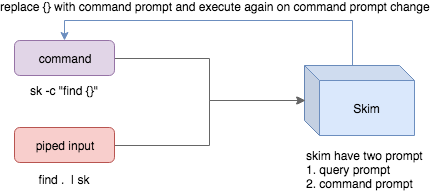
- Skim accepts two kinds of sources: Command output or piped input
- Skim has two kinds of prompts: A query prompt to specify the query pattern and a command prompt to specify the "arguments" of the command
-cis used to specify the command to execute and defaults toSKIM_DEFAULT_COMMAND-itells skim to open command prompt on startup, which will showc>by default.
To further narrow down the results returned by the command, press
Ctrl-Q to toggle interactive mode.
Executing external programs
You can configure key bindings to start external processes without leaving Skim (execute, execute-silent).
# Press F1 to open the file with less without leaving skim
# Press CTRL-Y to copy the line to clipboard and aborts skim (requires pbcopy)
sk --bind 'f1:execute(less -f {}),ctrl-y:execute-silent(echo {} | pbcopy)+abort'
Algorithms
Skim offers multiple algorithms, check the help or manpage for an exhaustive list. Among them are:
skim_v2, the default algorithm, loosely based onfzf's algorithmfrizbee(crate, the typo-resistant algorithm used in the blink.cmp neovim pluginfzy, based on fzy's algorithm expanded for basic typo-resistancearinae, skim's newest algorithm, designed in-house with typo-resistance in mind, expanding on all the above to make typo-resistant matching feel more natural while keeping the per-item performance up to the best standards
Preview Window
This is a great feature of fzf that skim borrows. For example, we use 'ag' to
find the matched lines, and once we narrow down to the target lines, we want to
finally decide which lines to pick by checking the context around the line.
grep and ag have the option --context, and skim can make use of --context for
a better preview window. For example:
sk --ansi -i -c 'ag --color {q}' --preview "preview.sh {}"
(Note that preview.sh is a script to print the context given filename:lines:columns)
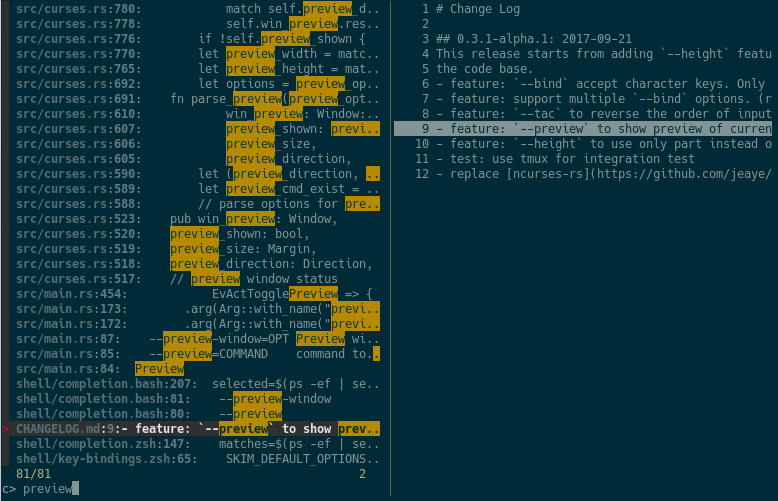
You get things like this:
How does it work?
If the preview command is given by the --preview option, skim will replace the
{} with the current highlighted line surrounded by single quotes, call the
command to get the output, and print the output on the preview window.
Sometimes you don't need the whole line for invoking the command. In this case
you can use {}, {1..}, {..3} or {1..5} to select the fields. The
syntax is explained in the section Fields Support.
Lastly, you might want to configure the position of preview window with --preview-window:
--preview-window up:30%to put the window in the up position with height 30% of the total height of skim.--preview-window left:10:wrapto specify thewrapallows the preview window to wrap the output of the preview command.--preview-window wrap:hiddento hide the preview window at startup, later it can be shown by the actiontoggle-preview.
Fields support
Normally only plugin users need to understand this.
For example, you have the data source with the format:
<filename>:<line number>:<column number>
However, you want to search <filename> only when typing in queries. That
means when you type 21, you want to find a <filename> that contains 21,
but not matching line number or column number.
You can use sk --delimiter ':' --nth 1 to achieve this.
You can also use --with-nth to re-arrange the order of fields.
Range Syntax
<num>-- to specify thenum-th fields, starting with 1.start..-- starting from thestart-th fields and the rest...end-- starting from the0-th field, all the way toend-th field, includingend.start..end-- starting fromstart-th field, all the way toend-th field, includingend.
Use as a library
Skim can be used as a library in your Rust crates.
First, add skim into your Cargo.toml:
[dependencies]
skim = { version = "<version>", default-features = false, features = [..] }
Note on features:
- the cli feature is required to use skim as a cli, it should not be needed when using it as a library.
Basic usage
Then try to run this simple example:
extern crate skim;
use skim::prelude::*;
use std::io::Cursor;

pub fn main() {
    let options = SkimOptionsBuilder::default()
        .height("50%")
        .multi(true)
        .build()
        .unwrap();

    let input = "aaaaa\nbbbb\nccc".to_string();

    // `SkimItemReader` is a helper to turn any `BufRead` into a stream of `SkimItem`
    // `SkimItem` was implemented for `AsRef<str>` by default
    let item_reader = SkimItemReader::default();
    let items = item_reader.of_bufread(Cursor::new(input));

    // `run_with` would read and show items from the stream
    let selected_items = Skim::run_with(&options, Some(items))
        .map(|out| out.selected_items)
        .unwrap_or_else(|| Vec::new());

    for item in selected_items.iter() {
        println!("{}", item.output());
    }
}
Fine-grained usage
You can also gain fine-grained usage of skim as a library using tokio and async code, allowing you to dynamically interact with
Internal workings
Given an Option<SkimItemReceiver>, skim will read items accordingly, do its
job and bring us back the user selection including the selected items, the
query, etc. Note that:
SkimItemReceiveriscrossbeam::channel::Receiver<Arc<dyn SkimItem>>- If it is none, it will invoke the given command and read items from command output
- Otherwise, it will read the items from the (crossbeam) channel.
Trait SkimItem is provided to customize how a line could be displayed,
compared and previewed. It is implemented by default for AsRef<str>
Plus, SkimItemReader is a helper to convert a BufRead into
SkimItemReceiver (we can easily turn a File or String into BufRead),
so that you could deal with strings or files easily.
Check out more examples under the examples/ directory.
FAQ
How to ignore files?
Skim invokes find . to fetch a list of files for filtering. You can override
this by setting the environment variable SKIM_DEFAULT_COMMAND. For example:
$ SKIM_DEFAULT_COMMAND="fd --type f || git ls-tree -r --name-only HEAD || rg --files || find ."
$ sk
You could put it in your .bashrc or .zshrc if you like it to be default.
Some files are not shown in Vim plugin
If you use the Vim plugin and execute the :SK command, you may find some
of your files not shown.
As described in #3, in the Vim
plugin, SKIM_DEFAULT_COMMAND is set to the command by default:
let $SKIM_DEFAULT_COMMAND = "git ls-tree -r --name-only HEAD || rg --files || ag -l -g \"\" || find ."
This means files not recognized by git won't be shown. You can either override the
default with let $SKIM_DEFAULT_COMMAND = '' or locate the missing files by
yourself.
Differences from fzf
fzf is a command-line fuzzy finder written in Go and skim tries to implement a new one in Rust!
This project is written from scratch. Some decisions of implementation are different from fzf. For example:
skimhas an interactive mode.skimsupports pre-selection.- The fuzzy search algorithm is different.
More generally, skim's maintainers allow themselves some freedom of implementation.
The goal is to keep skim as feature-full as fzf is, but the command flags might differ.
How to contribute
Create new issues if you encounter any bugs or have any ideas. Pull requests are warmly welcomed.
Troubleshooting
To troubleshoot what's happening, you can set the environment variable RUST_LOG to either debug or even trace, and set --log-file to a path. You can then read those logs during or after the execution to better understand what's happening. Don't hesitate to add those logs to an issue if you need help.
No line feed issues with nix, FreeBSD, termux
If you encounter display issues like:
$ for n in {1..10}; do echo "$n"; done | sk
  0/10 0/0.> 10/10  10  9  8  7  6  5  4  3  2> 1
For example
You need to set TERMINFO or TERMINFO_DIRS to the path of a correct terminfo database path
For example, with termux, you can add this in your bashrc:
export TERMINFO=/data/data/com.termux/files/usr/share/terminfo
Benchmarks
Shell script
The bench.sh script is available to benchmark the code against other versions or fzf using tmux and querying the output. This is by no means a precise or foolproof way of running benchmarks, but it has the added benefit of allowing us to benchmark against fzf and of giving us resource metrics.
You can use it directly using ./bench.sh <binary> -n <number of items> -r <number of runs>, or generate the data using ./bench.sh -g <output file> -n <number of items>, then ./bench.sh <binary> -f <file> -r <number of runs>
Criterion benchmarks
Criterion benchmarks are available to measure skim's performance more precisely.
To run them, you need to generate input data using ./bench.sh -g benches/fixtures/10M.txt -n 10000000 && ./bench.sh -g benches/fixtures/1M.txt -n 1000000, then run cargo bench -j 1.
These will run for several minutes.