|
|
||
|---|---|---|
| .github/workflows | ||
| images | ||
| .gitignore | ||
| .za-bgn-bin-or-src-function-body | ||
| .za-bgn-bin-or-src-function-body-cygwin | ||
| .za-bgn-mod-function-body | ||
| LICENSE | ||
| README.md | ||
| z-a-bin-gem-node.plugin.zsh | ||
| za-bgn-atclone-handler | ||
| za-bgn-atdelete-handler | ||
| za-bgn-atload-handler | ||
| za-bgn-help-handler | ||
| za-bgn-shim-list | ||

zinit-annex-bin-gem-node
A Zsh-Zinit annex (i.e. an extension) that provides functionality, which allows to:
- Run programs and scripts without adding anything to
$PATH, - Install and run Ruby gems, Node and Python modules from within a local directory with $GEM_HOME , $NODE_PATH and $VIRTUALENV automatically set,
- Run programs, scripts and functions with automatic
cdinto the plugin or snippet directory, plus also with automatic standard output & standard error redirecting. - Source scripts through an automatically created function with the above
$GEM_HOME,$NODE_PATH,$VIRTUALENVandcdfeatures available, - Create the so called
shimsknown from rbenv – the same feature as the first item of this enumaration – of running a program without adding anything to$PATHwith all of the above features, however through an automatic script created in$ZPFX/bin, not a function (the first item uses a function-based mechanism), - Automatic updates of Ruby gems and Node modules during regular plugin and snippet updates with
zinit update ….
Installation
Simply load like a regular plugin, i.e.:
zinit light zdharma-continuum/zinit-annex-bin-gem-node
After executing this command you can then use the new ice-mods provided by the annex.
How it works
Note: the README is somewhat outdated – the sbin'' ice that creates forwarder-scripts instead of
forwarder-functions (created by the fbin'' ice and elaborated in this How it works … section) turned out to be the
proper, best method for exposing binary programs and scripts. You can jump to the sbin'' ice
section if you want or read on, as the forwarder-scripts are pretty
similar to the forwarder-functions elaborated on in the following text:
Below is a diagram explaining the major feature – exposing a binary program or script through a Zsh function of the same name:
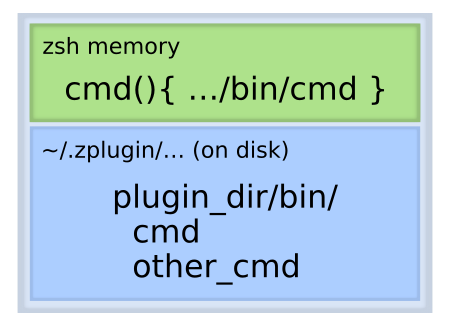
This way there is no need to add anything to $PATH – zinit-annex-bin-gem-node will automatically create a function
that will wrap the binary and provide it on the command line like if it was being placed in the $PATH.
Also, like mentioned in the enumeration, the function can automatically export $GEM_HOME, $NODE_PATH, $VIRTUALENV
shell variables and also automatically cd into the plugin or snippet directory right before executing the binary and
then cd back to the original directory after the execution is finished.
Also, like already mentioned, instead of the function an automatically created script – so called shim – can be used
for the same purpose and with the same functionality, so that the command is being accessible practically fully normally
– not only in the live Zsh session (only within which the functions created by fbin'' exist), but also from any Zsh
script.
Suppose that you would want to install junegunn/fzf-bin plugin from GitHub Releases, which contains only single file –
the fzf binary for the selected architecture. It is possible to do it in the standard way – by adding the plugin's
directory to the $PATH:
zinit ice as"command" from"github-rel"
zinit load junegunn/fzf-bin
After this command, the $PATH variable will contain e.g.:
% print $PATH
/home/sg/.zinit/plugins/junegunn---fzf-bin:/bin:/usr/bin:/usr/sbin:/sbin
For many such programs loaded as plugins the PATH can become quite cluttered. I've had 26 entries before switching to
zinit-annex-bin-gem-node. To solve this, load with use of sbin'' ice provided and handled by
zinit-annex-bin-gem-node:
zinit ice from"gh-r" sbin"fzf"
zinit load junegunn/fzf-bin
The $PATH will remain unchanged and a fzf forwarder-script, so called shim will be created in $ZPFX/bin
(~/.zinit/polaris/bin by default), which is being already added to the $PATH by Zinit when it is being sourced:
% cat $ZPFX/bin/fzf
#!/usr/bin/env zsh

function fzf {
    local bindir="/home/sg/.zinit/plugins/junegunn---fzf-bin"
    "$bindir"/"fzf" "$@"
}

fzf "$@"
Running the script will forward the call to the program accessed through an embedded path to it. Thus, no $PATH
changes are needed!
Ices
There are 7 ice-modifiers provided and handled by the annex. They are:
| ice | description |
|---|---|
| fbin | creates functions for binaries and scripts. |
| ferc | the same as fsrc, but using an alternate script-loading method. |
| fmod | creates wrapping functions for other functions. |
| fsrc | creates functions that source given scripts. |
| gem | installs and updates gems + creates functions for gems binaries. |
| node | installs and updates node_modules + creates functions for binaries of the modules. |
| pip | installs and updates python packages into a virtualenv + creates functions for binaries of the packages. |
| sbin | creates shims for binaries and scripts. |
sbin
Usage
sbin'[{g|n|c|N|E|O}:]{path-to-binary}[ -> {name-of-the-script}];'
It creates the so called shim known from rbenv – a wrapper script that forwards the call to the actual binary. The
script is created always under the same, standard and single $PATH entry: $ZPFX/bin (which is ~/.zinit/polaris/bin
by default).
The flags have the same meaning as with fbin'' ice.
Example
% zinit delete junegunn/fzf-bin
Delete /home/sg/.zinit/plugins/junegunn---fzf-bin?
[yY/n…]
y
Done (action executed, exit code: 0)
% zinit ice from"gh-r" sbin"fzf"
% zinit load junegunn/fzf-bin
…installation messages…
% cat $ZPFX/bin/fzf
#!/usr/bin/env zsh

function fzf {
    local bindir="/home/sg/.zinit/plugins/junegunn---fzf-bin"
    "$bindir"/"fzf" "$@"
}

fzf "$@"
The ice can be empty. It will then try to create the shim for:
- trailing component of the
id_asice, e.g.:id_as'exts/git-my'→ it'll check if a filegit-myexists and if yes, create the shimgit-my, - the plugin name, e.g.: for
paulirish/git-openit'll check if a filegit-openexists and if yes, create the shimgit-open, - trailing component of the snippet URL,
- for any alphabetically first executable file.
fbin
fbin'[{g|n|c|N|E|O}:]{path-to-binary}[ -> {name-of-the-function}]; …'
Creates a wrapper function of the name the same as the last segment of the path or as {name-of-the-function}. The
optional preceding flags mean:
g– set$GEM_HOMEvariable to{plugin-dir},n– set$NODE_PATHvariable to{plugin-dir}/node_modules,p– set$VIRTUALENVvariable to{plugin-dir}/venv,c– cd to the plugin's directory before running the program and then cd back after it has been run,N– append&>/dev/nullto the call of the binary, i.e. redirect both standard output and standard error to/dev/null,E– append2>/dev/nullto the call of the binary, i.e. redirect standard error to/dev/null,O– append>/dev/nullto the call of the binary, i.e. redirect standard output to/dev/null.
Example:
% zinit ice from"gh-r" fbin"g:fzf -> myfzf"
% zinit load junegunn/fzf-bin
% which myfzf
myfzf () {
        local bindir="/home/sg/.zinit/plugins/junegunn---fzf-bin"
        local -x GEM_HOME="/home/sg/.zinit/plugins/junegunn---fzf-bin"
        "$bindir"/"fzf" "$@"
}
The ice can be empty. It will then try to create the function for:
- trailing component of the
id_asice, e.g.:id_as'exts/git-my'→ it'll check if a filegit-myexists and if yes, create the functiongit-my, - the plugin name, e.g.: for
paulirish/git-openit'll check if a filegit-openexists and if yes, create the functiongit-open, - trailing component of the snippet URL,
- for any alphabetically first executable file.
gem
Usage
gem'{gem-name};'
gem"[{path-to-binary} <-] !{gem-name} [-> {name-of-the-function}]; …"
Installs the gem of name {gem-name} with $GEM_HOME set to the plugin's or snippet's directory. In other words, the
gem and its dependencies will be installed locally in that directory.
In the second form it also creates a wrapper function identical to the one created with fbin'' ice.
Example
% zinit ice gem'!asciidoctor'
% zinit load zdharma-continuum/null
% which asciidoctor
asciidoctor () {
        local bindir="/home/sg/.zinit/plugins/zdharma---null/bin"
        local -x GEM_HOME="/home/sg/.zinit/plugins/zdharma---null"
        "$bindir"/"asciidoctor" "$@"
}
node
Usage
node'{node-module}; …'
node'[{path-to-binary} <-] !{node-module} [-> {name-of-the-function}];
Installs the node module of name {node-module} inside the plugin's or snippet's directory.
In the second form it also creates a wrapper function identical to the one created with fbin'' ice.
Example
% zinit delete zdharma-continuum/null
Delete /home/sg/.zinit/plugins/zdharma---null?
[yY/n…]
y
Done (action executed, exit code: 0)
% zinit ice node'remark <- !remark-cli -> remark; remark-man'
% zinit load zdharma-continuum/null
…installation messages…
% which remark
remark () {
        local bindir="/home/sg/.zinit/plugins/zdharma---null/node_modules/.bin"
        local -x NODE_PATH="/home/sg/.zinit/plugins/zdharma---null"/node_modules
        "$bindir"/"remark" "$@"
}
In this case the name of the binary program provided by the node module is different from its name, hence the second
form with the b <- a -> c syntax has been used.
pip
Usage
Install the Python package of name {pip-package} inside a plugin or snippet directory.
pip'{pip-package}`
Create a wrapper function identical to the one created with fbin ice.
pip'[{path-to-binary} <-] !{pip-package} [-> {name-of-the-function}]'
Example
zi for \
    as'null' \
    id-as'ansible' \
    pip'ansible <- !ansible -> ansible; ansible-lint' \
  @zdharma-continuum/null
Verify:
$ type ansible
ansible is a shell function

$ which ansible
ansible () {
        local bindir="/Users/e109082/.local/share/zinit/plugins/ansible/venv/bin"
        local -x VIRTUALENV="/Users/e109082/.local/share/zinit/plugins/ansible"/venv
        local -xU PATH="/Users/e109082/.local/share/zinit/plugins/ansible"/venv/bin:"$bindir":"$PATH"
        "$bindir"/"ansible" "$@"
}

$ ansible --version
ansible [core 2.15.4]
  config file = None
  configured module search path = ['/Users/e109082/.ansible/plugins/modules', '/usr/share/ansible/plugins/modules']
  ansible python module location = /Users/e109082/.local/share/zinit/plugins/ansible/venv/lib/python3.9/site-packages/ansible
  ansible collection location = /Users/e109082/.ansible/collections:/usr/share/ansible/collections
  executable location = /Users/e109082/.local/share/zinit/plugins/ansible/venv/bin/ansible
  python version = 3.9.6 (default, Aug 12 2023, 04:13:21) [Clang 15.0.0 (clang-1500.0.40.1)] (/Users/e109082/.local/share/zinit/plugins/ansible/venv/bin/python3)
  jinja version = 3.1.2
  libyaml = True
In this case the name of the binary program provided by the pip package is different from its name, hence the second
form with the b <- a -> c syntax has been used.
fmod
Usage
The meaning of the g,n and c flags is the same as in the fbin'' ice.
fmod'[{g|n|c|N|E|O}:]{function-name}'
You can wrap the given function with the ability to set $GEM_HOME.
fmod'[{g|n|c|N|E|O}:]{function-name} -> {wrapping-function-name}'
Example
foobar(){ +zi-log -n '{m} foobar function -> '; pwd; }
zi for \
    as'null' \
    fmod'cgn:foobar' \
    id-as'fmod-demo' \
  @zdharma-continuum/null
Verify:
$ foobar
==> foobar function -> /Users/e109082/.local/share/zinit/plugins/fmod-demo
$ which foobar
foobar () {
    local -x GEM_HOME="/Users/e109082/.local/share/zinit/plugins/fmod-demo"
    local -x NODE_PATH="/Users/e109082/.local/share/zinit/plugins/fmod-demo"/node_modules
    local oldpwd="/Users/e109082/.local/share/zinit/plugins/zdharma-continuum---zinit-annex-bin-gem-node"
    () {
        setopt localoptions noautopushd
        builtin cd -q "/Users/e109082/.local/share/zinit/plugins/fmod-demo"
    }
    "foobar--za-bgn-orig" "$@"
    () {
        setopt localoptions noautopushd
        builtin cd -q "$oldpwd"
    }
}
fsrc
Usage
fsrc'\[{g|n|c|N|E|O}:\]{path-to-script}\[ -> {name-of-the-function}\];'
ferc'[{g|n|c|N|E|O}:]{path-to-script}[ -> {name-of-the-function}]; …'
Creates a wrapper function that at each invocation sources the given file. The second ice, ferc'' works the same with
the single difference that it uses eval "$(<{path-to-script})" instead of source "{path-to-script}" to load the
script.
Example
% zinit ice fsrc"myscript -> myfunc" ferc"myscript"
% zinit load zdharma-continuum/null
% which myfunc
myfunc () {
        local bindir="/home/sg/.zinit/plugins/zdharma---null"
        () {
                source "$bindir"/"myscript"
        } "$@"
}
% which myscript
myscript () {
        local bindir="/home/sg/.zinit/snippets/OMZ::plugins--git/git.plugin.zsh"
        () {
                eval "$(<"$bindir"/"myscript")"
        } "$@"
}
The ices can be empty. They will then try to create the function for trailing component of the id-as ice and the
other cases, in the same way as with the fbin ice.
Additional Zinit commands
There's an additional Zinit command that's provided by this annex –shim-list. It searches for and displays any shims
that are being currently stored under $ZPFX/bin. Example invocation:
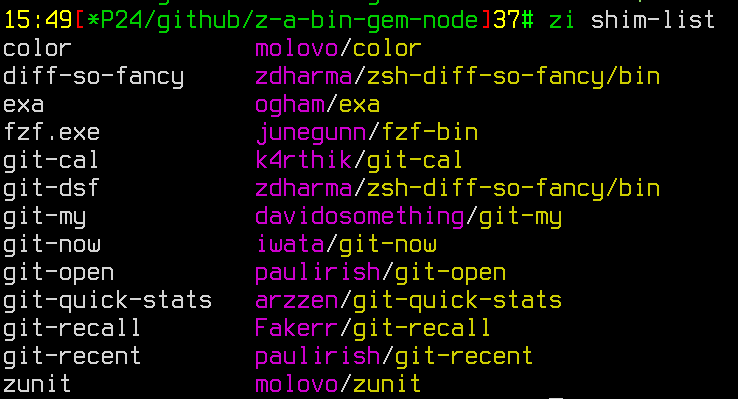
Available options are:
zinit shim-list [-h/--help] [-t|--this-dir] [-i|--from-ices] [-o|--one-line] [-s|--short] [-c|--cat]
The options' meanings:
| Option | Description |
|---|---|
-c/--cat |
displays contents of each of the found shim (unimplemented yet). |
-h/--help |
shows a usage information |
-i/--from-ices |
normally the code looks for the shim files by examining their contents (shims created by BGN annex have a fixed structure); this option instructs Zinit to show the list of shims that results from the sbin'' ice of the loaded plugins; i.e.: if a plugin has sbin'git-open', for example, then this means that there has to be such shim already created |
-o/--one-line |
display the list of shim files without line breaks, in single line, after spaces |
-s/--short |
don't show the plugin/snippet that the shim belongs to, |
-t/--this-dir |
instructs Zinit to look for shims in the current directory instead of $ZPFX/bin, |
Cygwin Support
The sbin'' ice has an explicit Cygwin support – it creates additional, extra shim files – Windows batch scripts
that allow to run the shielded applications from e.g.: Windows run dialog – if the ~/.zinit/polaris/bin directory is
being added to the Windows PATH environment variable, for example (it is a good idea to do so, IMHO). The Windows
shims have the same name as the standard ones (which are also being created, normally) plus the .cmd extension. You
can test the feature by e.g.: installing Firefox from the Zinit package via:
zinit pack=bgn for firefox