mirror of
https://github.com/norcalli/nvim-colorizer.lua.git
synced 2026-09-10 07:06:14 -04:00

151 lines
5 KiB
Markdown
151 lines
5 KiB
Markdown
# colorizer.lua
|
|
|
|
[](https://norcalli.github.io/luadoc/nvim-colorizer.lua/modules/colorizer.html)
|
|
|
|
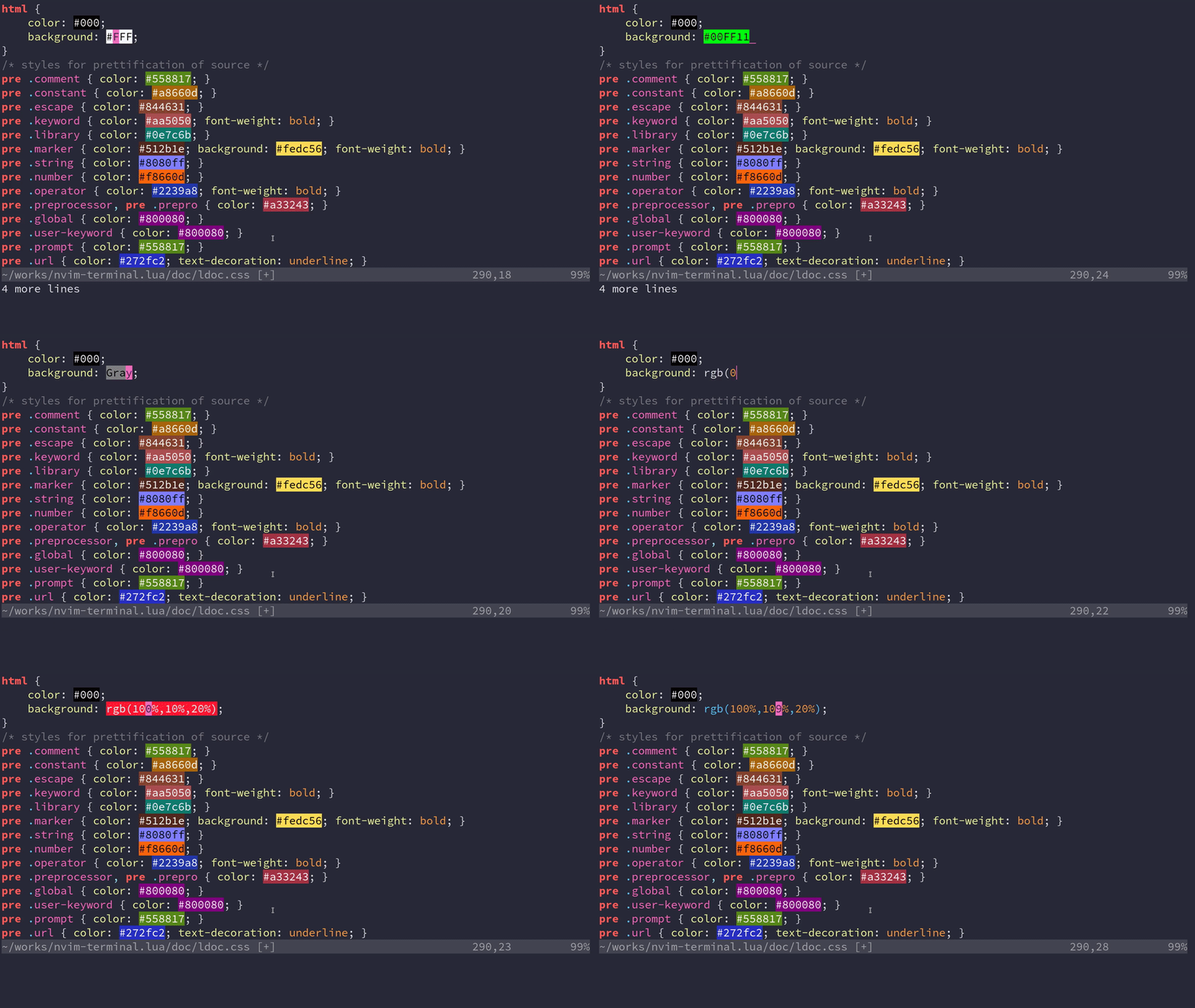
A high-performance color highlighter for Neovim which has **no external dependencies**! Written in performant Luajit.
|
|
|
|
|
|
|
|

|
|
|
|
## Installation and Usage
|
|
|
|
Requires Neovim >= 0.4.0 and `set termguicolors` (I'm looking into relaxing
|
|
these constraints). If you don't have true color for your terminal or are
|
|
unsure, [read this excellent guide](https://github.com/termstandard/colors).
|
|
|
|
Use your plugin manager or clone directly into your `runtimepath`.
|
|
|
|
```vim
|
|
Plug 'norcalli/nvim-colorizer.lua'
|
|
```
|
|
|
|
As long as you have `malloc()` and `free()` on your system, this will work.
|
|
Which includes Linux, OSX, and Windows.
|
|
|
|
One line setup. This will create an `autocmd` for `FileType *` to highlight
|
|
every filetype.
|
|
|
|
```vim
|
|
lua require'colorizer'.setup()
|
|
```
|
|
|
|
### Why another highlighter?
|
|
|
|
Mostly, **RAW SPEED**.
|
|
|
|
This has no external dependencies, which means you install it and **it just
|
|
works**. Other colorizers typically were synchronous and slow, as well. Being
|
|
written with performance in mind and leveraging the excellent LuaJIT and a
|
|
handwritten parser, updates can be done in real time. There are plugins such as
|
|
[hexokinase](https://github.com/RRethy/vim-hexokinase) which have good
|
|
performance, but it has some difficulty with becoming out of sync. The downside
|
|
is that *this only works for Neovim*, and that will never change.
|
|
|
|
Additionally, having a Lua API that's available means users can use this as a
|
|
library to do custom highlighting themselves.
|
|
|
|
### Customization
|
|
|
|
```lua
|
|
DEFAULT_OPTIONS = {
|
|
RGB = true; -- #RGB hex codes
|
|
RRGGBB = true; -- #RRGGBB hex codes
|
|
names = true; -- "Name" codes like Blue
|
|
RRGGBBAA = false; -- #RRGGBBAA hex codes
|
|
rgb_fn = false; -- CSS rgb() and rgba() functions
|
|
hsl_fn = false; -- CSS hsl() and hsla() functions
|
|
css = false; -- Enable all CSS features: rgb_fn, hsl_fn, names, RGB, RRGGBB
|
|
css_fn = false; -- Enable all CSS *functions*: rgb_fn, hsl_fn
|
|
-- Available modes: foreground, background
|
|
mode = 'background'; -- Set the display mode.
|
|
}
|
|
```
|
|
|
|
MODES:
|
|
- `foreground`: sets the foreground text color.
|
|
- `background`: sets the background text color.
|
|
|
|
For basic setup, you can use a command like the following.
|
|
|
|
```lua
|
|
-- Attaches to every FileType mode
|
|
require 'colorizer'.setup()
|
|
|
|
-- Attach to certain Filetypes, add special configuration for `html`
|
|
-- Use `background` for everything else.
|
|
require 'colorizer'.setup {
|
|
'css';
|
|
'javascript';
|
|
html = {
|
|
mode = 'foreground';
|
|
}
|
|
}
|
|
|
|
-- Use the `default_options` as the second parameter, which uses
|
|
-- `foreground` for every mode. This is the inverse of the previous
|
|
-- setup configuration.
|
|
require 'colorizer'.setup({
|
|
'css';
|
|
'javascript';
|
|
html = { mode = 'background' };
|
|
}, { mode = 'foreground' })
|
|
|
|
-- Use the `default_options` as the second parameter, which uses
|
|
-- `foreground` for every mode. This is the inverse of the previous
|
|
-- setup configuration.
|
|
require 'colorizer'.setup {
|
|
'*'; -- Highlight all files, but customize some others.
|
|
css = { rgb_fn = true; }; -- Enable parsing rgb(...) functions in css.
|
|
html = { names = false; } -- Disable parsing "names" like Blue or Gray
|
|
}
|
|
|
|
-- Exclude some filetypes from highlighting by using `!`
|
|
require 'colorizer'.setup {
|
|
'*'; -- Highlight all files, but customize some others.
|
|
'!vim'; -- Exclude vim from highlighting.
|
|
-- Exclusion Only makes sense if '*' is specified!
|
|
}
|
|
```
|
|
|
|
|
|
For lower level interface, see the [LuaDocs for API details](https://norcalli.github.io/luadoc/nvim-colorizer.lua/modules/colorizer.html) or use `:h colorizer.lua` once installed.
|
|
|
|
## Commands
|
|
|
|
```help
|
|
|:ColorizerAttachToBuffer|
|
|
|
|
Attach to the current buffer and start highlighting with the settings as
|
|
specified in setup (or the defaults).
|
|
|
|
If the buffer was already attached (i.e. being highlighted), the settings will
|
|
be reloaded with the ones from setup. This is useful for reloading settings
|
|
for just one buffer.
|
|
|
|
|:ColorizerDetachFromBuffer|
|
|
|
|
Stop highlighting the current buffer (detach).
|
|
|
|
|:ColorizerReloadAllBuffers|
|
|
|
|
Reload all buffers that are being highlighted with new settings from the setup
|
|
settings (or the defaults). Shortcut for ColorizerAttachToBuffer on every
|
|
buffer.
|
|
```
|
|
|
|
|
|
## Caveats
|
|
|
|
If the file you are editing has no filetype, the plugin won't be attached, as
|
|
it relies on AutoCmd to do so. You can still make it work by running the
|
|
following command: `:ColorizerAttachToBuffer`
|
|
|
|
See [this comment](https://github.com/norcalli/nvim-colorizer.lua/issues/9#issuecomment-543742619) for more information.
|
|
|
|
## TODO
|
|
|
|
- [ ] Add more display modes?
|
|
- [ ] Use a more space efficient trie implementation.
|
|
- [ ] Create a COMMON_SETUP which does obvious things like enable `rgb_fn` for css
|