mirror of
https://github.com/arzzen/git-quick-stats.git
synced 2026-09-12 08:36:17 -04:00
 628b31ffd8
* The README.md contained inline HTML for the contributors, backers,
  and sponsors section. This technically works when the README.md is
  rendered within a webpage, but other Markdown readers, such as those
  that are built into GUIs, may or may not render them correctly.
  This changes those inline HTML hyperlinks to pure Markdown as
  specified by Markdown Lint rule MD033. For more info, see:

  https://github.com/DavidAnson/markdownlint/blob/v0.23.1/doc/Rules.md#md033

* Fixes some other small whitespace and inconsistency issues
371 lines
13 KiB
Markdown
371 lines
13 KiB
Markdown
|
||
# GIT quick statistics [](#backers) [](#sponsors) [](https://twitter.com/intent/tweet?text=Simple%20and%20efficient%20way%20to%20access%20various%20statistics%20in%20git%20repository&url=https://github.com/arzzen/git-quick-stat&via=arzzen&hashtags=git,stats,tool,statistics,developers) [](https://travis-ci.org/arzzen/git-quick-stats) [](https://formulae.brew.sh/formula/git-quick-stats#default) [](https://repology.org/metapackage/git-quick-stats/packages)
|
||
|
||
> `git-quick-stats` is a simple and efficient way to access various statistics in a git repository.
|
||
>
|
||
> Any git repository may contain tons of information about commits, contributors, and files. Extracting this information is not always trivial, mostly because there are a gadzillion options to a gadzillion git commands – I don’t think there is a single person alive who knows them all. Probably not even [Linus Torvalds](https://github.com/torvalds) himself :).
|
||
|
||

|
||
|
||
## Table of Contents
|
||
|
||
[**Screenshots**](#screenshots)
|
||
|
||
[**Usage**](#usage)
|
||
|
||
* [**Interactive**](#interactive)
|
||
* [**Non-interactive**](#non-interactive)
|
||
* [**Command-line arguments**](#command-line-arguments)
|
||
* [**Git log since and until**](#git-log-since-and-until)
|
||
* [**Git log limit**](#git-log-limit)
|
||
* [**Git log options**](#git-log-options)
|
||
* [**Git pathspec**](#git-pathspec)
|
||
* [**Git merge view strategy**](#git-merge-view-strategy)
|
||
* [**Color themes**](#color-themes)
|
||
|
||
[**Installation**](#installation)
|
||
|
||
* [**UNIX and Linux**](#unix-and-linux)
|
||
* [**macOS**](#macos-homebrew)
|
||
* [**Windows**](#windows)
|
||
* [**Docker**](#docker)
|
||
|
||
[**System requirements**](#system-requirements)
|
||
|
||
* [**Dependencies**](#dependencies)
|
||
|
||
[**FAQ**](#faq)
|
||
|
||
[**Contribution**](#contribution)
|
||
|
||
* [**Code reviews**](#code-reviews)
|
||
* [**Some tips for good pull requests**](#some-tips-for-good-pull-requests)
|
||
* [**Formatting**](#formatting)
|
||
|
||
[**Tests**](#tests)
|
||
|
||
[**Licensing**](#licensing)
|
||
|
||
[**Contributors**](#contributors)
|
||
|
||
* [**Backers**](#backers)
|
||
* [**Sponsors**](#sponsors)
|
||
|
||
## Screenshots
|
||
|
||

|
||
|
||

|
||
|
||
## Usage
|
||
|
||
### Interactive
|
||
|
||
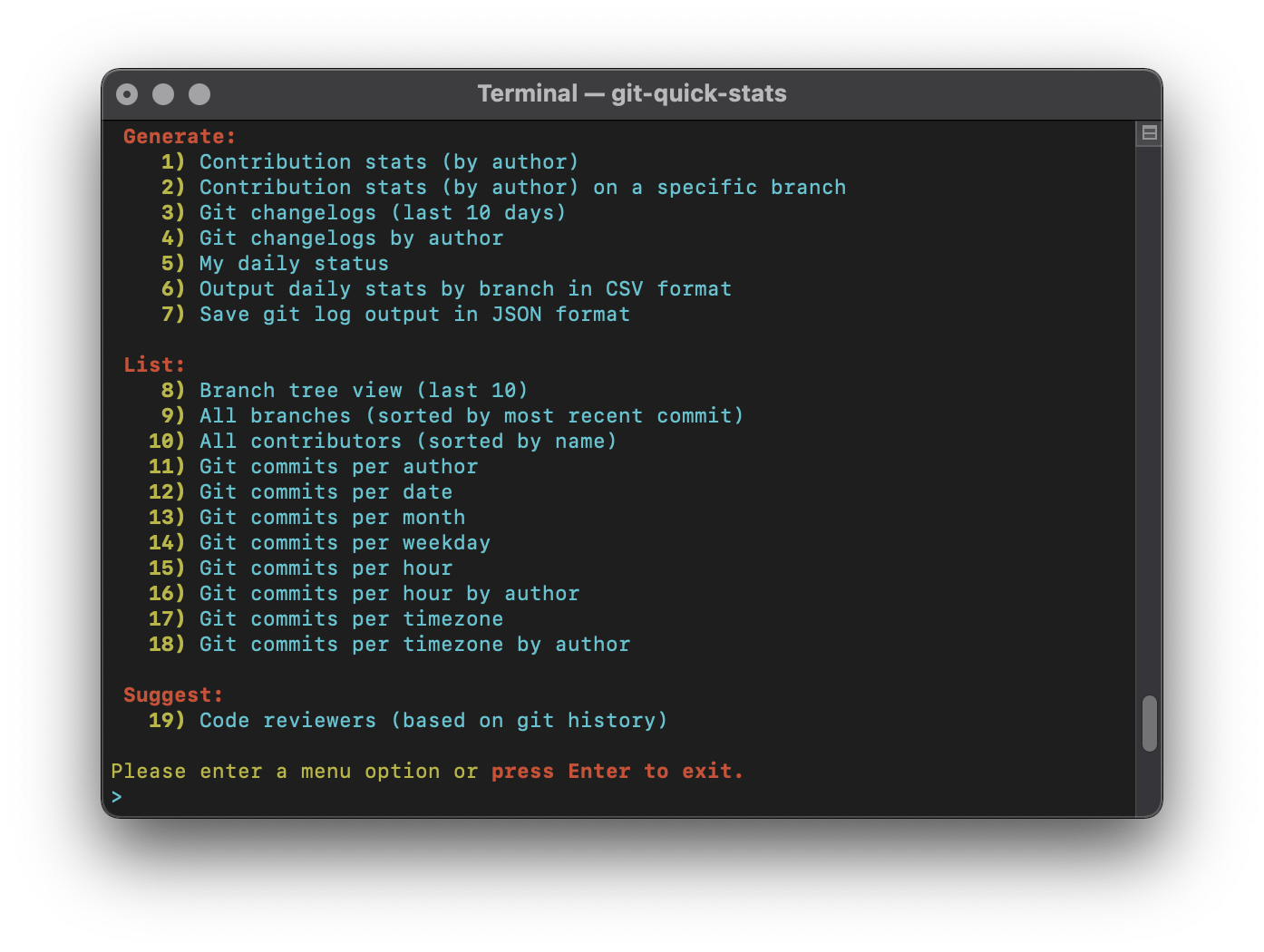
`git-quick-stats` has a built-in interactive menu that can be executed as such:
|
||
|
||
```bash
|
||
git-quick-stats
|
||
```
|
||
|
||
Or
|
||
|
||
```bash
|
||
git quick-stats
|
||
```
|
||
|
||
### Non-interactive
|
||
|
||
For those who prefer to utilize command-line options, `git-quick-stats` also has a non-interactive mode supporting both short and long options:
|
||
|
||
```bash
|
||
git-quick-stats <optional-command-to-execute-directly>
|
||
```
|
||
|
||
Or
|
||
|
||
```bash
|
||
git quick-stats <optional-command-to-execute-directly>
|
||
```
|
||
|
||
### Command-line arguments
|
||
|
||
Possible arguments in short and long form:
|
||
|
||
```bash
|
||
GENERATE OPTIONS
|
||
-T, --detailed-git-stats
|
||
give a detailed list of git stats
|
||
-R, --git-stats-by-branch
|
||
see detailed list of git stats by branch
|
||
-c, --changelogs
|
||
see changelogs
|
||
-L, --changelogs-by-author
|
||
see changelogs by author
|
||
-S, --my-daily-stats
|
||
see your current daily stats
|
||
-V, --csv-output-by-branch
|
||
output daily stats by branch in CSV format
|
||
-j, --json-output
|
||
save git log as a JSON formatted file to a specified area
|
||
|
||
LIST OPTIONS
|
||
-b, --branch-tree
|
||
show an ASCII graph of the git repo branch history
|
||
-D, --branches-by-date
|
||
show branches by date
|
||
-C, --contributors
|
||
see a list of everyone who contributed to the repo
|
||
-a, --commits-per-author
|
||
displays a list of commits per author
|
||
-d, --commits-per-day
|
||
displays a list of commits per day
|
||
-m, --commits-by-month
|
||
displays a list of commits per month
|
||
-w, --commits-by-weekday
|
||
displays a list of commits per weekday
|
||
-o, --commits-by-hour
|
||
displays a list of commits per hour
|
||
-A, --commits-by-author-by-hour
|
||
displays a list of commits per hour by author
|
||
-z, --commits-by-timezone
|
||
displays a list of commits per timezone
|
||
-Z, --commits-by-author-by-timezone
|
||
displays a list of commits per timezone by author
|
||
|
||
SUGGEST OPTIONS
|
||
-r, --suggest-reviewers
|
||
show the best people to contact to review code
|
||
-h, -?, --help
|
||
display this help text in the terminal
|
||
```
|
||
|
||
### Git log since and until
|
||
|
||
You can set the variables `_GIT_SINCE` and/or `_GIT_UNTIL` before running `git-quick-stats` to limit the git log. These work similar to git's built-in `--since` and `--until` log options.
|
||
|
||
```bash
|
||
export _GIT_SINCE="2017-01-20"
|
||
export _GIT_UNTIL="2017-01-22"
|
||
```
|
||
|
||
Once set, run `git quick-stats` as normal. Note that this affects all stats that parse the git log history until unset.
|
||
|
||
### Git log limit
|
||
|
||
You can set variable `_GIT_LIMIT` for limited output. It will affect the "changelogs" and "branch tree" options.
|
||
|
||
```bash
|
||
export _GIT_LIMIT=20
|
||
```
|
||
|
||
### Git log options
|
||
|
||
You can set `_GIT_LOG_OPTIONS` for [git log options](https://git-scm.com/docs/git-log#_options):
|
||
|
||
```bash
|
||
export _GIT_LOG_OPTIONS="--ignore-all-space --ignore-blank-lines"
|
||
```
|
||
|
||
### Git pathspec
|
||
|
||
You can exclude a directory from the stats by using [pathspec](https://git-scm.com/docs/gitglossary#gitglossary-aiddefpathspecapathspec)
|
||
|
||
```bash
|
||
export _GIT_PATHSPEC=':!directory'
|
||
```
|
||
|
||
You can also exclude files from the stats. Note that it works with any alphanumeric, glob, or regex that git respects.
|
||
|
||
```bash
|
||
export _GIT_PATHSPEC=':!package-lock.json'
|
||
```
|
||
|
||
### Git merge view strategy
|
||
|
||
You can set the variable `_GIT_MERGE_VIEW` to enable merge commits to be part of the stats by setting `_GIT_MERGE_VIEW` to `enable`. You can also choose to only show merge commits by setting `_GIT_MERGE_VIEW` to `exclusive`. Default is to not show merge commits. These work similar to git's built-in `--merges` and `--no-merges` log options.
|
||
|
||
```bash
|
||
export _GIT_MERGE_VIEW="enable"
|
||
export _GIT_MERGE_VIEW="exclusive"
|
||
```
|
||
|
||
### Git branch
|
||
|
||
You can set the variable `_GIT_BRANCH` to set the branch of the stats. Works with commands `--git-stats-by-branch` and `--csv-output-by-branch`.
|
||
|
||
```bash
|
||
export _GIT_BRANCH="master"
|
||
```
|
||
|
||
### Color themes
|
||
|
||
You can change to the legacy color scheme by toggling the variable `_MENU_THEME` between `default` and `legacy`
|
||
|
||
```bash
|
||
export _MENU_THEME="legacy"
|
||
```
|
||
|
||
|
||
|
||
## Installation
|
||
|
||
### Debian and Ubuntu
|
||
|
||
If you are on at least Debian Bullseye or Ubuntu Focal you can use apt for installation:
|
||
|
||
```bash
|
||
apt install git-quick-stats
|
||
```
|
||
|
||
### UNIX and Linux
|
||
|
||
```bash
|
||
git clone https://github.com/arzzen/git-quick-stats.git && cd git-quick-stats
|
||
sudo make install
|
||
```
|
||
|
||
For uninstalling, open up the cloned directory and run
|
||
|
||
```bash
|
||
sudo make uninstall
|
||
```
|
||
|
||
For update/reinstall
|
||
|
||
```bash
|
||
sudo make reinstall
|
||
```
|
||
|
||
### macOS (homebrew)
|
||
|
||
```bash
|
||
brew install git-quick-stats
|
||
```
|
||
|
||
Or you can follow the UNIX and Linux instructions if you wish.
|
||
|
||
### Windows
|
||
|
||
If you are installing with Cygwin, use these scripts:
|
||
|
||
* [installer](https://gist.github.com/arzzen/35e09866dfdadf2108b2420045739245)
|
||
* [uninstaller](https://gist.github.com/arzzen/21c660014d0663b6c5710014714779d6)
|
||
|
||
If you are wishing to use this with WSL, follow the UNIX and Linux instructions.
|
||
|
||
### Docker
|
||
|
||
You can use the Docker image provided:
|
||
|
||
* Build: `docker build -t arzzen/git-quick-stats .`
|
||
* Run interactive menu: `docker run --rm -it -v $(pwd):/git arzzen/git-quick-stats`
|
||
* Docker pull command: `docker pull arzzen/git-quick-stats` [docker repository](https://hub.docker.com/r/arzzen/git-quick-stats)
|
||
|
||
## System requirements
|
||
|
||
* An OS with a Bash shell
|
||
* Tools we use:
|
||
|
||
```bash
|
||
awk
|
||
basename
|
||
cat
|
||
column
|
||
echo
|
||
git
|
||
grep
|
||
head
|
||
printf
|
||
seq
|
||
sort
|
||
tput
|
||
tr
|
||
uniq
|
||
wc
|
||
```
|
||
|
||
### Dependencies
|
||
|
||
* [`bsdmainutils`](https://packages.debian.org/sid/bsdmainutils) `apt install bsdmainutils`
|
||
|
||
## FAQ
|
||
|
||
*Q:* I get some errors after run git-quick-stats in cygwin like `/usr/local/bin/git-quick-stats: line 2: $'\r': command not found`
|
||
|
||
*A:* You can run the dos2unix app in cygwin as follows: `/bin/dos2unix.exe /usr/local/bin/git-quick-stats`. This will convert the script from the CR-LF convention that Microsoft uses to the LF convention that UNIX, OS X, and Linux use. You should then should be able to run it as normal.
|
||
|
||
*Q:* How they could be used in a project with many git projects and statistics would show a summary of all git projects?
|
||
|
||
*A:* If you want to include submodule logs, you can try using the following: `export _GIT_LOG_OPTIONS="-p --submodule=log"`
|
||
(more info about [git log --submodule](https://git-scm.com/docs/git-log#Documentation/git-log.txt---submoduleltformatgt))
|
||
|
||
## Contribution
|
||
|
||
Want to contribute? Great! First, read this page.
|
||
|
||
### Code reviews
|
||
|
||
All submissions, including submissions by project members, require review.</br>
|
||
We use GitHub pull requests for this purpose.
|
||
|
||
### Some tips for good pull requests
|
||
|
||
* Use our code </br>
|
||
When in doubt, try to stay true to the existing code of the project.
|
||
* Write a descriptive commit message. What problem are you solving and what
|
||
are the consequences? Where and what did you test? Some good tips:
|
||
[here](http://robots.thoughtbot.com/5-useful-tips-for-a-better-commit-message)
|
||
and [here](https://www.kernel.org/doc/Documentation/SubmittingPatches).
|
||
* If your PR consists of multiple commits which are successive improvements /
|
||
fixes to your first commit, consider squashing them into a single commit
|
||
(`git rebase -i`) such that your PR is a single commit on top of the current
|
||
HEAD. This make reviewing the code so much easier, and our history more
|
||
readable.
|
||
|
||
### Formatting
|
||
|
||
This documentation is written using standard [markdown syntax](https://help.github.com/articles/markdown-basics/). Please submit your changes using the same syntax.
|
||
|
||
## Tests
|
||
|
||
[](https://codecov.io/gh/arzzen/git-quick-stats)
|
||
|
||
```bash
|
||
make test
|
||
```
|
||
|
||
## Licensing
|
||
|
||
MIT see [LICENSE][] for the full license text.
|
||
|
||
[read this page]: http://github.com/arzzen/git-quick-stats/blob/master/.github/CONTRIBUTING.md
|
||
[landing page]: http://arzzen.github.io/git-quick-stats
|
||
[LICENSE]: https://github.com/arzzen/git-quick-stats/blob/master/LICENSE
|
||
|
||
## Contributors
|
||
|
||
This project exists thanks to all the people who contribute.
|
||
|
||
[](https://github.com/arzzen/git-quick-stats/graphs/contributors)
|
||
|
||
### Backers
|
||
|
||
Thank you to all our backers! 🙏 [[Become a backer](https://opencollective.com/git-quick-stats#backer)]
|
||
|
||
[](https://opencollective.com/git-quick-stats#backers)
|
||
|
||
### Sponsors
|
||
|
||
Support this project by becoming a sponsor. Your logo will show up here with a link to your website. [[Become a sponsor](https://opencollective.com/git-quick-stats#sponsor)]
|
||
|
||
[](https://opencollective.com/git-quick-stats/sponsor/0/website)
|
||
[](https://opencollective.com/git-quick-stats/sponsor/1/website)
|
||
[](https://opencollective.com/git-quick-stats/sponsor/2/website)
|
||
[](https://opencollective.com/git-quick-stats/sponsor/3/website)
|
||
[](https://opencollective.com/git-quick-stats/sponsor/4/website)
|
||
[](https://opencollective.com/git-quick-stats/sponsor/5/website)
|
||
[](https://opencollective.com/git-quick-stats/sponsor/6/website)
|
||
[](https://opencollective.com/git-quick-stats/sponsor/7/website)
|
||
[](https://opencollective.com/git-quick-stats/sponsor/8/website)
|
||
[](https://opencollective.com/git-quick-stats/sponsor/9/website)
|