mirror of
https://github.com/davidosomething/git-my.git
synced 2026-09-16 01:56:20 -04:00

48 lines
882 B
Markdown
48 lines
882 B
Markdown
# git-my v0.3.0
|
|
|
|
> Lists a user's remote branches and shows if it was merged and/or available
|
|
> locally
|
|
|
|
[Homepage](https://github.com/davidosomething/git-my)
|
|
|
|
## About
|
|
|
|
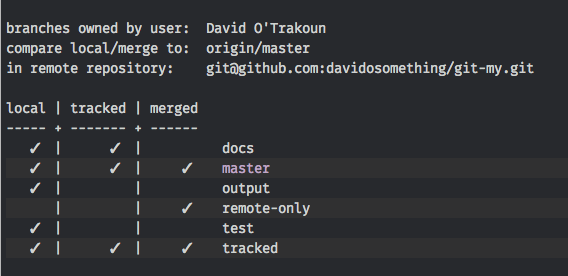
Unlike `git branch -r` and `git remote show origin` this shows only branches
|
|
where YOU were the last committer and it will tell you if you have a copy of
|
|
that branch locally.
|
|
|
|
Here's a screenshot:
|
|
|
|
|
|
## Installation
|
|
|
|
- Add the `git-my` file somewhere in your path, e.g. `/usr/local/bin/`
|
|
|
|
## Usage
|
|
|
|
From command line execute:
|
|
|
|
```
|
|
git my
|
|
```
|
|
|
|
## To do
|
|
|
|
- Colorize output
|
|
- Options support
|
|
|
|
```
|
|
-v|--version
|
|
-h|--help
|
|
-d|--decorate LOCAL,MERGED
|
|
-r|--remote-ref origin/master
|
|
-U|--username
|
|
--no-color
|
|
--no-header
|
|
--no-decorate
|
|
```
|
|
|
|
|
|
Copyright (c) 2015 David O'Trakoun <me@davidosomething.com>
|
|
|