mirror of
https://github.com/paulirish/git-open.git
synced 2026-09-10 07:26:15 -04:00

176 lines
5.9 KiB
Markdown
176 lines
5.9 KiB
Markdown
# git-open [](https://travis-ci.org/paulirish/git-open)
|
|
|
|
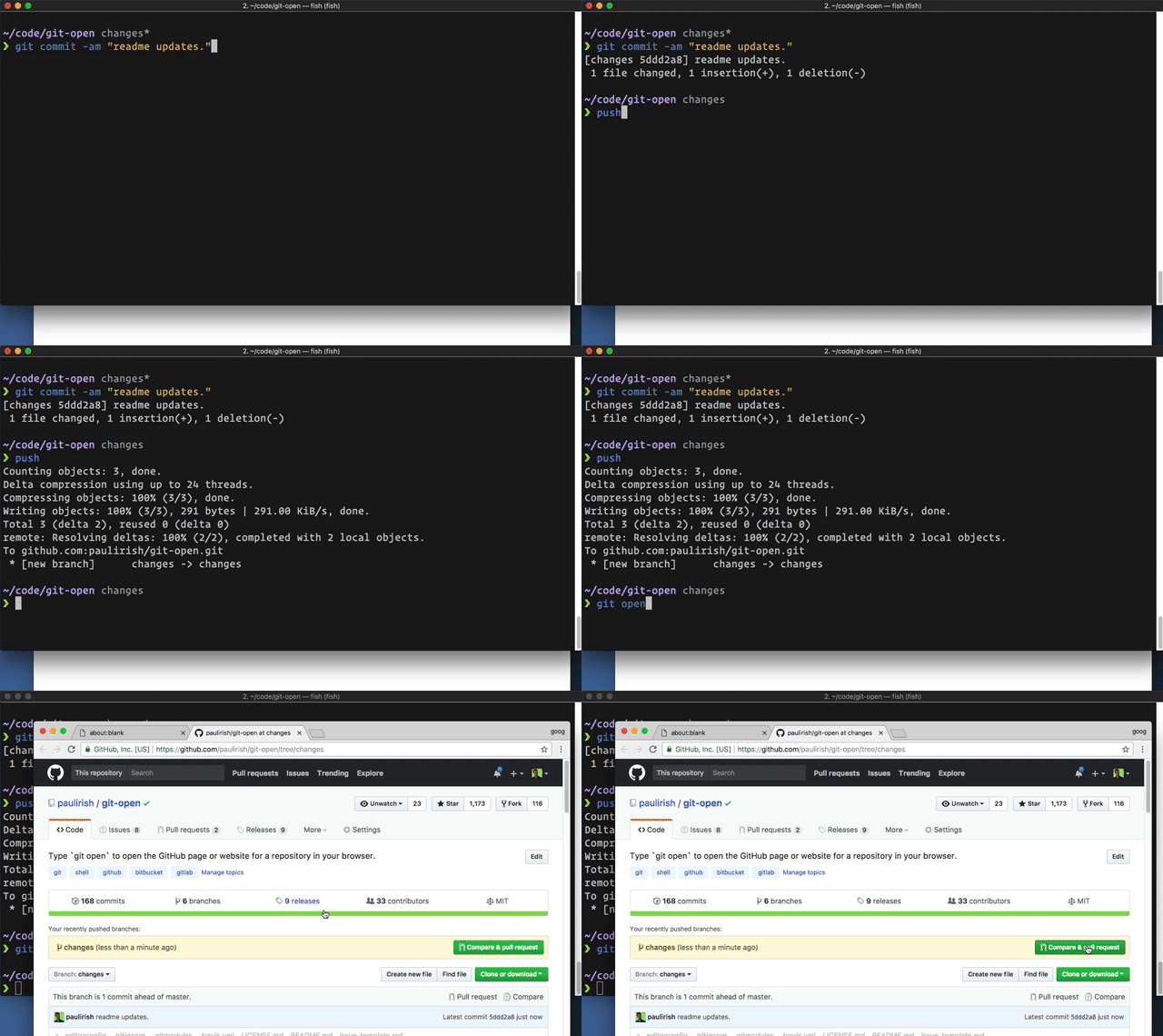
Type `git open` to open the repo website (GitHub, GitLab, Bitbucket) in your browser.
|
|
|
|
|
|
|
|
## Usage
|
|
|
|
```sh
|
|
git open [remote-name] [branch-name]
|
|
|
|
git open --issue
|
|
```
|
|
|
|
(`git open` works with these [hosted repo providers](#supported-remote-repositories), `git open --issue` currently only works with GitHub, Visual Studio Team Services and Team Foundation Server)
|
|
|
|
### Examples
|
|
|
|
```sh
|
|
$ git open
|
|
# opens https://github.com/TRACKED_REMOTE_USER/CURRENT_REPO/tree/CURRENT_BRANCH
|
|
|
|
$ git open someremote
|
|
# opens https://github.com/PROVIDED_REMOTE_USER/CURRENT_REPO/tree/CURRENT_BRANCH
|
|
|
|
$ git open someremote somebranch
|
|
# opens https://github.com/PROVIDED_REMOTE_USER/CURRENT_REPO/tree/PROVIDED_BRANCH
|
|
|
|
$ git open --issue
|
|
# If branches use naming convention of issues/#123,
|
|
# opens https://github.com/TRACKED_REMOTE_USER/CURRENT_REPO/issues/123
|
|
```
|
|
|
|
## Installation
|
|
|
|
### Basic install
|
|
|
|
The preferred way of installation is to simply add the `git-open` script
|
|
somewhere into your path (e.g. add the directory to your `PATH` environment
|
|
or copy `git-open` into an existing included path like `/usr/local/bin`).
|
|
|
|
### Install via NPM:
|
|
|
|
```sh
|
|
npm install --global git-open
|
|
```
|
|
|
|
### Windows Powershell
|
|
|
|
Save git-open anywhere, say as ~/Documents/Scripts/git-open.sh and define
|
|
a function in your Powershell profile (see ~/Documents/WindowsPowerShell/profile.ps1) like this:
|
|
|
|
```sh
|
|
function git-open { cmd /c "C:\Program Files\Git\usr\bin\bash.exe" "~/Documents/Scripts/git-open.sh" }
|
|
Set-Alias -Name gop -Value git-open
|
|
```
|
|
|
|
### Windows with `cmd` terminal
|
|
|
|
Save the `git-open` script in any place accessible via your `%PATH%` environment var.
|
|
|
|
### ZSH
|
|
|
|
#### [Antigen](https://github.com/zsh-users/antigen)
|
|
|
|
Add `antigen bundle paulirish/git-open` to your `.zshrc` with your other bundle
|
|
commands.
|
|
|
|
Antigen will handle cloning the plugin for you automatically the next time you
|
|
start zsh, and periodically checking for updates to the git repository. You can
|
|
also add the plugin to a running zsh with `antigen bundle paulirish/git-open`
|
|
for testing before adding it to your `.zshrc`.
|
|
|
|
#### [Oh-My-Zsh](http://ohmyz.sh/)
|
|
|
|
1. `git clone https://github.com/paulirish/git-open.git $ZSH_CUSTOM/plugins/git-open`
|
|
1. Add `git-open` to your plugin list - edit `~/.zshrc` and change
|
|
`plugins=(...)` to `plugins=(... git-open)`
|
|
|
|
#### [Zgen](https://github.com/tarjoilija/zgen)
|
|
|
|
Add `zgen load paulirish/git-open` to your .zshrc file in the same function
|
|
you're doing your other `zgen load` calls in. ZGen will take care of cloning
|
|
the repository the next time you run `zgen save`, and will also periodically
|
|
check for updates to the git repository.
|
|
|
|
#### [zplug](https://github.com/zplug/zplug)
|
|
|
|
`zplug "paulirish/git-open", as:plugin`
|
|
|
|
## Supported remote repositories
|
|
|
|
git-open can automatically guess the corresponding repository page for remotes
|
|
(default looks for `origin`) on the following hosts:
|
|
|
|
- github.com
|
|
- gist.github.com
|
|
- gitlab.com
|
|
- GitLab custom hosted (see below)
|
|
- bitbucket.org
|
|
- Atlassian Bitbucket Server (formerly _Atlassian Stash_)
|
|
- Visual Studio Team Services
|
|
- Team Foundation Server (on-premises)
|
|
|
|
## Configuration
|
|
|
|
See the [man page](git-open.1.md) for more information on how to configure `git-open`.
|
|
|
|
## Alternative projects
|
|
|
|
See [hub](https://github.com/github/hub) for complete GitHub opening support.
|
|
It's the official GitHub project and provides `hub browse`.
|
|
|
|
[Homebrew has an alternate git-open](https://github.com/jeffreyiacono/git-open)
|
|
that only works with GitHub but can open user profile pages, too.
|
|
|
|
@[gerep has an alternate git-open](https://github.com/gerep/git-open) that
|
|
works with a few providers. Of note, it opens the default view for BitBucket
|
|
instead of the source view.
|
|
|
|
And, of course, [jasonmccreary's original gh](https://github.com/jasonmccreary/gh)
|
|
from which this plugin was forked.
|
|
|
|
## Thanks
|
|
|
|
[jasonmccreary](https://github.com/jasonmccreary/) did [the initial hard work](https://github.com/jasonmccreary/gh). Since then, [many contributors](https://github.com/paulirish/git-open/graphs/contributors) have submitted great PRs.
|
|
|
|
## Contributing & Development
|
|
|
|
Please provide examples of the URLs you are parsing with each PR.
|
|
|
|
You can run `git-open` in `echo` mode, which doesn't open your browser, but just prints the URL to stdout:
|
|
```sh
|
|
env BROWSER='echo' ./git-open
|
|
```
|
|
|
|
#### Testing:
|
|
|
|
You'll need to install [bats](https://github.com/sstephenson/bats#installing-bats-from-source), the Bash automated testing system. It's also available as `brew install bats`
|
|
|
|
```sh
|
|
git submodule update --init # pull in the assertion libraries
|
|
|
|
# Run the test suite once:
|
|
bats test # or `npm run unit`
|
|
|
|
# Run it on every change with `entr`
|
|
brew install entr
|
|
npm run watch
|
|
```
|
|
|
|
## Related projects
|
|
|
|
- [`git recent`](https://github.com/paulirish/git-recent) - View your most recent git branches
|
|
- [`diff-so-fancy`](https://github.com/so-fancy/diff-so-fancy/) - Making the output of `git diff` so fancy
|
|
|
|
## License
|
|
|
|
Copyright Jason McCreary & Paul Irish. Licensed under MIT.
|
|
<http://opensource.org/licenses/MIT>
|
|
|
|
## Changelog
|
|
|
|
- **2017-12-01** - 2.0 shipped. Breaking change: [Gitlab configuration](https://github.com/paulirish/git-open#configuration) handled differently.
|
|
- **2017-12-01** - Configuration for custom remote added
|
|
- **2017-11-30** - Support for VSTS Added
|
|
- **2017-10-31** - `--issue` and `-h` added
|
|
- **2017-10-30** - Configuration for custom domains added
|
|
- **2017-10-30** - WSL support added
|
|
- **2017-06-16** - Introduced a test suite in BATS
|
|
- **2017-06-15** - Entire script rewritten and simplified by @dermagia
|
|
- **2016-07-23** - Readme: fix oh-my-zsh install instructions
|
|
- **2016-07-22** - 1.1.0 shipped. update and add linters for package.json, readme.
|
|
- **2016-07-11** - Readme formatting and installation instructions updated. Changelog started
|
|
|