mirror of
https://github.com/lotabout/skim.git
synced 2026-09-10 07:16:23 -04:00

479 lines
16 KiB
Markdown
479 lines
16 KiB
Markdown
<p align="center">
|
|
<a href="https://crates.io/crates/skim">
|
|
<img src="https://img.shields.io/crates/v/skim.svg" alt="Crates.io" />
|
|
</a>
|
|
<a href="https://github.com/lotabout/skim/actions?query=workflow%3A%22Build+%26+Test%22">
|
|
<img src="https://github.com/lotabout/skim/workflows/Build%20&%20Test/badge.svg" alt="Build & Test" />
|
|
</a>
|
|
<a href="https://repology.org/project/skim/versions">
|
|
<img src="https://repology.org/badge/tiny-repos/skim.svg" alt="Packaging status" />
|
|
</a>
|
|
<a href="https://discord.gg/23PuxttufP">
|
|
<img alt="Skim Discord" src="https://img.shields.io/discord/1031830957432504361?label=&color=7389d8&labelColor=6a7ec2&logoColor=ffffff&logo=discord" />
|
|
</a>
|
|
</p>
|
|
|
|
> Life is short, skim!
|
|
|
|
Half of our life is spent on navigation: files, lines, commands… You need skim!
|
|
It is a general fuzzy finder that saves you time.
|
|
|
|
[](https://asciinema.org/a/pIfwazaM0mTHA8F7qRbjrqOnm)
|
|
|
|
skim provides a single executable: `sk`. Basically anywhere you would want to use
|
|
`grep`, try `sk` instead.
|
|
|
|
# Table of contents
|
|
|
|
- [Installation](#installation)
|
|
- [Usage](#usage)
|
|
- [As Filter](#as-filter)
|
|
- [As Interactive Interface](#as-interactive-interface)
|
|
- [Key Bindings](#key-bindings)
|
|
- [Search Syntax](#search-syntax)
|
|
- [Exit code](#exit-code)
|
|
- [Customization](#customization)
|
|
- [Keymap to redefine](#keymap)
|
|
- [Sort Criteria](#sort-criteria)
|
|
- [Color Scheme](#color-scheme)
|
|
- [Misc](#misc)
|
|
- [Advance Topics](#advance-topics)
|
|
- [Interactive Mode](#interactive-mode)
|
|
- [Executing external programs](#executing-external-programs)
|
|
- [Preview Window](#preview-window)
|
|
- [Fields Support](#fields-support)
|
|
- [Use as a Library](#use-as-a-library)
|
|
- [FAQ](#faq)
|
|
- [How to ignore files?](#how-to-ignore-files)
|
|
- [Some files are not shown in vim plugin](#some-files-are-not-shown-in-vim-plugin)
|
|
- [Differences to fzf](#differences-to-fzf)
|
|
- [How to contribute](#how-to-contribute)
|
|
|
|
# Installation
|
|
|
|
The skim project contains several components:
|
|
|
|
1. `sk` executable -- the core.
|
|
2. `sk-tmux` -- script for launching `sk` in a tmux pane.
|
|
3. Vim/Nvim plugin -- to call `sk` inside Vim/Nvim. check [skim.vim](https://github.com/lotabout/skim.vim) for more Vim support.
|
|
|
|
## Package Managers
|
|
|
|
| Distribution | Package Manager | Command |
|
|
| -------------- | ----------------- | ------------------------- |
|
|
| macOS | Homebrew | `brew install sk` |
|
|
| macOS | MacPorts | `sudo port install skim` |
|
|
| Fedora | dnf | `dnf install skim` |
|
|
| Alpine | apk | `apk add skim` |
|
|
| Arch | pacman | `pacman -S skim` |
|
|
| Gentoo | Portage | `emerge --ask app-misc/skim` |
|
|
| Guix | guix | `guix install skim` |
|
|
| Void | XBPS | `xbps-install -S skim` |
|
|
|
|
See [repology](https://repology.org/project/skim/versions) for a comprehensive overview of package availability.
|
|
|
|
|
|
## Install as Vim plugin
|
|
|
|
Via vim-plug (recommended):
|
|
|
|
```vim
|
|
Plug 'lotabout/skim', { 'dir': '~/.skim', 'do': './install' }
|
|
```
|
|
|
|
## Hard Core
|
|
|
|
Any of the following applies:
|
|
|
|
- Using Git
|
|
```sh
|
|
$ git clone --depth 1 git@github.com:lotabout/skim.git ~/.skim
|
|
$ ~/.skim/install
|
|
```
|
|
- Using Binary: directly [download the sk executable](https://github.com/lotabout/skim/releases).
|
|
- Install from [crates.io](https://crates.io/): `cargo install skim`
|
|
- Build Manually
|
|
```sh
|
|
$ git clone --depth 1 git@github.com:lotabout/skim.git ~/.skim
|
|
$ cd ~/.skim
|
|
$ cargo install
|
|
$ cargo build --release
|
|
$ # put the resulting `target/release/sk` executable on your PATH.
|
|
```
|
|
|
|
# Usage
|
|
|
|
skim can be used as a general filter (like `grep`) or as an interactive
|
|
interface for invoking commands.
|
|
|
|
## As filter
|
|
|
|
Try the following
|
|
|
|
```bash
|
|
# directly invoke skim
|
|
sk
|
|
|
|
# or pipe some input to it: (press TAB key select multiple items with -m enabled)
|
|
vim $(find . -name "*.rs" | sk -m)
|
|
```
|
|
The above command will allow you to select files with ".rs" extension and open
|
|
the ones you selected in Vim.
|
|
|
|
## As Interactive Interface
|
|
|
|
`skim` can invoke other commands dynamically. Normally you would want to
|
|
integrate it with [grep](https://www.gnu.org/software/grep/),
|
|
[ack](https://github.com/petdance/ack2),
|
|
[ag](https://github.com/ggreer/the_silver_searcher), or
|
|
[rg](https://github.com/BurntSushi/ripgrep) for searching contents in a
|
|
project directory:
|
|
|
|
```sh
|
|
# works with grep
|
|
sk --ansi -i -c 'grep -rI --color=always --line-number "{}" .'
|
|
# works with ack
|
|
sk --ansi -i -c 'ack --color "{}"'
|
|
# works with ag
|
|
sk --ansi -i -c 'ag --color "{}"'
|
|
# works with rg
|
|
sk --ansi -i -c 'rg --color=always --line-number "{}"'
|
|
```
|
|
|
|

|
|
|
|
## Key Bindings
|
|
|
|
Some commonly used key bindings:
|
|
|
|
| Key | Action |
|
|
|------------------:|--------------------------------------------|
|
|
| Enter | Accept (select current one and quit) |
|
|
| ESC/Ctrl-G | Abort |
|
|
| Ctrl-P/Up | Move cursor up |
|
|
| Ctrl-N/Down | Move cursor Down |
|
|
| TAB | Toggle selection and move down (with `-m`) |
|
|
| Shift-TAB | Toggle selection and move up (with `-m`) |
|
|
|
|
For full list of key bindings, check out the [man
|
|
page](https://github.com/lotabout/skim/blob/master/man/man1/sk.1) (`man sk`).
|
|
|
|
## Search Syntax
|
|
|
|
`skim` borrowed `fzf`'s syntax for matching items:
|
|
|
|
| Token | Match type | Description |
|
|
|----------|----------------------------|-----------------------------------|
|
|
| `text` | fuzzy-match | items that match `text` |
|
|
| `^music` | prefix-exact-match | items that start with `music` |
|
|
| `.mp3$` | suffix-exact-match | items that end with `.mp3` |
|
|
| `'wild` | exact-match (quoted) | items that include `wild` |
|
|
| `!fire` | inverse-exact-match | items that do not include `fire` |
|
|
| `!.mp3$` | inverse-suffix-exact-match | items that do not end with `.mp3` |
|
|
|
|
`skim` also supports the combination of tokens.
|
|
|
|
- Whitespace has the meaning of `AND`. With the term `src main`, `skim` will search
|
|
for items that match **both** `src` and `main`.
|
|
- ` | ` means `OR` (note the spaces around `|`). With the term `.md$ |
|
|
.markdown$`, `skim` will search for items ends with either `.md` or
|
|
`.markdown`.
|
|
- `OR` has higher precedence. So `readme .md$ | .markdown$` is grouped into
|
|
`readme AND (.md$ OR .markdown$)`.
|
|
|
|
In case that you want to use regular expressions, `skim` provides `regex` mode:
|
|
|
|
```sh
|
|
sk --regex
|
|
```
|
|
|
|
You can switch to `regex` mode dynamically by pressing `Ctrl-R` (Rotate Mode).
|
|
|
|
## exit code
|
|
|
|
| Exit Code | Meaning |
|
|
|-----------|-----------------------------------|
|
|
| 0 | Exit normally |
|
|
| 1 | No Match found |
|
|
| 130 | Abort by Ctrl-C/Ctrl-G/ESC/etc... |
|
|
|
|
# Customization
|
|
|
|
The doc here is only a preview, please check the man page (`man sk`) for a full
|
|
list of options.
|
|
|
|
## Keymap
|
|
|
|
Specify the bindings with comma separated pairs (no space allowed), example:
|
|
|
|
```sh
|
|
sk --bind 'alt-a:select-all,alt-d:deselect-all'
|
|
```
|
|
|
|
Additionally, use `+` to concatenate actions, such as `execute-silent(echo {} | pbcopy)+abort`.
|
|
|
|
See the _KEY BINDINGS_ section of the man page for details.
|
|
|
|
## Sort Criteria
|
|
|
|
There are five sort keys for results: `score, index, begin, end, length`, you can
|
|
specify how the records are sorted by `sk --tiebreak score,index,-begin` or any
|
|
other order you want.
|
|
|
|
## Color Scheme
|
|
|
|
It is a high chance that you are a better artist than me. Luckily you won't
|
|
be stuck with the default colors, `skim` supports customization of the color scheme.
|
|
|
|
```sh
|
|
--color=[BASE_SCHEME][,COLOR:ANSI]
|
|
```
|
|
|
|
The configuration of colors starts with the name of the base color scheme,
|
|
followed by custom color mappings. For example:
|
|
|
|
|
|
```sh
|
|
sk --color=current_bg:24
|
|
sk --color=light,fg:232,bg:255,current_bg:116,info:27
|
|
```
|
|
|
|
See `--color` option in the man page for details.
|
|
|
|
## Misc
|
|
|
|
- `--ansi`: to parse ANSI color codes (e.g., `\e[32mABC`) of the data source
|
|
- `--regex`: use the query as regular expression to match the data source
|
|
|
|
# Advanced Topics
|
|
|
|
## Interactive mode
|
|
|
|
With "interactive mode", you could invoke command dynamically. Try out:
|
|
|
|
```sh
|
|
sk --ansi -i -c 'rg --color=always --line-number "{}"'
|
|
```
|
|
|
|
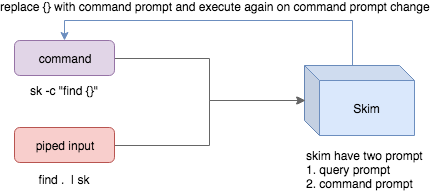
How it works?
|
|
|
|
|
|
|
|
- Skim could accept two kinds of source: command output or piped input
|
|
- Skim has two kinds of prompts: A query prompt to specify the query pattern and a
|
|
command prompt to specify the "arguments" of the command
|
|
- `-c` is used to specify the command to execute while defaults to `SKIM_DEFAULT_COMMAND`
|
|
- `-i` is to tell skim open command prompt on startup, which will show `c>` by default.
|
|
|
|
If you want to further narrow down the results returned by the command, press
|
|
`Ctrl-Q` to toggle interactive mode.
|
|
|
|
## Executing external programs
|
|
|
|
You can set up key bindings for starting external processes without leaving skim (`execute`, `execute-silent`).
|
|
|
|
```sh
|
|
# Press F1 to open the file with less without leaving skim
|
|
# Press CTRL-Y to copy the line to clipboard and aborts skim (requires pbcopy)
|
|
sk --bind 'f1:execute(less -f {}),ctrl-y:execute-silent(echo {} | pbcopy)+abort'
|
|
```
|
|
|
|
## Preview Window
|
|
|
|
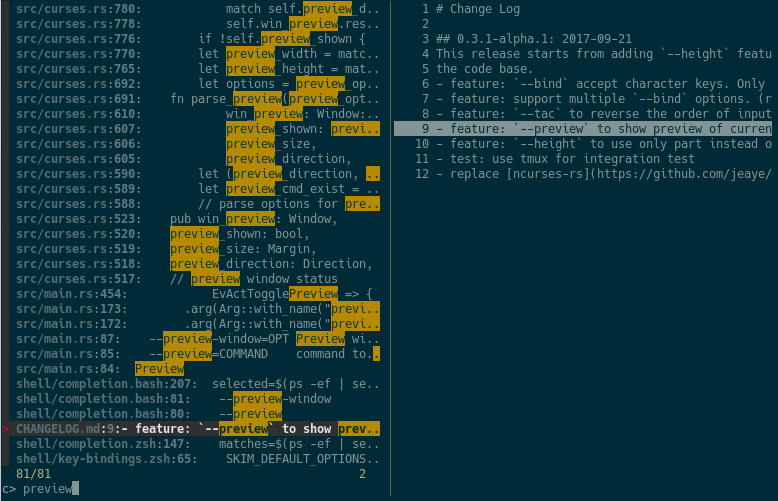
This is a great feature of fzf that skim borrows. For example, we use 'ag' to
|
|
find the matched lines, once we narrow down to the target lines, we want to
|
|
finally decide which lines to pick by checking the context around the line.
|
|
`grep` and `ag` has an option `--context`, skim can do better with preview
|
|
window. For example:
|
|
|
|
```sh
|
|
sk --ansi -i -c 'ag --color "{}"' --preview "preview.sh {}"
|
|
```
|
|
|
|
(Note the [preview.sh](https://github.com/junegunn/fzf.vim/blob/master/bin/preview.sh) is a script to print the context given filename:lines:columns)
|
|
You got things like this:
|
|
|
|
|
|
|
|
### How does it work?
|
|
|
|
If the preview command is given by the `--preview` option, skim will replace the
|
|
`{}` with the current highlighted line surrounded by single quotes, call the
|
|
command to get the output, and print the output on the preview window.
|
|
|
|
Sometimes you don't need the whole line for invoking the command. In this case
|
|
you can use `{}`, `{1..}`, `{..3}` or `{1..5}` to select the fields. The
|
|
syntax is explained in the section "Fields Support".
|
|
|
|
Last, you might want to configure the position of preview windows, use
|
|
`--preview-window`.
|
|
- `--preview-window up:30%` to put the window in the up position with height
|
|
30% of the total height of skim.
|
|
- `--preview-window left:10:wrap`, to specify the `wrap` allows the preview
|
|
window to wrap the output of the preview command.
|
|
- `--preview-window wrap:hidden` to hide the preview window at startup, later
|
|
it can be shown by the action `toggle-preview`.
|
|
|
|
## Fields support
|
|
|
|
Normally only plugin users need to understand this.
|
|
|
|
For example, you have the data source with the format:
|
|
|
|
```sh
|
|
<filename>:<line number>:<column number>
|
|
```
|
|
|
|
However, you want to search `<filename>` only when typing in queries. That
|
|
means when you type `21`, you want to find a `<filename>` that contains `21`,
|
|
but not matching line number or column number.
|
|
|
|
You can use `sk --delimiter ':' --nth 1` to achieve this.
|
|
|
|
Also you can use `--with-nth` to re-arrange the order of fields.
|
|
|
|
**Range Syntax**
|
|
|
|
- `<num>` -- to specify the `num`-th fields, starting with 1.
|
|
- `start..` -- starting from the `start`-th fields, and the rest.
|
|
- `..end` -- starting from the `0`-th field, all the way to `end`-th field,
|
|
including `end`.
|
|
- `start..end` -- starting from `start`-th field, all the way to `end`-th
|
|
field, including `end`.
|
|
|
|
## Use as a library
|
|
|
|
Skim can be used as a library in your Rust crates.
|
|
|
|
First, add skim into your `Cargo.toml`:
|
|
|
|
```toml
|
|
[dependencies]
|
|
skim = "*"
|
|
```
|
|
|
|
Then try to run this simple example:
|
|
|
|
```rust
|
|
extern crate skim;
|
|
use skim::prelude::*;
|
|
use std::io::Cursor;
|
|
|
|
pub fn main() {
|
|
let options = SkimOptionsBuilder::default()
|
|
.height(Some("50%"))
|
|
.multi(true)
|
|
.build()
|
|
.unwrap();
|
|
|
|
let input = "aaaaa\nbbbb\nccc".to_string();
|
|
|
|
// `SkimItemReader` is a helper to turn any `BufRead` into a stream of `SkimItem`
|
|
// `SkimItem` was implemented for `AsRef<str>` by default
|
|
let item_reader = SkimItemReader::default();
|
|
let items = item_reader.of_bufread(Cursor::new(input));
|
|
|
|
// `run_with` would read and show items from the stream
|
|
let selected_items = Skim::run_with(&options, Some(items))
|
|
.map(|out| out.selected_items)
|
|
.unwrap_or_else(|| Vec::new());
|
|
|
|
for item in selected_items.iter() {
|
|
print!("{}{}", item.output(), "\n");
|
|
}
|
|
}
|
|
```
|
|
|
|
Given an `Option<SkimItemReceiver>`, skim will read items accordingly, do its
|
|
job and bring us back the user selection including the selected items, the
|
|
query, etc. Note that:
|
|
|
|
- `SkimItemReceiver` is `crossbeam::channel::Receiver<Arc<dyn SkimItem>>`
|
|
- If it is none, it will invoke the given command and read items from command output
|
|
- Otherwise, it will read the items from the (crossbeam) channel.
|
|
|
|
Trait `SkimItem` is provided to customize how a line could be displayed,
|
|
compared and previewed. It is implemented by default for `AsRef<str>`
|
|
|
|
Plus, `SkimItemReader` is a helper to convert a `BufRead` into
|
|
`SkimItemReceiver` (we can easily turn a `File` for `String` into `BufRead`).
|
|
So that you could deal with strings or files easily.
|
|
|
|
Check more examples under [examples/](https://github.com/lotabout/skim/tree/master/examples) directory.
|
|
|
|
# FAQ
|
|
|
|
## How to ignore files?
|
|
|
|
Skim invokes `find .` to fetch a list of files for filtering. You can override
|
|
that by setting the environment variable `SKIM_DEFAULT_COMMAND`. For example:
|
|
|
|
```sh
|
|
$ SKIM_DEFAULT_COMMAND="fd --type f || git ls-tree -r --name-only HEAD || rg --files || find ."
|
|
$ sk
|
|
```
|
|
|
|
You could put it in your `.bashrc` or `.zshrc` if you like it to be default.
|
|
|
|
## Some files are not shown in Vim plugin
|
|
|
|
If you use the Vim plugin and execute the `:SK` command, you might find some
|
|
of your files not shown.
|
|
|
|
As described in [#3](https://github.com/lotabout/skim/issues/3), in the Vim
|
|
plugin, `SKIM_DEFAULT_COMMAND` is set to the command by default:
|
|
|
|
```vim
|
|
let $SKIM_DEFAULT_COMMAND = "git ls-tree -r --name-only HEAD || rg --files || ag -l -g \"\" || find ."
|
|
```
|
|
|
|
That means, the files not recognized by git will not shown. Either override the
|
|
default with `let $SKIM_DEFAULT_COMMAND = ''` or find the missing file by
|
|
yourself.
|
|
|
|
# Differences to fzf
|
|
|
|
[fzf](https://github.com/junegunn/fzf) is a command-line fuzzy finder written
|
|
in Go and [skim](https://github.com/lotabout/skim) tries to implement a new one
|
|
in Rust!
|
|
|
|
This project is written from scratch. Some decisions of implementation are
|
|
different from fzf. For example:
|
|
|
|
1. `skim` is a binary as well as a library while fzf is only a binary.
|
|
2. `skim` has an interactive mode.
|
|
3. `skim` supports pre-selection
|
|
4. The fuzzy search algorithm is different.
|
|
5. ~~UI of showing matched items. `fzf` will show only the range matched while
|
|
`skim` will show each character matched.~~ (fzf has this now)
|
|
6. ~~`skim`'s range syntax is Git style~~: now it is the same with fzf.
|
|
|
|
# How to contribute
|
|
|
|
[Create new issues](https://github.com/lotabout/skim/issues/new) if you meet any bugs
|
|
or have any ideas. Pull requests are warmly welcomed.
|
|
|
|
# Troubleshooting
|
|
|
|
## No line feed issues with nix , FreeBSD, termux
|
|
|
|
If you encounter display issues like:
|
|
|
|
```bash
|
|
$ for n in {1..10}; do echo "$n"; done | sk
|
|
0/10 0/0.> 10/10 10 9 8 7 6 5 4 3 2> 1
|
|
```
|
|
|
|
For example
|
|
|
|
- https://github.com/lotabout/skim/issues/412
|
|
- https://github.com/lotabout/skim/issues/455
|
|
|
|
You need to set TERMINFO or TERMINFO_DIRS to the path to a correct terminfo database path
|
|
|
|
For example, with termux, you can add in your bashr:
|
|
|
|
```
|
|
export TERMINFO=/data/data/com.termux/files/usr/share/terminfo
|
|
```
|