 4672ad5dd9
Some checks failed
zunit / zunit (push) Has been cancelled
The ssh chroma keeps a list of flags whose argument must be skipped, so the
argument is not mistaken for the hostname. Every entry is hyphenated except
two: `Q` and `R` are written bare, so `-Q` and `-R` never match.

For `-R` the consequence is visible. Typing

    ssh -R 5037:localhost:5037 devbox

leaves `5037:localhost:5037` counted as the first non-option token, so it
becomes the hostname. Its trailing `:5037` then matches the host:port check and
the chroma calls `zle -M` with

    Format of hostname incorrect, use -p to pass port number

while you type, on a command line that is perfectly valid. `-L` is in the list
correctly, so the identical local-forward spec highlights fine and only the
remote forward is affected. `-Q` mislabels its argument as the host in the same
way, without reaching the message.

Adds two tests: `-R` must stay silent, and a hostspec that really does carry a
port must still be reported.

Related to #33, which reports `-LRD` forwarding specs highlighting wrongly;
this fixes the `-R` half.

Co-authored-by: Claude Opus 5 (1M context) <noreply@anthropic.com>
|
||
|---|---|---|
| .github/workflows | ||
| images | ||
| share | ||
| test | ||
| tests | ||
| themes | ||
| →chroma | ||
| .fast-make-targets | ||
| .fast-read-ini-file | ||
| .fast-run-command | ||
| .fast-run-git-command | ||
| .fast-zts-read-all | ||
| .gitignore | ||
| .zunit.yml | ||
| _fast-theme | ||
| CHANGELOG.md | ||
| CHROMA_GUIDE.adoc | ||
| fast-highlight | ||
| fast-string-highlight | ||
| fast-syntax-highlighting.plugin.zsh | ||
| fast-theme | ||
| LICENSE | ||
| README.md | ||
| THEME_GUIDE.md | ||
Fast Syntax Highlighting (F-Sy-H) 
Feature rich syntax highlighting for Zsh.

Table of Contents
Other Contents
News
- 15-06-2019
- A new architecture for defining the highlighting for specific commands: it now uses abstract definitions
instead of top-down, regular code. The first effect is the highlighting for the
gitcommand it is now maximally faithful, it follows thegitcommand almost completely. Screencast
- A new architecture for defining the highlighting for specific commands: it now uses abstract definitions
instead of top-down, regular code. The first effect is the highlighting for the
Installation
Manual
Clone the Repository.
git clone https://github.com/zdharma-continuum/fast-syntax-highlighting ~/path/to/fsh
And add the following to your zshrc file.
source ~/path/to/fsh/fast-syntax-highlighting.plugin.zsh
Zinit
Add the following to your zshrc file.
zinit light zdharma-continuum/fast-syntax-highlighting
Here's an example of how to load the plugin together with a few other popular ones with the use of Turbo, i.e.: speeding up the Zsh startup by loading the plugin right after the first prompt, in background:
zinit wait lucid for \
 atinit"ZINIT[COMPINIT_OPTS]=-C; zicompinit; zicdreplay" \
    zdharma-continuum/fast-syntax-highlighting \
 blockf \
    zsh-users/zsh-completions \
 atload"!_zsh_autosuggest_start" \
    zsh-users/zsh-autosuggestions
Antigen
Add the following to your zshrc file.
antigen bundle zdharma-continuum/fast-syntax-highlighting
Fig
Fig adds apps, shortcuts, and autocomplete to your existing terminal.
Install fast-syntax-highlighting in just one click.

Zgen
Add the following to your .zshrc file in the same place you're doing your other zgen load calls in.
zgen load zdharma-continuum/fast-syntax-highlighting
Oh-My-Zsh
Clone the Repository.
git clone https://github.com/zdharma-continuum/fast-syntax-highlighting.git \
  ${ZSH_CUSTOM:-$HOME/.oh-my-zsh/custom}/plugins/fast-syntax-highlighting
And add fast-syntax-highlighting to your plugin list.
Features
Themes
Switch themes via fast-theme {theme-name}.
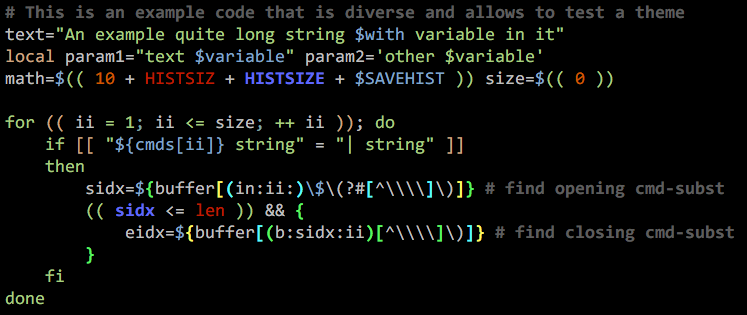
Run fast-theme -t {theme-name} option to obtain the snippet above.
Run fast-theme -l to list available themes.
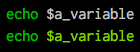
Variables
Comparing to the project zsh-users/zsh-syntax-highlighting (the upper line):

Brackets

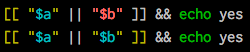
Conditions
Comparing to the project zsh-users/zsh-syntax-highlighting (the upper line):
Strings
Exact highlighting that recognizes quotings.

here-strings

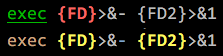
exec descriptor-variables
Comparing to the project zsh-users/zsh-syntax-highlighting (the upper line):
for-loops and alternate syntax (brace {/} blocks)

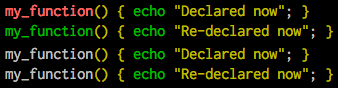
Function definitions
Comparing to the project zsh-users/zsh-syntax-highlighting (the upper 2 lines):
Recursive eval and $( ) highlighting
Comparing to the project zsh-users/zsh-syntax-highlighting (the upper line):

Chroma functions
Highlighting that is specific for a given command.

The chromas that are enabled by default can be found here.
Math-mode highlighting

Zcalc highlighting

Performance
Performance differences can be observed in this Asciinema recording, where a 10 kB function is being edited.
